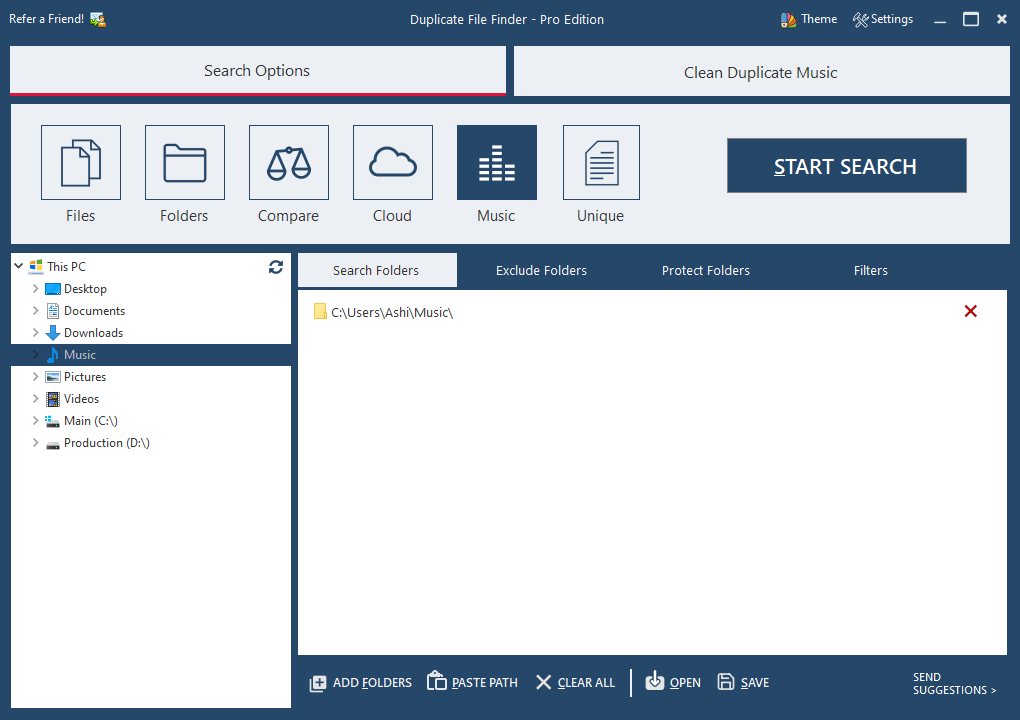
Solved App to compare 2 folders for file name, duplicates ignoring file sizes


JAK

Active member
Member
Local time
8:53 PM
Posts
203
OS
Windows 11
Need an App to compare 2 folders for file name, duplicates ignoring file sizes

Tried WinMerge and freefile sync but neither have this option. Have two folders of music files, want to know which ones are only present in folder 1, and are not in folder 2...
Any ideas ,,🤞
 

My Computer My Computer

At a glance

Windows 11Ryzen 78+16 total 24GB
OS
Windows 11
Computer type
Laptop
Manufacturer/Model
Asus
CPU
Ryzen 7
Memory
8+16 total 24GB
Other Info
Asus Vivobook 15 M513U
Hi, as you've mentioned music files, if you have the same song/piece of music as a file in each, will it be identical, or a different format or actually and identical file?

For possible consideration:

To remove duplicate music files, use dedicated software like AllDup, Audio Dedupe, or specialized tools such as Music Library Tracker (MLT) to scan and delete redundant tracks. Windows users can use File Explorer, Windows Media Player, or iTunes to identify and remove duplicates. For cloud services, tools like Spotify Dedup efficiently clear playlists.

Top Duplicate Music Finders & Removers (Windows/Mac)

  • Audio Dedupe: Analyzes audio content to find similar or identical songs, ideal for finding different file formats of the same song.
  • AllDup: A free tool to find, delete, and manage duplicate audio files.
  • Duplicate Media Finder (DMF): Identifies identical files like music, videos, and photos.
  • Music Library Tracker (MLT): Suitable for DJs, as it identifies duplicates and can create crates for review in Serato.
  • Audio Comparer: Analyzes audio content to find similar music files.
  • Duplicate Cleaner Pro: A fast scanner for identifying duplicates
More on some of these:
 

My Computer My Computer

At a glance

Windows 11 Proi7-8650U16GBIntel UHD 620
OS
Windows 11 Pro
Computer type
Laptop
Manufacturer/Model
Lenovo t480s
CPU
i7-8650U
Memory
16GB
Graphics Card(s)
Intel UHD 620
Screen Resolution
1920x1080
Hard Drives
C SN810 SDCPNRY-512G-1006
Browser
Edge, Firefox
Antivirus
Defender
Thank you so much.
After trying loads, I found Compare Advance dies exactly what I need, doesn't worry about titles that are the same just ones in folder 1 but not in folder 2 and vice versa, recommended.

Thanks again
 

My Computer My Computer

At a glance

Windows 11Ryzen 78+16 total 24GB
OS
Windows 11
Computer type
Laptop
Manufacturer/Model
Asus
CPU
Ryzen 7
Memory
8+16 total 24GB
Other Info
Asus Vivobook 15 M513U
This is very close to a tool I’ve been building for Windows.
It’s called FoldIQ and it focuses specifically on comparing two folders and showing which files match, which are missing, and which are different.
My approach is a little different because it can also verify file contents with SHA-256 when you want more than just filename/size comparison.
I’m the developer, so full disclosure there, but if you’re still looking for something in this area I’d be interested to know whether this kind of workflow matches what you had in mind.
 

My Computer My Computer

At a glance

Windows 11
OS
Windows 11
Computer type
PC/Desktop
Manufacturer/Model
Custom Build PC
  • Like
Reactions: JAK
This is very close to a tool I’ve been building for Windows.
It’s called FoldIQ and it focuses specifically on comparing two folders and showing which files match, which are missing, and which are different.
My approach is a little different because it can also verify file contents with SHA-256 when you want more than just filename/size comparison.
I’m the developer, so full disclosure there, but if you’re still looking for something in this area I’d be interested to know whether this kind of workflow matches what you had in mind.
Yes I would definitely be interested, possiblity in evaluating it, if that's an option.
 

My Computer My Computer

At a glance

Windows 11Ryzen 78+16 total 24GB
OS
Windows 11
Computer type
Laptop
Manufacturer/Model
Asus
CPU
Ryzen 7
Memory
8+16 total 24GB
Other Info
Asus Vivobook 15 M513U
My approach is a little different because it can also verify file contents with SHA-256 when you want more than just filename/size comparison.

I always like the ones that have an in-between option.
  • For simple comparisons, file names and dates, maybe size also. That's a quick check.
  • For thorough comparisons, hash the entire file.
  • An in-between option: hash a few chunks of each file. Say you have some large ISO. If the first, let's say, 64KB of the files hash the same, along with the middle 64KB and the last 64KB, the file probably has not changed. Hashing a couple hundred KB is much faster than an 8GB ISO, and it's often a "good enough" alternative to hashing the whole thing.
 
Last edited:

My Computer My Computer

At a glance

Win11 Ent. 25H2
OS
Win11 Ent. 25H2
Yes I would definitely be interested, possiblity in evaluating it, if that's an option.
Absolutely, I’d really appreciate that.
FoldIQ is already available on the Microsoft Store, so you can try the current version here:
FoldIQ - Download and install on Windows | Microsoft Store
If you do test it, I’d especially like to hear what feels missing, confusing, or slower than you’d expect. I’m currently collecting feedback for future versions, so critical feedback is genuinely useful.
 

My Computer My Computer

At a glance

Windows 11
OS
Windows 11
Computer type
PC/Desktop
Manufacturer/Model
Custom Build PC
  • Like
Reactions: JAK
I always like the ones that have an in-between option.
  • For simple comparisons, file names and dates, maybe size also. That's a quick check.
  • For thorough comparisons, hash the entire file.
  • An between option: hash a few chunks of each file. Say you have some large ISO. If the first, let's say, 64KB of the files hash the same, along with the middle 64KB and the last 64KB, the file probably has not changed. Hashing a couple hundred KB is much faster than an 8GB ISO, and it's often a "good enough" alternative to hashing the whole thing.
That’s actually a really interesting idea.
A three-level comparison could make a lot of sense:
Quick: name/date/size
Smart: sample a few chunks from large files
Full: SHA-256 the entire file
The middle option could be especially useful for very large files where a full hash is overkill for a quick comparison.
I’d probably make it clear in the UI that sampled hashing is a fast confidence check rather than proof that the entire file is identical.
I’m adding this to my roadmap notes. Thanks — this is exactly the kind of feedback I was hoping to get.
 

My Computer My Computer

At a glance

Windows 11
OS
Windows 11
Computer type
PC/Desktop
Manufacturer/Model
Custom Build PC
There is a better workaround to copy only new/modified files to an existing backup. I always copy all the files without caring if they already exist in the backup. I then paste them to the backup folder. Windows 11 by default copies first the new files and then warns you the rest files already exist and what you want to do with them. I select let me decide for each file (or similar). Then there is a very convenient check box to automatically skip all unmodified files (same filename, same size, same date and probably same checksum). I check this box to skip all unchanged files and copy only the modified ones to the backup folder.
 

My Computers My Computers

  • At a glance

    Windows 11 Pro 23H2 (7584), 26H2 (9711)Mobile DualCore Intel Core 2 Duo T7250, 2000 MHz4GBMobile Intel(R) GMA 4500M (Mobile 4 series)
    OS
    Windows 11 Pro 23H2 (7584), 26H2 (9711)
    Computer type
    Laptop
    Manufacturer/Model
    Acer Extensa 5630EZ
    CPU
    Mobile DualCore Intel Core 2 Duo T7250, 2000 MHz
    Motherboard
    Acer Extensa 5630
    Memory
    4GB
    Graphics Card(s)
    Mobile Intel(R) GMA 4500M (Mobile 4 series)
    Sound Card
    Realtek ALC268 @ Intel 82801IB ICH9 - High Definition Audio Controller
    Monitor(s) Displays
    1
    Screen Resolution
    1280x800
    Hard Drives
    Samsung SSD 850 EVO 250GB SATA Device (250 GB, SATA-III)
    Internet Speed
    802.11g wireless 54 Mbps
    Browser
    MICROSOFT EDGE
    Antivirus
    WINDOWS DEFENDER
    Other Info
    Legacy MBR installation, no TPM, no Secure Boot, no WDDM 2.0 graphics drivers, no SSE4.2, cannot get more unsupported ;) This is only my test laptop. I had installed Windows 11 here before upgrading my main PC. For my main PC I use everyday see my 2nd system specs.
  • At a glance

    Windows 11 Pro 26H2 (build 26300.9711)Intel Core-i7 3770 3.40GHz s1155 (3rd generat...2x Kingston Hyper-X Blu 8GB DDR3-1600GIGABYTE GeForce RTX 3050 WINDFORCE OC V2 6GB...
    Operating System
    Windows 11 Pro 26H2 (build 26300.9711)
    Computer type
    PC/Desktop
    Manufacturer/Model
    Custom-built PC
    CPU
    Intel Core-i7 3770 3.40GHz s1155 (3rd generation)
    Motherboard
    Asus P8H61 s1155 ATX
    Memory
    2x Kingston Hyper-X Blu 8GB DDR3-1600
    Graphics card(s)
    GIGABYTE GeForce RTX 3050 WINDFORCE OC V2 6GB (GV-N3050WF2OCV2-6GD)
    Sound Card
    Realtek HD audio (ALC887)
    Monitor(s) Displays
    Sony Bravia KDL-19L4000 19" LCD TV via VGA
    Screen Resolution
    1440x900 32-bit 60Hz
    Hard Drives
    WD Blue SA510 2.5 1000GB SSD as system disk, Western Digital Caviar Purple 4TB SATA III (WD40PURZ) as second
    PSU
    Thermaltake Litepower RGB 550W Full Wired
    Case
    SUPERCASE MIDI-TOWER
    Cooling
    Deepcool Gamma Archer CPU cooler, 1x 8cm fan at the back
    Keyboard
    Mitsumi 101-key PS/2
    Mouse
    Microsoft Compact Optical Mouse
    Internet Speed
    802.11ac 5GHz wireless 260Mpbs
    Browser
    Microsoft Edge, Mozilla Firefox
    Antivirus
    Microsoft Windows Defender
    Other Info
    Legacy BIOS (MBR) installation, no TPM, no Secure Boot, WDDM 3.0 graphics drivers, WEI score 7.4
There is a better workaround to copy only new/modified files to an existing backup. I always copy all the files without caring if they already exist in the backup. I then paste them to the backup folder. Windows 11 by default copies first the new files and then warns you the rest files already exist and what you want to do with them. I select let me decide for each file (or similar). Then there is a very convenient check box to automatically skip all unmodified files (same filename, same size, same date and probably same checksum). I check this box to skip all unchanged files and copy only the modified ones to the backup folder.

I guess better is subjective; it sounds overly simplistic to me for all but the most basic of backup scenarios.

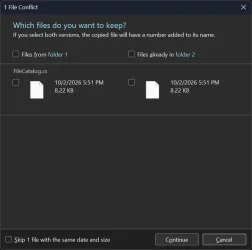
These files have the exact same values for all three timestamps, but the contents are different. Which one do I keep? I can't really skip based on date and size, because that is totally unimportant; the source code inside is what matters.

different contents - same timestamp.webp

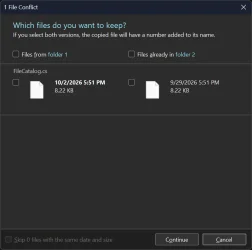
These files have the same contents but different timestamps. You could say in this case that it doesn't matter, I can just overwrite or not. But how do I know that from the information presented? It appears from the dialog that the files are different.

same contents - different timestamp.webp
 

My Computer My Computer

At a glance

Win11 Ent. 25H2
OS
Win11 Ent. 25H2
  • Like
Reactions: JAK
I guess better is subjective; it sounds overly simplistic to me for all but the most basic of backup scenarios.

These files have the exact same values for all three timestamps, but the contents are different. Which one do I keep? I can't really skip based on date and size, because that is totally unimportant; the source code inside is what matters.

View attachment 185113

These files have the same contents but different timestamps. You could say in this case that it doesn't matter, I can just overwrite or not. But how do I know that from the information presented? It appears from the dialog that the files are different.

View attachment 185114
If we are talking about two files with the same filename in the same folder, the same size but different modified date, then I would keep the newer version. For example I create a video file and I take a backup of the folder with other videos. Later I discover that the sound is out of sync and I create the video again with the same filename and the same compression settings, so it should have the same size. However since the second version of the file is done at a later time or date, it has a DIFFERENT date/time stamp. So I should see that when comparing the two files and choose to keep the newer version, unless for some reason I want to keep the older version. You can't modify a file and then it has exactly the same filename, same size and same date/time stamp, unless you use a utility to manually change the modified date/time to that of the original version. That's the point of the backup, to keep the latest version of a modified file. If you want to also keep the older version you should copy it in a separate location before adding new/modified files to the backup.
 

My Computers My Computers

  • At a glance

    Windows 11 Pro 23H2 (7584), 26H2 (9711)Mobile DualCore Intel Core 2 Duo T7250, 2000 MHz4GBMobile Intel(R) GMA 4500M (Mobile 4 series)
    OS
    Windows 11 Pro 23H2 (7584), 26H2 (9711)
    Computer type
    Laptop
    Manufacturer/Model
    Acer Extensa 5630EZ
    CPU
    Mobile DualCore Intel Core 2 Duo T7250, 2000 MHz
    Motherboard
    Acer Extensa 5630
    Memory
    4GB
    Graphics Card(s)
    Mobile Intel(R) GMA 4500M (Mobile 4 series)
    Sound Card
    Realtek ALC268 @ Intel 82801IB ICH9 - High Definition Audio Controller
    Monitor(s) Displays
    1
    Screen Resolution
    1280x800
    Hard Drives
    Samsung SSD 850 EVO 250GB SATA Device (250 GB, SATA-III)
    Internet Speed
    802.11g wireless 54 Mbps
    Browser
    MICROSOFT EDGE
    Antivirus
    WINDOWS DEFENDER
    Other Info
    Legacy MBR installation, no TPM, no Secure Boot, no WDDM 2.0 graphics drivers, no SSE4.2, cannot get more unsupported ;) This is only my test laptop. I had installed Windows 11 here before upgrading my main PC. For my main PC I use everyday see my 2nd system specs.
  • At a glance

    Windows 11 Pro 26H2 (build 26300.9711)Intel Core-i7 3770 3.40GHz s1155 (3rd generat...2x Kingston Hyper-X Blu 8GB DDR3-1600GIGABYTE GeForce RTX 3050 WINDFORCE OC V2 6GB...
    Operating System
    Windows 11 Pro 26H2 (build 26300.9711)
    Computer type
    PC/Desktop
    Manufacturer/Model
    Custom-built PC
    CPU
    Intel Core-i7 3770 3.40GHz s1155 (3rd generation)
    Motherboard
    Asus P8H61 s1155 ATX
    Memory
    2x Kingston Hyper-X Blu 8GB DDR3-1600
    Graphics card(s)
    GIGABYTE GeForce RTX 3050 WINDFORCE OC V2 6GB (GV-N3050WF2OCV2-6GD)
    Sound Card
    Realtek HD audio (ALC887)
    Monitor(s) Displays
    Sony Bravia KDL-19L4000 19" LCD TV via VGA
    Screen Resolution
    1440x900 32-bit 60Hz
    Hard Drives
    WD Blue SA510 2.5 1000GB SSD as system disk, Western Digital Caviar Purple 4TB SATA III (WD40PURZ) as second
    PSU
    Thermaltake Litepower RGB 550W Full Wired
    Case
    SUPERCASE MIDI-TOWER
    Cooling
    Deepcool Gamma Archer CPU cooler, 1x 8cm fan at the back
    Keyboard
    Mitsumi 101-key PS/2
    Mouse
    Microsoft Compact Optical Mouse
    Internet Speed
    802.11ac 5GHz wireless 260Mpbs
    Browser
    Microsoft Edge, Mozilla Firefox
    Antivirus
    Microsoft Windows Defender
    Other Info
    Legacy BIOS (MBR) installation, no TPM, no Secure Boot, WDDM 3.0 graphics drivers, WEI score 7.4
  • Like
Reactions: JAK
If we are talking about two files with the same filename in the same folder, the same size but different modified date,

Not what the thread is about. Also you can't have two files with the same name in the same folder.

then I would keep the newer version. For example I create a video file .... since the second version of the file is done at a later time or date, it has a DIFFERENT date/time stamp. So I should see that when comparing the two files and choose to keep the newer version, unless for some reason I want to keep the older version.

You would keep the newer version, but not everyone would at every time. That's where your simplistic "just throw all the files in the other folder and hope for the best" plan breaks down.

You can't modify a file and then it has exactly the same filename, same size and same date/time stamp, unless you use a utility to manually change the modified date/time to that of the original version.

That wasn't really the point of the screenshots. The point is, you can't always rely on timestamps and file sizes. In my situation, they're basically irrelevant.

You can also have the same file modified by two people at different times, so now you have three: the original and the two modified versions. Now which one do I keep?

That's the point of the backup, to keep the latest version of a modified file.

In simple scenarios, yes. Sometimes, it's to keep the best version of a file, maybe merging in changes from more than one point in time.

If you want to also keep the older version you should copy it in a separate location before adding new/modified files to the backup.

Oh good, now I have yet another copy of the same file.
 

My Computer My Computer

At a glance

Win11 Ent. 25H2
OS
Win11 Ent. 25H2
I don't understand your logic. You create a file and backup the folder. The backup contains the original version of the file. Then you modify that file and has a different size and date/time stamp. Even if the size is the same it will have a different date/time stamp. So when you later want to add the new/modified files in the backup the original version will be replaced by the new version. Where is the problem in that? If you want to keep the original version, then you save any changes with a different filename! Common sense. You don't save changes to the same file. I would even add a date at the filename to mark when I modified it and separate different versions.
 

My Computers My Computers

  • At a glance

    Windows 11 Pro 23H2 (7584), 26H2 (9711)Mobile DualCore Intel Core 2 Duo T7250, 2000 MHz4GBMobile Intel(R) GMA 4500M (Mobile 4 series)
    OS
    Windows 11 Pro 23H2 (7584), 26H2 (9711)
    Computer type
    Laptop
    Manufacturer/Model
    Acer Extensa 5630EZ
    CPU
    Mobile DualCore Intel Core 2 Duo T7250, 2000 MHz
    Motherboard
    Acer Extensa 5630
    Memory
    4GB
    Graphics Card(s)
    Mobile Intel(R) GMA 4500M (Mobile 4 series)
    Sound Card
    Realtek ALC268 @ Intel 82801IB ICH9 - High Definition Audio Controller
    Monitor(s) Displays
    1
    Screen Resolution
    1280x800
    Hard Drives
    Samsung SSD 850 EVO 250GB SATA Device (250 GB, SATA-III)
    Internet Speed
    802.11g wireless 54 Mbps
    Browser
    MICROSOFT EDGE
    Antivirus
    WINDOWS DEFENDER
    Other Info
    Legacy MBR installation, no TPM, no Secure Boot, no WDDM 2.0 graphics drivers, no SSE4.2, cannot get more unsupported ;) This is only my test laptop. I had installed Windows 11 here before upgrading my main PC. For my main PC I use everyday see my 2nd system specs.
  • At a glance

    Windows 11 Pro 26H2 (build 26300.9711)Intel Core-i7 3770 3.40GHz s1155 (3rd generat...2x Kingston Hyper-X Blu 8GB DDR3-1600GIGABYTE GeForce RTX 3050 WINDFORCE OC V2 6GB...
    Operating System
    Windows 11 Pro 26H2 (build 26300.9711)
    Computer type
    PC/Desktop
    Manufacturer/Model
    Custom-built PC
    CPU
    Intel Core-i7 3770 3.40GHz s1155 (3rd generation)
    Motherboard
    Asus P8H61 s1155 ATX
    Memory
    2x Kingston Hyper-X Blu 8GB DDR3-1600
    Graphics card(s)
    GIGABYTE GeForce RTX 3050 WINDFORCE OC V2 6GB (GV-N3050WF2OCV2-6GD)
    Sound Card
    Realtek HD audio (ALC887)
    Monitor(s) Displays
    Sony Bravia KDL-19L4000 19" LCD TV via VGA
    Screen Resolution
    1440x900 32-bit 60Hz
    Hard Drives
    WD Blue SA510 2.5 1000GB SSD as system disk, Western Digital Caviar Purple 4TB SATA III (WD40PURZ) as second
    PSU
    Thermaltake Litepower RGB 550W Full Wired
    Case
    SUPERCASE MIDI-TOWER
    Cooling
    Deepcool Gamma Archer CPU cooler, 1x 8cm fan at the back
    Keyboard
    Mitsumi 101-key PS/2
    Mouse
    Microsoft Compact Optical Mouse
    Internet Speed
    802.11ac 5GHz wireless 260Mpbs
    Browser
    Microsoft Edge, Mozilla Firefox
    Antivirus
    Microsoft Windows Defender
    Other Info
    Legacy BIOS (MBR) installation, no TPM, no Secure Boot, WDDM 3.0 graphics drivers, WEI score 7.4
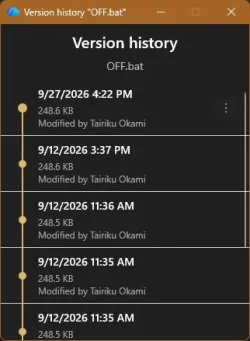
One great feature of a cloud backup is, that you can have multiple versions of the same file and restore it as needed.

capture_10032026_084216.webp
 

My Computer My Computer

At a glance

Home2FH2CanAMD Ryzen 5 8600G (07/24)2x32GB Kingston FURY DDR5 5600 MHz CL36 @5200...ASROCK Radeon RX 6600 Challenger D 8G @48FPS ...
OS
Home2FH2Can
Computer type
PC/Desktop
CPU
AMD Ryzen 5 8600G (07/24)
Motherboard
ASROCK B650M-HDV/M.2 (07/24) BIOS 4.60 AGESA ComboAM5 1.3.0.1d (10/26)
Memory
2x32GB Kingston FURY DDR5 5600 MHz CL36 @5200 CL40 (07/24)
Graphics Card(s)
ASROCK Radeon RX 6600 Challenger D 8G @48FPS (08/24)
Sound Card
Creative Sound BlasterX AE-5 Plus (05/24)
Monitor(s) Displays
24" Philips 24M1N3200ZS/00 (05/24)
Screen Resolution
1920Ă—1080@165Hz via DP1.4
Hard Drives
Kingston KC3000 NVMe 2TB (05/24)
ADATA XPG GAMMIX S11 Pro 512GB (07/19)
PSU
Seasonic Core GM 550 Gold (04/24)
Case
Fractal Design Define 7 Mini with 3x Noctua NF-P14s/12@555rpm (04/24)
Cooling
Noctua NH-U12S with Noctua NF-P12 (04/24)
Keyboard
HP Pavilion Wired Keyboard 300 (07/24) + Rabalux 76017 Parker (01/24)
Mouse
Logitech M330 Silent Plus (07/26)
Internet Speed
500/100 Mbps via RouterOS (05/21) & TCP Optimizer
Browser
Edge, Brave for YouTube, LibreWolf for FB
Antivirus
NextDNS blocking 50% Traffic
Other Info
Phone: Motorola Moto G86 (02/26)
Backup: Hasleo Backup Suite (PreOS)
Headphones: Sennheiser RS170 (09/10)
Chair: Huzaro Force 4.4 Grey Mesh (05/24)
Notifier: Xiaomi Mi Band 9 Milanese (10/24)
FlexCore USB-C 3.2 Gen 1 (M) to LAN (F) (08/25)

My Computer My Computer

At a glance

Windows 11 Insider Experimental (26H2)Intel Core i5-1140032Gb (DDR4 SDRAM)Intel(R) UHD Graphics 730
OS
Windows 11 Insider Experimental (26H2)
Computer type
PC/Desktop
Manufacturer/Model
Gigabyte Technology Co., Ltd.
CPU
Intel Core i5-11400
Motherboard
Z590 AORUS PRO AX
Memory
32Gb (DDR4 SDRAM)
Graphics Card(s)
Intel(R) UHD Graphics 730
Sound Card
Realtek USB Audio
Monitor(s) Displays
LG 27US500-W 4K UHD UltraFine™
Screen Resolution
3840x2160
Hard Drives
Samsung SSD 980 PRO 1TB
WDC WD7501AALS
PSU
Montech CENTURY, 650W, 80+ Gold
Case
Cougar Airface ECO RGB
Cooling
ID-COOLING SE-224-XTS BLACK
Keyboard
Microsoft SideWinder X6 Keyboard
Mouse
Microsoft SideWinder Mouse
Internet Speed
Internet speed of 1 Gbit/s
Browser
Vivaldi browser
Antivirus
Windows Defender

My Computer My Computer

At a glance

Windows 11 26H2 Home Single Language (26300.9...Intel Core i3-1115G48GBon-board
OS
Windows 11 26H2 Home Single Language (26300.9457)
Computer type
Laptop
Manufacturer/Model
LENOVO IdeaPad 5 15ITL05
CPU
Intel Core i3-1115G4
Motherboard
There is no such a God, I only know mother-Earth
Memory
8GB
Graphics Card(s)
on-board
Sound Card
on-board
Monitor(s) Displays
(s) is too ambitious for me
Screen Resolution
1920*1080
Hard Drives
256GB (SSD)
PSU
I was very young when I last saw a PSU
Case
...
Cooling
My coldness is enough to cool the computer
Keyboard
A broken and very clean keyboard
Mouse
A rat
Internet Speed
Slowest internet connection in Europe
Browser
ChromePortable / FirefoxPortable / TorBrowser
Antivirus
G-Virus
Other Info
I can simply say that I took the red pill and I am not happy with it.

My Computer My Computer

At a glance

WIN 11, WIN 10, WIN 8.1, WIN 7 U, WIN 7 PRO, ...Intel i7 6900K and i9-7960X / AMD 3800X (8 core)128 GB CORSAIR DOMINATOR PLATINUM (B DIE)NVIDIA 1070 and RTX 3070
OS
WIN 11, WIN 10, WIN 8.1, WIN 7 U, WIN 7 PRO, WIN 7 HOME (32 Bit), LINUX MINT
Computer type
PC/Desktop
Manufacturer/Model
DIY, ASUS, and DELL
CPU
Intel i7 6900K and i9-7960X / AMD 3800X (8 core)
Motherboard
ASUS X99E-WS USB 3.1 and ASUS X299 SAGE
Memory
128 GB CORSAIR DOMINATOR PLATINUM (B DIE)
Graphics Card(s)
NVIDIA 1070 and RTX 3070
Sound Card
Crystal Sound (onboard)
Monitor(s) Displays
single Samsung 30" 4K and 8" aux monitor
Screen Resolution
4K and something equally attrocious. I'll be working on this.
Hard Drives
A, B, C, D, E, F, G, H, I, J, K, L, M, N, O, P, Q, R, S, T, U, V, W

Ports X, Y, and Z are reserved for USB access and removable drives.

Drive types consist of the following: Various mechanical hard drives bearing the brand names, Seagate, Toshiba, and Western Digital. Various NVMe drives bearing the brand names Kingston, Intel, Silicon Power, Crucial, Western Digital, and Team Group. Various SATA SSDs bearing various different brand names.

RAID arrays included:

LSI RAID 10 (WD Velociraptors) 1115.72 GB
LSI RAID 10 (WD SSDS) 463.80 GB

INTEL RAID 0 (KINGSTON HYPER X) System 447.14 GB
INTEL RAID 1 TOSHIBA ENTERPRIZE class Data 2794.52 GB
INTEL RAID 1 SEAGATE HYBRID 931.51 GB
PSU
SEVERAL. I prefer my Corsair Platinum HX1000i but I also like EVGA power supplies
Case
ThermalTake Level 10 GT (among others)
Cooling
Noctua is my favorite and I use it in my main. I also own various other coolers.
Keyboard
all kinds.
Mouse
all kinds
Internet Speed
360 mbps - 1 gbps (depending)
Browser
FIREFOX
Antivirus
KASPERSKY (no apologies)
Other Info
Gave Dell touch screen with Windows 11 to daughter and got me an OTVOC. Being a PC builder I own many desktop PCs as well. I am a father of five providing PCs, laptops, and tablets for all my family, most of which I have modified, rebuilt, or simply built from scratch. I do not own a cell phone, never have, never will.
... want to know which ones are only present in folder 1, and are not in folder 2...,
Any ideas
Create a File List in each folder using Command Prompt:
Code:
dir /b /a:-d-h > "Files List.txt"
... then compare them in Vovsoft Compare Two Texts

By the way, CTT recently got an update:

14111.webp
 

My Computers My Computers

  • At a glance

    Windows 11 Pro
    OS
    Windows 11 Pro
    Computer type
    PC/Desktop
    Manufacturer/Model
    ASUS ROG Strix
  • At a glance

    Windows 11 Pro
    Operating System
    Windows 11 Pro
    Computer type
    Laptop
    Manufacturer/Model
    ASUS VivoBook
  • ASUS VivoBook 'Lite' ~ Windows 11 Home
I didn't read through all of the details posted here, but I've never encountered a comparison problem I couldn't solve with Beyond Compare.
 

My Computer My Computer

At a glance

Windows 10/11
OS
Windows 10/11
Computer type
Laptop
Manufacturer/Model
Acer
Back
Top Bottom