Solved Archive (zip, cab, rar, etc.) Folders - Enable or Disable Windows Explorer View


unifex

Well-known member
Member
VIP
Local time
1:32 AM
Posts
279
OS
Windows 10
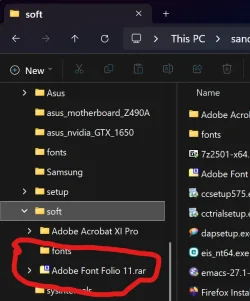
Nowadays Windows tries to open archived (compressed) files natively in Explorer. Which would not be a problem, if the Explorer didn't treat these files as folders. By default, they show up in the Navigation pane as folders (see the attached image for example). There are numerous threads about that behavior with not much in terms of solutions, so I decided to post this here in attempt to gather the existing solutions and maybe find the missing ones.

A common suggestion from all the existing threads is to change file associations. For example, I use 7-zip and associate all archive files with it. This however, does not solve the problem of the archive files showing up in the navigation pane as folders, again, see the attached image.

Zip folders can be managed using the old tutorial from the sevenforums.com: Zip Folders - Enable or Disable Windows Explorer View.

Cab folders are included in the same tutorial as well.

The question that I have right now is Rar folders - at the time, Windows could not open rar archives natively and hence there was no need to do anything. Windows 11, on the other hand, does and hence in the attached image the rar archive is shown as a folder in the navigation pane. If anyone knows how to disable that "feature", please post it here.
 
Windows Build/Version
Version 25H2, Build 26200.7171

Attachments
  • Screenshot 2026-01-02 134131.webp
    Screenshot 2026-01-02 134131.webp
    38.5 KB · Views: 1

My Computer

System One

  • OS
    Windows 10
    Computer type
    PC/Desktop
    CPU
    i5-10600K
    Motherboard
    Asus Rog Strix Z490-A Gaming
    Memory
    16 GB
    Graphics Card(s)
    GeForce GTX 1650
    Monitor(s) Displays
    Samsung U32J59x 32" 4K
    Screen Resolution
    3840x2160
@unifex

Just a reminder that when you disable these, you will no longer be able to extract, open, and view them in File Explorer. You'll have to use a 3rd party archive file viewer instead.
 

My Computers

System One System Two

  • OS
    Windows 11 Pro for Workstations
    Computer type
    PC/Desktop
    Manufacturer/Model
    Custom self build
    CPU
    Intel i7-8700K 5 GHz
    Motherboard
    ASUS ROG Maximus XI Formula Z390
    Memory
    64 GB (4x16GB) G.SKILL TridentZ RGB DDR4 3600 MHz (F4-3600C18D-32GTZR)
    Graphics Card(s)
    ASUS ROG-STRIX-GTX1080TI-O11G-GAMING (11GB GDDR5X)
    Sound Card
    Integrated Digital Audio (S/PDIF)
    Monitor(s) Displays
    2 x Samsung Odyssey G75 27"
    Screen Resolution
    2560x1440
    Hard Drives
    1TB Samsung 990 PRO M.2,
    4TB Samsung 990 PRO M.2,
    TerraMaster F8 SSD Plus NAS
    PSU
    Seasonic Prime Titanium 850W
    Case
    Thermaltake Core P3 wall mounted
    Cooling
    Corsair Hydro H115i
    Keyboard
    Amazon Basics Wired Full Keyboard MD005
    Mouse
    Logitech MX Master 4
    Internet Speed
    2 Gbps Download and 100 Mbps Upload
    Browser
    Chrome and Edge
    Antivirus
    Microsoft Defender
    Other Info
    Logitech Z625 speaker system,
    Logitech BRIO 4K Pro webcam,
    HP Color LaserJet Pro MFP M477fdn,
    CyberPower CP1500PFCLCD
    Galaxy S23 Plus phone
  • Operating System
    Windows 11 Pro
    Computer type
    Laptop
    Manufacturer/Model
    Surface Laptop 7 Copilot+ PC
    CPU
    Snapdragon X Elite (12 core) 3.42 GHz
    Memory
    16 GB LPDDR5x-7467 MHz
    Monitor(s) Displays
    15" HDR
    Screen Resolution
    2496 x 1664
    Hard Drives
    1 TB SSD
    Internet Speed
    Wi-Fi 7 and Bluetooth 5.4
    Browser
    Chrome and Edge
    Antivirus
    Microsoft Defender
@unifex

Just a reminder that when you disable these, you will no longer be able to extract, open, and view them in File Explorer. You'll have to use a 3rd party archive file viewer instead.
For me, extraction in Explorer still works (this is on a VM with no 3rd party archiver installed).
 

My Computer

System One

  • OS
    Windows 10/11
    Computer type
    Laptop
    Manufacturer/Model
    Acer
For me, extraction in Explorer still works (this is on a VM with no 3rd party archiver installed).

This below disabled it all for me: (restart explorer process afterwards required)

Code:
Windows Registry Editor Version 5.00

[-HKEY_CLASSES_ROOT\ArchiveFolder\CLSID]
[-HKEY_CLASSES_ROOT\CABFolder\CLSID]
[-HKEY_CLASSES_ROOT\CompressedFolder\CLSID]
[-HKEY_CLASSES_ROOT\SystemFileAssociations\.7z\CLSID]
[-HKEY_CLASSES_ROOT\SystemFileAssociations\.bz2\CLSID]
[-HKEY_CLASSES_ROOT\SystemFileAssociations\.cab\CLSID]
[-HKEY_CLASSES_ROOT\SystemFileAssociations\.gz\CLSID]
[-HKEY_CLASSES_ROOT\SystemFileAssociations\.rar\CLSID]
[-HKEY_CLASSES_ROOT\SystemFileAssociations\.tar\CLSID]
[-HKEY_CLASSES_ROOT\SystemFileAssociations\.tbz2\CLSID]
[-HKEY_CLASSES_ROOT\SystemFileAssociations\.tgz\CLSID]
[-HKEY_CLASSES_ROOT\SystemFileAssociations\.txz\CLSID]
[-HKEY_CLASSES_ROOT\SystemFileAssociations\.tzst\CLSID]
[-HKEY_CLASSES_ROOT\SystemFileAssociations\.xz\CLSID]
[-HKEY_CLASSES_ROOT\SystemFileAssociations\.zip\CLSID]
[-HKEY_CLASSES_ROOT\SystemFileAssociations\.zst\CLSID]

To undo and enable again: (restart explorer process afterwards required)

Code:
Windows Registry Editor Version 5.00

[HKEY_CLASSES_ROOT\ArchiveFolder\CLSID]
@="{0C1FD748-B888-443D-9EC3-AD7E22D48808}"

[HKEY_CLASSES_ROOT\CABFolder\CLSID]
@="{0CD7A5C0-9F37-11CE-AE65-08002B2E1262}"

[HKEY_CLASSES_ROOT\CompressedFolder\CLSID]
@="{E88DCCE0-B7B3-11d1-A9F0-00AA0060FA31}"

[HKEY_CLASSES_ROOT\SystemFileAssociations\.7z\CLSID]
@="{0C1FD748-B888-443D-9EC3-AD7E22D48808}"

[HKEY_CLASSES_ROOT\SystemFileAssociations\.bz2\CLSID]
@="{0C1FD748-B888-443D-9EC3-AD7E22D48808}"

[HKEY_CLASSES_ROOT\SystemFileAssociations\.cab\CLSID]
@="{0CD7A5C0-9F37-11CE-AE65-08002B2E1262}"

[HKEY_CLASSES_ROOT\SystemFileAssociations\.gz\CLSID]
@="{0C1FD748-B888-443D-9EC3-AD7E22D48808}"

[HKEY_CLASSES_ROOT\SystemFileAssociations\.rar\CLSID]
@="{0C1FD748-B888-443D-9EC3-AD7E22D48808}"

[HKEY_CLASSES_ROOT\SystemFileAssociations\.tar\CLSID]
@="{0C1FD748-B888-443D-9EC3-AD7E22D48808}"

[HKEY_CLASSES_ROOT\SystemFileAssociations\.tbz2\CLSID]
@="{0C1FD748-B888-443D-9EC3-AD7E22D48808}"

[HKEY_CLASSES_ROOT\SystemFileAssociations\.tgz\CLSID]
@="{0C1FD748-B888-443D-9EC3-AD7E22D48808}"

[HKEY_CLASSES_ROOT\SystemFileAssociations\.txz\CLSID]
@="{0C1FD748-B888-443D-9EC3-AD7E22D48808}"

[HKEY_CLASSES_ROOT\SystemFileAssociations\.tzst\CLSID]
@="{0C1FD748-B888-443D-9EC3-AD7E22D48808}"

[HKEY_CLASSES_ROOT\SystemFileAssociations\.xz\CLSID]
@="{0C1FD748-B888-443D-9EC3-AD7E22D48808}"

[HKEY_CLASSES_ROOT\SystemFileAssociations\.zip\CLSID]
@="{E88DCCE0-B7B3-11d1-A9F0-00AA0060FA31}"

[HKEY_CLASSES_ROOT\SystemFileAssociations\.zst\CLSID]
@="{0C1FD748-B888-443D-9EC3-AD7E22D48808}"
 

My Computers

System One System Two

  • OS
    Windows 11 Pro for Workstations
    Computer type
    PC/Desktop
    Manufacturer/Model
    Custom self build
    CPU
    Intel i7-8700K 5 GHz
    Motherboard
    ASUS ROG Maximus XI Formula Z390
    Memory
    64 GB (4x16GB) G.SKILL TridentZ RGB DDR4 3600 MHz (F4-3600C18D-32GTZR)
    Graphics Card(s)
    ASUS ROG-STRIX-GTX1080TI-O11G-GAMING (11GB GDDR5X)
    Sound Card
    Integrated Digital Audio (S/PDIF)
    Monitor(s) Displays
    2 x Samsung Odyssey G75 27"
    Screen Resolution
    2560x1440
    Hard Drives
    1TB Samsung 990 PRO M.2,
    4TB Samsung 990 PRO M.2,
    TerraMaster F8 SSD Plus NAS
    PSU
    Seasonic Prime Titanium 850W
    Case
    Thermaltake Core P3 wall mounted
    Cooling
    Corsair Hydro H115i
    Keyboard
    Amazon Basics Wired Full Keyboard MD005
    Mouse
    Logitech MX Master 4
    Internet Speed
    2 Gbps Download and 100 Mbps Upload
    Browser
    Chrome and Edge
    Antivirus
    Microsoft Defender
    Other Info
    Logitech Z625 speaker system,
    Logitech BRIO 4K Pro webcam,
    HP Color LaserJet Pro MFP M477fdn,
    CyberPower CP1500PFCLCD
    Galaxy S23 Plus phone
  • Operating System
    Windows 11 Pro
    Computer type
    Laptop
    Manufacturer/Model
    Surface Laptop 7 Copilot+ PC
    CPU
    Snapdragon X Elite (12 core) 3.42 GHz
    Memory
    16 GB LPDDR5x-7467 MHz
    Monitor(s) Displays
    15" HDR
    Screen Resolution
    2496 x 1664
    Hard Drives
    1 TB SSD
    Internet Speed
    Wi-Fi 7 and Bluetooth 5.4
    Browser
    Chrome and Edge
    Antivirus
    Microsoft Defender
I did not apply either of these:

[-HKEY_CLASSES_ROOT\CABFolder\CLSID]
[-HKEY_CLASSES_ROOT\CompressedFolder\CLSID]

Maybe that's why I could still extract but not have RAR and 7zip treated as folders.
 

My Computer

System One

  • OS
    Windows 10/11
    Computer type
    Laptop
    Manufacturer/Model
    Acer
I did not apply either of these:

[-HKEY_CLASSES_ROOT\CABFolder\CLSID]
[-HKEY_CLASSES_ROOT\CompressedFolder\CLSID]

Maybe that's why I could still extract but not have RAR and 7zip treated as folders.

That would indeed be why.
 

My Computers

System One System Two

  • OS
    Windows 11 Pro for Workstations
    Computer type
    PC/Desktop
    Manufacturer/Model
    Custom self build
    CPU
    Intel i7-8700K 5 GHz
    Motherboard
    ASUS ROG Maximus XI Formula Z390
    Memory
    64 GB (4x16GB) G.SKILL TridentZ RGB DDR4 3600 MHz (F4-3600C18D-32GTZR)
    Graphics Card(s)
    ASUS ROG-STRIX-GTX1080TI-O11G-GAMING (11GB GDDR5X)
    Sound Card
    Integrated Digital Audio (S/PDIF)
    Monitor(s) Displays
    2 x Samsung Odyssey G75 27"
    Screen Resolution
    2560x1440
    Hard Drives
    1TB Samsung 990 PRO M.2,
    4TB Samsung 990 PRO M.2,
    TerraMaster F8 SSD Plus NAS
    PSU
    Seasonic Prime Titanium 850W
    Case
    Thermaltake Core P3 wall mounted
    Cooling
    Corsair Hydro H115i
    Keyboard
    Amazon Basics Wired Full Keyboard MD005
    Mouse
    Logitech MX Master 4
    Internet Speed
    2 Gbps Download and 100 Mbps Upload
    Browser
    Chrome and Edge
    Antivirus
    Microsoft Defender
    Other Info
    Logitech Z625 speaker system,
    Logitech BRIO 4K Pro webcam,
    HP Color LaserJet Pro MFP M477fdn,
    CyberPower CP1500PFCLCD
    Galaxy S23 Plus phone
  • Operating System
    Windows 11 Pro
    Computer type
    Laptop
    Manufacturer/Model
    Surface Laptop 7 Copilot+ PC
    CPU
    Snapdragon X Elite (12 core) 3.42 GHz
    Memory
    16 GB LPDDR5x-7467 MHz
    Monitor(s) Displays
    15" HDR
    Screen Resolution
    2496 x 1664
    Hard Drives
    1 TB SSD
    Internet Speed
    Wi-Fi 7 and Bluetooth 5.4
    Browser
    Chrome and Edge
    Antivirus
    Microsoft Defender
Great, thanks a lot!
 

My Computer

System One

  • OS
    Windows 10
    Computer type
    PC/Desktop
    CPU
    i5-10600K
    Motherboard
    Asus Rog Strix Z490-A Gaming
    Memory
    16 GB
    Graphics Card(s)
    GeForce GTX 1650
    Monitor(s) Displays
    Samsung U32J59x 32" 4K
    Screen Resolution
    3840x2160
Glad we could help. :shawn:
 

My Computers

System One System Two

  • OS
    Windows 11 Pro for Workstations
    Computer type
    PC/Desktop
    Manufacturer/Model
    Custom self build
    CPU
    Intel i7-8700K 5 GHz
    Motherboard
    ASUS ROG Maximus XI Formula Z390
    Memory
    64 GB (4x16GB) G.SKILL TridentZ RGB DDR4 3600 MHz (F4-3600C18D-32GTZR)
    Graphics Card(s)
    ASUS ROG-STRIX-GTX1080TI-O11G-GAMING (11GB GDDR5X)
    Sound Card
    Integrated Digital Audio (S/PDIF)
    Monitor(s) Displays
    2 x Samsung Odyssey G75 27"
    Screen Resolution
    2560x1440
    Hard Drives
    1TB Samsung 990 PRO M.2,
    4TB Samsung 990 PRO M.2,
    TerraMaster F8 SSD Plus NAS
    PSU
    Seasonic Prime Titanium 850W
    Case
    Thermaltake Core P3 wall mounted
    Cooling
    Corsair Hydro H115i
    Keyboard
    Amazon Basics Wired Full Keyboard MD005
    Mouse
    Logitech MX Master 4
    Internet Speed
    2 Gbps Download and 100 Mbps Upload
    Browser
    Chrome and Edge
    Antivirus
    Microsoft Defender
    Other Info
    Logitech Z625 speaker system,
    Logitech BRIO 4K Pro webcam,
    HP Color LaserJet Pro MFP M477fdn,
    CyberPower CP1500PFCLCD
    Galaxy S23 Plus phone
  • Operating System
    Windows 11 Pro
    Computer type
    Laptop
    Manufacturer/Model
    Surface Laptop 7 Copilot+ PC
    CPU
    Snapdragon X Elite (12 core) 3.42 GHz
    Memory
    16 GB LPDDR5x-7467 MHz
    Monitor(s) Displays
    15" HDR
    Screen Resolution
    2496 x 1664
    Hard Drives
    1 TB SSD
    Internet Speed
    Wi-Fi 7 and Bluetooth 5.4
    Browser
    Chrome and Edge
    Antivirus
    Microsoft Defender
Back
Top Bottom