Solved Are Portable SSD's Good for Backup Purposes? How long will they last? And what about 'bit-rot'?


My Computer My Computer

At a glance

Windows 11 ProIntel Core Ultra16GBIntel(R) Arc Graphics
OS
Windows 11 Pro
Computer type
Laptop
Manufacturer/Model
ASUS Zenbook 14 OLED
CPU
Intel Core Ultra
Memory
16GB
Graphics Card(s)
Intel(R) Arc Graphics
Sound Card
Realtek High Definition Audio(SST)
Screen Resolution
2880 x 1800
Hard Drives
500 GB NVMe SSD
Internet Speed
1,500Mbps
Browser
Firefox, Edge
Antivirus
Windows Defender
I use Microsoft Money from 2005. The data file I use daily has 25 years of transactions which I have wish to lose. Treasured photos and videos fall into the same category.
Just delete it, you'll lose it. :lmao:
 

My Computers My Computers

  • At a glance

    Win 11 Pro 25H2, Build 26200.8894Intel Core i5 1450064GB DDR4GeForce RTX 4060
    OS
    Win 11 Pro 25H2, Build 26200.8894
    Computer type
    PC/Desktop
    Manufacturer/Model
    Home Brew
    CPU
    Intel Core i5 14500
    Motherboard
    Gigabyte B760M G P WIFI
    Memory
    64GB DDR4
    Graphics Card(s)
    GeForce RTX 4060
    Sound Card
    Chipset Realtek
    Monitor(s) Displays
    LG 45" Ultragear, Acer 24" 1080p
    Screen Resolution
    5120x1440, 1920x1080
    Hard Drives
    Crucial P310 2TB 2280 PCIe Gen4 3D NAND NVMe M.2 SSD (O/S)
    Silicon Power 2TB US75 NVMe PCIe Gen4 M.2 2280 SSD (backup)
    Crucial BX500 2TB 3D NAND (2nd backup)
    Seagate 4TB Ironwolf, rotating HDD archive files
    External off-line backup Drives: 2 NVMe 4TB drives in external enclosures
    PSU
    Thermaltake Toughpower GF3 750W
    Case
    LIAN LI LANCOOL 216 E-ATX PC Case
    Cooling
    Lots of fans!
    Keyboard
    Microsoft Comfort Curve 2000
    Mouse
    Logitech G305
    Internet Speed
    Verizon FiOS 1GB
    Browser
    Firefox
    Antivirus
    Malware Bytes & Windows Defender Security
  • At a glance

    Win 11 Pro 25H2, Build 26200.8894Intel Core i5 1440032GB DDR5Intel 700 Embedded GPU
    Operating System
    Win 11 Pro 25H2, Build 26200.8894
    Computer type
    PC/Desktop
    Manufacturer/Model
    Home Brew
    CPU
    Intel Core i5 14400
    Motherboard
    Gigabyte B760M DS3H AX
    Memory
    32GB DDR5
    Graphics card(s)
    Intel 700 Embedded GPU
    Sound Card
    Realtek Embedded
    Monitor(s) Displays
    27" HP 1080p
    Screen Resolution
    1920x1080
    Hard Drives
    Crucial P310 2TB 2280 PCIe Gen4 eD NAND PCIe SSD
    Samsung EVO 990 2TB NVMe Gen4 SSD
    Samsung 2TB SATA SSD
    PSU
    Thermaltake Smart BM3 650W
    Case
    Okinos Micro ATX Case
    Cooling
    Fans
    Keyboard
    Microsoft Comfort Curve 2000
    Mouse
    Logitech G305
    Internet Speed
    Verizon FiOS 1GB
    Browser
    Firefox
    Antivirus
    Malware Bytes & Windows Defender Security
  • Nimo N171 17" Laptop, (Intel i3-1215U, 16GB RAM, 2TB NVMe, Win11 Pro)
    Acemagic Vista Mini PC V1 (Intel N150, 16GB RAM, 1TB NVMe, Win11 Pro)
    HP ENVY h8-1540t, (24GB RAM, 2TB SSD, 2TB HDD, Win11 Pro)
I've read something about that too and very recently. It might even have been on here. I think one point was that SSD's should be powered up relatively frequently to 'refresh' them since they work by retaining microscopic levels of electrical charge on the mosfet transistors that make up each cell... a little bit like a capacitor that holds charge. If that charge leaks away then the logic state of the cell is lost meaning the date (whether it was a 1 or a 0 is lost). The drive is still good but the data lost. In other words they are not suitable to use for storing data over many many months and years without ever being powered up unlike traditional HDD's. If you are using them frequently (few times a year) there should be no issue.

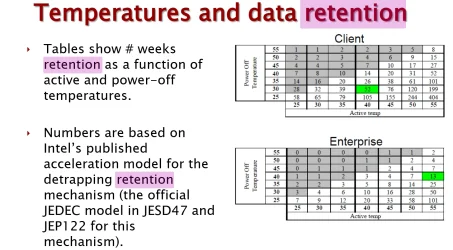
It is called data retention period, and depends on the temperature it is stored at without power. It is specified by a JEDEC standard minimum requirement:

So a year at 30c no power

Screenshot 2025-05-18 154001.webp
Screenshot 2023-02-15 150352.webp

 
Last edited:

My Computers My Computers

  • At a glance

    Windows 11 ProIntel Core i9 14900K 5800/4500 P/E all core96GB (2x48) G.skill Ripjaws 6800 MT/s DDR5Asus ROG Strix 4070 Ti OC
    OS
    Windows 11 Pro
    Computer type
    PC/Desktop
    Manufacturer/Model
    DIY Photoshop/Audio/Game/tinker
    CPU
    Intel Core i9 14900K 5800/4500 P/E all core
    Motherboard
    Asus ROG Maximus Z790 Dark Hero
    Memory
    96GB (2x48) G.skill Ripjaws 6800 MT/s DDR5
    Graphics Card(s)
    Asus ROG Strix 4070 Ti OC
    Sound Card
    Bowers & Wilkins 606 S3 speakers; Audiolabs 7000a integrated amp; RSL 10S Mk2 sub; Creative Pebble Pro Minimilist
    Monitor(s) Displays
    Eizo CG2730 ColorEdge, ViewSonic VP2768, i1 Display Pro calibration puck
    Screen Resolution
    2560 x 1440p x 2
    Hard Drives
    WDC SN850X 4TB nvme, SN850 1TB nvme, SK-Hynix 2 TB P41 nvme,. Sabrent USB-C DS-SC5B 5-bay docking station: 6TB WDC Black, 6TB Ironwolf Pro; 2x 2TB WDC Black HDD
    PSU
    850W Seasonic Vertex PX-850 ATX 3.0/PCI-E 5.0
    Case
    Fractal Design North XL Mesh, Black Walnut
    Cooling
    EK Nucleus black 360 AIO w/Phanteks T30-120 fans, 2 Noctua NF-A14 Chromax case fan, 1 T30-120 fan cooling memory
    Keyboard
    Keychron Q3 Max TKL with custom GMK Redsuns Red Samuri keycaps, TX Stabs
    Mouse
    Logitech G305 wireless gaming
    Internet Speed
    575 Mb/s down | 25 Mb/s up
    Browser
    Firefox
    Antivirus
    Defender, Macrium Reflect X
    Other Info
    Phangkey Amaterasu V2 Desk Mat
  • At a glance

    Apple M1
    Computer type
    Laptop
    Manufacturer/Model
    💻 Apple 13" Macbook Pro 2020 (m1)
    CPU
    Apple M1
    Screen Resolution
    2560x1600
    Browser
    Firefox
I did find this webpage that discusses the data retention of SSD drives. No doubt this is under ideal conditions:


They claim at the beginning of the article that retention can be as much as 3 to 5 years unpowered, but later in the article they are talking about one year or less when stored unpowered at 30C. I suspect that the 3 to 5 year figures are given by the manufacturers and are under optimal conditions.

I suggest that if you are going to use an SSD for backup that you refresh it every so often.

Some flash chips that are available commercially have a retention spec of up to 10 years, but this is not NAND flash as used in SSDs. The 10 year retention ones are used in memory applications where small amounts of permanent storage are needed. These chips are usually not written to very often, which increases their life span. I have these chips in hardware at work that has sat on the shelf for at least 7 years and the data in the flash chips is still fine.

NOR flash on the other hand, can last up to 20 years (so says the company Infineon, which makes some of these chips), but these are often small configuration chips which store information to start up FPGA and other programmable logic circuits. NOR flash is sometimes used in SSDs, but they would probably be Enterprise grade as NOR flash is more expensive than NAND flash.

If it were me, I would not trust an SSD to retain information without a refresh for more than a year, but then I am something of a cautious person when it comes to electronics and computing. YMMV.

 

My Computer My Computer

At a glance

Win 11 Pro 25H2Intel i7 13700KF32 GB Team Group DDR5 - 6000 CL 30ASUS TUF GAMING RTX 3070 Ti
OS
Win 11 Pro 25H2
Computer type
PC/Desktop
Manufacturer/Model
Self build
CPU
Intel i7 13700KF
Motherboard
Gigabyte Z790 UD AC
Memory
32 GB Team Group DDR5 - 6000 CL 30
Graphics Card(s)
ASUS TUF GAMING RTX 3070 Ti
Sound Card
On board Realtek
Monitor(s) Displays
ACER 34 inch
Screen Resolution
4K
Hard Drives
1 TB Samsung 980 Pro Nvme, 1 TB Samsung 970 EVO Nvme, 2 x Samsung 970 2TB SSD SATA
PSU
EVGA 1000Q
Case
Rosewill something or other
Cooling
Noctua NH-D15. A whole schwak of Noctua case fans. $$$
Keyboard
Logitech G815
Mouse
Logitech G502 Hero
Internet Speed
700 up, 600 down
Browser
Firefox
Antivirus
MalwareBytes
I use Microsoft Money from 2005. The data file I use daily has 25 years of transactions which I have wish to lose. Treasured photos and videos fall into the same category.
I can understand photos and videos but money transactions from 25 years ago 😱?

Each to their own of course.
 

My Computer My Computer

At a glance

Windows 11 Pro + Win11 Canary VM.I9 13th gen i9-13900H 2.60 GHZ16 GB solderedIntegrated Intel Iris XE
OS
Windows 11 Pro + Win11 Canary VM.
Computer type
Laptop
Manufacturer/Model
ASUS Zenbook 14
CPU
I9 13th gen i9-13900H 2.60 GHZ
Motherboard
Yep, Laptop has one.
Memory
16 GB soldered
Graphics Card(s)
Integrated Intel Iris XE
Sound Card
Realtek built in
Monitor(s) Displays
laptop OLED screen
Screen Resolution
2880x1800 touchscreen
Hard Drives
1 TB NVME SSD (only weakness is only one slot)
PSU
Internal + 65W thunderbolt USB4 charger
Case
Yep, got one
Cooling
Stella Artois (UK pint cans - 568 ml) - extra cost.
Keyboard
Built in UK keybd
Mouse
Bluetooth , wireless dongled, wired
Internet Speed
900 mbs (ethernet), wifi 6 typical 350-450 mb/s both up and down
Browser
Edge
Antivirus
Defender
Other Info
TPM 2.0, 2xUSB4 thunderbolt, 1xUsb3 (usb a), 1xUsb-c, hdmi out, 3.5 mm audio out/in combo, ASUS backlit trackpad (inc. switchable number pad)

Macrium Reflect Home V8
Office 365 Family (6 users each 1TB onedrive space)
Hyper-V (a vm runs almost as fast as my older laptop)
I did find this webpage that discusses the data retention of SSD drives. No doubt this is under ideal conditions:


They claim at the beginning of the article that retention can be as much as 3 to 5 years unpowered, but later in the article they are talking about one year or less when stored unpowered at 30C. I suspect that the 3 to 5 year figures are given by the manufacturers and are under optimal conditions.

I suggest that if you are going to use an SSD for backup that you refresh it every so often.

Some flash chips that are available commercially have a retention spec of up to 10 years, but this is not NAND flash as used in SSDs. The 10 year retention ones are used in memory applications where small amounts of permanent storage are needed. These chips are usually not written to very often, which increases their life span. I have these chips in hardware at work that has sat on the shelf for at least 7 years and the data in the flash chips is still fine.

NOR flash on the other hand, can last up to 20 years (so says the company Infineon, which makes some of these chips), but these are often small configuration chips which store information to start up FPGA and other programmable logic circuits. NOR flash is sometimes used in SSDs, but they would probably be Enterprise grade as NOR flash is more expensive than NAND flash.

If it were me, I would not trust an SSD to retain information without a refresh for more than a year, but then I am something of a cautious person when it comes to electronics and computing. YMMV.

The 1 year at 30c is for a drive at it's endurance rating (as specified by the manufacturer). A fresh new SSD has a longer lifetime.
 

My Computers My Computers

  • At a glance

    Windows 11 ProIntel Core i9 14900K 5800/4500 P/E all core96GB (2x48) G.skill Ripjaws 6800 MT/s DDR5Asus ROG Strix 4070 Ti OC
    OS
    Windows 11 Pro
    Computer type
    PC/Desktop
    Manufacturer/Model
    DIY Photoshop/Audio/Game/tinker
    CPU
    Intel Core i9 14900K 5800/4500 P/E all core
    Motherboard
    Asus ROG Maximus Z790 Dark Hero
    Memory
    96GB (2x48) G.skill Ripjaws 6800 MT/s DDR5
    Graphics Card(s)
    Asus ROG Strix 4070 Ti OC
    Sound Card
    Bowers & Wilkins 606 S3 speakers; Audiolabs 7000a integrated amp; RSL 10S Mk2 sub; Creative Pebble Pro Minimilist
    Monitor(s) Displays
    Eizo CG2730 ColorEdge, ViewSonic VP2768, i1 Display Pro calibration puck
    Screen Resolution
    2560 x 1440p x 2
    Hard Drives
    WDC SN850X 4TB nvme, SN850 1TB nvme, SK-Hynix 2 TB P41 nvme,. Sabrent USB-C DS-SC5B 5-bay docking station: 6TB WDC Black, 6TB Ironwolf Pro; 2x 2TB WDC Black HDD
    PSU
    850W Seasonic Vertex PX-850 ATX 3.0/PCI-E 5.0
    Case
    Fractal Design North XL Mesh, Black Walnut
    Cooling
    EK Nucleus black 360 AIO w/Phanteks T30-120 fans, 2 Noctua NF-A14 Chromax case fan, 1 T30-120 fan cooling memory
    Keyboard
    Keychron Q3 Max TKL with custom GMK Redsuns Red Samuri keycaps, TX Stabs
    Mouse
    Logitech G305 wireless gaming
    Internet Speed
    575 Mb/s down | 25 Mb/s up
    Browser
    Firefox
    Antivirus
    Defender, Macrium Reflect X
    Other Info
    Phangkey Amaterasu V2 Desk Mat
  • At a glance

    Apple M1
    Computer type
    Laptop
    Manufacturer/Model
    💻 Apple 13" Macbook Pro 2020 (m1)
    CPU
    Apple M1
    Screen Resolution
    2560x1600
    Browser
    Firefox
I had two small portable HHDs which I had used for the last 11 years solely for backup purposes. One of them gave a file corruption error a little while ago so I decided I had got my money's worth out of them time to ditch them and get something else.

In the end I got two of these: Samsung T7 Portable SSD - 2 TB - USB 3.2 Gen.2 External SSD

I've started using them, they work fine, and are considerably quicker than backing up to my old spinning disk drives. However, now I'm wondering if I have made a good choice in going over to SSDs. So the following questions:

Are portable SSDs a good choice for backup purposes? Are they reliable for this?

A friend of mine, though not a computer geek (nor am I) mentioned that he had read somewhere about 'bit-rot' with SSDs. He was really vague on this just saying that they made them not a good choice for backup purposes when compared to HDDs as the data on the SSD can 'rot' over time. So will my use of the SSDs suffer bit-rot over time?

I should add that my use of the drives will be restricted to once-weekly backups, the rest of the time they'll be detached from the PC and just sitting in a drawer.
I have a Samsung T7 portable SSD 2 TB too.

In general, SSDs keep their data, for about 1 year, without any use.

Hard Disks keep them for about 5 years.

If you use SSDs frequently for backups, the SSD data will be fine.
 

My Computer My Computer

At a glance

macOSApple silicon M432 GBApple silicon M4
OS
macOS
Computer type
PC/Desktop
Manufacturer/Model
Mac mini M4
CPU
Apple silicon M4
Memory
32 GB
Graphics Card(s)
Apple silicon M4
Monitor(s) Displays
LG 27GN650-B IPS HDR Gaming Monitor 27" FHD
Screen Resolution
1080p
Hard Drives
Apple SSD AP1024Z
Internet Speed
1 Gbps / 1 Gbps symmetrical FTTH (GPON)
Browser
Microsoft Edge
I think the age old question of “How long is a piece of string?” is relevant here.
How many backups do you predict you’d make, are they incremental, are you continuously writing to the drive?
I’d imaging the longevity of the drive, like any other, would depend on the usage.

A quick search gave me this. I have no experience with them:

The number of times you can write to a Samsung T7 portable SSD depends on the type of flash memory used, but generally, SSDs are rated for between 3,000 and 100,000 write cycles. While the exact number isn't specified for the T7, it utilizes PCIe NVMe technology for high read/write speeds, which suggests it's built to handle a substantial number of write operations. The Samsung site states the T7 Touch has sequential read/write speeds of up to 1,050/1,000 MB/s, respectively.
 

My Computers My Computers

  • At a glance

    Windows 11 Pro 25H2 Build 26200.8894Intel(R) Core(TM) i7-4770K CPU @ 3.50GHz32.0 GB of I forget and the box is in storage.Gigabyte nVidia GeForce GTX 1660 Super OC 6GB
    OS
    Windows 11 Pro 25H2 Build 26200.8894
    Computer type
    PC/Desktop
    Manufacturer/Model
    Sin-built 2013
    CPU
    Intel(R) Core(TM) i7-4770K CPU @ 3.50GHz
    Motherboard
    ASUS ROG Maximus VI Formula
    Memory
    32.0 GB of I forget and the box is in storage.
    Graphics Card(s)
    Gigabyte nVidia GeForce GTX 1660 Super OC 6GB
    Sound Card
    ROG SupremeFX Formula 8-Channel High Definition Audio
    Monitor(s) Displays
    5 x LG 25MS500-B - 1 x 24MK430H-B - 1 x Wacom Pro 22" Touch Screen Tablet
    Screen Resolution
    All over the place
    Hard Drives
    Too many to list. OS on Samsung 1TB 870 QVO SATA
    PSU
    Silverstone 1500
    Case
    NZXT Phantom 820 Full-Tower Case
    Cooling
    Noctua NH-D15 Elite Class Dual Tower CPU Cooler / 6 x EziDIY 120mm / 2 x Corsair 140mm somethings / 1 x 140mm Thermaltake something / 2 x 200mm Corsair.
    Keyboard
    Corsair K95 / Logitech diNovo Edge Wireless
    Mouse
    Logitech: G402 / G502 / Mx Masters / Mx Air Cordless
    Internet Speed
    2000/500Mbps
    Browser
    All sorts
    Antivirus
    Kaspersky Premium
    Other Info
    ㅤㅤㅤㅤㅤㅤㅤㅤㅤㅤㅤㅤㅤㅤㅤㅤㅤㅤㅤㅤㅤㅤㅤㅤㅤㅤㅤㅤㅤㅤㅤㅤㅤㅤㅤㅤㅤㅤㅤㅤ⠀⠀⠀⠀⠀⠀⠀⠀⠀⠀
    TP-Link BE9300 WiFi 7 Bluetooth 5.4 (Archer TBE550E)
    TP-Link TX201 V1 2.5GB Lan

    Grandstream HT812 - VoIP
    ASUS DSL-AX82U - Mesh
    ASUS RT-AC68U - Mesh
    ASUS RT-BE88U Router

    Brother MFC-L2880DW Printer

    I’m on a horse.
  • At a glance

    Windows 11 Pro 25H2 Build 26200.8894 (Wifes)13th Generation Intel® Core™ i5-1340P Process...16GB LPDDR5-52001x Intel® Iris® Xe Graphics
    Operating System
    Windows 11 Pro 25H2 Build 26200.8894 (Wifes)
    Computer type
    Laptop
    Manufacturer/Model
    LENOVO Yoga 7 14IRL8 - Type 82YL
    CPU
    13th Generation Intel® Core™ i5-1340P Processor(Core™ i5-1340P)
    Memory
    16GB LPDDR5-5200
    Graphics card(s)
    1x Intel® Iris® Xe Graphics
    Sound Card
    Optimized with Dolby Atmos®
    Screen Resolution
    QHD 2880 x 1800 OLED
    Hard Drives
    M.2 512 GB SSD PCIe
    Mouse
    Logiteck MX Master 3S
    Internet Speed
    2000/500
    Antivirus
    Defender / Malwarebytes
    Other Info
    …still on a horse.


    Wireless Network: Wi-Fi 6E 2x2 AX; Bluetooth® 5.1 or above
    Ports: 1x 1 Novo button; 2 in 1 Audio Combo jack; Micro SD Card Reader; HDMI 1.4b; 2 x USB Type-C (TBT4)
    USB 3.2 Gen 2 DP 1.4a
    PD 3.0); 1 x USB 3.2 Gen1 Type A
    Camera
    1x 1080P FHD IR/RGB Hybrid with Privacy Shutter and Dual Array Microphone
    Graphics
    1x Intel® Iris® Xe Graphics
    Monitor
    14" WUXGA
    Form Factor
    Convertible Notebook
  • Windows 11 Pro 25H2 Build 26200.8894 (Wifes)

    Yoga 7 2-in-1 14IML9 - Type 83DJ

    Processor: Intel® Core™ Ultra 7 155H Processor(Core™ Ultra 7 155H)

    Memory: 32GB LPD5X-7467

    Hard Drive: 1 TB SSD PCIe

    Wireless Network: 1x Wi-Fi 6E 2x2 AX; Bluetooth® 5.1 or above

    Ports: 1 x HDMI 2.1 TMDS; 1 x Novo Button; 1 x Combo Audio Jack
    2 x USB-C (USB 4.0)
    1 x USB-A 3.2 Gen 1

    Camera: 1080P FHD IR Hybrid with Dual Microphone

    Graphics: Intel® Arc™ Graphics

    Monitor: 14" 2.8K

    ...Where's my horse?
I have Samsung:
2 T5 1TB
3 T7 2TB
3 T9 4TB

That's a total of 8 Samsung Portable SSD drives and I've not had a problem with any of them. They are used daily as backup drives. For the specs and what they cost, I wouldn't expect any problems.
 

My Computers My Computers

  • At a glance

    Windows 11 ProIntel Series 3 Core Ultra X9 388H64GB LPDDR5x 9600 MT/sIntel Arc graphics B390 Panther Lake
    OS
    Windows 11 Pro
    Computer type
    Laptop
    Manufacturer/Model
    Dell XPS 16 DA16260
    CPU
    Intel Series 3 Core Ultra X9 388H
    Memory
    64GB LPDDR5x 9600 MT/s
    Graphics Card(s)
    Intel Arc graphics B390 Panther Lake
    Monitor(s) Displays
    16" 3.2K Tandem OLED Infinity Edge
    Screen Resolution
    3200 x 2000 16:10 236 PPI
    Hard Drives
    1 Terabyte M.2 PCIe NVMe SSD
    Case
    Black Anodized Aluminum
    Cooling
    Vapor Chamber Cooling
    Mouse
    None
    Internet Speed
    942 Mbps Netgear Mesh + 2 Satellites
    Browser
    Microsoft Edge (Chromium)
    Antivirus
    Windows Security (Defender)
    Other Info
    NPU delivering 67 TOPS
    Microsoft 365 subscription
    Microsoft Office 365
    Microsoft OneDrive 1TB Cloud
    Microsoft Visual Studio
    Microsoft Visual Studio Code
    Microsoft Sysinternals Suite
    Microsoft BitLocker
    Microsoft Copilot
    Dell Support Assist
    Dell Command | Update
    Macrium Reflect X subscription
    1Password Password Manager
    Amazon Kindle for PC
    Lightroom/Photoshop subscription
    Interactive Brokers Trader Workstation
  • At a glance

    Windows 11 ProSnapdragon® X Elite (12 Core) with Hexagon NP...32GB LPDDR5x 8448 MT/sIntegrated Adreno GPU
    Operating System
    Windows 11 Pro
    Computer type
    Laptop
    Manufacturer/Model
    Microsoft Surface Laptop 7
    CPU
    Snapdragon® X Elite (12 Core) with Hexagon NPU delivering 45 TOPS
    Memory
    32GB LPDDR5x 8448 MT/s
    Graphics card(s)
    Integrated Adreno GPU
    Sound Card
    Omnisonic speakers with Dolby Atmos spatial sound
    Monitor(s) Displays
    13.8″ PixelSense Flow touchscreen 120 Hz 600 NIT
    Screen Resolution
    2304 × 1536 (201 PPI), 3:2 aspect ratio
    Hard Drives
    1 TB PCIe NVMe Gen 4 SSD
    Case
    Black Anodized Aluminum
    Cooling
    Vapor Chamber Cooling
    Mouse
    None
    Internet Speed
    942 Mbps Netgear Mesh + 2 Satellites
    Browser
    Microsoft Edge (Chromium)
    Antivirus
    Windows Security (Defender)
    Other Info
    Microsoft 365 subscription (Office)
    Microsoft Office 365
    Microsoft OneDrive 1TB Cloud
    Microsoft Visual Studio 2026
    Microsoft Visual Studio Code
    Interactive Brokers Trader Workstation
    Lightroom/Photoshop subscription
    1Password Password Manager
    Microsoft Sysinternals
    Amazon Kindle for PC
    Microsoft BitLocker
    Microsoft Copilot
Hi folks.

Things like ripped CD's / photos etc are often kept for years and years and are irreplaceable. Cloud services are fine for "Reasonable amounts" of data but if you have say 11 TB of Music / other multi-media etc - that's a lot of cloud storage at current prices.

However if you have 2 sets of media for your archive the chances of BOTH failing at the same time is about as likely as a load of "Undomesticated Equines " trampling through your property trashing everything. !!

Any archive or even "bog standard backup" should be stored on at least 2 separate sets of media -- if on the cloud then the cloud provider will have plenty of resilience and backup (at least ones like Google and Microsoft will) so you don't need duplicate media unless you need the data to be available even if you lose Internet connection for a while.

At current prices 10 TB of cloud storage would probably cost over €110 a month (excluding appropriate sales / other taxes in your jursisdiction) so not a realistic option for large permanent archives whatever your Internet speed.

At that price you could easily buy NEW SETS of media every month far cheaper if you were worried about archive backup media failing. !!!!!!!!!

Cheers
jimbo
 
Last edited:

My Computer My Computer

At a glance

Windows XP,11 Linux Fedora Rawhide pre-releas...2 X Intel i7
OS
Windows XP,11 Linux Fedora Rawhide pre-release 45
Computer type
PC/Desktop
CPU
2 X Intel i7
Screen Resolution
4KUHD X 2
Thank you all for the responses. I'm happy to learn that using the SSDs once-weekly for backups should be fine. But I'm kind of perplexed on the issue of the drive being 'refreshed' as no one has said how this happens. Does this mean that once the SSD is plugged in then there is some kind of controller chip that runs through the memory cells and checks them? I mean how does it know what 'values' to 'refresh' in what cell? How does it know what cell is meant to be a 'zero' and which is meant to be a '1'?

Lastly, is it good practice to use 'trim' on the drives during every backup routine? And, if so, when is best to do this — before doing the backup, or once the backup is completed?
 

My Computers My Computers

  • At a glance

    Win 11 Pro. 25H2Intel Core i7-14700 (Raptor Lake)32GB Corsair Vengeance LPX (DDR4)Intel UHD 770 — onboard standard as supplied ...
    OS
    Win 11 Pro. 25H2
    Computer type
    PC/Desktop
    Manufacturer/Model
    Customised "Chillblast Apex Intel Core i7 Office PC"
    CPU
    Intel Core i7-14700 (Raptor Lake)
    Motherboard
    ASUS Prime B760M-A WiFi D4
    Memory
    32GB Corsair Vengeance LPX (DDR4)
    Graphics Card(s)
    Intel UHD 770 — onboard standard as supplied by Intel/Asus
    Monitor(s) Displays
    Dell P2421 24 inch WUXGA (1920x1200) 16:10 Monitor
    Screen Resolution
    1920x1200
    Hard Drives
    First (Boot Drive Only): 2TB Samsung SSD 990 Pro.
    Second (Data Drive) 2TB Samsung SSD 990 Pro.
    PSU
    850W Corsair RM850x 80 Plus Gold
    Cooling
    Just standard fans for both the case and CPU.
    Keyboard
    Unicomp Model M (IBM Style keyboard)
    Mouse
    Wired Mouse
    Internet Speed
    1.6 MB/s
    Browser
    Firefox
    Antivirus
    Microsoft's Defender
  • At a glance

    Win 11 Pro. 25H214th Generation Intel® Core™ i9-14900HX32 GB DDR5-5600MHzNVIDIA® GeForce RTX™ 4080 Laptop GPU 12GB GDDR6
    Operating System
    Win 11 Pro. 25H2
    Computer type
    Laptop
    Manufacturer/Model
    Lenovo Legion Pro 7i Gen 9 (16" Intel)
    CPU
    14th Generation Intel® Core™ i9-14900HX
    Memory
    32 GB DDR5-5600MHz
    Graphics card(s)
    NVIDIA® GeForce RTX™ 4080 Laptop GPU 12GB GDDR6
    Monitor(s) Displays
    16" WQXGA (2560 x 1600), IPS, Anti-Glare, Non-Touch, HDR 40
    Screen Resolution
    2560 x 1600
    Hard Drives
    First (Boot): 1 TB SSD M.2 2280 PCIe Gen4 TLC
    Second (Data): 1 TB SSD M.2 2280 PCIe Gen4 TLC
    Keyboard
    Per-Key RGB-Coloured Backlit - English (UK)
    Mouse
    Wired Mouse
    Internet Speed
    1.6 MB/s
    Browser
    Firefox
    Antivirus
    Microsoft's Defender
Thank you all for the responses. I'm happy to learn that using the SSDs once-weekly for backups should be fine. But I'm kind of perplexed on the issue of the drive being 'refreshed' as no one has said how this happens. Does this mean that once the SSD is plugged in then there is some kind of controller chip that runs through the memory cells and checks them? I mean how does it know what 'values' to 'refresh' in what cell? How does it know what cell is meant to be a 'zero' and which is meant to be a '1'?

Lastly, is it good practice to use 'trim' on the drives during every backup routine? And, if so, when is best to do this — before doing the backup, or once the backup is completed?
My view on most of these type of things --unless you are a real Geek and understand Windows from top to bottom - I'd just let Windows get on with its job -- especially if you are just using these devices for backups and the like. Unless you are an inveterate gamer or need the really serious extra ounce / gram etc of performance from your machine --modern hardware is good enough now for around 95% of stuff most Windows users do I'd just leave it alone.

By all means experiment -- no probs there but don't use hardware or devices you need because you've got data on them that you really don't want to lose whether by accident, default(s) in the OS, malware etc etc.

Cheers
jimbo
 

My Computer My Computer

At a glance

Windows XP,11 Linux Fedora Rawhide pre-releas...2 X Intel i7
OS
Windows XP,11 Linux Fedora Rawhide pre-release 45
Computer type
PC/Desktop
CPU
2 X Intel i7
Screen Resolution
4KUHD X 2
"Refreshing" an SSD is not a Windows issue, it's done by the SSD itself during WRITE operations. NAND cells are cleared and rewritten constantly as part of its garbage collection function... Windows hasn't got a clue that it's going on. What Windows does do is offer hints as to its usage of required virtual storage blocks... this is done by the use of the TRIM function that is part of Windows specific use of SSDs ONLY.
 

My Computer My Computer

At a glance

Windows 10, Linux MINT (V-guests 7, 11, ZorinOS)Intel Core i7-1070032gB (DDR4)Intel UHD Graphics 630
OS
Windows 10, Linux MINT (V-guests 7, 11, ZorinOS)
Computer type
PC/Desktop
Manufacturer/Model
HP Z2 G5 Workstation
CPU
Intel Core i7-10700
Motherboard
HP Model# 8751
Memory
32gB (DDR4)
Graphics Card(s)
Intel UHD Graphics 630
Sound Card
Realtek basic audio
Monitor(s) Displays
32" (Viewsonic) UHD
Screen Resolution
3840 x 2160
Hard Drives
2-NvME (mainboard), 1-NvME (PCIe), 1-SATA3 SSD
Hi folks.

Things like ripped CD's / photos etc are often kept for years and years and are irreplaceable. Cloud services are fine for "Reasonable amounts" of data but if you have say 11 TB of Music / other multi-media etc - that's a lot of cloud storage at current prices.

However if you have 2 sets of media for your archive the chances of BOTH failing at the same time is about as likely as a load of "Undomesticated Equines " trampling through your property trashing everything. !!

Any archive or even "bog standard backup" should be stored on at least 2 separate sets of media -- if on the cloud then the cloud provider will have plenty of resilience and backup (at least ones like Google and Microsoft will) so you don't need duplicate media unless you need the data to be available even if you lose Internet connection for a while.

At current prices 10 TB of cloud storage would probably cost over €110 a month (excluding appropriate sales / other taxes in your jursisdiction) so not a realistic option for large permanent archives whatever your Internet speed.

At that price you could easily buy NEW SETS of media every month far cheaper if you were worried about archive backup media failing. !!!!!!!!!

Cheers
jimbo
I have no idea what a home user would be backing up to require multi terabytes of cloud storage.

The most important part of my cloud storage includes many thousands of irreplaceable family photos.

I have a Microsoft 365 subscription for which I pay only $69 USD annually and get 1 Terabyte of OneDrive cloud storage with all of Microsoft Office included.

My total OneDrive storage is currently:
163 GB (175,041,134,592 bytes)
46,919 Files, 17,638 Folders


I'm only using 15% of my 1.04 TB of OneDrive cloud space. And importantly, its off-site storage.
 

My Computers My Computers

  • At a glance

    Windows 11 ProIntel Series 3 Core Ultra X9 388H64GB LPDDR5x 9600 MT/sIntel Arc graphics B390 Panther Lake
    OS
    Windows 11 Pro
    Computer type
    Laptop
    Manufacturer/Model
    Dell XPS 16 DA16260
    CPU
    Intel Series 3 Core Ultra X9 388H
    Memory
    64GB LPDDR5x 9600 MT/s
    Graphics Card(s)
    Intel Arc graphics B390 Panther Lake
    Monitor(s) Displays
    16" 3.2K Tandem OLED Infinity Edge
    Screen Resolution
    3200 x 2000 16:10 236 PPI
    Hard Drives
    1 Terabyte M.2 PCIe NVMe SSD
    Case
    Black Anodized Aluminum
    Cooling
    Vapor Chamber Cooling
    Mouse
    None
    Internet Speed
    942 Mbps Netgear Mesh + 2 Satellites
    Browser
    Microsoft Edge (Chromium)
    Antivirus
    Windows Security (Defender)
    Other Info
    NPU delivering 67 TOPS
    Microsoft 365 subscription
    Microsoft Office 365
    Microsoft OneDrive 1TB Cloud
    Microsoft Visual Studio
    Microsoft Visual Studio Code
    Microsoft Sysinternals Suite
    Microsoft BitLocker
    Microsoft Copilot
    Dell Support Assist
    Dell Command | Update
    Macrium Reflect X subscription
    1Password Password Manager
    Amazon Kindle for PC
    Lightroom/Photoshop subscription
    Interactive Brokers Trader Workstation
  • At a glance

    Windows 11 ProSnapdragon® X Elite (12 Core) with Hexagon NP...32GB LPDDR5x 8448 MT/sIntegrated Adreno GPU
    Operating System
    Windows 11 Pro
    Computer type
    Laptop
    Manufacturer/Model
    Microsoft Surface Laptop 7
    CPU
    Snapdragon® X Elite (12 Core) with Hexagon NPU delivering 45 TOPS
    Memory
    32GB LPDDR5x 8448 MT/s
    Graphics card(s)
    Integrated Adreno GPU
    Sound Card
    Omnisonic speakers with Dolby Atmos spatial sound
    Monitor(s) Displays
    13.8″ PixelSense Flow touchscreen 120 Hz 600 NIT
    Screen Resolution
    2304 × 1536 (201 PPI), 3:2 aspect ratio
    Hard Drives
    1 TB PCIe NVMe Gen 4 SSD
    Case
    Black Anodized Aluminum
    Cooling
    Vapor Chamber Cooling
    Mouse
    None
    Internet Speed
    942 Mbps Netgear Mesh + 2 Satellites
    Browser
    Microsoft Edge (Chromium)
    Antivirus
    Windows Security (Defender)
    Other Info
    Microsoft 365 subscription (Office)
    Microsoft Office 365
    Microsoft OneDrive 1TB Cloud
    Microsoft Visual Studio 2026
    Microsoft Visual Studio Code
    Interactive Brokers Trader Workstation
    Lightroom/Photoshop subscription
    1Password Password Manager
    Microsoft Sysinternals
    Amazon Kindle for PC
    Microsoft BitLocker
    Microsoft Copilot
I have no idea what a home user would be backing up to require multi terabytes of cloud storage.

The most important part of my cloud storage includes many thousands of irreplaceable family photos.

I have a Microsoft 365 subscription for which I pay only $69 USD annually and get 1 Terabyte of OneDrive cloud storage with all of Microsoft Office included.

My total OneDrive storage is currently:
163 GB (175,041,134,592 bytes)
46,919 Files, 17,638 Folders


I'm only using 15% of my 1.04 TB of OneDrive cloud space. And importantly, its off-site storage.
That's the obviously the best way for you !!!

But I have over the years from analog tapes, analog vinyls or even old digital ripped CD's or other directly captured audio etc of around 14 TB of multi-media -- and 14 TB of cloud storage for stuff that doesn't actually change much so expensive cloud storage is just "Not On".

1TB for your situation and price is brilliant !! -- but as I keep saying --there's no "One size fits all" in spite of an increasingly "Binary digital world" !!.

Cheers
jimbo
 

My Computer My Computer

At a glance

Windows XP,11 Linux Fedora Rawhide pre-releas...2 X Intel i7
OS
Windows XP,11 Linux Fedora Rawhide pre-release 45
Computer type
PC/Desktop
CPU
2 X Intel i7
Screen Resolution
4KUHD X 2
Back
Top Bottom