Solved asking for account sign in after boot up or restart


jds63

Well-known member
Member
VIP
Local time
1:39 AM
Posts
360
Location
United States
OS
Windows 11 Pro
Sure other may have this issue after a recent windows update.

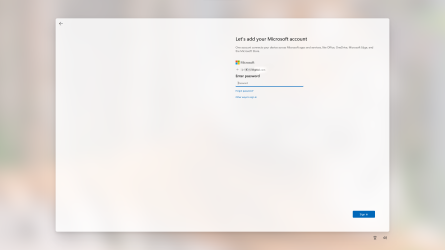
After i cold boot or restart after entering my password for logging in when i get to home screen i see this. How do i disable this annoyance ?
Already have a Microsoft account and have logged in just don't do it to log in at boot.
Never had it before this update (2024-01 Cumulative Update Preview for Windows 11 Version 23H2 for x64-based Systems (KB5034204) ) Thanks !!Screenshot 2024-01-27 181709.png
 

Attachments

  • Screenshot 2024-01-27 181709.png
    Screenshot 2024-01-27 181709.png
    644.3 KB · Views: 4

My Computer My Computer

At a glance

Windows 11 ProIntel Core i7 10700KF 3.8 MHzG.Skill Trident RGB Series 64GB DDR4-3600MHzASUS ROG Strix GeForce RTX 3060 Ti OC Edition
OS
Windows 11 Pro
Computer type
PC/Desktop
Manufacturer/Model
jds63 /self built
CPU
Intel Core i7 10700KF 3.8 MHz
Motherboard
ASUS ROG Strix Z490-E Gaming
Memory
G.Skill Trident RGB Series 64GB DDR4-3600MHz
Graphics Card(s)
ASUS ROG Strix GeForce RTX 3060 Ti OC Edition
Sound Card
Creative Sound BlasterX AE-5 Plus
Monitor(s) Displays
ASUS VG28UQL1A 28" 144 Mhz 4K Monitor
Screen Resolution
3840 X 2160p HDR
Hard Drives
Samsung 970 EVO Plus NVMe 500GB M.2 Drive, (2) Samsung 870 EVO 1TB SATA III Internal SSD, (2) Samsung 860 EVO 1TB SATA III Internal SSD & Seagate Barracuda 2TB
PSU
ASUS ROG Thor 850 80+ Platinum 850W Fully Modular RGB Power Supply
Case
Lian Li Lancool II Mesh Performance
Cooling
Noctua NH-U12A CPU Cooler, (5) Noctua NF-A12x15 chromax.black.swap 120mm, (3) Lepa BOL.Quiet PWM LED 120mm
Keyboard
Logitech MX Keys
Mouse
Logitech MX Ergo Trackball
Internet Speed
325Mbps/ 20Mbps
Browser
Mozilla Firefox 64-bit, Microsoft Edge
Antivirus
Kaspersky Plus 2023
Other Info
Pioneer Blu-Ray/DVD Burner 209DBK, Logitech Z906 5.1 Speakers and Epson XP7100 All-in-One Printer
You could try uninstalling KB5034204. Since it is a preview, it wont harm anything and it will be installed properly when the full update is released.

Go to Settings > Windows Update > Update History > Uninstall Updates and find KB5034204 then click on uninstall.
 

My Computer My Computer

At a glance

Windows 11 ProRyzen 9 3900XG-Skill RipjawsV F4-3600C18 (16GB x 2)Gigabyte RX 5700 XT Gaming OC
OS
Windows 11 Pro
Computer type
PC/Desktop
CPU
Ryzen 9 3900X
Motherboard
ASUS ROG Strix X570-E Gaming
Memory
G-Skill RipjawsV F4-3600C18 (16GB x 2)
Graphics Card(s)
Gigabyte RX 5700 XT Gaming OC
Sound Card
Realtek ALC1220P
Monitor(s) Displays
ASUS VE278 (x 2)
Screen Resolution
1920x1080
Hard Drives
Samsung 850 Pro 256GB
Samsung 970 Pro NVMe 512GB (x 2)
ST10000VN0004 10TB (x 2)
ST10000VN0008 10TB (x 2)
ST4000VN000 4TB (x 2)
PSU
Corsair HX1000
Case
Corsair Carbide 400R
Cooling
AMD Wraith Prism (Stock)
Keyboard
Logitech G213
Mouse
Logitech G502
Internet Speed
100Mbps down / 40Mbps up
Browser
Firefox - Chrome - Edge
Antivirus
Windows Defender - Clamwin
How do i disable this annoyance ?
Already have a Microsoft account and have logged in just don't do it to log in at boot.
Are you are signing in with a local account, and just using your MS account for other apps?

If so, you should go to Settings > System > Notifications, scroll right to the bottom, and turn off all these 'Additional settings'. It was probably the first of these three, the 'Show ... after updates...' one, that caused your 'annoyance', if so that one can occur after any update, nothing specific about this Preview one.

1706402970910.png
 

My Computers My Computers

  • At a glance

    Windows 11 HomeAMD Athlon Silver 3050U8GBRadeon Graphics
    OS
    Windows 11 Home
    Computer type
    Laptop
    Manufacturer/Model
    Acer Aspire 3 A315-23-R9VY
    CPU
    AMD Athlon Silver 3050U
    Memory
    8GB
    Graphics Card(s)
    Radeon Graphics
    Monitor(s) Displays
    laptop screen
    Screen Resolution
    1366x768 native resolution, up to 2560x1440 with Radeon Virtual Super Resolution
    Hard Drives
    1TB Samsung EVO 870 SSD (from April 2026: 250GB EVO 850)
    Internet Speed
    150 Mbps
    Browser
    Edge, Firefox
    Antivirus
    Defender
    Other Info
    fully 'Windows 11 ready' laptop. Windows 10 C: partition migrated from my old unsupported 'main machine' then upgraded to 11. A test migration ran Insider builds for 2 months. When 11 was released on 5th October 2021 it was re-imaged back to 10 and was offered the upgrade in Windows Update on 20th October. Windows Update offered the 22H2 Feature Update on 20th September 2022. It got the 23H2 Feature Update on 4th November 2023 through Windows Update, 24H2 on 3rd October 2024 through Windows Update by setting the Target Release Version for 24H2, and 25H2 on 30th September 2025 through Windows Update by setting the Target Release Version for 25H2.

    UPDATE - 11 April 2026: due to mechanical deterioration this PC has been retired from active duty. The OS with all software and files has been migrated to my System Seven in 'Other systems' to carry on as my general purpose 'main machine'.
  • At a glance

    Windows 11 ProIntel® Core™ i5-520M8GB(integrated graphics) Intel HD Graphics
    Operating System
    Windows 11 Pro
    Computer type
    Laptop
    Manufacturer/Model
    Dell Latitude E4310
    CPU
    Intel® Core™ i5-520M
    Motherboard
    0T6M8G
    Memory
    8GB
    Graphics card(s)
    (integrated graphics) Intel HD Graphics
    Screen Resolution
    1366x768
    Hard Drives
    500GB Crucial MX500 SSD
    Browser
    Firefox, Edge
    Antivirus
    Defender
    Other Info
    unsupported machine: Legacy bios, MBR, TPM 1.2, upgraded from W10 to W11 using W10/W11 hybrid install media workaround.

    In-place upgrade to 22H2 using ISO and a workaround.
    Feature Update to 23H2 by manually installing the Enablement Package.
    In-place upgrade to 24H2 using hybrid 23H2/24H2 install media.
    Upgraded to 25H2 by Enablement Package.

    Also running Insider Dev, and Canary builds and Windows 10 as native boot .vhdx.
  • My SYSTEM THREE is a Dell Latitude 5410, i7-10610U, 32GB RAM, 512GB NVMe ssd, supported device running Windows 11 Pro.

    My SYSTEM FOUR is a 2-in-1 convertible Lenovo Yoga 11e 20DA, Celeron N2930, 8GB RAM, 256GB ssd. Unsupported device: currently running Win10 Pro, plus Win11 Pro RTM and Insider Dev, Beta, and RP 24H2 as native boot vhdx.

    My SYSTEM FIVE is a Dell Latitude 3190 2-in-1, Pentium Silver N5030, 8GB RAM, 1TB NVMe ssd, supported device running Windows 11 Pro, plus Insider Beta, Dev, and Canary builds (and a few others) as a native boot .vhdx.

    My SYSTEM SIX is a Dell Latitude 5550, Core Ultra 7 165H, 64GB RAM, 1TB NVMe SSD, supported device, Windows 11 Pro 24H2, Hyper-V host machine. Updated to 25H2 on 30th September 2025.

    My SYSTEM SEVEN is a Lenovo Thinkpad T580, Intel Core i7-8650U, 16GB RAM, 512GB NVMe SSD + 2nd 512GB NVMe SSD, a supported device for Windows 11. This is my current general purpose 'main machine'. The installed Windows 11 Home from my System One has been migrated to this machine.
Are you are signing in with a local account, and just using your MS account for other apps?
Just using Local Account to sign in, never used Microsoft Account to sign in except for apps.
For some reason i found out wanted me to verify my Microsoft account again for some reason message i seen in Settings>Accounts and just had to click that message to verify and all is better now. No Startup message about it anymore.
 

My Computer My Computer

At a glance

Windows 11 ProIntel Core i7 10700KF 3.8 MHzG.Skill Trident RGB Series 64GB DDR4-3600MHzASUS ROG Strix GeForce RTX 3060 Ti OC Edition
OS
Windows 11 Pro
Computer type
PC/Desktop
Manufacturer/Model
jds63 /self built
CPU
Intel Core i7 10700KF 3.8 MHz
Motherboard
ASUS ROG Strix Z490-E Gaming
Memory
G.Skill Trident RGB Series 64GB DDR4-3600MHz
Graphics Card(s)
ASUS ROG Strix GeForce RTX 3060 Ti OC Edition
Sound Card
Creative Sound BlasterX AE-5 Plus
Monitor(s) Displays
ASUS VG28UQL1A 28" 144 Mhz 4K Monitor
Screen Resolution
3840 X 2160p HDR
Hard Drives
Samsung 970 EVO Plus NVMe 500GB M.2 Drive, (2) Samsung 870 EVO 1TB SATA III Internal SSD, (2) Samsung 860 EVO 1TB SATA III Internal SSD & Seagate Barracuda 2TB
PSU
ASUS ROG Thor 850 80+ Platinum 850W Fully Modular RGB Power Supply
Case
Lian Li Lancool II Mesh Performance
Cooling
Noctua NH-U12A CPU Cooler, (5) Noctua NF-A12x15 chromax.black.swap 120mm, (3) Lepa BOL.Quiet PWM LED 120mm
Keyboard
Logitech MX Keys
Mouse
Logitech MX Ergo Trackball
Internet Speed
325Mbps/ 20Mbps
Browser
Mozilla Firefox 64-bit, Microsoft Edge
Antivirus
Kaspersky Plus 2023
Other Info
Pioneer Blu-Ray/DVD Burner 209DBK, Logitech Z906 5.1 Speakers and Epson XP7100 All-in-One Printer
You could try uninstalling KB5034204. Since it is a preview, it wont harm anything and it will be installed properly when the full update is released.
So pretty sure it happened after installing that update, but fine now. Update still installed.
 

My Computer My Computer

At a glance

Windows 11 ProIntel Core i7 10700KF 3.8 MHzG.Skill Trident RGB Series 64GB DDR4-3600MHzASUS ROG Strix GeForce RTX 3060 Ti OC Edition
OS
Windows 11 Pro
Computer type
PC/Desktop
Manufacturer/Model
jds63 /self built
CPU
Intel Core i7 10700KF 3.8 MHz
Motherboard
ASUS ROG Strix Z490-E Gaming
Memory
G.Skill Trident RGB Series 64GB DDR4-3600MHz
Graphics Card(s)
ASUS ROG Strix GeForce RTX 3060 Ti OC Edition
Sound Card
Creative Sound BlasterX AE-5 Plus
Monitor(s) Displays
ASUS VG28UQL1A 28" 144 Mhz 4K Monitor
Screen Resolution
3840 X 2160p HDR
Hard Drives
Samsung 970 EVO Plus NVMe 500GB M.2 Drive, (2) Samsung 870 EVO 1TB SATA III Internal SSD, (2) Samsung 860 EVO 1TB SATA III Internal SSD & Seagate Barracuda 2TB
PSU
ASUS ROG Thor 850 80+ Platinum 850W Fully Modular RGB Power Supply
Case
Lian Li Lancool II Mesh Performance
Cooling
Noctua NH-U12A CPU Cooler, (5) Noctua NF-A12x15 chromax.black.swap 120mm, (3) Lepa BOL.Quiet PWM LED 120mm
Keyboard
Logitech MX Keys
Mouse
Logitech MX Ergo Trackball
Internet Speed
325Mbps/ 20Mbps
Browser
Mozilla Firefox 64-bit, Microsoft Edge
Antivirus
Kaspersky Plus 2023
Other Info
Pioneer Blu-Ray/DVD Burner 209DBK, Logitech Z906 5.1 Speakers and Epson XP7100 All-in-One Printer
Thanks for the replies !!!
 

My Computer My Computer

At a glance

Windows 11 ProIntel Core i7 10700KF 3.8 MHzG.Skill Trident RGB Series 64GB DDR4-3600MHzASUS ROG Strix GeForce RTX 3060 Ti OC Edition
OS
Windows 11 Pro
Computer type
PC/Desktop
Manufacturer/Model
jds63 /self built
CPU
Intel Core i7 10700KF 3.8 MHz
Motherboard
ASUS ROG Strix Z490-E Gaming
Memory
G.Skill Trident RGB Series 64GB DDR4-3600MHz
Graphics Card(s)
ASUS ROG Strix GeForce RTX 3060 Ti OC Edition
Sound Card
Creative Sound BlasterX AE-5 Plus
Monitor(s) Displays
ASUS VG28UQL1A 28" 144 Mhz 4K Monitor
Screen Resolution
3840 X 2160p HDR
Hard Drives
Samsung 970 EVO Plus NVMe 500GB M.2 Drive, (2) Samsung 870 EVO 1TB SATA III Internal SSD, (2) Samsung 860 EVO 1TB SATA III Internal SSD & Seagate Barracuda 2TB
PSU
ASUS ROG Thor 850 80+ Platinum 850W Fully Modular RGB Power Supply
Case
Lian Li Lancool II Mesh Performance
Cooling
Noctua NH-U12A CPU Cooler, (5) Noctua NF-A12x15 chromax.black.swap 120mm, (3) Lepa BOL.Quiet PWM LED 120mm
Keyboard
Logitech MX Keys
Mouse
Logitech MX Ergo Trackball
Internet Speed
325Mbps/ 20Mbps
Browser
Mozilla Firefox 64-bit, Microsoft Edge
Antivirus
Kaspersky Plus 2023
Other Info
Pioneer Blu-Ray/DVD Burner 209DBK, Logitech Z906 5.1 Speakers and Epson XP7100 All-in-One Printer

Latest Support Threads

Back
Top Bottom