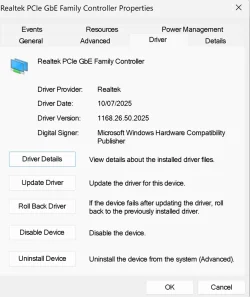
Auto Driver Installer did not install LAN driver


Chuck99

Well-known member
Member
Local time
12:10 PM
Posts
68
OS
Windows 11 Pro 25H2
When I installed Windows 10 and used the ASRock Auto Driver Installer, it installed 4 drivers including the LAN driver.

Now I did a clean install of Windows 11 and the ASRock Auto Driver Installer only installed 3 drivers & did not install the LAN driver.

The ASRock website lists a Realtek LAN driver ver:10.060.0615.2022.

Everything seems to work as is. Should I install the driver anyway?

Thanks
 
Windows Build/Version
25H2

My Computer

System One

  • OS
    Windows 11 Pro 25H2
    Computer type
    PC/Desktop
    Manufacturer/Model
    ASRock B760M Pro RS/D4 motherboard
    CPU
    Intel i5-14500
    Motherboard
    ASRock
    Memory
    16 GB
    Graphics Card(s)
    Intel
    Hard Drives
    1 TB Samsung M.2 SSD
    1 TB WD HDD
When I installed Windows 10 and used the ASRock Auto Driver Installer, it installed 4 drivers including the LAN driver.

Now I did a clean install of Windows 11 and the ASRock Auto Driver Installer only installed 3 drivers & did not install the LAN driver.

The ASRock website lists a Realtek LAN driver ver:10.060.0615.2022.

Everything seems to work as is. Should I install the driver anyway?

Thanks
Check the version on the ASRock software to what it is installed in Windows.
Maybe Windows update installed the same or newer version as the ASRock software.
I have a Gigabyte motherboard and the Gigabyte Website has a newer version of the AMD Chipset Software than the AMD website go figure.
 

My Computer

System One

  • OS
    Windows 11
    Computer type
    PC/Desktop
    Manufacturer/Model
    Generic
    CPU
    AMD Ryzen 8700G
    Motherboard
    Gigabyte B650 UD AC
    Memory
    64 GB
    Graphics Card(s)
    Onboard
    Sound Card
    Onboard
    Monitor(s) Displays
    Del U2723QE
    Screen Resolution
    3840 x 2160
    Hard Drives
    Corsiar MP600 1TB
    PSU
    Silverstone 750 GOLD
    Case
    Silverstone FARA 513
Check the version on the ASRock software to what it is installed in Windows.
Maybe Windows update installed the same or newer version as the ASRock software.
I have a Gigabyte motherboard and the Gigabyte Website has a newer version of the AMD Chipset Software than the AMD website go figure.

I don't see a LAN driver installed, at least not in Device Manager. Where else would I look?
 

My Computer

System One

  • OS
    Windows 11 Pro 25H2
    Computer type
    PC/Desktop
    Manufacturer/Model
    ASRock B760M Pro RS/D4 motherboard
    CPU
    Intel i5-14500
    Motherboard
    ASRock
    Memory
    16 GB
    Graphics Card(s)
    Intel
    Hard Drives
    1 TB Samsung M.2 SSD
    1 TB WD HDD
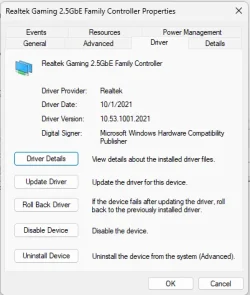
Possibly Windows update installed it or one newer. Look in Device Manager. Expand Network Adapters. Is there a Realtek LAN there? If so, right click on it,
select properties. Select driver tab. That tells you what version of the driver that is installed,
 

My Computers

System One System Two

  • OS
    Windows 11 Pro 25H2
    Computer type
    PC/Desktop
    Manufacturer/Model
    Dell Optiplex 7080
    CPU
    i9-10900 10 core 20 threads
    Motherboard
    DELL 0J37VM
    Memory
    32 gb
    Graphics Card(s)
    none-Intel UHD Graphics 630
    Sound Card
    Integrated Realtek
    Monitor(s) Displays
    Benq 27
    Screen Resolution
    2560x1440
    Hard Drives
    2x1tb Solidigm m.2 nvme /External drives 512gb Samsung m.2 sata+2tb Kingston m2.nvme
    PSU
    500w
    Case
    MT
    Cooling
    Dell Premium
    Keyboard
    Logitech wired
    Mouse
    Logitech wireless
    Internet Speed
    so slow I'm too embarrassed to tell
    Browser
    #1 Edge #2 Firefox
    Antivirus
    Defender+MWB Premium
  • Operating System
    Windows 11 Pro 24H2 26200.8457
    Computer type
    PC/Desktop
    Manufacturer/Model
    Beelink Mini PC SER5
    CPU
    AMD Ryzen 7 6800U
    Memory
    32 gb
    Graphics card(s)
    integrated
    Sound Card
    integrated
    Monitor(s) Displays
    Benq 27
    Screen Resolution
    2560x1440
    Hard Drives
    1TB Crucial nvme
    Keyboard
    Logitech wired
    Mouse
    Logitech wireless
    Internet Speed
    still too embarrassed to tell
    Browser
    Firefox
    Antivirus
    Defender
    Other Info
    System 3 is non compliant Dell 9020 i7-4770/24gb ram Win11 PRO 26200.8457
I don't see a LAN driver installed, at least not in Device Manager. Where else would I look?
See attached screengrab should be similar.
Also have a look at your Windows Update history.
 

Attachments

  • Screenshot 2025-11-22 182941.webp
    Screenshot 2025-11-22 182941.webp
    54.4 KB · Views: 1

My Computer

System One

  • OS
    Windows 11
    Computer type
    PC/Desktop
    Manufacturer/Model
    Generic
    CPU
    AMD Ryzen 8700G
    Motherboard
    Gigabyte B650 UD AC
    Memory
    64 GB
    Graphics Card(s)
    Onboard
    Sound Card
    Onboard
    Monitor(s) Displays
    Del U2723QE
    Screen Resolution
    3840 x 2160
    Hard Drives
    Corsiar MP600 1TB
    PSU
    Silverstone 750 GOLD
    Case
    Silverstone FARA 513
@Chuck99

This is one of the reasons we ask that folks fill out their computer specs.
From your specs, we can't tell what model of AsRock board you have.

CPU-Z can tell you the model number for your motherboard (mainboard).


For example...

Image1.webp
 

My Computers

System One System Two

  • OS
    Win 11 Home ♦♦♦26200.8457 ♦♦♦♦♦♦♦25H2
    Computer type
    PC/Desktop
    Manufacturer/Model
    Built by Ghot® [May 2020]
    CPU
    AMD Ryzen 7 3700X
    Motherboard
    Asus Pro WS X570-ACE (BIOS 5302)
    Memory
    G.Skill (F4-3200C14D-16GTZKW)
    Graphics Card(s)
    EVGA RTX 2070 (08G-P4-2171-KR)
    Sound Card
    Realtek ALC1220P / ALC S1220A
    Monitor(s) Displays
    Dell U3011 30"
    Screen Resolution
    2560 x 1600
    Hard Drives
    2x Samsung 860 EVO 500GB,
    WD 4TB Black FZBX - SATA III,
    WD 8TB Black FZBX - SATA III,
    DRW-24B1ST CD/DVD Burner
    PSU
    PC Power & Cooling 750W Quad EPS12V
    Case
    Cooler Master ATCS 840 Tower
    Cooling
    CM Hyper 212 EVO (push/pull)
    Keyboard
    Ducky DK9008 Shine II Blue LED
    Mouse
    Logitech Optical M-100
    Internet Speed
    300/300
    Browser
    Firefox (latest)
    Antivirus
    Bitdefender Total Security
    Other Info
    Speakers: Klipsch Pro Media 2.1
  • Operating System
    Windows XP Pro 32bit w/SP3
    Computer type
    PC/Desktop
    Manufacturer/Model
    Built by Ghot® (not in use)
    CPU
    AMD Athlon 64 X2 5000+ (OC'd @ 3.2Ghz)
    Motherboard
    ASUS M2N32-SLI Deluxe Wireless Edition
    Memory
    TWIN2X2048-6400C4DHX (2 x 1GB, DDR2 800)
    Graphics card(s)
    EVGA 256-P2-N758-TR GeForce 8600GT SSC
    Sound Card
    Onboard
    Monitor(s) Displays
    ViewSonic G90FB Black 19" Professional (CRT)
    Screen Resolution
    up to 2048 x 1536
    Hard Drives
    WD 36GB 10,000rpm Raptor SATA
    Seagate 80GB 7200rpm SATA
    Lite-On LTR-52246S CD/RW
    Lite-On LH-18A1P CD/DVD Burner
    PSU
    PC Power & Cooling Silencer 750 Quad EPS12V
    Case
    Generic Beige case, 80mm fans
    Cooling
    ZALMAN 9500A 92mm CPU Cooler
    Keyboard
    Logitech Classic Keybooard 200
    Mouse
    Logitech Optical M-BT96a
    Internet Speed
    300/300
    Browser
    Firefox 3.x ??
    Antivirus
    Symantec (Norton)
    Other Info
    Still assembled, still runs. Haven't turned it on for 15 years?
Possibly Windows update installed it or one newer. Look in Device Manager. Expand Network Adapters. Is there a Realtek LAN there? If so, right click on it,
select properties. Select driver tab. That tells you what version of the driver that is installed,

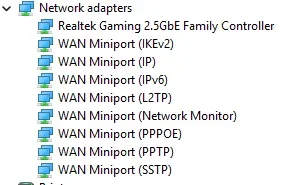
Here’s a screenshot of Device Manager > Network Adapters.

1763808794777.webp
 

My Computer

System One

  • OS
    Windows 11 Pro 25H2
    Computer type
    PC/Desktop
    Manufacturer/Model
    ASRock B760M Pro RS/D4 motherboard
    CPU
    Intel i5-14500
    Motherboard
    ASRock
    Memory
    16 GB
    Graphics Card(s)
    Intel
    Hard Drives
    1 TB Samsung M.2 SSD
    1 TB WD HDD
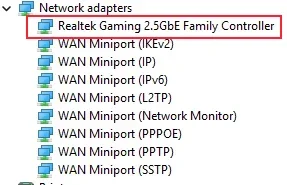
See attached screengrab should be similar.
Also have a look at your Windows Update history.
There is nothing in Windows Update history showing a LAN driver.
 

My Computer

System One

  • OS
    Windows 11 Pro 25H2
    Computer type
    PC/Desktop
    Manufacturer/Model
    ASRock B760M Pro RS/D4 motherboard
    CPU
    Intel i5-14500
    Motherboard
    ASRock
    Memory
    16 GB
    Graphics Card(s)
    Intel
    Hard Drives
    1 TB Samsung M.2 SSD
    1 TB WD HDD
@Chuck99

This is one of the reasons we ask that folks fill out their computer specs.
From your specs, we can't tell what model of AsRock board you have.

CPU-Z can tell you the model number for your motherboard (mainboard).


For example...

View attachment 153893

ASRock B760M Pro RS/D4 motherboard.

I tried to install Windows 11 without an Internet connection. However at one point the process wanted to install a LAN driver & wanted me browse the C: drive for the driver, which of course was not there.

I could not proceed & had to connect to the Internet. At that point it allowed me to click on the “Next” button, which had to be done a few times. Then the install completed. I never installed a LAN driver because I didn’t have one.

I was surprised the ASRock Auto Driver Installer didn’t install one. I know sometimes drivers are rolled back because the newest version doesn't work too well. Since everything is working thought I'd ask before installing something that's not needed.
 

My Computer

System One

  • OS
    Windows 11 Pro 25H2
    Computer type
    PC/Desktop
    Manufacturer/Model
    ASRock B760M Pro RS/D4 motherboard
    CPU
    Intel i5-14500
    Motherboard
    ASRock
    Memory
    16 GB
    Graphics Card(s)
    Intel
    Hard Drives
    1 TB Samsung M.2 SSD
    1 TB WD HDD
Here’s a screenshot of Device Manager > Network Adapters.

View attachment 153896
Right there 2.5GbE

The driver on the support site is about a year old (

Windows® 11 64bit10.6MB2024/4/11

ver:10.060.0615.2022
windows probably has a newer version
 

Attachments

  • 1763808794777.webp
    1763808794777.webp
    12.8 KB · Views: 0

My Computer

System One

  • OS
    Windows 11 Pro
    Computer type
    PC/Desktop
    CPU
    Ryzen 5 5800X
    Motherboard
    Asus B550 Strix gaming
    Memory
    32Gb Corsair 3200
    Graphics Card(s)
    Gigabyte RTX4070-Super
    Screen Resolution
    2x 1440, 1x 1080
@Chuck99

Is your Realtek ethernet card one of these listed on this driver download page?


My Computers

System One System Two

  • OS
    Windows 11 Pro 25H2
    Computer type
    PC/Desktop
    Manufacturer/Model
    Homebuilt
    CPU
    Intel Core i9 13900K
    Motherboard
    Asus ProArt Z790 Creator WiFi - Bios 3107
    Memory
    Corsair Dominator Platinum 64gb 5600MT/s DDR5 Dual Channel
    Graphics Card(s)
    Sapphire NITRO+ AMD Radeon RX 7900 XTX Vapor-X 24GB
    Sound Card
    External DAC: Cambridge Audio DACMagic200M - Headphone Amp: Topping L50
    Monitor(s) Displays
    Panasonic MX950 Mini LED 55" TV 120hz
    Screen Resolution
    3840 x 2160 120hz
    Hard Drives
    Samsung 980 Pro 2TB (OS)
    Samsung 980 Pro 1TB (Files)
    Lexar NZ790 4TB
    LaCie d2 Professional 6TB external - USB 3.1
    Seagate Expansion 16TB external - USB 3.2
    Seagate One Touch 18TB external HD - USB 3.0
    PSU
    Corsair RM1200x Shift
    Case
    Corsair RGB Smart Case 5000x (white)
    Cooling
    Corsair iCue H150i Elite Capellix XT
    Keyboard
    Incase Ergonomic USB (Microsoft clone)
    Mouse
    Logitech MX Master 3S
    Internet Speed
    Fibre 900/500 Mbps
    Browser
    Microsoft Edge Chromium
    Antivirus
    Bitdefender Total Security
    Other Info
    AMD Radeon Software & Drivers 26.1.1
    Hasleo Backup Suite
    Dashlane password manager
    Kensington Verimark fingerprint reader
    Logitech Brio 4K webcam
    Orico 10-port powered USB 3.0 hub
  • Operating System
    Windows 11 Pro 25H2
    Computer type
    Laptop
    Manufacturer/Model
    Asus Vivobook X1605VA
    CPU
    Intel® Core™ i9-13900H
    Motherboard
    Asus X1605VA bios 309
    Memory
    32GB DDR4-3200 Dual channel
    Graphics card(s)
    *Intel Iris Xᵉ Graphics G7
    Sound Card
    Realtek | Intel SST Bluetooth & USB
    Monitor(s) Displays
    16.0-inch, WUXGA 16:10 aspect ratio, IPS-level Panel
    Screen Resolution
    1920 x 1200 60hz
    Hard Drives
    512GB M.2 NVMe™ PCIe® 3.0 SSD
    Mouse
    Logitech MX Ergo Trackball
    Antivirus
    Bitdefender Total Security
    Other Info
    720p Webcam
    WiFi & USB to ethernet
Here’s a screenshot of Device Manager > Network Adapters.

View attachment 153896
If there is nothing under Windows Update and the Ethernet is working it maybe using the Default Windows Driver.
Go back to Network adapters in Device Manager right click on the Realtek Gaming 2.5Gbe Family Controller, select Properties and go to the Driver Tab.
You will then see the Driver Details.
If the Adpater is using a Microsoft Driver and for what ever reason the AsRock supplied Driver is not working
Here’s a screenshot of Device Manager > Network Adapters.

View attachment 153896
Double Click on the Realtek Gaming 2.5Gbe Family Controller, next screen click on Driver and you will see the details as per my earlier post.
 

My Computer

System One

  • OS
    Windows 11
    Computer type
    PC/Desktop
    Manufacturer/Model
    Generic
    CPU
    AMD Ryzen 8700G
    Motherboard
    Gigabyte B650 UD AC
    Memory
    64 GB
    Graphics Card(s)
    Onboard
    Sound Card
    Onboard
    Monitor(s) Displays
    Del U2723QE
    Screen Resolution
    3840 x 2160
    Hard Drives
    Corsiar MP600 1TB
    PSU
    Silverstone 750 GOLD
    Case
    Silverstone FARA 513
There's a driver for these Realtek PCIe GBE Family Controllers available via the Microsoft Update Catalog for 24H2 or later.


My Computers

System One System Two

  • OS
    Windows 11 Pro 25H2
    Computer type
    PC/Desktop
    Manufacturer/Model
    Homebuilt
    CPU
    Intel Core i9 13900K
    Motherboard
    Asus ProArt Z790 Creator WiFi - Bios 3107
    Memory
    Corsair Dominator Platinum 64gb 5600MT/s DDR5 Dual Channel
    Graphics Card(s)
    Sapphire NITRO+ AMD Radeon RX 7900 XTX Vapor-X 24GB
    Sound Card
    External DAC: Cambridge Audio DACMagic200M - Headphone Amp: Topping L50
    Monitor(s) Displays
    Panasonic MX950 Mini LED 55" TV 120hz
    Screen Resolution
    3840 x 2160 120hz
    Hard Drives
    Samsung 980 Pro 2TB (OS)
    Samsung 980 Pro 1TB (Files)
    Lexar NZ790 4TB
    LaCie d2 Professional 6TB external - USB 3.1
    Seagate Expansion 16TB external - USB 3.2
    Seagate One Touch 18TB external HD - USB 3.0
    PSU
    Corsair RM1200x Shift
    Case
    Corsair RGB Smart Case 5000x (white)
    Cooling
    Corsair iCue H150i Elite Capellix XT
    Keyboard
    Incase Ergonomic USB (Microsoft clone)
    Mouse
    Logitech MX Master 3S
    Internet Speed
    Fibre 900/500 Mbps
    Browser
    Microsoft Edge Chromium
    Antivirus
    Bitdefender Total Security
    Other Info
    AMD Radeon Software & Drivers 26.1.1
    Hasleo Backup Suite
    Dashlane password manager
    Kensington Verimark fingerprint reader
    Logitech Brio 4K webcam
    Orico 10-port powered USB 3.0 hub
  • Operating System
    Windows 11 Pro 25H2
    Computer type
    Laptop
    Manufacturer/Model
    Asus Vivobook X1605VA
    CPU
    Intel® Core™ i9-13900H
    Motherboard
    Asus X1605VA bios 309
    Memory
    32GB DDR4-3200 Dual channel
    Graphics card(s)
    *Intel Iris Xᵉ Graphics G7
    Sound Card
    Realtek | Intel SST Bluetooth & USB
    Monitor(s) Displays
    16.0-inch, WUXGA 16:10 aspect ratio, IPS-level Panel
    Screen Resolution
    1920 x 1200 60hz
    Hard Drives
    512GB M.2 NVMe™ PCIe® 3.0 SSD
    Mouse
    Logitech MX Ergo Trackball
    Antivirus
    Bitdefender Total Security
    Other Info
    720p Webcam
    WiFi & USB to ethernet
Right there 2.5GbE

The driver on the support site is about a year old (

Windows® 11 64bit10.6MB2024/4/11

ver:10.060.0615.2022
windows probably has a newer version

I didn't know the Family Controller included the LAN driver.
 

My Computer

System One

  • OS
    Windows 11 Pro 25H2
    Computer type
    PC/Desktop
    Manufacturer/Model
    ASRock B760M Pro RS/D4 motherboard
    CPU
    Intel i5-14500
    Motherboard
    ASRock
    Memory
    16 GB
    Graphics Card(s)
    Intel
    Hard Drives
    1 TB Samsung M.2 SSD
    1 TB WD HDD
@Chuck99

Is your Realtek ethernet card one of these listed on this driver download page?


The motherboard owners manual lists this for LAN.
2.5 Gigabit LAN 10/100/1000/2500 Mb/s
Dragon RTL8125BG
Supports Dragon 2.5G LAN Software
 

My Computer

System One

  • OS
    Windows 11 Pro 25H2
    Computer type
    PC/Desktop
    Manufacturer/Model
    ASRock B760M Pro RS/D4 motherboard
    CPU
    Intel i5-14500
    Motherboard
    ASRock
    Memory
    16 GB
    Graphics Card(s)
    Intel
    Hard Drives
    1 TB Samsung M.2 SSD
    1 TB WD HDD
If there is nothing under Windows Update and the Ethernet is working it maybe using the Default Windows Driver.
Go back to Network adapters in Device Manager right click on the Realtek Gaming 2.5Gbe Family Controller, select Properties and go to the Driver Tab.
You will then see the Driver Details.
If the Adpater is using a Microsoft Driver and for what ever reason the AsRock supplied Driver is not working

Double Click on the Realtek Gaming 2.5Gbe Family Controller, next screen click on Driver and you will see the details as per my earlier post.
1763847157891.webp
 

My Computer

System One

  • OS
    Windows 11 Pro 25H2
    Computer type
    PC/Desktop
    Manufacturer/Model
    ASRock B760M Pro RS/D4 motherboard
    CPU
    Intel i5-14500
    Motherboard
    ASRock
    Memory
    16 GB
    Graphics Card(s)
    Intel
    Hard Drives
    1 TB Samsung M.2 SSD
    1 TB WD HDD
The motherboard owners manual lists this for LAN.
2.5 Gigabit LAN 10/100/1000/2500 Mb/s
Dragon RTL8125BG
Supports Dragon 2.5G LAN Software

The motherboards support page says you must install the realtek driver you can check in the devices properties, before you install the Dragon lan software (personnally never found any of the bundled software to actually help.

https://www.asrock.com/mb/Intel/B760M Pro RSD4/index.asp#Download

The sites driver is more recent
 

My Computer

System One

  • OS
    Windows 11 Pro
    Computer type
    PC/Desktop
    CPU
    Ryzen 5 5800X
    Motherboard
    Asus B550 Strix gaming
    Memory
    32Gb Corsair 3200
    Graphics Card(s)
    Gigabyte RTX4070-Super
    Screen Resolution
    2x 1440, 1x 1080
The motherboards support page says you must install the realtek driver you can check in the devices properties, before you install the Dragon lan software (personnally never found any of the bundled software to actually help.

https://www.asrock.com/mb/Intel/B760M Pro RSD4/index.asp#Download

The sites driver is more recent
From the motherboard manual:

Dragon RTL8125BG•
Supports Dragon 2.5G LAN Software:
  • Smart Auto Adjust Bandwidth Control
  • Visual User Friendly UI
  • Visual Network Usage Statistics
  • Optimized Default Setting for Game, Browser, and Streaming Modes
  • User Customized Priority Control
I agree stuff like listed above isn't going to make much difference anyway. Never has in my experience.
 

My Computers

System One System Two

  • OS
    Windows 11 Pro 25H2
    Computer type
    PC/Desktop
    Manufacturer/Model
    Homebuilt
    CPU
    Intel Core i9 13900K
    Motherboard
    Asus ProArt Z790 Creator WiFi - Bios 3107
    Memory
    Corsair Dominator Platinum 64gb 5600MT/s DDR5 Dual Channel
    Graphics Card(s)
    Sapphire NITRO+ AMD Radeon RX 7900 XTX Vapor-X 24GB
    Sound Card
    External DAC: Cambridge Audio DACMagic200M - Headphone Amp: Topping L50
    Monitor(s) Displays
    Panasonic MX950 Mini LED 55" TV 120hz
    Screen Resolution
    3840 x 2160 120hz
    Hard Drives
    Samsung 980 Pro 2TB (OS)
    Samsung 980 Pro 1TB (Files)
    Lexar NZ790 4TB
    LaCie d2 Professional 6TB external - USB 3.1
    Seagate Expansion 16TB external - USB 3.2
    Seagate One Touch 18TB external HD - USB 3.0
    PSU
    Corsair RM1200x Shift
    Case
    Corsair RGB Smart Case 5000x (white)
    Cooling
    Corsair iCue H150i Elite Capellix XT
    Keyboard
    Incase Ergonomic USB (Microsoft clone)
    Mouse
    Logitech MX Master 3S
    Internet Speed
    Fibre 900/500 Mbps
    Browser
    Microsoft Edge Chromium
    Antivirus
    Bitdefender Total Security
    Other Info
    AMD Radeon Software & Drivers 26.1.1
    Hasleo Backup Suite
    Dashlane password manager
    Kensington Verimark fingerprint reader
    Logitech Brio 4K webcam
    Orico 10-port powered USB 3.0 hub
  • Operating System
    Windows 11 Pro 25H2
    Computer type
    Laptop
    Manufacturer/Model
    Asus Vivobook X1605VA
    CPU
    Intel® Core™ i9-13900H
    Motherboard
    Asus X1605VA bios 309
    Memory
    32GB DDR4-3200 Dual channel
    Graphics card(s)
    *Intel Iris Xᵉ Graphics G7
    Sound Card
    Realtek | Intel SST Bluetooth & USB
    Monitor(s) Displays
    16.0-inch, WUXGA 16:10 aspect ratio, IPS-level Panel
    Screen Resolution
    1920 x 1200 60hz
    Hard Drives
    512GB M.2 NVMe™ PCIe® 3.0 SSD
    Mouse
    Logitech MX Ergo Trackball
    Antivirus
    Bitdefender Total Security
    Other Info
    720p Webcam
    WiFi & USB to ethernet
From the motherboard manual:

Dragon RTL8125BG•
Supports Dragon 2.5G LAN Software:
  • Smart Auto Adjust Bandwidth Control
  • Visual User Friendly UI
  • Visual Network Usage Statistics
  • Optimized Default Setting for Game, Browser, and Streaming Modes
  • User Customized Priority Control
I agree stuff like listed above isn't going to make much difference anyway. Never has in my experience.

Which driver should I install, the one from ASRock or the one from Microsoft?

The Microsoft one is newer. However I've read that sometime a driver from the motherboard manufacturer might be tweaked or modified to work better with their motherboard. I don't know if that still holds true.
 

My Computer

System One

  • OS
    Windows 11 Pro 25H2
    Computer type
    PC/Desktop
    Manufacturer/Model
    ASRock B760M Pro RS/D4 motherboard
    CPU
    Intel i5-14500
    Motherboard
    ASRock
    Memory
    16 GB
    Graphics Card(s)
    Intel
    Hard Drives
    1 TB Samsung M.2 SSD
    1 TB WD HDD
Which driver should I install, the one from ASRock or the one from Microsoft?

The Microsoft one is newer. However I've read that sometime a driver from the motherboard manufacturer might be tweaked or modified to work better with their motherboard. I don't know if that still holds true.
Honestly if its working and you are having no issues and its stable, keep it as is.


The latest drivers I could find are 2.5GbE : 1125.27.50.919 WHQL [19/09/2025] no idea if anything changed or if they are any better, more chance of breaking something that's not broken.
 

My Computer

System One

  • OS
    Windows 11 Pro
    Computer type
    PC/Desktop
    CPU
    Ryzen 5 5800X
    Motherboard
    Asus B550 Strix gaming
    Memory
    32Gb Corsair 3200
    Graphics Card(s)
    Gigabyte RTX4070-Super
    Screen Resolution
    2x 1440, 1x 1080

Latest Support Threads

Back
Top Bottom