Automation: WMIC And PowerShell Command's


WyattCollins

Well-known member
Member
Local time
1:25 AM
Posts
43
OS
Windows 11 Home 64-bit v10.0.26200 N/A Build 26200
I keep running into PowerShell command's to run.
Last I knew, MS Windows cmd (Admin) couldn't recognize PowerShell command's.
Has that been changed to PowerShell and CMD using the same scripting language(s)?
 

My Computer My Computer

At a glance

Windows 11 Home 64-bit v10.0.26200 N/A Build ...Intel(R) Core(TM) i3-N305 (1.80 GHz)8.00 GB (7.70 GB usable)8.00 GB (7.70 GB usable)
OS
Windows 11 Home 64-bit v10.0.26200 N/A Build 26200
Computer type
Laptop
Manufacturer/Model
Lenovo 82XB IdeaPad Slim 3 15IAN8
CPU
Intel(R) Core(TM) i3-N305 (1.80 GHz)
Memory
8.00 GB (7.70 GB usable)
Graphics Card(s)
8.00 GB (7.70 GB usable)
Hard Drives
238 GB SSD
Mouse
ELAN touchpad; Logitech Wireless
Has that been changed to PowerShell and CMD using the same scripting language(s)?
No.
And it never will. MS do not even always update their documentation when they alter Cmd commands so they'll never bother further developing them to align them with anything else.

my ditty - Batch file and PowerShell guides [post #7] - ElevenForum


Denis


Welcome to ElevenForum.

It's really worth making time to browse through the ElevenForum Tutorial index - there's a shortcut to it at the top of every ElevenForum page [within the Tutorials dropdown list].
- At the foot of the ElevenForum Tutorial index is a shortcut to download it as a spreadsheet.
- I download a new copy each month.
- By downloading it as a spreadsheet I can benefit from Excel's excellent filtering capabilities when I search for topics of interest.
- ElevenForum tutorials are also listed at Tutorials and there's a shortcut to that at the top of every page.

You can search ElevenForum using the search box in the top-right corner of all ElevenForum webpages or using Advanced Search - ElevenForum
- You can also search ElevenForum threads in many general search engines, such as Google, by adding site:elevenforum.com after your search term. For example,
Taskbar setup site:elevenforum.com
- [This is what the search box in the top-right corner of ElevenForum webpages does automatically]
 

My Computer My Computer

At a glance

Windows 11 Home x64 Version 25H2 Build 26200....
OS
Windows 11 Home x64 Version 25H2 Build 26200.8037
WMIC and VBS are disabled by default now. CMD is replaced by Terminal.
I have removed Terminal and replaced Start's PS with CMD. I hate PS.

capture_01242026_211311.webp


My Computer My Computer

At a glance

Home26H2CanAMD Ryzen 5 8600G (07/24)2x32GB Kingston FURY DDR5 5600 MHz CL36 @5200...ASROCK Radeon RX 6600 Challenger D 8G @48FPS ...
OS
Home26H2Can
Computer type
PC/Desktop
CPU
AMD Ryzen 5 8600G (07/24)
Motherboard
ASROCK B650M-HDV/M.2 (07/24) BIOS 4.21 AGESA ComboAM5 1.3.0.1 (04/26)
Memory
2x32GB Kingston FURY DDR5 5600 MHz CL36 @5200 CL36 (07/24)
Graphics Card(s)
ASROCK Radeon RX 6600 Challenger D 8G @48FPS (08/24)
Sound Card
Creative Sound BlasterX AE-5 Plus (05/24)
Monitor(s) Displays
24" Philips 24M1N3200ZS/00 (05/24)
Screen Resolution
1920×1080@165Hz via DP1.4
Hard Drives
Kingston KC3000 NVMe 2TB (05/24)
ADATA XPG GAMMIX S11 Pro 512GB (07/19)
PSU
Seasonic Core GM 550 Gold (04/24)
Case
Fractal Design Define 7 Mini with 3x Noctua NF-P14s/12@555rpm (04/24)
Cooling
Noctua NH-U12S with Noctua NF-P12 (04/24)
Keyboard
HP Pavilion Wired Keyboard 300 (07/24) + Rabalux 76017 Parker (01/24)
Mouse
Logitech M330 Silent Plus (01/26)
Internet Speed
500/100 Mbps via RouterOS (05/21) & TCP Optimizer
Browser
Edge, Brave for YouTube, LibreWolf for FB
Antivirus
NextDNS blocking 1/3 Traffic
Other Info
Phone: Motorola Moto G86 (02/26)
Backup: Hasleo Backup Suite (PreOS)
Headphones: Sennheiser RS170 (09/10)
Chair: Huzaro Force 4.4 Grey Mesh (05/24)
Notifier: Xiaomi Mi Band 9 Milanese (10/24)
FlexCore USB-C 3.2 Gen 1 (M) to LAN (F) (08/25)
What Denis/Try3 says is true. There are also aliases in PowerShell for some cmd commands. For example, you can use "copy" and "dir" in a PowerShell session, because they are aliases for Copy-Item and Get-ChildItem, respectively. You can see a list of defined aliases with Get-Alias, or simply "alias."
 

My Computer My Computer

At a glance

Windows 11 Pro 25H212th Gen Core i7-1260P64 GB Micron PC4-25600Intel Iris Xe Graphics
OS
Windows 11 Pro 25H2
Computer type
PC/Desktop
Manufacturer/Model
Intel NUC12WSHi7
CPU
12th Gen Core i7-1260P
Motherboard
NUC12WSBi7
Memory
64 GB Micron PC4-25600
Graphics Card(s)
Intel Iris Xe Graphics
Sound Card
on-board Realtek HD Audio
Monitor(s) Displays
Dell U3219Q
Screen Resolution
3840 x 2160
Hard Drives
Samsung SSD 990 PRO 1TB
Crucial MX500 2 TB
Antivirus
Microsoft Defender
This may have changed some time after I last tried PowerShell.
PowerShell on my system at that time wouldn't open in Safe Mode or Safe Mode with Networking.
Of course, that was during Windows 7 Home Premium SP1.
 
Last edited:

My Computer My Computer

At a glance

Windows 11 Home 64-bit v10.0.26200 N/A Build ...Intel(R) Core(TM) i3-N305 (1.80 GHz)8.00 GB (7.70 GB usable)8.00 GB (7.70 GB usable)
OS
Windows 11 Home 64-bit v10.0.26200 N/A Build 26200
Computer type
Laptop
Manufacturer/Model
Lenovo 82XB IdeaPad Slim 3 15IAN8
CPU
Intel(R) Core(TM) i3-N305 (1.80 GHz)
Memory
8.00 GB (7.70 GB usable)
Graphics Card(s)
8.00 GB (7.70 GB usable)
Hard Drives
238 GB SSD
Mouse
ELAN touchpad; Logitech Wireless
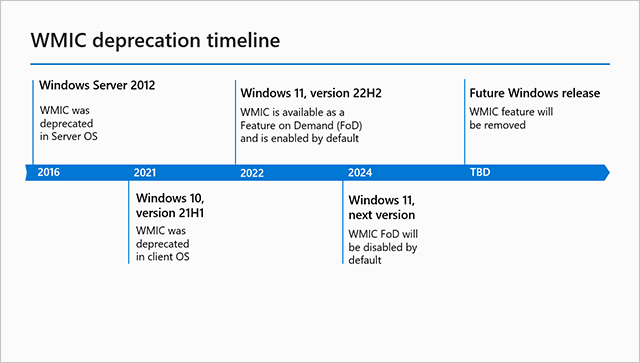
After reading extensive, I feel led to ask...
Is wmic still able to be used for end-user level scenario's?
 

My Computer My Computer

At a glance

Windows 11 Home 64-bit v10.0.26200 N/A Build ...Intel(R) Core(TM) i3-N305 (1.80 GHz)8.00 GB (7.70 GB usable)8.00 GB (7.70 GB usable)
OS
Windows 11 Home 64-bit v10.0.26200 N/A Build 26200
Computer type
Laptop
Manufacturer/Model
Lenovo 82XB IdeaPad Slim 3 15IAN8
CPU
Intel(R) Core(TM) i3-N305 (1.80 GHz)
Memory
8.00 GB (7.70 GB usable)
Graphics Card(s)
8.00 GB (7.70 GB usable)
Hard Drives
238 GB SSD
Mouse
ELAN touchpad; Logitech Wireless

My Computer My Computer

At a glance

Windows 11 Pro 25H212th Gen Core i7-1260P64 GB Micron PC4-25600Intel Iris Xe Graphics
OS
Windows 11 Pro 25H2
Computer type
PC/Desktop
Manufacturer/Model
Intel NUC12WSHi7
CPU
12th Gen Core i7-1260P
Motherboard
NUC12WSBi7
Memory
64 GB Micron PC4-25600
Graphics Card(s)
Intel Iris Xe Graphics
Sound Card
on-board Realtek HD Audio
Monitor(s) Displays
Dell U3219Q
Screen Resolution
3840 x 2160
Hard Drives
Samsung SSD 990 PRO 1TB
Crucial MX500 2 TB
Antivirus
Microsoft Defender
WMIC is included by default on every clean 24H2/25H2 install.

But after OOBE has completed, a hidden scheduled task deliberately uninstalls it (after the point where someone who needs WMIC to support a legacy setup script would have used it). Now you have to re-enable it as an Optional Feature from Settings. The only difference with earlier Windows is the stealth task to uninstall WMIC as soon as the Windows install is over.

You probably won't find WMIC in 26H2. But most of the same functions can be done by calling PowerShell.
 

My Computer My Computer

At a glance

Windows 7
OS
Windows 7
WMIC is included by default on every clean 24H2/25H2 install.

---

You probably won't find WMIC in 26H2. But most of the same functions can be done by calling PowerShell.
Is MS trying to move away from WMIC in CMD completely?
 

My Computer My Computer

At a glance

Windows 11 Home 64-bit v10.0.26200 N/A Build ...Intel(R) Core(TM) i3-N305 (1.80 GHz)8.00 GB (7.70 GB usable)8.00 GB (7.70 GB usable)
OS
Windows 11 Home 64-bit v10.0.26200 N/A Build 26200
Computer type
Laptop
Manufacturer/Model
Lenovo 82XB IdeaPad Slim 3 15IAN8
CPU
Intel(R) Core(TM) i3-N305 (1.80 GHz)
Memory
8.00 GB (7.70 GB usable)
Graphics Card(s)
8.00 GB (7.70 GB usable)
Hard Drives
238 GB SSD
Mouse
ELAN touchpad; Logitech Wireless

My Computer My Computer

At a glance

Windows 11 Home x64 Version 25H2 Build 26200....
OS
Windows 11 Home x64 Version 25H2 Build 26200.8037
WMIC is a standalone executable. While you can run it from inside PowerShell, the whole point is PS has native methods for accessing Windows API's directly. So you don't really need to call external Windows tools like WMIC.

PS supports the Get-WMIObject function, which does the same lifting as WMIC before it. The function returns an object as the result, so you can pick at the different object fields to extract your data instead of the tedious way you normally parse WMIC (or any external command's) output from CMD.

Parsing WMIC from CMD:
Code:
for /f "tokens=*" %%a in ('wmic bios get smbiosbiosversion ^| findstr /v SMBIOSBIOSVersion') do set version=%%a

Because the Get-WMIObject Win32_BIOS call returns a data object with multiple fields, you can extract just the Version:
Code:
PS C:\Users\GARLIN\Downloads> Get-WmiObject -Class Win32_BIOS

SMBIOSBIOSVersion : 9ECN37WW(V2.01)
Manufacturer      : LENOVO
Name              : Compiler Version: VC 9.0
SerialNumber      : xxxxxxxxxxxxxxxx
Version           : LENOVO - 1

PS C:\Users\GARLIN\Downloads> $Version = Get-WmiObject -Class Win32_BIOS | select Version
 

My Computer My Computer

At a glance

Windows 7
OS
Windows 7
so following all this...currently I can still use it but in 26H2...yep...no longer used?
 

My Computer My Computer

At a glance

Windows 11 Home 64-bit v10.0.26200 N/A Build ...Intel(R) Core(TM) i3-N305 (1.80 GHz)8.00 GB (7.70 GB usable)8.00 GB (7.70 GB usable)
OS
Windows 11 Home 64-bit v10.0.26200 N/A Build 26200
Computer type
Laptop
Manufacturer/Model
Lenovo 82XB IdeaPad Slim 3 15IAN8
CPU
Intel(R) Core(TM) i3-N305 (1.80 GHz)
Memory
8.00 GB (7.70 GB usable)
Graphics Card(s)
8.00 GB (7.70 GB usable)
Hard Drives
238 GB SSD
Mouse
ELAN touchpad; Logitech Wireless
So you don't really need to call external Windows tools like WMIC.

If or when wmic is no longer available what are replacement commands when booting into Windows RE?
 

My Computer My Computer

At a glance

Windows 10Intel(R) Core(TM) i7-4800MQ CPU @ 2.70GHz16 GB Total: Manufacturer : Samsung MemoryTyp...NVIDIA Quadro K3100M; Intel(R) HD Graphics 4600
OS
Windows 10
Computer type
Laptop
Manufacturer/Model
HP
CPU
Intel(R) Core(TM) i7-4800MQ CPU @ 2.70GHz
Motherboard
Product : 190A Version : KBC Version 94.56
Memory
16 GB Total: Manufacturer : Samsung MemoryType : DDR3 FormFactor : SODIMM Capacity : 8GB Speed : 1600
Graphics Card(s)
NVIDIA Quadro K3100M; Intel(R) HD Graphics 4600
Sound Card
IDT High Definition Audio CODEC; PNP Device ID HDAUDIO\FUNC_01&VEN_111D&DEV_76E0
Hard Drives
Model Hitachi HTS727575A9E364
Antivirus
Microsoft Defender
Other Info
Mobile Workstation
what are replacement commands
They vary depending on exactly which of the many WMIC commands you want to replace.
For example, instead of
wmic os get LocalDateTime
I can use
Get-CimInstance Win32_OperatingSystem | Select-Object -ExpandProperty LocalDateTime
but the responses are in different formats.

There's further info in the links I posted earlier.


All the best,
Denis
 

My Computer My Computer

At a glance

Windows 11 Home x64 Version 25H2 Build 26200....
OS
Windows 11 Home x64 Version 25H2 Build 26200.8037
They vary depending on exactly which of the many WMIC commands you want to replace.

Without a universal command: how would this be modified:

PS C:\WINDOWS\system32> Get-Partition | Select-Object DriveLetter, PartitionNumber, Guid


Get-CimInstance Win32_OperatingSystem | Select-Object DriveLetter, PartitionNumber, Guid
 

My Computer My Computer

At a glance

Windows 10Intel(R) Core(TM) i7-4800MQ CPU @ 2.70GHz16 GB Total: Manufacturer : Samsung MemoryTyp...NVIDIA Quadro K3100M; Intel(R) HD Graphics 4600
OS
Windows 10
Computer type
Laptop
Manufacturer/Model
HP
CPU
Intel(R) Core(TM) i7-4800MQ CPU @ 2.70GHz
Motherboard
Product : 190A Version : KBC Version 94.56
Memory
16 GB Total: Manufacturer : Samsung MemoryType : DDR3 FormFactor : SODIMM Capacity : 8GB Speed : 1600
Graphics Card(s)
NVIDIA Quadro K3100M; Intel(R) HD Graphics 4600
Sound Card
IDT High Definition Audio CODEC; PNP Device ID HDAUDIO\FUNC_01&VEN_111D&DEV_76E0
Hard Drives
Model Hitachi HTS727575A9E364
Antivirus
Microsoft Defender
Other Info
Mobile Workstation
Last edited:

My Computer My Computer

At a glance

Windows 11 Home x64 Version 25H2 Build 26200....
OS
Windows 11 Home x64 Version 25H2 Build 26200.8037
so following all this...currently I can still use it but in 26H2...yep...no longer used?
It hasn’t been announced, but this year marks the 10th year of deprecation, so it would make sense. Any new scripts/processes should be written in PowerShell or something else, and any existing things should be migrated pretty soon.
 

My Computer My Computer

At a glance

Windows 11 Pro 25H212th Gen Core i7-1260P64 GB Micron PC4-25600Intel Iris Xe Graphics
OS
Windows 11 Pro 25H2
Computer type
PC/Desktop
Manufacturer/Model
Intel NUC12WSHi7
CPU
12th Gen Core i7-1260P
Motherboard
NUC12WSBi7
Memory
64 GB Micron PC4-25600
Graphics Card(s)
Intel Iris Xe Graphics
Sound Card
on-board Realtek HD Audio
Monitor(s) Displays
Dell U3219Q
Screen Resolution
3840 x 2160
Hard Drives
Samsung SSD 990 PRO 1TB
Crucial MX500 2 TB
Antivirus
Microsoft Defender
If or when wmic is no longer available what are replacement commands when booting into Windows RE?
PS isn't built into WinPE or WinRE because it requires additional libraries.

But you can create a custom image, by mounting it and using the Windows ADK Add-on's to add the PS optional components. WinRE is a specialized version of WinPE. There's a specific order that must be followed in adding the OC's (because of layered dependencies). Usually you can find an online guide which walks you through the process.
 

My Computer My Computer

At a glance

Windows 7
OS
Windows 7

My Computer My Computer

At a glance

Windows 11 Home x64 Version 25H2 Build 26200....
OS
Windows 11 Home x64 Version 25H2 Build 26200.8037
VBS ... disabled by default now
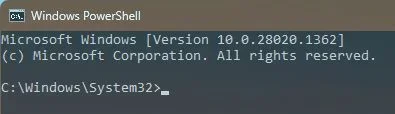
Do note that the member who posted this is on build 28020.1362

My 25H2 [26200.7171] still has VBS without my having taken any action about it.


Denis
 

My Computer My Computer

At a glance

Windows 11 Home x64 Version 25H2 Build 26200....
OS
Windows 11 Home x64 Version 25H2 Build 26200.8037
Back
Top Bottom