

- Local time
- 5:42 AM
- Posts
- 5,949
- Location
- Hafnarfjörður IS
- OS
- Windows XP,11 Linux Fedora Rawhide pre-release 46
Hi folks
I'm running W11 DEV Enterprise on a laptop with only 8GB RAM from 2016 - with Gen 6 intel 5 CPU so shouldn't theoretically be able to run W11 at all - but it does so without a problem. I'm even running W11 Host as a WintoGo system from an external NVME->USB3 device.
But I had trouble getting a Linux VM (Fedora server 42 - current release) to run on Hyper-V --it would terminate with "lack of resources" type of message.
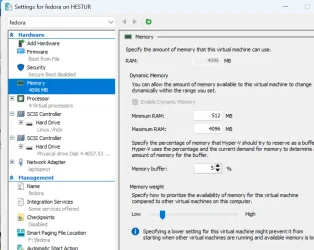
Fiddling around a bit (disable checkpoints, secure boot and alter the max memory etc) as shown in the screenshot, plus reduce virtual CPU from 4 to 2 it works perfectly including running the KDE plasma desktop space. You can if it works increase again the nr of virtual cpu's to 4. Here's the config with an external physical disk attached. The physical disk has a load of multi-media files on it which KODI on an amazon firestick attached to a remote TV has no problem in acessing and playing -- even 4K UHD video !!.
- note OFFLINE the disk to windows first via diskpart to use physical usb disks on the VM.
and the VM - part of the desktop :
So don't throw away those old laptops just yet.
(The simplest way to bypass all the Windows restrictions on running W11 is toinstall via dism.exe /Apply-Image and install the bootloader via bcdboot.exe - plenty of examples on how to do that on this Forum !!).
Cheers
jimbo
I'm running W11 DEV Enterprise on a laptop with only 8GB RAM from 2016 - with Gen 6 intel 5 CPU so shouldn't theoretically be able to run W11 at all - but it does so without a problem. I'm even running W11 Host as a WintoGo system from an external NVME->USB3 device.
But I had trouble getting a Linux VM (Fedora server 42 - current release) to run on Hyper-V --it would terminate with "lack of resources" type of message.
Fiddling around a bit (disable checkpoints, secure boot and alter the max memory etc) as shown in the screenshot, plus reduce virtual CPU from 4 to 2 it works perfectly including running the KDE plasma desktop space. You can if it works increase again the nr of virtual cpu's to 4. Here's the config with an external physical disk attached. The physical disk has a load of multi-media files on it which KODI on an amazon firestick attached to a remote TV has no problem in acessing and playing -- even 4K UHD video !!.
- note OFFLINE the disk to windows first via diskpart to use physical usb disks on the VM.
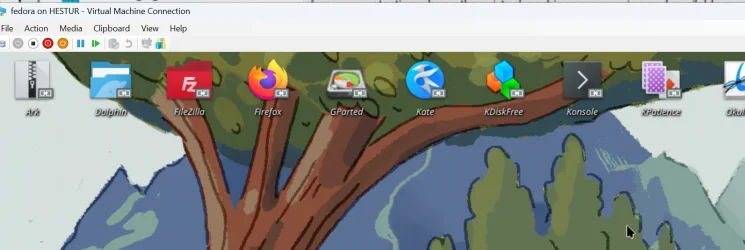
and the VM - part of the desktop :
So don't throw away those old laptops just yet.
(The simplest way to bypass all the Windows restrictions on running W11 is toinstall via dism.exe /Apply-Image and install the bootloader via bcdboot.exe - plenty of examples on how to do that on this Forum !!).
Cheers
jimbo
Last edited:
My Computer
At a glance
Windows XP,11 Linux Fedora Rawhide pre-releas...2 X Intel i7
- OS
- Windows XP,11 Linux Fedora Rawhide pre-release 46
- Computer type
- PC/Desktop
- CPU
- 2 X Intel i7
- Screen Resolution
- 4KUHD X 2






