Solved Background on Monitor 2 or Monitor 2 ?


NexusFred

Well-known member
Local time
7:31 PM
Posts
24
OS
Windows 11 Pro 25H2 build 26200.8655
Hello

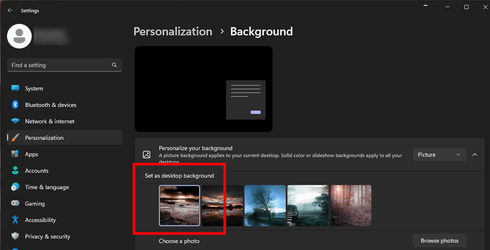
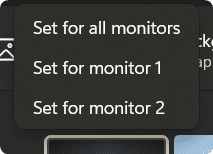
usually I have a different background on each of my monitors but since a few days when I start my PC I have the same background on each monitor.

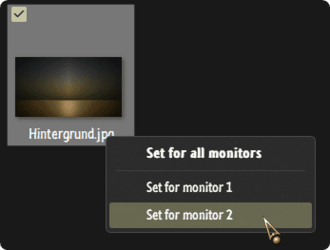
I try to change it but in the background panel I only have the choice between "Monitor 2" or "Monitor 2" or no choice at all :unsure:

1685259617374.png

1685260886715.png

I have to reboot several times or even shut down and restart to fix this problem.

Any idea what's going on?

Thanks
NexusFred
 
Last edited:

My Computer My Computer

At a glance

Windows 11 Pro 25H2 build 26200.8655Intel Core Ultra 9 285KSkill RipjawsV F5-6000J3238G32GX2-RS5KASUS RTX 5080 OC Noctua
OS
Windows 11 Pro 25H2 build 26200.8655
Computer type
PC/Desktop
Manufacturer/Model
Custom
CPU
Intel Core Ultra 9 285K
Motherboard
ASUS ProArt Z890-Creator WiFi
Memory
Skill RipjawsV F5-6000J3238G32GX2-RS5K
Graphics Card(s)
ASUS RTX 5080 OC Noctua
Sound Card
None
Monitor(s) Displays
Eizo CG2420 & Moniteur & Eizo Nanao FlexScan EV2456
Screen Resolution
1920x1200
Hard Drives
Samsung SSD 990 PRO 1TB
Samsung SSD 980 PRO 1TB
Samsung SSD 970 EVO Plus 2TB
+ 10 HDD
PSU
Seasonic Prime TX-1600 Noctua Edition
Case
Antec Flux PRO Noctua
Cooling
Noctua NH-D15 G2
Keyboard
Keytronic Ergoforce PS2
Mouse
Wacom Intuos3 PTZ-930
Internet Speed
600 Megabits per second
Browser
All (Chrome, Chrome Dev, Firefox, Opera, Chromium)
Antivirus
Avast
Any idea what's going on?
Nope! All normal here!

000564.png

Try pasting explorer shell:::{ED834ED6-4B5A-4bfe-8F11-A626DCB6A921} -Microsoft.Personalization\pageWallpaper into a Run box..., see if you get a different result there.

000565.png
 

My Computers My Computers

  • At a glance

    Windows 11 Pro
    OS
    Windows 11 Pro
    Computer type
    PC/Desktop
    Manufacturer/Model
    ASUS ROG Strix
  • At a glance

    Windows 11 Pro
    Operating System
    Windows 11 Pro
    Computer type
    Laptop
    Manufacturer/Model
    ASUS VivoBook
  • ASUS VivoBook 'Lite' ~ Windows 11 Home
I'm lucky today I do not have the issue :LOL:
I will try this solution tomorrow.
 

My Computer My Computer

At a glance

Windows 11 Pro 25H2 build 26200.8655Intel Core Ultra 9 285KSkill RipjawsV F5-6000J3238G32GX2-RS5KASUS RTX 5080 OC Noctua
OS
Windows 11 Pro 25H2 build 26200.8655
Computer type
PC/Desktop
Manufacturer/Model
Custom
CPU
Intel Core Ultra 9 285K
Motherboard
ASUS ProArt Z890-Creator WiFi
Memory
Skill RipjawsV F5-6000J3238G32GX2-RS5K
Graphics Card(s)
ASUS RTX 5080 OC Noctua
Sound Card
None
Monitor(s) Displays
Eizo CG2420 & Moniteur & Eizo Nanao FlexScan EV2456
Screen Resolution
1920x1200
Hard Drives
Samsung SSD 990 PRO 1TB
Samsung SSD 980 PRO 1TB
Samsung SSD 970 EVO Plus 2TB
+ 10 HDD
PSU
Seasonic Prime TX-1600 Noctua Edition
Case
Antec Flux PRO Noctua
Cooling
Noctua NH-D15 G2
Keyboard
Keytronic Ergoforce PS2
Mouse
Wacom Intuos3 PTZ-930
Internet Speed
600 Megabits per second
Browser
All (Chrome, Chrome Dev, Firefox, Opera, Chromium)
Antivirus
Avast
Try pasting explorer shell:::{ED834ED6-4B5A-4bfe-8F11-A626DCB6A921} -Microsoft.Personalization\pageWallpaper into a Run box..., see if you get a different result

Hello, well with this code is worst because I have no monitor choice.
 

My Computer My Computer

At a glance

Windows 11 Pro 25H2 build 26200.8655Intel Core Ultra 9 285KSkill RipjawsV F5-6000J3238G32GX2-RS5KASUS RTX 5080 OC Noctua
OS
Windows 11 Pro 25H2 build 26200.8655
Computer type
PC/Desktop
Manufacturer/Model
Custom
CPU
Intel Core Ultra 9 285K
Motherboard
ASUS ProArt Z890-Creator WiFi
Memory
Skill RipjawsV F5-6000J3238G32GX2-RS5K
Graphics Card(s)
ASUS RTX 5080 OC Noctua
Sound Card
None
Monitor(s) Displays
Eizo CG2420 & Moniteur & Eizo Nanao FlexScan EV2456
Screen Resolution
1920x1200
Hard Drives
Samsung SSD 990 PRO 1TB
Samsung SSD 980 PRO 1TB
Samsung SSD 970 EVO Plus 2TB
+ 10 HDD
PSU
Seasonic Prime TX-1600 Noctua Edition
Case
Antec Flux PRO Noctua
Cooling
Noctua NH-D15 G2
Keyboard
Keytronic Ergoforce PS2
Mouse
Wacom Intuos3 PTZ-930
Internet Speed
600 Megabits per second
Browser
All (Chrome, Chrome Dev, Firefox, Opera, Chromium)
Antivirus
Avast
Anybody have an idea of what is going on ?
 

My Computer My Computer

At a glance

Windows 11 Pro 25H2 build 26200.8655Intel Core Ultra 9 285KSkill RipjawsV F5-6000J3238G32GX2-RS5KASUS RTX 5080 OC Noctua
OS
Windows 11 Pro 25H2 build 26200.8655
Computer type
PC/Desktop
Manufacturer/Model
Custom
CPU
Intel Core Ultra 9 285K
Motherboard
ASUS ProArt Z890-Creator WiFi
Memory
Skill RipjawsV F5-6000J3238G32GX2-RS5K
Graphics Card(s)
ASUS RTX 5080 OC Noctua
Sound Card
None
Monitor(s) Displays
Eizo CG2420 & Moniteur & Eizo Nanao FlexScan EV2456
Screen Resolution
1920x1200
Hard Drives
Samsung SSD 990 PRO 1TB
Samsung SSD 980 PRO 1TB
Samsung SSD 970 EVO Plus 2TB
+ 10 HDD
PSU
Seasonic Prime TX-1600 Noctua Edition
Case
Antec Flux PRO Noctua
Cooling
Noctua NH-D15 G2
Keyboard
Keytronic Ergoforce PS2
Mouse
Wacom Intuos3 PTZ-930
Internet Speed
600 Megabits per second
Browser
All (Chrome, Chrome Dev, Firefox, Opera, Chromium)
Antivirus
Avast

Latest Support Threads

Back
Top Bottom