NexusFred
Well-known member
- Local time
- 6:51 PM
- Posts
- 24
- OS
- Windows 11 Pro 25H2 build 26200.8655
Hello
usually I have a different background on each of my monitors but since a few days when I start my PC I have the same background on each monitor.
I try to change it but in the background panel I only have the choice between "Monitor 2" or "Monitor 2" or no choice at all

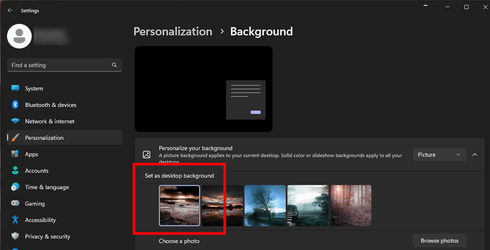
I have to reboot several times or even shut down and restart to fix this problem.
Any idea what's going on?
Thanks
NexusFred
usually I have a different background on each of my monitors but since a few days when I start my PC I have the same background on each monitor.
I try to change it but in the background panel I only have the choice between "Monitor 2" or "Monitor 2" or no choice at all
I have to reboot several times or even shut down and restart to fix this problem.
Any idea what's going on?
Thanks
NexusFred
Last edited:
My Computer
At a glance
Windows 11 Pro 25H2 build 26200.8655Intel Core Ultra 9 285KSkill RipjawsV F5-6000J3238G32GX2-RS5KASUS RTX 5080 OC Noctua
- OS
- Windows 11 Pro 25H2 build 26200.8655
- Computer type
- PC/Desktop
- Manufacturer/Model
- Custom
- CPU
- Intel Core Ultra 9 285K
- Motherboard
- ASUS ProArt Z890-Creator WiFi
- Memory
- Skill RipjawsV F5-6000J3238G32GX2-RS5K
- Graphics Card(s)
- ASUS RTX 5080 OC Noctua
- Sound Card
- None
- Monitor(s) Displays
- Eizo CG2420 & Moniteur & Eizo Nanao FlexScan EV2456
- Screen Resolution
- 1920x1200
- Hard Drives
- Samsung SSD 990 PRO 1TB
Samsung SSD 980 PRO 1TB
Samsung SSD 970 EVO Plus 2TB
+ 10 HDD
- PSU
- Seasonic Prime TX-1600 Noctua Edition
- Case
- Antec Flux PRO Noctua
- Cooling
- Noctua NH-D15 G2
- Keyboard
- Keytronic Ergoforce PS2
- Mouse
- Wacom Intuos3 PTZ-930
- Internet Speed
- 600 Megabits per second
- Browser
- All (Chrome, Chrome Dev, Firefox, Opera, Chromium)
- Antivirus
- Avast