Backup advice, daily monthly yearly


ChrisPbass

Well-known member
Member
Local time
5:34 AM
Posts
163
OS
w11 home
I have been using EASEus and I'm beginning to question my system. I know storage is relatively cheap, but I am using a lot (relatively)
The business is small but we need to keep 15 months and we need to be able to restore files on a daily basis, in case of accidental delete or whatever.
Basically, I back up 1 HD and only certain folders on it.
EASEus has us backing up once a week and daily. It's good because when we have lost files I've been able to find them by browsing.
I'm told that if I ever need to backup the whole drive I need the original giant file and all the the incremental backups (daily) (I have never tested this..)

What I'm left with, currently,
  • Original giant backup
  • weekly large backups
  • daily not so large
I backup to 1 internal platter drive, one 1 external SSD and then once a week I copy the week's files to a 4tb SSD that I keep elsewhere . That 4tb will not last forever . I suppose it will last 15 months. I suppose storage is not that big of a deal either, I can always buy another SSD and continue. Maybe that's what I should focus on; one packet of 15 month backups then start over.

Advice?
 

My Computers

System One System Two

  • OS
    w11 home
    Computer type
    Laptop
    Manufacturer/Model
    ThinkPad T14s Gen 4
    CPU
    i7 Raptor Lake
    Memory
    16gb DDR5 8 slots/2 each???
    Graphics Card(s)
    Intel XE
    Monitor(s) Displays
    Acer / Viewsonic 24"
    Screen Resolution
    1920*1200
    Hard Drives
    M2 Aprilcom 1tb
    Keyboard
    wireless Logi
    Mouse
    Logi k270
    Internet Speed
    1gb
    Browser
    Brave or Thorium ocasionally
    Antivirus
    Malwarebytes
    Other Info
    W11 Home
  • Operating System
    W11 Pro
    Computer type
    PC/Desktop
    Manufacturer/Model
    custom
    CPU
    AMD ryzen 7 5500x
    Motherboard
    ASus B550F Gaming
    Memory
    16gb
    Hard Drives
    m2 1tb
You are correct,
I have been using EASEus and I'm beginning to question my system. I know storage is relatively cheap, but I am using a lot (relatively)
The business is small but we need to keep 15 months and we need to be able to restore files on a daily basis, in case of accidental delete or whatever.
Basically, I back up 1 HD and only certain folders on it.
EASEus has us backing up once a week and daily. It's good because when we have lost files I've been able to find them by browsing.
I'm told that if I ever need to backup the whole drive I need the original giant file and all the the incremental backups (daily) (I have never tested this..)

What I'm left with, currently,
  • Original giant backup
  • weekly large backups
  • daily not so large
I backup to 1 internal platter drive, one 1 external SSD and then once a week I copy the week's files to a 4tb SSD that I keep elsewhere . That 4tb will not last forever . I suppose it will last 15 months. I suppose storage is not that big of a deal either, I can always buy another SSD and continue. Maybe that's what I should focus on; one packet of 15 month backups then start over.

Advice?
What I do is I do differential backups. Unless there is a TON of different files changing every day, I find the differential backup to be more restore friendly, you just need the root file and the latest good differential file. I also do a root copy periodically, for daily stuff I do it every 30 days.

Are you attempting to keep a backup of ALL files updated every day for 15 months? What kind of business is this? I would think once you verified that a you had backup integrity for a period of time, say one month, that you could take an archive snapshot of what you have and keep at least two copies of those files and not have to retain a blow-by-blow of every day.

I have a combination of on-line automated storage, which consists of two 2TB backup drives in my computer, and automated copies to my NAS with mirrored 8TB drives. Also, I have two 4TB USB drives that get alternated every two weeks and get a complete backup of everything on the computer and then disconnected.

I'd start by evaluating what data you really have to save and how often. The first step in analyzing your backup strategy is to understand exactly what the true requirements are.
 

My Computers

System One System Two

  • OS
    Win 11 Pro 25H2, Build 26200.8655
    Computer type
    PC/Desktop
    Manufacturer/Model
    Home Brew
    CPU
    Intel Core i5 14500
    Motherboard
    Gigabyte B760M G P WIFI
    Memory
    64GB DDR4
    Graphics Card(s)
    GeForce RTX 4060
    Sound Card
    Chipset Realtek
    Monitor(s) Displays
    LG 45" Ultragear, Acer 24" 1080p
    Screen Resolution
    5120x1440, 1920x1080
    Hard Drives
    Crucial P310 2TB 2280 PCIe Gen4 3D NAND NVMe M.2 SSD (O/S)
    Silicon Power 2TB US75 NVMe PCIe Gen4 M.2 2280 SSD (backup)
    Crucial BX500 2TB 3D NAND (2nd backup)
    Seagate 4TB Ironwolf, rotating HDD archive files
    External off-line backup Drives: 2 NVMe 4TB drives in external enclosures
    PSU
    Thermaltake Toughpower GF3 750W
    Case
    LIAN LI LANCOOL 216 E-ATX PC Case
    Cooling
    Lots of fans!
    Keyboard
    Microsoft Comfort Curve 2000
    Mouse
    Logitech G305
    Internet Speed
    Verizon FiOS 1GB
    Browser
    Firefox
    Antivirus
    Malware Bytes & Windows Defender Security
  • Operating System
    Win 11 Pro 25H2, Build 26200.8524
    Computer type
    PC/Desktop
    Manufacturer/Model
    Home Brew
    CPU
    Intel Core i5 14400
    Motherboard
    Gigabyte B760M DS3H AX
    Memory
    32GB DDR5
    Graphics card(s)
    Intel 700 Embedded GPU
    Sound Card
    Realtek Embedded
    Monitor(s) Displays
    27" HP 1080p
    Screen Resolution
    1920x1080
    Hard Drives
    Crucial P310 2TB 2280 PCIe Gen4 eD NAND PCIe SSD
    Samsung EVO 990 2TB NVMe Gen4 SSD
    Samsung 2TB SATA SSD
    PSU
    Thermaltake Smart BM3 650W
    Case
    Okinos Micro ATX Case
    Cooling
    Fans
    Keyboard
    Microsoft Comfort Curve 2000
    Mouse
    Logitech G305
    Internet Speed
    Verizon FiOS 1GB
    Browser
    Firefox
    Antivirus
    Malware Bytes & Windows Defender Security
Here is an alternate strategies to consider.

1. System Backup
- a full backup once a month just prior to the patch Tuesday update
- an weekly incremental backup
- keep a second copy of these backups offline
- keep 3 or 4 sets

2. Data Backup
- a full backup monthly
- a daily incremental of differential backup daily depending on the volatility of your data
- keep a second copy of these backups in the cloud
- keep a third copy of these backup offsite (rotating storage media)
- keep the monthly full backups for 15 months
- only you know if all the incremental/differential backups need to be kept for an extended period of time
- business regulatory requirements may mandate longer retention periods if there is not paper historical records

Regularly validate your offsite media to detect early possible failure.

Bottom line is if the data is important then you cannot have too many backups.
 

My Computer

System One

  • OS
    Windows 11 Pro
    Computer type
    Laptop
    Manufacturer/Model
    ASUS Zenbook 14 OLED
    CPU
    Intel Core Ultra
    Memory
    16GB
    Graphics Card(s)
    Intel(R) Arc Graphics
    Sound Card
    Realtek High Definition Audio(SST)
    Screen Resolution
    2880 x 1800
    Hard Drives
    500 GB NVMe SSD
    Internet Speed
    1,500Mbps
    Browser
    Firefox, Edge
    Antivirus
    Windows Defender
I have been using EASEus and I'm beginning to question my system. I know storage is relatively cheap, but I am using a lot (relatively)
The business is small but we need to keep 15 months and we need to be able to restore files on a daily basis, in case of accidental delete or whatever.
Basically, I back up 1 HD and only certain folders on it.
.... snip ....
Advice?
For backing up a business, it's good to have "up to the second" backups of your data in case the data drive dies. Here's a plan to consider:

DRIVES:
1 512GB SSD for system drive.
1 xxTB SSD or HDD for data drive.
1 xxTB HDD for realtime backup of the data drive.
2 xxxxxTB HDDs for image backups that are stored in a safe.
(maybe 1 xxxxxTB HDD for offsite backup.)

PROCEDURE:
  1. Have a SSD for your system "C" drive. Have only Windows and installed programs on this SSD.
  2. Have a separate drive for your "D" data drive. Can be a SSD or mechanical HDD, depending on how much data you have. (HDD is more cost effective for large amount of data.)
  3. --- Backup Drives ---
  4. Have a third internal drive for real-time backup of your "D" data drive. Use the BVCKUP 2 software to do this real-time backup.
  5. Have two bare HDD drives for "image" backups of your system drive and data drive. Use a USB3 docking station for these drives. Alternate backups between the the two drives. Image backups allow storing more than one backup on a drive. (Clone backups only allow one backup per drive.
  6. After you have a least two image backups of your system drive, it's only necessary to back it up when you install more programs or when there have been sufficient Windows updates to make backup worthwhile.
  7. Do image backups of your data drive more frequently per your comfort level. Maybe once every two weeks or once a month.
  8. Store your two image backup HDDs in a fire resistant safe that's bolted to the floor.
  9. You could even have a third external HDD drive that's stored off site, for image backups of your system drive and your data drive.
Note that the third "internal" drive (item-4 above) provides up to the second, real-time backups of your data. This is only for hardware failure of your daily use data drive. Not for file corruption or deletion or infections.

A) If your system SSD dies, its fast and easy to replace it and do an image restore to the new SSD. Probably an hour for the whole job.

B) If your data drive dies, you can instantly replace it with the real-time backup (item-4) drive. Then setup another real-time drive for the BVCKUP 2 software. Note that it can take a "long" time to do a restore of an image backup of a data drive which is why the instant replacement of the data drive is important. .... Plus a restore of an image backup of the data drive loses all data that was saved "after" the image backup was made.

C) If your system or data gets corrupt or deleted inadvertently or infected, you can restore a backup from a backup drive in the safe.

My $.02 anyway ... 😊.
 
Last edited:

My Computer

System One

  • OS
    Windows 11
    Computer type
    PC/Desktop
    Manufacturer/Model
    Self Built
    CPU
    Intel Core Ultra 7, 265K
    Motherboard
    MSI Pro Z890-P WiFi
    Memory
    32GB
    Graphics Card(s)
    Using integrated graphics
    Monitor(s) Displays
    LG
    Screen Resolution
    4K
    Hard Drives
    512 GB SSD, 2TB M.2 SSD and 2TB SATA SSD
    PSU
    Seasonic Modular 550 watt Focus Plus
    Case
    Corsair 4000D
    Cooling
    ThermalRight Phantom Sprit
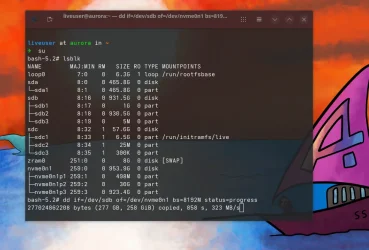
I still find the easiest way if you've got oodles of storage is to boot up a Linux live distro from a small usb stick and just use dd.

Here I'm using a live distro to clone an external 1TB device to an internal Nvme one

No need to worry about the file system or anything else -- it just uses physical blocks whether encrypted "bit-locked" dog-dinnered file format or whatever.

Screenshot_20250722_075549.webp


Here cloning the 1 TB SSD (/dev/sdb) to the 1TB Nvme device - /dev/ /nvme0n1 using a live linux distro (aurora) - testing also a live immutable distro which is on /dev/sdc -- the usb thumb stick.

Cheers

jimbo
 

My Computer

System One

  • OS
    Windows XP,11 Linux Fedora Rawhide pre-release 45
    Computer type
    PC/Desktop
    CPU
    2 X Intel i7
    Screen Resolution
    4KUHD X 2
You are correct,

What I do is I do differential backups. Unless there is a TON of different files changing every day, I find the differential backup to be more restore friendly, you just need the root file and the latest good differential file. I also do a root copy periodically, for daily stuff I do it every 30 days.

Are you attempting to keep a backup of ALL files updated every day for 15 months? What kind of business is this? I would think once you verified that a you had backup integrity for a period of time, say one month, that you could take an archive snapshot of what you have and keep at least two copies of those files and not have to retain a blow-by-blow of every day.

I have a combination of on-line automated storage, which consists of two 2TB backup drives in my computer, and automated copies to my NAS with mirrored 8TB drives. Also, I have two 4TB USB drives that get alternated every two weeks and get a complete backup of everything on the computer and then disconnected.

I'd start by evaluating what data you really have to save and how often. The first step in analyzing your backup strategy is to understand exactly what the true requirements are.

It's an accounting business and we are basically slaves to the annual format because of tax returns. Maybe I keep all the current backups I have and start over. Create one big backup and then differentials daily., which I'm already doing. The differentials are not that big as we are not doing tons of activity.
I used AI to set up this backup system and it has me doing a big backup every week. I have gigs and gigs of backups
 

My Computers

System One System Two

  • OS
    w11 home
    Computer type
    Laptop
    Manufacturer/Model
    ThinkPad T14s Gen 4
    CPU
    i7 Raptor Lake
    Memory
    16gb DDR5 8 slots/2 each???
    Graphics Card(s)
    Intel XE
    Monitor(s) Displays
    Acer / Viewsonic 24"
    Screen Resolution
    1920*1200
    Hard Drives
    M2 Aprilcom 1tb
    Keyboard
    wireless Logi
    Mouse
    Logi k270
    Internet Speed
    1gb
    Browser
    Brave or Thorium ocasionally
    Antivirus
    Malwarebytes
    Other Info
    W11 Home
  • Operating System
    W11 Pro
    Computer type
    PC/Desktop
    Manufacturer/Model
    custom
    CPU
    AMD ryzen 7 5500x
    Motherboard
    ASus B550F Gaming
    Memory
    16gb
    Hard Drives
    m2 1tb
It's an accounting business and we are basically slaves to the annual format because of tax returns. Maybe I keep all the current backups I have and start over. Create one big backup and then differentials daily., which I'm already doing. The differentials are not that big as we are not doing tons of activity.
I used AI to set up this backup system and it has me doing a big backup every week. I have gigs and gigs of backups
Well, I have gigs and gigs of backups, it doesn't take much to have that happen. :LOL: I have 6TB of SSD, three 2TB drives. Two of the three 2TB drives are strictly backup for the 2TB primary drive. All of that data gets further backed up on two 4TB USB drives.
 

My Computers

System One System Two

  • OS
    Win 11 Pro 25H2, Build 26200.8655
    Computer type
    PC/Desktop
    Manufacturer/Model
    Home Brew
    CPU
    Intel Core i5 14500
    Motherboard
    Gigabyte B760M G P WIFI
    Memory
    64GB DDR4
    Graphics Card(s)
    GeForce RTX 4060
    Sound Card
    Chipset Realtek
    Monitor(s) Displays
    LG 45" Ultragear, Acer 24" 1080p
    Screen Resolution
    5120x1440, 1920x1080
    Hard Drives
    Crucial P310 2TB 2280 PCIe Gen4 3D NAND NVMe M.2 SSD (O/S)
    Silicon Power 2TB US75 NVMe PCIe Gen4 M.2 2280 SSD (backup)
    Crucial BX500 2TB 3D NAND (2nd backup)
    Seagate 4TB Ironwolf, rotating HDD archive files
    External off-line backup Drives: 2 NVMe 4TB drives in external enclosures
    PSU
    Thermaltake Toughpower GF3 750W
    Case
    LIAN LI LANCOOL 216 E-ATX PC Case
    Cooling
    Lots of fans!
    Keyboard
    Microsoft Comfort Curve 2000
    Mouse
    Logitech G305
    Internet Speed
    Verizon FiOS 1GB
    Browser
    Firefox
    Antivirus
    Malware Bytes & Windows Defender Security
  • Operating System
    Win 11 Pro 25H2, Build 26200.8524
    Computer type
    PC/Desktop
    Manufacturer/Model
    Home Brew
    CPU
    Intel Core i5 14400
    Motherboard
    Gigabyte B760M DS3H AX
    Memory
    32GB DDR5
    Graphics card(s)
    Intel 700 Embedded GPU
    Sound Card
    Realtek Embedded
    Monitor(s) Displays
    27" HP 1080p
    Screen Resolution
    1920x1080
    Hard Drives
    Crucial P310 2TB 2280 PCIe Gen4 eD NAND PCIe SSD
    Samsung EVO 990 2TB NVMe Gen4 SSD
    Samsung 2TB SATA SSD
    PSU
    Thermaltake Smart BM3 650W
    Case
    Okinos Micro ATX Case
    Cooling
    Fans
    Keyboard
    Microsoft Comfort Curve 2000
    Mouse
    Logitech G305
    Internet Speed
    Verizon FiOS 1GB
    Browser
    Firefox
    Antivirus
    Malware Bytes & Windows Defender Security
Back
Top Bottom