Backup in Win11


ozdennisb

New member
Local time
2:32 PM
Posts
10
OS
windows 11 professional
I will be most grateful for advice regarding backup via xcopy of all new or updated subfolders, files and file data that has occurred during this last month (i.e., Jun , 2024).
Data needs to be copied from external drive F:\DATAPOST4Feb24 into existing folders and subfolders in external drive E:\ BackupJun24 by using xcopy in the cmd prompt. In addition, all new subfolders and the files within them in F Drive need to be copied into E Drive. The data is mostly, but not all, text in Word.
The PC runs on Windows 22 Pro and Office professional 2021. I am uncertain of what precise input is sufficient and what switches, if any, are needed to ensure that the update and new files are copied into the correct folders in E drive. My question then is whether the following is sufficient? xcopy F:\DATAPOST4Feb24 E:\BackupJun24 /d: 01-06-2024 All help gratefully received
Dennis B
Toorak Victoria Australia
 

My Computer My Computer

At a glance

windows 11 professionalintel Evo i7
OS
windows 11 professional
Computer type
Laptop
Manufacturer/Model
lenovo Thinkpad XI Carbon Gen 11
CPU
intel Evo i7
The attached batch script can perform Incremental backup which will create full backup and copies the new files and changed files.
 

Attachments

My Computer My Computer

At a glance

Windows 11AMD Ryzen 7 5700GMicron Technology DDR4-3200 16GBNVIDIA GeForce RTX 3060
OS
Windows 11
Computer type
PC/Desktop
Manufacturer/Model
HP Pavilion
CPU
AMD Ryzen 7 5700G
Motherboard
Erica6
Memory
Micron Technology DDR4-3200 16GB
Graphics Card(s)
NVIDIA GeForce RTX 3060
Sound Card
Realtek ALC671
Monitor(s) Displays
Samsung SyncMaster U28E590
Screen Resolution
3840 x 2160
Hard Drives
SAMSUNG MZVLQ1T0HALB-000H1
I tried to restore a backup today - damn thing does not do it claiming some sort of fault and any date.
 

My Computers My Computers

  • At a glance

    Win 11 x 64 HomeAMD Ryzen 5 7600 6-Core ProcessorDDR 5. 32GB (2 x16GB)GeForce RTX 5060i
    OS
    Win 11 x 64 Home
    Computer type
    PC/Desktop
    Manufacturer/Model
    pc specialists build (updated various times)
    CPU
    AMD Ryzen 5 7600 6-Core Processor
    Motherboard
    Gigabyte Technology Co., Ltd. Product:B650M K
    Memory
    DDR 5. 32GB (2 x16GB)
    Graphics Card(s)
    GeForce RTX 5060i
    Sound Card
    2 channel HD Audio + Mic/Hphone jack
    Monitor(s) Displays
    coolermaster 27 inch
    Screen Resolution
    1920 x 1080
    Hard Drives
    three external 3TBs, 4 TBs and 5tb. (Storage) Samsung SSD 970 (C).
    Case
    Coolermaster
    Cooling
    internal fans
    Keyboard
    Logi K270 & Logitech gamer G213
    Mouse
    M310 and Logi Gamer G203
    Internet Speed
    530.85mbps download. 52.70 upload
    Browser
    Opera, Vivaldi, Chrome & Firefox
    Antivirus
    Kaspersky Premium
    Other Info
    Build: 26100.ge_release 240331-1435
  • At a glance

    Android
    Operating System
    Android
    Computer type
    Tablet
    Manufacturer/Model
    Samsung
    Keyboard
    logi K270, when in use.
    Mouse
    Logi M220
    Internet Speed
    500
    Browser
    Opera.Edge. Chrome.Vivaldi
    Antivirus
    Kaspersky Premium
To answer your question, Elbmek, the answer would be "NO".
You will need "Switches" to tell XCOPY just how you want it to run. *
* You might want to get a print out of all the switches available in XCOPY.

I do my own Data backups, weekly, or more often, using XCOPY, in a DOS Batch File, and sending the files to various Flash Drives, external HD's, etc.
Here is just one example of my Data Backup, using XCOPY. (my Date files are NEVER on my C: drive, but on a separate SSD, or partition.)

Rem: Backup My Documents Folder to external HD.

XCOPY /D /S /C /I /H /R /K /Y /J "D:\My Docs\*.*" "E:\Backup Folders\Documents\"
XCOPY /D /S /C /I /H /R /K /Y /J "D:\My Pictures\*.*" "E:\Backup Folders\My Pictures\"
XCOPY /D /S /C /I /H /R /K /Y /J "D:\Misc\*.*" "E:\Backup Folders\Misc\"
XCOPY /D /S /C /I /H /R /K /Y /J "D:\Graphics\*.*" "E:\Backup Folders\Graphics\"
XCOPY /D /S /C /I /H /R /K /Y /J "D:\Updates Etc\*.*" "E:\Backup Folders\Updates Etc\"
Echo: My Data files copy is complete.

Pause Press any key to continue

I have customized this batch file, to send my backups to different Flash Drives, external drives, etc.
In the above case, my data files are located on the D: drive, and never on C:.
Also, in this case, drive E: is my External, 1TB hard drive, permanently mounted in my Desktop Case.

XCOPY is old, but still runs in Windows just like any other program, and still does one heck of a GOOD Job.
I like to keep my data files separated, , , even the Backup batch files have their own Folder, called, "Updates Ect".

I hope you can put this information to good use.
Cheers Mate!
TM :cool:
 
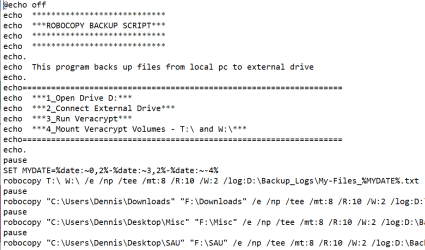
I use Robocopy rather than Xcopy but my batch file look very similar to the one above:
1721325553451.png
 

My Computer My Computer

At a glance

Windows 11 Professional 24H2Intel i5 8th Gen
OS
Windows 11 Professional 24H2
Computer type
Laptop
Manufacturer/Model
Thinkpad T480
CPU
Intel i5 8th Gen
I will be most grateful for confirmation as to whether the robocopy command to effect a differential backup from external drive E:\ to external drive. F:\ in a Win11, Office 21 Pro, environment?
robocopy e:\info f:\backupinfo /e /h /zb /xo /r:5 /w:5 /y /log f:\robolog\backup
All advice gratefully received Dennis B Toorak Vic Australia
 

My Computer My Computer

At a glance

windows 11 professionalintel Evo i7
OS
windows 11 professional
Computer type
Laptop
Manufacturer/Model
lenovo Thinkpad XI Carbon Gen 11
CPU
intel Evo i7
I will be most grateful for confirmation as to whether the robocopy command to effect a differential backup from external drive E:\ to external drive. F:\ in a Win11, Office 21 Pro, environment?
robocopy e:\info f:\backupinfo /e /h /zb /xo /r:5 /w:5 /y /log f:\robolog\backup
All advice gratefully received Dennis B Toorak Vic Australia
I'm not an expert with Robocopy. A friend suggested I try it. I played around with it and found the above switches and batch file did what I wanted ie back up various folders from my laptop to an external drive. When I run it, just the new or modified files are transferred. Been using it for a couple of years now. This is probably not the most elegant way of using Robocopy, so would welcome any suggestions for improvement if you find any.
As an aside, I have thought about doing this in Powershell - but without success.
 

My Computer My Computer

At a glance

Windows 11 Professional 24H2Intel i5 8th Gen
OS
Windows 11 Professional 24H2
Computer type
Laptop
Manufacturer/Model
Thinkpad T480
CPU
Intel i5 8th Gen
I've been using RichCopy64 v4.0.217.0 for many years (discontinued in 2010) as it has worked on 7, 10 and Win11.
Mostly use CLI for backups... here's my custom script - good old .BAT file (could also be .CMD) that backs up my VM's, then the rest of my 3 data drives to my large multi-TB "I" drive. Note that each drive has it's own top level folder for easy recovery and manual browsing.
NOTE: This only copies newer files, it does not MIRROR a drive.
Source drives are SSD, target is HDD.

Batch:
--@ECHO OFF
:: Batch script example for Microsoft RichCopy 4.x
:: Ref: http://blogs.technet.com/b/ken/archive/2009/04/29/multi-threaded-file-copy-richcopy.aspx#3372805
:: Save as richcopyfolder.bat and go to sleep.
SET LOGPATH=C:\Users\%USERNAME%\Documents\Richcopy\CopyLog.log
SET STATS=C:\Users\%USERNAME%\Documents\Richcopy\CopyStats.log
ECHO "C:\Program Files (x86)\RichCopy 4.0\RichCopy64.exe" - LOGS to %logpath% , STATS to %STATS% >>%LOGPATH%

ECHO E:\VM to I:\E_DRIVE_BKUP\VM run initiated on %DATE% at %TIME% >> %LOGPATH%
CALL:RICHCOPYFOLDERS_2 E:\VM    "I:\E_DRIVE_BKUP\VM"
ECHO D: to I:\D_DRIVE_BKUP Backup run initiated on %DATE% at %TIME% >> %LOGPATH%
CALL:RICHCOPYFOLDERS D:\    "I:\D_DRIVE_BKUP"
ECHO E: to I:\E_DRIVE_BKUP run initiated on %DATE% at %TIME% >> %LOGPATH%
CALL:RICHCOPYFOLDERS E:\    "I:\E_DRIVE_BKUP"
ECHO G: to I:\G_DRIVE_BKUP run initiated on %DATE% at %TIME% >> %LOGPATH%
CALL:RICHCOPYFOLDERS G:\    "I:\G_DRIVE_BKUP"
GOTO :END

:RICHCOPYFOLDERS
:: NORMAL FILE copy
SET src=%1
SET dst=%2
:: Set directories to EXCLUDE. Exclude String + dir's w/ spaces must be inside quotes.. note double-quotes on end !!
SET EXCL=/FED "*.bin,System Volume Information" /FEF "*.db,*.tmp,*.info,*.vdi"
SET opt=%EXCL% /NE /CNF /NC /SZ /TS 5 /TD 35 /FC 1024 /QP %STATS% /QA /USC /USS /USD /UET /UC

SET parms=%opt% %src% %dst%
ECHO "C:\Program Files (x86)\RichCopy 4.0\RichCopy64.exe" %parms% >>%LOGPATH%
"C:\Program Files (x86)\RichCopy 4.0\RichCopy64.exe" %parms%
EXIT /B
GOTO :END

:RICHCOPYFOLDERS_2
:: Large FILE copy
SET src=%1
SET dst=%2
SET EXCL=/FEF "*.db,*.tmp,*.info" /FED "$RECYCLE.BIN, System Volume Information"
SET opt=%EXCL% /FSD /NC /SZ /TD 5 /TP 30 /QN /QP %STATS% /UE /UPC /UPS /UFC /UCS /USC /USS /USD /UPR /UET
SET parms=%opt% %src% %dst%
ECHO "C:\Program Files (x86)\RichCopy 4.0\RichCopy64.exe" %parms% >>%LOGPATH%
"C:\Program Files (x86)\RichCopy 4.0\RichCopy64.exe" %parms%
EXIT /B
GOTO :END

:END
ECHO SSD Drives (D:,E:,G:) to I: Backup run TERMINATED on %DATE% at %TIME% >> %LOGPATH%
ECHO ============================================== >> %LOGPATH%
:EOF
 

My Computer My Computer

At a glance

Win11 Pro 25H2 Latest GA buildIntel(R) Core(TM) i9-14900KF 3.20 GHzG.Skill DDR5-5600 / PC5-44800 DDR5 SDRAM UDIMMGIGABYTE GeForce RTX 4070 Ti WINDFORCE OC 12G...
OS
Win11 Pro 25H2 Latest GA build
Computer type
PC/Desktop
Manufacturer/Model
Powerspec
CPU
Intel(R) Core(TM) i9-14900KF 3.20 GHz
Motherboard
MSI PRO Z690-A WIFI (latest BIOS)
Memory
G.Skill DDR5-5600 / PC5-44800 DDR5 SDRAM UDIMM
Graphics Card(s)
GIGABYTE GeForce RTX 4070 Ti WINDFORCE OC 12G (GV-N407TWF3OC-12GD)
Sound Card
OnBoard
Monitor(s) Displays
Dell - various (3)
Screen Resolution
1920x1080
Hard Drives
SSD/HDD/NVME
PSU
850 Watt 80+ Gold Modular
Case
PowerSpec/Lian Li ATX 205 Mesh
Cooling
Coolermaster MASTERLIQUID ML240L V2 RGB
Keyboard
Logi MX Keys S
Mouse
MX Master 3S
Internet Speed
600 mbps
Browser
various (Opera, Vivaldi, Edge, Brave, Chrome)
Antivirus
anitmalwarebytes; superantispyware; defender
Other Info
Windows Feature Experience Pack 1000.26100.36.0
I've been using RichCopy64 v4.0.217.0 for many years (discontinued in 2010) as it has worked on 7, 10 and Win11.
Mostly use CLI for backups... here's my custom script - good old .BAT file (could also be .CMD) that backs up my VM's, then the rest of my 3 data drives to my large multi-TB "I" drive. Note that each drive has it's own top level folder for easy recovery and manual browsing.
NOTE: This only copies newer files, it does not MIRROR a drive.
Source drives are SSD, target is HDD.

Batch:
--@ECHO OFF
:: Batch script example for Microsoft RichCopy 4.x
:: Ref: http://blogs.technet.com/b/ken/archive/2009/04/29/multi-threaded-file-copy-richcopy.aspx#3372805
:: Save as richcopyfolder.bat and go to sleep.
SET LOGPATH=C:\Users\%USERNAME%\Documents\Richcopy\CopyLog.log
SET STATS=C:\Users\%USERNAME%\Documents\Richcopy\CopyStats.log
ECHO "C:\Program Files (x86)\RichCopy 4.0\RichCopy64.exe" - LOGS to %logpath% , STATS to %STATS% >>%LOGPATH%

ECHO E:\VM to I:\E_DRIVE_BKUP\VM run initiated on %DATE% at %TIME% >> %LOGPATH%
CALL:RICHCOPYFOLDERS_2 E:\VM    "I:\E_DRIVE_BKUP\VM"
ECHO D: to I:\D_DRIVE_BKUP Backup run initiated on %DATE% at %TIME% >> %LOGPATH%
CALL:RICHCOPYFOLDERS D:\    "I:\D_DRIVE_BKUP"
ECHO E: to I:\E_DRIVE_BKUP run initiated on %DATE% at %TIME% >> %LOGPATH%
CALL:RICHCOPYFOLDERS E:\    "I:\E_DRIVE_BKUP"
ECHO G: to I:\G_DRIVE_BKUP run initiated on %DATE% at %TIME% >> %LOGPATH%
CALL:RICHCOPYFOLDERS G:\    "I:\G_DRIVE_BKUP"
GOTO :END

:RICHCOPYFOLDERS
:: NORMAL FILE copy
SET src=%1
SET dst=%2
:: Set directories to EXCLUDE. Exclude String + dir's w/ spaces must be inside quotes.. note double-quotes on end !!
SET EXCL=/FED "*.bin,System Volume Information" /FEF "*.db,*.tmp,*.info,*.vdi"
SET opt=%EXCL% /NE /CNF /NC /SZ /TS 5 /TD 35 /FC 1024 /QP %STATS% /QA /USC /USS /USD /UET /UC

SET parms=%opt% %src% %dst%
ECHO "C:\Program Files (x86)\RichCopy 4.0\RichCopy64.exe" %parms% >>%LOGPATH%
"C:\Program Files (x86)\RichCopy 4.0\RichCopy64.exe" %parms%
EXIT /B
GOTO :END

:RICHCOPYFOLDERS_2
:: Large FILE copy
SET src=%1
SET dst=%2
SET EXCL=/FEF "*.db,*.tmp,*.info" /FED "$RECYCLE.BIN, System Volume Information"
SET opt=%EXCL% /FSD /NC /SZ /TD 5 /TP 30 /QN /QP %STATS% /UE /UPC /UPS /UFC /UCS /USC /USS /USD /UPR /UET
SET parms=%opt% %src% %dst%
ECHO "C:\Program Files (x86)\RichCopy 4.0\RichCopy64.exe" %parms% >>%LOGPATH%
"C:\Program Files (x86)\RichCopy 4.0\RichCopy64.exe" %parms%
EXIT /B
GOTO :END

:END
ECHO SSD Drives (D:,E:,G:) to I: Backup run TERMINATED on %DATE% at %TIME% >> %LOGPATH%
ECHO ============================================== >> %LOGPATH%
:EOF
I used Richcopy but straight from the GUI. A friend told me about Robocopy which is built into Windows (so presumably kept up to date). I started to experiment with that, evolved my batch file, and stayed with it.
 

My Computer My Computer

At a glance

Windows 11 Professional 24H2Intel i5 8th Gen
OS
Windows 11 Professional 24H2
Computer type
Laptop
Manufacturer/Model
Thinkpad T480
CPU
Intel i5 8th Gen
Thankyou both SOC9 and DennisG for your kindness and preparedness to assist. l am looking at regularly using either robocopy (preferred) or xcopy for differential copy and merely want to be sure of not losing data. It seems to my ill informed newbie position that richcopy is not likely to help. Thanks anyway and next time you are in Melbourne Aus, please call in for coffee. My wife is a great biscuit maker
Dennis Bails
 

My Computer My Computer

At a glance

windows 11 professionalintel Evo i7
OS
windows 11 professional
Computer type
Laptop
Manufacturer/Model
lenovo Thinkpad XI Carbon Gen 11
CPU
intel Evo i7
Thankyou both SOC9 and DennisG for your kindness and preparedness to assist. l am looking at regularly using either robocopy (preferred) or xcopy for differential copy and merely want to be sure of not losing data. It seems to my ill informed newbie position that richcopy is not likely to help. Thanks anyway and next time you are in Melbourne Aus, please call in for coffee. My wife is a great biscuit maker
Dennis Bails
We were last in Melbourne about 5 years ago for the tennis and saw Federer beat Nadal in the Rod Laver Arena to take the Open. What an experience. We really enjoyed our time there, so may well take you up on your offer some day. My wife is a great biscuit eater !!
 

My Computer My Computer

At a glance

Windows 11 Professional 24H2Intel i5 8th Gen
OS
Windows 11 Professional 24H2
Computer type
Laptop
Manufacturer/Model
Thinkpad T480
CPU
Intel i5 8th Gen
Back
Top Bottom