Solved battery percentage on the taskbar


Darko

Well-known member
Local time
7:24 PM
Posts
28
Location
Croatia, EU
OS
Windows 11
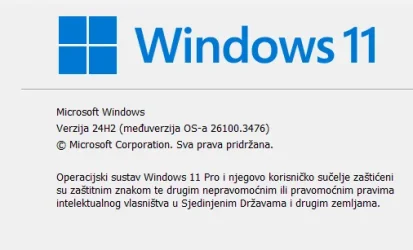
I don't, like everyone else, after the new Win 11 update the battery percentage on the taskbar. Why?
1742473797802.webp
1742473835372.webp
1742473914432.webp
 
Windows Build/Version
Win 11 24H2 (26100.2476)
Last edited:

My Computer My Computer

At a glance

Windows 1113th Gen Intel(R) Core(TM) i7-13700H 2.40 GHz32,0 GB
OS
Windows 11
Computer type
Laptop
Manufacturer/Model
Lenovo
CPU
13th Gen Intel(R) Core(TM) i7-13700H 2.40 GHz
Memory
32,0 GB
Browser
Edge
Antivirus
BitDefenter Total Security
Other Info
Edition Windows 11 Pro
Version 24H2
Installed on ‎3.‎2.‎2025.
OS build 26100.3476
Experience Windows Feature Experience Pack 1000.22639.1000.0
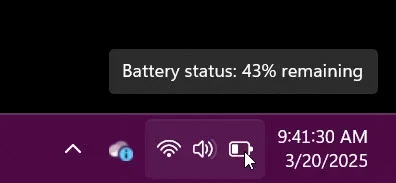
To see the battery percentage, you need to simply hover your mouse pointer over the battery icon like this:

Image1.webp
 

My Computers My Computers

  • At a glance

    Win11 Pro 25H2 (RTM+)Intel i7-14650HX32 GBNo GPU - Built-in Intel Graphics
    OS
    Win11 Pro 25H2 (RTM+)
    Computer type
    PC/Desktop
    Manufacturer/Model
    Acemagic
    CPU
    Intel i7-14650HX
    Memory
    32 GB
    Graphics Card(s)
    No GPU - Built-in Intel Graphics
    Sound Card
    Integrated
    Monitor(s) Displays
    Varies as machine will often be moved to locations with different monitors
    Screen Resolution
    Varies
    Hard Drives
    1 x 1TB Gen 4 NVMe SSD
    PSU
    120W Power Brick
    Keyboard
    Corsair K70 Max RGB Magnetic Keyboard
    Mouse
    Logitech MX Master 3
    Internet Speed
    1Gb Up / 1 Gb Down
    Browser
    Edge
    Antivirus
    Windows Defender
  • At a glance

    Win11 Pro 25H2 (RTM+)Intel i7-1255U16 GBIntel Iris Xe Graphics
    Operating System
    Win11 Pro 25H2 (RTM+)
    Computer type
    Laptop
    Manufacturer/Model
    Lenovo ThinkBook 13x Gen 2
    CPU
    Intel i7-1255U
    Memory
    16 GB
    Graphics card(s)
    Intel Iris Xe Graphics
    Sound Card
    Realtek® ALC3306-CG codec
    Monitor(s) Displays
    13.3-inch IPS Display
    Screen Resolution
    WQXGA (2560 x 1600)
    Hard Drives
    2 TB 4 x 4 NVMe SSD
    PSU
    USB-C / Thunderbolt 4 Power / Charging
    Keyboard
    Backlit, spill resistant keyboard
    Mouse
    Buttonless Glass Precision Touchpad
    Internet Speed
    1Gb Up / 1Gb Down
    Browser
    Edge
    Antivirus
    Windows Defender
    Other Info
    WiFi 6e / Bluetooth 5.1 / Facial Recognition / Fingerprint Sensor / ToF (Time of Flight) Human Presence Sensor
I don't, like everyone else, after the new Win 11 update the battery percentage on the taskbar. Why?

View attachment 128929
Patience. It is already in the Insider Dev and Beta 24H2 builds, and may well soon make its way into the retail build.

battery-icon-colors-webp.123139

Microsoft is beginning to roll this out to Windows Insiders in the Dev Channel, so the experience isn’t available to all Insiders just yet as Microsoft plans to monitor feedback before pushing it out to everyone.


My Computers My Computers

  • At a glance

    Windows 11 HomeAMD Athlon Silver 3050U8GBRadeon Graphics
    OS
    Windows 11 Home
    Computer type
    Laptop
    Manufacturer/Model
    Acer Aspire 3 A315-23-R9VY
    CPU
    AMD Athlon Silver 3050U
    Memory
    8GB
    Graphics Card(s)
    Radeon Graphics
    Monitor(s) Displays
    laptop screen
    Screen Resolution
    1366x768 native resolution, up to 2560x1440 with Radeon Virtual Super Resolution
    Hard Drives
    1TB Samsung EVO 870 SSD (from April 2026: 250GB EVO 850)
    Internet Speed
    150 Mbps
    Browser
    Edge, Firefox
    Antivirus
    Defender
    Other Info
    fully 'Windows 11 ready' laptop. Windows 10 C: partition migrated from my old unsupported 'main machine' then upgraded to 11. A test migration ran Insider builds for 2 months. When 11 was released on 5th October 2021 it was re-imaged back to 10 and was offered the upgrade in Windows Update on 20th October. Windows Update offered the 22H2 Feature Update on 20th September 2022. It got the 23H2 Feature Update on 4th November 2023 through Windows Update, 24H2 on 3rd October 2024 through Windows Update by setting the Target Release Version for 24H2, and 25H2 on 30th September 2025 through Windows Update by setting the Target Release Version for 25H2.

    UPDATE - 11 April 2026: due to mechanical deterioration this PC has been retired from active duty. The OS with all software and files has been migrated to my System Seven in 'Other systems' to carry on as my general purpose 'main machine'.
  • At a glance

    Windows 11 ProIntel® Core™ i5-520M8GB(integrated graphics) Intel HD Graphics
    Operating System
    Windows 11 Pro
    Computer type
    Laptop
    Manufacturer/Model
    Dell Latitude E4310
    CPU
    Intel® Core™ i5-520M
    Motherboard
    0T6M8G
    Memory
    8GB
    Graphics card(s)
    (integrated graphics) Intel HD Graphics
    Screen Resolution
    1366x768
    Hard Drives
    500GB Crucial MX500 SSD
    Browser
    Firefox, Edge
    Antivirus
    Defender
    Other Info
    unsupported machine: Legacy bios, MBR, TPM 1.2, upgraded from W10 to W11 using W10/W11 hybrid install media workaround.

    In-place upgrade to 22H2 using ISO and a workaround.
    Feature Update to 23H2 by manually installing the Enablement Package.
    In-place upgrade to 24H2 using hybrid 23H2/24H2 install media.
    Upgraded to 25H2 by Enablement Package.

    Also running Insider Dev, and Canary builds and Windows 10 as native boot .vhdx.
  • My SYSTEM THREE is a Dell Latitude 5410, i7-10610U, 32GB RAM, 512GB NVMe ssd, supported device running Windows 11 Pro.

    My SYSTEM FOUR is a 2-in-1 convertible Lenovo Yoga 11e 20DA, Celeron N2930, 8GB RAM, 256GB ssd. Unsupported device: currently running Win10 Pro, plus Win11 Pro RTM and Insider Dev, Beta, and RP 24H2 as native boot vhdx.

    My SYSTEM FIVE is a Dell Latitude 3190 2-in-1, Pentium Silver N5030, 8GB RAM, 1TB NVMe ssd, supported device running Windows 11 Pro, plus Insider Beta, Dev, and Canary builds (and a few others) as a native boot .vhdx.

    My SYSTEM SIX is a Dell Latitude 5550, Core Ultra 7 165H, 64GB RAM, 1TB NVMe SSD, supported device, Windows 11 Pro 24H2, Hyper-V host machine. Updated to 25H2 on 30th September 2025.

    My SYSTEM SEVEN is a Lenovo Thinkpad T580, Intel Core i7-8650U, 16GB RAM, 512GB NVMe SSD + 2nd 512GB NVMe SSD, a supported device for Windows 11. This is my current general purpose 'main machine'. The installed Windows 11 Home from my System One has been migrated to this machine.
Thank you all.
 

My Computer My Computer

At a glance

Windows 1113th Gen Intel(R) Core(TM) i7-13700H 2.40 GHz32,0 GB
OS
Windows 11
Computer type
Laptop
Manufacturer/Model
Lenovo
CPU
13th Gen Intel(R) Core(TM) i7-13700H 2.40 GHz
Memory
32,0 GB
Browser
Edge
Antivirus
BitDefenter Total Security
Other Info
Edition Windows 11 Pro
Version 24H2
Installed on ‎3.‎2.‎2025.
OS build 26100.3476
Experience Windows Feature Experience Pack 1000.22639.1000.0
I had the new color battery percentage icons on the previous 26100 build but for some reason it was pulled on RP build 26100.3613 and can't be enabled with the Vivetool codes either. Guess they found some bugs although I still have it on the latest beta build.
 

My Computers My Computers

  • At a glance

    Windows 11 25H2Intel Core Ultra 9 275HX (24-Core)64GB DDR5 6400MT/sNVIDIA GeForce RTX 5080 and Intel UHD Graphics
    OS
    Windows 11 25H2
    Computer type
    Laptop
    Manufacturer/Model
    Alienware 18 Area-51
    CPU
    Intel Core Ultra 9 275HX (24-Core)
    Motherboard
    Alienware
    Memory
    64GB DDR5 6400MT/s
    Graphics Card(s)
    NVIDIA GeForce RTX 5080 and Intel UHD Graphics
    Sound Card
    Onboard, Realtek high-performance Audio chips (ALC3329 & ALC1708))
    Monitor(s) Displays
    300HZ 18-inch QHD 500 nit Comfort View+
    Screen Resolution
    2560 x 1600
    Hard Drives
    2TB NVMe M.2 PCIe Gen 5 SSD
    Case
    Magnesium Alloy
    Cooling
    Advanced Cryo-Tech Quad-Fan Cooling system & large vapor chamber
    Keyboard
    Cherry MX ultra low profile mechanical keyboard with per key AlienFX RGB lighting
    Mouse
    Logitech MX Master 4
    Browser
    Vivaldi (main), Firefox, Chrome, Edge
    Antivirus
    MS Defender and Malwarebytes Free
  • At a glance

    Windows 11 25H2Qualcomm Snapdragon X Elite (12 Core) ARM bas...16GB LPDDR5Qualcomm Adreno X1-85
    Operating System
    Windows 11 25H2
    Computer type
    Laptop
    Manufacturer/Model
    Microsoft Surface Laptop 7
    CPU
    Qualcomm Snapdragon X Elite (12 Core) ARM based CPU
    Motherboard
    Microsoft Corp.
    Memory
    16GB LPDDR5
    Graphics card(s)
    Qualcomm Adreno X1-85
    Sound Card
    Omnisonic speakers with Dolby Atmos spatial sound
    Monitor(s) Displays
    120 Hz 13.8-inch 600 nit PixelSense Flow touchscreen
    Screen Resolution
    2304x1536
    Hard Drives
    1TB NVMe Gen 4 SSD
    Case
    Anodized Aluminum
    Cooling
    Traditional active cooling fan system
    Keyboard
    Mechanical QWERTY, backlit when in use
    Mouse
    Logitech MX Master 4 and Surface Arc Mouse
    Browser
    Vivaldi (main), Firefox, Chrome, Edge
    Antivirus
    MS Defender and Malwarebytes Free
The new battery indications are one of those "rolling out gradually" features so not everyone gets them at the same time, even if on the same build.
 

My Computers My Computers

  • At a glance

    Win11 Pro 25H2 (RTM+)Intel i7-14650HX32 GBNo GPU - Built-in Intel Graphics
    OS
    Win11 Pro 25H2 (RTM+)
    Computer type
    PC/Desktop
    Manufacturer/Model
    Acemagic
    CPU
    Intel i7-14650HX
    Memory
    32 GB
    Graphics Card(s)
    No GPU - Built-in Intel Graphics
    Sound Card
    Integrated
    Monitor(s) Displays
    Varies as machine will often be moved to locations with different monitors
    Screen Resolution
    Varies
    Hard Drives
    1 x 1TB Gen 4 NVMe SSD
    PSU
    120W Power Brick
    Keyboard
    Corsair K70 Max RGB Magnetic Keyboard
    Mouse
    Logitech MX Master 3
    Internet Speed
    1Gb Up / 1 Gb Down
    Browser
    Edge
    Antivirus
    Windows Defender
  • At a glance

    Win11 Pro 25H2 (RTM+)Intel i7-1255U16 GBIntel Iris Xe Graphics
    Operating System
    Win11 Pro 25H2 (RTM+)
    Computer type
    Laptop
    Manufacturer/Model
    Lenovo ThinkBook 13x Gen 2
    CPU
    Intel i7-1255U
    Memory
    16 GB
    Graphics card(s)
    Intel Iris Xe Graphics
    Sound Card
    Realtek® ALC3306-CG codec
    Monitor(s) Displays
    13.3-inch IPS Display
    Screen Resolution
    WQXGA (2560 x 1600)
    Hard Drives
    2 TB 4 x 4 NVMe SSD
    PSU
    USB-C / Thunderbolt 4 Power / Charging
    Keyboard
    Backlit, spill resistant keyboard
    Mouse
    Buttonless Glass Precision Touchpad
    Internet Speed
    1Gb Up / 1Gb Down
    Browser
    Edge
    Antivirus
    Windows Defender
    Other Info
    WiFi 6e / Bluetooth 5.1 / Facial Recognition / Fingerprint Sensor / ToF (Time of Flight) Human Presence Sensor
I know this was rolling out gradually but here we are nearly at the end of July and I'm on 26100.4767 and I still do not have this feature. What's going on?
 

My Computer My Computer

At a glance

Windows 11Intel(R) Core(TM) i7-1165G716GB
OS
Windows 11
Computer type
Tablet
Manufacturer/Model
Microsoft Surface Pro 7+
CPU
Intel(R) Core(TM) i7-1165G7
Memory
16GB
Monitor(s) Displays
Samsung LS34C650T
Internet Speed
300Mbps
Browser
Chrome & Edge
I know this was rolling out gradually but here we are nearly at the end of July and I'm on 26100.4767 and I still do not have this feature. What's going on?
I went the vivetool route to enable them, I think it's a new code:

Taskbar - vivetool /enable /id:56328729

Lock Screen - vivetool /enable /id:55467432,55648925
 

My Computers My Computers

  • At a glance

    Windows 11 25H2Intel Core Ultra 9 275HX (24-Core)64GB DDR5 6400MT/sNVIDIA GeForce RTX 5080 and Intel UHD Graphics
    OS
    Windows 11 25H2
    Computer type
    Laptop
    Manufacturer/Model
    Alienware 18 Area-51
    CPU
    Intel Core Ultra 9 275HX (24-Core)
    Motherboard
    Alienware
    Memory
    64GB DDR5 6400MT/s
    Graphics Card(s)
    NVIDIA GeForce RTX 5080 and Intel UHD Graphics
    Sound Card
    Onboard, Realtek high-performance Audio chips (ALC3329 & ALC1708))
    Monitor(s) Displays
    300HZ 18-inch QHD 500 nit Comfort View+
    Screen Resolution
    2560 x 1600
    Hard Drives
    2TB NVMe M.2 PCIe Gen 5 SSD
    Case
    Magnesium Alloy
    Cooling
    Advanced Cryo-Tech Quad-Fan Cooling system & large vapor chamber
    Keyboard
    Cherry MX ultra low profile mechanical keyboard with per key AlienFX RGB lighting
    Mouse
    Logitech MX Master 4
    Browser
    Vivaldi (main), Firefox, Chrome, Edge
    Antivirus
    MS Defender and Malwarebytes Free
  • At a glance

    Windows 11 25H2Qualcomm Snapdragon X Elite (12 Core) ARM bas...16GB LPDDR5Qualcomm Adreno X1-85
    Operating System
    Windows 11 25H2
    Computer type
    Laptop
    Manufacturer/Model
    Microsoft Surface Laptop 7
    CPU
    Qualcomm Snapdragon X Elite (12 Core) ARM based CPU
    Motherboard
    Microsoft Corp.
    Memory
    16GB LPDDR5
    Graphics card(s)
    Qualcomm Adreno X1-85
    Sound Card
    Omnisonic speakers with Dolby Atmos spatial sound
    Monitor(s) Displays
    120 Hz 13.8-inch 600 nit PixelSense Flow touchscreen
    Screen Resolution
    2304x1536
    Hard Drives
    1TB NVMe Gen 4 SSD
    Case
    Anodized Aluminum
    Cooling
    Traditional active cooling fan system
    Keyboard
    Mechanical QWERTY, backlit when in use
    Mouse
    Logitech MX Master 4 and Surface Arc Mouse
    Browser
    Vivaldi (main), Firefox, Chrome, Edge
    Antivirus
    MS Defender and Malwarebytes Free
I went the vivetool route to enable them, I think it's a new code:

Taskbar - vivetool /enable /id:56328729

Lock Screen - vivetool /enable /id:55467432,55648925
Thanks. I'd like to avoid installing additional software if possible.
 

My Computer My Computer

At a glance

Windows 11Intel(R) Core(TM) i7-1165G716GB
OS
Windows 11
Computer type
Tablet
Manufacturer/Model
Microsoft Surface Pro 7+
CPU
Intel(R) Core(TM) i7-1165G7
Memory
16GB
Monitor(s) Displays
Samsung LS34C650T
Internet Speed
300Mbps
Browser
Chrome & Edge
Thanks. I'd like to avoid installing additional software if possible.

That's the same as applying this reg file (and restarting Windows):
Code:
Windows Registry Editor Version 5.00

[HKEY_LOCAL_MACHINE\System\ControlSet001\Control\FeatureManagement\Overrides\8]

; Taskbar
[HKEY_LOCAL_MACHINE\System\ControlSet001\Control\FeatureManagement\Overrides\8\862603406]
"EnabledStateOptions"=dword:00000000
"EnabledState"=dword:00000002
"VariantPayloadKind"=dword:00000000
"VariantPayload"=dword:00000000
"Variant"=dword:00000000

; Lock Screen
[HKEY_LOCAL_MACHINE\System\ControlSet001\Control\FeatureManagement\Overrides\8\1356096143]
"EnabledStateOptions"=dword:00000000
"EnabledState"=dword:00000002
"VariantPayloadKind"=dword:00000000
"VariantPayload"=dword:00000000
"Variant"=dword:00000000

[HKEY_LOCAL_MACHINE\System\ControlSet001\Control\FeatureManagement\Overrides\8\975854735]
"EnabledState"=dword:00000002
"Variant"=dword:00000000
"VariantPayload"=dword:00000000
"VariantPayloadKind"=dword:00000000
"EnabledStateOptions"=dword:00000000
 

My Computer My Computer

At a glance

Windows 7
OS
Windows 7
That's the same as applying this reg file (and restarting Windows):
Code:
Windows Registry Editor Version 5.00

[HKEY_LOCAL_MACHINE\System\ControlSet001\Control\FeatureManagement\Overrides\8]

; Taskbar
[HKEY_LOCAL_MACHINE\System\ControlSet001\Control\FeatureManagement\Overrides\8\862603406]
"EnabledStateOptions"=dword:00000000
"EnabledState"=dword:00000002
"VariantPayloadKind"=dword:00000000
"VariantPayload"=dword:00000000
"Variant"=dword:00000000

; Lock Screen
[HKEY_LOCAL_MACHINE\System\ControlSet001\Control\FeatureManagement\Overrides\8\1356096143]
"EnabledStateOptions"=dword:00000000
"EnabledState"=dword:00000002
"VariantPayloadKind"=dword:00000000
"VariantPayload"=dword:00000000
"Variant"=dword:00000000

[HKEY_LOCAL_MACHINE\System\ControlSet001\Control\FeatureManagement\Overrides\8\975854735]
"EnabledState"=dword:00000002
"Variant"=dword:00000000
"VariantPayload"=dword:00000000
"VariantPayloadKind"=dword:00000000
"EnabledStateOptions"=dword:00000000
Thanks but this did not work either. There's still no option in the settings to display the battery percentage.
 

My Computer My Computer

At a glance

Windows 11Intel(R) Core(TM) i7-1165G716GB
OS
Windows 11
Computer type
Tablet
Manufacturer/Model
Microsoft Surface Pro 7+
CPU
Intel(R) Core(TM) i7-1165G7
Memory
16GB
Monitor(s) Displays
Samsung LS34C650T
Internet Speed
300Mbps
Browser
Chrome & Edge
Well, I have a battery icon on my production baseline OS Build 26100.4652, which is a "line powered" desktop machine, and this icon does nothing. Hovering over creates no popup, left clicking on it shows I have 100% battery available and takes me to the System>Power & Battery Page in settings. When I click on the battery tab it shows I have 0% battery.

So, this begs the question "Why do I even have a battery icon or even the ablility to navigate through all this when my system is line powered and there are no batteries involved?" Microsoft needs to figure out when you're on a battery powered device and when you aren't. If you aren't this battery related information should be hidden.

Don't they test this stuff?

Clearly, this needs more work......

Jabiru
 

My Computers My Computers

  • At a glance

    Host: Windows 11 Pro 24H2AMD Ryzen 9 7945HX2X 16GB DDR5-5200MTs (32GB)AMD Radeon Pro WX5100 Workstation
    OS
    Host: Windows 11 Pro 24H2
    Computer type
    PC/Desktop
    Manufacturer/Model
    Custom User Build
    CPU
    AMD Ryzen 9 7945HX
    Motherboard
    Minisforum BD795i SE
    Memory
    2X 16GB DDR5-5200MTs (32GB)
    Graphics Card(s)
    AMD Radeon Pro WX5100 Workstation
    Sound Card
    Integrated AMD High Definition Audio CODEC
    Monitor(s) Displays
    2X LG 32UN880-A
    Screen Resolution
    3840x2160
    Hard Drives
    2X NVMe 1TB SSDs
    PSU
    Corsair SF450
    Case
    Fractal Design Terra
    Cooling
    Noctua FS-A12
    Keyboard
    Logitech K270 KB/Mouse Combo
    Mouse
    Logitech K270 KB/Mouse Combo
    Internet Speed
    800Mb
    Browser
    Firefox, Edge, Edge Chromium
    Antivirus
    MalwareBytes, MS Defender
    Other Info
    2x Seagate 2TB external USB HDD, 1x 5TB external USB WD Passport HDD, 1x externql USB WD SATA 1TB Green SATA SSD
  • At a glance

    Windows 11 HomeRyzen 7 4700U @ 2GHz-->4.2GHz Boost16GB LPD DDR4XAMD Radeon (Renoir) Vega
    Operating System
    Windows 11 Home
    Computer type
    Laptop
    Manufacturer/Model
    Acer Swift 3 SF314-42 R3U5
    CPU
    Ryzen 7 4700U @ 2GHz-->4.2GHz Boost
    Motherboard
    RO Kona_RN
    Memory
    16GB LPD DDR4X
    Graphics card(s)
    AMD Radeon (Renoir) Vega
    Sound Card
    ATI/AMD Renoir/Van Gough/Cezanne/Rembrandt HD Audio Controller
    Monitor(s) Displays
    IPS LCD Integrated Chi Mei CMN14D4
    Screen Resolution
    1920x1080
    Hard Drives
    Hynix 512GB NVMe (PCIe 4.0)
    PSU
    Ext 19v
    Case
    Integrated Magnesium
    Cooling
    Therm internal fan
    Keyboard
    Integrated
    Mouse
    Jellycomb
    Internet Speed
    800MB
    Browser
    Firefox, Edge Chromium
    Antivirus
    Malwarebytes, MS Defender
    Other Info
    External USB-C 1Gb Ethernet connection
Well, I have a battery icon on my production baseline OS Build 26100.4652, which is a "line powered" desktop machine, and this icon does nothing.

Have you considered that this may not be a Microsoft issue at all? It may be the firmware in your system. Clearly this is not a problem on all machines - I have never ever seen a battery icon on a machine that does not have the ability to run on a battery, so it is possible that the issue is the specific machine.

If this is regarding the Minisforum MB, I looked on their Web site and I see two BIOS updates available, the most recent being version 1.12. If you are not yet on that version, it might be worth a shot to see if that helps.

I am not definitively saying that the issue is not with Microsoft, merely that this is a possibility.
 

My Computers My Computers

  • At a glance

    Win11 Pro 25H2 (RTM+)Intel i7-14650HX32 GBNo GPU - Built-in Intel Graphics
    OS
    Win11 Pro 25H2 (RTM+)
    Computer type
    PC/Desktop
    Manufacturer/Model
    Acemagic
    CPU
    Intel i7-14650HX
    Memory
    32 GB
    Graphics Card(s)
    No GPU - Built-in Intel Graphics
    Sound Card
    Integrated
    Monitor(s) Displays
    Varies as machine will often be moved to locations with different monitors
    Screen Resolution
    Varies
    Hard Drives
    1 x 1TB Gen 4 NVMe SSD
    PSU
    120W Power Brick
    Keyboard
    Corsair K70 Max RGB Magnetic Keyboard
    Mouse
    Logitech MX Master 3
    Internet Speed
    1Gb Up / 1 Gb Down
    Browser
    Edge
    Antivirus
    Windows Defender
  • At a glance

    Win11 Pro 25H2 (RTM+)Intel i7-1255U16 GBIntel Iris Xe Graphics
    Operating System
    Win11 Pro 25H2 (RTM+)
    Computer type
    Laptop
    Manufacturer/Model
    Lenovo ThinkBook 13x Gen 2
    CPU
    Intel i7-1255U
    Memory
    16 GB
    Graphics card(s)
    Intel Iris Xe Graphics
    Sound Card
    Realtek® ALC3306-CG codec
    Monitor(s) Displays
    13.3-inch IPS Display
    Screen Resolution
    WQXGA (2560 x 1600)
    Hard Drives
    2 TB 4 x 4 NVMe SSD
    PSU
    USB-C / Thunderbolt 4 Power / Charging
    Keyboard
    Backlit, spill resistant keyboard
    Mouse
    Buttonless Glass Precision Touchpad
    Internet Speed
    1Gb Up / 1Gb Down
    Browser
    Edge
    Antivirus
    Windows Defender
    Other Info
    WiFi 6e / Bluetooth 5.1 / Facial Recognition / Fingerprint Sensor / ToF (Time of Flight) Human Presence Sensor
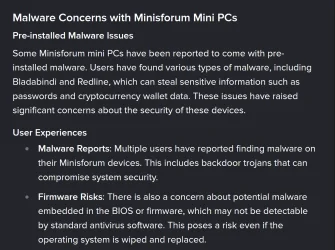
That's a possibility, I'll look into it. I have to say though I'm not keen on downloading anything from Minisforum. There are several articles indicating they've proliferated drivers with Malware in them. I found malware in their BT/WiFi driver that was calling home. I didn't do any research into it but I found my firewall was blocking an outbound request and traced it to the driver. I deleted the driver in favor of the MS provided one.

1753194474209.webp
 

My Computers My Computers

  • At a glance

    Host: Windows 11 Pro 24H2AMD Ryzen 9 7945HX2X 16GB DDR5-5200MTs (32GB)AMD Radeon Pro WX5100 Workstation
    OS
    Host: Windows 11 Pro 24H2
    Computer type
    PC/Desktop
    Manufacturer/Model
    Custom User Build
    CPU
    AMD Ryzen 9 7945HX
    Motherboard
    Minisforum BD795i SE
    Memory
    2X 16GB DDR5-5200MTs (32GB)
    Graphics Card(s)
    AMD Radeon Pro WX5100 Workstation
    Sound Card
    Integrated AMD High Definition Audio CODEC
    Monitor(s) Displays
    2X LG 32UN880-A
    Screen Resolution
    3840x2160
    Hard Drives
    2X NVMe 1TB SSDs
    PSU
    Corsair SF450
    Case
    Fractal Design Terra
    Cooling
    Noctua FS-A12
    Keyboard
    Logitech K270 KB/Mouse Combo
    Mouse
    Logitech K270 KB/Mouse Combo
    Internet Speed
    800Mb
    Browser
    Firefox, Edge, Edge Chromium
    Antivirus
    MalwareBytes, MS Defender
    Other Info
    2x Seagate 2TB external USB HDD, 1x 5TB external USB WD Passport HDD, 1x externql USB WD SATA 1TB Green SATA SSD
  • At a glance

    Windows 11 HomeRyzen 7 4700U @ 2GHz-->4.2GHz Boost16GB LPD DDR4XAMD Radeon (Renoir) Vega
    Operating System
    Windows 11 Home
    Computer type
    Laptop
    Manufacturer/Model
    Acer Swift 3 SF314-42 R3U5
    CPU
    Ryzen 7 4700U @ 2GHz-->4.2GHz Boost
    Motherboard
    RO Kona_RN
    Memory
    16GB LPD DDR4X
    Graphics card(s)
    AMD Radeon (Renoir) Vega
    Sound Card
    ATI/AMD Renoir/Van Gough/Cezanne/Rembrandt HD Audio Controller
    Monitor(s) Displays
    IPS LCD Integrated Chi Mei CMN14D4
    Screen Resolution
    1920x1080
    Hard Drives
    Hynix 512GB NVMe (PCIe 4.0)
    PSU
    Ext 19v
    Case
    Integrated Magnesium
    Cooling
    Therm internal fan
    Keyboard
    Integrated
    Mouse
    Jellycomb
    Internet Speed
    800MB
    Browser
    Firefox, Edge Chromium
    Antivirus
    Malwarebytes, MS Defender
    Other Info
    External USB-C 1Gb Ethernet connection
If you own a smart UPS and install the management driver, you will get a battery indicator. The USB link provides status back to your PC.
 

My Computer My Computer

At a glance

Windows 7
OS
Windows 7
Interesting thought, I hadn't considered that. I do have a UPS connected so I'm thinking Windows must have detected that since the control cable is connected to my desktop. Having said that, I installed the UPS control software (PowerChute PE) and the battery icon in the systray disappeared, so the behavior is opposite of what you said above . Either way I consider this solved, thanks. :-)
 

My Computers My Computers

  • At a glance

    Host: Windows 11 Pro 24H2AMD Ryzen 9 7945HX2X 16GB DDR5-5200MTs (32GB)AMD Radeon Pro WX5100 Workstation
    OS
    Host: Windows 11 Pro 24H2
    Computer type
    PC/Desktop
    Manufacturer/Model
    Custom User Build
    CPU
    AMD Ryzen 9 7945HX
    Motherboard
    Minisforum BD795i SE
    Memory
    2X 16GB DDR5-5200MTs (32GB)
    Graphics Card(s)
    AMD Radeon Pro WX5100 Workstation
    Sound Card
    Integrated AMD High Definition Audio CODEC
    Monitor(s) Displays
    2X LG 32UN880-A
    Screen Resolution
    3840x2160
    Hard Drives
    2X NVMe 1TB SSDs
    PSU
    Corsair SF450
    Case
    Fractal Design Terra
    Cooling
    Noctua FS-A12
    Keyboard
    Logitech K270 KB/Mouse Combo
    Mouse
    Logitech K270 KB/Mouse Combo
    Internet Speed
    800Mb
    Browser
    Firefox, Edge, Edge Chromium
    Antivirus
    MalwareBytes, MS Defender
    Other Info
    2x Seagate 2TB external USB HDD, 1x 5TB external USB WD Passport HDD, 1x externql USB WD SATA 1TB Green SATA SSD
  • At a glance

    Windows 11 HomeRyzen 7 4700U @ 2GHz-->4.2GHz Boost16GB LPD DDR4XAMD Radeon (Renoir) Vega
    Operating System
    Windows 11 Home
    Computer type
    Laptop
    Manufacturer/Model
    Acer Swift 3 SF314-42 R3U5
    CPU
    Ryzen 7 4700U @ 2GHz-->4.2GHz Boost
    Motherboard
    RO Kona_RN
    Memory
    16GB LPD DDR4X
    Graphics card(s)
    AMD Radeon (Renoir) Vega
    Sound Card
    ATI/AMD Renoir/Van Gough/Cezanne/Rembrandt HD Audio Controller
    Monitor(s) Displays
    IPS LCD Integrated Chi Mei CMN14D4
    Screen Resolution
    1920x1080
    Hard Drives
    Hynix 512GB NVMe (PCIe 4.0)
    PSU
    Ext 19v
    Case
    Integrated Magnesium
    Cooling
    Therm internal fan
    Keyboard
    Integrated
    Mouse
    Jellycomb
    Internet Speed
    800MB
    Browser
    Firefox, Edge Chromium
    Antivirus
    Malwarebytes, MS Defender
    Other Info
    External USB-C 1Gb Ethernet connection
Well, I just learned something new, and I consider myself somewhat of an expert on UPSes, although I admit it probably been a decade since I used an APC UPS. I'm currently running Ecoflow.
 

My Computers My Computers

  • At a glance

    Win11 Pro 25H2 (RTM+)Intel i7-14650HX32 GBNo GPU - Built-in Intel Graphics
    OS
    Win11 Pro 25H2 (RTM+)
    Computer type
    PC/Desktop
    Manufacturer/Model
    Acemagic
    CPU
    Intel i7-14650HX
    Memory
    32 GB
    Graphics Card(s)
    No GPU - Built-in Intel Graphics
    Sound Card
    Integrated
    Monitor(s) Displays
    Varies as machine will often be moved to locations with different monitors
    Screen Resolution
    Varies
    Hard Drives
    1 x 1TB Gen 4 NVMe SSD
    PSU
    120W Power Brick
    Keyboard
    Corsair K70 Max RGB Magnetic Keyboard
    Mouse
    Logitech MX Master 3
    Internet Speed
    1Gb Up / 1 Gb Down
    Browser
    Edge
    Antivirus
    Windows Defender
  • At a glance

    Win11 Pro 25H2 (RTM+)Intel i7-1255U16 GBIntel Iris Xe Graphics
    Operating System
    Win11 Pro 25H2 (RTM+)
    Computer type
    Laptop
    Manufacturer/Model
    Lenovo ThinkBook 13x Gen 2
    CPU
    Intel i7-1255U
    Memory
    16 GB
    Graphics card(s)
    Intel Iris Xe Graphics
    Sound Card
    Realtek® ALC3306-CG codec
    Monitor(s) Displays
    13.3-inch IPS Display
    Screen Resolution
    WQXGA (2560 x 1600)
    Hard Drives
    2 TB 4 x 4 NVMe SSD
    PSU
    USB-C / Thunderbolt 4 Power / Charging
    Keyboard
    Backlit, spill resistant keyboard
    Mouse
    Buttonless Glass Precision Touchpad
    Internet Speed
    1Gb Up / 1Gb Down
    Browser
    Edge
    Antivirus
    Windows Defender
    Other Info
    WiFi 6e / Bluetooth 5.1 / Facial Recognition / Fingerprint Sensor / ToF (Time of Flight) Human Presence Sensor
Well, I just learned something new, and I consider myself somewhat of an expert on UPSes, although I admit it probably been a decade since I used an APC UPS. I'm currently running Ecoflow.
My last APC was two decades ago. They're tough critters, but replacement batteries are expensive...
 

My Computer My Computer

At a glance

Windows 7
OS
Windows 7
I love the idea of the Ecoflow with the LiFePo4 batteries that are good for 3,000 charge/discharge cycles, especially now that they have a USB connection to the PC so it do a proper shutdown when the battery is getting low. But one thing that not a single review I saw ever mentioned: The stupid UPS monitoring software from Ecoflow does not run as a service so you have to logon before it will run and when you logoff it stops running so you need to lock the PC rather than logoff. But that call that "Pro grade UPS".

Since this is their very first shot at "real" UPS functionality, hopefully they release a better version of their software.
 

My Computers My Computers

  • At a glance

    Win11 Pro 25H2 (RTM+)Intel i7-14650HX32 GBNo GPU - Built-in Intel Graphics
    OS
    Win11 Pro 25H2 (RTM+)
    Computer type
    PC/Desktop
    Manufacturer/Model
    Acemagic
    CPU
    Intel i7-14650HX
    Memory
    32 GB
    Graphics Card(s)
    No GPU - Built-in Intel Graphics
    Sound Card
    Integrated
    Monitor(s) Displays
    Varies as machine will often be moved to locations with different monitors
    Screen Resolution
    Varies
    Hard Drives
    1 x 1TB Gen 4 NVMe SSD
    PSU
    120W Power Brick
    Keyboard
    Corsair K70 Max RGB Magnetic Keyboard
    Mouse
    Logitech MX Master 3
    Internet Speed
    1Gb Up / 1 Gb Down
    Browser
    Edge
    Antivirus
    Windows Defender
  • At a glance

    Win11 Pro 25H2 (RTM+)Intel i7-1255U16 GBIntel Iris Xe Graphics
    Operating System
    Win11 Pro 25H2 (RTM+)
    Computer type
    Laptop
    Manufacturer/Model
    Lenovo ThinkBook 13x Gen 2
    CPU
    Intel i7-1255U
    Memory
    16 GB
    Graphics card(s)
    Intel Iris Xe Graphics
    Sound Card
    Realtek® ALC3306-CG codec
    Monitor(s) Displays
    13.3-inch IPS Display
    Screen Resolution
    WQXGA (2560 x 1600)
    Hard Drives
    2 TB 4 x 4 NVMe SSD
    PSU
    USB-C / Thunderbolt 4 Power / Charging
    Keyboard
    Backlit, spill resistant keyboard
    Mouse
    Buttonless Glass Precision Touchpad
    Internet Speed
    1Gb Up / 1Gb Down
    Browser
    Edge
    Antivirus
    Windows Defender
    Other Info
    WiFi 6e / Bluetooth 5.1 / Facial Recognition / Fingerprint Sensor / ToF (Time of Flight) Human Presence Sensor
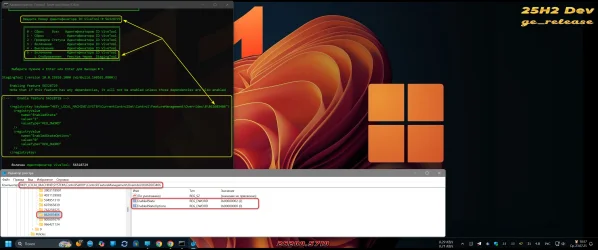
That's the same as applying this reg file (and restarting Windows):
I would like to understand why, at least I have never come across, we never discuss such a tool as StagingTool? It also works with ViveTool IDs and immediately shows changes in the registry.

1.webp
 

My Computer My Computer

At a glance

Windows 11 Stable, Beta, Dev, CanaryAMD Ryzen 9 PRO 5950X128 GbIntel(R) Arc(TM) A380 Graphics (2 ГБ)
OS
Windows 11 Stable, Beta, Dev, Canary
Computer type
PC/Desktop
Manufacturer/Model
Micro-Star International Co., Ltd. MS-7D54
CPU
AMD Ryzen 9 PRO 5950X
Motherboard
MSI MAG X570S Tomahawk Max WiFi (MS-7D54) (2 PCI-E x1, 2 PCI-E x16, 2 M.2, 4 DDR4 DIMM, Audio, Video, 2.5GbE LAN, WiFi)
Memory
128 Gb
Graphics Card(s)
Intel(R) Arc(TM) A380 Graphics (2 ГБ)
Sound Card
Устройство с поддержкой High Definition Audio
Monitor(s) Displays
HP X34 [34" LCD] (6CM1300J5J) {2021}
Screen Resolution
3440x1440
Hard Drives
KINGSTON SFYRD2000G (2000 ГБ, PCI-E 4.0 x4)
PSU
Be Quiet! Dark Rock Pro 4
Case
Cooler Master HAF XB EVO
Internet Speed
1000 Mb/s
Browser
Chrome
Antivirus
Windows Defender

Latest Support Threads

Back
Top Bottom