Solved Best way to install Win11 on this machine


gunrunnerjohn

Well-known member
Pro User
VIP
Local time
3:22 AM
Posts
3,407
Location
SE-PA
OS
Win 11 Pro 25H2, Build 26200.8894
I have an HP ENVY H8-1540T desktop. I'm trying to see what is the easiest path to install Windows 11 on this machine. I obviously want to be able to continue to receive updates for security reasons, but the machine is more than capable of doing the tasks I use it for.
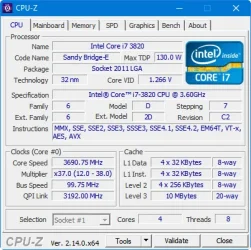
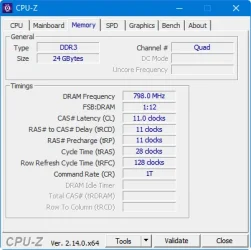
1742149228340.webp 1742149254737.webp1742149235731.webp

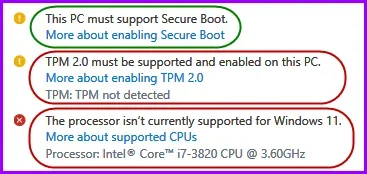
It appears that I have two sticking points that I can't get around. I can enable Secure Boot in the BIOS, so that would fix one issue, but I can't fix the other two.

TPM 2.0
CPU Type

1742149318837.webp

I was wondering if the software TPU 2.0 emulations would be good enough to make Windows happy?

Next, I have to address is the processor. While it's not the fastest on the planet, it's more than sufficient for standard desktop tasks. Obviously, I doubt I can fix that easily.

I see many mentions of RUFUS to bypass the requirements, however I also see folks anguishing about receiving security updates after they install using this method. I just need to know if that's realistic or that would be my path forward.
 

My Computers My Computers

  • At a glance

    Win 11 Pro 25H2, Build 26200.8894Intel Core i5 1450064GB DDR4GeForce RTX 4060
    OS
    Win 11 Pro 25H2, Build 26200.8894
    Computer type
    PC/Desktop
    Manufacturer/Model
    Home Brew
    CPU
    Intel Core i5 14500
    Motherboard
    Gigabyte B760M G P WIFI
    Memory
    64GB DDR4
    Graphics Card(s)
    GeForce RTX 4060
    Sound Card
    Chipset Realtek
    Monitor(s) Displays
    LG 45" Ultragear, Acer 24" 1080p
    Screen Resolution
    5120x1440, 1920x1080
    Hard Drives
    Crucial P310 2TB 2280 PCIe Gen4 3D NAND NVMe M.2 SSD (O/S)
    Silicon Power 2TB US75 NVMe PCIe Gen4 M.2 2280 SSD (backup)
    Crucial BX500 2TB 3D NAND (2nd backup)
    Seagate 4TB Ironwolf, rotating HDD archive files
    External off-line backup Drives: 2 NVMe 4TB drives in external enclosures
    PSU
    Thermaltake Toughpower GF3 750W
    Case
    LIAN LI LANCOOL 216 E-ATX PC Case
    Cooling
    Lots of fans!
    Keyboard
    Microsoft Comfort Curve 2000
    Mouse
    Logitech G305
    Internet Speed
    Verizon FiOS 1GB
    Browser
    Firefox
    Antivirus
    Malware Bytes & Windows Defender Security
  • At a glance

    Win 11 Pro 25H2, Build 26200.8894Intel Core i5 1440032GB DDR5Intel 700 Embedded GPU
    Operating System
    Win 11 Pro 25H2, Build 26200.8894
    Computer type
    PC/Desktop
    Manufacturer/Model
    Home Brew
    CPU
    Intel Core i5 14400
    Motherboard
    Gigabyte B760M DS3H AX
    Memory
    32GB DDR5
    Graphics card(s)
    Intel 700 Embedded GPU
    Sound Card
    Realtek Embedded
    Monitor(s) Displays
    27" HP 1080p
    Screen Resolution
    1920x1080
    Hard Drives
    Crucial P310 2TB 2280 PCIe Gen4 eD NAND PCIe SSD
    Samsung EVO 990 2TB NVMe Gen4 SSD
    Samsung 2TB SATA SSD
    PSU
    Thermaltake Smart BM3 650W
    Case
    Okinos Micro ATX Case
    Cooling
    Fans
    Keyboard
    Microsoft Comfort Curve 2000
    Mouse
    Logitech G305
    Internet Speed
    Verizon FiOS 1GB
    Browser
    Firefox
    Antivirus
    Malware Bytes & Windows Defender Security
  • Nimo N171 17" Laptop, (Intel i3-1215U, 16GB RAM, 2TB NVMe, Win11 Pro)
    Acemagic Vista Mini PC V1 (Intel N150, 16GB RAM, 1TB NVMe, Win11 Pro)
    HP ENVY h8-1540t, (24GB RAM, 2TB SSD, 2TB HDD, Win11 Pro)

You might want to try the above.
 

My Computers My Computers

  • At a glance

    Windows11 Pro 26200.8894Intel Core i9 14900F (24 -Core, 68 MB Total C...32GB DDR5RTX 4080 Super w/610.74
    OS
    Windows11 Pro 26200.8894
    Computer type
    PC/Desktop
    Manufacturer/Model
    Dell Alienware Aurora R16
    CPU
    Intel Core i9 14900F (24 -Core, 68 MB Total Cache)
    Motherboard
    Dell Alienware
    Memory
    32GB DDR5
    Graphics Card(s)
    RTX 4080 Super w/610.74
    Sound Card
    Realtec
    Monitor(s) Displays
    Corsair XENEON 32QHD165
    Screen Resolution
    2560 X 1440
    Hard Drives
    1-2TB Samsung 990 Pro PCIe NVMe M2 SSD
    1-4TB Samsung 990 Pro PCIe NVMe M2 SSD
    PSU
    1000 Watt Platinum Dell
    Case
    Alienware
    Cooling
    Liquid Closed Loop
    Keyboard
    Corsair Strafe RGB
    Mouse
    Logitech MK270 Wireless
    Internet Speed
    100Gb's Down-20 Up
    Browser
    Firefox 152.0.6
    Antivirus
    Defender
    Other Info
    Very Quiet And Fast
    CyberPower UPS CP1500PFCLCD
  • At a glance

    PClinuxOS Mate (2025.7)13th Gen Inter(R) Core(TM) i3-1315U64 GB DDR4 @3200 MHz.Internal
    Operating System
    PClinuxOS Mate (2025.7)
    Computer type
    PC/Desktop
    Manufacturer/Model
    Intel
    CPU
    13th Gen Inter(R) Core(TM) i3-1315U
    Motherboard
    Intel
    Memory
    64 GB DDR4 @3200 MHz.
    Graphics card(s)
    Internal
    Sound Card
    None
    Monitor(s) Displays
    Dell 2419HGCF
    Screen Resolution
    1920 X 1080
    Hard Drives
    SAMSUNG 980 PRO SSD 2TB, PCIe 4.0 M.2 2280
    PSU
    Chicony 30 Watt
    Case
    Small
    Keyboard
    Dell
    Mouse
    Razor
    Internet Speed
    1GB
    Browser
    Slimjet
your CPU supports SSE4.2 so you could use Rufus to burn the Windows 11 ISO as a bootable USB.
with that you can install Windows 11 directly or use the setup.exe file within the Rufus USB to upgrade.
it would also help if you did enable secure boot in the BIOS.

but it would be a better idea to have a clean install.
please ensure you back up your data.

you can get Rufus 4.6 from this link but it is also available from the MS store.

when burning the bootable USB a menu will appear before starting the burn. please make sure you tick all the boxes and fill in your account user name.

best of luck, Steve ..
 

My Computers My Computers

  • At a glance

    Windows 11 HomeRyzen 7 5825u64GB DDR4 3200Ryzen 7 5825u
    OS
    Windows 11 Home
    Computer type
    PC/Desktop
    Manufacturer/Model
    HP 24" AiO
    CPU
    Ryzen 7 5825u
    Motherboard
    HP
    Memory
    64GB DDR4 3200
    Graphics Card(s)
    Ryzen 7 5825u
    Sound Card
    RealTek
    Monitor(s) Displays
    24" HP AiO
    Screen Resolution
    1920 x 1080 @60 Hz
    Hard Drives
    1TB WD Blue SN580 M2 SSD Partitioned.
    2x 1TB USB HDD External Backup/Storage.
    PSU
    90W external power brick
    Case
    24" All in One
    Cooling
    Default Air Cooling
    Keyboard
    HP WiFi UK extended
    Mouse
    HP WiFi 3 Button
    Internet Speed
    1GB full fibre
    Browser
    Edge & Firefox
    Antivirus
    AVG Internet Security/Windows Defender
    Other Info
    Mainly Open Source Software
  • At a glance

    Ubuntu 22.04.5 LTSi5 7200u16GB DDR4Intel
    Operating System
    Ubuntu 22.04.5 LTS
    Computer type
    Laptop
    Manufacturer/Model
    Dell 13" Latitude 2017
    CPU
    i5 7200u
    Motherboard
    Dell
    Memory
    16GB DDR4
    Graphics card(s)
    Intel
    Sound Card
    Intel
    Monitor(s) Displays
    13" Dell Laptop
    Hard Drives
    250GB Crucial 2.5" SSD
    Mouse
    Generic WiFi 3 button
    Internet Speed
    WiFi only
    Browser
    Firefox
    Antivirus
    ClamAV TK
    Other Info
    Mainly Open Source Software
I see many mentions of RUFUS to bypass the requirements, however I also see folks anguishing about receiving security updates after they install using this method. I just need to know if that's realistic or that would be my path forward.
System Two in My Computers below has a 1st gen i5, only TPM 1.2, and is a Legacy bios machine (so no secure boot). It has been running Windows 11 since the first release in October 2021 and is now on 24H2.

However you bypass the hardware checks and install Win11, you will still get all the cumulative updates and security updates that any supported device would get. The only thing that an unsupported device won't see in Windows Update is the offer of any Feature Update to the next version. For that you need to perform a manual upgrade with an ISO, using a workaround again, as I have had to do.
 

My Computers My Computers

  • At a glance

    Windows 11 HomeAMD Athlon Silver 3050U8GBRadeon Graphics
    OS
    Windows 11 Home
    Computer type
    Laptop
    Manufacturer/Model
    Acer Aspire 3 A315-23-R9VY
    CPU
    AMD Athlon Silver 3050U
    Memory
    8GB
    Graphics Card(s)
    Radeon Graphics
    Monitor(s) Displays
    laptop screen
    Screen Resolution
    1366x768 native resolution, up to 2560x1440 with Radeon Virtual Super Resolution
    Hard Drives
    1TB Samsung EVO 870 SSD (from April 2026: 250GB EVO 850)
    Internet Speed
    150 Mbps
    Browser
    Edge, Firefox
    Antivirus
    Defender
    Other Info
    fully 'Windows 11 ready' laptop. Windows 10 C: partition migrated from my old unsupported 'main machine' then upgraded to 11. A test migration ran Insider builds for 2 months. When 11 was released on 5th October 2021 it was re-imaged back to 10 and was offered the upgrade in Windows Update on 20th October. Windows Update offered the 22H2 Feature Update on 20th September 2022. It got the 23H2 Feature Update on 4th November 2023 through Windows Update, 24H2 on 3rd October 2024 through Windows Update by setting the Target Release Version for 24H2, and 25H2 on 30th September 2025 through Windows Update by setting the Target Release Version for 25H2.

    UPDATE - 11 April 2026: due to mechanical deterioration this PC has been retired from active duty. The OS with all software and files has been migrated to my System Seven in 'Other systems' to carry on as my general purpose 'main machine'.

    I've now clean installed 25H2 and used Garlin's scripts to update Secure Boot to CA 2023 and revoke the PCA 2011 certificates. It's new role is to test secure boot issues.
  • At a glance

    Windows 11 ProIntel® Core™ i5-520M8GB(integrated graphics) Intel HD Graphics
    Operating System
    Windows 11 Pro
    Computer type
    Laptop
    Manufacturer/Model
    Dell Latitude E4310
    CPU
    Intel® Core™ i5-520M
    Motherboard
    0T6M8G
    Memory
    8GB
    Graphics card(s)
    (integrated graphics) Intel HD Graphics
    Screen Resolution
    1366x768
    Hard Drives
    500GB Crucial MX500 SSD
    Browser
    Firefox, Edge
    Antivirus
    Defender
    Other Info
    unsupported machine: Legacy bios, MBR, TPM 1.2, upgraded from W10 to W11 using W10/W11 hybrid install media workaround.

    In-place upgrade to 22H2 using ISO and a workaround.
    Feature Update to 23H2 by manually installing the Enablement Package.
    In-place upgrade to 24H2 using hybrid 23H2/24H2 install media.
    Upgraded to 25H2 by Enablement Package.

    Also running Insider Dev, and Canary builds and Windows 10 as native boot .vhdx.
  • My SYSTEM THREE is a Dell Latitude 5410, i7-10610U, 32GB RAM, 512GB NVMe ssd, supported device running Windows 11 Pro.

    My SYSTEM FOUR is a 2-in-1 convertible Lenovo Yoga 11e 20DA, Celeron N2930, 8GB RAM, 256GB ssd. Unsupported device: currently running Win10 Pro, plus Win11 Pro RTM and Insider Dev, Beta, and RP 24H2 as native boot vhdx.

    My SYSTEM FIVE is a Dell Latitude 3190 2-in-1, Pentium Silver N5030, 8GB RAM, 1TB NVMe ssd, supported device running Windows 11 Pro, plus Insider Beta, Dev, and Canary builds (and a few others) as a native boot .vhdx.

    My SYSTEM SIX is a Dell Latitude 5550, Core Ultra 7 165H, 64GB RAM, 1TB NVMe SSD, supported device, Windows 11 Pro 24H2, Hyper-V host machine. Updated to 25H2 on 30th September 2025.

    My SYSTEM SEVEN is a Lenovo Thinkpad T580, Intel Core i7-8650U, 16GB RAM, 512GB NVMe SSD + 2nd 512GB NVMe SSD, a supported device for Windows 11. This is my current general purpose 'main machine'. The installed Windows 11 Home from my System One has been migrated to this machine.

You might want to try the above.
My two key concerns are compatibility with all the existing Windows applications and the availability of future Windows security updates. I don't see those mentioned in their material. I'd like to find some
System Two in My Computers below has a 1st gen i5, only TPM 1.2, and is a Legacy bios machine (so no secure boot). It has been running Windows 11 since the first release in October 2021 and is now on 24H2.

However you bypass the hardware checks and install Win11, you will still get all the cumulative updates and security updates that any supported device would get. The only thing that an unsupported device won't see in Windows Update is the offer of any Feature Update to the next version. For that you need to perform a manual upgrade with an ISO, using a workaround again, as I have had to do.
Please explain the "workaround" for the feature update. Do you have to do a complete install over the existing system, something like the old repair update?
 

My Computers My Computers

  • At a glance

    Win 11 Pro 25H2, Build 26200.8894Intel Core i5 1450064GB DDR4GeForce RTX 4060
    OS
    Win 11 Pro 25H2, Build 26200.8894
    Computer type
    PC/Desktop
    Manufacturer/Model
    Home Brew
    CPU
    Intel Core i5 14500
    Motherboard
    Gigabyte B760M G P WIFI
    Memory
    64GB DDR4
    Graphics Card(s)
    GeForce RTX 4060
    Sound Card
    Chipset Realtek
    Monitor(s) Displays
    LG 45" Ultragear, Acer 24" 1080p
    Screen Resolution
    5120x1440, 1920x1080
    Hard Drives
    Crucial P310 2TB 2280 PCIe Gen4 3D NAND NVMe M.2 SSD (O/S)
    Silicon Power 2TB US75 NVMe PCIe Gen4 M.2 2280 SSD (backup)
    Crucial BX500 2TB 3D NAND (2nd backup)
    Seagate 4TB Ironwolf, rotating HDD archive files
    External off-line backup Drives: 2 NVMe 4TB drives in external enclosures
    PSU
    Thermaltake Toughpower GF3 750W
    Case
    LIAN LI LANCOOL 216 E-ATX PC Case
    Cooling
    Lots of fans!
    Keyboard
    Microsoft Comfort Curve 2000
    Mouse
    Logitech G305
    Internet Speed
    Verizon FiOS 1GB
    Browser
    Firefox
    Antivirus
    Malware Bytes & Windows Defender Security
  • At a glance

    Win 11 Pro 25H2, Build 26200.8894Intel Core i5 1440032GB DDR5Intel 700 Embedded GPU
    Operating System
    Win 11 Pro 25H2, Build 26200.8894
    Computer type
    PC/Desktop
    Manufacturer/Model
    Home Brew
    CPU
    Intel Core i5 14400
    Motherboard
    Gigabyte B760M DS3H AX
    Memory
    32GB DDR5
    Graphics card(s)
    Intel 700 Embedded GPU
    Sound Card
    Realtek Embedded
    Monitor(s) Displays
    27" HP 1080p
    Screen Resolution
    1920x1080
    Hard Drives
    Crucial P310 2TB 2280 PCIe Gen4 eD NAND PCIe SSD
    Samsung EVO 990 2TB NVMe Gen4 SSD
    Samsung 2TB SATA SSD
    PSU
    Thermaltake Smart BM3 650W
    Case
    Okinos Micro ATX Case
    Cooling
    Fans
    Keyboard
    Microsoft Comfort Curve 2000
    Mouse
    Logitech G305
    Internet Speed
    Verizon FiOS 1GB
    Browser
    Firefox
    Antivirus
    Malware Bytes & Windows Defender Security
  • Nimo N171 17" Laptop, (Intel i3-1215U, 16GB RAM, 2TB NVMe, Win11 Pro)
    Acemagic Vista Mini PC V1 (Intel N150, 16GB RAM, 1TB NVMe, Win11 Pro)
    HP ENVY h8-1540t, (24GB RAM, 2TB SSD, 2TB HDD, Win11 Pro)
This video provides a comprehensive tutorial on how to install Windows 11 24H2 on hardware that does not meet the official system requirements.


My Computer My Computer

At a glance

Windows 11AMD Ryzen 7 5700GMicron Technology DDR4-3200 16GBNVIDIA GeForce RTX 3060
OS
Windows 11
Computer type
PC/Desktop
Manufacturer/Model
HP Pavilion
CPU
AMD Ryzen 7 5700G
Motherboard
Erica6
Memory
Micron Technology DDR4-3200 16GB
Graphics Card(s)
NVIDIA GeForce RTX 3060
Sound Card
Realtek ALC671
Monitor(s) Displays
Samsung SyncMaster U28E590
Screen Resolution
3840 x 2160
Hard Drives
SAMSUNG MZVLQ1T0HALB-000H1
The future use of Windows 11 on unsupported hardware could change at any time. One thing with MS is they are not consistent.
 

My Computers My Computers

  • At a glance

    Windows11 Pro 26200.8894Intel Core i9 14900F (24 -Core, 68 MB Total C...32GB DDR5RTX 4080 Super w/610.74
    OS
    Windows11 Pro 26200.8894
    Computer type
    PC/Desktop
    Manufacturer/Model
    Dell Alienware Aurora R16
    CPU
    Intel Core i9 14900F (24 -Core, 68 MB Total Cache)
    Motherboard
    Dell Alienware
    Memory
    32GB DDR5
    Graphics Card(s)
    RTX 4080 Super w/610.74
    Sound Card
    Realtec
    Monitor(s) Displays
    Corsair XENEON 32QHD165
    Screen Resolution
    2560 X 1440
    Hard Drives
    1-2TB Samsung 990 Pro PCIe NVMe M2 SSD
    1-4TB Samsung 990 Pro PCIe NVMe M2 SSD
    PSU
    1000 Watt Platinum Dell
    Case
    Alienware
    Cooling
    Liquid Closed Loop
    Keyboard
    Corsair Strafe RGB
    Mouse
    Logitech MK270 Wireless
    Internet Speed
    100Gb's Down-20 Up
    Browser
    Firefox 152.0.6
    Antivirus
    Defender
    Other Info
    Very Quiet And Fast
    CyberPower UPS CP1500PFCLCD
  • At a glance

    PClinuxOS Mate (2025.7)13th Gen Inter(R) Core(TM) i3-1315U64 GB DDR4 @3200 MHz.Internal
    Operating System
    PClinuxOS Mate (2025.7)
    Computer type
    PC/Desktop
    Manufacturer/Model
    Intel
    CPU
    13th Gen Inter(R) Core(TM) i3-1315U
    Motherboard
    Intel
    Memory
    64 GB DDR4 @3200 MHz.
    Graphics card(s)
    Internal
    Sound Card
    None
    Monitor(s) Displays
    Dell 2419HGCF
    Screen Resolution
    1920 X 1080
    Hard Drives
    SAMSUNG 980 PRO SSD 2TB, PCIe 4.0 M.2 2280
    PSU
    Chicony 30 Watt
    Case
    Small
    Keyboard
    Dell
    Mouse
    Razor
    Internet Speed
    1GB
    Browser
    Slimjet
You can try Flyby11 Releases · builtbybel/Flyby11
It's not dangerous and it's the easiest method to upgrade an unsupported machine to Windows 11
 

My Computer My Computer

At a glance

Windows 11 and Windows 10AMD Athlon(tm) X4 860K Quad Core Processor 3....16 GB DDR3Radeon RX 550 4GB
OS
Windows 11 and Windows 10
Computer type
PC/Desktop
Manufacturer/Model
MSI
CPU
AMD Athlon(tm) X4 860K Quad Core Processor 3.70 GHz
Motherboard
MSI A68HM-E33V2
Memory
16 GB DDR3
Graphics Card(s)
Radeon RX 550 4GB
Sound Card
Realtek Audio
Monitor(s) Displays
LG LED 100hz
Screen Resolution
1920x1080
Hard Drives
1xSSD
2xHDD
Case
Sentey
Keyboard
Redragon K552RGB-BA
Mouse
Redragon K552RGB-BA
Internet Speed
1Gbps
Browser
Edge, Chrome, Firefox
Antivirus
Microsoft Defender
I have an HP ENVY H8-1540T desktop. I'm trying to see what is the easiest path to install Windows 11 on this machine. I obviously want to be able to continue to receive updates for security reasons, but the machine is more than capable of doing the tasks I use it for.
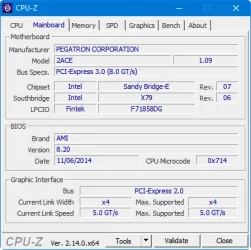
View attachment 128401 View attachment 128403View attachment 128402

It appears that I have two sticking points that I can't get around. I can enable Secure Boot in the BIOS, so that would fix one issue, but I can't fix the other two.

TPM 2.0
CPU Type
View attachment 128404

I was wondering if the software TPU 2.0 emulations would be good enough to make Windows happy?

Next, I have to address is the processor. While it's not the fastest on the planet, it's more than sufficient for standard desktop tasks. Obviously, I doubt I can fix that easily.

I see many mentions of RUFUS to bypass the requirements, however I also see folks anguishing about receiving security updates after they install using this method. I just need to know if that's realistic or that would be my path forward.

@gunrunnerjohn Simple, THIS is the EASIEST, and SIMPLEST, TROUBLE-FREE method to install Windows 11 on unsupported hardware . . . PERIOD.

It works EVERY TIME. How do I know? I've done it many times. Just follow the video.
Good luck! (y)

Install Windows 11 24H2 on Unsupported Hardware
www.youtube.com/watch?v=gKMB7WSEbMM&list=PLNQZzkZidAGC2fccgVLRz6Hpg79S6IpcH&index=20&t=179s
 

My Computers My Computers

  • At a glance

    Windows 11 Pro 25H2 (OS Build 26200.8246)Intel(R) Xeon(R) CPU E3-1535M v5 @ 2.90 Max T...64GB DDR4 ECC (Error-Correcting Code memory)NVIDIA Quadro M2000M 4GB GDDR5 & Intel(R) HD ...
    OS
    Windows 11 Pro 25H2 (OS Build 26200.8246)
    Computer type
    Laptop
    Manufacturer/Model
    Dell Precision Mobile Workstation
    CPU
    Intel(R) Xeon(R) CPU E3-1535M v5 @ 2.90 Max Turbo 3.80
    Motherboard
    00V5FJ
    Memory
    64GB DDR4 ECC (Error-Correcting Code memory)
    Graphics Card(s)
    NVIDIA Quadro M2000M 4GB GDDR5 & Intel(R) HD Graphics P530
    Sound Card
    Realtek Audio
    Monitor(s) Displays
    15.6" 4K UltraHD
    Screen Resolution
    4K UHD 3840x2160
    Hard Drives
    2TB Crucial NVMe & 2TB Seagate SATA
    PSU
    Dell 180W 19.5V-9.23A
    Keyboard
    Backlit
    Mouse
    Logitech G703 & Logitech G305
    Internet Speed
    WIFI: Intel(R) Wi-Fi 6E AX210NGW(Gig+) 160MHz Bands 2.4GHz(574Mbps), 5GHz 2.4Gbps, 6 GHz (160MHz) 2.4Gbps
    Browser
    Mozilla Firefox
    Antivirus
    Windows Defender/Microsoft Security + additional Anti Spyware, Anti Malware, etc.
    Other Info
    Thunderbolt 3
  • At a glance

    Windows 11 Pro 24H2 (OS Build 26100.6725)Dual (X2) Intel(R) Xeon(R) CPU E5-2690 0 @ 2....64GB DDR3 ECC (Error-Correcting Code memory)NVIDIA GeForce GTX 970 4GB of GDDR5
    Operating System
    Windows 11 Pro 24H2 (OS Build 26100.6725)
    Computer type
    PC/Desktop
    Manufacturer/Model
    Dell Precision Workstation T5610
    CPU
    Dual (X2) Intel(R) Xeon(R) CPU E5-2690 0 @ 2.90GHz Max Turbo 3.80
    Motherboard
    0WN7Y6
    Memory
    64GB DDR3 ECC (Error-Correcting Code memory)
    Graphics card(s)
    NVIDIA GeForce GTX 970 4GB of GDDR5
    Sound Card
    Realtek Audio & NVIDIA High Definition Audio
    Monitor(s) Displays
    3 Acer Monitors
    Screen Resolution
    1920x1080
    Hard Drives
    2 Seagate Barracuda ST2000DM008-2UB102 (RAID)
    Mouse
    Logitech G305
Please explain the "workaround" for the feature update. Do you have to do a complete install over the existing system, something like the old repair update?
You start an in-place upgrade by mounting an ISO or using an install USB and running the Setup.exe you'll find there from within your existing Windows. An in-place upgrade installs a new version of Windows, keeping all your apps, files, and most of your settings (exactly the same as Windows Update would do on a supported device).

For an unsupported device there are several workarounds. You could prepare an install USB using Rufus so that it will bypass the checks (Option One in this tutorial). I generally use Option Three (Bypass Windows 11 System Requirements for 24H2 In-place Upgrade using Command) which sets a few registry settings before you run Setup from an unmodified ISO.


My Computers My Computers

  • At a glance

    Windows 11 HomeAMD Athlon Silver 3050U8GBRadeon Graphics
    OS
    Windows 11 Home
    Computer type
    Laptop
    Manufacturer/Model
    Acer Aspire 3 A315-23-R9VY
    CPU
    AMD Athlon Silver 3050U
    Memory
    8GB
    Graphics Card(s)
    Radeon Graphics
    Monitor(s) Displays
    laptop screen
    Screen Resolution
    1366x768 native resolution, up to 2560x1440 with Radeon Virtual Super Resolution
    Hard Drives
    1TB Samsung EVO 870 SSD (from April 2026: 250GB EVO 850)
    Internet Speed
    150 Mbps
    Browser
    Edge, Firefox
    Antivirus
    Defender
    Other Info
    fully 'Windows 11 ready' laptop. Windows 10 C: partition migrated from my old unsupported 'main machine' then upgraded to 11. A test migration ran Insider builds for 2 months. When 11 was released on 5th October 2021 it was re-imaged back to 10 and was offered the upgrade in Windows Update on 20th October. Windows Update offered the 22H2 Feature Update on 20th September 2022. It got the 23H2 Feature Update on 4th November 2023 through Windows Update, 24H2 on 3rd October 2024 through Windows Update by setting the Target Release Version for 24H2, and 25H2 on 30th September 2025 through Windows Update by setting the Target Release Version for 25H2.

    UPDATE - 11 April 2026: due to mechanical deterioration this PC has been retired from active duty. The OS with all software and files has been migrated to my System Seven in 'Other systems' to carry on as my general purpose 'main machine'.

    I've now clean installed 25H2 and used Garlin's scripts to update Secure Boot to CA 2023 and revoke the PCA 2011 certificates. It's new role is to test secure boot issues.
  • At a glance

    Windows 11 ProIntel® Core™ i5-520M8GB(integrated graphics) Intel HD Graphics
    Operating System
    Windows 11 Pro
    Computer type
    Laptop
    Manufacturer/Model
    Dell Latitude E4310
    CPU
    Intel® Core™ i5-520M
    Motherboard
    0T6M8G
    Memory
    8GB
    Graphics card(s)
    (integrated graphics) Intel HD Graphics
    Screen Resolution
    1366x768
    Hard Drives
    500GB Crucial MX500 SSD
    Browser
    Firefox, Edge
    Antivirus
    Defender
    Other Info
    unsupported machine: Legacy bios, MBR, TPM 1.2, upgraded from W10 to W11 using W10/W11 hybrid install media workaround.

    In-place upgrade to 22H2 using ISO and a workaround.
    Feature Update to 23H2 by manually installing the Enablement Package.
    In-place upgrade to 24H2 using hybrid 23H2/24H2 install media.
    Upgraded to 25H2 by Enablement Package.

    Also running Insider Dev, and Canary builds and Windows 10 as native boot .vhdx.
  • My SYSTEM THREE is a Dell Latitude 5410, i7-10610U, 32GB RAM, 512GB NVMe ssd, supported device running Windows 11 Pro.

    My SYSTEM FOUR is a 2-in-1 convertible Lenovo Yoga 11e 20DA, Celeron N2930, 8GB RAM, 256GB ssd. Unsupported device: currently running Win10 Pro, plus Win11 Pro RTM and Insider Dev, Beta, and RP 24H2 as native boot vhdx.

    My SYSTEM FIVE is a Dell Latitude 3190 2-in-1, Pentium Silver N5030, 8GB RAM, 1TB NVMe ssd, supported device running Windows 11 Pro, plus Insider Beta, Dev, and Canary builds (and a few others) as a native boot .vhdx.

    My SYSTEM SIX is a Dell Latitude 5550, Core Ultra 7 165H, 64GB RAM, 1TB NVMe SSD, supported device, Windows 11 Pro 24H2, Hyper-V host machine. Updated to 25H2 on 30th September 2025.

    My SYSTEM SEVEN is a Lenovo Thinkpad T580, Intel Core i7-8650U, 16GB RAM, 512GB NVMe SSD + 2nd 512GB NVMe SSD, a supported device for Windows 11. This is my current general purpose 'main machine'. The installed Windows 11 Home from my System One has been migrated to this machine.

My Computers My Computers

  • At a glance

    Windows 11 Pro 25H2 (OS Build 26200.8246)Intel(R) Xeon(R) CPU E3-1535M v5 @ 2.90 Max T...64GB DDR4 ECC (Error-Correcting Code memory)NVIDIA Quadro M2000M 4GB GDDR5 & Intel(R) HD ...
    OS
    Windows 11 Pro 25H2 (OS Build 26200.8246)
    Computer type
    Laptop
    Manufacturer/Model
    Dell Precision Mobile Workstation
    CPU
    Intel(R) Xeon(R) CPU E3-1535M v5 @ 2.90 Max Turbo 3.80
    Motherboard
    00V5FJ
    Memory
    64GB DDR4 ECC (Error-Correcting Code memory)
    Graphics Card(s)
    NVIDIA Quadro M2000M 4GB GDDR5 & Intel(R) HD Graphics P530
    Sound Card
    Realtek Audio
    Monitor(s) Displays
    15.6" 4K UltraHD
    Screen Resolution
    4K UHD 3840x2160
    Hard Drives
    2TB Crucial NVMe & 2TB Seagate SATA
    PSU
    Dell 180W 19.5V-9.23A
    Keyboard
    Backlit
    Mouse
    Logitech G703 & Logitech G305
    Internet Speed
    WIFI: Intel(R) Wi-Fi 6E AX210NGW(Gig+) 160MHz Bands 2.4GHz(574Mbps), 5GHz 2.4Gbps, 6 GHz (160MHz) 2.4Gbps
    Browser
    Mozilla Firefox
    Antivirus
    Windows Defender/Microsoft Security + additional Anti Spyware, Anti Malware, etc.
    Other Info
    Thunderbolt 3
  • At a glance

    Windows 11 Pro 24H2 (OS Build 26100.6725)Dual (X2) Intel(R) Xeon(R) CPU E5-2690 0 @ 2....64GB DDR3 ECC (Error-Correcting Code memory)NVIDIA GeForce GTX 970 4GB of GDDR5
    Operating System
    Windows 11 Pro 24H2 (OS Build 26100.6725)
    Computer type
    PC/Desktop
    Manufacturer/Model
    Dell Precision Workstation T5610
    CPU
    Dual (X2) Intel(R) Xeon(R) CPU E5-2690 0 @ 2.90GHz Max Turbo 3.80
    Motherboard
    0WN7Y6
    Memory
    64GB DDR3 ECC (Error-Correcting Code memory)
    Graphics card(s)
    NVIDIA GeForce GTX 970 4GB of GDDR5
    Sound Card
    Realtek Audio & NVIDIA High Definition Audio
    Monitor(s) Displays
    3 Acer Monitors
    Screen Resolution
    1920x1080
    Hard Drives
    2 Seagate Barracuda ST2000DM008-2UB102 (RAID)
    Mouse
    Logitech G305
Is there anywhere that this is actually written down. I find trying to do this from a video is frustrating as you don't have anything to look at during the process. At least for me, a video is a poor way to deliver step-by-step instructions.

While I have a running Win10 system on this machine, I'm thinking of a clean install. My reasoning is that after a few days of being booted, the machine gets very slow to boot, and sometimes simply won't recover from sleep. A repair install some time back didn't seem to make any difference, so I'm thinking a fresh install is the way to go.
 

My Computers My Computers

  • At a glance

    Win 11 Pro 25H2, Build 26200.8894Intel Core i5 1450064GB DDR4GeForce RTX 4060
    OS
    Win 11 Pro 25H2, Build 26200.8894
    Computer type
    PC/Desktop
    Manufacturer/Model
    Home Brew
    CPU
    Intel Core i5 14500
    Motherboard
    Gigabyte B760M G P WIFI
    Memory
    64GB DDR4
    Graphics Card(s)
    GeForce RTX 4060
    Sound Card
    Chipset Realtek
    Monitor(s) Displays
    LG 45" Ultragear, Acer 24" 1080p
    Screen Resolution
    5120x1440, 1920x1080
    Hard Drives
    Crucial P310 2TB 2280 PCIe Gen4 3D NAND NVMe M.2 SSD (O/S)
    Silicon Power 2TB US75 NVMe PCIe Gen4 M.2 2280 SSD (backup)
    Crucial BX500 2TB 3D NAND (2nd backup)
    Seagate 4TB Ironwolf, rotating HDD archive files
    External off-line backup Drives: 2 NVMe 4TB drives in external enclosures
    PSU
    Thermaltake Toughpower GF3 750W
    Case
    LIAN LI LANCOOL 216 E-ATX PC Case
    Cooling
    Lots of fans!
    Keyboard
    Microsoft Comfort Curve 2000
    Mouse
    Logitech G305
    Internet Speed
    Verizon FiOS 1GB
    Browser
    Firefox
    Antivirus
    Malware Bytes & Windows Defender Security
  • At a glance

    Win 11 Pro 25H2, Build 26200.8894Intel Core i5 1440032GB DDR5Intel 700 Embedded GPU
    Operating System
    Win 11 Pro 25H2, Build 26200.8894
    Computer type
    PC/Desktop
    Manufacturer/Model
    Home Brew
    CPU
    Intel Core i5 14400
    Motherboard
    Gigabyte B760M DS3H AX
    Memory
    32GB DDR5
    Graphics card(s)
    Intel 700 Embedded GPU
    Sound Card
    Realtek Embedded
    Monitor(s) Displays
    27" HP 1080p
    Screen Resolution
    1920x1080
    Hard Drives
    Crucial P310 2TB 2280 PCIe Gen4 eD NAND PCIe SSD
    Samsung EVO 990 2TB NVMe Gen4 SSD
    Samsung 2TB SATA SSD
    PSU
    Thermaltake Smart BM3 650W
    Case
    Okinos Micro ATX Case
    Cooling
    Fans
    Keyboard
    Microsoft Comfort Curve 2000
    Mouse
    Logitech G305
    Internet Speed
    Verizon FiOS 1GB
    Browser
    Firefox
    Antivirus
    Malware Bytes & Windows Defender Security
  • Nimo N171 17" Laptop, (Intel i3-1215U, 16GB RAM, 2TB NVMe, Win11 Pro)
    Acemagic Vista Mini PC V1 (Intel N150, 16GB RAM, 1TB NVMe, Win11 Pro)
    HP ENVY h8-1540t, (24GB RAM, 2TB SSD, 2TB HDD, Win11 Pro)
I'm thinking of a clean install
If you have issues in 10, that's smart. I suggest making a system image first, but make sure you use imaging software that will allow you to mount your image so you can copy personal files from the image. Or at the very least backup your personal files first.
 

My Computers My Computers

  • At a glance

    Windows 11 Pro 25H2 26200.8875i9-10900 10 core 20 threads32 gbnone-Intel UHD Graphics 630
    OS
    Windows 11 Pro 25H2 26200.8875
    Computer type
    PC/Desktop
    Manufacturer/Model
    Dell Optiplex 7080
    CPU
    i9-10900 10 core 20 threads
    Motherboard
    DELL 0J37VM
    Memory
    32 gb
    Graphics Card(s)
    none-Intel UHD Graphics 630
    Sound Card
    Integrated Realtek
    Monitor(s) Displays
    Benq 27
    Screen Resolution
    2560x1440
    Hard Drives
    2x1tb Solidigm m.2 nvme /External drives 512gb Samsung m.2 sata+2tb Kingston m2.nvme
    PSU
    500w
    Case
    MT
    Cooling
    Dell Premium
    Keyboard
    Logitech wired
    Mouse
    Logitech wireless
    Internet Speed
    so slow I'm too embarrassed to tell
    Browser
    #1 Edge #2 Firefox
    Antivirus
    Defender+MWB Premium
  • At a glance

    Windows 11 Pro 24H2 26200.8875AMD Ryzen 7 6800U32 gbintegrated
    Operating System
    Windows 11 Pro 24H2 26200.8875
    Computer type
    PC/Desktop
    Manufacturer/Model
    Beelink Mini PC SER5
    CPU
    AMD Ryzen 7 6800U
    Memory
    32 gb
    Graphics card(s)
    integrated
    Sound Card
    integrated
    Monitor(s) Displays
    Benq 27
    Screen Resolution
    2560x1440
    Hard Drives
    1TB Crucial nvme
    Keyboard
    Logitech wired
    Mouse
    Logitech wireless
    Internet Speed
    still too embarrassed to tell
    Browser
    Firefox
    Antivirus
    Defender
    Other Info
    System 3 is non compliant Dell 9020 i7-4770/24gb ram Win11 PRO 26200.8875
If you have issues in 10, that's smart. I suggest making a system image first, but make sure you use imaging software that will allow you to mount your image so you can copy personal files from the image. Or at the very least backup your personal files first.
I have multiple levels of backup, including all my personal files. All my data is on a separate logical drive for easy backup, and I also have automated backup of select configuration files that reside on the Windows drive.

My real issue is to get this machine running Windows 11. I might be better off to treat it to a new motherboard and processor, that would solve all my problems.
 

My Computers My Computers

  • At a glance

    Win 11 Pro 25H2, Build 26200.8894Intel Core i5 1450064GB DDR4GeForce RTX 4060
    OS
    Win 11 Pro 25H2, Build 26200.8894
    Computer type
    PC/Desktop
    Manufacturer/Model
    Home Brew
    CPU
    Intel Core i5 14500
    Motherboard
    Gigabyte B760M G P WIFI
    Memory
    64GB DDR4
    Graphics Card(s)
    GeForce RTX 4060
    Sound Card
    Chipset Realtek
    Monitor(s) Displays
    LG 45" Ultragear, Acer 24" 1080p
    Screen Resolution
    5120x1440, 1920x1080
    Hard Drives
    Crucial P310 2TB 2280 PCIe Gen4 3D NAND NVMe M.2 SSD (O/S)
    Silicon Power 2TB US75 NVMe PCIe Gen4 M.2 2280 SSD (backup)
    Crucial BX500 2TB 3D NAND (2nd backup)
    Seagate 4TB Ironwolf, rotating HDD archive files
    External off-line backup Drives: 2 NVMe 4TB drives in external enclosures
    PSU
    Thermaltake Toughpower GF3 750W
    Case
    LIAN LI LANCOOL 216 E-ATX PC Case
    Cooling
    Lots of fans!
    Keyboard
    Microsoft Comfort Curve 2000
    Mouse
    Logitech G305
    Internet Speed
    Verizon FiOS 1GB
    Browser
    Firefox
    Antivirus
    Malware Bytes & Windows Defender Security
  • At a glance

    Win 11 Pro 25H2, Build 26200.8894Intel Core i5 1440032GB DDR5Intel 700 Embedded GPU
    Operating System
    Win 11 Pro 25H2, Build 26200.8894
    Computer type
    PC/Desktop
    Manufacturer/Model
    Home Brew
    CPU
    Intel Core i5 14400
    Motherboard
    Gigabyte B760M DS3H AX
    Memory
    32GB DDR5
    Graphics card(s)
    Intel 700 Embedded GPU
    Sound Card
    Realtek Embedded
    Monitor(s) Displays
    27" HP 1080p
    Screen Resolution
    1920x1080
    Hard Drives
    Crucial P310 2TB 2280 PCIe Gen4 eD NAND PCIe SSD
    Samsung EVO 990 2TB NVMe Gen4 SSD
    Samsung 2TB SATA SSD
    PSU
    Thermaltake Smart BM3 650W
    Case
    Okinos Micro ATX Case
    Cooling
    Fans
    Keyboard
    Microsoft Comfort Curve 2000
    Mouse
    Logitech G305
    Internet Speed
    Verizon FiOS 1GB
    Browser
    Firefox
    Antivirus
    Malware Bytes & Windows Defender Security
  • Nimo N171 17" Laptop, (Intel i3-1215U, 16GB RAM, 2TB NVMe, Win11 Pro)
    Acemagic Vista Mini PC V1 (Intel N150, 16GB RAM, 1TB NVMe, Win11 Pro)
    HP ENVY h8-1540t, (24GB RAM, 2TB SSD, 2TB HDD, Win11 Pro)
The future use of Windows 11 on unsupported hardware could change at any time. One thing with MS is they are not consistent.
I think that exactly states my real concern! I may be better in biting the bullet for a cheap MB/CPU upgrade that gives me true Win11 compatibility.
 

My Computers My Computers

  • At a glance

    Win 11 Pro 25H2, Build 26200.8894Intel Core i5 1450064GB DDR4GeForce RTX 4060
    OS
    Win 11 Pro 25H2, Build 26200.8894
    Computer type
    PC/Desktop
    Manufacturer/Model
    Home Brew
    CPU
    Intel Core i5 14500
    Motherboard
    Gigabyte B760M G P WIFI
    Memory
    64GB DDR4
    Graphics Card(s)
    GeForce RTX 4060
    Sound Card
    Chipset Realtek
    Monitor(s) Displays
    LG 45" Ultragear, Acer 24" 1080p
    Screen Resolution
    5120x1440, 1920x1080
    Hard Drives
    Crucial P310 2TB 2280 PCIe Gen4 3D NAND NVMe M.2 SSD (O/S)
    Silicon Power 2TB US75 NVMe PCIe Gen4 M.2 2280 SSD (backup)
    Crucial BX500 2TB 3D NAND (2nd backup)
    Seagate 4TB Ironwolf, rotating HDD archive files
    External off-line backup Drives: 2 NVMe 4TB drives in external enclosures
    PSU
    Thermaltake Toughpower GF3 750W
    Case
    LIAN LI LANCOOL 216 E-ATX PC Case
    Cooling
    Lots of fans!
    Keyboard
    Microsoft Comfort Curve 2000
    Mouse
    Logitech G305
    Internet Speed
    Verizon FiOS 1GB
    Browser
    Firefox
    Antivirus
    Malware Bytes & Windows Defender Security
  • At a glance

    Win 11 Pro 25H2, Build 26200.8894Intel Core i5 1440032GB DDR5Intel 700 Embedded GPU
    Operating System
    Win 11 Pro 25H2, Build 26200.8894
    Computer type
    PC/Desktop
    Manufacturer/Model
    Home Brew
    CPU
    Intel Core i5 14400
    Motherboard
    Gigabyte B760M DS3H AX
    Memory
    32GB DDR5
    Graphics card(s)
    Intel 700 Embedded GPU
    Sound Card
    Realtek Embedded
    Monitor(s) Displays
    27" HP 1080p
    Screen Resolution
    1920x1080
    Hard Drives
    Crucial P310 2TB 2280 PCIe Gen4 eD NAND PCIe SSD
    Samsung EVO 990 2TB NVMe Gen4 SSD
    Samsung 2TB SATA SSD
    PSU
    Thermaltake Smart BM3 650W
    Case
    Okinos Micro ATX Case
    Cooling
    Fans
    Keyboard
    Microsoft Comfort Curve 2000
    Mouse
    Logitech G305
    Internet Speed
    Verizon FiOS 1GB
    Browser
    Firefox
    Antivirus
    Malware Bytes & Windows Defender Security
  • Nimo N171 17" Laptop, (Intel i3-1215U, 16GB RAM, 2TB NVMe, Win11 Pro)
    Acemagic Vista Mini PC V1 (Intel N150, 16GB RAM, 1TB NVMe, Win11 Pro)
    HP ENVY h8-1540t, (24GB RAM, 2TB SSD, 2TB HDD, Win11 Pro)
Is there anywhere that this is actually written down. I find trying to do this from a video is frustrating as you don't have anything to look at during the process. At least for me, a video is a poor way to deliver step-by-step instructions.

While I have a running Win10 system on this machine, I'm thinking of a clean install. My reasoning is that after a few days of being booted, the machine gets very slow to boot, and sometimes simply won't recover from sleep. A repair install some time back didn't seem to make any difference, so I'm thinking a fresh install is the way to go.

@gunrunnerjohn Yes, jensd_be also has a website. Here you go.


My Computers My Computers

  • At a glance

    Windows 11 Pro 25H2 (OS Build 26200.8246)Intel(R) Xeon(R) CPU E3-1535M v5 @ 2.90 Max T...64GB DDR4 ECC (Error-Correcting Code memory)NVIDIA Quadro M2000M 4GB GDDR5 & Intel(R) HD ...
    OS
    Windows 11 Pro 25H2 (OS Build 26200.8246)
    Computer type
    Laptop
    Manufacturer/Model
    Dell Precision Mobile Workstation
    CPU
    Intel(R) Xeon(R) CPU E3-1535M v5 @ 2.90 Max Turbo 3.80
    Motherboard
    00V5FJ
    Memory
    64GB DDR4 ECC (Error-Correcting Code memory)
    Graphics Card(s)
    NVIDIA Quadro M2000M 4GB GDDR5 & Intel(R) HD Graphics P530
    Sound Card
    Realtek Audio
    Monitor(s) Displays
    15.6" 4K UltraHD
    Screen Resolution
    4K UHD 3840x2160
    Hard Drives
    2TB Crucial NVMe & 2TB Seagate SATA
    PSU
    Dell 180W 19.5V-9.23A
    Keyboard
    Backlit
    Mouse
    Logitech G703 & Logitech G305
    Internet Speed
    WIFI: Intel(R) Wi-Fi 6E AX210NGW(Gig+) 160MHz Bands 2.4GHz(574Mbps), 5GHz 2.4Gbps, 6 GHz (160MHz) 2.4Gbps
    Browser
    Mozilla Firefox
    Antivirus
    Windows Defender/Microsoft Security + additional Anti Spyware, Anti Malware, etc.
    Other Info
    Thunderbolt 3
  • At a glance

    Windows 11 Pro 24H2 (OS Build 26100.6725)Dual (X2) Intel(R) Xeon(R) CPU E5-2690 0 @ 2....64GB DDR3 ECC (Error-Correcting Code memory)NVIDIA GeForce GTX 970 4GB of GDDR5
    Operating System
    Windows 11 Pro 24H2 (OS Build 26100.6725)
    Computer type
    PC/Desktop
    Manufacturer/Model
    Dell Precision Workstation T5610
    CPU
    Dual (X2) Intel(R) Xeon(R) CPU E5-2690 0 @ 2.90GHz Max Turbo 3.80
    Motherboard
    0WN7Y6
    Memory
    64GB DDR3 ECC (Error-Correcting Code memory)
    Graphics card(s)
    NVIDIA GeForce GTX 970 4GB of GDDR5
    Sound Card
    Realtek Audio & NVIDIA High Definition Audio
    Monitor(s) Displays
    3 Acer Monitors
    Screen Resolution
    1920x1080
    Hard Drives
    2 Seagate Barracuda ST2000DM008-2UB102 (RAID)
    Mouse
    Logitech G305
your CPU supports SSE4.2 so you could use Rufus to burn the Windows 11 ISO as a bootable USB.
with that you can install Windows 11 directly or use the setup.exe file within the Rufus USB to upgrade.
it would also help if you did enable secure boot in the BIOS.

but it would be a better idea to have a clean install.
please ensure you back up your data.

you can get Rufus 4.6 from this link but it is also available from the MS store.

when burning the bootable USB a menu will appear before starting the burn. please make sure you tick all the boxes and fill in your account user name.

best of luck, Steve ..

I’m with Steve. My opinion is that you save a lot of mucking around by creating the install media using RUFUS.

Like I said, just my opinion.
 

My Computers My Computers

  • At a glance

    Windows 11 Pro 25H2 Build 26200.8894Intel(R) Core(TM) i7-4770K CPU @ 3.50GHz32.0 GB of I forget and the box is in storage.Gigabyte nVidia GeForce GTX 1660 Super OC 6GB
    OS
    Windows 11 Pro 25H2 Build 26200.8894
    Computer type
    PC/Desktop
    Manufacturer/Model
    Sin-built 2013
    CPU
    Intel(R) Core(TM) i7-4770K CPU @ 3.50GHz
    Motherboard
    ASUS ROG Maximus VI Formula
    Memory
    32.0 GB of I forget and the box is in storage.
    Graphics Card(s)
    Gigabyte nVidia GeForce GTX 1660 Super OC 6GB
    Sound Card
    ROG SupremeFX Formula 8-Channel High Definition Audio
    Monitor(s) Displays
    5 x LG 25MS500-B - 1 x 24MK430H-B - 1 x Wacom Pro 22" Touch Screen Tablet
    Screen Resolution
    All over the place
    Hard Drives
    Too many to list. OS on Samsung 1TB 870 QVO SATA
    PSU
    Silverstone 1500
    Case
    NZXT Phantom 820 Full-Tower Case
    Cooling
    Noctua NH-D15 Elite Class Dual Tower CPU Cooler / 6 x EziDIY 120mm / 2 x Corsair 140mm somethings / 1 x 140mm Thermaltake something / 2 x 200mm Corsair.
    Keyboard
    Corsair K95 / Logitech diNovo Edge Wireless
    Mouse
    Logitech: G402 / G502 / Mx Masters / Mx Air Cordless
    Internet Speed
    2000/500Mbps
    Browser
    All sorts
    Antivirus
    Kaspersky Premium
    Other Info
    ㅤㅤㅤㅤㅤㅤㅤㅤㅤㅤㅤㅤㅤㅤㅤㅤㅤㅤㅤㅤㅤㅤㅤㅤㅤㅤㅤㅤㅤㅤㅤㅤㅤㅤㅤㅤㅤㅤㅤㅤ⠀⠀⠀⠀⠀⠀⠀⠀⠀⠀
    TP-Link BE9300 WiFi 7 Bluetooth 5.4 (Archer TBE550E)
    TP-Link TX201 V1 2.5GB Lan

    Grandstream HT812 - VoIP
    ASUS DSL-AX82U - Mesh
    ASUS RT-AC68U - Mesh
    ASUS RT-BE88U Router

    Brother MFC-L2880DW Printer

    I’m on a horse.
  • At a glance

    Windows 11 Pro 25H2 Build 26200.8894 (Wifes)13th Generation Intel® Core™ i5-1340P Process...16GB LPDDR5-52001x Intel® Iris® Xe Graphics
    Operating System
    Windows 11 Pro 25H2 Build 26200.8894 (Wifes)
    Computer type
    Laptop
    Manufacturer/Model
    LENOVO Yoga 7 14IRL8 - Type 82YL
    CPU
    13th Generation Intel® Core™ i5-1340P Processor(Core™ i5-1340P)
    Memory
    16GB LPDDR5-5200
    Graphics card(s)
    1x Intel® Iris® Xe Graphics
    Sound Card
    Optimized with Dolby Atmos®
    Screen Resolution
    QHD 2880 x 1800 OLED
    Hard Drives
    M.2 512 GB SSD PCIe
    Mouse
    Logiteck MX Master 3S
    Internet Speed
    2000/500
    Antivirus
    Defender / Malwarebytes
    Other Info
    …still on a horse.


    Wireless Network: Wi-Fi 6E 2x2 AX; Bluetooth® 5.1 or above
    Ports: 1x 1 Novo button; 2 in 1 Audio Combo jack; Micro SD Card Reader; HDMI 1.4b; 2 x USB Type-C (TBT4)
    USB 3.2 Gen 2 DP 1.4a
    PD 3.0); 1 x USB 3.2 Gen1 Type A
    Camera
    1x 1080P FHD IR/RGB Hybrid with Privacy Shutter and Dual Array Microphone
    Graphics
    1x Intel® Iris® Xe Graphics
    Monitor
    14" WUXGA
    Form Factor
    Convertible Notebook
  • Windows 11 Pro 25H2 Build 26200.8894 (Wifes)

    Yoga 7 2-in-1 14IML9 - Type 83DJ

    Processor: Intel® Core™ Ultra 7 155H Processor(Core™ Ultra 7 155H)

    Memory: 32GB LPD5X-7467

    Hard Drive: 1 TB SSD PCIe

    Wireless Network: 1x Wi-Fi 6E 2x2 AX; Bluetooth® 5.1 or above

    Ports: 1 x HDMI 2.1 TMDS; 1 x Novo Button; 1 x Combo Audio Jack
    2 x USB-C (USB 4.0)
    1 x USB-A 3.2 Gen 1

    Camera: 1080P FHD IR Hybrid with Dual Microphone

    Graphics: Intel® Arc™ Graphics

    Monitor: 14" 2.8K

    ...Where's my horse?
find trying to do this from a video is frustrating as you don't have anything to look at during the process. At least for me, a video is a poor way to deliver step-by-step instructions.
Totally agree. I wish people would take the trouble to write out instructions instead of doing a video,
 

My Computer My Computer

At a glance

Windows 11 2H25AMD 9900X64 GBAMD 9070 XT
OS
Windows 11 2H25
Computer type
PC/Desktop
Manufacturer/Model
DIY
CPU
AMD 9900X
Motherboard
MSI X870E Carbon
Memory
64 GB
Graphics Card(s)
AMD 9070 XT
Sound Card
built-in
Monitor(s) Displays
Dell 24"
Hard Drives
Sabrent 1 TB NVMe, 4 x SSD (need to check models), 4 x 3.5" HDD, 8-16 TB, all WD
PSU
Seasonic 850
Case
Fractal Design North XL (which I likw)
Cooling
Corsair AIO for CPU, fans for case
Keyboard
Das Keyboard 4
Mouse
Corsair M65 (white)
Internet Speed
1 TB download
Browser
Firefox
Antivirus
Bitdefender
Other Info
Also have Lenovo T14S laptop (me) and Lenovo Slim 71 (wife)
@glasskuter signs his messages with
If I'm off the rails today, come back tomorrow. I'll make more sense once my memory pill kicks in....if I remember to take it.

Maybe you need one of these instead of a memory pill.


My Computer My Computer

At a glance

Windows 11 2H25AMD 9900X64 GBAMD 9070 XT
OS
Windows 11 2H25
Computer type
PC/Desktop
Manufacturer/Model
DIY
CPU
AMD 9900X
Motherboard
MSI X870E Carbon
Memory
64 GB
Graphics Card(s)
AMD 9070 XT
Sound Card
built-in
Monitor(s) Displays
Dell 24"
Hard Drives
Sabrent 1 TB NVMe, 4 x SSD (need to check models), 4 x 3.5" HDD, 8-16 TB, all WD
PSU
Seasonic 850
Case
Fractal Design North XL (which I likw)
Cooling
Corsair AIO for CPU, fans for case
Keyboard
Das Keyboard 4
Mouse
Corsair M65 (white)
Internet Speed
1 TB download
Browser
Firefox
Antivirus
Bitdefender
Other Info
Also have Lenovo T14S laptop (me) and Lenovo Slim 71 (wife)
I find trying to do this from a video is frustrating as you don't have anything to look at during the process. At least for me, a video is a poor way to deliver step-by-step instructions.
Totally agree. I wish people would take the trouble to write out instructions instead of doing a video,

Yes. I find videos helpful sometimes, but only when accompanied with text equivalent.

A video does nothing in Google to attract new people, but text fixes do. Rarely (if ever) have I seen a Google result from here that focus on a video fix. If one can make a video one can create a copy paste text interpretation. Perhaps posting them together would be more helpful. Actually I’ll rephrase that, it would be more helpful. The monetized issue bugs me also. Give freely.
 

My Computers My Computers

  • At a glance

    Windows 11 Pro 25H2 Build 26200.8894Intel(R) Core(TM) i7-4770K CPU @ 3.50GHz32.0 GB of I forget and the box is in storage.Gigabyte nVidia GeForce GTX 1660 Super OC 6GB
    OS
    Windows 11 Pro 25H2 Build 26200.8894
    Computer type
    PC/Desktop
    Manufacturer/Model
    Sin-built 2013
    CPU
    Intel(R) Core(TM) i7-4770K CPU @ 3.50GHz
    Motherboard
    ASUS ROG Maximus VI Formula
    Memory
    32.0 GB of I forget and the box is in storage.
    Graphics Card(s)
    Gigabyte nVidia GeForce GTX 1660 Super OC 6GB
    Sound Card
    ROG SupremeFX Formula 8-Channel High Definition Audio
    Monitor(s) Displays
    5 x LG 25MS500-B - 1 x 24MK430H-B - 1 x Wacom Pro 22" Touch Screen Tablet
    Screen Resolution
    All over the place
    Hard Drives
    Too many to list. OS on Samsung 1TB 870 QVO SATA
    PSU
    Silverstone 1500
    Case
    NZXT Phantom 820 Full-Tower Case
    Cooling
    Noctua NH-D15 Elite Class Dual Tower CPU Cooler / 6 x EziDIY 120mm / 2 x Corsair 140mm somethings / 1 x 140mm Thermaltake something / 2 x 200mm Corsair.
    Keyboard
    Corsair K95 / Logitech diNovo Edge Wireless
    Mouse
    Logitech: G402 / G502 / Mx Masters / Mx Air Cordless
    Internet Speed
    2000/500Mbps
    Browser
    All sorts
    Antivirus
    Kaspersky Premium
    Other Info
    ㅤㅤㅤㅤㅤㅤㅤㅤㅤㅤㅤㅤㅤㅤㅤㅤㅤㅤㅤㅤㅤㅤㅤㅤㅤㅤㅤㅤㅤㅤㅤㅤㅤㅤㅤㅤㅤㅤㅤㅤ⠀⠀⠀⠀⠀⠀⠀⠀⠀⠀
    TP-Link BE9300 WiFi 7 Bluetooth 5.4 (Archer TBE550E)
    TP-Link TX201 V1 2.5GB Lan

    Grandstream HT812 - VoIP
    ASUS DSL-AX82U - Mesh
    ASUS RT-AC68U - Mesh
    ASUS RT-BE88U Router

    Brother MFC-L2880DW Printer

    I’m on a horse.
  • At a glance

    Windows 11 Pro 25H2 Build 26200.8894 (Wifes)13th Generation Intel® Core™ i5-1340P Process...16GB LPDDR5-52001x Intel® Iris® Xe Graphics
    Operating System
    Windows 11 Pro 25H2 Build 26200.8894 (Wifes)
    Computer type
    Laptop
    Manufacturer/Model
    LENOVO Yoga 7 14IRL8 - Type 82YL
    CPU
    13th Generation Intel® Core™ i5-1340P Processor(Core™ i5-1340P)
    Memory
    16GB LPDDR5-5200
    Graphics card(s)
    1x Intel® Iris® Xe Graphics
    Sound Card
    Optimized with Dolby Atmos®
    Screen Resolution
    QHD 2880 x 1800 OLED
    Hard Drives
    M.2 512 GB SSD PCIe
    Mouse
    Logiteck MX Master 3S
    Internet Speed
    2000/500
    Antivirus
    Defender / Malwarebytes
    Other Info
    …still on a horse.


    Wireless Network: Wi-Fi 6E 2x2 AX; Bluetooth® 5.1 or above
    Ports: 1x 1 Novo button; 2 in 1 Audio Combo jack; Micro SD Card Reader; HDMI 1.4b; 2 x USB Type-C (TBT4)
    USB 3.2 Gen 2 DP 1.4a
    PD 3.0); 1 x USB 3.2 Gen1 Type A
    Camera
    1x 1080P FHD IR/RGB Hybrid with Privacy Shutter and Dual Array Microphone
    Graphics
    1x Intel® Iris® Xe Graphics
    Monitor
    14" WUXGA
    Form Factor
    Convertible Notebook
  • Windows 11 Pro 25H2 Build 26200.8894 (Wifes)

    Yoga 7 2-in-1 14IML9 - Type 83DJ

    Processor: Intel® Core™ Ultra 7 155H Processor(Core™ Ultra 7 155H)

    Memory: 32GB LPD5X-7467

    Hard Drive: 1 TB SSD PCIe

    Wireless Network: 1x Wi-Fi 6E 2x2 AX; Bluetooth® 5.1 or above

    Ports: 1 x HDMI 2.1 TMDS; 1 x Novo Button; 1 x Combo Audio Jack
    2 x USB-C (USB 4.0)
    1 x USB-A 3.2 Gen 1

    Camera: 1080P FHD IR Hybrid with Dual Microphone

    Graphics: Intel® Arc™ Graphics

    Monitor: 14" 2.8K

    ...Where's my horse?
Back
Top Bottom