- Local time
- 2:34 AM
- Posts
- 51
- OS
- Windows 11 Pro For Workstations 25H2
Hello all,
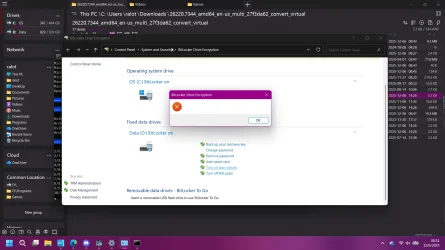
I cant get bitlocker auto-unlock to enable for my data drive. I get this blank dialog box popup when I try.
I've tried the common DISM and SFC commands to make sure all the system files are intact. It came up with one file to repair, but the CBS log listed it as the Bluetooth driver file and it did fix it, but it wouldnt have anything to do with it.
I also tried a repair install of Windows and it made no difference. This happened on the Dev build of 26220.7271. I did a clean install of Windows due to having some other issues, and this started after that. I thought maybe some files got botched during the install so I tried a repair install to see if it would fix it. No dice. Last night, my system updated to the newest Dev build so I thought I would check it again after that, and it still throws the same error.
I have bitlocker enabled on both my OS drive and Data drive. Anyone have any ideas what is causing this and what I can do? Im thinking its probably a bug in the dev flights but not sure.
I cant get bitlocker auto-unlock to enable for my data drive. I get this blank dialog box popup when I try.
I've tried the common DISM and SFC commands to make sure all the system files are intact. It came up with one file to repair, but the CBS log listed it as the Bluetooth driver file and it did fix it, but it wouldnt have anything to do with it.
I also tried a repair install of Windows and it made no difference. This happened on the Dev build of 26220.7271. I did a clean install of Windows due to having some other issues, and this started after that. I thought maybe some files got botched during the install so I tried a repair install to see if it would fix it. No dice. Last night, my system updated to the newest Dev build so I thought I would check it again after that, and it still throws the same error.
I have bitlocker enabled on both my OS drive and Data drive. Anyone have any ideas what is causing this and what I can do? Im thinking its probably a bug in the dev flights but not sure.
- Windows Build/Version
- Windows 11 Pro for Workstations 26220.7344
My Computer
At a glance
Windows 11 Pro For Workstations 25H2Intel Xeon W-10855M @ 4.9Ghz32GB OWC ECC DDR4-2666 RAMiGPU: Intel UHD Graphics P630 | Discrete GPU:...
- OS
- Windows 11 Pro For Workstations 25H2
- Computer type
- Laptop
- Manufacturer/Model
- Dell Precision 7550
- CPU
- Intel Xeon W-10855M @ 4.9Ghz
- Memory
- 32GB OWC ECC DDR4-2666 RAM
- Graphics Card(s)
- iGPU: Intel UHD Graphics P630 | Discrete GPU: NVIDIA Quadro RTX 3000 6GB
- Sound Card
- Realtek Audio
- Monitor(s) Displays
- Integrated Ultrasharp
- Screen Resolution
- 1920*1080
- Hard Drives
- OS: Samsung 980 PRO 500GB NVMe
Data: Western Digital Black SN750 1TB
- PSU
- Dell 180W
- Internet Speed
- 1Gbps
- Browser
- Edge Chromium
- Antivirus
- Microsoft Defender
- Other Info
- OpenSUSE Leap 16 VM
Zorin OS 18 VM