BitLocker automatically enabled after new Win 11 install?


JohnW63

Member
Local time
12:14 AM
Posts
9
OS
Windows 11
I just upgraded my brother's PC with a new M.2 terabyte drive and Windows 11 pro, but left his Windows 10 drive in place so he could transfer files. I did have to change the BIOS settings to get Win 11 to install. He told me he needed to boot back into Win 10 to run a program he doesn't have on Win 11 and when I changed the boot choice, and let the computer boot up I got a blue screen telling me BitLocker would require a key. Since we made sure that the check box options were turned off and did not create an MS account during this fresh install on a new drive, this was a big surprise. I really don't want BitLocker running, but it has already encrypted both hard drives. I found some threads about disabling BitLocker, which I will follow when I am back at my brother's house. What I would like to know is how would he be able to get a Key for Bitlocker, if we never asked to have it enabled or logged into a MS account? If it ever gets enabled again and we need to do something that requires the key, I want to have it stored somewhere. Lastly, if I just go into the settings and disable BitLocker, will it automatically un-encrypt both drives?

For now, he's just using Win 11 until I can get this figured out.
 

My Computer

System One

  • OS
    Windows 11
    Computer type
    PC/Desktop
    Manufacturer/Model
    User built Gigabyte
    CPU
    AMD Ryzen
    Motherboard
    Gigabyte Auros 850 wifi 6
    Memory
    32 Gig
    Graphics Card(s)
    Swft 210
    Sound Card
    SoundBlaster ZxR
if you open the control panel > disk encryption
it will give you the options to back up the encryption code
either to a outlook account or to file on the computer

yes you can disable bitlocker and it will then just un-encrypt the drive
settings > privacy and security > disc encryption

you can also disable the bitlocker service in Windows services

best of luck Steve ..
 

My Computers

System One System Two

  • OS
    Windows 11 Home
    Computer type
    PC/Desktop
    Manufacturer/Model
    HP 24" AiO
    CPU
    Ryzen 7 5825u
    Motherboard
    HP
    Memory
    64GB DDR4 3200
    Graphics Card(s)
    Ryzen 7 5825u
    Sound Card
    RealTek
    Monitor(s) Displays
    24" HP AiO
    Screen Resolution
    1920 x 1080 @60 Hz
    Hard Drives
    1TB WD Blue SN580 M2 SSD Partitioned.
    2x 1TB USB HDD External Backup/Storage.
    PSU
    90W external power brick
    Case
    24" All in One
    Cooling
    Default Air Cooling
    Keyboard
    HP WiFi UK extended
    Mouse
    HP WiFi 3 Button
    Internet Speed
    1GB full fibre
    Browser
    Edge & Firefox
    Antivirus
    AVG Internet Security/Windows Defender
    Other Info
    Mainly Open Source Software
  • Operating System
    Ubuntu 22.04.5 LTS
    Computer type
    Laptop
    Manufacturer/Model
    Dell 13" Latitude 2017
    CPU
    i5 7200u
    Motherboard
    Dell
    Memory
    16GB DDR4
    Graphics card(s)
    Intel
    Sound Card
    Intel
    Monitor(s) Displays
    13" Dell Laptop
    Hard Drives
    250GB Crucial 2.5" SSD
    Mouse
    Generic WiFi 3 button
    Internet Speed
    WiFi only
    Browser
    Firefox
    Antivirus
    ClamAV TK
    Other Info
    Mainly Open Source Software
To be clear, my brother let me know he needed to boot into Win 10 a few weeks later, not at the time we installed Win 11.
 

My Computer

System One

  • OS
    Windows 11
    Computer type
    PC/Desktop
    Manufacturer/Model
    User built Gigabyte
    CPU
    AMD Ryzen
    Motherboard
    Gigabyte Auros 850 wifi 6
    Memory
    32 Gig
    Graphics Card(s)
    Swft 210
    Sound Card
    SoundBlaster ZxR
Thanks Steve!
 

My Computer

System One

  • OS
    Windows 11
    Computer type
    PC/Desktop
    Manufacturer/Model
    User built Gigabyte
    CPU
    AMD Ryzen
    Motherboard
    Gigabyte Auros 850 wifi 6
    Memory
    32 Gig
    Graphics Card(s)
    Swft 210
    Sound Card
    SoundBlaster ZxR
did not create an MS account during this fresh install on a new drive......Since we made sure that the check box options were turned off

To be able to tell you why it happened, I have too many questions about your post to jump out there and give a succinct answer and each of these questions make a difference.

When you say "made sure that check box" was turned off, do you mean that you installed 11 on this new drive using the Rufus method? That be the case, the bitlocker box would have had to been checked, not unchecked, when you created the Rufus media.

Also am I correct to assume you use Home and are referring to device encryption rather than standard bitlocker? Home automatically encrypts the drives if certain hardware is detected and it encrypts ALL drives connected at time of install.
We know nothing about the form factor of the computer involved. (It matters if it is a laptop or all-in-one) You list Gigabyte in your specs but is that your specs or your brothers?

It would have been prudent to completely disconnect the Windows 10 drive while installing Windows 11 on the second drive. That way any issues with encryption would not have affected the W10 drive. (FYI as an added side note. You said you left the W10 drive in place during the install. By not disconnecting the W10 drive during install, more than likely the Win11 BCD data was written to the WW10 drive which is not ideal. If that W10 drive is ever disconnected, W11 will not boot.)

What I would like to know is how would he be able to get a Key for Bitlocker, if we never asked to have it enabled or logged into a MS account? If it ever gets enabled again and we need to do something that requires the key, I want to have it stored somewhere. Lastly, if I just go into the settings and disable BitLocker, will it automatically un-encrypt both drives?
1) He can not get a key after the fact.
2) If it ever gets enabled again the key would be different.
3)Assuming he uses Home and has device encryption, once you disable it, all drives will be de-crypted.
 

My Computers

System One System Two

  • OS
    Windows 11 Pro 25H2
    Computer type
    PC/Desktop
    Manufacturer/Model
    Dell Optiplex 7080
    CPU
    i9-10900 10 core 20 threads
    Motherboard
    DELL 0J37VM
    Memory
    32 gb
    Graphics Card(s)
    none-Intel UHD Graphics 630
    Sound Card
    Integrated Realtek
    Monitor(s) Displays
    Benq 27
    Screen Resolution
    2560x1440
    Hard Drives
    2x1tb Solidigm m.2 nvme /External drives 512gb Samsung m.2 sata+2tb Kingston m2.nvme
    PSU
    500w
    Case
    MT
    Cooling
    Dell Premium
    Keyboard
    Logitech wired
    Mouse
    Logitech wireless
    Internet Speed
    so slow I'm too embarrassed to tell
    Browser
    #1 Edge #2 Firefox
    Antivirus
    Defender+MWB Premium
  • Operating System
    Windows 11 Pro 24H2 26200.8457
    Computer type
    PC/Desktop
    Manufacturer/Model
    Beelink Mini PC SER5
    CPU
    AMD Ryzen 7 6800U
    Memory
    32 gb
    Graphics card(s)
    integrated
    Sound Card
    integrated
    Monitor(s) Displays
    Benq 27
    Screen Resolution
    2560x1440
    Hard Drives
    1TB Crucial nvme
    Keyboard
    Logitech wired
    Mouse
    Logitech wireless
    Internet Speed
    still too embarrassed to tell
    Browser
    Firefox
    Antivirus
    Defender
    Other Info
    System 3 is non compliant Dell 9020 i7-4770/24gb ram Win11 PRO 26200.8457
glasskutter,

I can give you more info.

I did unplug my brothers Win 10 drive before installing Windows 11 to make sure no mistakes were made in the drive choice. We installed Win 11 Pro, with a License key and a thumb drive with the installer on it. It was the standard msi installer from MS, not a Rufus install.

During the install, when I got to the page that gives you all the items that Windows really wants to add, I unchecked them all. I wanted a nice clean install with no extra features.

This is a desktop PC that I originally built in 2020. The motherboard is an Z490 AORUS ELITE.

Anything else you need to know about the computer or the install process?
 
Last edited:

My Computer

System One

  • OS
    Windows 11
    Computer type
    PC/Desktop
    Manufacturer/Model
    User built Gigabyte
    CPU
    AMD Ryzen
    Motherboard
    Gigabyte Auros 850 wifi 6
    Memory
    32 Gig
    Graphics Card(s)
    Swft 210
    Sound Card
    SoundBlaster ZxR
o be clear, my brother let me know he needed to boot into Win 10 a few weeks later,
OK, that may account for it. Is it Windows 10 Home with device encryption enabled? Is he using a MS account in 10?
 

My Computers

System One System Two

  • OS
    Windows 11 Pro 25H2
    Computer type
    PC/Desktop
    Manufacturer/Model
    Dell Optiplex 7080
    CPU
    i9-10900 10 core 20 threads
    Motherboard
    DELL 0J37VM
    Memory
    32 gb
    Graphics Card(s)
    none-Intel UHD Graphics 630
    Sound Card
    Integrated Realtek
    Monitor(s) Displays
    Benq 27
    Screen Resolution
    2560x1440
    Hard Drives
    2x1tb Solidigm m.2 nvme /External drives 512gb Samsung m.2 sata+2tb Kingston m2.nvme
    PSU
    500w
    Case
    MT
    Cooling
    Dell Premium
    Keyboard
    Logitech wired
    Mouse
    Logitech wireless
    Internet Speed
    so slow I'm too embarrassed to tell
    Browser
    #1 Edge #2 Firefox
    Antivirus
    Defender+MWB Premium
  • Operating System
    Windows 11 Pro 24H2 26200.8457
    Computer type
    PC/Desktop
    Manufacturer/Model
    Beelink Mini PC SER5
    CPU
    AMD Ryzen 7 6800U
    Memory
    32 gb
    Graphics card(s)
    integrated
    Sound Card
    integrated
    Monitor(s) Displays
    Benq 27
    Screen Resolution
    2560x1440
    Hard Drives
    1TB Crucial nvme
    Keyboard
    Logitech wired
    Mouse
    Logitech wireless
    Internet Speed
    still too embarrassed to tell
    Browser
    Firefox
    Antivirus
    Defender
    Other Info
    System 3 is non compliant Dell 9020 i7-4770/24gb ram Win11 PRO 26200.8457
Nope. Windows 10 Pro, and he never had encryption until it was plugged back into the PC with Win 11 Pro as the boot drive. Never created an MS account.
 
Last edited:

My Computer

System One

  • OS
    Windows 11
    Computer type
    PC/Desktop
    Manufacturer/Model
    User built Gigabyte
    CPU
    AMD Ryzen
    Motherboard
    Gigabyte Auros 850 wifi 6
    Memory
    32 Gig
    Graphics Card(s)
    Swft 210
    Sound Card
    SoundBlaster ZxR
Sorry, I'm out of ideas. It's not supposed to happen, but weird stuff is happening more and more often, it seems.
 

My Computers

System One System Two

  • OS
    Windows 11 Pro 25H2
    Computer type
    PC/Desktop
    Manufacturer/Model
    Dell Optiplex 7080
    CPU
    i9-10900 10 core 20 threads
    Motherboard
    DELL 0J37VM
    Memory
    32 gb
    Graphics Card(s)
    none-Intel UHD Graphics 630
    Sound Card
    Integrated Realtek
    Monitor(s) Displays
    Benq 27
    Screen Resolution
    2560x1440
    Hard Drives
    2x1tb Solidigm m.2 nvme /External drives 512gb Samsung m.2 sata+2tb Kingston m2.nvme
    PSU
    500w
    Case
    MT
    Cooling
    Dell Premium
    Keyboard
    Logitech wired
    Mouse
    Logitech wireless
    Internet Speed
    so slow I'm too embarrassed to tell
    Browser
    #1 Edge #2 Firefox
    Antivirus
    Defender+MWB Premium
  • Operating System
    Windows 11 Pro 24H2 26200.8457
    Computer type
    PC/Desktop
    Manufacturer/Model
    Beelink Mini PC SER5
    CPU
    AMD Ryzen 7 6800U
    Memory
    32 gb
    Graphics card(s)
    integrated
    Sound Card
    integrated
    Monitor(s) Displays
    Benq 27
    Screen Resolution
    2560x1440
    Hard Drives
    1TB Crucial nvme
    Keyboard
    Logitech wired
    Mouse
    Logitech wireless
    Internet Speed
    still too embarrassed to tell
    Browser
    Firefox
    Antivirus
    Defender
    Other Info
    System 3 is non compliant Dell 9020 i7-4770/24gb ram Win11 PRO 26200.8457
Nope. Windows 10 Pro, and he never had encryption until it was plugged back into the PC with Win 11 Pro as the boot drive. Never created an MS account.
i beleive since Windows 11 24H2 encryption is now automatic unless you disable it
Rufus can be used to create a bootable Windows ISO and allows certain Windows features to be disabled

its a very handy bit of software to use when installing or upgrading a Windows installation.

also it maybe an idea to add the Hotmail/Outlook account in
settings > your accounts > add account

this is still using the Local account but does give you the best of both worlds in the Local account
its something worth looking in to.

best of luck Steve ..
 

My Computers

System One System Two

  • OS
    Windows 11 Home
    Computer type
    PC/Desktop
    Manufacturer/Model
    HP 24" AiO
    CPU
    Ryzen 7 5825u
    Motherboard
    HP
    Memory
    64GB DDR4 3200
    Graphics Card(s)
    Ryzen 7 5825u
    Sound Card
    RealTek
    Monitor(s) Displays
    24" HP AiO
    Screen Resolution
    1920 x 1080 @60 Hz
    Hard Drives
    1TB WD Blue SN580 M2 SSD Partitioned.
    2x 1TB USB HDD External Backup/Storage.
    PSU
    90W external power brick
    Case
    24" All in One
    Cooling
    Default Air Cooling
    Keyboard
    HP WiFi UK extended
    Mouse
    HP WiFi 3 Button
    Internet Speed
    1GB full fibre
    Browser
    Edge & Firefox
    Antivirus
    AVG Internet Security/Windows Defender
    Other Info
    Mainly Open Source Software
  • Operating System
    Ubuntu 22.04.5 LTS
    Computer type
    Laptop
    Manufacturer/Model
    Dell 13" Latitude 2017
    CPU
    i5 7200u
    Motherboard
    Dell
    Memory
    16GB DDR4
    Graphics card(s)
    Intel
    Sound Card
    Intel
    Monitor(s) Displays
    13" Dell Laptop
    Hard Drives
    250GB Crucial 2.5" SSD
    Mouse
    Generic WiFi 3 button
    Internet Speed
    WiFi only
    Browser
    Firefox
    Antivirus
    ClamAV TK
    Other Info
    Mainly Open Source Software

My Computers

System One System Two

  • OS
    Windows 11 Pro
    Computer type
    Laptop
    Manufacturer/Model
    Dell xps 17 9710
    Other Info
    Sandisk Extreme Portable USB backup with Macrium 8 free
  • Operating System
    Windows 11
    Computer type
    PC/Desktop
    Manufacturer/Model
    Dell xps 8940, 8950
So, how do I disable BitLocker and is the key location still where Steve mentioned? Can I just do it in the Control Panel?
 

My Computer

System One

  • OS
    Windows 11
    Computer type
    PC/Desktop
    Manufacturer/Model
    User built Gigabyte
    CPU
    AMD Ryzen
    Motherboard
    Gigabyte Auros 850 wifi 6
    Memory
    32 Gig
    Graphics Card(s)
    Swft 210
    Sound Card
    SoundBlaster ZxR
please use settings > privacy and security > device encryption
in that window you can flick the switch to off and the drives will decrypt themselves
when the drives have decrypted

then in Windows tools > 'services'
in services there is the bitlocker service entry

right click the service entry and then properties
stop the service and then on the drop down menu click 'disable'
save settings and close Windows services.

best of luck Steve ..
 

My Computers

System One System Two

  • OS
    Windows 11 Home
    Computer type
    PC/Desktop
    Manufacturer/Model
    HP 24" AiO
    CPU
    Ryzen 7 5825u
    Motherboard
    HP
    Memory
    64GB DDR4 3200
    Graphics Card(s)
    Ryzen 7 5825u
    Sound Card
    RealTek
    Monitor(s) Displays
    24" HP AiO
    Screen Resolution
    1920 x 1080 @60 Hz
    Hard Drives
    1TB WD Blue SN580 M2 SSD Partitioned.
    2x 1TB USB HDD External Backup/Storage.
    PSU
    90W external power brick
    Case
    24" All in One
    Cooling
    Default Air Cooling
    Keyboard
    HP WiFi UK extended
    Mouse
    HP WiFi 3 Button
    Internet Speed
    1GB full fibre
    Browser
    Edge & Firefox
    Antivirus
    AVG Internet Security/Windows Defender
    Other Info
    Mainly Open Source Software
  • Operating System
    Ubuntu 22.04.5 LTS
    Computer type
    Laptop
    Manufacturer/Model
    Dell 13" Latitude 2017
    CPU
    i5 7200u
    Motherboard
    Dell
    Memory
    16GB DDR4
    Graphics card(s)
    Intel
    Sound Card
    Intel
    Monitor(s) Displays
    13" Dell Laptop
    Hard Drives
    250GB Crucial 2.5" SSD
    Mouse
    Generic WiFi 3 button
    Internet Speed
    WiFi only
    Browser
    Firefox
    Antivirus
    ClamAV TK
    Other Info
    Mainly Open Source Software
ChatGPT:

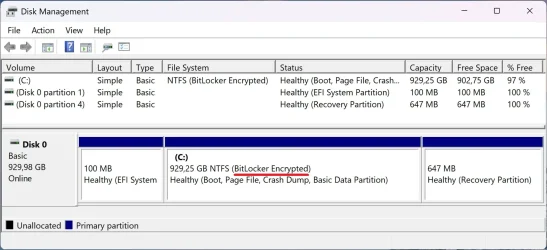
Why Disk Management Shows “BitLocker Encrypted” Even When BitLocker Isn’t Actually Enabled


On Windows 11 25H2, the setup process will not fully enable BitLocker (or Device Encryption) if you do not sign in with a Microsoft account during installation.

Even though Disk Management may display the system drive as “BitLocker Encrypted,” this does not mean BitLocker protection is active.

Windows 11 automatically performs “device encryption staging” on supported hardware. This means the OS pre-encrypts the drive, but the encryption key is not protected or backed up until a Microsoft account is added. Because of this:

  • Disk Management shows the partition as BitLocker Encrypted.
  • BitLocker protection is not actually enabled.
  • No recovery key is stored anywhere.
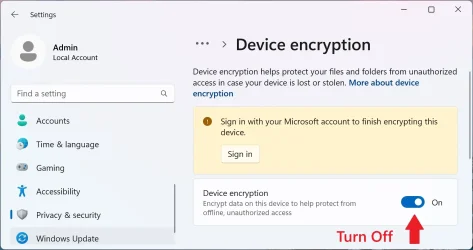
  • The OS reports “Sign in with your Microsoft account to finish encrypting this device.”
  • Device Encryption remains in a pending state.
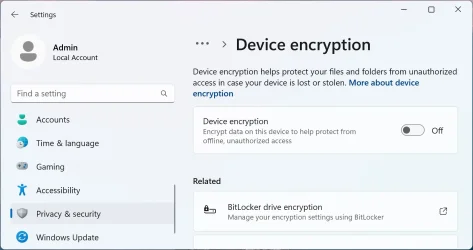
  • Turning off Device Encryption simply decrypts the pre-encrypted volume.

If BIOS settings change or another OS boots, BitLocker can demand a recovery key


When you booted into Windows 10, the following changed:

  • TPM state
  • Boot order
  • Secure Boot mode
  • Possibly CSM/UEFI settings

Any of those changes cause BitLocker/device encryption to go into recovery mode, asking for a key.

But the system never created a recovery key, because:

  • No Microsoft account was used
  • Full device encryption never completed
  • There was nowhere to back up a key

So Windows 10 sees “encrypted volume with no recovery key” and refuses to boot → blue recovery screen.

This is expected behavior for device encryption staging on dual-boot systems.

1 - Disk Management.webp

Go to:

Settings > Privacy & security > Device encryption

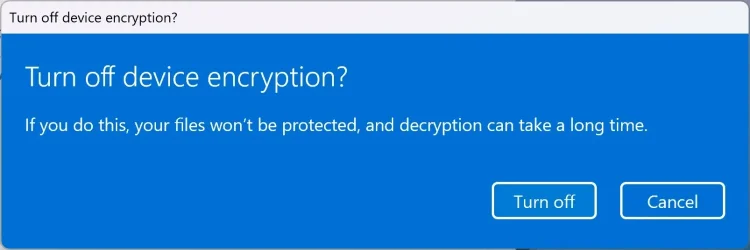
Turn it OFF.

2 - Sign in with your Microsoft account to finish encrypting this device.webp

3 - Turn off device encryption.webp

4 - Device encryption.webp
 

My Computers

System One System Two

  • OS
    Windows 11 Pro
    Computer type
    PC/Desktop
    CPU
    AMD Ryzen 9 9950X3D
    Motherboard
    ASRock B650E Taichi Lite
    Memory
    Kingston FURY Beast 64GB (2x32GB) DDR5 6000MT/s
    Graphics Card(s)
    ASUS TUF Gaming Radeon RX 9070 OC Edition 16GB GDDR6
    Hard Drives
    Solidigm P44 Pro 2TB M.2 NVMe SSD
  • Operating System
    Windows 11 Home
    Computer type
    Laptop
    Manufacturer/Model
    Lenovo Legion Pro 7i Gen 10 16"
    CPU
    Intel Core Ultra 9 275HX
    Memory
    64GB (2x 32GB) DDR5-6400
    Graphics card(s)
    NVIDIA GeForce RTX 5080 16GB GDDR7 Laptop GPU
    Hard Drives
    2x 1TB M.2 NVMe SSD (SK Hynix)
Thanks for that, Celery. We never booted up with the Win 10 drive. We just tried and got the Bitlocker screen. I hadn't made any changes to the BIOS yet. I was trying to see if I needed to change any of the settings back before the Win 10 drive would boot up or not. All I changed was the boot order from the Key press to go to the boot order menu. I believe when I looked at the disk management screen, as you showed, from the Windows 11 OS, both drives showed encrypted.

As long as disabling BitLLocker works, I am happy.
 

My Computer

System One

  • OS
    Windows 11
    Computer type
    PC/Desktop
    Manufacturer/Model
    User built Gigabyte
    CPU
    AMD Ryzen
    Motherboard
    Gigabyte Auros 850 wifi 6
    Memory
    32 Gig
    Graphics Card(s)
    Swft 210
    Sound Card
    SoundBlaster ZxR
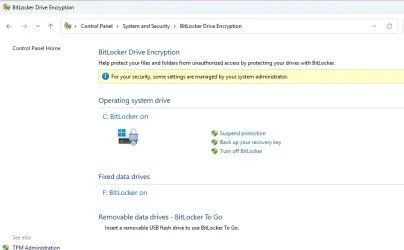
I'm now checking out my brothers PC. There is a Bitlocker key on his WIn 11 Pro drive. I've saved it to a thumb drive and printed it out. In this case, the Control Panel shows "BitLocker drive encryption".

BitLockerPanel.webp

The two drives are decrypting. They are both SD drives. One has 600gb on it and the other has 800 Gig on it. I hope it doesn't take too long. I wish it had a progress bar.
 

My Computer

System One

  • OS
    Windows 11
    Computer type
    PC/Desktop
    Manufacturer/Model
    User built Gigabyte
    CPU
    AMD Ryzen
    Motherboard
    Gigabyte Auros 850 wifi 6
    Memory
    32 Gig
    Graphics Card(s)
    Swft 210
    Sound Card
    SoundBlaster ZxR
Everything worked out as you all explained. Both drives were unencrypted. I set the process to " disabled " and we can not boot to ether drive without any issues. Thanks for all the help. I'll spend more time learning about the newest MS operating systems and it's oddities, from now on.
 

My Computer

System One

  • OS
    Windows 11
    Computer type
    PC/Desktop
    Manufacturer/Model
    User built Gigabyte
    CPU
    AMD Ryzen
    Motherboard
    Gigabyte Auros 850 wifi 6
    Memory
    32 Gig
    Graphics Card(s)
    Swft 210
    Sound Card
    SoundBlaster ZxR
Back
Top Bottom