I recently got a laptop with Win11 Home pre-installed. I fired it up and bypassed the Microsoft account as I always do on a new install. I was busy doing some other updates and I noticed a utility that mention BitLocker enabled. Note that I have never used BitLocker, and have no intention of starting. With all the discussion of BitLocker being on by default, I decided to check.
I opened a command prompt and ran manage-bde -status to see what it shows. To my dismay, it appears that it's indeed enabled, but protection is off, whatever that means! Of course, no BitLocker recovery key was provided with the pre-installed Windows, and I sure don't have one. I went to turn BitLocker off in Settings, and of course it wants the recovery key, something I don't have.
I'm assuming there is no recovery for this, and I sure don't want to leave it enabled and keep running. I'm sure at some point I'd have need for the recovery key (which I don't have)!
I'm considering just installing Win11 Pro and leaving all this behind, any reason I shouldn't do that?
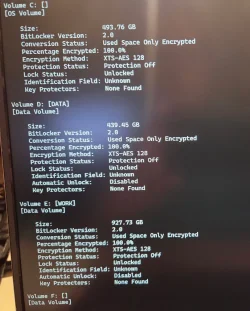
I opened a command prompt and ran manage-bde -status to see what it shows. To my dismay, it appears that it's indeed enabled, but protection is off, whatever that means! Of course, no BitLocker recovery key was provided with the pre-installed Windows, and I sure don't have one. I went to turn BitLocker off in Settings, and of course it wants the recovery key, something I don't have.
I'm assuming there is no recovery for this, and I sure don't want to leave it enabled and keep running. I'm sure at some point I'd have need for the recovery key (which I don't have)!
I'm considering just installing Win11 Pro and leaving all this behind, any reason I shouldn't do that?
My Computers
-
At a glance
Win 11 Pro 25H2, Build 26200.8894Intel Core i5 1450064GB DDR4GeForce RTX 4060- OS
- Win 11 Pro 25H2, Build 26200.8894
- Computer type
- PC/Desktop
- Manufacturer/Model
- Home Brew
- CPU
- Intel Core i5 14500
- Motherboard
- Gigabyte B760M G P WIFI
- Memory
- 64GB DDR4
- Graphics Card(s)
- GeForce RTX 4060
- Sound Card
- Chipset Realtek
- Monitor(s) Displays
- LG 45" Ultragear, Acer 24" 1080p
- Screen Resolution
- 5120x1440, 1920x1080
- Hard Drives
- Crucial P310 2TB 2280 PCIe Gen4 3D NAND NVMe M.2 SSD (O/S)
Silicon Power 2TB US75 NVMe PCIe Gen4 M.2 2280 SSD (backup)
Crucial BX500 2TB 3D NAND (2nd backup)
Seagate 4TB Ironwolf, rotating HDD archive files
External off-line backup Drives: 2 NVMe 4TB drives in external enclosures
- PSU
- Thermaltake Toughpower GF3 750W
- Case
- LIAN LI LANCOOL 216 E-ATX PC Case
- Cooling
- Lots of fans!
- Keyboard
- Microsoft Comfort Curve 2000
- Mouse
- Logitech G305
- Internet Speed
- Verizon FiOS 1GB
- Browser
- Firefox
- Antivirus
- Malware Bytes & Windows Defender Security
-
At a glance
Win 11 Pro 25H2, Build 26200.8894Intel Core i5 1440032GB DDR5Intel 700 Embedded GPU- Operating System
- Win 11 Pro 25H2, Build 26200.8894
- Computer type
- PC/Desktop
- Manufacturer/Model
- Home Brew
- CPU
- Intel Core i5 14400
- Motherboard
- Gigabyte B760M DS3H AX
- Memory
- 32GB DDR5
- Graphics card(s)
- Intel 700 Embedded GPU
- Sound Card
- Realtek Embedded
- Monitor(s) Displays
- 27" HP 1080p
- Screen Resolution
- 1920x1080
- Hard Drives
- Crucial P310 2TB 2280 PCIe Gen4 eD NAND PCIe SSD
Samsung EVO 990 2TB NVMe Gen4 SSD
Samsung 2TB SATA SSD
- PSU
- Thermaltake Smart BM3 650W
- Case
- Okinos Micro ATX Case
- Cooling
- Fans
- Keyboard
- Microsoft Comfort Curve 2000
- Mouse
- Logitech G305
- Internet Speed
- Verizon FiOS 1GB
- Browser
- Firefox
- Antivirus
- Malware Bytes & Windows Defender Security
-
Nimo N171 17" Laptop, (Intel i3-1215U, 16GB RAM, 2TB NVMe, Win11 Pro)
Acemagic Vista Mini PC V1 (Intel N150, 16GB RAM, 1TB NVMe, Win11 Pro)
HP ENVY h8-1540t, (24GB RAM, 2TB SSD, 2TB HDD, Win11 Pro)