block all windows 11 communication by firewall allowing only firefox.


So what's the difference between a "maintenance release" and a regular release?
The difference between active development and maintenance of an application is pretty straight forward. It's a matter of active design, programming, testing and deployment vs. simple bug fixes, minor optimizations, etc. The developer used to be very active at Wilders Security Forums, but ended participation when he made TW open source on 12-23-23, which you can see in the changelog. He responds to issues on the GitHub but TW is no longer his primary focus, and there are no other contributors.

The last true feature update was v3.3.0 on 3/3/23.

I actually love TW, and thought it was best firewall in terms of simplicity and lack of annoying popups. I tried using it not long ago until I could not find a way to allow Windows widgets after numerous attempts, and the dev was unable to provide a fix.

Minimal Firewall is very new, and not without its own issues, but the developer is proactive and responsive.
 

My Computer

System One

  • OS
    Windows 11 Pro 25H2 26200.7840
    Computer type
    Laptop
    Manufacturer/Model
    Lenovo IdeaPad L340
    CPU
    Intel Core i3-8145U
    Memory
    16GB
    Hard Drives
    500 GB M2 1 TB HDD
    Internet Speed
    400 MB
    Browser
    Chrome | Edge
    Antivirus
    Microsoft Defender | Block unknown executables | Various ASR rules enabled | Smart App Control
Not Open Source - but still free, i use Windows Firewall Control - which is basically a better GUI for Windows Firewall - with extra features. It's really easy to use. First you enable Notification:

1.webp

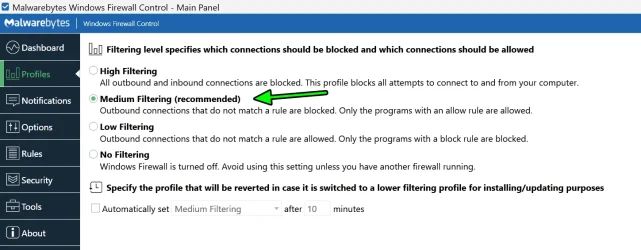
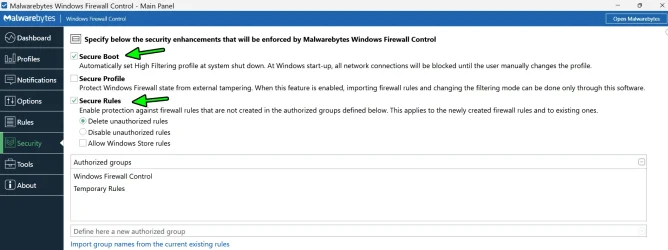
Next, you apply/enable Secure Rules. Optionally, you can also set Secure Boot - so Windows will start will ALL connections blocked. And i do mean ALL, you just have to right click on WFC icon from systray and select Profiles - > Medium Filtering - so you have access to internet and... Firefox (if that's the only thing you use).

2.webp

3rd, you select Medium Filtering (which will apply your rules).

3.webp

And 4th, you start Firefox and "Allow it" and from here on you can simply block whatever you don't like - since every connection will be registered and ask you if you allow or block it. If you Want to Update Windows - you simply select Profile - No Filtering (which disables the firewall) and do your thing.

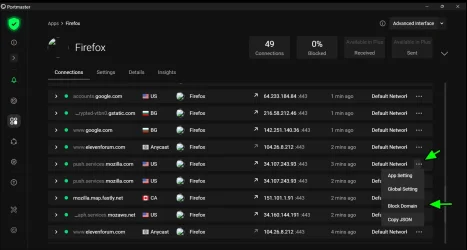
Furthermore - you can also install Port Master along WFC - and block/filter even Firefox connections. For example - blocking Mozilla Services:

4.webp

...or whatever you like. This one is a bit harder to set (at first / the menus can be confusing for some).
 

My Computer

System One

  • OS
    WinDOS 25H2
    Computer type
    Laptop
    CPU
    Intel & AMD
    Memory
    SO-DIMM SK Hynix 15.8 GB Dual-Channel DDR4-2666 (2 x 8 GB) 1329MHz (19-19-19-43)
    Graphics Card(s)
    nVidia RTX 2060 6GB Mobile GPU (TU106M)
    Sound Card
    Onbord Realtek ALC1220
    Screen Resolution
    1920 x 1080
    Hard Drives
    1x Samsung PM981 NVMe PCIe M.2 512GB / 1x Seagate Expansion ST1000LM035 1TB
It's a matter of active design, programming, testing and deployment vs. simple bug fixes, minor optimizations, etc.

Well it's a straightforward firewall. There's only so much you can do with it. So it is still getting some attention, yeah?

Does Minimal Firewall fix your widget issue?
 

My Computers

System One System Two

  • OS
    Windows 11 Pro 25H2 build: (26200.7623)
    Computer type
    Laptop
    Manufacturer/Model
    Microsoft Surface Pro
    Memory
    32GB
  • Operating System
    Microsoft 25H2 Pro
    Computer type
    Laptop
    Manufacturer/Model
    Dell Pro 14 - PC14250
    CPU
    Intel Core Ultra 7
    Memory
    64GB
    Graphics card(s)
    Intel Integrated Graphics
    Hard Drives
    Micron 1TB SSD
So it is still getting some attention, yeah?
Yes, and I wouldn't consider it abandonware at this point.
Does Minimal Firewall fix your widget issue?
Yes, but it has its own issues since it is so new. It's a portable app that simply uses Windows Firewall. I've only been testing it for a short time. I uncovered one issue and the developer had a fix for it.

Having said all of this, it may fit your needs but you'll only know if you try it. If TinyWall is working out for you, then maybe stick with it, or use WFC as @neves suggested.
 

My Computer

System One

  • OS
    Windows 11 Pro 25H2 26200.7840
    Computer type
    Laptop
    Manufacturer/Model
    Lenovo IdeaPad L340
    CPU
    Intel Core i3-8145U
    Memory
    16GB
    Hard Drives
    500 GB M2 1 TB HDD
    Internet Speed
    400 MB
    Browser
    Chrome | Edge
    Antivirus
    Microsoft Defender | Block unknown executables | Various ASR rules enabled | Smart App Control
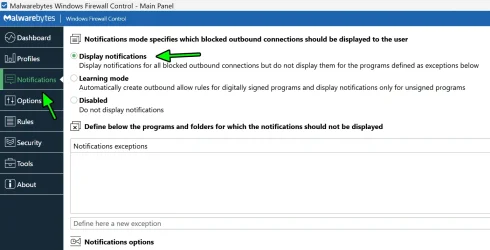
Not Open Source - but still free, i use Windows Firewall Control - which is basically a better GUI for Windows Firewall - with extra features. It's really easy to use. First you enable Notification:

View attachment 145778

. This one is a bit harder to set (at first / the menus can be confusing for some).

So how much memory does this use in that background?

I believe both TinyWall and Minimum Firewall use about 2MB, each. Really light.

And can you whitelist by program?

What about Windows updates? Are they interfered with?

Yes, but it has its own issues since it is so new. It's a portable app that simply uses Windows Firewall. I've only been testing it for a short time. I uncovered one issue and the developer had a fix for it.

Having said all of this, it may fit your needs but you'll only know if you try it. If TinyWall is working out for you, then maybe stick with it, or use WFC as @neves suggested.

It's been a few years but I remember TinyWall was pretty intuitive, no doubt about it.

And same thing with Mimimum Firewall: Can you whitelist by program?

What about Windows updates? Are they interfered with?
 
Last edited:

My Computers

System One System Two

  • OS
    Windows 11 Pro 25H2 build: (26200.7623)
    Computer type
    Laptop
    Manufacturer/Model
    Microsoft Surface Pro
    Memory
    32GB
  • Operating System
    Microsoft 25H2 Pro
    Computer type
    Laptop
    Manufacturer/Model
    Dell Pro 14 - PC14250
    CPU
    Intel Core Ultra 7
    Memory
    64GB
    Graphics card(s)
    Intel Integrated Graphics
    Hard Drives
    Micron 1TB SSD
So how much memory does this use in that background?

I believe both TinyWall and Minimum Firewall use about 2MB, each. Really light.

If you have only 256 SDRAM - wouldn't recommend it...

ytu.webp

The WFC app + the Service takes 41 MB!:scream: What are they thinking - that's obscene for the late 90s and users running Windows '98. :tears: But hey, as Nostradamus predicted - eventually, in the future - they'll release faster and better memory - and most will be able to afford 8GB SDRAM (or whatever its called). At such time - apps like this will be called Lite.

And can you whitelist by program?

What about Windows updates? Are they interfered with?

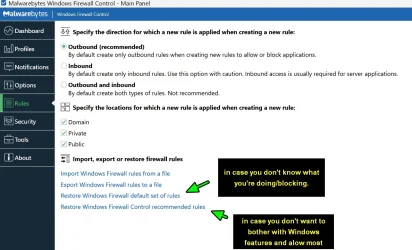
Yes, ofc. You chose what you allow or not. Including Windows Updates - you can chose to block or allow them. That's why i recommended to enable Notification - so you can whitelist (or block) any app connecting to the internet - as it happens. You only need to do this once. There's even a fail safe option...

2025-09-19_223617.webp

More useful for beginners - cause you can always change any rule made - be it to block or whitelist (or the other way around). It's enough to enable Notification and it's pretty intuitive (the other settings i recommended - are optional).
 

My Computer

System One

  • OS
    WinDOS 25H2
    Computer type
    Laptop
    CPU
    Intel & AMD
    Memory
    SO-DIMM SK Hynix 15.8 GB Dual-Channel DDR4-2666 (2 x 8 GB) 1329MHz (19-19-19-43)
    Graphics Card(s)
    nVidia RTX 2060 6GB Mobile GPU (TU106M)
    Sound Card
    Onbord Realtek ALC1220
    Screen Resolution
    1920 x 1080
    Hard Drives
    1x Samsung PM981 NVMe PCIe M.2 512GB / 1x Seagate Expansion ST1000LM035 1TB

My Computer

System One

  • OS
    Windows 11 Pro 25H2 26200.7840
    Computer type
    Laptop
    Manufacturer/Model
    Lenovo IdeaPad L340
    CPU
    Intel Core i3-8145U
    Memory
    16GB
    Hard Drives
    500 GB M2 1 TB HDD
    Internet Speed
    400 MB
    Browser
    Chrome | Edge
    Antivirus
    Microsoft Defender | Block unknown executables | Various ASR rules enabled | Smart App Control
If you have only 256 SDRAM - wouldn't recommend it...

View attachment 145939

The WFC app + the Service takes 41 MB!:scream: What are they thinking - that's obscene for the late 90s and users running Windows '98. :tears: But hey, as Nostradamus predicted - eventually, in the future - they'll release faster and better memory - and most will be able to afford 8GB SDRAM (or whatever its called). At such time - apps like this will be called Lite.
Wow, that's terrible! /s

That breaks the bank!

lol... 😅

~

Nahh, seriously I had to ask that question since a lot of stuff out there are resource hogs running unnecessary bloatware in the background. Even on 16GB, 41mb isn't gonna kill anybody.

You don't know unless you ask, right....? 😉

~

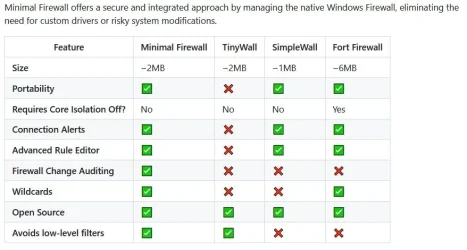
Besides, it seems Minimal Firewall likes to make it a feature they bring it up as.


chart.webp
 

My Computers

System One System Two

  • OS
    Windows 11 Pro 25H2 build: (26200.7623)
    Computer type
    Laptop
    Manufacturer/Model
    Microsoft Surface Pro
    Memory
    32GB
  • Operating System
    Microsoft 25H2 Pro
    Computer type
    Laptop
    Manufacturer/Model
    Dell Pro 14 - PC14250
    CPU
    Intel Core Ultra 7
    Memory
    64GB
    Graphics card(s)
    Intel Integrated Graphics
    Hard Drives
    Micron 1TB SSD
One other thing. I used TinyWall on an older machine, back before I started using a (paid) VPN.

How well do these firewalls play with VPNs?

Currently many VPNs offer split-tunneling for apps, protocols or both.
 

My Computers

System One System Two

  • OS
    Windows 11 Pro 25H2 build: (26200.7623)
    Computer type
    Laptop
    Manufacturer/Model
    Microsoft Surface Pro
    Memory
    32GB
  • Operating System
    Microsoft 25H2 Pro
    Computer type
    Laptop
    Manufacturer/Model
    Dell Pro 14 - PC14250
    CPU
    Intel Core Ultra 7
    Memory
    64GB
    Graphics card(s)
    Intel Integrated Graphics
    Hard Drives
    Micron 1TB SSD
Nahh, seriously I had to ask that question since a lot of stuff out there are resource hogs running unnecessary bloatware in the background. Even on 16GB, 41mb isn't gonna kill anybody.

You don't know unless you ask, right....? 😉

Don't like bloatware heavy apps myself - so wouldn't use it if that was the case. But for what it can do - the resource usage is more than justified. Here's a direct comparison:

Minimal Firewall vs WFC – Direct Feature Comparison​

Feature / CategoryMinimal FirewallWindows Firewall Control (WFC)
🔧 TypeLightweight GUI frontend for Windows FirewallAdvanced GUI frontend for Windows Firewall
🖥️ InterfaceVery minimal, clean, modernClassic Windows-style, more detailed
📦 Installer SizeVery small (<1 MB)~2–3 MB
📊 Resource UsageExtremely lowLow, but more than Minimal Firewall
🚦 Notification System✅ Yes (simple alerts for new outbound connections)✅ Yes (more detailed connection alerts)
📝 Rule Creation✅ Yes (basic allow/deny)✅ Yes (advanced: program, port, service, etc.)
🔒 Security FocusSimple app whitelisting/outbound controlFull control over inbound/outbound rules
🛑 Default Block All Outbound Option✅ Yes (default mode is block-all)✅ Yes (via "Medium Filtering" profile)
📌 Profiles / ModesBasic global mode (block all except allowed apps)Multiple profiles: High, Medium, Low, No Filtering
🔄 Learning Mode / Auto Rules❌ No learning mode✅ Optional learning/temporary rules
🧠 Granular Rule Control❌ No (basic app-level)✅ Full (per app, port, protocol, IP range, etc.)
🧹 Rule Logging / HistoryMinimal (if any)✅ Yes (with log viewer, connection monitor)
🔐 Service IntegrationRuns independently of Windows Firewall profilesDeeply integrates with Windows Firewall
💻 Multi-user / Admin support❌ Basic only✅ Better support for multi-user/admin environments
🔄 Portable Version✅ Yes✅ Yes
🔔 Notification Customization❌ Minimal✅ Detailed settings for notifications
👨‍💻 User LevelBeginner to intermediateIntermediate to advanced
💸 Price✅ Free and open-source✅ Free / $10 optional donation (was paid earlier)
⚙️ Advanced Features❌ No logging, service rules, or port-level config✅ Full rule management, logging, profiles, filters

How well do these firewalls play with VPNs?

Currently many VPNs offer split-tunneling for apps, protocols or both.

It's just an app (be it using the VPN's own App or the VPN manager included with Windows) - which filters/encrypts your internet traffic. Similar to Firefox (or any other app - connecting to the internet) - you just to have allow (white list) it. Firewalls like WFC is rather simple - so there's not much room for conflicts, but using something like Portmaster - could take more steps to set correctly. Was recommending Portmaster too above - but seeing you struggle with basic firewall functions - i wouldn't (even advanced users who tried it - end-up blocking essentials apps - and even their browsers didn't work). It's a bit tricky/confusing at first - but once you get the hang of it - it's rather simple.

Fun Fact: WFC dev tried portmaster - and found it to confusing. :)
 
Last edited:

My Computer

System One

  • OS
    WinDOS 25H2
    Computer type
    Laptop
    CPU
    Intel & AMD
    Memory
    SO-DIMM SK Hynix 15.8 GB Dual-Channel DDR4-2666 (2 x 8 GB) 1329MHz (19-19-19-43)
    Graphics Card(s)
    nVidia RTX 2060 6GB Mobile GPU (TU106M)
    Sound Card
    Onbord Realtek ALC1220
    Screen Resolution
    1920 x 1080
    Hard Drives
    1x Samsung PM981 NVMe PCIe M.2 512GB / 1x Seagate Expansion ST1000LM035 1TB
It's just an app (be it using the VPN's own App or the VPN manager included with Windows) - which filters/encrypts your internet traffic. Similar to Firefox (or any other app - connecting to the internet) - you just to have allow (white list) it. Firewalls like WFC is rather simple - so there's not much room for conflicts, but using something like Portmaster - could take more steps to set correctly. Was recommending Portmaster too above - but seeing you struggle with basic firewall functions - i wouldn't (even advanced users who tried it - end-up blocking essentials apps - and even their browsers didn't work). It's a bit tricky/confusing at first - but once you get the hang of it - it's rather simple.

Fun Fact: WFC dev tried portmaster - and found it to confusing. :)

Portmaster might be something I'd consider later. Do you use the portable version of WFC? How does that work?
 

My Computers

System One System Two

  • OS
    Windows 11 Pro 25H2 build: (26200.7623)
    Computer type
    Laptop
    Manufacturer/Model
    Microsoft Surface Pro
    Memory
    32GB
  • Operating System
    Microsoft 25H2 Pro
    Computer type
    Laptop
    Manufacturer/Model
    Dell Pro 14 - PC14250
    CPU
    Intel Core Ultra 7
    Memory
    64GB
    Graphics card(s)
    Intel Integrated Graphics
    Hard Drives
    Micron 1TB SSD
Do you use the portable version of WFC? How does that work?

No, never tried it and "don't recommend it". Officially, there's no portable version of WFC - here's the official page: Windows Firewall Control Since it needs the service to run.

Unofficially, you'll find some links on the internet - linking to a portable version (which i presume it starts the service at the same time you start the app). But the unofficial versions are filled with malicious code (mostly from A.I. AV scanners - which usually find a lot of false positives - but same scanners used on the official version - find it 100% clean - so i wouldn't risk it).
 

My Computer

System One

  • OS
    WinDOS 25H2
    Computer type
    Laptop
    CPU
    Intel & AMD
    Memory
    SO-DIMM SK Hynix 15.8 GB Dual-Channel DDR4-2666 (2 x 8 GB) 1329MHz (19-19-19-43)
    Graphics Card(s)
    nVidia RTX 2060 6GB Mobile GPU (TU106M)
    Sound Card
    Onbord Realtek ALC1220
    Screen Resolution
    1920 x 1080
    Hard Drives
    1x Samsung PM981 NVMe PCIe M.2 512GB / 1x Seagate Expansion ST1000LM035 1TB
Back
Top Bottom