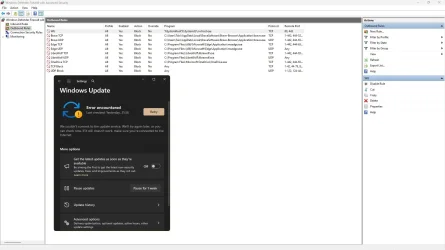
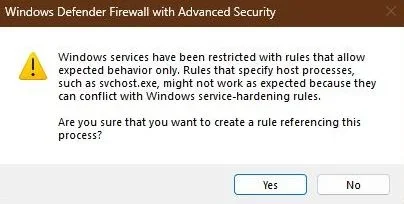
block all windows 11 communication by firewall allowing only firefox.


And for a few of you others.

Microsoft collects wayyyyyy more information then they need..
So its a differences between Security AND Privacy

Why do MS need your browsing history?
Why do they need to know what network devices i have in my network?
and a lot of other things.

and before you windows fanboys/girls start to say MS dont collect this.. Then i say.. Read ALL pages and sub-links of Microsoft privacy statement.

The OP did ask a valid question and some of you guys act like idiots.
If you dont have anything to contribute more then talk down on OP... Then zip it and grow up!!
 

My Computers

System One System Two

  • OS
    Linux: Debian, Kali-linux, Alma, Win: 7, 8.1,2012R
    Manufacturer/Model
    HP Elitebook 840, AsusX53, Aspire E1-572. AsusUX32A, HP Pro3130mt+3010mt, HP Proliant ML150, 3xCustom-PC, i3, i5, i7
    CPU
    i3, i5 and i7 From 2gen to 9th gen... Server dual Xenon
    Hard Drives
    Sata, M.2, SAS
  • Operating System
    Retro: 2003server.XPpro, Win2000, Win98SE, Win95, Win3.11, MS-DOS, IBM-DOS
    Manufacturer/Model
    Commodore, AST, Fujitsu, Compaq, etc etc. etc Around 15 desktops and 20 laptops in the collection
    CPU
    Oldest intel 8088 up to P4 dual core
    Hard Drives
    MFM, IDE, SCSI
Apart from TinyWall and SimpleWall, I use FreeFirewall v 2.6.1

German programme, although in English. Very thorough, very granular, will block everything in or out except that which you specifically allow.

Irrespective of those who believe MS plays by open rules, it squawks everytime it cannot get a "phone home" - and the number of times that happened until I'd finally managed to record and block all of them absolutely staggered me. Seemed to go on for months.

Of course, trust if you wish. For me, stopping someone peering through my bedroom window at 3am feels good.
 

My Computer

System One

  • OS
    Windows 11
    Computer type
    Laptop
    Manufacturer/Model
    HP 15s_du1xxx
    CPU
    Intel i5 10210U
    Motherboard
    85F1
    Memory
    16Gb
    Graphics Card(s)
    Intel UHD
    Sound Card
    Realtek
    Screen Resolution
    1920 x 1080
You cant block windows system processes with windows own firewall. It is constructed to let system services bypass blocked rules.

Test to block all except DHCP and gateway and then run windows update.
Win10 built in firewall let the system bypass block-rules

I use Kaspersky so if I block activity, nothing is getting through, in or out.

I gave that post as an alternative to 3rd party which the Op seems to have an issue with.

I can’t test Windows firewall, it’s not in use in any of my systems.
Seems lacking, if you’re correct.
 

My Computers

System One System Two

  • OS
    Windows 11 Pro 25H2 Build 26200.8524
    Computer type
    PC/Desktop
    Manufacturer/Model
    Sin-built 2013
    CPU
    Intel(R) Core(TM) i7-4770K CPU @ 3.50GHz
    Motherboard
    ASUS ROG Maximus VI Formula
    Memory
    32.0 GB of I forget and the box is in storage.
    Graphics Card(s)
    Gigabyte nVidia GeForce GTX 1660 Super OC 6GB
    Sound Card
    Onboard thingy
    Monitor(s) Displays
    5 x LG 25MS500-B - 1 x 24MK430H-B - 1 x Wacom Pro 22" Touch Screen Tablet
    Screen Resolution
    All over the place
    Hard Drives
    Too many to list.
    OS on Samsung 1TB 870 QVO SATA
    PSU
    Silverstone 1500
    Case
    NZXT Phantom 820 Full-Tower Case
    Cooling
    Noctua NH-D15 Elite Class Dual Tower CPU Cooler / 6 x EziDIY 120mm / 2 x Corsair 140mm somethings / 1 x 140mm Thermaltake something / 2 x 200mm Corsair.
    Keyboard
    Corsair K95 / Logitech diNovo Edge Wireless
    Mouse
    Logitech: G402 / G502 / Mx Masters / Mx Air Cordless
    Internet Speed
    2000/500Mbps
    Browser
    All sorts
    Antivirus
    Kaspersky Premium
    Other Info
    ㅤㅤㅤㅤㅤㅤㅤㅤㅤㅤㅤㅤㅤㅤㅤㅤㅤㅤㅤㅤㅤㅤㅤㅤㅤㅤㅤㅤㅤㅤㅤㅤㅤㅤㅤㅤㅤㅤㅤㅤ⠀⠀⠀⠀⠀⠀⠀⠀⠀⠀
    TP-Link BE9300 WiFi 7 Bluetooth 5.4 (Archer TBE550E)
    TP-Link TX201 V1 2.5GB Lan

    Grandstream HT812 - VoIP
    ASUS DSL-AX82U - Mesh
    ASUS RT-AC68U - Mesh
    ASUS RT-BE88U Router

    Brother MFC-L2880DW Printer

    I’m on a horse.
  • Operating System
    Windows 11 Pro 25H2 Build 26200.8524
    Computer type
    Laptop
    Manufacturer/Model
    LENOVO Yoga 7 14IRL8 - 7i EVO OLED 14" Touchscreen i5 12 Core 16GB/512GB
    CPU
    Intel Core 12th Gen i5-1240P Processor (1.7 - 4.4GHz)
    Memory
    16GB LPDDR5 RAM
    Graphics card(s)
    Intel Iris Xe Graphics Processor
    Sound Card
    Optimized with Dolby Atmos®
    Screen Resolution
    QHD 2880 x 1800 OLED
    Hard Drives
    M.2 512GB
    Antivirus
    Defender / Malwarebytes
    Other Info
    …still on a horse.

My Computers

System One System Two

  • OS
    Windows 11 Pro 25H2 Build 26200.8524
    Computer type
    PC/Desktop
    Manufacturer/Model
    Sin-built 2013
    CPU
    Intel(R) Core(TM) i7-4770K CPU @ 3.50GHz
    Motherboard
    ASUS ROG Maximus VI Formula
    Memory
    32.0 GB of I forget and the box is in storage.
    Graphics Card(s)
    Gigabyte nVidia GeForce GTX 1660 Super OC 6GB
    Sound Card
    Onboard thingy
    Monitor(s) Displays
    5 x LG 25MS500-B - 1 x 24MK430H-B - 1 x Wacom Pro 22" Touch Screen Tablet
    Screen Resolution
    All over the place
    Hard Drives
    Too many to list.
    OS on Samsung 1TB 870 QVO SATA
    PSU
    Silverstone 1500
    Case
    NZXT Phantom 820 Full-Tower Case
    Cooling
    Noctua NH-D15 Elite Class Dual Tower CPU Cooler / 6 x EziDIY 120mm / 2 x Corsair 140mm somethings / 1 x 140mm Thermaltake something / 2 x 200mm Corsair.
    Keyboard
    Corsair K95 / Logitech diNovo Edge Wireless
    Mouse
    Logitech: G402 / G502 / Mx Masters / Mx Air Cordless
    Internet Speed
    2000/500Mbps
    Browser
    All sorts
    Antivirus
    Kaspersky Premium
    Other Info
    ㅤㅤㅤㅤㅤㅤㅤㅤㅤㅤㅤㅤㅤㅤㅤㅤㅤㅤㅤㅤㅤㅤㅤㅤㅤㅤㅤㅤㅤㅤㅤㅤㅤㅤㅤㅤㅤㅤㅤㅤ⠀⠀⠀⠀⠀⠀⠀⠀⠀⠀
    TP-Link BE9300 WiFi 7 Bluetooth 5.4 (Archer TBE550E)
    TP-Link TX201 V1 2.5GB Lan

    Grandstream HT812 - VoIP
    ASUS DSL-AX82U - Mesh
    ASUS RT-AC68U - Mesh
    ASUS RT-BE88U Router

    Brother MFC-L2880DW Printer

    I’m on a horse.
  • Operating System
    Windows 11 Pro 25H2 Build 26200.8524
    Computer type
    Laptop
    Manufacturer/Model
    LENOVO Yoga 7 14IRL8 - 7i EVO OLED 14" Touchscreen i5 12 Core 16GB/512GB
    CPU
    Intel Core 12th Gen i5-1240P Processor (1.7 - 4.4GHz)
    Memory
    16GB LPDDR5 RAM
    Graphics card(s)
    Intel Iris Xe Graphics Processor
    Sound Card
    Optimized with Dolby Atmos®
    Screen Resolution
    QHD 2880 x 1800 OLED
    Hard Drives
    M.2 512GB
    Antivirus
    Defender / Malwarebytes
    Other Info
    …still on a horse.
You cant block windows system processes with windows own firewall. It is constructed to let system services bypass blocked rules.

Test to block all except DHCP and gateway and then run windows update.
Win10 built in firewall let the system bypass block-rules
I can't say I'm surprised by that. That's why I have a very strong preference for non-Microsoft software. Bonus points if the source is available, so I can (pay somebody to) check if the program is doing what it claims to be doing.

Tinywall claims to be able to block windows update. I'll test that and report back.
I'll also check if tinywall is able to block ALL communication.
 

My Computer

System One

  • OS
    Arch linux
    Computer type
    PC/Desktop
You mean the feature for which you need a CoPilot+ PC, hard drive encryption, Windows Hello ESS, and is opt-in and totally removable?
Yea, that one. The one that was supposed to be opt-out, and was only changed to opt-in after heavy backlash.

That makes me wonder what other anti-privacy features are opt-out in windows that didn't cause enough backlash (yet) to be changed to opt-in.

One other thing i don't like is that Windows changes privacy settings after some updates. An OS should never change settings on it's own during an update, especially privacy settings.

Source: this Reddit post from 2 years ago (I couldn't be bothered to find a more recent nor reputable source right now)
 

My Computer

System One

  • OS
    Arch linux
    Computer type
    PC/Desktop
You cant block windows system processes with windows own firewall. It is constructed to let system services bypass blocked rules.
Not if you remove all rules or block specific processes. I have never had system services bypass WF in 11. It will complain, but that is it.

capture_09162025_080607.webp capture_09162025_080847.webp
 

My Computer

System One

  • OS
    Home26H2Can
    Computer type
    PC/Desktop
    CPU
    AMD Ryzen 5 8600G (07/24)
    Motherboard
    ASROCK B650M-HDV/M.2 (07/24) BIOS 4.21 AGESA ComboAM5 1.3.0.1 (04/26)
    Memory
    2x32GB Kingston FURY DDR5 5600 MHz CL36 @5200 CL36 (07/24)
    Graphics Card(s)
    ASROCK Radeon RX 6600 Challenger D 8G @48FPS (08/24)
    Sound Card
    Creative Sound BlasterX AE-5 Plus (05/24)
    Monitor(s) Displays
    24" Philips 24M1N3200ZS/00 (05/24)
    Screen Resolution
    1920×1080@165Hz via DP1.4
    Hard Drives
    Kingston KC3000 NVMe 2TB (05/24)
    ADATA XPG GAMMIX S11 Pro 512GB (07/19)
    PSU
    Seasonic Core GM 550 Gold (04/24)
    Case
    Fractal Design Define 7 Mini with 3x Noctua NF-P14s/12@555rpm (04/24)
    Cooling
    Noctua NH-U12S with Noctua NF-P12 (04/24)
    Keyboard
    HP Pavilion Wired Keyboard 300 (07/24) + Rabalux 76017 Parker (01/24)
    Mouse
    Logitech M330 Silent Plus (01/26)
    Internet Speed
    500/100 Mbps via RouterOS (05/21) & TCP Optimizer
    Browser
    Edge, Brave for YouTube, LibreWolf for FB
    Antivirus
    NextDNS blocking 1/3 Traffic
    Other Info
    Phone: Motorola Moto G86 (02/26)
    Backup: Hasleo Backup Suite (PreOS)
    Headphones: Sennheiser RS170 (09/10)
    Chair: Huzaro Force 4.4 Grey Mesh (05/24)
    Notifier: Xiaomi Mi Band 9 Milanese (10/24)
    FlexCore USB-C 3.2 Gen 1 (M) to LAN (F) (08/25)

My Computer

System One

  • OS
    windows 11 Pro
    Computer type
    Laptop
    Manufacturer/Model
    Dell XPS 15 9510
    CPU
    11th Gen Intel(R) Core(TM) i7-11800H @ 2.30GHz (16 CPUs
    Memory
    16 GB
    Graphics Card(s)
    NVIDIA GeForce RTX 3050 Ti
    Hard Drives
    512GB Solid State Drive
    Browser
    Firefox
I can't say I'm surprised by that. That's why I have a very strong preference for non-Microsoft software. Bonus points if the source is available, so I can (pay somebody to) check if the program is doing what it claims to be doing.

Tinywall claims to be able to block windows update. I'll test that and report back.
I'll also check if tinywall is able to block ALL communication.
I actually dont know if there is any open source firewalls left to Windows.. I'm 7yeas out of the loop on Windows since i switched to to Linux as daily driver.. and my windows machines i have for win-only software is windows 7 offline usage.
a few weeks back or if its a month back.. i started to do some research of firewalls to windows LTSC as i need one dualboot machine with windows "just in case" i need windows online one day.
But i have not had the time to finish it yet.


Not if you remove all rules or block specific processes. I have never had system services bypass WF in 11. It will complain, but that is it.

View attachment 145525 View attachment 145527
I did a test for fun over at tenforums.com in one of the threads LastOneToPostWins to tame win-update and some other things.. and it was then i discovered that win-update can not be blocked in windows built in firewall..
So i became curious and did some web-searching and found that windows can allow certain system services and trusted OS components to bypass or be excluded from normal firewall restrictions.
So in stead of asking why??... or find out how to "fix" windows built in firewall.., i started to look after 3rd party firewall as that is less work and less frustration.
I have a list of firewalls, but i have not done the research of them if they are good or not.


So what is your answer/solution to the OP's question?
My answer to OP will start with questions..

Does the programs need internet access?
How deep is the knowledge about windows system and components?
Is it Windows Home, Pro or Enterprise?

and then i need at least two more cups of coffee ☕☕ before i write anything more. 😅
 

My Computers

System One System Two

  • OS
    Linux: Debian, Kali-linux, Alma, Win: 7, 8.1,2012R
    Manufacturer/Model
    HP Elitebook 840, AsusX53, Aspire E1-572. AsusUX32A, HP Pro3130mt+3010mt, HP Proliant ML150, 3xCustom-PC, i3, i5, i7
    CPU
    i3, i5 and i7 From 2gen to 9th gen... Server dual Xenon
    Hard Drives
    Sata, M.2, SAS
  • Operating System
    Retro: 2003server.XPpro, Win2000, Win98SE, Win95, Win3.11, MS-DOS, IBM-DOS
    Manufacturer/Model
    Commodore, AST, Fujitsu, Compaq, etc etc. etc Around 15 desktops and 20 laptops in the collection
    CPU
    Oldest intel 8088 up to P4 dual core
    Hard Drives
    MFM, IDE, SCSI
After 30 years of disagreeing with Microsoft and just about every other software developer over who owns my hardware, I've learned a few things. If you want a computer that doesn't spy on you or "update" unless YOU want it to update, a good start is Windows X-lite. I deleted a few registry keys after installing and now I actually own my hardware.. Here's a list of running services on my system, which I think might help you in locking down your own. Note what is missing.
 

Attachments

My Computer

System One

  • OS
    Windows 11 22H2 Pro (X-lite Micro 11 version)
    Computer type
    Laptop
    Manufacturer/Model
    Dell/ Precision 7680
    CPU
    i7 13850HX (20 cores, 28 threads)
    Motherboard
    Dell
    Memory
    32GB DDR5
    Graphics Card(s)
    Intel UHD/ RTX 1000 ADA
    Sound Card
    Realtek
    Monitor(s) Displays
    4K UHD Touchscreen
    Screen Resolution
    3840 x 2400
    Hard Drives
    Samsung 512GB system drive
    WD Blue 1TB game drive
    PSU
    240W AC adapter, 1800W when docked
    Internet Speed
    1 gigabit symmetrical
    Browser
    Firefox, Librewolf
    Antivirus
    None. Manully configured so nobody except me can change any critical system files. (Don't ask how, it's probably against some rule somewhere)
My answer to OP will start with questions..

Does the programs need internet access?
How deep is the knowledge about windows system and components?
Is it Windows Home, Pro or Enterprise?

and then i need at least two more cups of coffee ☕☕ before i write anything more. 😅
I run a couple of programs that are windows only and don't need internet access.
I run a browser that needs internet access
I run anydesk that needs internet access.
I have a license for Windows 11 home (came with the laptop). As I don't like Windows 11, I have used that key to activate Windows 10 home on that machine.

I don't want to know much about windows beyond these things:
1) howto stop windows from rebooting (blocking updates is a nice way to do that)
2) howto stop background processes from slowing the machine down (this is an open question, I want to kill windows defender for this.)
3) howto stop Windows from leaking information about what I do on the machine. (For this I use a firewall and o&o shut up, applying all adjustments, and a local account)
4) howto do 1,2,3 while still running the programs I need to run.
5) howto do 1,2,3,4 on both bare metal and on a VM
6) howto do 1-5 without using anything that requires paying Oracle money
7) howto do 1-6 at work (so the VirtualBox Extension Pack cannot be used)
 

My Computer

System One

  • OS
    Arch linux
    Computer type
    PC/Desktop
I can't say I'm surprised by that. That's why I have a very strong preference for non-Microsoft software. Bonus points if the source is available, so I can (pay somebody to) check if the program is doing what it claims to be doing.

Tinywall claims to be able to block windows update. I'll test that and report back.
I'll also check if tinywall is able to block ALL communication.
I have finished my test, windows update indeed complains about not having internet access when I block it in tinywall.
I could not be bothered (yet) to see if it blocks ALL communication.
 

My Computer

System One

  • OS
    Arch linux
    Computer type
    PC/Desktop
I used TinyWall for awhile and it's somewhat effective and blocking some things. I may even go back to it here in the near future. Maybe, maybe not.

~

Btw, I'm playing the Devil's Advocate, below here... 😈

You mean the feature for which you need a CoPilot+ PC, hard drive encryption, Windows Hello ESS, and is opt-in and totally removable?

Yup. And I hope it stays that way, too. 😉 (winkie-winkie)

Shut the PC down and browse on your phone.

Ha, that's even worse! lol

No it's best to get rid of the phone entirely and use landlines and pay phone booths. That'll work. 😅

Do you know there has not been a single case in a decade where MS have been shown to use legitimate telemetry for nefarious purposes?

Well, not we know of... 😉 (winkie-winkie, again)
 

My Computers

System One System Two

  • OS
    Windows 11 Pro 25H2 build: (26200.7623)
    Computer type
    Laptop
    Manufacturer/Model
    Microsoft Surface Pro
    Memory
    32GB
  • Operating System
    Microsoft 25H2 Pro
    Computer type
    Laptop
    Manufacturer/Model
    Dell Pro 14 - PC14250
    CPU
    Intel Core Ultra 7
    Memory
    64GB
    Graphics card(s)
    Intel Integrated Graphics
    Hard Drives
    Micron 1TB SSD
I run a couple of programs that are windows only and don't need internet access.
I run a browser that needs internet access
I run anydesk that needs internet access.
I have a license for Windows 11 home (came with the laptop). As I don't like Windows 11, I have used that key to activate Windows 10 home on that machine.

I don't want to know much about windows beyond these things:
1) howto stop windows from rebooting (blocking updates is a nice way to do that)
2) howto stop background processes from slowing the machine down (this is an open question, I want to kill windows defender for this.)
3) howto stop Windows from leaking information about what I do on the machine. (For this I use a firewall and o&o shut up, applying all adjustments, and a local account)
4) howto do 1,2,3 while still running the programs I need to run.
5) howto do 1,2,3,4 on both bare metal and on a VM
6) howto do 1-5 without using anything that requires paying Oracle money
7) howto do 1-6 at work (so the VirtualBox Extension Pack cannot be used)
I know your frustration. This was my solution:
Windows X-Lite. It's free and can be activated by any valid W11 license. No windows defender. No EDGE. No Copilot, No telemetry. No error reporting. Updates are turned off until the year 3000. On my machine, 109 running processes using 3.9GB RAM at idle. It doesn't slow down, it doesn't update, it doesn't reboot unless I tell it to. And it doesn't complain about all the "features" that have been turned off.
 

My Computer

System One

  • OS
    Windows 11 22H2 Pro (X-lite Micro 11 version)
    Computer type
    Laptop
    Manufacturer/Model
    Dell/ Precision 7680
    CPU
    i7 13850HX (20 cores, 28 threads)
    Motherboard
    Dell
    Memory
    32GB DDR5
    Graphics Card(s)
    Intel UHD/ RTX 1000 ADA
    Sound Card
    Realtek
    Monitor(s) Displays
    4K UHD Touchscreen
    Screen Resolution
    3840 x 2400
    Hard Drives
    Samsung 512GB system drive
    WD Blue 1TB game drive
    PSU
    240W AC adapter, 1800W when docked
    Internet Speed
    1 gigabit symmetrical
    Browser
    Firefox, Librewolf
    Antivirus
    None. Manully configured so nobody except me can change any critical system files. (Don't ask how, it's probably against some rule somewhere)
Thank you. Tiny wall does exactly what I want.
Be aware that TW is not actively developed. It is in maintenance-only mode. Minimal Firewall is actively developed and meets all your requirements.
 

My Computer

System One

  • OS
    Windows 11 Pro 25H2 26200.7840
    Computer type
    Laptop
    Manufacturer/Model
    Lenovo IdeaPad L340
    CPU
    Intel Core i3-8145U
    Memory
    16GB
    Hard Drives
    500 GB M2 1 TB HDD
    Internet Speed
    400 MB
    Browser
    Chrome | Edge
    Antivirus
    Microsoft Defender | Block unknown executables | Various ASR rules enabled | Smart App Control
Be aware that TW is not actively developed.
Not so, TinyWall released a new version in April 2025, version 3.4. which included various fixes, updates and feature additions.
 

My Computer

System One

  • OS
    windows 11 Pro
    Computer type
    Laptop
    Manufacturer/Model
    Dell XPS 15 9510
    CPU
    11th Gen Intel(R) Core(TM) i7-11800H @ 2.30GHz (16 CPUs
    Memory
    16 GB
    Graphics Card(s)
    NVIDIA GeForce RTX 3050 Ti
    Hard Drives
    512GB Solid State Drive
    Browser
    Firefox

My Computer

System One

  • OS
    Windows 11 Pro 25H2 26200.7840
    Computer type
    Laptop
    Manufacturer/Model
    Lenovo IdeaPad L340
    CPU
    Intel Core i3-8145U
    Memory
    16GB
    Hard Drives
    500 GB M2 1 TB HDD
    Internet Speed
    400 MB
    Browser
    Chrome | Edge
    Antivirus
    Microsoft Defender | Block unknown executables | Various ASR rules enabled | Smart App Control
3.4.1 - Maintenance release (06.04.2025.)

So what's the difference between a "maintenance release" and a regular release?

~

Btw, I have no bias towards either TinyWall or Minimal Firewall
 

My Computers

System One System Two

  • OS
    Windows 11 Pro 25H2 build: (26200.7623)
    Computer type
    Laptop
    Manufacturer/Model
    Microsoft Surface Pro
    Memory
    32GB
  • Operating System
    Microsoft 25H2 Pro
    Computer type
    Laptop
    Manufacturer/Model
    Dell Pro 14 - PC14250
    CPU
    Intel Core Ultra 7
    Memory
    64GB
    Graphics card(s)
    Intel Integrated Graphics
    Hard Drives
    Micron 1TB SSD

My Computer

System One

  • OS
    Windows 11 Pro + Win11 Canary VM.
    Computer type
    Laptop
    Manufacturer/Model
    ASUS Zenbook 14
    CPU
    I9 13th gen i9-13900H 2.60 GHZ
    Motherboard
    Yep, Laptop has one.
    Memory
    16 GB soldered
    Graphics Card(s)
    Integrated Intel Iris XE
    Sound Card
    Realtek built in
    Monitor(s) Displays
    laptop OLED screen
    Screen Resolution
    2880x1800 touchscreen
    Hard Drives
    1 TB NVME SSD (only weakness is only one slot)
    PSU
    Internal + 65W thunderbolt USB4 charger
    Case
    Yep, got one
    Cooling
    Stella Artois (UK pint cans - 568 ml) - extra cost.
    Keyboard
    Built in UK keybd
    Mouse
    Bluetooth , wireless dongled, wired
    Internet Speed
    900 mbs (ethernet), wifi 6 typical 350-450 mb/s both up and down
    Browser
    Edge
    Antivirus
    Defender
    Other Info
    TPM 2.0, 2xUSB4 thunderbolt, 1xUsb3 (usb a), 1xUsb-c, hdmi out, 3.5 mm audio out/in combo, ASUS backlit trackpad (inc. switchable number pad)

    Macrium Reflect Home V8
    Office 365 Family (6 users each 1TB onedrive space)
    Hyper-V (a vm runs almost as fast as my older laptop)
Back
Top Bottom