Bluescreen and/or reboot


nummerelf

Member
Local time
9:04 AM
Posts
4
OS
windows 11 home
Hello Forum,
a few months ago, I bought a gaming-PC for playing baldurs gate.

I use this Computer for playing this game, playing around with stableDiffusion and other AI-tools and booting into Linux Mint for Video-Editing.

Everthing was fine until last week.
I do not think I have changed anything. Not installing any software and also not changing any hardware, but: when I play Baldurs Gate, after a couple of minutes, the Computer suddenly reboots, sometimes I see a blue screen, sometimes not.
Sometimes, the Game crashes back to Windows, sometimes the PC completely reboots.

Until now, the Problem only appears when Playing Baldurs Gate 3.
I update my Graphics-Driver and reinstalled the game over night. But the problem still exists.

AMD Ryzen 7 7700X
32,0 GB RAM (2 x 16 )
GX 4080

windows 11
version 23H2 (Build 22631.3007)

I used the version from win10-Forum, but maybe the attached TuneUp-Logs can bring some light into the dark.

in advance: thanks for any help

Steve


.
 
Windows Build/Version
version 23H2 (Build 22631.3007)

Attachments

My Computer My Computer

At a glance

windows 11 homeRyzen 7 7700X2 x 16 GBGTX 4080
OS
windows 11 home
Computer type
PC/Desktop
CPU
Ryzen 7 7700X
Memory
2 x 16 GB
Graphics Card(s)
GTX 4080
0x0000000a=Likely CPU core fault=Need to RMA CPU, most likely. Same with 0x00000124.

However, a WHEA with "Cache Hierarchy Error" as the reason, can also mean a VRAM fault on your RTX 4080. That bugcheck code will also be 0x00000124 as well.

Without looking at any logs, this looks like a CPU-core-related or VRAM-related crash.

However, it could very well be system RAM instability, if "Cache Hierarchy Error" is logged by Windows.
 

My Computers My Computers

  • At a glance

    Windows 11 Pro x64 25H2Ryzen 9 5900X64 GB G.Skill RipJaws V F4-3200C16D-64GVKASRock Steel Legend Arc B580 12 GB
    OS
    Windows 11 Pro x64 25H2
    Computer type
    PC/Desktop
    CPU
    Ryzen 9 5900X
    Motherboard
    ASRock B550 PG Velocita (UEFI-BIOS 3.90)
    Memory
    64 GB G.Skill RipJaws V F4-3200C16D-64GVK
    Graphics Card(s)
    ASRock Steel Legend Arc B580 12 GB
    Monitor(s) Displays
    Alienware AW3423DWF OLED ultrawide
    Hard Drives
    Samsung 990 Pro 1 TB NVMe SSD
    PSU
    eVGA Supernova 750 G3
    Case
    Corsair 275R
    Internet Speed
    VTel FTTH 1 Gb down and 1 Gb up
  • At a glance

    Windows 11 Home x64 25H2Ryzen 7 5800X3D32 GB (2x16 GB G.Skill TridentZ Neo)Sapphire Nitro+ Radeon RX 6750 XT
    Operating System
    Windows 11 Home x64 25H2
    Computer type
    PC/Desktop
    CPU
    Ryzen 7 5800X3D
    Motherboard
    Asus ROG Strix B550-F Gaming (UEFI-BIOS version 3644)
    Memory
    32 GB (2x16 GB G.Skill TridentZ Neo)
    Graphics card(s)
    Sapphire Nitro+ Radeon RX 6750 XT
    Hard Drives
    Samsung 970 Pro 512 GB NVMe SSD
    PSU
    Corsair RM850x
    Case
    Fractal Focus G
Without looking at any logs, this looks like a CPU-core-related or VRAM-related crash.

Which logs can I attach to see clearly?

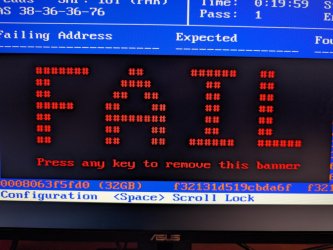
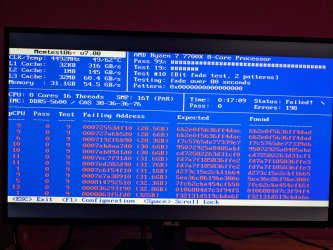
Memtest86 Shows me FAIL so I hope that there is only a broken RAM-Component because CPU and/or gpu will become expensive ...
 

Attachments

  • ffed3d03-2b2e-43f8-a696-69441d86056f.jpg
    ffed3d03-2b2e-43f8-a696-69441d86056f.jpg
    282.5 KB · Views: 4
  • 3b3cacc1-3978-4181-9dda-1d2b3c6b18f7.jpg
    3b3cacc1-3978-4181-9dda-1d2b3c6b18f7.jpg
    352.5 KB · Views: 4

My Computer My Computer

At a glance

windows 11 homeRyzen 7 7700X2 x 16 GBGTX 4080
OS
windows 11 home
Computer type
PC/Desktop
CPU
Ryzen 7 7700X
Memory
2 x 16 GB
Graphics Card(s)
GTX 4080
I would remove of the RAM sticks and then run MemTest86 again, it'll help to determine which one is faulty, I doubt this is a CPU issue unless both sticks fail the test. However, you could determine that by testing them in another machine.
 

My Computer My Computer

At a glance

Windows 11, Windows 10, Linux Fedora Cinnamon
OS
Windows 11, Windows 10, Linux Fedora Cinnamon
Thank you.
Memtest86 tells me FAIL, when I use both sticks. Using only one gives me PASS for both

Seems to me, that disabling XMP in UEFI (BIOS) solved my problem.
Deeper testing next week.


.
 

My Computer My Computer

At a glance

windows 11 homeRyzen 7 7700X2 x 16 GBGTX 4080
OS
windows 11 home
Computer type
PC/Desktop
CPU
Ryzen 7 7700X
Memory
2 x 16 GB
Graphics Card(s)
GTX 4080
Seems to me, that disabling XMP in UEFI (BIOS) solved my problem.
You may want to have a look at the specifications for the RAM and the motherboard to see which settings are most likely going to be compatible. Since both RAM sticks are passing individually then they won't be the problem.
 

My Computer My Computer

At a glance

Windows 11, Windows 10, Linux Fedora Cinnamon
OS
Windows 11, Windows 10, Linux Fedora Cinnamon
I set DDR5 VDD Volt from Auto (1.1V ) to 1.25 V
seems good sor far

Maybe this can help others

Thanks for all ya help
 

My Computer My Computer

At a glance

windows 11 homeRyzen 7 7700X2 x 16 GBGTX 4080
OS
windows 11 home
Computer type
PC/Desktop
CPU
Ryzen 7 7700X
Memory
2 x 16 GB
Graphics Card(s)
GTX 4080
I set DDR5 VDD Volt from Auto (1.1V ) to 1.25 V
seems good sor far
Glad to hear that you haven't had any other crashes, just keep a note of what settings you've changed so if you do have another crash, you know exactly which setting caused it. If you don't have any more crashes over the next few days then we can probably mark this thread as solved.
 

My Computer My Computer

At a glance

Windows 11, Windows 10, Linux Fedora Cinnamon
OS
Windows 11, Windows 10, Linux Fedora Cinnamon

Latest Support Threads

Back
Top Bottom