- Local time
- 11:42 PM
- Posts
- 23
- OS
- Windows 11
Follow along with the video below to see how to install our site as a web app on your home screen.
Note: This feature may not be available in some browsers.
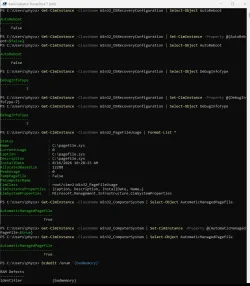
Get-CimInstance -ClassName Win32_OSRecoveryConfiguration | Select-Object AutoReboot
Get-CimInstance -ClassName Win32_OSRecoveryConfiguration | Set-CimInstance -Property @{AutoReboot=$false}
Get-CimInstance -ClassName Win32_OSRecoveryConfiguration | Select-Object AutoReboot
Get-CimInstance -ClassName Win32_OSRecoveryConfiguration | Select-Object DebugInfoType
Get-CimInstance -ClassName Win32_OSRecoveryConfiguration | Set-CimInstance -Property @{DebugInfoType=7}
Get-CimInstance -ClassName Win32_OSRecoveryConfiguration | Select-Object DebugInfoType
Get-CimInstance -ClassName Win32_PageFileUsage | Format-List *
Get-CimInstance -ClassName Win32_ComputerSystem | Select-Object AutomaticManagedPagefile
Get-CimInstance -ClassName Win32_ComputerSystem | Set-CimInstance -Property @{AutomaticManagedPagefile=$true}
Get-CimInstance -ClassName Win32_ComputerSystem | Select-Object AutomaticManagedPagefile
bcdedit /enum '{badmemory}'
www.elevenforum.com
www.elevenforum.com
iastorvd Intel(R) Chipset VMD RST Controller service c:\windows\system32\drivers\iastorvd.sys Kernel Driver Yes Boot Running OK Normal No Yes
Name Intel RST VMD Managed Controller 09AB
Manufacturer Intel Corporation
Status Unknown
PNP Device ID PCI\VEN_8086&DEV_09AB&SUBSYS_00000000&REV_00\3&11583659&1&D0
Name Intel RST VMD Controller A77F
Manufacturer Intel Corporation
Status OK
PNP Device ID PCI\VEN_8086&DEV_A77F&SUBSYS_00008086&REV_00\3&11583659&1&70
Driver C:\WINDOWS\SYSTEM32\DRIVERS\IASTORVD.SYS (20.2.8.1028, 1.55 MB (1,624,152 bytes), 8/15/2026 7:25 PM)
iaStorVD.sys Mon Jun 23 04:49:46 2025 (6859233A)