

- Local time
- 9:26 AM
- Posts
- 56
- OS
- Windows 11 Pro 25H2 OS Build 26200.7705
Good mornin', Everyone.....
Welp, 5 Windows iterations ago (once upon a time in the Land of Windows 7), we felt that we had a good grasp on the
foundational architecture of Microsoft Windows OS and seemingly fluid changes from version to version (XP>7 et al.).......
EHHHHH!!!!.....(loud buzzer sound)......WRONG!!!......
We simply had a love affair with Windows 7 Professional x64, and thus said, we skipped right over the Vista-esque (IMO)
8/8.1 versions, and didn't even give Windows 10 a nod. Soooo, here we are. Thee ol' Windows 7 machine justa hummin'
along like a loyal and faithful Small Block Chevrolet snappin' through this Windows 11 Pro as though the 'antiquated'
hardware was of no concern (knock-knock...on wood!)
Yeah, we had some glitches along the way with the clean 24H2 install on a fresh SSD, but with each subsequent Update
everything seems to be gettin' better, smoother, and of a more fluid nature.
And now, we've arrived at this new puzzler...... First off, perhaps due to the exuberance of the install violating the bs Microsoft
Hardware Requirements and basically functioning beyond our own expectations, we scuffed up and created a Microsoft Account
thinking they had everything rigged whereas nothing would work properly without the barrel of the Microsoft gun to my head....
Capisce?..... Once the excitement waned, we set up a Local Account (Administrator) in me own name, attempted to
dislodge ourself from the big government grip of Microsoft control. Well, somethin' in me thought process apparently went awry.
Last night, finally, the bulb lit up......after jumpin' through a sundry of Microsoft hoops (log in, log out, forgot main Microsoft admin pw)
we were able to disassociate THIS PC, along with the telltale info exposing the 'antiquated' unblessed Microsoft hardware bs, and
shut the reliance down on that main Microsoft acct....so we thought. Promptly we were greeted with a notice that it could take
~24 hrs. for the changes to take effect........Sooooo, now, we're so spun that we're not sure what's going on!
The problem?.....even though we 'thought' our Local Account awarded Full Administrative Privileges, apparently that's not
the case....... in any event, we've put together some screenshots, marked up, to present here with the hope one of you more
than capable Windows Wizards can help me get sorted out. And THAT, would be most greatly appreciated!.....read on, por favor-
Somehow, I've things mixed up..... All I wanted to do was clean stuff up around here a bit and decided to broom the old
Defender Scan History into the trash. Wanted to make sure we did it right, so we looked in C:\Windows\Microsoft Antimalware\
Support directory, and, after browsing about therein, had planned on brooming everything in there. Ding-ding, not a good idea
said the voice in my left ear.....research time..... we discovered the proper way was NOT within above directory, but rather
C:\ProgramData\Microsoft\Windows Defender\Scans\History......Yee-up!......and FINALLY!.....we've arrived at my dilemma!....
We were stopped in our tracks with-
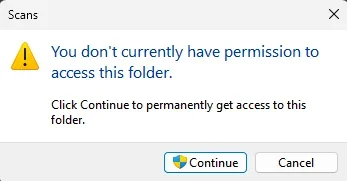
OK, no problem!...... Then THIS!-
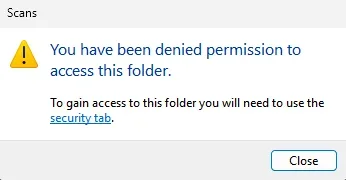
Off to the Security tab we go......
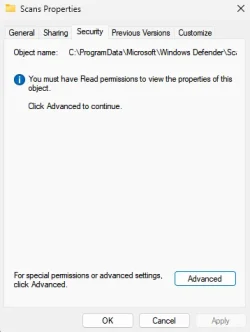
>Advanced.......
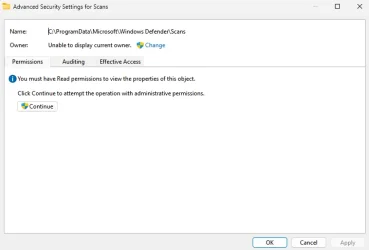
Need READ Permissions...... CONTINUE.....
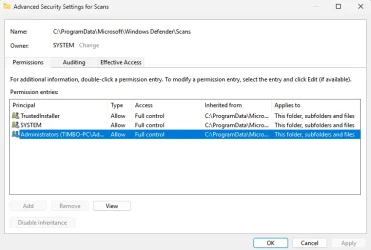
Dbl. click on 'Administrators (TIMBO-PC\Administrators), Access- FULL CONTROL> Show Advanced Permissions>

AAAND!......I'm stumped!.....everything's greyed out!.....Couldn't change 'Owner' in pane 3 screens prior, either.....
Now, here's something else......going to Control Panel>User Accounts>
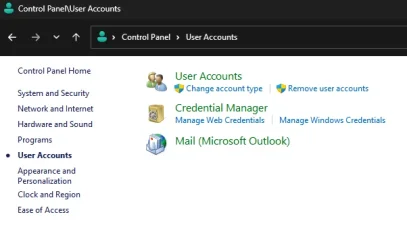
And>
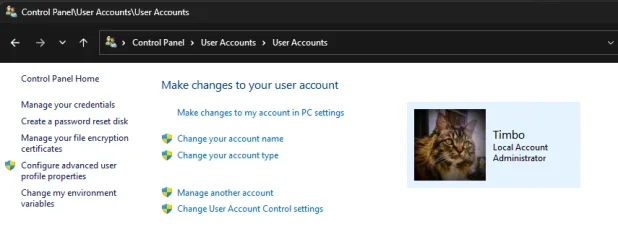
WHAT am I missing?.....Configure advanced user profile properties?....Change your acct type?.....
But, watch what happens there......
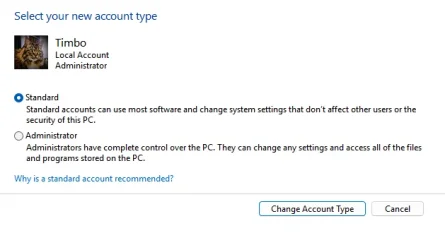
>>>>>>
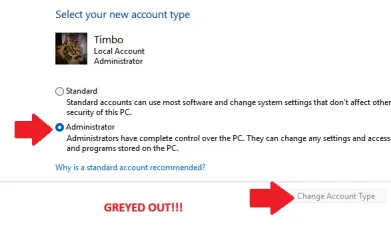
Can't change from Standard to Administrator...... Ok, let's scoot on over to Settings>Accounts and have a look-see......
NOTE!: upper left hand corner displays my legal name and email (along with gorgeous photo of me beloved Toon Bot, Layla),
which is my Microsoft account nomenclature, and under Accounts>Your Info my Local Acct is displayed.....
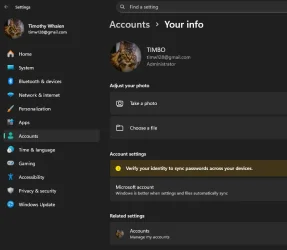
Not sure how to put this, exactly, but there appears to be some sort of a CONFLICT going on here, perhaps......
I hope we've provided enough information here whereas to garner some much needed help......Simply put,
I absolutely hate it when I'm not in complete control of my personal world. Very good chance, too, that I'm
missing something here- obviously brought on by mine own self imposed frustration......
Could someone(s) please school me as to what's going on here?.......PLEASE?......
In advance, we offer the most heartfelt gratitude and thanks for any and all help......
ThankYou-ThankYou, Kind Regards, and wishing ALL a great day out there in Windows World.

AND PLEASE!..... Don't try and fix ME, just my Windows 11.......

Welp, 5 Windows iterations ago (once upon a time in the Land of Windows 7), we felt that we had a good grasp on the
foundational architecture of Microsoft Windows OS and seemingly fluid changes from version to version (XP>7 et al.).......
EHHHHH!!!!.....(loud buzzer sound)......WRONG!!!......
We simply had a love affair with Windows 7 Professional x64, and thus said, we skipped right over the Vista-esque (IMO)
8/8.1 versions, and didn't even give Windows 10 a nod. Soooo, here we are. Thee ol' Windows 7 machine justa hummin'
along like a loyal and faithful Small Block Chevrolet snappin' through this Windows 11 Pro as though the 'antiquated'
hardware was of no concern (knock-knock...on wood!)
Yeah, we had some glitches along the way with the clean 24H2 install on a fresh SSD, but with each subsequent Update
everything seems to be gettin' better, smoother, and of a more fluid nature.
And now, we've arrived at this new puzzler...... First off, perhaps due to the exuberance of the install violating the bs Microsoft
Hardware Requirements and basically functioning beyond our own expectations, we scuffed up and created a Microsoft Account
thinking they had everything rigged whereas nothing would work properly without the barrel of the Microsoft gun to my head....
Capisce?..... Once the excitement waned, we set up a Local Account (Administrator) in me own name, attempted to
dislodge ourself from the big government grip of Microsoft control. Well, somethin' in me thought process apparently went awry.
Last night, finally, the bulb lit up......after jumpin' through a sundry of Microsoft hoops (log in, log out, forgot main Microsoft admin pw)
we were able to disassociate THIS PC, along with the telltale info exposing the 'antiquated' unblessed Microsoft hardware bs, and
shut the reliance down on that main Microsoft acct....so we thought. Promptly we were greeted with a notice that it could take
~24 hrs. for the changes to take effect........Sooooo, now, we're so spun that we're not sure what's going on!
The problem?.....even though we 'thought' our Local Account awarded Full Administrative Privileges, apparently that's not
the case....... in any event, we've put together some screenshots, marked up, to present here with the hope one of you more
than capable Windows Wizards can help me get sorted out. And THAT, would be most greatly appreciated!.....read on, por favor-
Somehow, I've things mixed up..... All I wanted to do was clean stuff up around here a bit and decided to broom the old
Defender Scan History into the trash. Wanted to make sure we did it right, so we looked in C:\Windows\Microsoft Antimalware\
Support directory, and, after browsing about therein, had planned on brooming everything in there. Ding-ding, not a good idea
said the voice in my left ear.....research time..... we discovered the proper way was NOT within above directory, but rather
C:\ProgramData\Microsoft\Windows Defender\Scans\History......Yee-up!......and FINALLY!.....we've arrived at my dilemma!....
We were stopped in our tracks with-
OK, no problem!...... Then THIS!-
Off to the Security tab we go......
>Advanced.......
Need READ Permissions...... CONTINUE.....
Dbl. click on 'Administrators (TIMBO-PC\Administrators), Access- FULL CONTROL> Show Advanced Permissions>
AAAND!......I'm stumped!.....everything's greyed out!.....Couldn't change 'Owner' in pane 3 screens prior, either.....
Now, here's something else......going to Control Panel>User Accounts>
And>
WHAT am I missing?.....Configure advanced user profile properties?....Change your acct type?.....
But, watch what happens there......
>>>>>>
Can't change from Standard to Administrator...... Ok, let's scoot on over to Settings>Accounts and have a look-see......
NOTE!: upper left hand corner displays my legal name and email (along with gorgeous photo of me beloved Toon Bot, Layla),
which is my Microsoft account nomenclature, and under Accounts>Your Info my Local Acct is displayed.....
Not sure how to put this, exactly, but there appears to be some sort of a CONFLICT going on here, perhaps......
I hope we've provided enough information here whereas to garner some much needed help......Simply put,
I absolutely hate it when I'm not in complete control of my personal world. Very good chance, too, that I'm
missing something here- obviously brought on by mine own self imposed frustration......
Could someone(s) please school me as to what's going on here?.......PLEASE?......
In advance, we offer the most heartfelt gratitude and thanks for any and all help......
ThankYou-ThankYou, Kind Regards, and wishing ALL a great day out there in Windows World.
AND PLEASE!..... Don't try and fix ME, just my Windows 11.......
My Computers
-
At a glance
Windows 11 Pro 25H2 OS Build 26200.7705Gen 5 Haswell i7-477032 GB G. SKILL DDR-3 Ripjaws X- 8GB x 4Integrated Intel 4600 (112MB)- OS
- Windows 11 Pro 25H2 OS Build 26200.7705
- Computer type
- PC/Desktop
- Manufacturer/Model
- HP ENVY 700-515xt CTO (mATX platform)
- CPU
- Gen 5 Haswell i7-4770
- Motherboard
- OEM (Asus)
- Memory
- 32 GB G. SKILL DDR-3 Ripjaws X- 8GB x 4
- Graphics Card(s)
- Integrated Intel 4600 (112MB)
- Sound Card
- OEM
- Monitor(s) Displays
- HP 27eb
- Screen Resolution
- 1920 x 1080
- Hard Drives
- Samsung 860 PRO 256GB, SG ST1000DM003-1CH162, Barracuda 7200.14 Series, 1 TB storage, 64MB cache and a SATA 6Gb/s interface (Hard drive is used for Storage only)
- PSU
- OEM 350W
- Case
- OEM
- Cooling
- OEM (ACPI fans)
- Keyboard
- Logitech K120
- Mouse
- Logitech M100
- Internet Speed
- 440.1 Down/ 11.2 Up, 13 ms latency, server based in Chicago, IP- Spectrum in Midland, MI
- Browser
- Google Chrome
- Antivirus
- MS Defender
-
At a glance
Android 15Qualcomm Snapdragon 8 Gen 28GB LPDDR5X (ramped to 12GB, borrowed from 51...Integrated Adreno 740 GPU- Operating System
- Android 15
- Manufacturer/Model
- Motorola Edge+ 2023
- CPU
- Qualcomm Snapdragon 8 Gen 2
- Motherboard
- What's that???.....
- Memory
- 8GB LPDDR5X (ramped to 12GB, borrowed from 512GB UFS 4.0 storage)
- Graphics card(s)
- Integrated Adreno 740 GPU
- Sound Card
- Dolby Atmos
- Monitor(s) Displays
- Display Technology - pOLED, HDR10+, 10-bit; Over a billion shades of color, DCI-P3 color space, Dolby Vision®, 165Hz refresh rate, Touch rate: 360Hz, Peak Brightness: 1300 nits
- Screen Resolution
- Resolution - FHD+ (2400 x 1080) | 394ppi
- Hard Drives
- UFS 4.0 internal storage, which is the standard type of high-speed flash storage for modern flagship smartphones.
- PSU
- 5100mAh Li-Ion, Charging - 68W TurboPower™ charging | 15W wireless charging | 5W wireless power sharing
- Case
- Sandblasted aluminum
- Keyboard
- GBoard and Google Voice typing
- Mouse
- Yep.....primarily rt. index finger
- Internet Speed
- 499.23 down, 11.53 up, 12 ms latency
- Browser
- Chrome
- Antivirus
- Nah......built in Motorola Security
- Other Info
- This device smokes the Samsung Galaxy S25 Ultra, for $400-$500 less, except the Camera specs. My eyes can't tell the difference!






