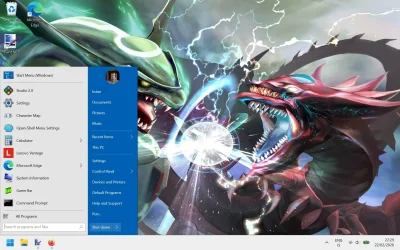
Solved Windows 11 Home has changed the start menu without permission how do i revert it ?


I provided a link to their website. For a single user it is now $10 for a perpetual license. You can try it free for 30 days.


Thanks for the link! Looks like they have lifetime licenses on some of their stuff again. (y)

That's good news since I won't pay a subscription for it.
 

My Computers

System One System Two

  • OS
    Windows 11 Pro 25H2 build: (26200.7623)
    Computer type
    Laptop
    Manufacturer/Model
    Microsoft Surface Pro
    Memory
    32GB
  • Operating System
    Microsoft 25H2 Pro
    Computer type
    Laptop
    Manufacturer/Model
    Dell Pro 14 - PC14250
    CPU
    Intel Core Ultra 7
    Memory
    64GB
    Graphics card(s)
    Intel Integrated Graphics
    Hard Drives
    Micron 1TB SSD

My Computers

System One System Two

  • OS
    Windows 11 (up to date)
    Computer type
    PC/Desktop
    Manufacturer/Model
    Custom
    CPU
    Intel i5 12400
    Motherboard
    Gigabyte Z690 UA
    Memory
    Corsair Vengeance LPX 16GB
    Graphics Card(s)
    On Board the Z690
    Sound Card
    On Board
    Monitor(s) Displays
    43" Samsung tu7000
    Screen Resolution
    2560 x 1440
    Hard Drives
    SAMSUNG SSD 1TB NVMe M.2
    PSU
    Thermaltake smart 500w 80+
    Case
    LIAN LANCOOL_205M
    Cooling
    Bunch of fans . . . :o) (lights dont work)
    Keyboard
    Unicomp: Ultra Classic White Buckling Spring USB
    Mouse
    M510
    Internet Speed
    50mbps on Ethernet
    Browser
    Fire Fox
    Antivirus
    Windows
    Other Info
    Love this computer but I still prefer Win-7 like I love my old Lazy Boy Recliner . . . it just feels better.
  • Operating System
    WIN-7-64BIT and Win-11 pro for testing on unsupported hardware
    Computer type
    PC/Desktop
    Manufacturer/Model
    Home built
    CPU
    i5-3570K CPU @ 3.40GHz, 3801 Mhz, 4 Core(s), 4 Logical Processor(s)
    Motherboard
    GA-Z77-HD3
    Memory
    16 GB - Crucial Ballistick 4GB PC3-14900 DDR3-1333 MHz
    Graphics card(s)
    NVIDIA GeForce GTX 1050
    Sound Card
    On Board
    Monitor(s) Displays
    ASUS VP278
    Screen Resolution
    1920 x 1080
    Hard Drives
    4 - internal Samsung 2.5" SSD, 1 WD HDD 7200 and some external drives
    PSU
    EVGA 550w
    Case
    Old Gygabyte Tower
    Cooling
    Yes
    Keyboard
    Unicomp - UNIOP4A USB (like the old IBM Model H that I started with)
    Mouse
    M510
    Internet Speed
    50mbps
    Browser
    Firefox
    Antivirus
    Windows
    Other Info
    The only thing it lack is USB-3.2 on the front face but it has 3.0 on the back

My Computers

System One System Two

  • OS
    Windows 11 Pro 25H2 build: (26200.7623)
    Computer type
    Laptop
    Manufacturer/Model
    Microsoft Surface Pro
    Memory
    32GB
  • Operating System
    Microsoft 25H2 Pro
    Computer type
    Laptop
    Manufacturer/Model
    Dell Pro 14 - PC14250
    CPU
    Intel Core Ultra 7
    Memory
    64GB
    Graphics card(s)
    Intel Integrated Graphics
    Hard Drives
    Micron 1TB SSD
And you got that through Start11?
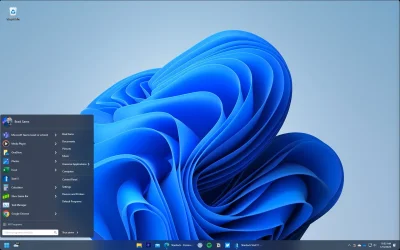
If you go to their webpage, it has all sorts of examples of what you can do.
h1-19201.webp
My desktop layout is similar to this, except I have the taskbar aligned to the left instead of centered and of course a different darker background.
 

My Computer

System One

  • OS
    Windows 11 25H2
    Computer type
    PC/Desktop
    Manufacturer/Model
    EVGA home brew
    CPU
    Broadwell-e 6850K 4.5ghz @1.36v
    Motherboard
    EVGA X99 FTW K
    Memory
    32GB Corsair LPM 3600 C16
    Graphics Card(s)
    EVGA RTX 3080Ti FTW
    Sound Card
    Asus Centurion true 7.1 headset. (5 speakers in each earpeice)
    Monitor(s) Displays
    LG C4 55"
    Screen Resolution
    4K 144hz
    Hard Drives
    Various models of SSDs ~10TB No HDDs installed.
    PSU
    be quiet! BN516 Straight Power 12-1000w 80 Plus Platinum
    Case
    Corsair 780T modified to dual 200mm intake fans
    Cooling
    Corsair H110i
    Keyboard
    Corsair K95 Platinum
    Mouse
    Corsair M65 RGB Elite
    Internet Speed
    50Mbs

My Computers

System One System Two

  • OS
    Windows 11 (up to date)
    Computer type
    PC/Desktop
    Manufacturer/Model
    Custom
    CPU
    Intel i5 12400
    Motherboard
    Gigabyte Z690 UA
    Memory
    Corsair Vengeance LPX 16GB
    Graphics Card(s)
    On Board the Z690
    Sound Card
    On Board
    Monitor(s) Displays
    43" Samsung tu7000
    Screen Resolution
    2560 x 1440
    Hard Drives
    SAMSUNG SSD 1TB NVMe M.2
    PSU
    Thermaltake smart 500w 80+
    Case
    LIAN LANCOOL_205M
    Cooling
    Bunch of fans . . . :o) (lights dont work)
    Keyboard
    Unicomp: Ultra Classic White Buckling Spring USB
    Mouse
    M510
    Internet Speed
    50mbps on Ethernet
    Browser
    Fire Fox
    Antivirus
    Windows
    Other Info
    Love this computer but I still prefer Win-7 like I love my old Lazy Boy Recliner . . . it just feels better.
  • Operating System
    WIN-7-64BIT and Win-11 pro for testing on unsupported hardware
    Computer type
    PC/Desktop
    Manufacturer/Model
    Home built
    CPU
    i5-3570K CPU @ 3.40GHz, 3801 Mhz, 4 Core(s), 4 Logical Processor(s)
    Motherboard
    GA-Z77-HD3
    Memory
    16 GB - Crucial Ballistick 4GB PC3-14900 DDR3-1333 MHz
    Graphics card(s)
    NVIDIA GeForce GTX 1050
    Sound Card
    On Board
    Monitor(s) Displays
    ASUS VP278
    Screen Resolution
    1920 x 1080
    Hard Drives
    4 - internal Samsung 2.5" SSD, 1 WD HDD 7200 and some external drives
    PSU
    EVGA 550w
    Case
    Old Gygabyte Tower
    Cooling
    Yes
    Keyboard
    Unicomp - UNIOP4A USB (like the old IBM Model H that I started with)
    Mouse
    M510
    Internet Speed
    50mbps
    Browser
    Firefox
    Antivirus
    Windows
    Other Info
    The only thing it lack is USB-3.2 on the front face but it has 3.0 on the back
It's one of the sample layouts on their web page.
I downloaded it and will play with it after lunch
Start 11 is not on the free end. Scratch that off.

I will test Open Shell and see what sticks.
 

My Computer

System One

  • OS
    Windows 11 Home
    Computer type
    Laptop
    Manufacturer/Model
    Lenovo Yoga 7 Slim 14I110
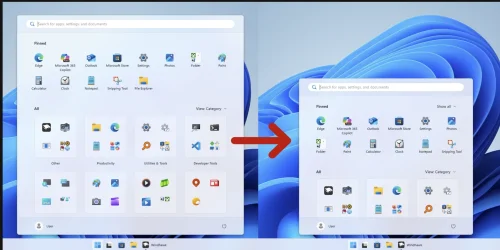
Another new free option for the start menu. I've been playing with Windhawk for a few days now but just discovered the new start menu resizer mod a few minutes ago. Just another option.

Screenshot 2026-02-22 135758.webpScreenshot 2026-02-22 140444.webp
 

My Computers

System One System Two

  • OS
    Windows 11 25H2
    Computer type
    Laptop
    Manufacturer/Model
    Alienware 18 Area-51
    CPU
    Intel Core Ultra 9 275HX (24-Core)
    Motherboard
    Alienware
    Memory
    64GB DDR5 6400MT/s
    Graphics Card(s)
    NVIDIA GeForce RTX 5080 and Intel UHD Graphics
    Sound Card
    Onboard, Realtek high-performance Audio chips (ALC3329 & ALC1708))
    Monitor(s) Displays
    300HZ 18-inch QHD 500 nit Comfort View+
    Screen Resolution
    2560 x 1600
    Hard Drives
    2TB NVMe M.2 PCIe Gen 5 SSD
    Case
    Magnesium Alloy
    Cooling
    Advanced Cryo-Tech Quad-Fan Cooling system & large vapor chamber
    Keyboard
    Cherry MX ultra low profile mechanical keyboard with per key AlienFX RGB lighting
    Mouse
    Logitech MX Master 4
    Browser
    Vivaldi (main), Firefox, Chrome, Edge
    Antivirus
    MS Defender and Malwarebytes Free
  • Operating System
    Windows 11 25H2
    Computer type
    Laptop
    Manufacturer/Model
    Microsoft Surface Laptop 7
    CPU
    Qualcomm Snapdragon X Elite (12 Core) ARM based CPU
    Motherboard
    Microsoft Corp.
    Memory
    16GB LPDDR5
    Graphics card(s)
    Qualcomm Adreno X1-85
    Sound Card
    Omnisonic speakers with Dolby Atmos spatial sound
    Monitor(s) Displays
    120 Hz 13.8-inch 600 nit PixelSense Flow touchscreen
    Screen Resolution
    2304x1536
    Hard Drives
    1TB NVMe Gen 4 SSD
    Case
    Anodized Aluminum
    Cooling
    Traditional active cooling fan system
    Keyboard
    Mechanical QWERTY, backlit when in use
    Mouse
    Logitech MX Master 4 and Surface Arc Mouse
    Browser
    Vivaldi (main), Firefox, Chrome, Edge
    Antivirus
    MS Defender and Malwarebytes Free
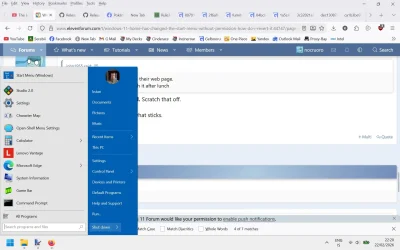
Open Shell is great now. But can the blue be changed to gray ?

Its almost better.
 

Attachments

  • better.webp
    better.webp
    109.6 KB · Views: 2

My Computer

System One

  • OS
    Windows 11 Home
    Computer type
    Laptop
    Manufacturer/Model
    Lenovo Yoga 7 Slim 14I110
current base form but blue is little bit out of touch with theme if open shell can change color into gray or red ?
 

Attachments

  • base form.webp
    base form.webp
    214.1 KB · Views: 1

My Computer

System One

  • OS
    Windows 11 Home
    Computer type
    Laptop
    Manufacturer/Model
    Lenovo Yoga 7 Slim 14I110
current base form but blue is little bit out of touch with theme if open shell can change color into gray or red ?

Have you taken the time to look around the settings? Recommended as you want to use the software. A small effort.
 

My Computers

System One System Two

  • OS
    Windows 11 Pro 25H2 Build 26200.8524
    Computer type
    PC/Desktop
    Manufacturer/Model
    Sin-built 2013
    CPU
    Intel(R) Core(TM) i7-4770K CPU @ 3.50GHz
    Motherboard
    ASUS ROG Maximus VI Formula
    Memory
    32.0 GB of I forget and the box is in storage.
    Graphics Card(s)
    Gigabyte nVidia GeForce GTX 1660 Super OC 6GB
    Sound Card
    Onboard thingy
    Monitor(s) Displays
    5 x LG 25MS500-B - 1 x 24MK430H-B - 1 x Wacom Pro 22" Touch Screen Tablet
    Screen Resolution
    All over the place
    Hard Drives
    Too many to list.
    OS on Samsung 1TB 870 QVO SATA
    PSU
    Silverstone 1500
    Case
    NZXT Phantom 820 Full-Tower Case
    Cooling
    Noctua NH-D15 Elite Class Dual Tower CPU Cooler / 6 x EziDIY 120mm / 2 x Corsair 140mm somethings / 1 x 140mm Thermaltake something / 2 x 200mm Corsair.
    Keyboard
    Corsair K95 / Logitech diNovo Edge Wireless
    Mouse
    Logitech: G402 / G502 / Mx Masters / Mx Air Cordless
    Internet Speed
    2000/500Mbps
    Browser
    All sorts
    Antivirus
    Kaspersky Premium
    Other Info
    ㅤㅤㅤㅤㅤㅤㅤㅤㅤㅤㅤㅤㅤㅤㅤㅤㅤㅤㅤㅤㅤㅤㅤㅤㅤㅤㅤㅤㅤㅤㅤㅤㅤㅤㅤㅤㅤㅤㅤㅤ⠀⠀⠀⠀⠀⠀⠀⠀⠀⠀
    TP-Link BE9300 WiFi 7 Bluetooth 5.4 (Archer TBE550E)
    TP-Link TX201 V1 2.5GB Lan

    Grandstream HT812 - VoIP
    ASUS DSL-AX82U - Mesh
    ASUS RT-AC68U - Mesh
    ASUS RT-BE88U Router

    Brother MFC-L2880DW Printer

    I’m on a horse.
  • Operating System
    Windows 11 Pro 25H2 Build 26200.8524
    Computer type
    Laptop
    Manufacturer/Model
    LENOVO Yoga 7 14IRL8 - 7i EVO OLED 14" Touchscreen i5 12 Core 16GB/512GB
    CPU
    Intel Core 12th Gen i5-1240P Processor (1.7 - 4.4GHz)
    Memory
    16GB LPDDR5 RAM
    Graphics card(s)
    Intel Iris Xe Graphics Processor
    Sound Card
    Optimized with Dolby Atmos®
    Screen Resolution
    QHD 2880 x 1800 OLED
    Hard Drives
    M.2 512GB
    Antivirus
    Defender / Malwarebytes
    Other Info
    …still on a horse.
Have you taken the time to look around the settings? Recommended as you want to use the software. A small effort.
There was a time when it was the kids helping the adults figure out this stuff.
 

My Computers

System One System Two

  • OS
    Windows 11 (up to date)
    Computer type
    PC/Desktop
    Manufacturer/Model
    Custom
    CPU
    Intel i5 12400
    Motherboard
    Gigabyte Z690 UA
    Memory
    Corsair Vengeance LPX 16GB
    Graphics Card(s)
    On Board the Z690
    Sound Card
    On Board
    Monitor(s) Displays
    43" Samsung tu7000
    Screen Resolution
    2560 x 1440
    Hard Drives
    SAMSUNG SSD 1TB NVMe M.2
    PSU
    Thermaltake smart 500w 80+
    Case
    LIAN LANCOOL_205M
    Cooling
    Bunch of fans . . . :o) (lights dont work)
    Keyboard
    Unicomp: Ultra Classic White Buckling Spring USB
    Mouse
    M510
    Internet Speed
    50mbps on Ethernet
    Browser
    Fire Fox
    Antivirus
    Windows
    Other Info
    Love this computer but I still prefer Win-7 like I love my old Lazy Boy Recliner . . . it just feels better.
  • Operating System
    WIN-7-64BIT and Win-11 pro for testing on unsupported hardware
    Computer type
    PC/Desktop
    Manufacturer/Model
    Home built
    CPU
    i5-3570K CPU @ 3.40GHz, 3801 Mhz, 4 Core(s), 4 Logical Processor(s)
    Motherboard
    GA-Z77-HD3
    Memory
    16 GB - Crucial Ballistick 4GB PC3-14900 DDR3-1333 MHz
    Graphics card(s)
    NVIDIA GeForce GTX 1050
    Sound Card
    On Board
    Monitor(s) Displays
    ASUS VP278
    Screen Resolution
    1920 x 1080
    Hard Drives
    4 - internal Samsung 2.5" SSD, 1 WD HDD 7200 and some external drives
    PSU
    EVGA 550w
    Case
    Old Gygabyte Tower
    Cooling
    Yes
    Keyboard
    Unicomp - UNIOP4A USB (like the old IBM Model H that I started with)
    Mouse
    M510
    Internet Speed
    50mbps
    Browser
    Firefox
    Antivirus
    Windows
    Other Info
    The only thing it lack is USB-3.2 on the front face but it has 3.0 on the back
There was a time when it was the kids helping the adults figure out this stuff.

Ha! Not in my household.

Off topic and not directed at the thread creator:
Most generations that come after mine seem to be quite lazy and are of the mindset of “I want, therefore I deserve”
I’ll be dead before the crap hits the fan.
 

My Computers

System One System Two

  • OS
    Windows 11 Pro 25H2 Build 26200.8524
    Computer type
    PC/Desktop
    Manufacturer/Model
    Sin-built 2013
    CPU
    Intel(R) Core(TM) i7-4770K CPU @ 3.50GHz
    Motherboard
    ASUS ROG Maximus VI Formula
    Memory
    32.0 GB of I forget and the box is in storage.
    Graphics Card(s)
    Gigabyte nVidia GeForce GTX 1660 Super OC 6GB
    Sound Card
    Onboard thingy
    Monitor(s) Displays
    5 x LG 25MS500-B - 1 x 24MK430H-B - 1 x Wacom Pro 22" Touch Screen Tablet
    Screen Resolution
    All over the place
    Hard Drives
    Too many to list.
    OS on Samsung 1TB 870 QVO SATA
    PSU
    Silverstone 1500
    Case
    NZXT Phantom 820 Full-Tower Case
    Cooling
    Noctua NH-D15 Elite Class Dual Tower CPU Cooler / 6 x EziDIY 120mm / 2 x Corsair 140mm somethings / 1 x 140mm Thermaltake something / 2 x 200mm Corsair.
    Keyboard
    Corsair K95 / Logitech diNovo Edge Wireless
    Mouse
    Logitech: G402 / G502 / Mx Masters / Mx Air Cordless
    Internet Speed
    2000/500Mbps
    Browser
    All sorts
    Antivirus
    Kaspersky Premium
    Other Info
    ㅤㅤㅤㅤㅤㅤㅤㅤㅤㅤㅤㅤㅤㅤㅤㅤㅤㅤㅤㅤㅤㅤㅤㅤㅤㅤㅤㅤㅤㅤㅤㅤㅤㅤㅤㅤㅤㅤㅤㅤ⠀⠀⠀⠀⠀⠀⠀⠀⠀⠀
    TP-Link BE9300 WiFi 7 Bluetooth 5.4 (Archer TBE550E)
    TP-Link TX201 V1 2.5GB Lan

    Grandstream HT812 - VoIP
    ASUS DSL-AX82U - Mesh
    ASUS RT-AC68U - Mesh
    ASUS RT-BE88U Router

    Brother MFC-L2880DW Printer

    I’m on a horse.
  • Operating System
    Windows 11 Pro 25H2 Build 26200.8524
    Computer type
    Laptop
    Manufacturer/Model
    LENOVO Yoga 7 14IRL8 - 7i EVO OLED 14" Touchscreen i5 12 Core 16GB/512GB
    CPU
    Intel Core 12th Gen i5-1240P Processor (1.7 - 4.4GHz)
    Memory
    16GB LPDDR5 RAM
    Graphics card(s)
    Intel Iris Xe Graphics Processor
    Sound Card
    Optimized with Dolby Atmos®
    Screen Resolution
    QHD 2880 x 1800 OLED
    Hard Drives
    M.2 512GB
    Antivirus
    Defender / Malwarebytes
    Other Info
    …still on a horse.
Ha! Not in my household.

Off topic and not directed at the thread creator:
Most generations that come after mine seem to be quite lazy and are of the mindset of “I want, therefore I deserve”
I’ll be dead before the crap hits the fan.
I'm talking about you and me. When we were "young" the older adults didn't know anything about technology. What you said is exactly what I meant.
 

My Computers

System One System Two

  • OS
    Windows 11 (up to date)
    Computer type
    PC/Desktop
    Manufacturer/Model
    Custom
    CPU
    Intel i5 12400
    Motherboard
    Gigabyte Z690 UA
    Memory
    Corsair Vengeance LPX 16GB
    Graphics Card(s)
    On Board the Z690
    Sound Card
    On Board
    Monitor(s) Displays
    43" Samsung tu7000
    Screen Resolution
    2560 x 1440
    Hard Drives
    SAMSUNG SSD 1TB NVMe M.2
    PSU
    Thermaltake smart 500w 80+
    Case
    LIAN LANCOOL_205M
    Cooling
    Bunch of fans . . . :o) (lights dont work)
    Keyboard
    Unicomp: Ultra Classic White Buckling Spring USB
    Mouse
    M510
    Internet Speed
    50mbps on Ethernet
    Browser
    Fire Fox
    Antivirus
    Windows
    Other Info
    Love this computer but I still prefer Win-7 like I love my old Lazy Boy Recliner . . . it just feels better.
  • Operating System
    WIN-7-64BIT and Win-11 pro for testing on unsupported hardware
    Computer type
    PC/Desktop
    Manufacturer/Model
    Home built
    CPU
    i5-3570K CPU @ 3.40GHz, 3801 Mhz, 4 Core(s), 4 Logical Processor(s)
    Motherboard
    GA-Z77-HD3
    Memory
    16 GB - Crucial Ballistick 4GB PC3-14900 DDR3-1333 MHz
    Graphics card(s)
    NVIDIA GeForce GTX 1050
    Sound Card
    On Board
    Monitor(s) Displays
    ASUS VP278
    Screen Resolution
    1920 x 1080
    Hard Drives
    4 - internal Samsung 2.5" SSD, 1 WD HDD 7200 and some external drives
    PSU
    EVGA 550w
    Case
    Old Gygabyte Tower
    Cooling
    Yes
    Keyboard
    Unicomp - UNIOP4A USB (like the old IBM Model H that I started with)
    Mouse
    M510
    Internet Speed
    50mbps
    Browser
    Firefox
    Antivirus
    Windows
    Other Info
    The only thing it lack is USB-3.2 on the front face but it has 3.0 on the back
To be honest, when I was a kid, technology was a Radio. There were 2 switches and a knob. Parent proof.

It was all fun and games, then someone invented Microwave ovens. And TV remote controls that didn’t involve telling your kid to get up and change the channel.
 

My Computers

System One System Two

  • OS
    Windows 11 Pro 25H2 Build 26200.8524
    Computer type
    PC/Desktop
    Manufacturer/Model
    Sin-built 2013
    CPU
    Intel(R) Core(TM) i7-4770K CPU @ 3.50GHz
    Motherboard
    ASUS ROG Maximus VI Formula
    Memory
    32.0 GB of I forget and the box is in storage.
    Graphics Card(s)
    Gigabyte nVidia GeForce GTX 1660 Super OC 6GB
    Sound Card
    Onboard thingy
    Monitor(s) Displays
    5 x LG 25MS500-B - 1 x 24MK430H-B - 1 x Wacom Pro 22" Touch Screen Tablet
    Screen Resolution
    All over the place
    Hard Drives
    Too many to list.
    OS on Samsung 1TB 870 QVO SATA
    PSU
    Silverstone 1500
    Case
    NZXT Phantom 820 Full-Tower Case
    Cooling
    Noctua NH-D15 Elite Class Dual Tower CPU Cooler / 6 x EziDIY 120mm / 2 x Corsair 140mm somethings / 1 x 140mm Thermaltake something / 2 x 200mm Corsair.
    Keyboard
    Corsair K95 / Logitech diNovo Edge Wireless
    Mouse
    Logitech: G402 / G502 / Mx Masters / Mx Air Cordless
    Internet Speed
    2000/500Mbps
    Browser
    All sorts
    Antivirus
    Kaspersky Premium
    Other Info
    ㅤㅤㅤㅤㅤㅤㅤㅤㅤㅤㅤㅤㅤㅤㅤㅤㅤㅤㅤㅤㅤㅤㅤㅤㅤㅤㅤㅤㅤㅤㅤㅤㅤㅤㅤㅤㅤㅤㅤㅤ⠀⠀⠀⠀⠀⠀⠀⠀⠀⠀
    TP-Link BE9300 WiFi 7 Bluetooth 5.4 (Archer TBE550E)
    TP-Link TX201 V1 2.5GB Lan

    Grandstream HT812 - VoIP
    ASUS DSL-AX82U - Mesh
    ASUS RT-AC68U - Mesh
    ASUS RT-BE88U Router

    Brother MFC-L2880DW Printer

    I’m on a horse.
  • Operating System
    Windows 11 Pro 25H2 Build 26200.8524
    Computer type
    Laptop
    Manufacturer/Model
    LENOVO Yoga 7 14IRL8 - 7i EVO OLED 14" Touchscreen i5 12 Core 16GB/512GB
    CPU
    Intel Core 12th Gen i5-1240P Processor (1.7 - 4.4GHz)
    Memory
    16GB LPDDR5 RAM
    Graphics card(s)
    Intel Iris Xe Graphics Processor
    Sound Card
    Optimized with Dolby Atmos®
    Screen Resolution
    QHD 2880 x 1800 OLED
    Hard Drives
    M.2 512GB
    Antivirus
    Defender / Malwarebytes
    Other Info
    …still on a horse.
Cool story, grandpa. :winkt:
 

My Computer

System One

  • OS
    Windows 11 Pro 25H2
    Computer type
    PC/Desktop
    Manufacturer/Model
    Intel NUC12WSHi7
    CPU
    12th Gen Core i7-1260P
    Motherboard
    NUC12WSBi7
    Memory
    64 GB Micron PC4-25600
    Graphics Card(s)
    Intel Iris Xe Graphics
    Sound Card
    on-board Realtek HD Audio
    Monitor(s) Displays
    Dell U3219Q
    Screen Resolution
    3840 x 2160
    Hard Drives
    Samsung SSD 990 PRO 1TB
    Crucial MX500 2 TB
    Antivirus
    Microsoft Defender
Open Shell is great now. But can the blue be changed to gray ?

Its almost better.

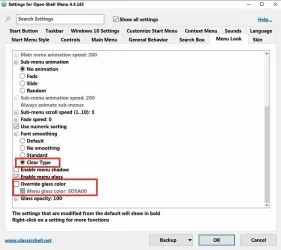
I “think” it’s in the settings under “Menu Look” tab. I also “Think” you need to Override the glass colour.

This is an older version. Not sure if still the same?

IMG_5870.webp
 

My Computers

System One System Two

  • OS
    Windows 11 Pro 25H2 Build 26200.8524
    Computer type
    PC/Desktop
    Manufacturer/Model
    Sin-built 2013
    CPU
    Intel(R) Core(TM) i7-4770K CPU @ 3.50GHz
    Motherboard
    ASUS ROG Maximus VI Formula
    Memory
    32.0 GB of I forget and the box is in storage.
    Graphics Card(s)
    Gigabyte nVidia GeForce GTX 1660 Super OC 6GB
    Sound Card
    Onboard thingy
    Monitor(s) Displays
    5 x LG 25MS500-B - 1 x 24MK430H-B - 1 x Wacom Pro 22" Touch Screen Tablet
    Screen Resolution
    All over the place
    Hard Drives
    Too many to list.
    OS on Samsung 1TB 870 QVO SATA
    PSU
    Silverstone 1500
    Case
    NZXT Phantom 820 Full-Tower Case
    Cooling
    Noctua NH-D15 Elite Class Dual Tower CPU Cooler / 6 x EziDIY 120mm / 2 x Corsair 140mm somethings / 1 x 140mm Thermaltake something / 2 x 200mm Corsair.
    Keyboard
    Corsair K95 / Logitech diNovo Edge Wireless
    Mouse
    Logitech: G402 / G502 / Mx Masters / Mx Air Cordless
    Internet Speed
    2000/500Mbps
    Browser
    All sorts
    Antivirus
    Kaspersky Premium
    Other Info
    ㅤㅤㅤㅤㅤㅤㅤㅤㅤㅤㅤㅤㅤㅤㅤㅤㅤㅤㅤㅤㅤㅤㅤㅤㅤㅤㅤㅤㅤㅤㅤㅤㅤㅤㅤㅤㅤㅤㅤㅤ⠀⠀⠀⠀⠀⠀⠀⠀⠀⠀
    TP-Link BE9300 WiFi 7 Bluetooth 5.4 (Archer TBE550E)
    TP-Link TX201 V1 2.5GB Lan

    Grandstream HT812 - VoIP
    ASUS DSL-AX82U - Mesh
    ASUS RT-AC68U - Mesh
    ASUS RT-BE88U Router

    Brother MFC-L2880DW Printer

    I’m on a horse.
  • Operating System
    Windows 11 Pro 25H2 Build 26200.8524
    Computer type
    Laptop
    Manufacturer/Model
    LENOVO Yoga 7 14IRL8 - 7i EVO OLED 14" Touchscreen i5 12 Core 16GB/512GB
    CPU
    Intel Core 12th Gen i5-1240P Processor (1.7 - 4.4GHz)
    Memory
    16GB LPDDR5 RAM
    Graphics card(s)
    Intel Iris Xe Graphics Processor
    Sound Card
    Optimized with Dolby Atmos®
    Screen Resolution
    QHD 2880 x 1800 OLED
    Hard Drives
    M.2 512GB
    Antivirus
    Defender / Malwarebytes
    Other Info
    …still on a horse.
To be honest, when I was a kid, technology was a Radio. There were 2 switches and a knob. Parent proof.

It was all fun and games, then someone invented Microwave ovens. And TV remote controls that didn’t involve telling your kid to get up and change the channel.
High tec was an eight track tape player
 

My Computers

System One System Two

  • OS
    Windows 11 (up to date)
    Computer type
    PC/Desktop
    Manufacturer/Model
    Custom
    CPU
    Intel i5 12400
    Motherboard
    Gigabyte Z690 UA
    Memory
    Corsair Vengeance LPX 16GB
    Graphics Card(s)
    On Board the Z690
    Sound Card
    On Board
    Monitor(s) Displays
    43" Samsung tu7000
    Screen Resolution
    2560 x 1440
    Hard Drives
    SAMSUNG SSD 1TB NVMe M.2
    PSU
    Thermaltake smart 500w 80+
    Case
    LIAN LANCOOL_205M
    Cooling
    Bunch of fans . . . :o) (lights dont work)
    Keyboard
    Unicomp: Ultra Classic White Buckling Spring USB
    Mouse
    M510
    Internet Speed
    50mbps on Ethernet
    Browser
    Fire Fox
    Antivirus
    Windows
    Other Info
    Love this computer but I still prefer Win-7 like I love my old Lazy Boy Recliner . . . it just feels better.
  • Operating System
    WIN-7-64BIT and Win-11 pro for testing on unsupported hardware
    Computer type
    PC/Desktop
    Manufacturer/Model
    Home built
    CPU
    i5-3570K CPU @ 3.40GHz, 3801 Mhz, 4 Core(s), 4 Logical Processor(s)
    Motherboard
    GA-Z77-HD3
    Memory
    16 GB - Crucial Ballistick 4GB PC3-14900 DDR3-1333 MHz
    Graphics card(s)
    NVIDIA GeForce GTX 1050
    Sound Card
    On Board
    Monitor(s) Displays
    ASUS VP278
    Screen Resolution
    1920 x 1080
    Hard Drives
    4 - internal Samsung 2.5" SSD, 1 WD HDD 7200 and some external drives
    PSU
    EVGA 550w
    Case
    Old Gygabyte Tower
    Cooling
    Yes
    Keyboard
    Unicomp - UNIOP4A USB (like the old IBM Model H that I started with)
    Mouse
    M510
    Internet Speed
    50mbps
    Browser
    Firefox
    Antivirus
    Windows
    Other Info
    The only thing it lack is USB-3.2 on the front face but it has 3.0 on the back
I “think” it’s in the settings under “Menu Look” tab. I also “Think” you need to Override the glass colour.

This is an older version. Not sure if still the same?

View attachment 164085

That's it it works on OpenShell 4.4.196

We can turn off the stories now guys :-)
 

My Computer

System One

  • OS
    Windows 11 Home
    Computer type
    Laptop
    Manufacturer/Model
    Lenovo Yoga 7 Slim 14I110

My Computers

System One System Two

  • OS
    Windows 11 (up to date)
    Computer type
    PC/Desktop
    Manufacturer/Model
    Custom
    CPU
    Intel i5 12400
    Motherboard
    Gigabyte Z690 UA
    Memory
    Corsair Vengeance LPX 16GB
    Graphics Card(s)
    On Board the Z690
    Sound Card
    On Board
    Monitor(s) Displays
    43" Samsung tu7000
    Screen Resolution
    2560 x 1440
    Hard Drives
    SAMSUNG SSD 1TB NVMe M.2
    PSU
    Thermaltake smart 500w 80+
    Case
    LIAN LANCOOL_205M
    Cooling
    Bunch of fans . . . :o) (lights dont work)
    Keyboard
    Unicomp: Ultra Classic White Buckling Spring USB
    Mouse
    M510
    Internet Speed
    50mbps on Ethernet
    Browser
    Fire Fox
    Antivirus
    Windows
    Other Info
    Love this computer but I still prefer Win-7 like I love my old Lazy Boy Recliner . . . it just feels better.
  • Operating System
    WIN-7-64BIT and Win-11 pro for testing on unsupported hardware
    Computer type
    PC/Desktop
    Manufacturer/Model
    Home built
    CPU
    i5-3570K CPU @ 3.40GHz, 3801 Mhz, 4 Core(s), 4 Logical Processor(s)
    Motherboard
    GA-Z77-HD3
    Memory
    16 GB - Crucial Ballistick 4GB PC3-14900 DDR3-1333 MHz
    Graphics card(s)
    NVIDIA GeForce GTX 1050
    Sound Card
    On Board
    Monitor(s) Displays
    ASUS VP278
    Screen Resolution
    1920 x 1080
    Hard Drives
    4 - internal Samsung 2.5" SSD, 1 WD HDD 7200 and some external drives
    PSU
    EVGA 550w
    Case
    Old Gygabyte Tower
    Cooling
    Yes
    Keyboard
    Unicomp - UNIOP4A USB (like the old IBM Model H that I started with)
    Mouse
    M510
    Internet Speed
    50mbps
    Browser
    Firefox
    Antivirus
    Windows
    Other Info
    The only thing it lack is USB-3.2 on the front face but it has 3.0 on the back
Generally... the new Start Menu comes with 25H2.
But as usual MS is not rolling it out to everyone at the same time.

MS thinks it's "less" confusing that way. :D
Isn't that supposed to be what the Insider Builds are for? My understanding is that the Insiders are suppose to test the new features and changes and report any bugs. All of this is so the release builds can be as bug free as possible. The way it's going, everybody is a tester no matter what build they are running.
 

My Computers

System One System Two

  • OS
    Windows 11 Pro 25H2
    Computer type
    PC/Desktop
    Manufacturer/Model
    PowerSpec B746
    CPU
    Intel Core i7-10700K
    Motherboard
    ASRock Z490 Phantom Gaming 4/ax
    Memory
    16GB (8GB PC4-19200 DDR4 SDRAM x2)
    Graphics Card(s)
    NVIDIA GeForce GTX 1050 TI
    Sound Card
    Realtek Audio
    Monitor(s) Displays
    #1. LG ULTRAWIDE 34" #2. AOC Q32G2WG3 32"
    Screen Resolution
    #1. 3440 X 1440 #2. 1920 x 1080
    Hard Drives
    NVMe WDC WDS100T2B0C-00PXH0 1TB
    Samsung SSD 860 EVO 1TB
    PSU
    750 Watts (62.5A)
    Case
    PowerSpec/Lian Li ATX 205
    Keyboard
    Logitech K270
    Mouse
    Logitech M185
    Browser
    Microsoft Edge and Firefox
    Antivirus
    Webroot SecureAnywhere CE 26.1
  • Operating System
    Windows 11 Canary Channel
    Computer type
    PC/Desktop
    Manufacturer/Model
    PowerSpec G156
    CPU
    Intel Core i5-8400 CPU @ 2.80GHz
    Motherboard
    AsusTeK Prime B360M-A
    Memory
    16 MB DDR 4-2666
    Monitor(s) Displays
    23" Speptre HDMI 75Hz
    Screen Resolution
    1920x1080
    Hard Drives
    Samsung 970 EVO 500GB NVMe
    Keyboard
    Logitek K270
    Mouse
    Logitek M185
    Browser
    Firefox, Edge and Edge Canary
    Antivirus
    Windows Defender

Latest Support Threads

Back
Top Bottom