Random DRIVER_IRQL_NOT_LESS_OR_EQUAL (rdyboost.sys) and DPC_WATCHDOG_VIOLATION on HP 255R G10


Local time
6:41 PM
Posts
4
OS
Windows 11 Home 25H2 Build 26200.8655
Hello everyone,

I have been troubleshooting a random BSOD issue on my HP notebook for about a week and I have already performed many hardware and software diagnostics without finding the root cause.

I would really appreciate if someone could analyze my Minidump and help me identify what is causing these crashes.

System specifications​

  • HP 255R 15.6" G10 Notebook PC
  • AMD Ryzen 7 7735U with Radeon Graphics
  • 16 GB RAM
  • Samsung MZVL8512HFLU-00BH1 NVMe SSD (512 GB)
  • Windows 11 Home 25H2
  • OS Build 26200.8655
  • BIOS updated from F.09 to F.11

Symptoms​

The issue started a few days ago.

The crashes are completely random.

Sometimes the notebook works perfectly for many hours, while other times it crashes shortly after startup.

The problems I have experienced include:

  • Complete system freezes while playing League of Legends.
  • During one freeze, Spotify also stopped responding.
  • Sometimes I leave the notebook powered on with the lid open, and when I come back it has powered off by itself.
  • Several times Windows automatically started repairing drive C: during boot.
  • Occasionally Windows displayed a black screen saying that an error occurred during startup.
  • Sometimes the notebook becomes completely unresponsive with only the power LED blinking. In that state I have to hold the power button for about 15 seconds to turn it off.

BSODs observed​

The first BSOD was:

DPC_WATCHDOG_VIOLATION

Later I received another BSOD:

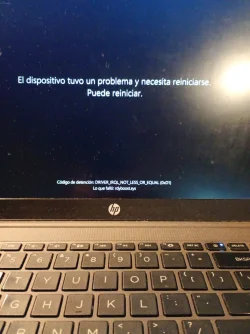
DRIVER_IRQL_NOT_LESS_OR_EQUAL

The "What failed" field displayed:

rdyboost.sys

After some crashes Windows fails to create new Minidump files.

Event Viewer repeatedly shows:

volmgr - Event ID 161

"Dump file creation failed due to an error during dump creation."

Diagnostics already performed​

Windows​

  • SFC /SCANNOW → No integrity violations found.
  • DISM /RestoreHealth completed successfully.
  • Windows automatically repaired the C: drive.
  • <span>fsutil dirty query C:</span> originally reported errors, but after the repair it now reports that the volume contains no errors.

Storage​

PowerShell reports the SSD health as:

Healthy

Memory​

Windows Memory Diagnostic:

PASS

No errors detected.

HP Hardware Diagnostics UEFI​

All tests passed successfully:

  • Processor Test
  • Memory Test
  • System Board Test
  • SSD Test
  • Battery Test
  • AC Adapter Test
No Failure ID was reported.

Drivers and updates​

Using HP Support Assistant I updated:

  • BIOS
  • Realtek Audio
  • Realtek Wireless LAN
  • Realtek Bluetooth
  • Synaptics Touchpad

Additional observation​

When I connect my original Samsung USB-C earphones (with microphone), Device Manager reports:

USB\VID_04E8&PID_A063&MI_04

Code 10

"HID Report Descriptor validation failure."

The warning disappears after disconnecting the earphones.

I do not know whether this is related to the BSODs.

Current configuration​

  • Automatic restart after BSOD is disabled.
  • Small Memory Dump (256 KB) is enabled.
  • Paging file is managed automatically.
Despite this, Windows often fails to generate new Minidumps after crashes.

Files attached​

  • Minidump from June 15.
  • drivers.csv
  • Photos of the BSOD.
  • Event Viewer screenshots.

My question​

At this point every hardware diagnostic has passed successfully, so I am wondering whether the problem is more likely related to:

  • AMD chipset or power management drivers,
  • Storage drivers,
  • USB/HID drivers,
  • Windows 11 Build 26200.8655,
  • or another third-party driver.
Any help analyzing the Minidump or identifying the faulty driver would be greatly appreciated.

Thank you very much for your time.
 
Windows Build/Version
Version 25H2 (compilacion SO 26200.8655)

Attachments
Last edited:

My Computer My Computer

At a glance

Windows 11 Home 25H2 Build 26200.8655AMD Ryzen 7 7735U with Radeon Graphics16 GB DDR4AMD Radeon 680M Graphics (integrada en el Ryz...
OS
Windows 11 Home 25H2 Build 26200.8655
Computer type
Laptop
Manufacturer/Model
HP 255R 15.6 inch G10 Notebook PC
CPU
AMD Ryzen 7 7735U with Radeon Graphics
Motherboard
Hewlett-Packard 8D22 (Version 44.22)
Memory
16 GB DDR4
Graphics Card(s)
AMD Radeon 680M Graphics (integrada en el Ryzen 7 7735U)
Sound Card
Realtek High Definition Audio
Monitor(s) Displays
15.6" FHD (1920×1080)
Screen Resolution
1920×1080
Hard Drives
Samsung MZVL8512HFLU-00BH1 NVMe SSD 512 GB
PSU
Internal HP Laptop Power Supply
Case
HP 255R G10 Laptop
Cooling
Stock HP Cooling
Keyboard
HP Laptop Keyboard
Mouse
Red Dragon
Browser
Microsoft Edge
Antivirus
Microsoft Defender
Other Info
Windows 11 Home 25H2 Build 26200.8655 - BIOS F.11

You might want to test the memory using Memtest 86. That will eliminate the memory causing the issue. I just had some 2 year old memory go bad, both of the modules failed after about 10 seconds. Luckily it has a lifetime warranty and hope to have new ones returned in about 10 days.
Hope you can find your problem.
 

My Computer My Computer

At a glance

Ryzen 5800X64GB GSkill DDR4MSI RX6750 XT OC
Computer type
PC/Desktop
Manufacturer/Model
MSI
CPU
Ryzen 5800X
Motherboard
MSI X570S Carbon Pro
Memory
64GB GSkill DDR4
Graphics Card(s)
MSI RX6750 XT OC
Monitor(s) Displays
Dell U2711
Screen Resolution
1920 x 1080
Hard Drives
Nexstorage NN4LE 2TB2C
PSU
850 watt
Cooling
Corsair H100i
During the troubleshoooting please use English as the default language.

Run the V2 log collector and post a share link into the newest post.


Code:
Durante la resolución de problemas, utilicen el inglés como idioma predeterminado.

Ejecuten el recopilador de registros V2 y publiquen un enlace en la última entrada.


My Computer My Computer

At a glance

Windows 10Intel(R) Core(TM) i7-4800MQ CPU @ 2.70GHz16 GB Total: Manufacturer : Samsung MemoryTyp...NVIDIA Quadro K3100M; Intel(R) HD Graphics 4600
OS
Windows 10
Computer type
Laptop
Manufacturer/Model
HP
CPU
Intel(R) Core(TM) i7-4800MQ CPU @ 2.70GHz
Motherboard
Product : 190A Version : KBC Version 94.56
Memory
16 GB Total: Manufacturer : Samsung MemoryType : DDR3 FormFactor : SODIMM Capacity : 8GB Speed : 1600
Graphics Card(s)
NVIDIA Quadro K3100M; Intel(R) HD Graphics 4600
Sound Card
IDT High Definition Audio CODEC; PNP Device ID HDAUDIO\FUNC_01&VEN_111D&DEV_76E0
Hard Drives
Model Hitachi HTS727575A9E364
Antivirus
Microsoft Defender
Other Info
Mobile Workstation
Hello,

I have updated my original post and changed it to English, as requested.

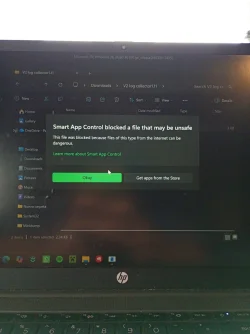
I was unable to run the V2 Log Collector because Windows 11 Smart App Control blocked it.

Instead, I ran the DM Log Collector, which completed successfully.

The generated ZIP file is too large to upload directly to the forum, so here is the share link:


Please let me know if you need any additional information.

Thank you.
 

My Computer My Computer

At a glance

Windows 11 Home 25H2 Build 26200.8655AMD Ryzen 7 7735U with Radeon Graphics16 GB DDR4AMD Radeon 680M Graphics (integrada en el Ryz...
OS
Windows 11 Home 25H2 Build 26200.8655
Computer type
Laptop
Manufacturer/Model
HP 255R 15.6 inch G10 Notebook PC
CPU
AMD Ryzen 7 7735U with Radeon Graphics
Motherboard
Hewlett-Packard 8D22 (Version 44.22)
Memory
16 GB DDR4
Graphics Card(s)
AMD Radeon 680M Graphics (integrada en el Ryzen 7 7735U)
Sound Card
Realtek High Definition Audio
Monitor(s) Displays
15.6" FHD (1920×1080)
Screen Resolution
1920×1080
Hard Drives
Samsung MZVL8512HFLU-00BH1 NVMe SSD 512 GB
PSU
Internal HP Laptop Power Supply
Case
HP 255R G10 Laptop
Cooling
Stock HP Cooling
Keyboard
HP Laptop Keyboard
Mouse
Red Dragon
Browser
Microsoft Edge
Antivirus
Microsoft Defender
Other Info
Windows 11 Home 25H2 Build 26200.8655 - BIOS F.11
If possible, please modify the computer's default language to English during the troubleshooting so that files can be scanned and read.

(see earlier post links)


1) Open administrative command prompt and copy and paste:

fltmc

Post a share link.


2) Boot into safe mode (shift + restart) > run V2 > post a share link


4) Reboot


5) Run V2 > post a share link


6) Add WMIC:

Administrative command prompt:

Code:
DISM /Online /Add-Capability /CapabilityName:WMIC~~~~


7) Run Tuneup plus >post a share link


8) Enable Regback:


9) Create a new restore point:


Code:
Event[30412]
  Log Name: System
  Source: volmgr
  Date: 2026-06-18T12:25:50.6020000Z
  Event ID: 161
  Task: Ninguna
  Level: Error
  Opcode: N/A
  Keyword: Clásico,
  User: N/A
  User Name: N/A
  Computer: GaelRamos
  Description:
Error al crear el archivo de volcado debido a un error durante la creación del volcado. BugCheckProgress era: 0x0004004F


Code:
Event[30081]
  Log Name: System
  Source: Microsoft-Windows-Kernel-Power
  Date: 2026-06-17T17:13:09.0010000Z
  Event ID: 41
  Task: N/A
  Level: Crítico
  Opcode: Información 
  Keyword: N/A
  User: S-1-5-18
  User Name: NT AUTHORITY\SYSTEM
  Computer: GaelRamos
  Description:
Se reinició el sistema sin apagarlo limpiamente primero. Este error puede producirse si el sistema dejó de responder, se bloqueó o se interrumpió el suministro eléctrico de forma inesperada.
 

My Computer My Computer

At a glance

Windows 10Intel(R) Core(TM) i7-4800MQ CPU @ 2.70GHz16 GB Total: Manufacturer : Samsung MemoryTyp...NVIDIA Quadro K3100M; Intel(R) HD Graphics 4600
OS
Windows 10
Computer type
Laptop
Manufacturer/Model
HP
CPU
Intel(R) Core(TM) i7-4800MQ CPU @ 2.70GHz
Motherboard
Product : 190A Version : KBC Version 94.56
Memory
16 GB Total: Manufacturer : Samsung MemoryType : DDR3 FormFactor : SODIMM Capacity : 8GB Speed : 1600
Graphics Card(s)
NVIDIA Quadro K3100M; Intel(R) HD Graphics 4600
Sound Card
IDT High Definition Audio CODEC; PNP Device ID HDAUDIO\FUNC_01&VEN_111D&DEV_76E0
Hard Drives
Model Hitachi HTS727575A9E364
Antivirus
Microsoft Defender
Other Info
Mobile Workstation
This link is for step #6:


My Computer My Computer

At a glance

Windows 10Intel(R) Core(TM) i7-4800MQ CPU @ 2.70GHz16 GB Total: Manufacturer : Samsung MemoryTyp...NVIDIA Quadro K3100M; Intel(R) HD Graphics 4600
OS
Windows 10
Computer type
Laptop
Manufacturer/Model
HP
CPU
Intel(R) Core(TM) i7-4800MQ CPU @ 2.70GHz
Motherboard
Product : 190A Version : KBC Version 94.56
Memory
16 GB Total: Manufacturer : Samsung MemoryType : DDR3 FormFactor : SODIMM Capacity : 8GB Speed : 1600
Graphics Card(s)
NVIDIA Quadro K3100M; Intel(R) HD Graphics 4600
Sound Card
IDT High Definition Audio CODEC; PNP Device ID HDAUDIO\FUNC_01&VEN_111D&DEV_76E0
Hard Drives
Model Hitachi HTS727575A9E364
Antivirus
Microsoft Defender
Other Info
Mobile Workstation
I have completed the requested steps.

  • I changed the Windows display language to English.
  • I installed the WMIC optional feature.
  • I ran <span>fltmc</span> and uploaded the output.
  • I tested the V2 Log Collector in Safe Mode. It was blocked by Windows 11 Smart App Control (screenshot attached).
  • I rebooted and tested the V2 Log Collector again in normal mode. It was also blocked by Windows 11 Smart App Control.
  • I ran Tuneup Plus successfully.
  • I enabled RegBack.
  • I created a new System Restore point before making the RegBack change.
Here are the requested files:

DM Log Collector:

fltmc output:

Tuneup Plus log:

Please let me know if you need any additional information or if there is another way you would like me to collect the V2 logs despite Smart App Control blocking the application.

Thank you very much for your time and assistance.
 

Attachments

  • safe mode.webp
    safe mode.webp
    213.1 KB · Views: 1

My Computer My Computer

At a glance

Windows 11 Home 25H2 Build 26200.8655AMD Ryzen 7 7735U with Radeon Graphics16 GB DDR4AMD Radeon 680M Graphics (integrada en el Ryz...
OS
Windows 11 Home 25H2 Build 26200.8655
Computer type
Laptop
Manufacturer/Model
HP 255R 15.6 inch G10 Notebook PC
CPU
AMD Ryzen 7 7735U with Radeon Graphics
Motherboard
Hewlett-Packard 8D22 (Version 44.22)
Memory
16 GB DDR4
Graphics Card(s)
AMD Radeon 680M Graphics (integrada en el Ryzen 7 7735U)
Sound Card
Realtek High Definition Audio
Monitor(s) Displays
15.6" FHD (1920×1080)
Screen Resolution
1920×1080
Hard Drives
Samsung MZVL8512HFLU-00BH1 NVMe SSD 512 GB
PSU
Internal HP Laptop Power Supply
Case
HP 255R G10 Laptop
Cooling
Stock HP Cooling
Keyboard
HP Laptop Keyboard
Mouse
Red Dragon
Browser
Microsoft Edge
Antivirus
Microsoft Defender
Other Info
Windows 11 Home 25H2 Build 26200.8655 - BIOS F.11
Prior post deleted on smart app control.
 

My Computer My Computer

At a glance

Windows 10Intel(R) Core(TM) i7-4800MQ CPU @ 2.70GHz16 GB Total: Manufacturer : Samsung MemoryTyp...NVIDIA Quadro K3100M; Intel(R) HD Graphics 4600
OS
Windows 10
Computer type
Laptop
Manufacturer/Model
HP
CPU
Intel(R) Core(TM) i7-4800MQ CPU @ 2.70GHz
Motherboard
Product : 190A Version : KBC Version 94.56
Memory
16 GB Total: Manufacturer : Samsung MemoryType : DDR3 FormFactor : SODIMM Capacity : 8GB Speed : 1600
Graphics Card(s)
NVIDIA Quadro K3100M; Intel(R) HD Graphics 4600
Sound Card
IDT High Definition Audio CODEC; PNP Device ID HDAUDIO\FUNC_01&VEN_111D&DEV_76E0
Hard Drives
Model Hitachi HTS727575A9E364
Antivirus
Microsoft Defender
Other Info
Mobile Workstation
The DM logs remained in a foreign language and could not be scanned.

Please try again to use English as the default language.

Smart app control can be turned off and on as needed (Windows 11 Home 64-bit (10.0, Build 26200) (26100.ge_release.240331-1435))


Code:
Event[30055]
  Log Name: System
  Source: EventLog
  Date: 2026-06-17T17:13:20.0600000Z
  Event ID: 6008
  Task: Ninguna
  Level: Error
  Opcode: N/A
  Keyword: Clásico,
  User: N/A
  User Name: N/A
  Computer: GaelRamos
  Description:
El cierre anterior del sistema a las 02:42:25 p. m. del ?17/?06/?2026 resultó inesperado.


Code:
Event[30081]
  Log Name: System
  Source: Microsoft-Windows-Kernel-Power
  Date: 2026-06-17T17:13:09.0010000Z
  Event ID: 41
  Task: N/A
  Level: Crítico
  Opcode: Información 
  Keyword: N/A
  User: S-1-5-18
  User Name: NT AUTHORITY\SYSTEM
  Computer: GaelRamos
  Description:
Se reinició el sistema sin apagarlo limpiamente primero. Este error puede producirse si el sistema dejó de responder, se bloqueó o se interrumpió el suministro eléctrico de forma inesperada.
 

My Computer My Computer

At a glance

Windows 10Intel(R) Core(TM) i7-4800MQ CPU @ 2.70GHz16 GB Total: Manufacturer : Samsung MemoryTyp...NVIDIA Quadro K3100M; Intel(R) HD Graphics 4600
OS
Windows 10
Computer type
Laptop
Manufacturer/Model
HP
CPU
Intel(R) Core(TM) i7-4800MQ CPU @ 2.70GHz
Motherboard
Product : 190A Version : KBC Version 94.56
Memory
16 GB Total: Manufacturer : Samsung MemoryType : DDR3 FormFactor : SODIMM Capacity : 8GB Speed : 1600
Graphics Card(s)
NVIDIA Quadro K3100M; Intel(R) HD Graphics 4600
Sound Card
IDT High Definition Audio CODEC; PNP Device ID HDAUDIO\FUNC_01&VEN_111D&DEV_76E0
Hard Drives
Model Hitachi HTS727575A9E364
Antivirus
Microsoft Defender
Other Info
Mobile Workstation
I changed the Windows display language to English.

I disabled Smart App Control as requested, successfully ran the V2 Log Collector, and then re-enabled Smart App Control.

Here is the V2 Log Collector share link:

GAELRAMOS-(2026-06-19_15-22-03).zip

Please let me know if you need anything else.

Thank you.
 

My Computer My Computer

At a glance

Windows 11 Home 25H2 Build 26200.8655AMD Ryzen 7 7735U with Radeon Graphics16 GB DDR4AMD Radeon 680M Graphics (integrada en el Ryz...
OS
Windows 11 Home 25H2 Build 26200.8655
Computer type
Laptop
Manufacturer/Model
HP 255R 15.6 inch G10 Notebook PC
CPU
AMD Ryzen 7 7735U with Radeon Graphics
Motherboard
Hewlett-Packard 8D22 (Version 44.22)
Memory
16 GB DDR4
Graphics Card(s)
AMD Radeon 680M Graphics (integrada en el Ryzen 7 7735U)
Sound Card
Realtek High Definition Audio
Monitor(s) Displays
15.6" FHD (1920×1080)
Screen Resolution
1920×1080
Hard Drives
Samsung MZVL8512HFLU-00BH1 NVMe SSD 512 GB
PSU
Internal HP Laptop Power Supply
Case
HP 255R G10 Laptop
Cooling
Stock HP Cooling
Keyboard
HP Laptop Keyboard
Mouse
Red Dragon
Browser
Microsoft Edge
Antivirus
Microsoft Defender
Other Info
Windows 11 Home 25H2 Build 26200.8655 - BIOS F.11

1) Run the Sea Tools Long generic test > take pictures > post images or share links


If it passes then continue:


2) Boot to Windows Recovery Environment (RE) > command prompt > type >


2) Type:

bcdedit

bcdedit | find "osdevice"

(record the partition drive letter)


chkdsk /b /v W:

Change the letter W to the partition drive letter in the result of the prior command.

chkdsk /b /v W:

The type of the file system is NTFS.

Cannot lock current drive.


Chkdsk cannot run because the volume is in use by another

process. Would you like to schedule this volume to be

checked the next time the system restarts? (Y/N)

type: y

Reboot as needed.


Run the chkdsk /b /v W: overnight while sleeping.


4) After completing all chkdsk /b /v run:

https://www.tenforums.com/attachmen...-files-use-bsod-debugging-chkdskfromevent.bat

Batch files for use in BSOD debugging - Windows 10 Help Forums

Batch files for use in BSOD debugging - Windows 10 Help Forums


Make sure that this runs only after the prior three steps for each drive.


5) Run HD Sentinel (all drives) > post images or share links (do not run until posting results for each steps 5, 6, 7 and 8)

Hard Disk Sentinel - HDD health and temperature monitoring
a) Overview
b) Temperature
c) SMART


6) Completely uninstall VGK Riot-Vanguard


7) Do not reinstall VGK Riot-Vanguard until comments are made

Play non Riot-Vanguard games for stress testing


8) Run the AMD cleanup utility


9) Reinstall AMD chipset, audio, and GPU drivers from the AMD website


10) Monitor for 3 days (72 hours) - 5 days depending on usage


Code:
vgk    vgk    \??\c:\program files\riot vanguard\vgk.sys    Kernel Driver    Sí    System    Running    OK    Ignore    No    Sí


Code:
Nombre    AMD Audio Device
Fabricante    AMD
Estado    OK
Id. de dispositivo PNP    ACP\DEVTYPE_0002&DEVREV_0000&VEN_1022&DEV_15E2&SUBSYS_103C8D22&REV_60\5&22B79C9F&0&04
Controlador    C:\WINDOWS\SYSTEM32\DRIVERSTORE\FILEREPOSITORY\AMDACPAFD.INF_AMD64_C2FED73370E4C01F\AMDACPAFD.SYS (6.0.2.59, 389,88 KB (399.240 bytes), 26/1/2026 14:35)


Code:
amdacpbus    Audio Coprocessr Driver for DSP    c:\windows\system32\driverstore\filerepository\amdacpbus.inf_amd64_1ef8c0c88c1e246e\amdacpbus.sys    Kernel Driver    Sí    Manual    Running    OK    Normal    No    Sí


Code:
amdfendr    AMD Crash Defender Driver    c:\windows\system32\driverstore\filerepository\amdfendr.inf_amd64_2a2d80570dc9cadf\amdfendr.sys    Kernel Driver    Sí    Manual    Running    OK    Normal    No    Sí


Code:
Nombre    AMD Radeon(TM) Graphics
Id. de dispositivo PNP    PCI\VEN_1002&DEV_1681&SUBSYS_8D22103C&REV_0C\4&31F4EC98&0&0041
Tipo de adaptador     AMD Radeon Graphics Processor (0x1681), compatible con Advanced Micro Devices, Inc.
Descripción de adaptador    AMD Radeon(TM) Graphics
RAM de adaptador    512,00 MB (536.870.912 bytes)
Controladores instalados    C:\WINDOWS\System32\DriverStore\FileRepository\u0198084.inf_amd64_ed0bda362f6adb11\B025673\atidx9loader64.dll,C:\WINDOWS\System32\DriverStore\FileRepository\u0198084.inf_amd64_ed0bda362f6adb11\B025673\amdxx64.dll,C:\WINDOWS\System32\DriverStore\FileRepository\u0198084.inf_amd64_ed0bda362f6adb11\B025673\amdxx64.dll,C:\WINDOWS\System32\DriverStore\FileRepository\u0198084.inf_amd64_ed0bda362f6adb11\B025673\amdxc64.dll
Versión del controlador    32.0.21039.2003
Archivo INF    oem1.inf (sección ati2mtag_Rembrandt)
Controlador    C:\WINDOWS\SYSTEM32\DRIVERSTORE\FILEREPOSITORY\U0198084.INF_AMD64_ED0BDA362F6ADB11\B025673\AMDKMDAG.SYS (32.0.21039.2003, 97,43 MB (102.158.352 bytes), 7/3/2026 13:47)


Code:
Event[5880]
  Log Name: System
  Source: Ntfs
  Date: 2026-06-11T16:58:01.6670000Z
  Event ID: 55
  Task: N/A
  Level: Error
  Opcode: Info
  Keyword: N/A
  User: S-1-5-18
  User Name: NT AUTHORITY\SYSTEM
  Computer: GaelRamos
  Description:
A corruption was discovered in the file system structure on volume C:.

The exact nature of the corruption is unknown.  The file system structures need to be scanned online.


Code:
Event[8334]
  Log Name: System
  Source: Ntfs
  Date: 2026-06-17T13:00:35.0700000Z
  Event ID: 55
  Task: N/A
  Level: Error
  Opcode: Info
  Keyword: N/A
  User: S-1-5-18
  User Name: NT AUTHORITY\SYSTEM
  Computer: GaelRamos
  Description:
A corruption was discovered in the file system structure on volume C:.

The exact nature of the corruption is unknown.  The file system structures need to be scanned online.


Code:
Event[6017]
  Log Name: Application
  Source: Chkdsk
  Date: 2026-06-16T19:33:27.3500000Z
  Event ID: 26226
  Task: None
  Level: Information
  Opcode: Info 
  Keyword: Classic,
  User: N/A
  User Name: N/A
  Computer: GaelRamos
  Description:
Chkdsk was executed in scan mode on a volume snapshot. 

Comprobando el sistema de archivos en C:
Espacio de almacenamiento insuficiente para crear el archivo de almacenamiento de instantßneas u otros datos de instantßnea.

Se produjo un error de instantßnea al examinar esta unidad. Ejecute un anßlisis y reparaci¾n sin conexi¾n.


Code:
vgk.sys      Fri Apr  3 15:03:47 2026 (69D01D23)

Code:
amdacpbus.sys Thu Dec 25 21:42:45 2025 (694E0435)

Code:
amdkmdag.sys Mon Jan 19 02:20:40 2026 (696DE958)
 

My Computer My Computer

At a glance

Windows 10Intel(R) Core(TM) i7-4800MQ CPU @ 2.70GHz16 GB Total: Manufacturer : Samsung MemoryTyp...NVIDIA Quadro K3100M; Intel(R) HD Graphics 4600
OS
Windows 10
Computer type
Laptop
Manufacturer/Model
HP
CPU
Intel(R) Core(TM) i7-4800MQ CPU @ 2.70GHz
Motherboard
Product : 190A Version : KBC Version 94.56
Memory
16 GB Total: Manufacturer : Samsung MemoryType : DDR3 FormFactor : SODIMM Capacity : 8GB Speed : 1600
Graphics Card(s)
NVIDIA Quadro K3100M; Intel(R) HD Graphics 4600
Sound Card
IDT High Definition Audio CODEC; PNP Device ID HDAUDIO\FUNC_01&VEN_111D&DEV_76E0
Hard Drives
Model Hitachi HTS727575A9E364
Antivirus
Microsoft Defender
Other Info
Mobile Workstation
Back
Top Bottom