LoboViajero537
Member
- Local time
- 10:31 PM
- Posts
- 5
- OS
- Windows 11 Home 25H2 Build 26200.8655
Hello everyone,
I have been troubleshooting a random BSOD issue on my HP notebook for about a week and I have already performed many hardware and software diagnostics without finding the root cause.
I would really appreciate if someone could analyze my Minidump and help me identify what is causing these crashes.
The crashes are completely random.
Sometimes the notebook works perfectly for many hours, while other times it crashes shortly after startup.
The problems I have experienced include:
DPC_WATCHDOG_VIOLATION
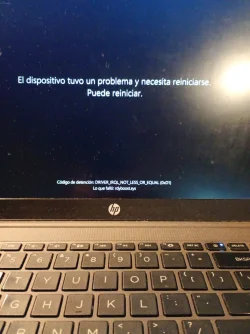
Later I received another BSOD:
DRIVER_IRQL_NOT_LESS_OR_EQUAL
The "What failed" field displayed:
rdyboost.sys
After some crashes Windows fails to create new Minidump files.
Event Viewer repeatedly shows:
volmgr - Event ID 161
"Dump file creation failed due to an error during dump creation."
Healthy
PASS
No errors detected.
USB\VID_04E8&PID_A063&MI_04
Code 10
"HID Report Descriptor validation failure."
The warning disappears after disconnecting the earphones.
I do not know whether this is related to the BSODs.
Thank you very much for your time.
I have been troubleshooting a random BSOD issue on my HP notebook for about a week and I have already performed many hardware and software diagnostics without finding the root cause.
I would really appreciate if someone could analyze my Minidump and help me identify what is causing these crashes.
System specifications
- HP 255R 15.6" G10 Notebook PC
- AMD Ryzen 7 7735U with Radeon Graphics
- 16 GB RAM
- Samsung MZVL8512HFLU-00BH1 NVMe SSD (512 GB)
- Windows 11 Home 25H2
- OS Build 26200.8655
- BIOS updated from F.09 to F.11
Symptoms
The issue started a few days ago.The crashes are completely random.
Sometimes the notebook works perfectly for many hours, while other times it crashes shortly after startup.
The problems I have experienced include:
- Complete system freezes while playing League of Legends.
- During one freeze, Spotify also stopped responding.
- Sometimes I leave the notebook powered on with the lid open, and when I come back it has powered off by itself.
- Several times Windows automatically started repairing drive C: during boot.
- Occasionally Windows displayed a black screen saying that an error occurred during startup.
- Sometimes the notebook becomes completely unresponsive with only the power LED blinking. In that state I have to hold the power button for about 15 seconds to turn it off.
BSODs observed
The first BSOD was:DPC_WATCHDOG_VIOLATION
Later I received another BSOD:
DRIVER_IRQL_NOT_LESS_OR_EQUAL
The "What failed" field displayed:
rdyboost.sys
After some crashes Windows fails to create new Minidump files.
Event Viewer repeatedly shows:
volmgr - Event ID 161
"Dump file creation failed due to an error during dump creation."
Diagnostics already performed
Windows
- SFC /SCANNOW → No integrity violations found.
- DISM /RestoreHealth completed successfully.
- Windows automatically repaired the C: drive.
- <span>fsutil dirty query C:</span> originally reported errors, but after the repair it now reports that the volume contains no errors.
Storage
PowerShell reports the SSD health as:Healthy
Memory
Windows Memory Diagnostic:PASS
No errors detected.
HP Hardware Diagnostics UEFI
All tests passed successfully:- Processor Test
- Memory Test
- System Board Test
- SSD Test
- Battery Test
- AC Adapter Test
Drivers and updates
Using HP Support Assistant I updated:- BIOS
- Realtek Audio
- Realtek Wireless LAN
- Realtek Bluetooth
- Synaptics Touchpad
Additional observation
When I connect my original Samsung USB-C earphones (with microphone), Device Manager reports:USB\VID_04E8&PID_A063&MI_04
Code 10
"HID Report Descriptor validation failure."
The warning disappears after disconnecting the earphones.
I do not know whether this is related to the BSODs.
Current configuration
- Automatic restart after BSOD is disabled.
- Small Memory Dump (256 KB) is enabled.
- Paging file is managed automatically.
Files attached
- Minidump from June 15.
- drivers.csv
- Photos of the BSOD.
- Event Viewer screenshots.
My question
At this point every hardware diagnostic has passed successfully, so I am wondering whether the problem is more likely related to:- AMD chipset or power management drivers,
- Storage drivers,
- USB/HID drivers,
- Windows 11 Build 26200.8655,
- or another third-party driver.
Thank you very much for your time.
- Windows Build/Version
- Version 25H2 (compilacion SO 26200.8655)
Attachments
Last edited:
My Computer
At a glance
Windows 11 Home 25H2 Build 26200.8655AMD Ryzen 7 7735U with Radeon Graphics16 GB DDR4AMD Radeon 680M Graphics (integrada en el Ryz...
- OS
- Windows 11 Home 25H2 Build 26200.8655
- Computer type
- Laptop
- Manufacturer/Model
- HP 255R 15.6 inch G10 Notebook PC
- CPU
- AMD Ryzen 7 7735U with Radeon Graphics
- Motherboard
- Hewlett-Packard 8D22 (Version 44.22)
- Memory
- 16 GB DDR4
- Graphics Card(s)
- AMD Radeon 680M Graphics (integrada en el Ryzen 7 7735U)
- Sound Card
- Realtek High Definition Audio
- Monitor(s) Displays
- 15.6" FHD (1920×1080)
- Screen Resolution
- 1920×1080
- Hard Drives
- Samsung MZVL8512HFLU-00BH1 NVMe SSD 512 GB
- PSU
- Internal HP Laptop Power Supply
- Case
- HP 255R G10 Laptop
- Cooling
- Stock HP Cooling
- Keyboard
- HP Laptop Keyboard
- Mouse
- Red Dragon
- Browser
- Microsoft Edge
- Antivirus
- Microsoft Defender
- Other Info
- Windows 11 Home 25H2 Build 26200.8655 - BIOS F.11