Bluetooth #101


Patsy1011

Well-known member
Member
Local time
6:08 PM
Posts
478
OS
11
I had posted a few weeks back that this lovely technology was working for me -- for a whole week! But sadly, on day 8, no more work. No deal. I had given up on it because nothing had changed - except the mood of the bluest tooth.Today, I tried it again and voila! worked. So, here is my question. What is the best method - when finished using it - just put it back in the case. Or, turn it off on the thing itself. I had been just putting it in the case but then it stopped working after one week. It was fully charged so that's not it. Anyway, pls tell me the best way to keep this goofy thing working. Would appreciate.
 
Windows Build/Version
24H2

My Computer My Computer

At a glance

1113th Gen Intel(R) Core(TM) i5-1335U 1.30 GHz8 gb
OS
11
Computer type
Laptop
Manufacturer/Model
Lenovo Ideapad
CPU
13th Gen Intel(R) Core(TM) i5-1335U 1.30 GHz
Memory
8 gb
Screen Resolution
1900x1200
Hard Drives
500 gb ssd
Wish I could advise you one way or the other, Patsy. But I gave up on BT a long time ago. All I wanted to do was pair my phone with my PC. Every once in a while it worked, but most of the time it did not. I finally gave up and went back to the dependable old usb cable. I value consistency over so called progress, so I'll deal with the wires instead.
 

My Computers My Computers

  • At a glance

    Windows 11 Pro 25H2 26200.8655i9-10900 10 core 20 threads32 gbnone-Intel UHD Graphics 630
    OS
    Windows 11 Pro 25H2 26200.8655
    Computer type
    PC/Desktop
    Manufacturer/Model
    Dell Optiplex 7080
    CPU
    i9-10900 10 core 20 threads
    Motherboard
    DELL 0J37VM
    Memory
    32 gb
    Graphics Card(s)
    none-Intel UHD Graphics 630
    Sound Card
    Integrated Realtek
    Monitor(s) Displays
    Benq 27
    Screen Resolution
    2560x1440
    Hard Drives
    2x1tb Solidigm m.2 nvme /External drives 512gb Samsung m.2 sata+2tb Kingston m2.nvme
    PSU
    500w
    Case
    MT
    Cooling
    Dell Premium
    Keyboard
    Logitech wired
    Mouse
    Logitech wireless
    Internet Speed
    so slow I'm too embarrassed to tell
    Browser
    #1 Edge #2 Firefox
    Antivirus
    Defender+MWB Premium
  • At a glance

    Windows 11 Pro 24H2 26200.8457AMD Ryzen 7 6800U32 gbintegrated
    Operating System
    Windows 11 Pro 24H2 26200.8457
    Computer type
    PC/Desktop
    Manufacturer/Model
    Beelink Mini PC SER5
    CPU
    AMD Ryzen 7 6800U
    Memory
    32 gb
    Graphics card(s)
    integrated
    Sound Card
    integrated
    Monitor(s) Displays
    Benq 27
    Screen Resolution
    2560x1440
    Hard Drives
    1TB Crucial nvme
    Keyboard
    Logitech wired
    Mouse
    Logitech wireless
    Internet Speed
    still too embarrassed to tell
    Browser
    Firefox
    Antivirus
    Defender
    Other Info
    System 3 is non compliant Dell 9020 i7-4770/24gb ram Win11 PRO 26200.8457
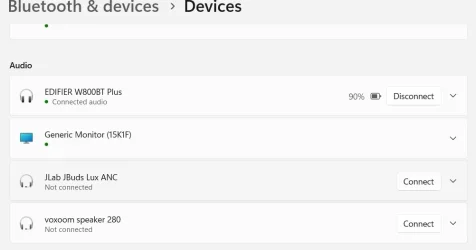
Once the headphones are paired with your computer, they appear in the device list and remain in the device list until you manually remove them from the list.

1.webp

When connected to a charger, the device automatically turns off (Not connected).

Maybe you hold down the button too long when you turn it on (see the instructions for your device).

It is better not to use BT mice.
 

My Computer My Computer

At a glance

Microsoft Windows 11 HomeIntel Core i5-13490F2 x 16 Patriot Memory (PDP Systems) PSD516G56...GIGABYTE GeForce RTX 4070 WINDFORCE OC 12G (G...
OS
Microsoft Windows 11 Home
Computer type
PC/Desktop
Manufacturer/Model
MSI MS-7D98
CPU
Intel Core i5-13490F
Motherboard
MSI B760 GAMING PLUS WIFI
Memory
2 x 16 Patriot Memory (PDP Systems) PSD516G560081 6400MT (32-37-37-74); 1.35V)
Graphics Card(s)
GIGABYTE GeForce RTX 4070 WINDFORCE OC 12G (GV-N4070WF3OC-12GD)
Sound Card
Bluetooth Аудио
Monitor(s) Displays
INNOCN 15K1F
Screen Resolution
1920 x 1080
Hard Drives
WD_BLACK SN770 250GB
KINGSTON SNV2S1000G (ELFK0S.6)
PSU
Thermaltake Toughpower GF3 1000W
Case
CG560 - DeepCool
Cooling
ID-COOLING SE-224-XTS / 2 x 140Mm Fan - rear and top; 3 x 120Mm - front
Keyboard
Corsair K70 RGB TKL
Mouse
Corsair KATAR PRO XT
Internet Speed
100 Mbps
Browser
Firefox
Antivirus
Microsoft Defender Antivirus
Other Info
https://www.userbenchmark.com/UserRun/66553205
As I posted in the other tread you started, I gave up trying to get my Bluetooth audio devices to work in Windows and bought a USB Bluetooth transmitter/receiver from Amazon. It's not a free option but it works. I did learn the hard way that when in pairing mode, only have the devices you want to pair too turned on. My son's Bluetooth speakers where on and they where one of the devices it paired to. Bluetooth -- again...
 

My Computers My Computers

  • At a glance

    Windows 11 Pro 25H2Intel Core i7-10700K16GB (8GB PC4-19200 DDR4 SDRAM x2)NVIDIA GeForce GTX 1050 TI
    OS
    Windows 11 Pro 25H2
    Computer type
    PC/Desktop
    Manufacturer/Model
    PowerSpec B746
    CPU
    Intel Core i7-10700K
    Motherboard
    ASRock Z490 Phantom Gaming 4/ax
    Memory
    16GB (8GB PC4-19200 DDR4 SDRAM x2)
    Graphics Card(s)
    NVIDIA GeForce GTX 1050 TI
    Sound Card
    Realtek Audio
    Monitor(s) Displays
    #1. LG ULTRAWIDE 34" #2. AOC Q32G2WG3 32"
    Screen Resolution
    #1. 3440 X 1440 #2. 1920 x 1080
    Hard Drives
    NVMe WDC WDS100T2B0C-00PXH0 1TB
    Samsung SSD 860 EVO 1TB
    PSU
    750 Watts (62.5A)
    Case
    PowerSpec/Lian Li ATX 205
    Keyboard
    Logitech K270
    Mouse
    Logitech M185
    Browser
    Microsoft Edge and Firefox
    Antivirus
    Webroot SecureAnywhere CE 26.1
  • At a glance

    Windows 11 Canary ChannelIntel Core i5-8400 CPU @ 2.80GHz16 MB DDR 4-2666
    Operating System
    Windows 11 Canary Channel
    Computer type
    PC/Desktop
    Manufacturer/Model
    PowerSpec G156
    CPU
    Intel Core i5-8400 CPU @ 2.80GHz
    Motherboard
    AsusTeK Prime B360M-A
    Memory
    16 MB DDR 4-2666
    Monitor(s) Displays
    23" Speptre HDMI 75Hz
    Screen Resolution
    1920x1080
    Hard Drives
    Samsung 970 EVO 500GB NVMe
    Keyboard
    Logitek K270
    Mouse
    Logitek M185
    Browser
    Firefox, Edge and Edge Canary
    Antivirus
    Windows Defender
Once the headphones are paired with your computer, they appear in the device list and remain in the device list until you manually remove them from the list.

View attachment 135060

When connected to a charger, the device automatically turns off (Not connected).

Maybe you hold down the button too long when you turn it on (see the instructions for your device).

It is better not to use BT mice.
Thanks -- I see the BT in the device list oh yes. But it still does not work - so I remove it. I then try to connect and it fails. Probably just not my thing but I paid 22 bucks for it and I would like it to cooperate.
 

My Computer My Computer

At a glance

1113th Gen Intel(R) Core(TM) i5-1335U 1.30 GHz8 gb
OS
11
Computer type
Laptop
Manufacturer/Model
Lenovo Ideapad
CPU
13th Gen Intel(R) Core(TM) i5-1335U 1.30 GHz
Memory
8 gb
Screen Resolution
1900x1200
Hard Drives
500 gb ssd
Wish I could advise you one way or the other, Patsy. But I gave up on BT a long time ago. All I wanted to do was pair my phone with my PC. Every once in a while it worked, but most of the time it did not. I finally gave up and went back to the dependable old usb cable. I value consistency over so called progress, so I'll deal with the wires instead.
Yes I remember that you just plain said never mind - that's how I'm starting to feel. I have tried every combination of off, on, connect, remove, disconnect. Just not my thing I guess. Thanks for your thoughts.
 

My Computer My Computer

At a glance

1113th Gen Intel(R) Core(TM) i5-1335U 1.30 GHz8 gb
OS
11
Computer type
Laptop
Manufacturer/Model
Lenovo Ideapad
CPU
13th Gen Intel(R) Core(TM) i5-1335U 1.30 GHz
Memory
8 gb
Screen Resolution
1900x1200
Hard Drives
500 gb ssd
Yes I remember that you just plain said never mind - that's how I'm starting to feel. I have tried every combination of off, on, connect, remove, disconnect. Just not my thing I guess. Thanks for your thoughts.
My experience is that Bluetooth is hit and miss. Be it speakers, ear buds or mice it works then doesn't work. My USB Bluetooth transmitter/receiver seems to be the most reliable for using with my ear buds and speakers. Even the Bluetooth on my Galaxy phone isn't always reliable. I use the Bluetooth on my phone for my hearing aids and to connect to the radios in my truck and car. As an example, When I'm using my phone in my truck or car most of the time the call will use the speakers but then out of the blue, the calls will come through my hearing aids. A pain for my wife when she is trying to talk to someone. The quick fix is that she has to switch the phone to speaker. Kind of defeats the purpose of using the Bluetooth.
 

My Computers My Computers

  • At a glance

    Windows 11 Pro 25H2Intel Core i7-10700K16GB (8GB PC4-19200 DDR4 SDRAM x2)NVIDIA GeForce GTX 1050 TI
    OS
    Windows 11 Pro 25H2
    Computer type
    PC/Desktop
    Manufacturer/Model
    PowerSpec B746
    CPU
    Intel Core i7-10700K
    Motherboard
    ASRock Z490 Phantom Gaming 4/ax
    Memory
    16GB (8GB PC4-19200 DDR4 SDRAM x2)
    Graphics Card(s)
    NVIDIA GeForce GTX 1050 TI
    Sound Card
    Realtek Audio
    Monitor(s) Displays
    #1. LG ULTRAWIDE 34" #2. AOC Q32G2WG3 32"
    Screen Resolution
    #1. 3440 X 1440 #2. 1920 x 1080
    Hard Drives
    NVMe WDC WDS100T2B0C-00PXH0 1TB
    Samsung SSD 860 EVO 1TB
    PSU
    750 Watts (62.5A)
    Case
    PowerSpec/Lian Li ATX 205
    Keyboard
    Logitech K270
    Mouse
    Logitech M185
    Browser
    Microsoft Edge and Firefox
    Antivirus
    Webroot SecureAnywhere CE 26.1
  • At a glance

    Windows 11 Canary ChannelIntel Core i5-8400 CPU @ 2.80GHz16 MB DDR 4-2666
    Operating System
    Windows 11 Canary Channel
    Computer type
    PC/Desktop
    Manufacturer/Model
    PowerSpec G156
    CPU
    Intel Core i5-8400 CPU @ 2.80GHz
    Motherboard
    AsusTeK Prime B360M-A
    Memory
    16 MB DDR 4-2666
    Monitor(s) Displays
    23" Speptre HDMI 75Hz
    Screen Resolution
    1920x1080
    Hard Drives
    Samsung 970 EVO 500GB NVMe
    Keyboard
    Logitek K270
    Mouse
    Logitek M185
    Browser
    Firefox, Edge and Edge Canary
    Antivirus
    Windows Defender
No kidding!! While I am sorry for your woes with this technology, I am glad I'm not alone in experiencing the frustration it causes. Going now to don my pair and see if they continue to work from yesterday. Thanks for your input...
 

My Computer My Computer

At a glance

1113th Gen Intel(R) Core(TM) i5-1335U 1.30 GHz8 gb
OS
11
Computer type
Laptop
Manufacturer/Model
Lenovo Ideapad
CPU
13th Gen Intel(R) Core(TM) i5-1335U 1.30 GHz
Memory
8 gb
Screen Resolution
1900x1200
Hard Drives
500 gb ssd
Back
Top Bottom