Bluetooth Hands-free AG Audio


jbcarreon123

Well-known member
Power User
VIP
Local time
7:44 AM
Posts
1,186
Location
Quezon City, Philippines
OS
Windows 11 Home
Hi. After I connect my Bluetooth Headset, I see this options:

Code:
1. Out:  Bluetooth Stereo
    In:  [NO DEVICE]

2. Out:  Bluetooth Hands-free AG Audio
    In:  Bluetooth Hands-free AG Audio

If I go to any program that uses the AG one, my Bluetooth headset doesn't recieve nor transmit Audio, and after 2 minutes, it will automatically disconnect. If I choose the Stereo one, there is no issue, but the purpose of a mic on that headset is nothing.

I found threads about it on TenForums, and the HG one is mono because of BT 4.0 Compatibility.

How do I make it to work?
 
Windows Build/Version
Win11 or 10, I use 10 currently

My Computers My Computers

  • At a glance

    Windows 11 HomeCore i5-12450HX20GB DDR5-4800iGPU + RTX 3050 Mobile (6GB)
    OS
    Windows 11 Home
    Computer type
    Laptop
    Manufacturer/Model
    Lenovo
    CPU
    Core i5-12450HX
    Memory
    20GB DDR5-4800
    Graphics Card(s)
    iGPU + RTX 3050 Mobile (6GB)
    Sound Card
    Realtek
    Monitor(s) Displays
    the built-in laptop screen, and a generic monitor
    Screen Resolution
    1080p * 2
    Hard Drives
    GIGABYTE NVMe SSD 256GB (GP-GSM2NE3256GNTD)
    Micron NVMe SSD 512GB (MTFDKCD512QFM-1BDIAABLA)
    Browser
    Firefox
    Antivirus
    WD
  • At a glance

    Windows 10 ProCore i3-21004GB DDR3-2133iGPU
    Operating System
    Windows 10 Pro
    Computer type
    PC/Desktop
    Manufacturer/Model
    Dell
    CPU
    Core i3-2100
    Memory
    4GB DDR3-2133
    Graphics card(s)
    iGPU
    Screen Resolution
    1080p
    Antivirus
    WD
Hi. After I connect my Bluetooth Headset, I see this options:

Code:
1. Out:  Bluetooth Stereo
    In:  [NO DEVICE]

2. Out:  Bluetooth Hands-free AG Audio
    In:  Bluetooth Hands-free AG Audio

If I go to any program that uses the AG one, my Bluetooth headset doesn't recieve nor transmit Audio, and after 2 minutes, it will automatically disconnect. If I choose the Stereo one, there is no issue, but the purpose of a mic on that headset is nothing.

I found threads about it on TenForums, and the HG one is mono because of BT 4.0 Compatibility.

How do I make it to work?
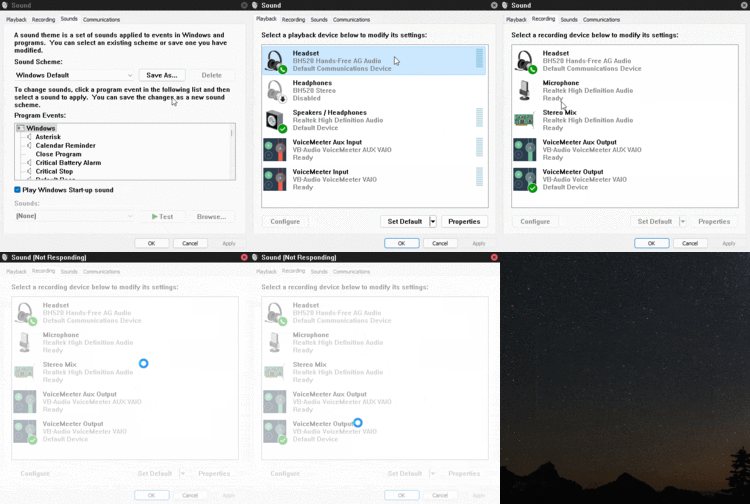
Was it set as "default" device under recording tab in Sound settings?

1649564571067.png
 

My Computers My Computers

  • At a glance

    Windows 11 ProAMD Ryzen 7 9800X3D32GB DDR5 CL30 Kingston FuryASUS Prime Radeon RX 9060 XT OC Edition 16GB
    OS
    Windows 11 Pro
    Computer type
    PC/Desktop
    CPU
    AMD Ryzen 7 9800X3D
    Motherboard
    MSI PRO B850-P Wifi
    Memory
    32GB DDR5 CL30 Kingston Fury
    Graphics Card(s)
    ASUS Prime Radeon RX 9060 XT OC Edition 16GB
    Monitor(s) Displays
    LG Ultrawide 34" 1440p+ MSI 27" 4K UHD
    Screen Resolution
    3440x1440
    Hard Drives
    Main Boot Drive : 512GB Adata XPG RGB Gen3x4 NVMe M.2 SSD
    PSU
    EVGA 750 Watts 80+ Gold
    Case
    Deepcool Genome II
    Cooling
    Thermalright Burst Assassin 120
    Internet Speed
    FTTH 3Gbps
    Browser
    Chrome
    Antivirus
    "Moderna"
  • At a glance

    Windows 11 Proi7-4790K16GB Corsair Vengeance ProMSI R9 290
    Operating System
    Windows 11 Pro
    Computer type
    PC/Desktop
    CPU
    i7-4790K
    Motherboard
    ASRock Xtreme6 Z97
    Memory
    16GB Corsair Vengeance Pro
    Graphics card(s)
    MSI R9 290
    Monitor(s) Displays
    LG Ultrawide 34"
    Screen Resolution
    3440x1440
    Hard Drives
    500GB Adata SSD (OS Only)
    PSU
    Thermaltake 475 Watts 80 Bronze
    Case
    Thermaltake Commander I Snow Edition
    Cooling
    Deep Cool Archer Air Cooler
    Keyboard
    Armageddon MKA-5R RGB-Hornet
    Mouse
    Logitech G402
    Internet Speed
    1Gbps
    Browser
    Chrome
    Antivirus
    Moderna :)
First off, AG audio is for communication. which will let you use both audio in and audio out. Using The Stereo (HQ audio) will close the mic and only let you hear audio. This is done because of BT bandwidth limitations.

If you are connected to HQ Audio, some headsets won't do anything on the AG one, but when you disconnect the HQ one, the AG one will work flawlessly.

I learned this the hard way. Thought I could use a good pair of BT headset for gaming, but the result was horrible. Either I had HQ stereo audio and the mic don't work, or I had low quality mono sound with a working mic.
 

My Computers My Computers

  • At a glance

    Win 11 Pro 25H2 26200.9168 / Linux Mint 22.3Ryzen 7 2700U Pro32GBiGPU Vega 10
    OS
    Win 11 Pro 25H2 26200.9168 / Linux Mint 22.3
    Computer type
    Laptop
    Manufacturer/Model
    Lenovo A485
    CPU
    Ryzen 7 2700U Pro
    Motherboard
    Lenovo (WiFi/BT module upgraded to Intel Wireless-AC-9260)
    Memory
    32GB
    Graphics Card(s)
    iGPU Vega 10
    Sound Card
    Realtek
    Monitor(s) Displays
    14" FHD (built-in) + 14" Lenovo Thinkvision M14t (touch+pen) + 32" Asus PB328
    Screen Resolution
    FHD + FHD + 1440p
    Hard Drives
    Intel 660p m.2 nVME PCIe3.0 x2 512GB
    PSU
    125W(Dock)/65W(Travel Adapter)
    Keyboard
    Thinkpad / Logitech MX Keys
    Mouse
    Logitech MX Master 2S
    Internet Speed
    1/1Gbit
    Browser
    Firefox
    Antivirus
    Windows Defender
    Other Info
    SecureBoot: Enabled
    TPM2.0: Enabled
    AMD-V: Enabled
  • At a glance

    Win 11 Pro 25H2 26200.9267(RP)i7-7700k @4.8GHz32GB 2x16GB 2133MHz CL15EVGA GTX1080Ti FTW 11GB
    Operating System
    Win 11 Pro 25H2 26200.9267(RP)
    Computer type
    PC/Desktop
    Manufacturer/Model
    Custom
    CPU
    i7-7700k @4.8GHz
    Motherboard
    Asus PRIME Z270-A
    Memory
    32GB 2x16GB 2133MHz CL15
    Graphics card(s)
    EVGA GTX1080Ti FTW 11GB
    Sound Card
    Integrated
    Monitor(s) Displays
    32" 10-bit Asus PB328Q
    Screen Resolution
    WQHD 2560x1440
    Hard Drives
    512GB ADATA SX8000NP NVMe PCIe Gen 3 x4
    PSU
    850W
    Case
    Fractal Design Define 7
    Cooling
    Noctua NH-D15 chromax.black
    Keyboard
    Logitech MX Keys
    Mouse
    Logitech MX Master 2S
    Internet Speed
    1/1Gbit
    Browser
    Firefox
    Antivirus
    Windows Defender
    Other Info
    AC WiFi Card
  • Asus U46SV (laptop), i5-2410M, 8GB RAM, 500GB SSD, 750GB HDD, Windows 10. (used as a local Minecraft server and data dump)
Was it set as "default" device under recording tab in Sound settings?
No, I disabled it because if I keep it enabled and go to the Sound CPL settings, the CPL will hang a bit.

I have VoiceMeeter installed and it was my default recording device.
1649571524471.png
 

My Computers My Computers

  • At a glance

    Windows 11 HomeCore i5-12450HX20GB DDR5-4800iGPU + RTX 3050 Mobile (6GB)
    OS
    Windows 11 Home
    Computer type
    Laptop
    Manufacturer/Model
    Lenovo
    CPU
    Core i5-12450HX
    Memory
    20GB DDR5-4800
    Graphics Card(s)
    iGPU + RTX 3050 Mobile (6GB)
    Sound Card
    Realtek
    Monitor(s) Displays
    the built-in laptop screen, and a generic monitor
    Screen Resolution
    1080p * 2
    Hard Drives
    GIGABYTE NVMe SSD 256GB (GP-GSM2NE3256GNTD)
    Micron NVMe SSD 512GB (MTFDKCD512QFM-1BDIAABLA)
    Browser
    Firefox
    Antivirus
    WD
  • At a glance

    Windows 10 ProCore i3-21004GB DDR3-2133iGPU
    Operating System
    Windows 10 Pro
    Computer type
    PC/Desktop
    Manufacturer/Model
    Dell
    CPU
    Core i3-2100
    Memory
    4GB DDR3-2133
    Graphics card(s)
    iGPU
    Screen Resolution
    1080p
    Antivirus
    WD
Aah...you have VoiceMeeter installed. That explains issues. While very good tool, I too have had some issues with it from time to time. Audio routing can be tricky and Windows gets easily confused. Same applies for Linux BTW, which can have even worse experience on some distributions.
 

My Computers My Computers

  • At a glance

    Win 11 Pro 25H2 26200.9168 / Linux Mint 22.3Ryzen 7 2700U Pro32GBiGPU Vega 10
    OS
    Win 11 Pro 25H2 26200.9168 / Linux Mint 22.3
    Computer type
    Laptop
    Manufacturer/Model
    Lenovo A485
    CPU
    Ryzen 7 2700U Pro
    Motherboard
    Lenovo (WiFi/BT module upgraded to Intel Wireless-AC-9260)
    Memory
    32GB
    Graphics Card(s)
    iGPU Vega 10
    Sound Card
    Realtek
    Monitor(s) Displays
    14" FHD (built-in) + 14" Lenovo Thinkvision M14t (touch+pen) + 32" Asus PB328
    Screen Resolution
    FHD + FHD + 1440p
    Hard Drives
    Intel 660p m.2 nVME PCIe3.0 x2 512GB
    PSU
    125W(Dock)/65W(Travel Adapter)
    Keyboard
    Thinkpad / Logitech MX Keys
    Mouse
    Logitech MX Master 2S
    Internet Speed
    1/1Gbit
    Browser
    Firefox
    Antivirus
    Windows Defender
    Other Info
    SecureBoot: Enabled
    TPM2.0: Enabled
    AMD-V: Enabled
  • At a glance

    Win 11 Pro 25H2 26200.9267(RP)i7-7700k @4.8GHz32GB 2x16GB 2133MHz CL15EVGA GTX1080Ti FTW 11GB
    Operating System
    Win 11 Pro 25H2 26200.9267(RP)
    Computer type
    PC/Desktop
    Manufacturer/Model
    Custom
    CPU
    i7-7700k @4.8GHz
    Motherboard
    Asus PRIME Z270-A
    Memory
    32GB 2x16GB 2133MHz CL15
    Graphics card(s)
    EVGA GTX1080Ti FTW 11GB
    Sound Card
    Integrated
    Monitor(s) Displays
    32" 10-bit Asus PB328Q
    Screen Resolution
    WQHD 2560x1440
    Hard Drives
    512GB ADATA SX8000NP NVMe PCIe Gen 3 x4
    PSU
    850W
    Case
    Fractal Design Define 7
    Cooling
    Noctua NH-D15 chromax.black
    Keyboard
    Logitech MX Keys
    Mouse
    Logitech MX Master 2S
    Internet Speed
    1/1Gbit
    Browser
    Firefox
    Antivirus
    Windows Defender
    Other Info
    AC WiFi Card
  • Asus U46SV (laptop), i5-2410M, 8GB RAM, 500GB SSD, 750GB HDD, Windows 10. (used as a local Minecraft server and data dump)
I know there a audio routing issues on VoiceMeeter, but even VoiceMeeter is uninstalled, the same thing happens. If we found that VoiceMeeter is the culprit, I will post a issue on VoiceMeeter forums.
 

My Computers My Computers

  • At a glance

    Windows 11 HomeCore i5-12450HX20GB DDR5-4800iGPU + RTX 3050 Mobile (6GB)
    OS
    Windows 11 Home
    Computer type
    Laptop
    Manufacturer/Model
    Lenovo
    CPU
    Core i5-12450HX
    Memory
    20GB DDR5-4800
    Graphics Card(s)
    iGPU + RTX 3050 Mobile (6GB)
    Sound Card
    Realtek
    Monitor(s) Displays
    the built-in laptop screen, and a generic monitor
    Screen Resolution
    1080p * 2
    Hard Drives
    GIGABYTE NVMe SSD 256GB (GP-GSM2NE3256GNTD)
    Micron NVMe SSD 512GB (MTFDKCD512QFM-1BDIAABLA)
    Browser
    Firefox
    Antivirus
    WD
  • At a glance

    Windows 10 ProCore i3-21004GB DDR3-2133iGPU
    Operating System
    Windows 10 Pro
    Computer type
    PC/Desktop
    Manufacturer/Model
    Dell
    CPU
    Core i3-2100
    Memory
    4GB DDR3-2133
    Graphics card(s)
    iGPU
    Screen Resolution
    1080p
    Antivirus
    WD
If you have it disabled, then that explains why the mic is not working on your bluetooth device. AG is for calls and the bluetooth device should be set to default to make it work. The "stereo" is just for PC audio.
 

My Computers My Computers

  • At a glance

    Windows 11 ProAMD Ryzen 7 9800X3D32GB DDR5 CL30 Kingston FuryASUS Prime Radeon RX 9060 XT OC Edition 16GB
    OS
    Windows 11 Pro
    Computer type
    PC/Desktop
    CPU
    AMD Ryzen 7 9800X3D
    Motherboard
    MSI PRO B850-P Wifi
    Memory
    32GB DDR5 CL30 Kingston Fury
    Graphics Card(s)
    ASUS Prime Radeon RX 9060 XT OC Edition 16GB
    Monitor(s) Displays
    LG Ultrawide 34" 1440p+ MSI 27" 4K UHD
    Screen Resolution
    3440x1440
    Hard Drives
    Main Boot Drive : 512GB Adata XPG RGB Gen3x4 NVMe M.2 SSD
    PSU
    EVGA 750 Watts 80+ Gold
    Case
    Deepcool Genome II
    Cooling
    Thermalright Burst Assassin 120
    Internet Speed
    FTTH 3Gbps
    Browser
    Chrome
    Antivirus
    "Moderna"
  • At a glance

    Windows 11 Proi7-4790K16GB Corsair Vengeance ProMSI R9 290
    Operating System
    Windows 11 Pro
    Computer type
    PC/Desktop
    CPU
    i7-4790K
    Motherboard
    ASRock Xtreme6 Z97
    Memory
    16GB Corsair Vengeance Pro
    Graphics card(s)
    MSI R9 290
    Monitor(s) Displays
    LG Ultrawide 34"
    Screen Resolution
    3440x1440
    Hard Drives
    500GB Adata SSD (OS Only)
    PSU
    Thermaltake 475 Watts 80 Bronze
    Case
    Thermaltake Commander I Snow Edition
    Cooling
    Deep Cool Archer Air Cooler
    Keyboard
    Armageddon MKA-5R RGB-Hornet
    Mouse
    Logitech G402
    Internet Speed
    1Gbps
    Browser
    Chrome
    Antivirus
    Moderna :)
If you have it disabled, then that explains why the mic is not working on your bluetooth device. AG is for calls and the bluetooth device should be set to default to make it work. The "stereo" is just for PC audio.
This is now enabled:
rundll32_IVn9yEJlla.gif

Now, having trouble to disable these...
 

My Computers My Computers

  • At a glance

    Windows 11 HomeCore i5-12450HX20GB DDR5-4800iGPU + RTX 3050 Mobile (6GB)
    OS
    Windows 11 Home
    Computer type
    Laptop
    Manufacturer/Model
    Lenovo
    CPU
    Core i5-12450HX
    Memory
    20GB DDR5-4800
    Graphics Card(s)
    iGPU + RTX 3050 Mobile (6GB)
    Sound Card
    Realtek
    Monitor(s) Displays
    the built-in laptop screen, and a generic monitor
    Screen Resolution
    1080p * 2
    Hard Drives
    GIGABYTE NVMe SSD 256GB (GP-GSM2NE3256GNTD)
    Micron NVMe SSD 512GB (MTFDKCD512QFM-1BDIAABLA)
    Browser
    Firefox
    Antivirus
    WD
  • At a glance

    Windows 10 ProCore i3-21004GB DDR3-2133iGPU
    Operating System
    Windows 10 Pro
    Computer type
    PC/Desktop
    Manufacturer/Model
    Dell
    CPU
    Core i3-2100
    Memory
    4GB DDR3-2133
    Graphics card(s)
    iGPU
    Screen Resolution
    1080p
    Antivirus
    WD
Try uninstalling the voice meeter if that fixes the issue. It seems like an invasive app.
 

My Computers My Computers

  • At a glance

    Windows 11 ProAMD Ryzen 7 9800X3D32GB DDR5 CL30 Kingston FuryASUS Prime Radeon RX 9060 XT OC Edition 16GB
    OS
    Windows 11 Pro
    Computer type
    PC/Desktop
    CPU
    AMD Ryzen 7 9800X3D
    Motherboard
    MSI PRO B850-P Wifi
    Memory
    32GB DDR5 CL30 Kingston Fury
    Graphics Card(s)
    ASUS Prime Radeon RX 9060 XT OC Edition 16GB
    Monitor(s) Displays
    LG Ultrawide 34" 1440p+ MSI 27" 4K UHD
    Screen Resolution
    3440x1440
    Hard Drives
    Main Boot Drive : 512GB Adata XPG RGB Gen3x4 NVMe M.2 SSD
    PSU
    EVGA 750 Watts 80+ Gold
    Case
    Deepcool Genome II
    Cooling
    Thermalright Burst Assassin 120
    Internet Speed
    FTTH 3Gbps
    Browser
    Chrome
    Antivirus
    "Moderna"
  • At a glance

    Windows 11 Proi7-4790K16GB Corsair Vengeance ProMSI R9 290
    Operating System
    Windows 11 Pro
    Computer type
    PC/Desktop
    CPU
    i7-4790K
    Motherboard
    ASRock Xtreme6 Z97
    Memory
    16GB Corsair Vengeance Pro
    Graphics card(s)
    MSI R9 290
    Monitor(s) Displays
    LG Ultrawide 34"
    Screen Resolution
    3440x1440
    Hard Drives
    500GB Adata SSD (OS Only)
    PSU
    Thermaltake 475 Watts 80 Bronze
    Case
    Thermaltake Commander I Snow Edition
    Cooling
    Deep Cool Archer Air Cooler
    Keyboard
    Armageddon MKA-5R RGB-Hornet
    Mouse
    Logitech G402
    Internet Speed
    1Gbps
    Browser
    Chrome
    Antivirus
    Moderna :)
Yeah Windows can sometimes get a bit confused because of VoiceMeeter...I remember having issues sometimes too. Didn't help to just uninstall though...started working properly again after a couple of Windows CUs.
 

My Computers My Computers

  • At a glance

    Win 11 Pro 25H2 26200.9168 / Linux Mint 22.3Ryzen 7 2700U Pro32GBiGPU Vega 10
    OS
    Win 11 Pro 25H2 26200.9168 / Linux Mint 22.3
    Computer type
    Laptop
    Manufacturer/Model
    Lenovo A485
    CPU
    Ryzen 7 2700U Pro
    Motherboard
    Lenovo (WiFi/BT module upgraded to Intel Wireless-AC-9260)
    Memory
    32GB
    Graphics Card(s)
    iGPU Vega 10
    Sound Card
    Realtek
    Monitor(s) Displays
    14" FHD (built-in) + 14" Lenovo Thinkvision M14t (touch+pen) + 32" Asus PB328
    Screen Resolution
    FHD + FHD + 1440p
    Hard Drives
    Intel 660p m.2 nVME PCIe3.0 x2 512GB
    PSU
    125W(Dock)/65W(Travel Adapter)
    Keyboard
    Thinkpad / Logitech MX Keys
    Mouse
    Logitech MX Master 2S
    Internet Speed
    1/1Gbit
    Browser
    Firefox
    Antivirus
    Windows Defender
    Other Info
    SecureBoot: Enabled
    TPM2.0: Enabled
    AMD-V: Enabled
  • At a glance

    Win 11 Pro 25H2 26200.9267(RP)i7-7700k @4.8GHz32GB 2x16GB 2133MHz CL15EVGA GTX1080Ti FTW 11GB
    Operating System
    Win 11 Pro 25H2 26200.9267(RP)
    Computer type
    PC/Desktop
    Manufacturer/Model
    Custom
    CPU
    i7-7700k @4.8GHz
    Motherboard
    Asus PRIME Z270-A
    Memory
    32GB 2x16GB 2133MHz CL15
    Graphics card(s)
    EVGA GTX1080Ti FTW 11GB
    Sound Card
    Integrated
    Monitor(s) Displays
    32" 10-bit Asus PB328Q
    Screen Resolution
    WQHD 2560x1440
    Hard Drives
    512GB ADATA SX8000NP NVMe PCIe Gen 3 x4
    PSU
    850W
    Case
    Fractal Design Define 7
    Cooling
    Noctua NH-D15 chromax.black
    Keyboard
    Logitech MX Keys
    Mouse
    Logitech MX Master 2S
    Internet Speed
    1/1Gbit
    Browser
    Firefox
    Antivirus
    Windows Defender
    Other Info
    AC WiFi Card
  • Asus U46SV (laptop), i5-2410M, 8GB RAM, 500GB SSD, 750GB HDD, Windows 10. (used as a local Minecraft server and data dump)
Try uninstalling the voice meeter if that fixes the issue. It seems like an invasive app.
Ok. If this will be the problem, I may be submit a issue on VoiceMeeter forums.
 

My Computers My Computers

  • At a glance

    Windows 11 HomeCore i5-12450HX20GB DDR5-4800iGPU + RTX 3050 Mobile (6GB)
    OS
    Windows 11 Home
    Computer type
    Laptop
    Manufacturer/Model
    Lenovo
    CPU
    Core i5-12450HX
    Memory
    20GB DDR5-4800
    Graphics Card(s)
    iGPU + RTX 3050 Mobile (6GB)
    Sound Card
    Realtek
    Monitor(s) Displays
    the built-in laptop screen, and a generic monitor
    Screen Resolution
    1080p * 2
    Hard Drives
    GIGABYTE NVMe SSD 256GB (GP-GSM2NE3256GNTD)
    Micron NVMe SSD 512GB (MTFDKCD512QFM-1BDIAABLA)
    Browser
    Firefox
    Antivirus
    WD
  • At a glance

    Windows 10 ProCore i3-21004GB DDR3-2133iGPU
    Operating System
    Windows 10 Pro
    Computer type
    PC/Desktop
    Manufacturer/Model
    Dell
    CPU
    Core i3-2100
    Memory
    4GB DDR3-2133
    Graphics card(s)
    iGPU
    Screen Resolution
    1080p
    Antivirus
    WD

My Computers My Computers

  • At a glance

    Windows 11 HomeCore i5-12450HX20GB DDR5-4800iGPU + RTX 3050 Mobile (6GB)
    OS
    Windows 11 Home
    Computer type
    Laptop
    Manufacturer/Model
    Lenovo
    CPU
    Core i5-12450HX
    Memory
    20GB DDR5-4800
    Graphics Card(s)
    iGPU + RTX 3050 Mobile (6GB)
    Sound Card
    Realtek
    Monitor(s) Displays
    the built-in laptop screen, and a generic monitor
    Screen Resolution
    1080p * 2
    Hard Drives
    GIGABYTE NVMe SSD 256GB (GP-GSM2NE3256GNTD)
    Micron NVMe SSD 512GB (MTFDKCD512QFM-1BDIAABLA)
    Browser
    Firefox
    Antivirus
    WD
  • At a glance

    Windows 10 ProCore i3-21004GB DDR3-2133iGPU
    Operating System
    Windows 10 Pro
    Computer type
    PC/Desktop
    Manufacturer/Model
    Dell
    CPU
    Core i3-2100
    Memory
    4GB DDR3-2133
    Graphics card(s)
    iGPU
    Screen Resolution
    1080p
    Antivirus
    WD
UPDATE:
Clean installed 10, same thing happened. No other apps for audio installed except Realtek Audio settings, and Realtek HD Audio driver.
 

My Computers My Computers

  • At a glance

    Windows 11 HomeCore i5-12450HX20GB DDR5-4800iGPU + RTX 3050 Mobile (6GB)
    OS
    Windows 11 Home
    Computer type
    Laptop
    Manufacturer/Model
    Lenovo
    CPU
    Core i5-12450HX
    Memory
    20GB DDR5-4800
    Graphics Card(s)
    iGPU + RTX 3050 Mobile (6GB)
    Sound Card
    Realtek
    Monitor(s) Displays
    the built-in laptop screen, and a generic monitor
    Screen Resolution
    1080p * 2
    Hard Drives
    GIGABYTE NVMe SSD 256GB (GP-GSM2NE3256GNTD)
    Micron NVMe SSD 512GB (MTFDKCD512QFM-1BDIAABLA)
    Browser
    Firefox
    Antivirus
    WD
  • At a glance

    Windows 10 ProCore i3-21004GB DDR3-2133iGPU
    Operating System
    Windows 10 Pro
    Computer type
    PC/Desktop
    Manufacturer/Model
    Dell
    CPU
    Core i3-2100
    Memory
    4GB DDR3-2133
    Graphics card(s)
    iGPU
    Screen Resolution
    1080p
    Antivirus
    WD
What is the specs of your headset?
Does your PC have built-in bluetooth? Are you using bluetooth adapter? Are the bluetooth versions between the headset and adapter the same (ex. BT 4.0, 5.0, etc.)?
 

My Computers My Computers

  • At a glance

    Windows 11 ProAMD Ryzen 7 9800X3D32GB DDR5 CL30 Kingston FuryASUS Prime Radeon RX 9060 XT OC Edition 16GB
    OS
    Windows 11 Pro
    Computer type
    PC/Desktop
    CPU
    AMD Ryzen 7 9800X3D
    Motherboard
    MSI PRO B850-P Wifi
    Memory
    32GB DDR5 CL30 Kingston Fury
    Graphics Card(s)
    ASUS Prime Radeon RX 9060 XT OC Edition 16GB
    Monitor(s) Displays
    LG Ultrawide 34" 1440p+ MSI 27" 4K UHD
    Screen Resolution
    3440x1440
    Hard Drives
    Main Boot Drive : 512GB Adata XPG RGB Gen3x4 NVMe M.2 SSD
    PSU
    EVGA 750 Watts 80+ Gold
    Case
    Deepcool Genome II
    Cooling
    Thermalright Burst Assassin 120
    Internet Speed
    FTTH 3Gbps
    Browser
    Chrome
    Antivirus
    "Moderna"
  • At a glance

    Windows 11 Proi7-4790K16GB Corsair Vengeance ProMSI R9 290
    Operating System
    Windows 11 Pro
    Computer type
    PC/Desktop
    CPU
    i7-4790K
    Motherboard
    ASRock Xtreme6 Z97
    Memory
    16GB Corsair Vengeance Pro
    Graphics card(s)
    MSI R9 290
    Monitor(s) Displays
    LG Ultrawide 34"
    Screen Resolution
    3440x1440
    Hard Drives
    500GB Adata SSD (OS Only)
    PSU
    Thermaltake 475 Watts 80 Bronze
    Case
    Thermaltake Commander I Snow Edition
    Cooling
    Deep Cool Archer Air Cooler
    Keyboard
    Armageddon MKA-5R RGB-Hornet
    Mouse
    Logitech G402
    Internet Speed
    1Gbps
    Browser
    Chrome
    Antivirus
    Moderna :)
What is the specs of your headset?
I don't know.

Does your PC have built-in bluetooth? Are you using bluetooth adapter? Are the bluetooth versions between the headset and adapter the same (ex. BT 4.0, 5.0, etc.)?
I have a BT USB adapter. it is BT 5.0.
 

My Computers My Computers

  • At a glance

    Windows 11 HomeCore i5-12450HX20GB DDR5-4800iGPU + RTX 3050 Mobile (6GB)
    OS
    Windows 11 Home
    Computer type
    Laptop
    Manufacturer/Model
    Lenovo
    CPU
    Core i5-12450HX
    Memory
    20GB DDR5-4800
    Graphics Card(s)
    iGPU + RTX 3050 Mobile (6GB)
    Sound Card
    Realtek
    Monitor(s) Displays
    the built-in laptop screen, and a generic monitor
    Screen Resolution
    1080p * 2
    Hard Drives
    GIGABYTE NVMe SSD 256GB (GP-GSM2NE3256GNTD)
    Micron NVMe SSD 512GB (MTFDKCD512QFM-1BDIAABLA)
    Browser
    Firefox
    Antivirus
    WD
  • At a glance

    Windows 10 ProCore i3-21004GB DDR3-2133iGPU
    Operating System
    Windows 10 Pro
    Computer type
    PC/Desktop
    Manufacturer/Model
    Dell
    CPU
    Core i3-2100
    Memory
    4GB DDR3-2133
    Graphics card(s)
    iGPU
    Screen Resolution
    1080p
    Antivirus
    WD

Bluetooth headset mic never appears in Windows 11 because a leftover OEM driver is shadowing Microsoft's inbox stack​

Short version: if a Bluetooth headset gives you working stereo audio but no microphone, and "Handsfree Telephony" is already ticked, check whether a third-party driver has claimed the Handsfree node. On my machine a Realtek HFP driver from 2017 had it, and Microsoft's BthHFEnum service was sitting stopped. Removing that package from the driver store fixed it permanently.

This is not specific to one headset or one adapter. It hits any Windows machine that has ever had a Realtek Bluetooth software bundle installed, which covers a lot of laptops and generic USB dongles.


Symptom​

  • Headset pairs and plays stereo audio fine
  • No microphone in mmsys.cpl > Recording, not even greyed out
  • Handsfree Telephony is present and ticked under Properties > Services
  • BTAGService, bthserv and the Bluetooth User Support Service are all running
  • Works correctly on Android, iOS and macOS, so the headset does support HFP

Why the usual advice does not stick​

The standard answer is: unpair, uninstall the Bluetooth audio devices in Device Manager, restart, re-pair. That does often work, and it worked for me too.

It works because it forces re-enumeration. It does not stick, because the package that caused the problem is still sitting in the driver store and wins the ranking again the next time the node is created. That is why these threads keep coming back.

Diagnosis​

Three checks. Run all of these in an elevated PowerShell.

1. Is a third-party driver holding the Handsfree node?​

Get-PnpDevice | Where-Object { $_.InstanceId -match 'BTHENUM\\{0000111E-' } | ForEach-Object {

Get-PnpDeviceProperty -InstanceId $_.InstanceId -KeyName `

DEVPKEY_Device_DriverProvider,DEVPKEY_Device_DriverVersion,DEVPKEY_Device_DriverInfPath |

Select-Object KeyName,Data

}

{0000111E} is the Handsfree profile UUID. Healthy output says Microsoft and microsoft_bluetooth_hfp_ag.inf. Mine said:

DEVPKEY_Device_DriverProvider Realtek Semiconductor Corp

DEVPKEY_Device_DriverVersion 1.1.84.3

DEVPKEY_Device_DriverInfPath oem11.inf <- rtkhfp.inf, dated 03/24/2017

A 2017 driver with the Legacy attribute servicing HFP on Windows 11 build 26200.

2. Which HFP service is actually running?​

Get-Service BthHFEnum,BthA2dp,BthAudioHF,RtkA2dp -EA SilentlyContinue |

Select-Object Name,Status,StartType

Before:

BthA2dp Stopped <- Microsoft inbox A2DP

BthAudioHF Running <- Realtek 2017 HFP

BthHFEnum Stopped <- Microsoft inbox HFP

RtkA2dp Running <- Realtek 2020 A2DP

Both inbox services stopped while the Realtek equivalents run. That is the tell.

3. Does the mic endpoint exist but sit inert?​

Get-ChildItem 'HKLM:\SOFTWARE\Microsoft\Windows\CurrentVersion\MMDevices\Audio\Capture' | ForEach-Object {

$s = (Get-ItemProperty $_.PSPath -Name DeviceState -EA 0).DeviceState

$n = (Get-ItemProperty "$($_.PSPath)\Properties" -EA 0).'{a45c254e-df1c-4efd-8020-67d146a850e0},2'

$d = (Get-ItemProperty "$($_.PSPath)\Properties" -EA 0).'{b3f8fa53-0004-438e-9003-51a46e139bfc},6'

"State=$s $n ($d)"

}

Mine returned State=4, which is DEVICE_STATE_NOTPRESENT. The endpoint was registered the whole time. The old driver creates the registration and never instantiates a capture pin, so it is filtered out of the Recording tab unless you tick "Show Disconnected Devices".

That is the actual bug. Not a missing device, an inert one.

Root cause​

Windows binds Bluetooth profiles per service GUID. Inbox bth.inf claims the generic form:

BTHENUM\{0000111e-0000-1000-8000-00805f9b34fb}_GENERIC

The Realtek package claims the more specific hardware ID that includes the device VID and PID. More specific wins driver ranking, so an ancient third-party package outranks the current inbox stack and Microsoft's HFP enumerator never starts.

Fix​

Read this before running anything: oemNN.inf numbers are assigned per machine. oem11.inf on my system is a Realtek HFP driver. On yours it is almost certainly something completely unrelated. Do not copy my numbers. Look yours up with step 1 above, or use the script at the end which discovers them.

Elevated PowerShell.

1. Find every third-party package bound to a Bluetooth audio node. Audio profile GUIDs worth checking are 0000111E (Handsfree), 00001108 (Headset), 0000110B / 0000110A (A2DP), 0000110C / 0000110E (AVRCP).

2. Confirm what each one is before deleting it.

Get-WindowsDriver -Online | Where-Object Driver -eq 'oemNN.inf' |

Select-Object Driver,OriginalFileName,ProviderName,Version,Date

In my case: rtkhfp.inf (2017), rtka2dp.inf (2020), rtkavrcp.inf (2018), bthvirtual.inf (2013).

Do not remove the radio driver. On a TP-Link UB500 that is rtkfilter.inf, which loads the RTL8761B firmware patch. It is required and unrelated. Only remove profile drivers.

3. Back up, then remove.

pnputil /export-driver oemNN.inf C:\btdriver-backup\oemNN

pnputil /delete-driver oemNN.inf /uninstall

4. Unpair the headset, remove leftover nodes, reboot, re-pair. Wait 30 seconds after pairing before checking.

Worth doing in the same pass: check for phantom device nodes. I had a complete duplicate enumeration branch, 13 dead nodes including a second copy of the Realtek HFP device, which is what produced duplicate endpoint entries.

Verification​

BthA2dp Running <- was Stopped

BthHFEnum Running <- was Stopped

BthAudioHF and RtkA2dp no longer exist as services. The Handsfree node now reports:

Provider Microsoft

InfPath microsoft_bluetooth_hfp_ag.inf

And the capture endpoint moved from State=4 to State=1 (DEVICE_STATE_ACTIVE). The device even renamed itself, from Realtek's Buds( Mono ) to Microsoft's Buds Hands-Free. The mic works in the Recording tab with a live level meter.

Stereo A2DP output still works and is now served by inbox BthA2dp rather than RtkA2dp.

Rollback​

Exports from step 3 restore cleanly:

pnputil /add-driver C:\btdriver-backup\oemNN\<name>.inf /install

Then unpair and re-pair.

Hardware this was found on​

TP-Link UB500 (USB\VID_2357&PID_0604, Realtek RTL8761B), TP-Link driver 1.9.1051.3016, Windows 11 build 26200, CMF Buds 2 Plus. The UB500 driver was correct and installed the whole time and was not the problem. Same fix should apply to any adapter and any headset, because the conflict is between driver packages, not with the radio.

 

My Computer My Computer

At a glance

Windows 11
OS
Windows 11
Computer type
PC/Desktop
Back
Top Bottom