Boot drive suddenly goes missing and machine starts in BIOS


CalypsoArt

Well-known member
Member
Local time
12:58 PM
Posts
105
OS
Windows 11
So I've been building this machine and had it running fine. Windows is installed as are several apps. I just started it up and it goes directly to BIOS. In the BIOS I see the boot loader is missing and the OS drive (Samsung 990EVO Plus 2TB) not listed. The data Drive doe show in the BIOS. Any thoughts on how to proceed in rectifying this?

Components:
MOBO: ASUS ROG STRIX B850-I
PROSSOR: Ryzen 9 9900X
MEMORY: G.SKILL DDR5 Flare X5 64GB 6000
OS Drive: Samsung 990EVO Plus 2TB
Data Drive: Silocon Power UD90 2TB
 

Attachments

  • BIOS_04.webp
    BIOS_04.webp
    850.7 KB · Views: 1
Last edited:

My Computers My Computers

  • At a glance

    Windows 11Ryzen 9 9900XG.SKILL DDR5 Flare X5 64GB 6000 CL30-40-40-96RTX 4060 6GB
    OS
    Windows 11
    Computer type
    PC/Desktop
    Manufacturer/Model
    Home Built
    CPU
    Ryzen 9 9900X
    Motherboard
    ROG STRIX B850-I
    Memory
    G.SKILL DDR5 Flare X5 64GB 6000 CL30-40-40-96
    Graphics Card(s)
    RTX 4060 6GB
    Sound Card
    Onboard Realtek
    Monitor(s) Displays
    Dual Dell U3014
    Screen Resolution
    2560x1600
    Hard Drives
    Samsung EVO m.2 2TB, Silicon Power m.2 2TB
    PSU
    Corsair Modular SFX 750W
    Case
    Lan-Li H2O
    Cooling
    NZXT KRAKEN 240 AIO
  • At a glance

    Windows 11i7-9750H16gbNVIDIA GeForce RTX2070 Q-Max
    Operating System
    Windows 11
    Computer type
    Laptop
    Manufacturer/Model
    MSI GS75 Stealth 9sf
    CPU
    i7-9750H
    Motherboard
    MS 17-G1
    Memory
    16gb
    Graphics card(s)
    NVIDIA GeForce RTX2070 Q-Max

Download the most recent Bios update for your model

Reseat the Samsung SSD into the motherboard.
In the Bios, set it to Defaults, Save and Exit.
after reboot the Boot order should be first boot device Windows Boot Manager.
 

My Computer My Computer

At a glance

Windows 11 Pro Insider 64 bit 25H2 26200.5742Intel Core i7 9700K 3.6016 GBnVidia GEForce RTX 2060 Super
OS
Windows 11 Pro Insider 64 bit 25H2 26200.5742
Computer type
PC/Desktop
Manufacturer/Model
Gigabyte Z390 UD
CPU
Intel Core i7 9700K 3.60
Motherboard
Gigabyte Z390 UD
Memory
16 GB
Graphics Card(s)
nVidia GEForce RTX 2060 Super
Sound Card
onboard
Monitor(s) Displays
Two 27" Dell 4K monitors
Screen Resolution
3840 x 2160
Hard Drives
M.2 NVME SSD, 500 GB; Two 2TB Mechanical HDD's
PSU
850w PSU
Case
Cyberpower PC
Cooling
Water cooled
Keyboard
Backlit Cyberpower gaming keyboard
Mouse
Backlit Cyberpower gaming mouse
Internet Speed
1 GB mbps
Browser
Brave
Antivirus
Windows Security
So I've been able to get the machine to start from a USB drive to see If I can repair the drive.
My Options are:
Startup Repair (This found nothing) -- UEFI Firmware Settings
Command Prompt -- System Restore
Uninstall Updates -- System Image Recovery

However, I figured since the OS drive is not listed in the BIOS, removing updates and system image recovery would be irrelevant? I went into the command prompt X:\ changed to C: which showed all the files in my Data drive which was the D: My D: drive is the USB Windows installer, and no E: can be found. As I said, this mach was running fine. (after much help from this forum) Could the brand new Samsung 2TB OS Drive have died? I guess my next step is to take apart the machine and try a different SSD and see if I shows up. Please let me know I that is stupid as a first fix. This is a SFF box and accessing any component is painful.
 

My Computers My Computers

  • At a glance

    Windows 11Ryzen 9 9900XG.SKILL DDR5 Flare X5 64GB 6000 CL30-40-40-96RTX 4060 6GB
    OS
    Windows 11
    Computer type
    PC/Desktop
    Manufacturer/Model
    Home Built
    CPU
    Ryzen 9 9900X
    Motherboard
    ROG STRIX B850-I
    Memory
    G.SKILL DDR5 Flare X5 64GB 6000 CL30-40-40-96
    Graphics Card(s)
    RTX 4060 6GB
    Sound Card
    Onboard Realtek
    Monitor(s) Displays
    Dual Dell U3014
    Screen Resolution
    2560x1600
    Hard Drives
    Samsung EVO m.2 2TB, Silicon Power m.2 2TB
    PSU
    Corsair Modular SFX 750W
    Case
    Lan-Li H2O
    Cooling
    NZXT KRAKEN 240 AIO
  • At a glance

    Windows 11i7-9750H16gbNVIDIA GeForce RTX2070 Q-Max

    Operating System
    Windows 11
    Computer type
    Laptop
    Manufacturer/Model
    MSI GS75 Stealth 9sf
    CPU
    i7-9750H
    Motherboard
    MS 17-G1
    Memory
    16gb
    Graphics card(s)
    NVIDIA GeForce RTX2070 Q-Max

at cmd prompt:

diskpart
lis dis

see if it lists both disks
if you see the samsung

sel dis ( whatever number it is e.g. 0 or 1 )
lis par

post the results
 

My Computers My Computers

  • At a glance

    Win7,Win11i7-97002x16gb 3600mhz
    OS
    Win7,Win11
    Computer type
    PC/Desktop
    CPU
    i7-9700
    Motherboard
    gigabyte b365m ds3h
    Memory
    2x16gb 3600mhz
    Monitor(s) Displays
    benq gw2480
    PSU
    bequiet pure power 11 400CM
    Cooling
    cryorig m9i
  • At a glance

    win7,win11i5-84002x8gb 3200
    Operating System
    win7,win11
    Computer type
    PC/Desktop
    CPU
    i5-8400
    Motherboard
    gigabyte b365m ds3h
    Memory
    2x8gb 3200
    PSU
    xfx pro 450
Download the most recent Bios update for your model

Reseat the Samsung SSD into the motherboard.
In the Bios, set it to Defaults, Save and Exit.
after reboot the Boot order should be first boot device Windows Boot Manager.
Already installed the most recent BIOS when I assembled two days ago. However, I just set the BIOS to defaults. Still no sign of the OS m.2 Drive. I guess removing it is the next step.
 

My Computers My Computers

  • At a glance

    Windows 11Ryzen 9 9900XG.SKILL DDR5 Flare X5 64GB 6000 CL30-40-40-96RTX 4060 6GB
    OS
    Windows 11
    Computer type
    PC/Desktop
    Manufacturer/Model
    Home Built
    CPU
    Ryzen 9 9900X
    Motherboard
    ROG STRIX B850-I
    Memory
    G.SKILL DDR5 Flare X5 64GB 6000 CL30-40-40-96
    Graphics Card(s)
    RTX 4060 6GB
    Sound Card
    Onboard Realtek
    Monitor(s) Displays
    Dual Dell U3014
    Screen Resolution
    2560x1600
    Hard Drives
    Samsung EVO m.2 2TB, Silicon Power m.2 2TB
    PSU
    Corsair Modular SFX 750W
    Case
    Lan-Li H2O
    Cooling
    NZXT KRAKEN 240 AIO
  • At a glance

    Windows 11i7-9750H16gbNVIDIA GeForce RTX2070 Q-Max
    Operating System
    Windows 11
    Computer type
    Laptop
    Manufacturer/Model
    MSI GS75 Stealth 9sf
    CPU
    i7-9750H
    Motherboard
    MS 17-G1
    Memory
    16gb
    Graphics card(s)
    NVIDIA GeForce RTX2070 Q-Max

My Computer My Computer

At a glance

Windows 10Intel(R) Core(TM) i7-4800MQ CPU @ 2.70GHz16 GB Total: Manufacturer : Samsung MemoryTyp...NVIDIA Quadro K3100M; Intel(R) HD Graphics 4600
OS
Windows 10
Computer type
Laptop
Manufacturer/Model
HP
CPU
Intel(R) Core(TM) i7-4800MQ CPU @ 2.70GHz
Motherboard
Product : 190A Version : KBC Version 94.56
Memory
16 GB Total: Manufacturer : Samsung MemoryType : DDR3 FormFactor : SODIMM Capacity : 8GB Speed : 1600
Graphics Card(s)
NVIDIA Quadro K3100M; Intel(R) HD Graphics 4600
Sound Card
IDT High Definition Audio CODEC; PNP Device ID HDAUDIO\FUNC_01&VEN_111D&DEV_76E0
Hard Drives
Model Hitachi HTS727575A9E364
Antivirus
Microsoft Defender
Other Info
Mobile Workstation
Did you reseat the drive like was suggested?
 

My Computers My Computers

  • At a glance

    Win 11 Pro 25H2, Build 26200.8894Intel Core i5 1450064GB DDR4GeForce RTX 4060
    OS
    Win 11 Pro 25H2, Build 26200.8894
    Computer type
    PC/Desktop
    Manufacturer/Model
    Home Brew
    CPU
    Intel Core i5 14500
    Motherboard
    Gigabyte B760M G P WIFI
    Memory
    64GB DDR4
    Graphics Card(s)
    GeForce RTX 4060
    Sound Card
    Chipset Realtek
    Monitor(s) Displays
    LG 45" Ultragear, Acer 24" 1080p
    Screen Resolution
    5120x1440, 1920x1080
    Hard Drives
    Crucial P310 2TB 2280 PCIe Gen4 3D NAND NVMe M.2 SSD (O/S)
    Silicon Power 2TB US75 NVMe PCIe Gen4 M.2 2280 SSD (backup)
    Crucial BX500 2TB 3D NAND (2nd backup)
    Seagate 4TB Ironwolf, rotating HDD archive files
    External off-line backup Drives: 2 NVMe 4TB drives in external enclosures
    PSU
    Thermaltake Toughpower GF3 750W
    Case
    LIAN LI LANCOOL 216 E-ATX PC Case
    Cooling
    Lots of fans!
    Keyboard
    Microsoft Comfort Curve 2000
    Mouse
    Logitech G305
    Internet Speed
    Verizon FiOS 1GB
    Browser
    Firefox
    Antivirus
    Malware Bytes & Windows Defender Security
  • At a glance

    Win 11 Pro 25H2, Build 26200.8894Intel Core i5 1440032GB DDR5Intel 700 Embedded GPU
    Operating System
    Win 11 Pro 25H2, Build 26200.8894
    Computer type
    PC/Desktop
    Manufacturer/Model
    Home Brew
    CPU
    Intel Core i5 14400
    Motherboard
    Gigabyte B760M DS3H AX
    Memory
    32GB DDR5
    Graphics card(s)
    Intel 700 Embedded GPU
    Sound Card
    Realtek Embedded
    Monitor(s) Displays
    27" HP 1080p
    Screen Resolution
    1920x1080
    Hard Drives
    Crucial P310 2TB 2280 PCIe Gen4 eD NAND PCIe SSD
    Samsung EVO 990 2TB NVMe Gen4 SSD
    Samsung 2TB SATA SSD
    PSU
    Thermaltake Smart BM3 650W
    Case
    Okinos Micro ATX Case
    Cooling
    Fans
    Keyboard
    Microsoft Comfort Curve 2000
    Mouse
    Logitech G305
    Internet Speed
    Verizon FiOS 1GB
    Browser
    Firefox
    Antivirus
    Malware Bytes & Windows Defender Security
  • Nimo N171 17" Laptop, (Intel i3-1215U, 16GB RAM, 2TB NVMe, Win11 Pro)
    Acemagic Vista Mini PC V1 (Intel N150, 16GB RAM, 1TB NVMe, Win11 Pro)
    HP ENVY h8-1540t, (24GB RAM, 2TB SSD, 2TB HDD, Win11 Pro)
at cmd prompt:

diskpart
lis dis

see if it lists both disks
if you see the samsung

sel dis ( whatever number it is e.g. 0 or 1 )
lis par

post the results
Followed the instructions. The Samsung disk was not found.
 

My Computers My Computers

  • At a glance

    Windows 11Ryzen 9 9900XG.SKILL DDR5 Flare X5 64GB 6000 CL30-40-40-96RTX 4060 6GB
    OS
    Windows 11
    Computer type
    PC/Desktop
    Manufacturer/Model
    Home Built
    CPU
    Ryzen 9 9900X
    Motherboard
    ROG STRIX B850-I
    Memory
    G.SKILL DDR5 Flare X5 64GB 6000 CL30-40-40-96
    Graphics Card(s)
    RTX 4060 6GB
    Sound Card
    Onboard Realtek
    Monitor(s) Displays
    Dual Dell U3014
    Screen Resolution
    2560x1600
    Hard Drives
    Samsung EVO m.2 2TB, Silicon Power m.2 2TB
    PSU
    Corsair Modular SFX 750W
    Case
    Lan-Li H2O
    Cooling
    NZXT KRAKEN 240 AIO
  • At a glance

    Windows 11i7-9750H16gbNVIDIA GeForce RTX2070 Q-Max
    Operating System
    Windows 11
    Computer type
    Laptop
    Manufacturer/Model
    MSI GS75 Stealth 9sf
    CPU
    i7-9750H
    Motherboard
    MS 17-G1
    Memory
    16gb
    Graphics card(s)
    NVIDIA GeForce RTX2070 Q-Max
In the Bios, make sure the M.2 nVME slot is enabled.
By default Some Bios 'will disable that Port if you have more then one nVME installed to the motherboard
 

My Computer My Computer

At a glance

Windows 11 Pro Insider 64 bit 25H2 26200.5742Intel Core i7 9700K 3.6016 GBnVidia GEForce RTX 2060 Super
OS
Windows 11 Pro Insider 64 bit 25H2 26200.5742
Computer type
PC/Desktop
Manufacturer/Model
Gigabyte Z390 UD
CPU
Intel Core i7 9700K 3.60
Motherboard
Gigabyte Z390 UD
Memory
16 GB
Graphics Card(s)
nVidia GEForce RTX 2060 Super
Sound Card
onboard
Monitor(s) Displays
Two 27" Dell 4K monitors
Screen Resolution
3840 x 2160
Hard Drives
M.2 NVME SSD, 500 GB; Two 2TB Mechanical HDD's
PSU
850w PSU
Case
Cyberpower PC
Cooling
Water cooled
Keyboard
Backlit Cyberpower gaming keyboard
Mouse
Backlit Cyberpower gaming mouse
Internet Speed
1 GB mbps
Browser
Brave
Antivirus
Windows Security
Thanks for that video link. I've done most of the suggestions except for enabling CSM because it is grayed out in my BIOS. The video explains that It is not available without an installed Graphic card. (I did not know this) I've been using the 9900x onboard graphics through the mobo HDMI port since first firing up the machine. My new Video Card for this machine arrives on Wednesday. Still, this all odd as the machine has been working fine for two days.
 

My Computers My Computers

  • At a glance

    Windows 11Ryzen 9 9900XG.SKILL DDR5 Flare X5 64GB 6000 CL30-40-40-96RTX 4060 6GB
    OS
    Windows 11
    Computer type
    PC/Desktop
    Manufacturer/Model
    Home Built
    CPU
    Ryzen 9 9900X
    Motherboard
    ROG STRIX B850-I
    Memory
    G.SKILL DDR5 Flare X5 64GB 6000 CL30-40-40-96
    Graphics Card(s)
    RTX 4060 6GB
    Sound Card
    Onboard Realtek
    Monitor(s) Displays
    Dual Dell U3014
    Screen Resolution
    2560x1600
    Hard Drives
    Samsung EVO m.2 2TB, Silicon Power m.2 2TB
    PSU
    Corsair Modular SFX 750W
    Case
    Lan-Li H2O
    Cooling
    NZXT KRAKEN 240 AIO
  • At a glance

    Windows 11i7-9750H16gbNVIDIA GeForce RTX2070 Q-Max
    Operating System
    Windows 11
    Computer type
    Laptop
    Manufacturer/Model
    MSI GS75 Stealth 9sf
    CPU
    i7-9750H
    Motherboard
    MS 17-G1
    Memory
    16gb
    Graphics card(s)
    NVIDIA GeForce RTX2070 Q-Max
Followed the instructions. The Samsung disk was not found.
You will have to open it up and try reseating the disk

if still not found it could be a problem with the nvme connector or the disk. Unless there is some bios setting that has been turned off.
 

My Computers My Computers

  • At a glance

    Win7,Win11i7-97002x16gb 3600mhz
    OS
    Win7,Win11
    Computer type
    PC/Desktop
    CPU
    i7-9700
    Motherboard
    gigabyte b365m ds3h
    Memory
    2x16gb 3600mhz
    Monitor(s) Displays
    benq gw2480
    PSU
    bequiet pure power 11 400CM
    Cooling
    cryorig m9i
  • At a glance

    win7,win11i5-84002x8gb 3200
    Operating System
    win7,win11
    Computer type
    PC/Desktop
    CPU
    i5-8400
    Motherboard
    gigabyte b365m ds3h
    Memory
    2x8gb 3200
    PSU
    xfx pro 450
Did you reseat the drive like was suggested?
This is the next step. But it is a SFF build and I have to remove a lot to access the drive. It'll be a while before I can get it all back together to test. While it's apart I also have an unused m.2 drive that I'm going to install just to see if the BIOS sees it.
 

My Computers My Computers

  • At a glance

    Windows 11Ryzen 9 9900XG.SKILL DDR5 Flare X5 64GB 6000 CL30-40-40-96RTX 4060 6GB
    OS
    Windows 11
    Computer type
    PC/Desktop
    Manufacturer/Model
    Home Built
    CPU
    Ryzen 9 9900X
    Motherboard
    ROG STRIX B850-I
    Memory
    G.SKILL DDR5 Flare X5 64GB 6000 CL30-40-40-96
    Graphics Card(s)
    RTX 4060 6GB
    Sound Card
    Onboard Realtek
    Monitor(s) Displays
    Dual Dell U3014
    Screen Resolution
    2560x1600
    Hard Drives
    Samsung EVO m.2 2TB, Silicon Power m.2 2TB
    PSU
    Corsair Modular SFX 750W
    Case
    Lan-Li H2O
    Cooling
    NZXT KRAKEN 240 AIO
  • At a glance

    Windows 11i7-9750H16gbNVIDIA GeForce RTX2070 Q-Max
    Operating System
    Windows 11
    Computer type
    Laptop
    Manufacturer/Model
    MSI GS75 Stealth 9sf
    CPU
    i7-9750H
    Motherboard
    MS 17-G1
    Memory
    16gb
    Graphics card(s)
    NVIDIA GeForce RTX2070 Q-Max
I had a power outage this morning and all my computers came back on line, except for my own personal computer. Of course.
It did exactly the same thing as yours. It booted to the bios screen. I knew better then to press save and continue. I didn't want to boot to an external data drive lol. My boot drive wasn't even listed in bios. Its a Crucial MX500 2tb ssd. sata.
So I just unplugged it and waited a few minutes then powered it back up. Same thing. Same thing. After 2 or 3 attempts it came back to life and booted normally.
So I think my ssd might be starting to display signs of trouble.
But I am on it right now. So far so good.
 

My Computers My Computers

  • At a glance

    Windows 11 Pro 23H2Intel(R) Core(TM) i7-4790 CPU @ 3.60GHz 3.30 GHz24gb
    OS
    Windows 11 Pro 23H2
    Computer type
    PC/Desktop
    Manufacturer/Model
    Acer Aspire TC-605
    CPU
    Intel(R) Core(TM) i7-4790 CPU @ 3.60GHz 3.30 GHz
    Memory
    24gb
  • At a glance

    Windows 11 Pro 22H2Intel(R) Core(TM) i7-4790 CPU @ 3.60GHz 3.30 GHz24.0 GB
    Operating System
    Windows 11 Pro 22H2
    Computer type
    PC/Desktop
    Manufacturer/Model
    Acer Aspire TC-605
    CPU
    Intel(R) Core(TM) i7-4790 CPU @ 3.60GHz 3.30 GHz
    Motherboard
    Asus
    Memory
    24.0 GB
I suspect you've got a connection issue with that drive. Not sure of this specific motherboard hardware but I have an Asus X570-I and you have to be careful how you assemble things together. Although the drive could have died it also could simply be a lose connection somewhere and not necessarily with the NVMe drive socket itself.
I've replaced my Asus X570-I 2 times under warranty.(on the 3rd one now) The first one was replaced similar to yours where the drive quit working.
 

My Computer My Computer

At a glance

Win 7/10/11
OS
Win 7/10/11
Computer type
PC/Desktop
Other Info
I'm a computer enthusiast so have quite a few systems that I run. More like an advanced hobby.
Actually, getting to the drive was way easier than I thought. This is what I did.

1. I removed the Samsung 2T drive, put it in a USB m.2 enclosure an plugged it into my other computer. It was not recognized by Explorer.
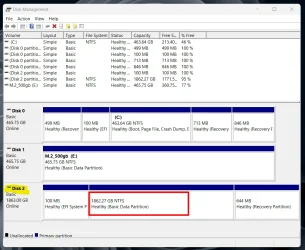
However, Running Disk Management found it. (Disk 2 in the pic) As you can see, It shows a healthy EFI system partition, a healthy recovery partition, and a healthy basic data partition. No boot, etc. This drive has Windows 11 and all my apps installed.

2. I took the Crucial drive that was in the USB enclosure and put it in the new machine. The BIOS found it immediately.

3. I then put the Samsung back in the computer, and again it was not found. Same with putting it back in the enclosure. I cannot access files or folders with explorer. I assume this means the drive is problematic?

Disks.webp
 

My Computers My Computers

  • At a glance

    Windows 11Ryzen 9 9900XG.SKILL DDR5 Flare X5 64GB 6000 CL30-40-40-96RTX 4060 6GB
    OS
    Windows 11
    Computer type
    PC/Desktop
    Manufacturer/Model
    Home Built
    CPU
    Ryzen 9 9900X
    Motherboard
    ROG STRIX B850-I
    Memory
    G.SKILL DDR5 Flare X5 64GB 6000 CL30-40-40-96
    Graphics Card(s)
    RTX 4060 6GB
    Sound Card
    Onboard Realtek
    Monitor(s) Displays
    Dual Dell U3014
    Screen Resolution
    2560x1600
    Hard Drives
    Samsung EVO m.2 2TB, Silicon Power m.2 2TB
    PSU
    Corsair Modular SFX 750W
    Case
    Lan-Li H2O
    Cooling
    NZXT KRAKEN 240 AIO
  • At a glance

    Windows 11i7-9750H16gbNVIDIA GeForce RTX2070 Q-Max
    Operating System
    Windows 11
    Computer type
    Laptop
    Manufacturer/Model
    MSI GS75 Stealth 9sf
    CPU
    i7-9750H
    Motherboard
    MS 17-G1
    Memory
    16gb
    Graphics card(s)
    NVIDIA GeForce RTX2070 Q-Max
I'd think more likely that it's the socket that's problematic.
 

My Computers My Computers

  • At a glance

    Win 11 Pro 25H2, Build 26200.8894Intel Core i5 1450064GB DDR4GeForce RTX 4060
    OS
    Win 11 Pro 25H2, Build 26200.8894
    Computer type
    PC/Desktop
    Manufacturer/Model
    Home Brew
    CPU
    Intel Core i5 14500
    Motherboard
    Gigabyte B760M G P WIFI
    Memory
    64GB DDR4
    Graphics Card(s)
    GeForce RTX 4060
    Sound Card
    Chipset Realtek
    Monitor(s) Displays
    LG 45" Ultragear, Acer 24" 1080p
    Screen Resolution
    5120x1440, 1920x1080
    Hard Drives
    Crucial P310 2TB 2280 PCIe Gen4 3D NAND NVMe M.2 SSD (O/S)
    Silicon Power 2TB US75 NVMe PCIe Gen4 M.2 2280 SSD (backup)
    Crucial BX500 2TB 3D NAND (2nd backup)
    Seagate 4TB Ironwolf, rotating HDD archive files
    External off-line backup Drives: 2 NVMe 4TB drives in external enclosures
    PSU
    Thermaltake Toughpower GF3 750W
    Case
    LIAN LI LANCOOL 216 E-ATX PC Case
    Cooling
    Lots of fans!
    Keyboard
    Microsoft Comfort Curve 2000
    Mouse
    Logitech G305
    Internet Speed
    Verizon FiOS 1GB
    Browser
    Firefox
    Antivirus
    Malware Bytes & Windows Defender Security
  • At a glance

    Win 11 Pro 25H2, Build 26200.8894Intel Core i5 1440032GB DDR5Intel 700 Embedded GPU
    Operating System
    Win 11 Pro 25H2, Build 26200.8894
    Computer type
    PC/Desktop
    Manufacturer/Model
    Home Brew
    CPU
    Intel Core i5 14400
    Motherboard
    Gigabyte B760M DS3H AX
    Memory
    32GB DDR5
    Graphics card(s)
    Intel 700 Embedded GPU
    Sound Card
    Realtek Embedded
    Monitor(s) Displays
    27" HP 1080p
    Screen Resolution
    1920x1080
    Hard Drives
    Crucial P310 2TB 2280 PCIe Gen4 eD NAND PCIe SSD
    Samsung EVO 990 2TB NVMe Gen4 SSD
    Samsung 2TB SATA SSD
    PSU
    Thermaltake Smart BM3 650W
    Case
    Okinos Micro ATX Case
    Cooling
    Fans
    Keyboard
    Microsoft Comfort Curve 2000
    Mouse
    Logitech G305
    Internet Speed
    Verizon FiOS 1GB
    Browser
    Firefox
    Antivirus
    Malware Bytes & Windows Defender Security
  • Nimo N171 17" Laptop, (Intel i3-1215U, 16GB RAM, 2TB NVMe, Win11 Pro)
    Acemagic Vista Mini PC V1 (Intel N150, 16GB RAM, 1TB NVMe, Win11 Pro)
    HP ENVY h8-1540t, (24GB RAM, 2TB SSD, 2TB HDD, Win11 Pro)
I'd think more likely that it's the socket that's problematic.
Do you mean the m.2 socket on the motherboard? The The Crucial drive is recognized in both the computer m.2 slot and the enclosure plugged into a different computer. The Samsung is now not recognized in either.
 

My Computers My Computers

  • At a glance

    Windows 11Ryzen 9 9900XG.SKILL DDR5 Flare X5 64GB 6000 CL30-40-40-96RTX 4060 6GB
    OS
    Windows 11
    Computer type
    PC/Desktop
    Manufacturer/Model
    Home Built
    CPU
    Ryzen 9 9900X
    Motherboard
    ROG STRIX B850-I
    Memory
    G.SKILL DDR5 Flare X5 64GB 6000 CL30-40-40-96
    Graphics Card(s)
    RTX 4060 6GB
    Sound Card
    Onboard Realtek
    Monitor(s) Displays
    Dual Dell U3014
    Screen Resolution
    2560x1600
    Hard Drives
    Samsung EVO m.2 2TB, Silicon Power m.2 2TB
    PSU
    Corsair Modular SFX 750W
    Case
    Lan-Li H2O
    Cooling
    NZXT KRAKEN 240 AIO
  • At a glance

    Windows 11i7-9750H16gbNVIDIA GeForce RTX2070 Q-Max
    Operating System
    Windows 11
    Computer type
    Laptop
    Manufacturer/Model
    MSI GS75 Stealth 9sf
    CPU
    i7-9750H
    Motherboard
    MS 17-G1
    Memory
    16gb
    Graphics card(s)
    NVIDIA GeForce RTX2070 Q-Max
Do you mean the m.2 socket on the motherboard? The The Crucial drive is recognized in both the computer m.2 slot and the enclosure plugged into a different computer. The Samsung is now not recognized in either.
OK, I missed a beat, that does sound like the Samsung drive. I thought it was recognized in one and not the other.
 

My Computers My Computers

  • At a glance

    Win 11 Pro 25H2, Build 26200.8894Intel Core i5 1450064GB DDR4GeForce RTX 4060
    OS
    Win 11 Pro 25H2, Build 26200.8894
    Computer type
    PC/Desktop
    Manufacturer/Model
    Home Brew
    CPU
    Intel Core i5 14500
    Motherboard
    Gigabyte B760M G P WIFI
    Memory
    64GB DDR4
    Graphics Card(s)
    GeForce RTX 4060
    Sound Card
    Chipset Realtek
    Monitor(s) Displays
    LG 45" Ultragear, Acer 24" 1080p
    Screen Resolution
    5120x1440, 1920x1080
    Hard Drives
    Crucial P310 2TB 2280 PCIe Gen4 3D NAND NVMe M.2 SSD (O/S)
    Silicon Power 2TB US75 NVMe PCIe Gen4 M.2 2280 SSD (backup)
    Crucial BX500 2TB 3D NAND (2nd backup)
    Seagate 4TB Ironwolf, rotating HDD archive files
    External off-line backup Drives: 2 NVMe 4TB drives in external enclosures
    PSU
    Thermaltake Toughpower GF3 750W
    Case
    LIAN LI LANCOOL 216 E-ATX PC Case
    Cooling
    Lots of fans!
    Keyboard
    Microsoft Comfort Curve 2000
    Mouse
    Logitech G305
    Internet Speed
    Verizon FiOS 1GB
    Browser
    Firefox
    Antivirus
    Malware Bytes & Windows Defender Security
  • At a glance

    Win 11 Pro 25H2, Build 26200.8894Intel Core i5 1440032GB DDR5Intel 700 Embedded GPU
    Operating System
    Win 11 Pro 25H2, Build 26200.8894
    Computer type
    PC/Desktop
    Manufacturer/Model
    Home Brew
    CPU
    Intel Core i5 14400
    Motherboard
    Gigabyte B760M DS3H AX
    Memory
    32GB DDR5
    Graphics card(s)
    Intel 700 Embedded GPU
    Sound Card
    Realtek Embedded
    Monitor(s) Displays
    27" HP 1080p
    Screen Resolution
    1920x1080
    Hard Drives
    Crucial P310 2TB 2280 PCIe Gen4 eD NAND PCIe SSD
    Samsung EVO 990 2TB NVMe Gen4 SSD
    Samsung 2TB SATA SSD
    PSU
    Thermaltake Smart BM3 650W
    Case
    Okinos Micro ATX Case
    Cooling
    Fans
    Keyboard
    Microsoft Comfort Curve 2000
    Mouse
    Logitech G305
    Internet Speed
    Verizon FiOS 1GB
    Browser
    Firefox
    Antivirus
    Malware Bytes & Windows Defender Security
  • Nimo N171 17" Laptop, (Intel i3-1215U, 16GB RAM, 2TB NVMe, Win11 Pro)
    Acemagic Vista Mini PC V1 (Intel N150, 16GB RAM, 1TB NVMe, Win11 Pro)
    HP ENVY h8-1540t, (24GB RAM, 2TB SSD, 2TB HDD, Win11 Pro)
There is no Boot file on the 2TB SSD. If there was, when you boot the computer with the drive inserted or even using a USB Adapter,. Windows would assign a drive letter. How did you install Windows on this new SSD?

You can attach the drive via your USB adapter, your can Assign a drive letter in Disk Management to view it in Explorer.
You can then browse the drive in Windows Explorer. You can copy any files you want to keep off of that drive to another drive.

Put the drive back into the troubled computer. Try Unplugging 'Removing any other drives other than this SSD. Swap the nVME to the other slot that was being used to troubleshoot if it is your motherboards M.2 slot that is the issue.

If the drive shows up in the Bios
Boot off of the the Windows installer USB Flash Drive.
Choose your language, then Repair Your Computer. This brings up the Troubleshooting menu.
Choose Advanced. First try a Startup Repair on that drive. There are other options to repair the boot file that can be done in the Command Prompt.
 
Last edited:

My Computer My Computer

At a glance

Windows 11 Pro Insider 64 bit 25H2 26200.5742Intel Core i7 9700K 3.6016 GBnVidia GEForce RTX 2060 Super
OS
Windows 11 Pro Insider 64 bit 25H2 26200.5742
Computer type
PC/Desktop
Manufacturer/Model
Gigabyte Z390 UD
CPU
Intel Core i7 9700K 3.60
Motherboard
Gigabyte Z390 UD
Memory
16 GB
Graphics Card(s)
nVidia GEForce RTX 2060 Super
Sound Card
onboard
Monitor(s) Displays
Two 27" Dell 4K monitors
Screen Resolution
3840 x 2160
Hard Drives
M.2 NVME SSD, 500 GB; Two 2TB Mechanical HDD's
PSU
850w PSU
Case
Cyberpower PC
Cooling
Water cooled
Keyboard
Backlit Cyberpower gaming keyboard
Mouse
Backlit Cyberpower gaming mouse
Internet Speed
1 GB mbps
Browser
Brave
Antivirus
Windows Security
Same with putting it back in the enclosure. I cannot access files or folders with explorer. I assume this means the drive is problematic?

It needs a drive letter to see it in explorer


It shows a healthy EFI system partition, a healthy recovery partition, and a healthy basic data partition. No boot

The word Boot only shows in diskmgmt for the partition you are currently booted into. You wouldn't expect to see it on a different disk.
 

My Computers My Computers

  • At a glance

    Win7,Win11i7-97002x16gb 3600mhz
    OS
    Win7,Win11
    Computer type
    PC/Desktop
    CPU
    i7-9700
    Motherboard
    gigabyte b365m ds3h
    Memory
    2x16gb 3600mhz
    Monitor(s) Displays
    benq gw2480
    PSU
    bequiet pure power 11 400CM
    Cooling
    cryorig m9i
  • At a glance

    win7,win11i5-84002x8gb 3200
    Operating System
    win7,win11
    Computer type
    PC/Desktop
    CPU
    i5-8400
    Motherboard
    gigabyte b365m ds3h
    Memory
    2x8gb 3200
    PSU
    xfx pro 450
Back
Top Bottom