Boot manager appear but not graphics


hispanico

Well-known member
Local time
9:39 PM
Posts
51
OS
Windows 11 Pro - 25H2
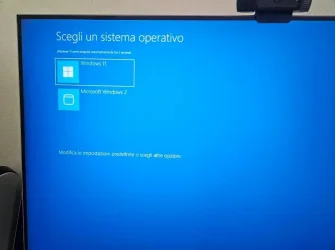
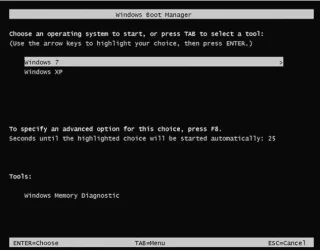
I install on my windows 11 25H2 on another disk, so i have dual boot, but when i restart computer Boot Manager appear (black and white) but not with blue graphics, how example image taht i annexe.
Please can you help me to fis this ?
I'm not very experienced and if you tell me exactly how to do it I would appreciate it.

Thank
Hispa
 

Attachments
  • what-is-boot-manager.webp
    what-is-boot-manager.webp
    18 KB · Views: 2
  • Immagine.webp
    Immagine.webp
    32.4 KB · Views: 2

My Computer My Computer

At a glance

Windows 11 Pro - 25H2AMD Ryzen 9 9950X3D48gbNvidia
OS
Windows 11 Pro - 25H2
Computer type
PC/Desktop
Manufacturer/Model
Asus
CPU
AMD Ryzen 9 9950X3D
Motherboard
Asus X870E Hero
Memory
48gb
Graphics Card(s)
Nvidia
Sound Card
Integrated
Monitor(s) Displays
ViewSonis 32"
It seems you didn't clean the disk before installing Win 11 and somehow you have or had Win 7 and Win XP on one of the drives.
I need to see the partitions on those two drives.
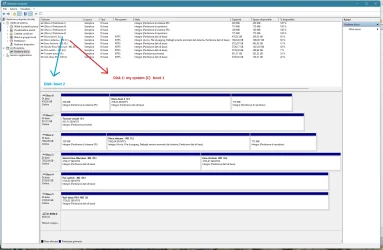
Please post a whole window Disk Manager image of ALL your drives. Don't forget to expand the columns so we can read them. How to Post a Screenshot of Disk Management
If you have a MiniTool or AOMEI Partition use it instead or Windows disk manager.
 

My Computers My Computers

  • At a glance

    Windows 11 Pro - Windows 7 HP 64 - Lubuntui5 6600K - 800MHz to 4400MHz4+4G GSkill DDR4 3000IG - Intel 530
    OS
    Windows 11 Pro - Windows 7 HP 64 - Lubuntu
    Computer type
    PC/Desktop
    Manufacturer/Model
    custom build
    CPU
    i5 6600K - 800MHz to 4400MHz
    Motherboard
    GA-Z170-HD3P
    Memory
    4+4G GSkill DDR4 3000
    Graphics Card(s)
    IG - Intel 530
    Monitor(s) Displays
    Samsung 226BW
    Screen Resolution
    1680x1050
    Hard Drives
    (1) -1 SM951 – 128GB M.2 AHCI PCIe SSD drive for Win 11
    (2) -1 WD SATA 3 - 1T for Data
    (3) -1 WD SATA 3 - 1T for backup
    (4) -1 BX500 SSD - 256G for Windows 7 and Lubuntu
    PSU
    Thermaltake 450W TR2 gold
    Keyboard
    Old and good Chicony mechanical keyboard
    Mouse
    Logitech mX performance - 9 buttons (had to disable some)
    Internet Speed
    500 Mb/s
    Browser
    Firefox 64
  • At a glance

    Windows 11 Proi7-4500U 800- 3000MHz(4+4)G DDR3 1600IG intel 4400 + NVIDIA GeForce GT 745M
    Operating System
    Windows 11 Pro
    Computer type
    Laptop
    Manufacturer/Model
    Asus Q550LF
    CPU
    i7-4500U 800- 3000MHz
    Motherboard
    Asus Q550LF
    Memory
    (4+4)G DDR3 1600
    Graphics card(s)
    IG intel 4400 + NVIDIA GeForce GT 745M
    Sound Card
    Realtek
    Monitor(s) Displays
    LG Display LP156WF4-SPH1
    Screen Resolution
    1920 x 1080
    Hard Drives
    BX500 120G SSD for Windows and programs
    & 1T HDD for data
    Internet Speed
    500 Mb/s
    Browser
    Firefox 64
Thank this is my sistuation

Hispa
 

Attachments

  • Senza titolo.webp
    Senza titolo.webp
    136.4 KB · Views: 4

My Computer My Computer

At a glance

Windows 11 Pro - 25H2AMD Ryzen 9 9950X3D48gbNvidia
OS
Windows 11 Pro - 25H2
Computer type
PC/Desktop
Manufacturer/Model
Asus
CPU
AMD Ryzen 9 9950X3D
Motherboard
Asus X870E Hero
Memory
48gb
Graphics Card(s)
Nvidia
Sound Card
Integrated
Monitor(s) Displays
ViewSonis 32"
Hi thank for your time...but i solving reading this post


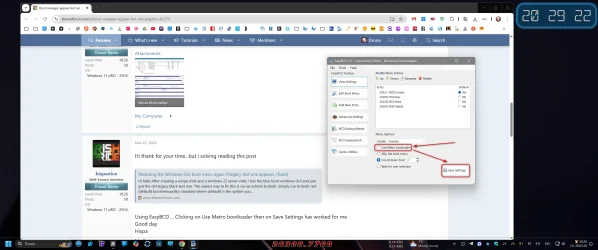
Using EasyBCD ... Clicking on Use Metro bootloader then on Save Settings has worked for me
Good day
Hispa
 

My Computer My Computer

At a glance

Windows 11 Pro - 25H2AMD Ryzen 9 9950X3D48gbNvidia
OS
Windows 11 Pro - 25H2
Computer type
PC/Desktop
Manufacturer/Model
Asus
CPU
AMD Ryzen 9 9950X3D
Motherboard
Asus X870E Hero
Memory
48gb
Graphics Card(s)
Nvidia
Sound Card
Integrated
Monitor(s) Displays
ViewSonis 32"
I'm glad you found a solution.
Please mark this thread as Solved
 

My Computers My Computers

  • At a glance

    Windows 11 Pro - Windows 7 HP 64 - Lubuntui5 6600K - 800MHz to 4400MHz4+4G GSkill DDR4 3000IG - Intel 530
    OS
    Windows 11 Pro - Windows 7 HP 64 - Lubuntu
    Computer type
    PC/Desktop
    Manufacturer/Model
    custom build
    CPU
    i5 6600K - 800MHz to 4400MHz
    Motherboard
    GA-Z170-HD3P
    Memory
    4+4G GSkill DDR4 3000
    Graphics Card(s)
    IG - Intel 530
    Monitor(s) Displays
    Samsung 226BW
    Screen Resolution
    1680x1050
    Hard Drives
    (1) -1 SM951 – 128GB M.2 AHCI PCIe SSD drive for Win 11
    (2) -1 WD SATA 3 - 1T for Data
    (3) -1 WD SATA 3 - 1T for backup
    (4) -1 BX500 SSD - 256G for Windows 7 and Lubuntu
    PSU
    Thermaltake 450W TR2 gold
    Keyboard
    Old and good Chicony mechanical keyboard
    Mouse
    Logitech mX performance - 9 buttons (had to disable some)
    Internet Speed
    500 Mb/s
    Browser
    Firefox 64
  • At a glance

    Windows 11 Proi7-4500U 800- 3000MHz(4+4)G DDR3 1600IG intel 4400 + NVIDIA GeForce GT 745M
    Operating System
    Windows 11 Pro
    Computer type
    Laptop
    Manufacturer/Model
    Asus Q550LF
    CPU
    i7-4500U 800- 3000MHz
    Motherboard
    Asus Q550LF
    Memory
    (4+4)G DDR3 1600
    Graphics card(s)
    IG intel 4400 + NVIDIA GeForce GT 745M
    Sound Card
    Realtek
    Monitor(s) Displays
    LG Display LP156WF4-SPH1
    Screen Resolution
    1920 x 1080
    Hard Drives
    BX500 120G SSD for Windows and programs
    & 1T HDD for data
    Internet Speed
    500 Mb/s
    Browser
    Firefox 64
I install on my windows 11 25H2 on another disk, so i have dual boot, but when i restart computer Boot Manager appear (black and white) but not with blue graphics, how example image taht i annexe.
Please can you help me to fis this ?
I'm not very experienced and if you tell me exactly how to do it I would appreciate it.

Thank
Hispa
I found a fix to this:
Run this in elevated command prompt.
bcdedit /set {bootmgr} locale en-US
bcdedit /deletevalue {bootmgr} displaybootmenu
 

My Computer My Computer

At a glance

Windiws 11
OS
Windiws 11
Computer type
Laptop
Manufacturer/Model
Precision 7550
Using EasyBCD ... Clicking on Use Metro bootloader then on Save Settings has worked for me
Sorry, but I'll add a screenshot to your message.

1.webp
 

My Computer My Computer

At a glance

Windows 11 Stable, Beta, Dev, CanaryAMD Ryzen 9 PRO 5950X128 GbIntel(R) Arc(TM) A380 Graphics (2 ГБ)
OS
Windows 11 Stable, Beta, Dev, Canary
Computer type
PC/Desktop
Manufacturer/Model
Micro-Star International Co., Ltd. MS-7D54
CPU
AMD Ryzen 9 PRO 5950X
Motherboard
MSI MAG X570S Tomahawk Max WiFi (MS-7D54) (2 PCI-E x1, 2 PCI-E x16, 2 M.2, 4 DDR4 DIMM, Audio, Video, 2.5GbE LAN, WiFi)
Memory
128 Gb
Graphics Card(s)
Intel(R) Arc(TM) A380 Graphics (2 ГБ)
Sound Card
Устройство с поддержкой High Definition Audio
Monitor(s) Displays
HP X34 [34" LCD] (6CM1300J5J) {2021}
Screen Resolution
3440x1440
Hard Drives
KINGSTON SFYRD2000G (2000 ГБ, PCI-E 4.0 x4)
PSU
Be Quiet! Dark Rock Pro 4
Case
Cooler Master HAF XB EVO
Internet Speed
1000 Mb/s
Browser
Chrome
Antivirus
Windows Defender

Latest Support Threads

Back
Top Bottom