bootable distro and secure boot query


perfection

Well-known member
Member
Local time
5:00 AM
Posts
45
OS
windows 11 64 bit
I have a laptop where i frequently boot my Macrium bootable usb drive and use it for imaging (or restore). The secure boot option is enabled on this laptop

recently i purchased a new laptop but the same bootable us does not boot and warns that seure boot is on (yes it is)

But why the difference in behavior??

How do i create a bootable usb drive that will work with secure boot on?
 

My Computer My Computer

At a glance

windows 11 64 bitintel i5 8th geeneration16GB
OS
windows 11 64 bit
Computer type
Laptop
Manufacturer/Model
HP x360 cd
CPU
intel i5 8th geeneration
Memory
16GB
Screen Resolution
1920
Hard Drives
one 500 GB SSD plus 1 TB hdd (2.5 inches)
Keyboard
inbuilt
Mouse
inbuilt trackpad
Internet Speed
500 Mbps
Browser
Edge chromium
Antivirus
Defender
Every EFI boot file is signed by an unique Secure Boot certificate. MS is in the planned process of getting the older (and insecure) CA 2011 signing certs revoked and switching everyone to CA 2023 certs.

The manufacturer of your new laptop is complying with MS' guidelines, and shipped with CA 2011 revoked and only trusting CA 2023-signed boot files. Your older laptop still trusts CA 2011 and hasn't revoked it.

Since the boot file can only be signed by one cert, your Macrium USB is trusted by the old PC and not the new PC.

The solution is to get your old laptop to trust the CA 2023 cert, and replace the boot file on the USB. This way, the drive works on both PC's.

1. Check your old laptop has been updated to the April 2024 or later Monthly Update.

2. Run these commands as Administrator:
Code:
reg add HKEY_LOCAL_MACHINE\SYSTEM\CurrentControlSet\Control\Secureboot /v AvailableUpdates /t REG_DWORD /d 0x40 /f
powershell Start-ScheduledTask -TaskName "\Microsoft\Windows\PI\Secure-Boot-Update"

copy C:\Windows\Boot\EFI_EX\bootmgfw_EX.efi E:\EFI\boot\bootx64.efi

Where E: is the drive letter of the attached USB drive. Some folks will suggest you recreate your Macrium USB. That's unnecessary work at this point, since it's only one boot file that's the difference between the CA 2011 and CA 2023 setups.
 

My Computer My Computer

At a glance

Windows 7
OS
Windows 7
Thank you for the reply - this clears up so many doubts garlin - but two remain

so how did this boot file get into the iso ? was it from the pc/laptop on which the iso was created?

Is this efi injected file coming from the macrium software, the PE environment or the laptop/Pc on which the iso was created ?
 

My Computer My Computer

At a glance

windows 11 64 bitintel i5 8th geeneration16GB
OS
windows 11 64 bit
Computer type
Laptop
Manufacturer/Model
HP x360 cd
CPU
intel i5 8th geeneration
Memory
16GB
Screen Resolution
1920
Hard Drives
one 500 GB SSD plus 1 TB hdd (2.5 inches)
Keyboard
inbuilt
Mouse
inbuilt trackpad
Internet Speed
500 Mbps
Browser
Edge chromium
Antivirus
Defender
When Macrium created an USB drive, it offered you a selection of Win PE images to pull boot files from.

The same boot files are available in a variety of locations:
- Downloading the Windows ADK toolkit (which always includes a then-current copy of the boot files)​
- Specific Windows releases where the updated boot files are present (ie. later 24H2 and all 25H2 ISO's)​
- Any W10 22H2 or W11 24H2/25H2 system which have been updated since April 2024.​

The current problem is tools like Macrium USB creator is agnostic. It doesn't think about the Secure Boot configuration, and doesn't ask you if the drive will be used on an older or updated UEFI. Adding that logic isn't too difficult, so it's baffling why Macrium hasn't been more proactive about it.

To check which version you have on the USB drive:
Code:
powershell "(Get-AuthenticodeSignature E:\EFI\boot\bootx64.efi).SignerCertificate.Issuer"

CN=Microsoft Windows Production PCA 2011, O=Microsoft Corporation, L=Redmond, S=Washington, C=US

PCA 2011 is the old version.
 

My Computer My Computer

At a glance

Windows 7
OS
Windows 7
Now i'm getting it - This is quite an education for me.

So the admin commands you gave earlier will extract the newest security boot file and place it in the bootable iso - so in all likelihood the distro should now boot on my new laptop without having to disable secure boot....is that what will be the result of running that command?

Last issue i'd like to clarify is that I made that macrium image as recently as 3 days ago ... so i must have taken it from an old adk ??

What is the (easiest) way to inject these latest boot file from a 25H2 iso into the bootable macrium iso i create?

....and multiple thanks again
 

My Computer My Computer

At a glance

windows 11 64 bitintel i5 8th geeneration16GB
OS
windows 11 64 bit
Computer type
Laptop
Manufacturer/Model
HP x360 cd
CPU
intel i5 8th geeneration
Memory
16GB
Screen Resolution
1920
Hard Drives
one 500 GB SSD plus 1 TB hdd (2.5 inches)
Keyboard
inbuilt
Mouse
inbuilt trackpad
Internet Speed
500 Mbps
Browser
Edge chromium
Antivirus
Defender
Right now your new laptop only trusts CA 2023. You don't want to go backwards on security.

To have an USB drive that works on either laptop, the boot file needs to be CA 2023. But in order for the old laptop to trust it, the first command is run to locally trust the CA 2023 certificate. So (for now), the old laptop can boot either CA 2011 or CA 2023 files.

Just run the two commands. Don't overthink it.

If you need to revert the boot file on the USB to the old version:
Code:
copy C:\Windows\Boot\EFI\bootmgfw.efi E:\EFI\boot\bootx64.efi

The commands look identical except the CA 2023 version has the "_EX" in the name, and CA 2011 does not.
 

My Computer My Computer

At a glance

Windows 7
OS
Windows 7
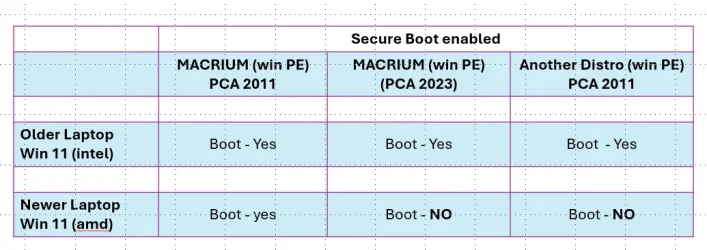
Garlin - something seems inconsistent. I did a more extensive testing with different bootable PE usbScreenshot 2025-10-26 190900.webps and here are the results. I'm wondering whether this about the boot file anymore or the embedded security keys. I got ventoy working after i installed the MOK key
 

My Computer My Computer

At a glance

windows 11 64 bitintel i5 8th geeneration16GB
OS
windows 11 64 bit
Computer type
Laptop
Manufacturer/Model
HP x360 cd
CPU
intel i5 8th geeneration
Memory
16GB
Screen Resolution
1920
Hard Drives
one 500 GB SSD plus 1 TB hdd (2.5 inches)
Keyboard
inbuilt
Mouse
inbuilt trackpad
Internet Speed
500 Mbps
Browser
Edge chromium
Antivirus
Defender
Please run this PowerShell script (as Administrator) on both laptops. Leave the Macrium USB drive plugged in while the script runs.
Code:
powershell -ep bypass -f yourfolder\Check_EFIBootFile.ps1

Copy the output here, so we can compare the UEFI settings. It will determine why the USB drive is trusted or not.
 

Attachments

My Computer My Computer

At a glance

Windows 7
OS
Windows 7
Here are the results

AVITA (older laptop)

PS C:\Users\keska> powershell -ep bypass -f C:\wow\Check_EFIBootFile.ps1
Secure Boot: ON
BitLocker on (C:) OFF

UEFI KEK Certs
--------------
Microsoft Corporation KEK CA 2011

UEFI DB Certs
-------------
Microsoft Corporation UEFI CA 2011
Microsoft Windows Production PCA 2011

UEFI DBX Certs
--------------

EFI Files
---------
Disk 0: Boot Manager [Production PCA 2011] is ALLOWED.

Registry: WindowsUEFICA2023Capable = 0
[Windows UEFI CA 2023] is not in UEFI DB.

Bootable Media
--------------
USB E: "RESCUE"
Boot File [Windows UEFI CA 2023] is BANNED.


LENOVO (new laptop)

PS C:\Users\keska> powershell -ep bypass -f C:\wow\Check_EFIBootFile.ps1
Secure Boot: ON
BitLocker on (C:) ON

UEFI KEK Certs
--------------
Microsoft Corporation KEK CA 2011

UEFI DB Certs
-------------
Microsoft Corporation UEFI CA 2011
Microsoft Windows Production PCA 2011

UEFI DBX Certs
--------------

EFI Files
---------
Disk 0: Boot Manager [Production PCA 2011] is ALLOWED.

Registry: WindowsUEFICA2023Capable = 0
[Windows UEFI CA 2023] is not in UEFI DB.

Bootable Media
--------------
USB E: "RESCUE"
Boot File [Windows UEFI CA 2023] is BANNED.


So both laptops are not allowing the boot file CA 2023 with secure boot enabled. Any way to make the BIOS accept the CA 2023 boot file with secure boot on?
 

My Computer My Computer

At a glance

windows 11 64 bitintel i5 8th geeneration16GB
OS
windows 11 64 bit
Computer type
Laptop
Manufacturer/Model
HP x360 cd
CPU
intel i5 8th geeneration
Memory
16GB
Screen Resolution
1920
Hard Drives
one 500 GB SSD plus 1 TB hdd (2.5 inches)
Keyboard
inbuilt
Mouse
inbuilt trackpad
Internet Speed
500 Mbps
Browser
Edge chromium
Antivirus
Defender
That's surprising, your new Lenovo doesn't have the CA 2023 certs pre-installed from the factory. Any laptop sold since mid-2024 should have them, since MS has directed the OEM's to take action.

So you can't use the CA 2023 boot file for your Macrium. Please run this command to copy back the CA 2011 boot file:
Code:
copy C:\Windows\Boot\EFI\bootmgfw.efi E:\EFI\boot\bootx64.efi

The first to check is if your Lenovo model has a BIOS update that hasn't been applied. A newer BIOS should install the CA 2023 certs for you. Your Avita might not have a newer BIOS, but also check for it.
 

My Computer My Computer

At a glance

Windows 7
OS
Windows 7
There are no bios updates for either of the laptops

(i) Why did my laptops not get this update. I am fully updated with every update including 25H2?

(ii) If a bios has the 2023 efi driver support does it mean that the 2011 gets blacklisted?

(iii) Is there any way I can inject my bios with the required PCA 2023 keys to allow my bootable isos to work on my laptops? (is iT through the reg entry you mentioned above?)

(iv) is there any mechanism whereby both PCA2011 AND CA P2023 efi drivers are 'passed' with support boot enabled?

(v) does there exist any tool to back up and restore bios of laptops ?

Thanks for being so patient
 

My Computer My Computer

At a glance

windows 11 64 bitintel i5 8th geeneration16GB
OS
windows 11 64 bit
Computer type
Laptop
Manufacturer/Model
HP x360 cd
CPU
intel i5 8th geeneration
Memory
16GB
Screen Resolution
1920
Hard Drives
one 500 GB SSD plus 1 TB hdd (2.5 inches)
Keyboard
inbuilt
Mouse
inbuilt trackpad
Internet Speed
500 Mbps
Browser
Edge chromium
Antivirus
Defender
There are no bios updates for either of the laptops

(i) Why did my laptops not get this update
You'll have to ask HP why they did not issue a Bios update.

(v) does there exist any tool to back up and restore bios of laptops ?
You'll have to ask HP if there is such a tool for their Bios.


Denis
 

My Computer My Computer

At a glance

Windows 11 Home x64 Version 25H2 Build 26200....
OS
Windows 11 Home x64 Version 25H2 Build 26200.9168
There are no bios updates for either of the laptops

(i) Why did my laptops not get this update. I am fully updated with every update including 25H2?
MS normally leaves the process of updating UEFI certs to the vendors. But starting next year, it might force the updated certs on supported PC's (where they've received the right technical details from the PC manufacturer).

(ii) If a bios has the 2023 efi driver support does it mean that the 2011 gets blacklisted?
There's two related moves planned to happen at the same time.

CA 2023 is to be installed so future Windows boot files released in 2026 and later are authorized. Insecure versions of CA 2011 are to be banned. MS cannot (for obvious reasons) ban CA 2011 until CA 2023 is enabled. They're not going to knowingly brick your PC.

(iii) Is there any way I can inject my bios with the required PCA 2023 keys to allow my bootable isos to work on my laptops? (is iT through the reg entry you mentioned above?)\
Yes. There's a mitigation guide. But you can follow the previous instructions, and re-run the script to check the results.

(iv) is there any mechanism whereby both PCA2011 AND CA P2023 efi drivers are 'passed' with support boot enabled?
A boot file can only have one signature. But your UEFI can (for the moment) trust either boot file version if both certs have been added.

(v) does there exist any tool to back up and restore bios of laptops ?
Not for normal use. It's expected you install the last available BIOS version. Some BIOS'es have a "reset to factory defaults" which will revert to only the CA 2011 versions, unless you have a newer BIOS that shipped with CA 2023 from the factory.

Even if you reset and lose the CA 2023 certs, you can always temporarily disable Secure Boot in the BIOS and boot up. Then you can manage to restore things, before re-enabling Secure Boot again. The entire Secure Boot matter at the heart of this problem was supposed to be completed by now, by feet dragging by different PC vendors has delayed this by over a year.
 

My Computer My Computer

At a glance

Windows 7
OS
Windows 7
The entire Secure Boot matter at the heart of this problem was supposed to be completed by now, by feet dragging by different PC vendors has delayed this by over a year.
hmmm... with PC and component sales declining over 14% (reports Gartner) in 2023 YOY from 2022 one can imagine why.
 

My Computers My Computers

  • At a glance

    Windows 11 ProRyzen 7 5800XGSkill 3200, 2x8GBMSI RX 6800 XT Gaming Z
    OS
    Windows 11 Pro
    Computer type
    PC/Desktop
    Manufacturer/Model
    DIY
    CPU
    Ryzen 7 5800X
    Motherboard
    Gigabyte B550M Aorus Pro
    Memory
    GSkill 3200, 2x8GB
    Graphics Card(s)
    MSI RX 6800 XT Gaming Z
    Sound Card
    on-board Realtek
    Monitor(s) Displays
    MSI 180hz
    Screen Resolution
    1440p
    Hard Drives
    Samsung 980 Pro, Samsung 870 Evo, generic PCIe NVME, WD 1TB 2.5" laptop spinner
    PSU
    Corsair RM 650
    Case
    mATX
    Cooling
    BeQuiet 240mm AIO and a bunch of case fans
    Keyboard
    one that clacks softly
    Mouse
    logitech
    Internet Speed
    bunches of bps
    Browser
    Firefox
    Antivirus
    Windows' own
  • At a glance

    Win11 ProRyzen 7 170016GB DDR4RX 5700 xFlashed to 5700XT
    Operating System
    Win11 Pro
    Computer type
    PC/Desktop
    Manufacturer/Model
    DIY
    CPU
    Ryzen 7 1700
    Motherboard
    GA-AB350M G-3
    Memory
    16GB DDR4
    Graphics card(s)
    RX 5700 xFlashed to 5700XT
    Sound Card
    In-Built Realtek
    Monitor(s) Displays
    Samsung
    Screen Resolution
    1080p
    Hard Drives
    NVME/SSD's
    PSU
    Thermaltake BX1 550W
    Case
    Some junky thing
    Cooling
    ThermalTake Assassin(?)
    Browser
    FF/Edge
    Antivirus
    Whatever Windows does
    Other Info
    Secure Boot enabled updated to 2023 CA keys, TPM2.0 enabled with system drive Bitlocker'd.
That's more from the rise of mobile computing (smartphones and tablets) taking up potential PC sales. MS and its partners were hoping the AI boom would launch more PC sales, but since most of that is currently cloud-based, you don't need to replace your PC just yet...
 

My Computer My Computer

At a glance

Windows 7
OS
Windows 7
That's more from the rise of mobile computing (smartphones and tablets) taking up potential PC sales. MS and its partners were hoping the AI boom would launch more PC sales, but since most of that is currently cloud-based, you don't need to replace your PC just yet...
The BIOS updates release notes for my 7 and 5 yo. MB's (released only in September) haven't said a word about about secure boot certificate updates even though they are included.

I think it's pretty obvious what their intentions are: if dragging their feet and obfuscating on this generates sales, they ain't gonna cry none.
 
Last edited:

My Computers My Computers

  • At a glance

    Windows 11 ProRyzen 7 5800XGSkill 3200, 2x8GBMSI RX 6800 XT Gaming Z
    OS
    Windows 11 Pro
    Computer type
    PC/Desktop
    Manufacturer/Model
    DIY
    CPU
    Ryzen 7 5800X
    Motherboard
    Gigabyte B550M Aorus Pro
    Memory
    GSkill 3200, 2x8GB
    Graphics Card(s)
    MSI RX 6800 XT Gaming Z
    Sound Card
    on-board Realtek
    Monitor(s) Displays
    MSI 180hz
    Screen Resolution
    1440p
    Hard Drives
    Samsung 980 Pro, Samsung 870 Evo, generic PCIe NVME, WD 1TB 2.5" laptop spinner
    PSU
    Corsair RM 650
    Case
    mATX
    Cooling
    BeQuiet 240mm AIO and a bunch of case fans
    Keyboard
    one that clacks softly
    Mouse
    logitech
    Internet Speed
    bunches of bps
    Browser
    Firefox
    Antivirus
    Windows' own
  • At a glance

    Win11 ProRyzen 7 170016GB DDR4RX 5700 xFlashed to 5700XT
    Operating System
    Win11 Pro
    Computer type
    PC/Desktop
    Manufacturer/Model
    DIY
    CPU
    Ryzen 7 1700
    Motherboard
    GA-AB350M G-3
    Memory
    16GB DDR4
    Graphics card(s)
    RX 5700 xFlashed to 5700XT
    Sound Card
    In-Built Realtek
    Monitor(s) Displays
    Samsung
    Screen Resolution
    1080p
    Hard Drives
    NVME/SSD's
    PSU
    Thermaltake BX1 550W
    Case
    Some junky thing
    Cooling
    ThermalTake Assassin(?)
    Browser
    FF/Edge
    Antivirus
    Whatever Windows does
    Other Info
    Secure Boot enabled updated to 2023 CA keys, TPM2.0 enabled with system drive Bitlocker'd.
If your vendor has supplied the details to MS's secureboot_objects GitHub, then MS can push out a KEK CA 2023 cert to your PC by force (in 2026). After that, installing other CA 2023 certs and banning CA 2011 is doable.

If your vendor hates you, it's still possible to install the KEK DER file going thru the manual UEFI menu. Which is scary for some people. I have a script which copies it to the EFI partition, so you don't need to find an USB drive to save it on.
 

My Computer My Computer

At a glance

Windows 7
OS
Windows 7
If your vendor hates you, it's still possible to install the KEK DER file going thru the manual UEFI menu. Which is scary for some people. I have a script which copies it to the EFI partition, so you don't need to find an USB drive to save it on.
That's where I'm curious: does this process sign a KEK DER using the PK on your computer?
 

My Computers My Computers

  • At a glance

    Windows 11 ProRyzen 7 5800XGSkill 3200, 2x8GBMSI RX 6800 XT Gaming Z
    OS
    Windows 11 Pro
    Computer type
    PC/Desktop
    Manufacturer/Model
    DIY
    CPU
    Ryzen 7 5800X
    Motherboard
    Gigabyte B550M Aorus Pro
    Memory
    GSkill 3200, 2x8GB
    Graphics Card(s)
    MSI RX 6800 XT Gaming Z
    Sound Card
    on-board Realtek
    Monitor(s) Displays
    MSI 180hz
    Screen Resolution
    1440p
    Hard Drives
    Samsung 980 Pro, Samsung 870 Evo, generic PCIe NVME, WD 1TB 2.5" laptop spinner
    PSU
    Corsair RM 650
    Case
    mATX
    Cooling
    BeQuiet 240mm AIO and a bunch of case fans
    Keyboard
    one that clacks softly
    Mouse
    logitech
    Internet Speed
    bunches of bps
    Browser
    Firefox
    Antivirus
    Windows' own
  • At a glance

    Win11 ProRyzen 7 170016GB DDR4RX 5700 xFlashed to 5700XT
    Operating System
    Win11 Pro
    Computer type
    PC/Desktop
    Manufacturer/Model
    DIY
    CPU
    Ryzen 7 1700
    Motherboard
    GA-AB350M G-3
    Memory
    16GB DDR4
    Graphics card(s)
    RX 5700 xFlashed to 5700XT
    Sound Card
    In-Built Realtek
    Monitor(s) Displays
    Samsung
    Screen Resolution
    1080p
    Hard Drives
    NVME/SSD's
    PSU
    Thermaltake BX1 550W
    Case
    Some junky thing
    Cooling
    ThermalTake Assassin(?)
    Browser
    FF/Edge
    Antivirus
    Whatever Windows does
    Other Info
    Secure Boot enabled updated to 2023 CA keys, TPM2.0 enabled with system drive Bitlocker'd.
There's two ways to inject a cert into UEFI. You can import a binary file already signed by the PK. If you can't get access to the PK (because you're not the vendor, and not making your own PK from scratch), then UEFI allows you to read a DER file off a storage device. Because you're manually in UEFI (physically on the machine), this imported DER can be signed by the current PK. Now it's trusted.
 

My Computer My Computer

At a glance

Windows 7
OS
Windows 7
my 2 penneth worth.
MS and the main computer manufactures are most certainly dragging their feet
this cert 2023 update has been available as a firmware update on Linux systems for over 6 months.

MS created secure boot now seem to be using secure boot as a means to force new computer sales
our two HP systems are only just coming up to being 3 years old, yet no updates for the 2023 cert from HP.
(both of my HP systems have been manually updated with the 2023 cert already)

i believe MS and the main computer manufactures will wait until the very last moment before releasing
any update for the 2023 secure boot cert but project fear will continue unabated.

not withstanding there are many causal computer users who still have no idea any update is needed
let alone how to complete that update is running into the many millions if not billions of users.

i really don't think that this is going to end well for many many users with personal computers.
just my thoughts on the subject, best of luck Steve ..
 

My Computers My Computers

  • At a glance

    Windows 11 HomeRyzen 7 5825u64GB DDR4 3200Ryzen 7 5825u
    OS
    Windows 11 Home
    Computer type
    PC/Desktop
    Manufacturer/Model
    HP 24" AiO
    CPU
    Ryzen 7 5825u
    Motherboard
    HP
    Memory
    64GB DDR4 3200
    Graphics Card(s)
    Ryzen 7 5825u
    Sound Card
    RealTek
    Monitor(s) Displays
    24" HP AiO
    Screen Resolution
    1920 x 1080 @60 Hz
    Hard Drives
    1TB WD Blue SN580 M2 SSD Partitioned.
    2x 1TB USB HDD External Backup/Storage.
    PSU
    90W external power brick
    Case
    24" All in One
    Cooling
    Default Air Cooling
    Keyboard
    HP WiFi UK extended
    Mouse
    HP WiFi 3 Button
    Internet Speed
    1GB full fibre
    Browser
    Edge & Firefox
    Antivirus
    AVG Internet Security/Windows Defender
    Other Info
    Mainly Open Source Software
  • At a glance

    Ubuntu 22.04.5 LTSi5 7200u16GB DDR4Intel
    Operating System
    Ubuntu 22.04.5 LTS
    Computer type
    Laptop
    Manufacturer/Model
    Dell 13" Latitude 2017
    CPU
    i5 7200u
    Motherboard
    Dell
    Memory
    16GB DDR4
    Graphics card(s)
    Intel
    Sound Card
    Intel
    Monitor(s) Displays
    13" Dell Laptop
    Hard Drives
    250GB Crucial 2.5" SSD
    Mouse
    Generic WiFi 3 button
    Internet Speed
    WiFi only
    Browser
    Firefox
    Antivirus
    ClamAV TK
    Other Info
    Mainly Open Source Software

Latest Support Threads

Back
Top Bottom