
Solved BOSE QC45 HEADPHONE ACTION WHEN RECORDING


retexan599

Well-known member
Member
Local time
6:50 PM
Posts
125
Location
Houston TX USA
OS
Windows 11 25H2 26200.8655
First I should say that the good news is that my QC45 Bluetooth headphones connected seamlessly to my new Windows 11 desktop. I can listen to music and speak into voice applications like windows speech recognition just fine; except for the problem below.

The problem I need help with occurs when I am listening to music and speaking with the headphones at the same time.

When I used these QC45 headphones with my old Windows 10 computer, the music would automatically mute when I activated a recording feature like Speech Recognition, Voice recorder, etc. The same thing is true when I use the QC45 with my iPad: the music mutes when recording into an app using voice to type. And when recording stops, the music returns to normal.

However, with this new Windows 11 system, instead of muting, the sound level from the speakers automatically goes from normal to maximum when recording. When recording stops, the music automatically returns to normal. Any hints as to why the behavior is different with Windows 11 (or is it that I have not set it up right). Thanks.
 

My Computer My Computer

At a glance

Windows 11 25H2 26200.86552.10GHz Intel 12th Gen Core i7-1270016GBNVIDIA GeForce 3050
OS
Windows 11 25H2 26200.8655
Computer type
PC/Desktop
Manufacturer/Model
HP Envy Desktop TE02-0xxx
CPU
2.10GHz Intel 12th Gen Core i7-12700
Motherboard
HP 'BlizzardU' 894B 10; Chipset Intel ADL Z690
Memory
16GB
Graphics Card(s)
NVIDIA GeForce 3050
Sound Card
Realtek Audio
Monitor(s) Displays
HP27er
Screen Resolution
1920x1080
Hard Drives
256GB NVMe SSD
2TB HDD
PSU
600W
Case
Desktop Tower
Cooling
Air
Keyboard
Logitech K350
Mouse
Logitech M510
Internet Speed
25Mps (Max)
Browser
Chrome
Antivirus
Windows native security
Other Info
HP replaced SSD under warranty in November, 2023.
No VPN.
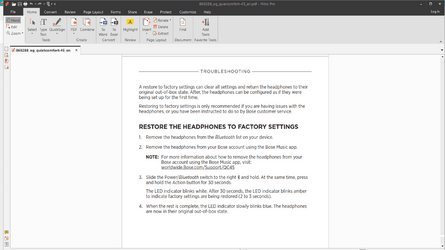
I'm not an audiophile nor am I familiar with the headset but have you restored the headphones to factory settings and connected again to see if it makes a difference. Last page of user manual. It would be worth a shot.
 

Attachments

  • Screenshot 2023-06-17 091257.png
    Screenshot 2023-06-17 091257.png
    163 KB · Views: 1

My Computers My Computers

  • At a glance

    Windows 11 Pro 25H2 26200.8655i9-10900 10 core 20 threads32 gbnone-Intel UHD Graphics 630
    OS
    Windows 11 Pro 25H2 26200.8655
    Computer type
    PC/Desktop
    Manufacturer/Model
    Dell Optiplex 7080
    CPU
    i9-10900 10 core 20 threads
    Motherboard
    DELL 0J37VM
    Memory
    32 gb
    Graphics Card(s)
    none-Intel UHD Graphics 630
    Sound Card
    Integrated Realtek
    Monitor(s) Displays
    Benq 27
    Screen Resolution
    2560x1440
    Hard Drives
    2x1tb Solidigm m.2 nvme /External drives 512gb Samsung m.2 sata+2tb Kingston m2.nvme
    PSU
    500w
    Case
    MT
    Cooling
    Dell Premium
    Keyboard
    Logitech wired
    Mouse
    Logitech wireless
    Internet Speed
    so slow I'm too embarrassed to tell
    Browser
    #1 Edge #2 Firefox
    Antivirus
    Defender+MWB Premium
  • At a glance

    Windows 11 Pro 24H2 26200.8457AMD Ryzen 7 6800U32 gbintegrated
    Operating System
    Windows 11 Pro 24H2 26200.8457
    Computer type
    PC/Desktop
    Manufacturer/Model
    Beelink Mini PC SER5
    CPU
    AMD Ryzen 7 6800U
    Memory
    32 gb
    Graphics card(s)
    integrated
    Sound Card
    integrated
    Monitor(s) Displays
    Benq 27
    Screen Resolution
    2560x1440
    Hard Drives
    1TB Crucial nvme
    Keyboard
    Logitech wired
    Mouse
    Logitech wireless
    Internet Speed
    still too embarrassed to tell
    Browser
    Firefox
    Antivirus
    Defender
    Other Info
    System 3 is non compliant Dell 9020 i7-4770/24gb ram Win11 PRO 26200.8457
Before I take the step of resetting the headphones to factory settings, I did some more digging. I observed the volume levels within the Windows 11 Settings | Sound. This is what it looked like without recording into speech recognition (normal):
1687028943728.png

Then this is what it looked like when recording into speech recognition (went to maximum):
1687028974976.png
This above suggests that the (unwanted) sound adjustments were coming from within Windows 11 and not within the headset itself.

Then I discovered something else: when I was recording (and the sound went to maximum) I manually moved the sound volume bar back to the normal position. Surprisingly, it stayed there! And I was able to record without the sound going to maximum. I don't know how long this (desired) behavior will last (after restarts, etc.) but it is a piece of the puzzle.
 

My Computer My Computer

At a glance

Windows 11 25H2 26200.86552.10GHz Intel 12th Gen Core i7-1270016GBNVIDIA GeForce 3050
OS
Windows 11 25H2 26200.8655
Computer type
PC/Desktop
Manufacturer/Model
HP Envy Desktop TE02-0xxx
CPU
2.10GHz Intel 12th Gen Core i7-12700
Motherboard
HP 'BlizzardU' 894B 10; Chipset Intel ADL Z690
Memory
16GB
Graphics Card(s)
NVIDIA GeForce 3050
Sound Card
Realtek Audio
Monitor(s) Displays
HP27er
Screen Resolution
1920x1080
Hard Drives
256GB NVMe SSD
2TB HDD
PSU
600W
Case
Desktop Tower
Cooling
Air
Keyboard
Logitech K350
Mouse
Logitech M510
Internet Speed
25Mps (Max)
Browser
Chrome
Antivirus
Windows native security
Other Info
HP replaced SSD under warranty in November, 2023.
No VPN.
Before I take the step of resetting the headphones to factory settings, I did some more digging. I observed the volume levels within the Windows 11 Settings | Sound. This is what it looked like without recording into speech recognition (normal):
View attachment 62685

Then this is what it looked like when recording into speech recognition (went to maximum):
View attachment 62686
This above suggests that the (unwanted) sound adjustments were coming from within Windows 11 and not within the headset itself.

Then I discovered something else: when I was recording (and the sound went to maximum) I manually moved the sound volume bar back to the normal position. Surprisingly, it stayed there! And I was able to record without the sound going to maximum. I don't know how long this (desired) behavior will last (after restarts, etc.) but it is a piece of the puzzle.
An addendum: the solution I mentioned above does not survive a restart of the computer. But, I can go into the various setting menus and restore the normal behavior. Of course, this particular unwanted behavior did not occur with my (now decommissioned) Windows 10 computer; I suppose that is not an uncommon refrain anytime there is a new major release...
 

My Computer My Computer

At a glance

Windows 11 25H2 26200.86552.10GHz Intel 12th Gen Core i7-1270016GBNVIDIA GeForce 3050
OS
Windows 11 25H2 26200.8655
Computer type
PC/Desktop
Manufacturer/Model
HP Envy Desktop TE02-0xxx
CPU
2.10GHz Intel 12th Gen Core i7-12700
Motherboard
HP 'BlizzardU' 894B 10; Chipset Intel ADL Z690
Memory
16GB
Graphics Card(s)
NVIDIA GeForce 3050
Sound Card
Realtek Audio
Monitor(s) Displays
HP27er
Screen Resolution
1920x1080
Hard Drives
256GB NVMe SSD
2TB HDD
PSU
600W
Case
Desktop Tower
Cooling
Air
Keyboard
Logitech K350
Mouse
Logitech M510
Internet Speed
25Mps (Max)
Browser
Chrome
Antivirus
Windows native security
Other Info
HP replaced SSD under warranty in November, 2023.
No VPN.

Latest Support Threads

Back
Top Bottom





