Boy I Don't Like the 'New' Start Menu


Am I the only one around here that hardly ever uses the Start Menu?
I won't go to the start menu more than once a month on average....if that. I have a folder on my desktop that has all my program shortcuts and power shortcuts in it and I then pinned that folder to taskbar.; my very own poor man's Quick Launch with no need for 3rd party tools..
 

My Computers My Computers

  • At a glance

    Windows 11 Pro 25H2 26200.8655i9-10900 10 core 20 threads32 gbnone-Intel UHD Graphics 630
    OS
    Windows 11 Pro 25H2 26200.8655
    Computer type
    PC/Desktop
    Manufacturer/Model
    Dell Optiplex 7080
    CPU
    i9-10900 10 core 20 threads
    Motherboard
    DELL 0J37VM
    Memory
    32 gb
    Graphics Card(s)
    none-Intel UHD Graphics 630
    Sound Card
    Integrated Realtek
    Monitor(s) Displays
    Benq 27
    Screen Resolution
    2560x1440
    Hard Drives
    2x1tb Solidigm m.2 nvme /External drives 512gb Samsung m.2 sata+2tb Kingston m2.nvme
    PSU
    500w
    Case
    MT
    Cooling
    Dell Premium
    Keyboard
    Logitech wired
    Mouse
    Logitech wireless
    Internet Speed
    so slow I'm too embarrassed to tell
    Browser
    #1 Edge #2 Firefox
    Antivirus
    Defender+MWB Premium
  • At a glance

    Windows 11 Pro 24H2 26200.8457AMD Ryzen 7 6800U32 gbintegrated
    Operating System
    Windows 11 Pro 24H2 26200.8457
    Computer type
    PC/Desktop
    Manufacturer/Model
    Beelink Mini PC SER5
    CPU
    AMD Ryzen 7 6800U
    Memory
    32 gb
    Graphics card(s)
    integrated
    Sound Card
    integrated
    Monitor(s) Displays
    Benq 27
    Screen Resolution
    2560x1440
    Hard Drives
    1TB Crucial nvme
    Keyboard
    Logitech wired
    Mouse
    Logitech wireless
    Internet Speed
    still too embarrassed to tell
    Browser
    Firefox
    Antivirus
    Defender
    Other Info
    System 3 is non compliant Dell 9020 i7-4770/24gb ram Win11 PRO 26200.8457
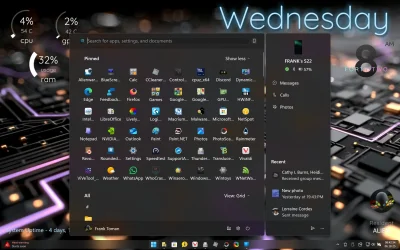
The Pinned is two rows - with an option to "Show All." The "All" - which used to be a click on the top - is now Icon List or Category based (their categories, not mine) - along fully half the bottom. To show all the Pinned, you have to click a drop down. So, two steps to see what you want to see, and zero steps to see the things you already made a conscious effort to hide.

Huzzah.
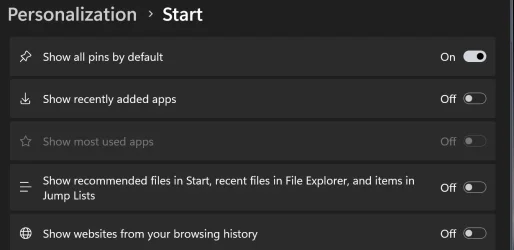
So did you go into settings/Personalization/Start and select the switch show all pins by default? Also the phone link flyout has a switch next to the start menu search bar to open and close it as well as an on/off switch in the settings. Also you have list, category, and grid view icon display options. I prefer grid view myself.
 

Attachments

  • PowerToys_6HJDDNwCg1.webp
    PowerToys_6HJDDNwCg1.webp
    29.3 KB · Views: 4

My Computers My Computers

  • At a glance

    Windows 11 25H2Intel Core Ultra 9 275HX (24-Core)64GB DDR5 6400MT/sNVIDIA GeForce RTX 5080 and Intel UHD Graphics
    OS
    Windows 11 25H2
    Computer type
    Laptop
    Manufacturer/Model
    Alienware 18 Area-51
    CPU
    Intel Core Ultra 9 275HX (24-Core)
    Motherboard
    Alienware
    Memory
    64GB DDR5 6400MT/s
    Graphics Card(s)
    NVIDIA GeForce RTX 5080 and Intel UHD Graphics
    Sound Card
    Onboard, Realtek high-performance Audio chips (ALC3329 & ALC1708))
    Monitor(s) Displays
    300HZ 18-inch QHD 500 nit Comfort View+
    Screen Resolution
    2560 x 1600
    Hard Drives
    2TB NVMe M.2 PCIe Gen 5 SSD
    Case
    Magnesium Alloy
    Cooling
    Advanced Cryo-Tech Quad-Fan Cooling system & large vapor chamber
    Keyboard
    Cherry MX ultra low profile mechanical keyboard with per key AlienFX RGB lighting
    Mouse
    Logitech MX Master 4
    Browser
    Vivaldi (main), Firefox, Chrome, Edge
    Antivirus
    MS Defender and Malwarebytes Free
  • At a glance

    Windows 11 25H2Qualcomm Snapdragon X Elite (12 Core) ARM bas...16GB LPDDR5Qualcomm Adreno X1-85
    Operating System
    Windows 11 25H2
    Computer type
    Laptop
    Manufacturer/Model
    Microsoft Surface Laptop 7
    CPU
    Qualcomm Snapdragon X Elite (12 Core) ARM based CPU
    Motherboard
    Microsoft Corp.
    Memory
    16GB LPDDR5
    Graphics card(s)
    Qualcomm Adreno X1-85
    Sound Card
    Omnisonic speakers with Dolby Atmos spatial sound
    Monitor(s) Displays
    120 Hz 13.8-inch 600 nit PixelSense Flow touchscreen
    Screen Resolution
    2304x1536
    Hard Drives
    1TB NVMe Gen 4 SSD
    Case
    Anodized Aluminum
    Cooling
    Traditional active cooling fan system
    Keyboard
    Mechanical QWERTY, backlit when in use
    Mouse
    Logitech MX Master 4 and Surface Arc Mouse
    Browser
    Vivaldi (main), Firefox, Chrome, Edge
    Antivirus
    MS Defender and Malwarebytes Free
Am I the only one around here that hardly ever uses the Start Menu?
I also have a few frequently-used BAT files pinned to my Start Menu.

So did you go into settings/Personalization/Start and select the switch show all pins by default? Also the phone link flyout has a switch next to the start menu search bar to open and close it as well as an on/off switch in the settings. Also you have list, category, and grid view icon display options. I prefer grid view myself.
I did not. The "Show All Pins" was helpful, thank you. (That was the help I needed before spiralling down the WindHawk hack hole...) But it still shows the app list below, I prefer not seeing any of that.
 

My Computer My Computer

At a glance

Windows 1111th Gen Intel(R) Core(TM) i7-1185G7 @ 3.00GH16GB
OS
Windows 11
Computer type
Laptop
Manufacturer/Model
MSFT Surface Pro 8
CPU
11th Gen Intel(R) Core(TM) i7-1185G7 @ 3.00GH
Memory
16GB
People have been complaining about the Windows start menu for a long time.

Windows 7 is when I first noticed the complaints ramping up and third party start menu apps popping up.

When Windows 8 was released, the complaints and apps went through the roof. Also, Stardock ModernMix made an appearance.


My Computers My Computers

  • At a glance

    Windows 11 ProIntel Core i9-10900XCorsair 64 GB (4 x 16 GB) CMW64GX4M4C3000C15 ...GIGABYTE GeForce GTX 1660 Super Mini ITX 6 GB OC
    OS
    Windows 11 Pro
    Computer type
    PC/Desktop
    Manufacturer/Model
    Stigg's Build
    CPU
    Intel Core i9-10900X
    Motherboard
    GIGABYTE X299X DESIGNARE 10G
    Memory
    Corsair 64 GB (4 x 16 GB) CMW64GX4M4C3000C15 Vengeance RGB Pro 3000Mhz DDR4
    Graphics Card(s)
    GIGABYTE GeForce GTX 1660 Super Mini ITX 6 GB OC
    Sound Card
    Realtek ALC1220
    Monitor(s) Displays
    Samsung 27" FHD LED FreeSync Gaming Monitor (LS27F350FHEXXY)
    Screen Resolution
    1920 x 1080
    Hard Drives
    Samsung 970 Pro Series 1TB M.2 2280 NVMe SSD
    Western Digital Red Pro WD8003FFBX-68B9AN0 8 TB, 7200 RPM, SATA-III
    Western Digital Red Pro WD8003FFBX-68B9AN0 8 TB, 7200 RPM, SATA-III
    PSU
    Corsair HX1200 1200W 80 Plus Platinum
    Case
    Fractal Design Define 7 Black Solid Case
    Cooling
    Noctua NH-D15 Chromax Black
    Keyboard
    Razer Ornata V2
    Mouse
    Razer DeathAdder Essential
    Internet Speed
    FTTN 100Mbps / 40Mbps
    Browser
    Mozilla Firefox
    Antivirus
    N/A
    Other Info
    Logitech BRIO 4k Ultra HD USB-C Webcam
  • At a glance

    Windows 10 ProCore i7-8750HSK Hynix 32 GB (2 x 16 GB) HMA82GS6CJR8N-VK 1...NVIDIA GeForce GTX 1070
    Operating System
    Windows 10 Pro
    Computer type
    Laptop
    Manufacturer/Model
    ASUS ROG Zephyrus M GM501GS
    CPU
    Core i7-8750H
    Motherboard
    Zephyrus M GM501GS
    Memory
    SK Hynix 32 GB (2 x 16 GB) HMA82GS6CJR8N-VK 16 GB DDR4-2666 DDR4 SDRAM
    Graphics card(s)
    NVIDIA GeForce GTX 1070
    Sound Card
    Realtek ALC294
    Monitor(s) Displays
    AU Optronics B156HAN07.1 [15.6" LCD]
    Screen Resolution
    1920 x 1080
    Hard Drives
    Samsung MZVKW512HMJP-00000 512 GB, PCI-E 3.0 x4
    Samsung SSD 860 QVO 4TB 4 TB, SATA-III
    PSU
    N/A
    Case
    N/A
    Cooling
    N/A
    Keyboard
    PC/AT Enhanced PS2 Keyboard (101/102-Key)
    Mouse
    Razer DeathAdder Essential
    Internet Speed
    FTTN 100Mbps / 40Mbps
    Browser
    Mozilla Firefox
    Antivirus
    N/A
    Other Info
    USB2.0 HD UVC Webcam
Recent update (beta channel) - forces ALL apps onto Start menu and condenses (expandable with dropdown) my curated list of apps.

They were curated for a reason!

Ugh. That is all.

[/rant]
I don't care since I use Open Shell!
 

My Computer My Computer

At a glance

Windows 11 ProCore i7-13700K64 GB Kingston Fury Beast DDR5Gigabyte GeForce RTX 2060 Super Gaming OC 8G
OS
Windows 11 Pro
Computer type
PC/Desktop
Manufacturer/Model
Self build
CPU
Core i7-13700K
Motherboard
Asus TUF Gaming Plus WiFi Z790
Memory
64 GB Kingston Fury Beast DDR5
Graphics Card(s)
Gigabyte GeForce RTX 2060 Super Gaming OC 8G
Sound Card
Realtek S1200A
Monitor(s) Displays
Viewsonic VP2770 & Dell (secondary)
Screen Resolution
2560 x 1440
Hard Drives
Kingston KC3000 2TB NVME SSD & SATA HDDs & SSD
PSU
EVGA SuperNova G2 850W
Case
Nanoxia Deep Silence 1
Cooling
Noctua NH-D14
Keyboard
Microsoft Digital Media Pro
Mouse
Logitech Wireless
Internet Speed
80 Mb / s
Browser
Chrome
Antivirus
Defender, Malwarebytes Free & AdwCleaner
Am I the only one around here that hardly ever uses the Start Menu?
I stopped using it around Vista and I remove it ever since, it only downloads junk in the background. These days, Insider is not so much about the latest Windows features, but about Copilot and Start. MS turned Start into a promotional platform. To me, it looks like:

milliondollarhomepage.webp

Code:
start "" /wait C:\Windows\System32\WindowsPowerShell\v1.0\powershell.exe "Get-AppxPackage -AllUsers -PackageTypeFilter Bundle -Name "Microsoft.StartExperiencesApp" | Remove-AppxPackage -AllUsers"

takeown /s %computername% /u %username% /f "%WINDIR%\SystemApps\Microsoft.Windows.StartMenuExperienceHost_cw5n1h2txyewy\StartMenuExperienceHost.exe"
icacls "%WINDIR%\SystemApps\Microsoft.Windows.StartMenuExperienceHost_cw5n1h2txyewy\StartMenuExperienceHost.exe" /inheritance:r /grant:r %username%:F
taskkill /im StartMenuExperienceHost.exe /f
del "%WINDIR%\SystemApps\Microsoft.Windows.StartMenuExperienceHost_cw5n1h2txyewy\StartMenuExperienceHost.exe" /s /f /q
 

My Computer My Computer

At a glance

Home26H2CanAMD Ryzen 5 8600G (07/24)2x32GB Kingston FURY DDR5 5600 MHz CL36 @5200...ASROCK Radeon RX 6600 Challenger D 8G @48FPS ...
OS
Home26H2Can
Computer type
PC/Desktop
CPU
AMD Ryzen 5 8600G (07/24)
Motherboard
ASROCK B650M-HDV/M.2 (07/24) BIOS 4.21 AGESA ComboAM5 1.3.0.1 (04/26)
Memory
2x32GB Kingston FURY DDR5 5600 MHz CL36 @5200 CL36 (07/24)
Graphics Card(s)
ASROCK Radeon RX 6600 Challenger D 8G @48FPS (08/24)
Sound Card
Creative Sound BlasterX AE-5 Plus (05/24)
Monitor(s) Displays
24" Philips 24M1N3200ZS/00 (05/24)
Screen Resolution
1920×1080@165Hz via DP1.4
Hard Drives
Kingston KC3000 NVMe 2TB (05/24)
ADATA XPG GAMMIX S11 Pro 512GB (07/19)
PSU
Seasonic Core GM 550 Gold (04/24)
Case
Fractal Design Define 7 Mini with 3x Noctua NF-P14s/12@555rpm (04/24)
Cooling
Noctua NH-U12S with Noctua NF-P12 (04/24)
Keyboard
HP Pavilion Wired Keyboard 300 (07/24) + Rabalux 76017 Parker (01/24)
Mouse
Logitech M330 Silent Plus (01/26)
Internet Speed
500/100 Mbps via RouterOS (05/21) & TCP Optimizer
Browser
Edge, Brave for YouTube, LibreWolf for FB
Antivirus
NextDNS blocking 1/3 Traffic
Other Info
Phone: Motorola Moto G86 (02/26)
Backup: Hasleo Backup Suite (PreOS)
Headphones: Sennheiser RS170 (09/10)
Chair: Huzaro Force 4.4 Grey Mesh (05/24)
Notifier: Xiaomi Mi Band 9 Milanese (10/24)
FlexCore USB-C 3.2 Gen 1 (M) to LAN (F) (08/25)
I stopped using it around Vista and I remove it ever since, it only downloads junk in the background. These days, Insider is not so much about the latest Windows features, but about Copilot and Start. MS turned Start into a promotional platform.
How do you remove the start menu?
 

My Computers My Computers

  • At a glance

    Windows 11 ProIntel Core i9-10900XCorsair 64 GB (4 x 16 GB) CMW64GX4M4C3000C15 ...GIGABYTE GeForce GTX 1660 Super Mini ITX 6 GB OC
    OS
    Windows 11 Pro
    Computer type
    PC/Desktop
    Manufacturer/Model
    Stigg's Build
    CPU
    Intel Core i9-10900X
    Motherboard
    GIGABYTE X299X DESIGNARE 10G
    Memory
    Corsair 64 GB (4 x 16 GB) CMW64GX4M4C3000C15 Vengeance RGB Pro 3000Mhz DDR4
    Graphics Card(s)
    GIGABYTE GeForce GTX 1660 Super Mini ITX 6 GB OC
    Sound Card
    Realtek ALC1220
    Monitor(s) Displays
    Samsung 27" FHD LED FreeSync Gaming Monitor (LS27F350FHEXXY)
    Screen Resolution
    1920 x 1080
    Hard Drives
    Samsung 970 Pro Series 1TB M.2 2280 NVMe SSD
    Western Digital Red Pro WD8003FFBX-68B9AN0 8 TB, 7200 RPM, SATA-III
    Western Digital Red Pro WD8003FFBX-68B9AN0 8 TB, 7200 RPM, SATA-III
    PSU
    Corsair HX1200 1200W 80 Plus Platinum
    Case
    Fractal Design Define 7 Black Solid Case
    Cooling
    Noctua NH-D15 Chromax Black
    Keyboard
    Razer Ornata V2
    Mouse
    Razer DeathAdder Essential
    Internet Speed
    FTTN 100Mbps / 40Mbps
    Browser
    Mozilla Firefox
    Antivirus
    N/A
    Other Info
    Logitech BRIO 4k Ultra HD USB-C Webcam
  • At a glance

    Windows 10 ProCore i7-8750HSK Hynix 32 GB (2 x 16 GB) HMA82GS6CJR8N-VK 1...NVIDIA GeForce GTX 1070
    Operating System
    Windows 10 Pro
    Computer type
    Laptop
    Manufacturer/Model
    ASUS ROG Zephyrus M GM501GS
    CPU
    Core i7-8750H
    Motherboard
    Zephyrus M GM501GS
    Memory
    SK Hynix 32 GB (2 x 16 GB) HMA82GS6CJR8N-VK 16 GB DDR4-2666 DDR4 SDRAM
    Graphics card(s)
    NVIDIA GeForce GTX 1070
    Sound Card
    Realtek ALC294
    Monitor(s) Displays
    AU Optronics B156HAN07.1 [15.6" LCD]
    Screen Resolution
    1920 x 1080
    Hard Drives
    Samsung MZVKW512HMJP-00000 512 GB, PCI-E 3.0 x4
    Samsung SSD 860 QVO 4TB 4 TB, SATA-III
    PSU
    N/A
    Case
    N/A
    Cooling
    N/A
    Keyboard
    PC/AT Enhanced PS2 Keyboard (101/102-Key)
    Mouse
    Razer DeathAdder Essential
    Internet Speed
    FTTN 100Mbps / 40Mbps
    Browser
    Mozilla Firefox
    Antivirus
    N/A
    Other Info
    USB2.0 HD UVC Webcam

My Computer My Computer

At a glance

Home26H2CanAMD Ryzen 5 8600G (07/24)2x32GB Kingston FURY DDR5 5600 MHz CL36 @5200...ASROCK Radeon RX 6600 Challenger D 8G @48FPS ...
OS
Home26H2Can
Computer type
PC/Desktop
CPU
AMD Ryzen 5 8600G (07/24)
Motherboard
ASROCK B650M-HDV/M.2 (07/24) BIOS 4.21 AGESA ComboAM5 1.3.0.1 (04/26)
Memory
2x32GB Kingston FURY DDR5 5600 MHz CL36 @5200 CL36 (07/24)
Graphics Card(s)
ASROCK Radeon RX 6600 Challenger D 8G @48FPS (08/24)
Sound Card
Creative Sound BlasterX AE-5 Plus (05/24)
Monitor(s) Displays
24" Philips 24M1N3200ZS/00 (05/24)
Screen Resolution
1920×1080@165Hz via DP1.4
Hard Drives
Kingston KC3000 NVMe 2TB (05/24)
ADATA XPG GAMMIX S11 Pro 512GB (07/19)
PSU
Seasonic Core GM 550 Gold (04/24)
Case
Fractal Design Define 7 Mini with 3x Noctua NF-P14s/12@555rpm (04/24)
Cooling
Noctua NH-U12S with Noctua NF-P12 (04/24)
Keyboard
HP Pavilion Wired Keyboard 300 (07/24) + Rabalux 76017 Parker (01/24)
Mouse
Logitech M330 Silent Plus (01/26)
Internet Speed
500/100 Mbps via RouterOS (05/21) & TCP Optimizer
Browser
Edge, Brave for YouTube, LibreWolf for FB
Antivirus
NextDNS blocking 1/3 Traffic
Other Info
Phone: Motorola Moto G86 (02/26)
Backup: Hasleo Backup Suite (PreOS)
Headphones: Sennheiser RS170 (09/10)
Chair: Huzaro Force 4.4 Grey Mesh (05/24)
Notifier: Xiaomi Mi Band 9 Milanese (10/24)
FlexCore USB-C 3.2 Gen 1 (M) to LAN (F) (08/25)

My Computers My Computers

  • At a glance

    Windows 11 ProIntel Core i9-10900XCorsair 64 GB (4 x 16 GB) CMW64GX4M4C3000C15 ...GIGABYTE GeForce GTX 1660 Super Mini ITX 6 GB OC
    OS
    Windows 11 Pro
    Computer type
    PC/Desktop
    Manufacturer/Model
    Stigg's Build
    CPU
    Intel Core i9-10900X
    Motherboard
    GIGABYTE X299X DESIGNARE 10G
    Memory
    Corsair 64 GB (4 x 16 GB) CMW64GX4M4C3000C15 Vengeance RGB Pro 3000Mhz DDR4
    Graphics Card(s)
    GIGABYTE GeForce GTX 1660 Super Mini ITX 6 GB OC
    Sound Card
    Realtek ALC1220
    Monitor(s) Displays
    Samsung 27" FHD LED FreeSync Gaming Monitor (LS27F350FHEXXY)
    Screen Resolution
    1920 x 1080
    Hard Drives
    Samsung 970 Pro Series 1TB M.2 2280 NVMe SSD
    Western Digital Red Pro WD8003FFBX-68B9AN0 8 TB, 7200 RPM, SATA-III
    Western Digital Red Pro WD8003FFBX-68B9AN0 8 TB, 7200 RPM, SATA-III
    PSU
    Corsair HX1200 1200W 80 Plus Platinum
    Case
    Fractal Design Define 7 Black Solid Case
    Cooling
    Noctua NH-D15 Chromax Black
    Keyboard
    Razer Ornata V2
    Mouse
    Razer DeathAdder Essential
    Internet Speed
    FTTN 100Mbps / 40Mbps
    Browser
    Mozilla Firefox
    Antivirus
    N/A
    Other Info
    Logitech BRIO 4k Ultra HD USB-C Webcam
  • At a glance

    Windows 10 ProCore i7-8750HSK Hynix 32 GB (2 x 16 GB) HMA82GS6CJR8N-VK 1...NVIDIA GeForce GTX 1070
    Operating System
    Windows 10 Pro
    Computer type
    Laptop
    Manufacturer/Model
    ASUS ROG Zephyrus M GM501GS
    CPU
    Core i7-8750H
    Motherboard
    Zephyrus M GM501GS
    Memory
    SK Hynix 32 GB (2 x 16 GB) HMA82GS6CJR8N-VK 16 GB DDR4-2666 DDR4 SDRAM
    Graphics card(s)
    NVIDIA GeForce GTX 1070
    Sound Card
    Realtek ALC294
    Monitor(s) Displays
    AU Optronics B156HAN07.1 [15.6" LCD]
    Screen Resolution
    1920 x 1080
    Hard Drives
    Samsung MZVKW512HMJP-00000 512 GB, PCI-E 3.0 x4
    Samsung SSD 860 QVO 4TB 4 TB, SATA-III
    PSU
    N/A
    Case
    N/A
    Cooling
    N/A
    Keyboard
    PC/AT Enhanced PS2 Keyboard (101/102-Key)
    Mouse
    Razer DeathAdder Essential
    Internet Speed
    FTTN 100Mbps / 40Mbps
    Browser
    Mozilla Firefox
    Antivirus
    N/A
    Other Info
    USB2.0 HD UVC Webcam
A condensed list on the left is all it needs to be.
 

My Computers My Computers

  • At a glance

    Windows 11 Pro
    OS
    Windows 11 Pro
    Computer type
    PC/Desktop
    Manufacturer/Model
    ASUS ROG Strix
  • At a glance

    Windows 11 Pro
    Operating System
    Windows 11 Pro
    Computer type
    Laptop
    Manufacturer/Model
    ASUS VivoBook
  • ASUS VivoBook 'Lite' ~ Windows 11 Home
This is BONKERS -- Really BONKERS -- it's going back to that hideous W8 menu !!!! -- If you have something complex like photoshop you need a decent cascading menu system -- PLEASE (caps intended) PC's and desktops ARE NOT MJUST BIG MOBILE PHONES !!!!!!

Cheers
jimbo
 

My Computer My Computer

At a glance

Windows XP,11 Linux Fedora Rawhide pre-releas...2 X Intel i7
OS
Windows XP,11 Linux Fedora Rawhide pre-release 45
Computer type
PC/Desktop
CPU
2 X Intel i7
Screen Resolution
4KUHD X 2
I also have a few frequently-used BAT files pinned to my Start Menu.


I did not. The "Show All Pins" was helpful, thank you. (That was the help I needed before spiralling down the WindHawk hack hole...) But it still shows the app list below, I prefer not seeing any of that.
Afraid there is no way to turn off the apps list but at least we can turn off the recommended items now. I guess with the three apps display choices most people will be satisfied with one and they like being able to scroll down the menu as one long page now. Kinda like the new Android UI 7 phone apps list now. The only thing I'm not sure about with this new start menu is the large size. I guess I need time to get use to that.
 

My Computers My Computers

  • At a glance

    Windows 11 25H2Intel Core Ultra 9 275HX (24-Core)64GB DDR5 6400MT/sNVIDIA GeForce RTX 5080 and Intel UHD Graphics
    OS
    Windows 11 25H2
    Computer type
    Laptop
    Manufacturer/Model
    Alienware 18 Area-51
    CPU
    Intel Core Ultra 9 275HX (24-Core)
    Motherboard
    Alienware
    Memory
    64GB DDR5 6400MT/s
    Graphics Card(s)
    NVIDIA GeForce RTX 5080 and Intel UHD Graphics
    Sound Card
    Onboard, Realtek high-performance Audio chips (ALC3329 & ALC1708))
    Monitor(s) Displays
    300HZ 18-inch QHD 500 nit Comfort View+
    Screen Resolution
    2560 x 1600
    Hard Drives
    2TB NVMe M.2 PCIe Gen 5 SSD
    Case
    Magnesium Alloy
    Cooling
    Advanced Cryo-Tech Quad-Fan Cooling system & large vapor chamber
    Keyboard
    Cherry MX ultra low profile mechanical keyboard with per key AlienFX RGB lighting
    Mouse
    Logitech MX Master 4
    Browser
    Vivaldi (main), Firefox, Chrome, Edge
    Antivirus
    MS Defender and Malwarebytes Free
  • At a glance

    Windows 11 25H2Qualcomm Snapdragon X Elite (12 Core) ARM bas...16GB LPDDR5Qualcomm Adreno X1-85
    Operating System
    Windows 11 25H2
    Computer type
    Laptop
    Manufacturer/Model
    Microsoft Surface Laptop 7
    CPU
    Qualcomm Snapdragon X Elite (12 Core) ARM based CPU
    Motherboard
    Microsoft Corp.
    Memory
    16GB LPDDR5
    Graphics card(s)
    Qualcomm Adreno X1-85
    Sound Card
    Omnisonic speakers with Dolby Atmos spatial sound
    Monitor(s) Displays
    120 Hz 13.8-inch 600 nit PixelSense Flow touchscreen
    Screen Resolution
    2304x1536
    Hard Drives
    1TB NVMe Gen 4 SSD
    Case
    Anodized Aluminum
    Cooling
    Traditional active cooling fan system
    Keyboard
    Mechanical QWERTY, backlit when in use
    Mouse
    Logitech MX Master 4 and Surface Arc Mouse
    Browser
    Vivaldi (main), Firefox, Chrome, Edge
    Antivirus
    MS Defender and Malwarebytes Free

My Computer My Computer

At a glance

Windows 1111th Gen Intel(R) Core(TM) i7-1185G7 @ 3.00GH16GB
OS
Windows 11
Computer type
Laptop
Manufacturer/Model
MSFT Surface Pro 8
CPU
11th Gen Intel(R) Core(TM) i7-1185G7 @ 3.00GH
Memory
16GB
Just a thought, but the thread would be more impactful for those not on the same channel if it included a screenshot of the changed Start menu. I understand what they've done based on the feedback(!) screenshot in post 2, but you know what they say about pictures.
 

My Computer My Computer

At a glance

Windows 11
OS
Windows 11
Just a thought, but the thread would be more impactful for those not on the same channel if it included a screenshot of the changed Start menu. I understand what they've done based on the feedback(!) screenshot in post 2, but you know what they say about pictures.
Good point, here's a quick shot of my big start menu.
 

Attachments

  • Screenshot (2).webp
    Screenshot (2).webp
    216.6 KB · Views: 5

My Computers My Computers

  • At a glance

    Windows 11 25H2Intel Core Ultra 9 275HX (24-Core)64GB DDR5 6400MT/sNVIDIA GeForce RTX 5080 and Intel UHD Graphics
    OS
    Windows 11 25H2
    Computer type
    Laptop
    Manufacturer/Model
    Alienware 18 Area-51
    CPU
    Intel Core Ultra 9 275HX (24-Core)
    Motherboard
    Alienware
    Memory
    64GB DDR5 6400MT/s
    Graphics Card(s)
    NVIDIA GeForce RTX 5080 and Intel UHD Graphics
    Sound Card
    Onboard, Realtek high-performance Audio chips (ALC3329 & ALC1708))
    Monitor(s) Displays
    300HZ 18-inch QHD 500 nit Comfort View+
    Screen Resolution
    2560 x 1600
    Hard Drives
    2TB NVMe M.2 PCIe Gen 5 SSD
    Case
    Magnesium Alloy
    Cooling
    Advanced Cryo-Tech Quad-Fan Cooling system & large vapor chamber
    Keyboard
    Cherry MX ultra low profile mechanical keyboard with per key AlienFX RGB lighting
    Mouse
    Logitech MX Master 4
    Browser
    Vivaldi (main), Firefox, Chrome, Edge
    Antivirus
    MS Defender and Malwarebytes Free
  • At a glance

    Windows 11 25H2Qualcomm Snapdragon X Elite (12 Core) ARM bas...16GB LPDDR5Qualcomm Adreno X1-85
    Operating System
    Windows 11 25H2
    Computer type
    Laptop
    Manufacturer/Model
    Microsoft Surface Laptop 7
    CPU
    Qualcomm Snapdragon X Elite (12 Core) ARM based CPU
    Motherboard
    Microsoft Corp.
    Memory
    16GB LPDDR5
    Graphics card(s)
    Qualcomm Adreno X1-85
    Sound Card
    Omnisonic speakers with Dolby Atmos spatial sound
    Monitor(s) Displays
    120 Hz 13.8-inch 600 nit PixelSense Flow touchscreen
    Screen Resolution
    2304x1536
    Hard Drives
    1TB NVMe Gen 4 SSD
    Case
    Anodized Aluminum
    Cooling
    Traditional active cooling fan system
    Keyboard
    Mechanical QWERTY, backlit when in use
    Mouse
    Logitech MX Master 4 and Surface Arc Mouse
    Browser
    Vivaldi (main), Firefox, Chrome, Edge
    Antivirus
    MS Defender and Malwarebytes Free
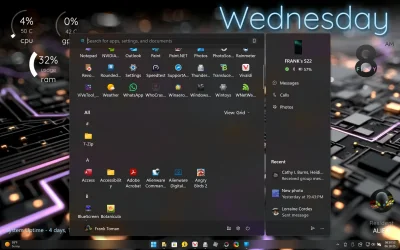
With Grid view of apps
 

Attachments

  • Screenshot (3).webp
    Screenshot (3).webp
    193.6 KB · Views: 4

My Computers My Computers

  • At a glance

    Windows 11 25H2Intel Core Ultra 9 275HX (24-Core)64GB DDR5 6400MT/sNVIDIA GeForce RTX 5080 and Intel UHD Graphics
    OS
    Windows 11 25H2
    Computer type
    Laptop
    Manufacturer/Model
    Alienware 18 Area-51
    CPU
    Intel Core Ultra 9 275HX (24-Core)
    Motherboard
    Alienware
    Memory
    64GB DDR5 6400MT/s
    Graphics Card(s)
    NVIDIA GeForce RTX 5080 and Intel UHD Graphics
    Sound Card
    Onboard, Realtek high-performance Audio chips (ALC3329 & ALC1708))
    Monitor(s) Displays
    300HZ 18-inch QHD 500 nit Comfort View+
    Screen Resolution
    2560 x 1600
    Hard Drives
    2TB NVMe M.2 PCIe Gen 5 SSD
    Case
    Magnesium Alloy
    Cooling
    Advanced Cryo-Tech Quad-Fan Cooling system & large vapor chamber
    Keyboard
    Cherry MX ultra low profile mechanical keyboard with per key AlienFX RGB lighting
    Mouse
    Logitech MX Master 4
    Browser
    Vivaldi (main), Firefox, Chrome, Edge
    Antivirus
    MS Defender and Malwarebytes Free
  • At a glance

    Windows 11 25H2Qualcomm Snapdragon X Elite (12 Core) ARM bas...16GB LPDDR5Qualcomm Adreno X1-85
    Operating System
    Windows 11 25H2
    Computer type
    Laptop
    Manufacturer/Model
    Microsoft Surface Laptop 7
    CPU
    Qualcomm Snapdragon X Elite (12 Core) ARM based CPU
    Motherboard
    Microsoft Corp.
    Memory
    16GB LPDDR5
    Graphics card(s)
    Qualcomm Adreno X1-85
    Sound Card
    Omnisonic speakers with Dolby Atmos spatial sound
    Monitor(s) Displays
    120 Hz 13.8-inch 600 nit PixelSense Flow touchscreen
    Screen Resolution
    2304x1536
    Hard Drives
    1TB NVMe Gen 4 SSD
    Case
    Anodized Aluminum
    Cooling
    Traditional active cooling fan system
    Keyboard
    Mechanical QWERTY, backlit when in use
    Mouse
    Logitech MX Master 4 and Surface Arc Mouse
    Browser
    Vivaldi (main), Firefox, Chrome, Edge
    Antivirus
    MS Defender and Malwarebytes Free
PM's are entitled to ignore MS Feedback or common sense.

t3mrkaZ.gif
 

My Computer My Computer

At a glance

Windows 11 Pro 24H2Intel Ultra 7 155H16gbIntel Arc integrated
OS
Windows 11 Pro 24H2
Computer type
Laptop
Manufacturer/Model
HP
CPU
Intel Ultra 7 155H
Memory
16gb
Graphics Card(s)
Intel Arc integrated
Hard Drives
SSD
Just a thought, but the thread would be more impactful for those not on the same channel if it included a screenshot of the changed Start menu. I understand what they've done based on the feedback(!) screenshot in post 2, but you know what they say about pictures.
Yeah, this kinda blew up. I figured this would be a quick "Hey, dummy, the Off switch is here" reply.Picture2.webp
 

My Computer My Computer

At a glance

Windows 1111th Gen Intel(R) Core(TM) i7-1185G7 @ 3.00GH16GB
OS
Windows 11
Computer type
Laptop
Manufacturer/Model
MSFT Surface Pro 8
CPU
11th Gen Intel(R) Core(TM) i7-1185G7 @ 3.00GH
Memory
16GB
Good point, here's a quick shot of my big start menu.
To be clear, the Pinned section appears collapsed when you open the Start menu? It also appears there's no longer a Back button to return you from All to Pinned in the new scrolling design. This is brain-dead. It's like my mom rearranging furniture because she got bored one day. "Can you come help me move the china cabinet back?"
 

My Computer My Computer

At a glance

Windows 11
OS
Windows 11
Yeah, this kinda blew up. I figured this would be a quick "Hey, dummy, the Off switch is here" reply.View attachment 137211
Yeah, this is bad. I might expand All a couple times a year. It's just clutter, and it's a real blunder to sacrifice any of Pinned to anything.
 

My Computer My Computer

At a glance

Windows 11
OS
Windows 11

Latest Support Threads

Back
Top Bottom