Brand new computer baffled by space or alleged lack off


auntiebiotics

New member
Local time
4:32 PM
Posts
5
OS
Windows11
Have been using Linux Mint for well over a decade so please forgive me if this is a stupid question
Just got my new win11 Pro 16GB Ram, 512GB SSD pc today.....and just finished updating.
I wanted to do one thing.
Download LOTRO about 40GB.
Any advice on getting proper spacing would be brilliant
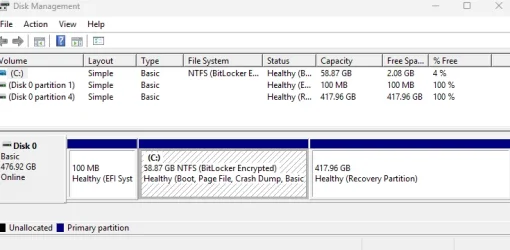
Going to system/About/ is says 57GB out of 477GB all is well but....
Pop up message said I was running out of space..
Went to File manager. Drive in red saying 2.07GB free out 0f 57.GB
Disk management has the following:
 
Windows Build/Version
Win11 Pro

Attachments

  • disk.webp
    disk.webp
    29.6 KB · Views: 2

My Computer

System One

  • OS
    Windows11
    Computer type
    PC/Desktop
    Manufacturer/Model
    ?
why is your recovery partition 417gb? it didnt come like that...
 

My Computer

System One

  • OS
    Windows 11 Pro
Wow thx so much for quick reply
I havent done ANYTHING except for windows update.
 

My Computer

System One

  • OS
    Windows11
    Computer type
    PC/Desktop
    Manufacturer/Model
    ?
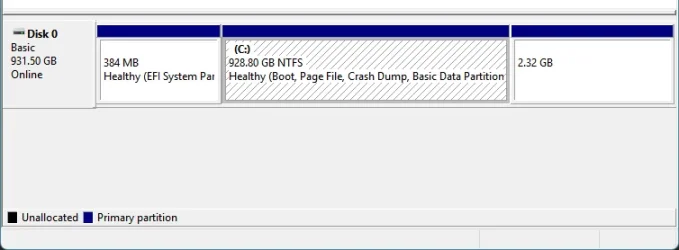
yeah it should be nowhere near that size. personally, i delete the recovery partition as i'll never use a factory image. i just made my own...

1761938380054.webp

but i'm hesistant to tell you to delete that to reclaim the space because i have no clue how it got so massive.

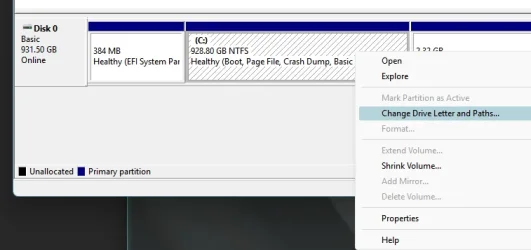
assign it a drive letter so you can browse it and see whats in there:

right click on the 417.96 GB partition > Change Driver Letter and Paths..." then give it a letter from the dropdown. then it will show under This PC in file explorer and you can access it.

1761938479511.webp
 

My Computer

System One

  • OS
    Windows 11 Pro
Cheers, but here is the state of play.
When I right click on 417.96 GB (Healthy recovery Partition) nothing except help comes up.
Right click on Drive C: 58.87GB has all options including, open,explore, change letter etc.
 

My Computer

System One

  • OS
    Windows11
    Computer type
    PC/Desktop
    Manufacturer/Model
    ?

My Computers

System One System Two

  • OS
    Win 11 Pro
    Computer type
    Laptop
    Manufacturer/Model
    ASUS Vivobook
    CPU
    AMD Ryzen™ 7 7730U
    Motherboard
    M1605YA
    Memory
    24GB Dual-Channel DDR4 @ 1596MHz (22-22-22-52)
    Graphics Card(s)
    512MB ATI AMD Radeon Graphics (ASUStek Computer Inc)
    Monitor(s) Displays
    Generic PnP Monitor (1920x1200@60Hz) - P1 PLUS (1920x1080@59Hz)
    Screen Resolution
    1920 X 1200
    Hard Drives
    953GB Western Digital WD
    PSU
    45 Watts
    Mouse
    Lenovo Bluetooth.
    Internet Speed
    500 Mbps
    Browser
    Edge
    Antivirus
    Defender
  • Operating System
    Windows 11
    Computer type
    Laptop
    Manufacturer/Model
    ACER NITRO
    CPU
    AMD Ryzen 7 5800H / 3.2 GHz
    Motherboard
    CZ Scala_CAS (FP6)
    Memory
    32 GB DDR4 SDRAM 3200 MHz
    Graphics card(s)
    NVIDIA GeForce RTX 3060 6 GB GDDR6 SDRAM
    Sound Card
    Realtek Audio. NVIDIA High Definition Audio
    Monitor(s) Displays
    15.6" LED backlight 1920 x 1080 (Full HD) 144 Hz
    Screen Resolution
    1920 x 1080 (Full HD)
    Hard Drives
    Samsung 970 Evo Plus 2TB NVMe M.2
    PSU
    180 Watt, 19.5 V
    Mouse
    Lenovo Bluetooth
    Internet Speed
    500 Mbps
    Browser
    Edge
    Antivirus
    Defender
open Command Prompt as Admin and run these commands:

Code:
diskpart
Code:
list disk
Code:
sel disk 0
Code:
list part
Code:
sel part (put the number associated with the Recovery partition)
Code:
assign letter=w
Code:
exit
Code:
exit

then it will be a drive with the letter W assigned. now you can open it
 

My Computer

System One

  • OS
    Windows 11 Pro
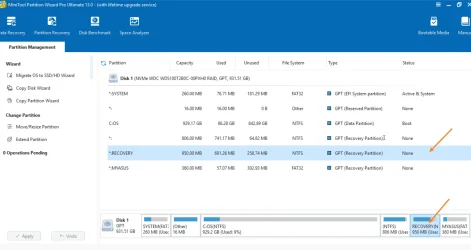
I would download the free MiniTool Partition Wizard.


If you click on the recovery partition it will highlight how much of it is used. Using MiniTool you could then work out how to safely expand the C: drive.

if that route, no need to install anything. use the portable (64 bit in step 2)
 

My Computer

System One

  • OS
    Windows 11 Pro
I feel such a fool. The link to minitool says not available. And sorry Dacrone but new to windows dont know how to get to admin and command prompts am just bound to mess up as I havent used windows since XP and cant remember things. If I can use software would prefer to do so
 

My Computer

System One

  • OS
    Windows11
    Computer type
    PC/Desktop
    Manufacturer/Model
    ?
I feel such a fool. The link to minitool says not available. And sorry Dacrone but new to windows dont know how to get to admin and command prompts am just bound to mess up as I havent used windows since XP and cant remember things. If I can use software would prefer to do so
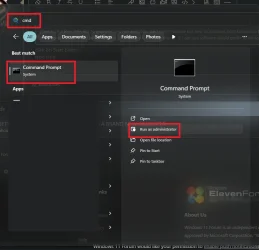
click on Start button
type cmd
run as administrator

1761939986421.webp
 

My Computer

System One

  • OS
    Windows 11 Pro
I feel such a fool. The link to minitool says not available. And sorry Dacrone but new to windows dont know how to get to admin and command prompts am just bound to mess up as I havent used windows since XP and cant remember things. If I can use software would prefer to do so
It's the site that's doing it. Try this,


Edit, that works.
 

My Computers

System One System Two

  • OS
    Win 11 Pro
    Computer type
    Laptop
    Manufacturer/Model
    ASUS Vivobook
    CPU
    AMD Ryzen™ 7 7730U
    Motherboard
    M1605YA
    Memory
    24GB Dual-Channel DDR4 @ 1596MHz (22-22-22-52)
    Graphics Card(s)
    512MB ATI AMD Radeon Graphics (ASUStek Computer Inc)
    Monitor(s) Displays
    Generic PnP Monitor (1920x1200@60Hz) - P1 PLUS (1920x1080@59Hz)
    Screen Resolution
    1920 X 1200
    Hard Drives
    953GB Western Digital WD
    PSU
    45 Watts
    Mouse
    Lenovo Bluetooth.
    Internet Speed
    500 Mbps
    Browser
    Edge
    Antivirus
    Defender
  • Operating System
    Windows 11
    Computer type
    Laptop
    Manufacturer/Model
    ACER NITRO
    CPU
    AMD Ryzen 7 5800H / 3.2 GHz
    Motherboard
    CZ Scala_CAS (FP6)
    Memory
    32 GB DDR4 SDRAM 3200 MHz
    Graphics card(s)
    NVIDIA GeForce RTX 3060 6 GB GDDR6 SDRAM
    Sound Card
    Realtek Audio. NVIDIA High Definition Audio
    Monitor(s) Displays
    15.6" LED backlight 1920 x 1080 (Full HD) 144 Hz
    Screen Resolution
    1920 x 1080 (Full HD)
    Hard Drives
    Samsung 970 Evo Plus 2TB NVMe M.2
    PSU
    180 Watt, 19.5 V
    Mouse
    Lenovo Bluetooth
    Internet Speed
    500 Mbps
    Browser
    Edge
    Antivirus
    Defender
In this video, i will take you through the steps to create a Windows recovery partition in a Windows 10 or Windows 11 PC installed in UEFI mode with GPT partition style.


In this video, i will guide on how to delete the recovery partition.


My Computer

System One

  • OS
    Windows 11
    Computer type
    PC/Desktop
    Manufacturer/Model
    HP Pavilion
    CPU
    AMD Ryzen 7 5700G
    Motherboard
    Erica6
    Memory
    Micron Technology DDR4-3200 16GB
    Graphics Card(s)
    NVIDIA GeForce RTX 3060
    Sound Card
    Realtek ALC671
    Monitor(s) Displays
    Samsung SyncMaster U28E590
    Screen Resolution
    3840 x 2160
    Hard Drives
    SAMSUNG MZVLQ1T0HALB-000H1
Thanks everyone!! Mixture of Minitool and Diskmanagment Recovery Partition is now 10GB instead of the large 417GB.
For my next trick i will try to dual boot with Linux Mint but thats not for tonight or possible even this week. thx all especially dacrone
 

My Computer

System One

  • OS
    Windows11
    Computer type
    PC/Desktop
    Manufacturer/Model
    ?
Did you guys see that the recovery partition had 0 bytes used. No way did that device leave the factory like that.
 

My Computers

System One System Two

  • OS
    Windows 11 Pro 25H2
    Computer type
    PC/Desktop
    Manufacturer/Model
    Dell Optiplex 7080
    CPU
    i9-10900 10 core 20 threads
    Motherboard
    DELL 0J37VM
    Memory
    32 gb
    Graphics Card(s)
    none-Intel UHD Graphics 630
    Sound Card
    Integrated Realtek
    Monitor(s) Displays
    Benq 27
    Screen Resolution
    2560x1440
    Hard Drives
    2x1tb Solidigm m.2 nvme /External drives 512gb Samsung m.2 sata+2tb Kingston m2.nvme
    PSU
    500w
    Case
    MT
    Cooling
    Dell Premium
    Keyboard
    Logitech wired
    Mouse
    Logitech wireless
    Internet Speed
    so slow I'm too embarrassed to tell
    Browser
    #1 Edge #2 Firefox
    Antivirus
    Defender+MWB Premium
  • Operating System
    Windows 11 Pro 24H2 26200.8457
    Computer type
    PC/Desktop
    Manufacturer/Model
    Beelink Mini PC SER5
    CPU
    AMD Ryzen 7 6800U
    Memory
    32 gb
    Graphics card(s)
    integrated
    Sound Card
    integrated
    Monitor(s) Displays
    Benq 27
    Screen Resolution
    2560x1440
    Hard Drives
    1TB Crucial nvme
    Keyboard
    Logitech wired
    Mouse
    Logitech wireless
    Internet Speed
    still too embarrassed to tell
    Browser
    Firefox
    Antivirus
    Defender
    Other Info
    System 3 is non compliant Dell 9020 i7-4770/24gb ram Win11 PRO 26200.8457
if you have a new computer with none of your data on the computer
i would download the Windows 11 25H2 ISO from Microsoft
make a bootable USB stick/drive from the Windows ISO

when doing the clean install delete all partitions on the drive
and let Windows create the default partitions for the install and start afresh.

best of luck Steve ..
 

My Computers

System One System Two

  • OS
    Debian Trixie KDE Windows 11 Home
    Computer type
    PC/Desktop
    Manufacturer/Model
    HP 24" AiO
    CPU
    Ryzen 7 5825u
    Motherboard
    HP
    Memory
    64GB DDR4 3200
    Graphics Card(s)
    Ryzen 7 5825u
    Sound Card
    RealTek
    Monitor(s) Displays
    24" HP AiO
    Screen Resolution
    1920 x 1080 @60 Hz
    Hard Drives
    1TB WD Blue SN580 M2 SSD Partitioned.
    2x 1TB USB HDD External Backup/Storage.
    PSU
    90W external power brick
    Case
    24" All in One
    Cooling
    Default Air Cooling
    Keyboard
    HP WiFi UK extended
    Mouse
    HP WiFi 3 Button
    Internet Speed
    1GB full fibre
    Browser
    Edge & Firefox
    Antivirus
    AVG Internet Security/Windows Defender
    Other Info
    Mainly Open Source Software
  • Operating System
    Ubuntu 22.04.5 LTS
    Computer type
    Laptop
    Manufacturer/Model
    Dell 13" Latitude 2017
    CPU
    i5 7200u
    Motherboard
    Dell
    Memory
    16GB DDR4
    Graphics card(s)
    Intel
    Sound Card
    Intel
    Monitor(s) Displays
    13" Dell Laptop
    Hard Drives
    250GB Crucial 2.5" SSD
    Mouse
    Generic WiFi 3 button
    Internet Speed
    WiFi only
    Browser
    Firefox
    Antivirus
    ClamAV TK
    Other Info
    Mainly Open Source Software
Back
Top Bottom