Solved Brother MFC-J1010DW has stopped working


caffeine

Well-known member
Member
Local time
3:11 PM
Posts
75
OS
windows 11 home 64bit 24H2 (OS Build 26100.7992)
current windows version: Windows 11 Home, 24H2 Build 26100.7922
Brother MFC-J1010DW connected via USB

There was a sequence of events that began with my printer printing two copies of every print job. The print window was set to one copy. I tried several suggested cures to no avail. So---I went to device manager, chose uninstall, and restarted my computer. (This an operation I have used countless times without issues.) Upon restart, I could not print anything. I Googled solutions which sent me to the Brother printer website.
The recommendation was to uinstall/reinstall the drivers. I followed the instructions carefully to ensure that I did not do anything wrong. The result was a new printer named "Brother MFC-J1010DWcopy. The original name is no longer shown under default printers. Nothing will print via windows print dialog window. The only way I can print anything is by using printQueueCleaner. Printing a test page via printQueueCleaner works flawlessly.
I would greatly appreciate any helpful replies.

reagards,
caffeine

EDIT: As an afterthought I copied a document directly from the printer successfully.
 
Windows Build/Version
Windows 11 Home, 24H2 Build 26100.7922
Last edited:

My Computer

System One

  • OS
    windows 11 home 64bit 24H2 (OS Build 26100.7992)
    Computer type
    Laptop
    Manufacturer/Model
    Lenovo ideapad 5
    CPU
    AMD RYZEN 5 8645HS, base 4.3GHz- up tp 5 GHz
    Memory
    16GB DDR5
    Monitor(s) Displays
    2
    Screen Resolution
    1920x1200
    Hard Drives
    512 GB SSD
    PSU
    65W
    Case
    military grade (mil-std 810h), color-abyss blue
    Keyboard
    backlit, light blue
    Mouse
    Logitech M100
    Internet Speed
    SLOOOOOOOW
    Antivirus
    Windows Defender & MBAM
    Other Info
    novabench score 2443
I don't have any suggestions, but I found my 16 year old Brother HL-5370DW disappeared from Windows 11 a couple weeks ago. I had to add it back as a new printer using drivers built into Windows, and it was fine thereafter.
 

My Computer

System One

  • OS
    Windows 11
Start by using the brother uninstall tool for your printer on win 11 below and take it from there:

Utilities | Downloads | MFC-J1010DW | United States | Brother

If I where you I would use only the latest drivers from brother and stop windows from updating them. Look in the tutorials here on how to prevent microsoft driver updates in win 11

let us know how it's going.
 
Last edited:

My Computer

System One

  • OS
    windows 10 21h2
Uninstall all Brother desktop software from this list:
Control Panel\Programs\Programs and Features.

Go to Settings>Bluetooth & Devices>Printer& Scanners
If any Brother Printer Devices (including scanners) appear in this list, remove them.

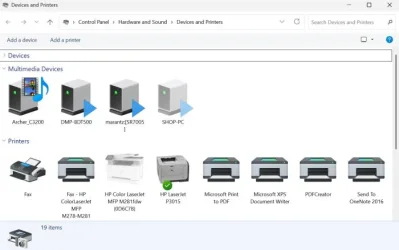
On same page find and go to More Devices and Printer Settings to get this screen:
derd.webp

If your Brother printer is still here, right-click, choose "See what's printing" and if any print jobs are in this queue, right-click and cancel them. Once clear, right-click and choose Remove Device.

Now disconnect USB data cable and reboot computer.

While computer restarts go into the printer's onboard menu and find Default Settings or Factory reset. Do that.

Do not connect printer to computer yet.

When printer comes back up, try a regular copy using the printer and it's controls only.

If successful, now install to computer using Brother software at: Downloads | MFC-J1010DW | United States | Brother

Choose Full Software Package. Don't connect the USB data cable until the installer tells you to. This way, the software installs the prnter instead of Windows trying to install it on its own.

Brother likes to update its software and firmware after installing and I recommend doing this. iPrint & Scan also. Once you get the software and firmwre components updated, turn off auto-checking for updates. iPrint & Scan has a switch for this in its settings and Brother Utilities also has an option to not check for updates.

This should get you straight. Unless you must have color, your next printer should be a black and white laser. My current recommendation is the DCP-L2640DW. About $220 on Amazon. Your printing life will be much more simpler with a laser printer.
 

My Computers

System One System Two

  • OS
    Windows 11 25H2
    Computer type
    Laptop
    Manufacturer/Model
    Lenovo Yoga 7 14ITL5 (82BH00DLUS)
    CPU
    Intel Core™ i7-1165G7 (4C / 8T, 2.8 / 4.7GHz, 12MB)
    Memory
    12GB Soldered DDR4-3200
    Graphics Card(s)
    Integrated Intel® Iris® Xe Graphics
    Monitor(s) Displays
    14" FHD (1920x1080) IPS 300nits Glossy, 72% NTSC, AGC Dragontrail™ Glass, Touch
    Screen Resolution
    1920x1080
    Hard Drives
    500 GB SSD
    Case
    Aluminum
    Cooling
    Single-fan
    Keyboard
    Backlit, internal
    Mouse
    Logitech M535
    Internet Speed
    With this laptop I usually test around 200/200 connected to UniFi UAP-AC-PRO ceiling units.
    Browser
    Chrome
    Antivirus
    Windows Security and my brain.
    Other Info
    I use this laptop mainly from my recliner. It's purpose is scheduling computer and TV services, closing TV work orders, remote customer support, research and recreation.

    Printers in the office room on my main floor were both acquired from business customers who upgraded equipment, had me handle the upgrade and then haul away the replaced hardware. I have not purchased a printer for myself in 15 years.

    Main: HP LaserJet P3010 (black & white, hardwired, networked)
    Aux: HP Color LaserJet MFP M281fdw (color laser, fax, hardwired, networked)

    Internet in my house is routed through a TP-Link AC3200 with radios disabled. Wireless access points are two (2) strategically-located UniFi UAP-AC-PRO ceiling units which cover my whole house including basement and front/back yards. Netgear gigabit switches and CAT6 cabling are used for wired purposes.
  • Operating System
    Windows 10 22H2
    Computer type
    PC/Desktop
    Manufacturer/Model
    Dell Optiplex 3010
    CPU
    Intel(R) Core(TM) i5-3470 CPU @ 3.20GHz 3.20 GHz
    Memory
    16 GB DDR3
    Graphics card(s)
    Intel(R) HD Graphics 2500
    Sound Card
    Onboard
    Monitor(s) Displays
    ACER KG271 (x2)
    Screen Resolution
    1920x1080
    Hard Drives
    WD 500GB SSD
    Keyboard
    Old Dell wireless
    Mouse
    Old Dell wired
    Internet Speed
    500/500
    Browser
    Chrome
    Antivirus
    Windows Security and my brain
    Other Info
    This computer was acquired from a customer who cleaned out her office. I upgraded it and now use it in my downstairs computer-repair office.

    My home office printer is an old HP LaserJet 3015. I acquired this after a customer passed away and his wife sold their house and downsized. She gave me all his equipment. I still help her with her tech issues.
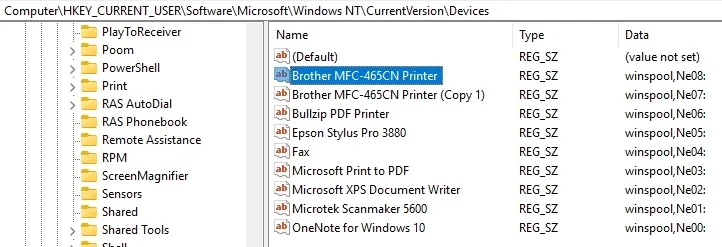
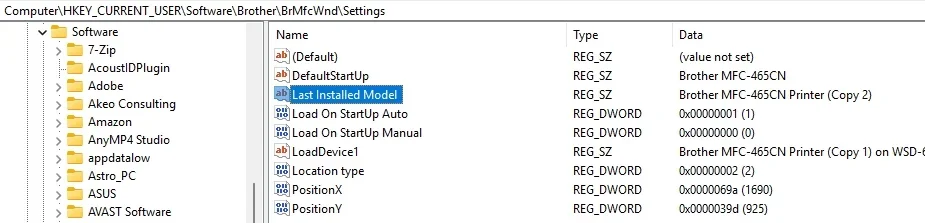
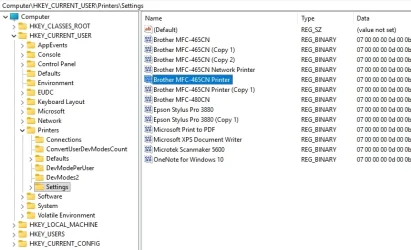
Like you I have "extra" copies of my printer on my desktop. Here's my story.

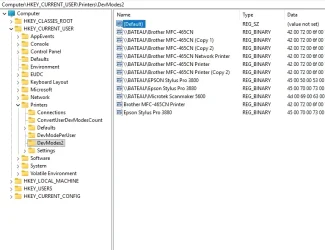
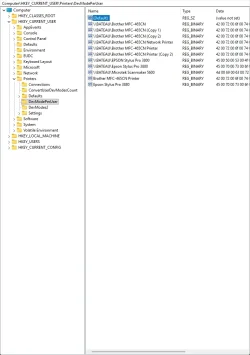
I have a Brother MFC-465CN Printer that has been unsupported by Brother for a few years (probably more). And I have had a horrible time reinstalling it whenever I have had a need to, like when doing a clean install. This printer works great and it makes no sense to sped money on a new one when it works so well for my needs. But if I have to reinstall it on my several laptops it is next to impossible. I try everything I can think of to get it installed ( the laptops don't have a DVD drive) but I do still have the CD that came with the printer and I just burn the CD contents to a CD-R and make it bootable. Still it is painful to get it recognized on my local network. Until such time as whatever I do becomes successful, which is a procedure that is non-repeatable. Now I do, like you, have a copy of the printer on my machines. It seems Windows will keep a copy in the Registry even when the printer has been uninstalled. See my screen shots below. If there was a way to remove these copies I would do it but I'm afraid that if I do somehow the devise might become inaccessible, so I leave my copies alone. So you too can search your registry and find where the copy of your printer is located, at least you'll know where the name is coming from.
 

Attachments

  • Brother MFC-465CN Printer in Registry 06.webp
    Brother MFC-465CN Printer in Registry 06.webp
    34 KB · Views: 1
  • Brother MFC-465CN Printer in Registry 05.webp
    Brother MFC-465CN Printer in Registry 05.webp
    30.6 KB · Views: 1
  • Brother MFC-465CN Printer in Registry 04.webp
    Brother MFC-465CN Printer in Registry 04.webp
    57.7 KB · Views: 1
  • Brother MFC-465CN Printer in Registry 03.webp
    Brother MFC-465CN Printer in Registry 03.webp
    53.7 KB · Views: 1
  • Brother MFC-465CN Printer in Registry 02.webp
    Brother MFC-465CN Printer in Registry 02.webp
    56.1 KB · Views: 1

My Computers

System One System Two

  • OS
    Windows 11 Home, ver 25H2 build 26200.8246
    Computer type
    Laptop
    Manufacturer/Model
    Hewlett-Packard Spectre 13-4001 x360 convertable
    CPU
    Intel Core i5 5200U @ 2.20GH
    Motherboard
    Hewlett-Packard 802D
    Memory
    4 GB
    Graphics Card(s)
    Intel HD Graphics 5500 on board
    Sound Card
    Intel Smart Sound Technology (Intel SST)
    Hard Drives
    Micron 256GB M.2 2280 NGFF SSD MTFDDAV256TBN, (SATA 6.0 Gb/s)
    Keyboard
    Model # G01KB
    Antivirus
    Microsoft Defender
    Other Info
    born on date: 25 Feb 2016
  • Operating System
    Win 11 Home 25H2 build 26200.7922
    Computer type
    PC/Desktop
    Manufacturer/Model
    Asus Desktop model M32AD-US019S (DOM: 6/9/2014 )
    CPU
    Intel Core i7 4th Gen 4790 (3.60GHz), Haswell 22nm Technology, SOCKET 1150
    Motherboard
    H81M-E/M51AD/DP_MB
    Memory
    Samsung 16 GB DDR3 (8GB in 2 modules)
    Graphics card(s)
    NVIDIA GeForce GTX 760, 3GB, and on-board Intel HD Graphics 4600 Rev 6
    Monitor(s) Displays
    HP EliteDisplay E241i LED; HP EliteDisplay E243
    Hard Drives
    Samsung 500GB SSD, 870 EVO (SATA 6.0 )
    Micron 250GB SSD, CT250MX500
    Toshiba HDD, 3GB (original drive w/PC)
    Case
    ASUS
    Keyboard
    ASUS-------------------------
    Antivirus
    MS Defender
    Other Info
    Additional Laptops:

    HEWLETT PACKARD
    HP OmniBook X Flip NGAI (Next Gen AI),
    Model: 16-as0023dx
    PT# B5UH1UA#ABA Product #: B5UH1UA
    delivered and setup 7/25/25
    16" 2K Touch-Screen Laptop
    Intel Core Ultra 7 256V '24 Series 2 - CPU
    Boost Clock Frequency 4.8 gigahertz; Neural Processing Unit (NPU) Yes;
    16GB Memory, LPDDR5X
    1TB SSD PCIe 4.0
    Graphics: Intel Arc 140V
    1 x HDMI 2.1
    1 x Thunderbolt 4
    2K Touch-Screen display, LED, IPS; 1920 x 1200 (Full HD+)
    USB Ports: 1 x USB-C 3.1, 2 x USB-A 3.1
    Wi-Fi 6E
    weight 4.15 pounds

    DELL
    Model:I7591-7483BLK-PUS 2-in-1 (7000 Series)
    purchased 12/3/2019,
    15.6 inch 2-IN-1;
    4K Ultra HD Touch-Screen, 3840 x 2160,
    Intel Core i7 10510U CPU 1.80GHz,
    16GB RAM DDR4 SDRAM 2400 megahert (2 slots),
    dedicated graphics Nvidia GeForce MX250 2 GB Graphics,
    PCIe 512GB Intel SSD + 32GB Optane Memory (Intel Optane Memory H10 with solid-state storage),
    wireless-AX & Bluetooth
    Battery: 68wh, Type 4VGMP 4 cell
The result was a new printer named "Brother MFC-J1010DWcopy

Uninstall everything Brother (Use Revo or the Brother uninstall tool if you have to)
Clear any Brother printers in the list.
Turn off the printer
Reboot
Turn on the Printer
Run the last available software for your exact Brother. Use the “Easy Setup” or the “Full Software Package”


Last week, the Brother printers (Brother MFC-L2880DW / Brother HL2270DW) vanished from my Sons PC. It was very testing.


My Computers

System One System Two

  • OS
    Windows 11 Pro 25H2 Build 26200.8524
    Computer type
    PC/Desktop
    Manufacturer/Model
    Sin-built 2013
    CPU
    Intel(R) Core(TM) i7-4770K CPU @ 3.50GHz
    Motherboard
    ASUS ROG Maximus VI Formula
    Memory
    32.0 GB of I forget and the box is in storage.
    Graphics Card(s)
    Gigabyte nVidia GeForce GTX 1660 Super OC 6GB
    Sound Card
    Onboard thingy
    Monitor(s) Displays
    5 x LG 25MS500-B - 1 x 24MK430H-B - 1 x Wacom Pro 22" Touch Screen Tablet
    Screen Resolution
    All over the place
    Hard Drives
    Too many to list.
    OS on Samsung 1TB 870 QVO SATA
    PSU
    Silverstone 1500
    Case
    NZXT Phantom 820 Full-Tower Case
    Cooling
    Noctua NH-D15 Elite Class Dual Tower CPU Cooler / 6 x EziDIY 120mm / 2 x Corsair 140mm somethings / 1 x 140mm Thermaltake something / 2 x 200mm Corsair.
    Keyboard
    Corsair K95 / Logitech diNovo Edge Wireless
    Mouse
    Logitech: G402 / G502 / Mx Masters / Mx Air Cordless
    Internet Speed
    2000/500Mbps
    Browser
    All sorts
    Antivirus
    Kaspersky Premium
    Other Info
    ㅤㅤㅤㅤㅤㅤㅤㅤㅤㅤㅤㅤㅤㅤㅤㅤㅤㅤㅤㅤㅤㅤㅤㅤㅤㅤㅤㅤㅤㅤㅤㅤㅤㅤㅤㅤㅤㅤㅤㅤ⠀⠀⠀⠀⠀⠀⠀⠀⠀⠀
    TP-Link BE9300 WiFi 7 Bluetooth 5.4 (Archer TBE550E)
    TP-Link TX201 V1 2.5GB Lan

    Grandstream HT812 - VoIP
    ASUS DSL-AX82U - Mesh
    ASUS RT-AC68U - Mesh
    ASUS RT-BE88U Router

    Brother MFC-L2880DW Printer

    I’m on a horse.
  • Operating System
    Windows 11 Pro 25H2 Build 26200.8524
    Computer type
    Laptop
    Manufacturer/Model
    LENOVO Yoga 7 14IRL8 - 7i EVO OLED 14" Touchscreen i5 12 Core 16GB/512GB
    CPU
    Intel Core 12th Gen i5-1240P Processor (1.7 - 4.4GHz)
    Memory
    16GB LPDDR5 RAM
    Graphics card(s)
    Intel Iris Xe Graphics Processor
    Sound Card
    Optimized with Dolby Atmos®
    Screen Resolution
    QHD 2880 x 1800 OLED
    Hard Drives
    M.2 512GB
    Antivirus
    Defender / Malwarebytes
    Other Info
    …still on a horse.
sgayres: SUCCESS! Thanks for your help. I'm going to address specific areas of your post with my own insight on what I learned from you during this process. First I apologize for not using the quote feature of this forum. I have trouble managing the locations where quotes appear within the other text.

You said
"Uninstall all Brother desktop software from this list:
Control Panel\Programs\Programs and Features." -- nothing to remove.
You said
"Go to Settings>Bluetooth & Devices>Printer& Scanners
If any Brother Printer Devices (including scanners) appear in this list, remove them. I had not thought of doing this. It worked perfectly.
You said
"If your Brother printer is still here, right-click, choose "See what's printing" and if any print jobs are in this queue, right-click and cancel them. Once clear, right-click and choose Remove Device." My printer was not shown.
You said
"While computer restarts go into the printer's onboard menu and find Default Settings or Factory reset." Do that. I did that and configured date and time.
You said
"When printer comes back up, try a regular copy using the printer and it's controls only." Manual copy from the printer worked fine.

Installation worked perfectly. You said
"Once you get the software and firmware components updated, turn off auto-checking for updates. iPrint & Scan has a switch for this in its settings and Brother Utilities also has an option to not check for updates." I did this as well as preventing windows update from installing driver updates.

As an aside, I spend 10-20 hours per month tutoring people on various Windows topics. One common topic is disabling automatic check for updates. These automatic features can be a resource hogs, especially if they run at startup. If they wish to update programs (apps) do so from the developer's website or a trusted mirror.

Thanks so much for your instruction set.

regards,
caffeine
 

My Computer

System One

  • OS
    windows 11 home 64bit 24H2 (OS Build 26100.7992)
    Computer type
    Laptop
    Manufacturer/Model
    Lenovo ideapad 5
    CPU
    AMD RYZEN 5 8645HS, base 4.3GHz- up tp 5 GHz
    Memory
    16GB DDR5
    Monitor(s) Displays
    2
    Screen Resolution
    1920x1200
    Hard Drives
    512 GB SSD
    PSU
    65W
    Case
    military grade (mil-std 810h), color-abyss blue
    Keyboard
    backlit, light blue
    Mouse
    Logitech M100
    Internet Speed
    SLOOOOOOOW
    Antivirus
    Windows Defender & MBAM
    Other Info
    novabench score 2443

Good to hear you got your printer back. Printer troubleshooting can be a pain. I struggled with it when I started doing computer repair full time. That was a series of steps I evolved doing regardless of manufacturer and it usually works.

You may find that if you open the iPrint & Scan utility that you have to manually "set the device" to your USB printer. It can take a few minutes to set.

You may also see something that says "Refresh". Pretend that isn't there. It's Brother's ink subscription program which I warn against signing up for.

Those two update switches in the Brother software only stop the Brother update system from checking for updates. Generally, updates offered from Brother are safe but I turn those off for customers after I catch the "new" software up with updates so that the customer isn't later faced with answering update questions and maybe something going wrong. If it ain't broke, don't fix it. Windows can still offer hardware updates but with printers, they will not force-install on Windows 11 systems. Printer-related updates offered by Microosoft will be in the Drivers section of Windows updates and with those, I let them sit there for eternity if everything with the printer is working ok. Again - if it ain't broke, don't fix it.

Sometimes we used to have to turn off Windows hardware updates in previous systems. This setting was in the System Properties - Advanced System Settings, Hardware tab and Device Installations Settings. We did this with hardware like legacy printers or USB wifi adapters to keep Windows from ruining our work where we had to locate legacy drivers to get hardware to function. I haven't had to do that with any Win11 systems.
 

My Computers

System One System Two

  • OS
    Windows 11 25H2
    Computer type
    Laptop
    Manufacturer/Model
    Lenovo Yoga 7 14ITL5 (82BH00DLUS)
    CPU
    Intel Core™ i7-1165G7 (4C / 8T, 2.8 / 4.7GHz, 12MB)
    Memory
    12GB Soldered DDR4-3200
    Graphics Card(s)
    Integrated Intel® Iris® Xe Graphics
    Monitor(s) Displays
    14" FHD (1920x1080) IPS 300nits Glossy, 72% NTSC, AGC Dragontrail™ Glass, Touch
    Screen Resolution
    1920x1080
    Hard Drives
    500 GB SSD
    Case
    Aluminum
    Cooling
    Single-fan
    Keyboard
    Backlit, internal
    Mouse
    Logitech M535
    Internet Speed
    With this laptop I usually test around 200/200 connected to UniFi UAP-AC-PRO ceiling units.
    Browser
    Chrome
    Antivirus
    Windows Security and my brain.
    Other Info
    I use this laptop mainly from my recliner. It's purpose is scheduling computer and TV services, closing TV work orders, remote customer support, research and recreation.

    Printers in the office room on my main floor were both acquired from business customers who upgraded equipment, had me handle the upgrade and then haul away the replaced hardware. I have not purchased a printer for myself in 15 years.

    Main: HP LaserJet P3010 (black & white, hardwired, networked)
    Aux: HP Color LaserJet MFP M281fdw (color laser, fax, hardwired, networked)

    Internet in my house is routed through a TP-Link AC3200 with radios disabled. Wireless access points are two (2) strategically-located UniFi UAP-AC-PRO ceiling units which cover my whole house including basement and front/back yards. Netgear gigabit switches and CAT6 cabling are used for wired purposes.
  • Operating System
    Windows 10 22H2
    Computer type
    PC/Desktop
    Manufacturer/Model
    Dell Optiplex 3010
    CPU
    Intel(R) Core(TM) i5-3470 CPU @ 3.20GHz 3.20 GHz
    Memory
    16 GB DDR3
    Graphics card(s)
    Intel(R) HD Graphics 2500
    Sound Card
    Onboard
    Monitor(s) Displays
    ACER KG271 (x2)
    Screen Resolution
    1920x1080
    Hard Drives
    WD 500GB SSD
    Keyboard
    Old Dell wireless
    Mouse
    Old Dell wired
    Internet Speed
    500/500
    Browser
    Chrome
    Antivirus
    Windows Security and my brain
    Other Info
    This computer was acquired from a customer who cleaned out her office. I upgraded it and now use it in my downstairs computer-repair office.

    My home office printer is an old HP LaserJet 3015. I acquired this after a customer passed away and his wife sold their house and downsized. She gave me all his equipment. I still help her with her tech issues.
Thank all of you who have contributed to this thread. I am preparing to mark this as solved.
 

My Computer

System One

  • OS
    windows 11 home 64bit 24H2 (OS Build 26100.7992)
    Computer type
    Laptop
    Manufacturer/Model
    Lenovo ideapad 5
    CPU
    AMD RYZEN 5 8645HS, base 4.3GHz- up tp 5 GHz
    Memory
    16GB DDR5
    Monitor(s) Displays
    2
    Screen Resolution
    1920x1200
    Hard Drives
    512 GB SSD
    PSU
    65W
    Case
    military grade (mil-std 810h), color-abyss blue
    Keyboard
    backlit, light blue
    Mouse
    Logitech M100
    Internet Speed
    SLOOOOOOOW
    Antivirus
    Windows Defender & MBAM
    Other Info
    novabench score 2443
Back
Top Bottom