Hi:)
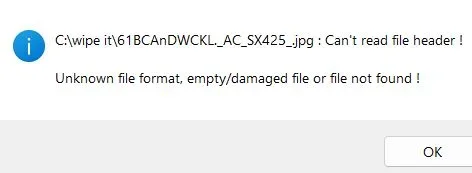
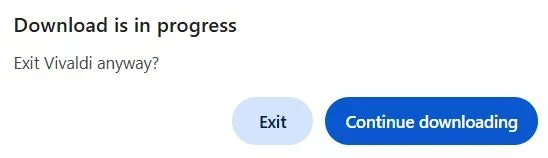
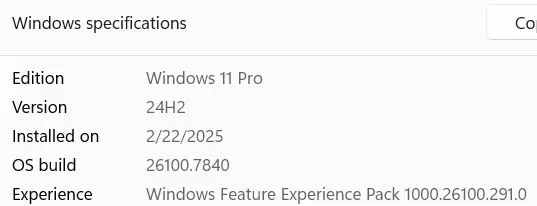
I have win 11 desktop version 24H and a download issue since December of 2025 regardless of which browser that I use... Vivaldi, Aloha and Floorp are my browsers. Even pausing or changing cities with my NordVPN has no impact on a solution. I have tried disk check, SCF... I have not tried safe mode with networking, to see, if this issue exists... I am a intermediate user into freeware/ shareware. My issue was discovered in early December of 2025, when I was searching for freeware images to use in my greeting/postcard creations. Normally, when, I see a download listed in my selected folder, I can open it as I continue to surf, even if, I am downloading freeware software... But, I get these types of messages about; ' can`t read file header... unknown file format... access denied... need to be an administrator.' The only way that I can open or install a download is to close the browser... When, I do that then, I get a message about: 'exit or continue downloading.' I have no problems after reopening the browser as long as the original website of the download is closed...If, any one has any idea's, please let me know:) I did take 3 screenshots, my PC build, and the messages...
I have win 11 desktop version 24H and a download issue since December of 2025 regardless of which browser that I use... Vivaldi, Aloha and Floorp are my browsers. Even pausing or changing cities with my NordVPN has no impact on a solution. I have tried disk check, SCF... I have not tried safe mode with networking, to see, if this issue exists... I am a intermediate user into freeware/ shareware. My issue was discovered in early December of 2025, when I was searching for freeware images to use in my greeting/postcard creations. Normally, when, I see a download listed in my selected folder, I can open it as I continue to surf, even if, I am downloading freeware software... But, I get these types of messages about; ' can`t read file header... unknown file format... access denied... need to be an administrator.' The only way that I can open or install a download is to close the browser... When, I do that then, I get a message about: 'exit or continue downloading.' I have no problems after reopening the browser as long as the original website of the download is closed...If, any one has any idea's, please let me know:) I did take 3 screenshots, my PC build, and the messages...
- Windows Build/Version
- 24H
My Computer
At a glance
win 11Intel Core i5 6500 @ 3.20GHzHD Graphics 530
- OS
- win 11
- Computer type
- PC/Desktop
- Manufacturer/Model
- HP
- CPU
- Intel Core i5 6500 @ 3.20GHz
- Motherboard
- HP 8054 (U3E1)
- Graphics Card(s)
- HD Graphics 530
- Monitor(s) Displays
- Generic Non-PnP Monitor on Intel HD Graphic
- Screen Resolution
- 1024x768 pixels
- Browser
- Vivaldi, Aloha, Floorp
- Antivirus
- Malwarebytes
- Other Info
- NordVPN, Pro 11 version 24H2