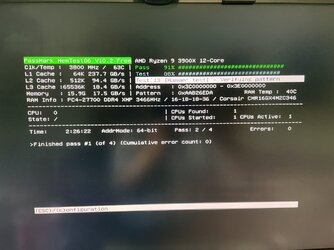
Tuneup plus results were all good.
Please make sure that all test result images or share links are posted into this thread so that result images can be viewed by all members.
Follow the trends in computer instability / stability using Resource Monitor:

 www.howtogeek.com
If the computer has any BSOD with a displayed bugcheck message then run the V2 log collector and post a new V2 share link into the newest post.
If the computer continues to have unexpected shutdowns and restarts without BSOD then continue to test hardware components.
OCCT has multiple one hours tests with self monitoring.
Run each of the one hour tests and post images or share links into this thread:
 www.ocbase.com
Often stress testing fails to identify the malfunctioning component and swap testing is required.
The computer had multiple corrected hardware errors.
There were no BSOD bugcheck WHEA 124 fatal errors seen in the collected log files.
Please make sure that all test result images or share links are posted into this thread so that result images can be viewed by all members.
Follow the trends in computer instability / stability using Resource Monitor:
Reliability Monitor is the Best Windows Troubleshooting Tool You Aren't Using
When it comes to hidden gems in Windows, nothing beats the Reliability monitor tool, hidden behind a link inside of another tool that you don't use either.
www.howtogeek.com
If the computer has any BSOD with a displayed bugcheck message then run the V2 log collector and post a new V2 share link into the newest post.
If the computer continues to have unexpected shutdowns and restarts without BSOD then continue to test hardware components.
OCCT has multiple one hours tests with self monitoring.
Run each of the one hour tests and post images or share links into this thread:
OCBASE/OCCT : Free, all-in-one stability, stress test, benchmark and monitoring tool for your PC
Ocbase is the home of OCCT, the most popular all-in-one stability / stress testing / benchmarking / monitoring tool available for PC
Often stress testing fails to identify the malfunctioning component and swap testing is required.
The computer had multiple corrected hardware errors.
There were no BSOD bugcheck WHEA 124 fatal errors seen in the collected log files.
Code:
Event[3596]
  Log Name: System
  Source: Microsoft-Windows-WHEA-Logger
  Date: 2023-02-27T13:06:22.8290000Z
  Event ID: 19
  Task: N/A
  Level: Warning
  Opcode: Info
  Keyword: N/A
  User: S-1-5-19
  User Name: NT AUTHORITY\LOCAL SERVICE
  Computer: GARoss
  Description:
A corrected hardware error has occurred.

Reported by component: Processor Core
Error Source: Corrected Machine Check
Error Type: No Error
Processor APIC ID: 0

The details view of this entry contains further information.
Last edited:
My Computer
At a glance
Windows 10Intel(R) Core(TM) i7-4800MQ CPU @ 2.70GHz16 GB Total: Manufacturer : Samsung MemoryTyp...NVIDIA Quadro K3100M; Intel(R) HD Graphics 4600
- OS
- Windows 10
- Computer type
- Laptop
- Manufacturer/Model
- HP
- CPU
- Intel(R) Core(TM) i7-4800MQ CPU @ 2.70GHz
- Motherboard
- Product : 190A Version : KBC Version 94.56
- Memory
- 16 GB Total: Manufacturer : Samsung MemoryType : DDR3 FormFactor : SODIMM Capacity : 8GB Speed : 1600
- Graphics Card(s)
- NVIDIA Quadro K3100M; Intel(R) HD Graphics 4600
- Sound Card
- IDT High Definition Audio CODEC; PNP Device ID HDAUDIO\FUNC_01&VEN_111D&DEV_76E0
- Hard Drives
- Model Hitachi HTS727575A9E364
- Antivirus
- Microsoft Defender
- Other Info
- Mobile Workstation