BSOD while doing "save as" in a program


For E: if there are any needed files these are some possible trial and error steps:

a) cable change
b) HD enclosure or empty bay on another computer
b) boot using Ubuntu / Linux
c) testdisk
etc.
 

My Computer My Computer

At a glance

Windows 10Intel(R) Core(TM) i7-4800MQ CPU @ 2.70GHz16 GB Total: Manufacturer : Samsung MemoryTyp...NVIDIA Quadro K3100M; Intel(R) HD Graphics 4600
OS
Windows 10
Computer type
Laptop
Manufacturer/Model
HP
CPU
Intel(R) Core(TM) i7-4800MQ CPU @ 2.70GHz
Motherboard
Product : 190A Version : KBC Version 94.56
Memory
16 GB Total: Manufacturer : Samsung MemoryType : DDR3 FormFactor : SODIMM Capacity : 8GB Speed : 1600
Graphics Card(s)
NVIDIA Quadro K3100M; Intel(R) HD Graphics 4600
Sound Card
IDT High Definition Audio CODEC; PNP Device ID HDAUDIO\FUNC_01&VEN_111D&DEV_76E0
Hard Drives
Model Hitachi HTS727575A9E364
Antivirus
Microsoft Defender
Other Info
Mobile Workstation
For E: if there are any needed files...
It was strictly a redundant backup-to-the-main-backup. Nothing on it that isn't still available on the D: drive, as well as Google Drive and a drive that I keep offsite. No need for extraordinary measures. Pondering whether to even replace it.

Next up, Lenovo UEFI diagnostics. Unlikely tonight, maybe tomorrow night.
 

My Computer My Computer

At a glance

Windows 11 24H2i5-1240p16gbWhatever comes in it
OS
Windows 11 24H2
Computer type
Laptop
Manufacturer/Model
Lenovo ThinkPad X1 Carbon G10
CPU
i5-1240p
Memory
16gb
Graphics Card(s)
Whatever comes in it
Sound Card
Whatever comes in it
Monitor(s) Displays
No external monitor. Yet.
Screen Resolution
1920 x 1200
Hard Drives
Internal 512 GB SSD
Desktop 6 TB, 1 TB, 225 GB, all HDDs
Portable 4TB SSD, 2TB HDD
A whole army of USB flash memory sticks
Mouse
Logitech M317
Internet Speed
500 mbps Fiber
Browser
Chrome
Antivirus
Windows Defender
Other Info
CalDigit TS4 dock for all my USB stuff, speakers, and connect to Android phone
HP MFP M277dw laser printer/scanner
Well, now...

Patch Tuesday updates ran last night. When the computer restarted, the E drive was connected. Side note - I took a quick look at the directories on it and confirmed that it is only (as expected) a redundant copy of D, which is my primary backup. No need for any data recovery from it.

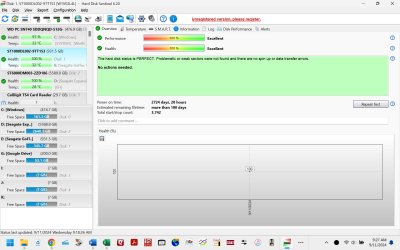
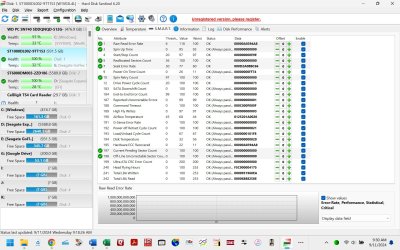
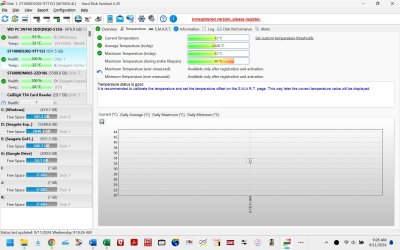
I ran HD Sentinel on E. Results attached - screen captures of Overview, Temperature, and SMART, as well as detailed text report.

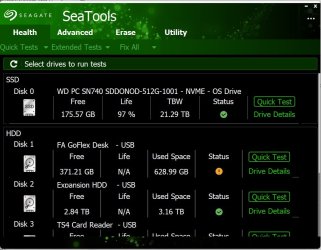
I then started SeaTools. Screen capture of the "front page" attached. Note the yellow "caution" status icon on E. I started the Long Generic test on E. After a short delay, a notification pops up "Long generic test failed to start". A couple of seconds later, the "USB disconnect" tone sounded and a notification popped up that E has disconnected. To the best of my memory, SeaTools hasn't been able to start any tests on E, even short self test.

And now, after a reboot, E is connected again. TBH, I'm pretty much over it. E is flaky, whether the tests can find it or not. I'm more interested in confirming that the processor and memory are good. So...

Back to the main plot, I hope to run the Lenovo UEFI tonight.
 

Attachments

  • HD Sentinel E-HDD 240911-0925.txt
    HD Sentinel E-HDD 240911-0925.txt
    58.5 KB · Views: 1
  • HD Sentinel E-HDD Overview 240911-0925.jpg
    HD Sentinel E-HDD Overview 240911-0925.jpg
    170.3 KB · Views: 1
  • HD Sentinel E-HDD SMART 240911-0925.jpg
    HD Sentinel E-HDD SMART 240911-0925.jpg
    280.9 KB · Views: 1
  • HD Sentinel E-HDD Temperature 240911-0925.jpg
    HD Sentinel E-HDD Temperature 240911-0925.jpg
    212.5 KB · Views: 1
  • SeaTools Health 240911-0935.jpg
    SeaTools Health 240911-0935.jpg
    85.5 KB · Views: 1
Last edited:

My Computer My Computer

At a glance

Windows 11 24H2i5-1240p16gbWhatever comes in it
OS
Windows 11 24H2
Computer type
Laptop
Manufacturer/Model
Lenovo ThinkPad X1 Carbon G10
CPU
i5-1240p
Memory
16gb
Graphics Card(s)
Whatever comes in it
Sound Card
Whatever comes in it
Monitor(s) Displays
No external monitor. Yet.
Screen Resolution
1920 x 1200
Hard Drives
Internal 512 GB SSD
Desktop 6 TB, 1 TB, 225 GB, all HDDs
Portable 4TB SSD, 2TB HDD
A whole army of USB flash memory sticks
Mouse
Logitech M317
Internet Speed
500 mbps Fiber
Browser
Chrome
Antivirus
Windows Defender
Other Info
CalDigit TS4 dock for all my USB stuff, speakers, and connect to Android phone
HP MFP M277dw laser printer/scanner
I downloaded the Lenovo UEFI diagnostics PDF. A LOT of info there - all, of course, new to me. I don't want to do something wrong and screw up my system.

Should I have it run all the tests or certain specific ones? (For example, it might seem unneeded to let it run the battery down. And some of them look like they need user interaction)
If specific, which ones?
Quick or extended? Number of repetitions?
I'm hoping it can run unattended and guessing that might influence the choice of tests to run.

On page 122 (Section 22), it says "After a test or a recover operation is finished, the user can see the Diagnostics Result Log screen by pressing the V key." If multiple tests are selected, does this happen after each one or at the end of all?

Apologies for all the questions - I'm hoping to get it right the first time.
 

My Computer My Computer

At a glance

Windows 11 24H2i5-1240p16gbWhatever comes in it
OS
Windows 11 24H2
Computer type
Laptop
Manufacturer/Model
Lenovo ThinkPad X1 Carbon G10
CPU
i5-1240p
Memory
16gb
Graphics Card(s)
Whatever comes in it
Sound Card
Whatever comes in it
Monitor(s) Displays
No external monitor. Yet.
Screen Resolution
1920 x 1200
Hard Drives
Internal 512 GB SSD
Desktop 6 TB, 1 TB, 225 GB, all HDDs
Portable 4TB SSD, 2TB HDD
A whole army of USB flash memory sticks
Mouse
Logitech M317
Internet Speed
500 mbps Fiber
Browser
Chrome
Antivirus
Windows Defender
Other Info
CalDigit TS4 dock for all my USB stuff, speakers, and connect to Android phone
HP MFP M277dw laser printer/scanner
Please run the Lenovo UEFI hardware diagnostics overnight while sleeping.

All tests
Extensive
If available, loop until error
The next day if there is no error (two or more loops) > take pictures > post images or share links displaying the tests performed with results

(Dell, HP, Lenovo, etc. have their proprietary diagnostics)
 
Last edited:

My Computer My Computer

At a glance

Windows 10Intel(R) Core(TM) i7-4800MQ CPU @ 2.70GHz16 GB Total: Manufacturer : Samsung MemoryTyp...NVIDIA Quadro K3100M; Intel(R) HD Graphics 4600
OS
Windows 10
Computer type
Laptop
Manufacturer/Model
HP
CPU
Intel(R) Core(TM) i7-4800MQ CPU @ 2.70GHz
Motherboard
Product : 190A Version : KBC Version 94.56
Memory
16 GB Total: Manufacturer : Samsung MemoryType : DDR3 FormFactor : SODIMM Capacity : 8GB Speed : 1600
Graphics Card(s)
NVIDIA Quadro K3100M; Intel(R) HD Graphics 4600
Sound Card
IDT High Definition Audio CODEC; PNP Device ID HDAUDIO\FUNC_01&VEN_111D&DEV_76E0
Hard Drives
Model Hitachi HTS727575A9E364
Antivirus
Microsoft Defender
Other Info
Mobile Workstation
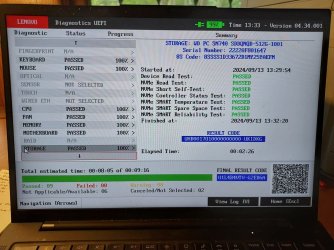
As a trial run of Lenovo UEFI, I chose the "short unattended" option, selecting "run all". It (obviously) runs the short form of all tests and bypasses anything that needs user interaction. Photo screen at completion attached, as well as the text file log. The photo has the summary in the display footer, even though the detail is for the SSD test. Scrolling up the left side recalls the prior tests. I didn't take all those photos, since a cursory look shows the same content in the log file.

Everything passed.

If all goes to plan, I'll run the "extended unattended" run tonight. This will still bypass anything that needs user interaction. My understanding is that's not necessarily entire tests, just the portion of them where it wants a response. Mouse, keyboard, touchpad, display, etc. I'm not finding an option for "loop until fail", so I'll run 2 passes. I'll save the text log and take photos of whatever display remains at the end.
 

Attachments

My Computer My Computer

At a glance

Windows 11 24H2i5-1240p16gbWhatever comes in it
OS
Windows 11 24H2
Computer type
Laptop
Manufacturer/Model
Lenovo ThinkPad X1 Carbon G10
CPU
i5-1240p
Memory
16gb
Graphics Card(s)
Whatever comes in it
Sound Card
Whatever comes in it
Monitor(s) Displays
No external monitor. Yet.
Screen Resolution
1920 x 1200
Hard Drives
Internal 512 GB SSD
Desktop 6 TB, 1 TB, 225 GB, all HDDs
Portable 4TB SSD, 2TB HDD
A whole army of USB flash memory sticks
Mouse
Logitech M317
Internet Speed
500 mbps Fiber
Browser
Chrome
Antivirus
Windows Defender
Other Info
CalDigit TS4 dock for all my USB stuff, speakers, and connect to Android phone
HP MFP M277dw laser printer/scanner
There are multiple test types.

The component and or interactive tests can run as needed.
 

My Computer My Computer

At a glance

Windows 10Intel(R) Core(TM) i7-4800MQ CPU @ 2.70GHz16 GB Total: Manufacturer : Samsung MemoryTyp...NVIDIA Quadro K3100M; Intel(R) HD Graphics 4600
OS
Windows 10
Computer type
Laptop
Manufacturer/Model
HP
CPU
Intel(R) Core(TM) i7-4800MQ CPU @ 2.70GHz
Motherboard
Product : 190A Version : KBC Version 94.56
Memory
16 GB Total: Manufacturer : Samsung MemoryType : DDR3 FormFactor : SODIMM Capacity : 8GB Speed : 1600
Graphics Card(s)
NVIDIA Quadro K3100M; Intel(R) HD Graphics 4600
Sound Card
IDT High Definition Audio CODEC; PNP Device ID HDAUDIO\FUNC_01&VEN_111D&DEV_76E0
Hard Drives
Model Hitachi HTS727575A9E364
Antivirus
Microsoft Defender
Other Info
Mobile Workstation
Back
Top Bottom