BSOD with screen corruption


So far 3 customized tests did not cause BSODs.

You had reported that all other commands caused BSODs.

There were no new reports within V2 logs.

When available post new result share links into the newest post.
 

My Computer

System One

  • OS
    Windows 10
    Computer type
    Laptop
    Manufacturer/Model
    HP
    CPU
    Intel(R) Core(TM) i7-4800MQ CPU @ 2.70GHz
    Motherboard
    Product : 190A Version : KBC Version 94.56
    Memory
    16 GB Total: Manufacturer : Samsung MemoryType : DDR3 FormFactor : SODIMM Capacity : 8GB Speed : 1600
    Graphics Card(s)
    NVIDIA Quadro K3100M; Intel(R) HD Graphics 4600
    Sound Card
    IDT High Definition Audio CODEC; PNP Device ID HDAUDIO\FUNC_01&VEN_111D&DEV_76E0
    Hard Drives
    Model Hitachi HTS727575A9E364
    Antivirus
    Microsoft Defender
    Other Info
    Mobile Workstation
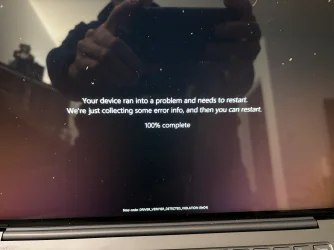
isn't this a BSOD?
 

Attachments

  • IMG_0112.webp
    IMG_0112.webp
    1.2 MB · Views: 2

My Computers

System One System Two

  • OS
    Windows 10
    Computer type
    PC/Desktop
    CPU
    Ryzen 5800X
    Motherboard
    MSI B550 Tomahawk
    Memory
    32GB
    Graphics Card(s)
    RTX 3070
  • Operating System
    Windows 11 24H1
    Computer type
    Laptop
    Manufacturer/Model
    Lenovo
    CPU
    Ryzen 6800HS
    Memory
    32GB
Wow that's a weird screen indeed. Can see what is happening here. The signal has lost it sync towards the screen. All screendata is there still but by missing the sync signal at the start of each line it just continues to write one line after an other. This is an extreme case of skewing. All screendata is still there; text, colors etc. What's the reason for it is unknown. Can be a hardware issue but if the display acts normal on other occasions that might not be the case here.

One things come to mind; your onboard GPU. You said that you have troubles with it installing the manufacturers drivers for it and it became stuck in the past. That should not be the case. They should function correctly with your type of laptop. Did you check if those drivers were for the correct type of laptop you have? If it would not install it that might be because of a piece of software it's conflicting it. I would recommend strongly to use those specific drivers for your laptop. Correct timings is crucial for sending data to your screen.

An other point; That Lenovo Yoga Slim 7 Pro X. This has a onboard NVidia RTX3050 Mobile GPU. You said that you disabled this GPU inside the BIOS. Why? Can't understand why you do such a thing. You bought it because it had a RTX3050 GPU and you disabled it? This laptop is not cheap. I can't image that it is possible to disable this GPU. What should it use then as a GPU? There are no external options available. And that it's drawing more power? It's a locked GPU with Mobile specs in mind. You can use it normally during many hours but if you are gaming for hours then yes it's impact will be noticeable, drawing 45W all the time. Yes 4Gb is less than 8Gb. In games those VRAM places restrictions on what setting you can turn on or off; eating Shader memory. Once you crossover that boundary the game can produce unwanted results or even crash.

I must admit that this RTX3050 Mobile GPU is a bit scaled down to 4Gb. The 8Gb variant is possible with the RTX3070 Mobile. (Or it's RTX3050 external counterpart which is unlocked) It's scaled down because of power restrictions. Otherwise it would draw more power that the 45W is has now. Specs: NVIDIA GeForce RTX 3050 Mobile Specs.

This GPU produces on it's own not the final signal send to it's screen. It is communicating with some Lenovo component that converts the data into a signal for the screen. It is just sitting there as internal PCI-Express 4.0 x8 device talking to that Lenovo component.

Some online tests you can go through; Display Test - Free Monitor Testing Tools They should pass without any incident.
 

My Computer

System One

  • OS
    Win 11 Pro "25H2" Build 26200.8655, Zorin OS Pro
    Computer type
    PC/Desktop
    Manufacturer/Model
    Self built
    CPU
    Intel® Core™ i7-12700KF 12th Gen.
    Motherboard
    ASUS Prime Z690-A, BIOS v4505
    Memory
    32GB DDR5 5600-36 Vengeance
    Graphics Card(s)
    PCIe4.0 Asus NVIDIA RTX3060Ti
    Sound Card
    Onboard; Realtek
    Monitor(s) Displays
    34" LG 34UC79G-B Curved 21:9 144Hz
    Screen Resolution
    2560x1080 (No HDR)
    Hard Drives
    250Gb Samsung 870PRO NVMe (Win 11 Pro)
    1Tb Samsung 980PRO NVMe
    1Tb Samsung 970EVO NVMe
    2Tb Samsung 990PRO NVMe with heatsink.
    4Tb WDC WD40EZRZ Blue SATA (Int.)
    4Tb WDC WD40EZRZ Blue SATA (Int.)
    3Tb WDC WD30EFRZ Red SATA (Int.)
    256Gb Samsung 840PRO SSD (RHEL 9,5)
    256Gb Samsung 850PRO SSD (Zorin OS Pro 18)
    PSU
    Coolermaster 850W V2 Gold with internal 12cm exaust fan
    Case
    Be-Quiet Pure Base 600.
    Cooling
    3x Be-Quiet! 12/14cm "Silent Wings 4" casefans, 1x Arctic Freezer i35 CPU towerblock with fan.
    Keyboard
    Steelseries APEX 7 keyboard.
    Mouse
    Logitech G-502 Hero
    Internet Speed
    1Gb
    Browser
    Brave
    Antivirus
    F-Secure
    Other Info
    No Noise system.
    256Gb Kingston Travler USB 3.0 drive.
    64Gb Sandisk USB 3.2 drive. (Ventoy)
    8Gb Philips USB 3.0 drive. (Win. Inst.)
    8Gb Philips USB 3.0 drive. (Rescue disk)
    2Tb WD USB 3.0 Passport drive.
    USB Ext. 500Gb WD SATA drive.
    External USB 3.0 C.A. CD/DVD* burner.
isn't this a BSOD?
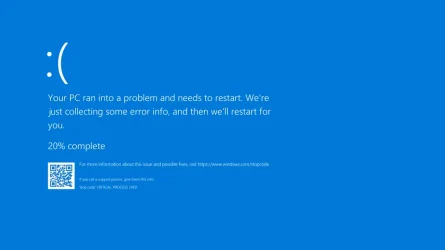
Some sort.... BSOD stands for Blue Screen Of Death. (It's possible that MS made it now a Black Screen Of Death) Seen that one very seldom. Sometimes I saw a error code on the screen and the system rebooted quickly before I had the chance to write down the code. See attachment for an other example of a BSOD.

Looking at the error is seems to say that a driver behaved illegal; it's made an illegal function call that makes the system instable. It is finding out which driver was responsible for it. Will leave a message inside the logbooks of Windows (system). Check if you can identify that driver. The entry should be marked critical. It will as result disable this driver otherwise your system will end in a loop if the cause is not taken care off. That you have a driver issue is confirmed by this error.
 

Attachments

  • Bsodwindows10.webp
    Bsodwindows10.webp
    17.2 KB · Views: 1

My Computer

System One

  • OS
    Win 11 Pro "25H2" Build 26200.8655, Zorin OS Pro
    Computer type
    PC/Desktop
    Manufacturer/Model
    Self built
    CPU
    Intel® Core™ i7-12700KF 12th Gen.
    Motherboard
    ASUS Prime Z690-A, BIOS v4505
    Memory
    32GB DDR5 5600-36 Vengeance
    Graphics Card(s)
    PCIe4.0 Asus NVIDIA RTX3060Ti
    Sound Card
    Onboard; Realtek
    Monitor(s) Displays
    34" LG 34UC79G-B Curved 21:9 144Hz
    Screen Resolution
    2560x1080 (No HDR)
    Hard Drives
    250Gb Samsung 870PRO NVMe (Win 11 Pro)
    1Tb Samsung 980PRO NVMe
    1Tb Samsung 970EVO NVMe
    2Tb Samsung 990PRO NVMe with heatsink.
    4Tb WDC WD40EZRZ Blue SATA (Int.)
    4Tb WDC WD40EZRZ Blue SATA (Int.)
    3Tb WDC WD30EFRZ Red SATA (Int.)
    256Gb Samsung 840PRO SSD (RHEL 9,5)
    256Gb Samsung 850PRO SSD (Zorin OS Pro 18)
    PSU
    Coolermaster 850W V2 Gold with internal 12cm exaust fan
    Case
    Be-Quiet Pure Base 600.
    Cooling
    3x Be-Quiet! 12/14cm "Silent Wings 4" casefans, 1x Arctic Freezer i35 CPU towerblock with fan.
    Keyboard
    Steelseries APEX 7 keyboard.
    Mouse
    Logitech G-502 Hero
    Internet Speed
    1Gb
    Browser
    Brave
    Antivirus
    F-Secure
    Other Info
    No Noise system.
    256Gb Kingston Travler USB 3.0 drive.
    64Gb Sandisk USB 3.2 drive. (Ventoy)
    8Gb Philips USB 3.0 drive. (Win. Inst.)
    8Gb Philips USB 3.0 drive. (Rescue disk)
    2Tb WD USB 3.0 Passport drive.
    USB Ext. 500Gb WD SATA drive.
    External USB 3.0 C.A. CD/DVD* burner.
@hader

MS has recently changed the colour to black, it was on the tech news some time ago.


I didn't say the 3050 didn't install. I said the dual-GPU implementation was poor. The laptop refused to sleep properly, battery consumption was too high - despite having windows and nVidia drivers set to "do not use 3050" and waking up the laptop was slow.
I tried manufacturer's and nvidia drivers, it woudn't help.

I don't use my laptop on a desk, I keep opening and closing it when I am on the go and at some point I discovered that the 3050 was a big cause for all my issues.

To be clear, the 3050 worked. And power consumption at idle with the 3050 enabled was as low as with the 3050 disabled. But something was happening under the hood WHILE using the laptop even when nVidia control panel said the 3050 was NOT being used. Fans would spin up easily but most importantly waking up from sleep was sluggish and delayed.

I didn't buy the laptop for the 3050 - though it was a nice extra. But with only 4GB of VRAM, it's pointless with Resolve which I might (very seldom) use on this laptop. So the 3050 was disabled in the BIOS and since then Windows is much more smooth in operations.

If you look at the corrupted image, the mouse "waiting" ball is still visible so it cannot be a HW issue.
 

My Computers

System One System Two

  • OS
    Windows 10
    Computer type
    PC/Desktop
    CPU
    Ryzen 5800X
    Motherboard
    MSI B550 Tomahawk
    Memory
    32GB
    Graphics Card(s)
    RTX 3070
  • Operating System
    Windows 11 24H1
    Computer type
    Laptop
    Manufacturer/Model
    Lenovo
    CPU
    Ryzen 6800HS
    Memory
    32GB
isn't this a BSOD?

Yes that was a BSOD caused by WDV.

Unfortunately Windows does not always create files.

So new customized tests were ordered to identify the cause.

If these commands still do not create useful files then other commands will be used (there is some flexibility).
 
Last edited:

My Computer

System One

  • OS
    Windows 10
    Computer type
    Laptop
    Manufacturer/Model
    HP
    CPU
    Intel(R) Core(TM) i7-4800MQ CPU @ 2.70GHz
    Motherboard
    Product : 190A Version : KBC Version 94.56
    Memory
    16 GB Total: Manufacturer : Samsung MemoryType : DDR3 FormFactor : SODIMM Capacity : 8GB Speed : 1600
    Graphics Card(s)
    NVIDIA Quadro K3100M; Intel(R) HD Graphics 4600
    Sound Card
    IDT High Definition Audio CODEC; PNP Device ID HDAUDIO\FUNC_01&VEN_111D&DEV_76E0
    Hard Drives
    Model Hitachi HTS727575A9E364
    Antivirus
    Microsoft Defender
    Other Info
    Mobile Workstation
I've provided to you the feedback in post #17.

This confirms the feedback:


Date: 2026-04-19T23:01:26.3510000Z
Date: 2026-04-19T21:56:51.2760000Z
Date: 2026-04-19T21:39:55.3980000Z


Code:
Event[18967]
  Log Name: System
  Source: volmgr
  Date: 2026-04-19T23:01:26.3510000Z
  Event ID: 46
  Task: None
  Level: Error
  Opcode: N/A
  Keyword: Classic,
  User: N/A
  User Name: N/A
  Computer: Yoga
  Description:
Crash dump initialization failed!


Code:
Event[18630]
  Log Name: System
  Source: volmgr
  Date: 2026-04-19T21:56:51.2760000Z
  Event ID: 46
  Task: None
  Level: Error
  Opcode: N/A
  Keyword: Classic,
  User: N/A
  User Name: N/A
  Computer: Yoga
  Description:
Crash dump initialization failed!


Code:
Event[18068]
  Log Name: System
  Source: volmgr
  Date: 2026-04-19T21:39:55.3980000Z
  Event ID: 46
  Task: None
  Level: Error
  Opcode: N/A
  Keyword: Classic,
  User: N/A
  User Name: N/A
  Computer: Yoga
  Description:
Crash dump initialization failed!
 

My Computer

System One

  • OS
    Windows 10
    Computer type
    Laptop
    Manufacturer/Model
    HP
    CPU
    Intel(R) Core(TM) i7-4800MQ CPU @ 2.70GHz
    Motherboard
    Product : 190A Version : KBC Version 94.56
    Memory
    16 GB Total: Manufacturer : Samsung MemoryType : DDR3 FormFactor : SODIMM Capacity : 8GB Speed : 1600
    Graphics Card(s)
    NVIDIA Quadro K3100M; Intel(R) HD Graphics 4600
    Sound Card
    IDT High Definition Audio CODEC; PNP Device ID HDAUDIO\FUNC_01&VEN_111D&DEV_76E0
    Hard Drives
    Model Hitachi HTS727575A9E364
    Antivirus
    Microsoft Defender
    Other Info
    Mobile Workstation
Sorry, I don't see that feedback in post 17 which was before I posted the logs, no?
Thanks for mentioning now.

One thing I forgot to mention is that Windows indeed failed to restart the laptop when BSOD happened. It got stuck on 100% dump creation, I gave it plenty of time but then I had to power cycle the laptop. I thought it did create the dump.

Is there a way to disable WDV without having to
- restart 3 times
- input Bitlocker key
- Get into safe mode
- restart

'cause that takes quite some time!

And is there a way to fix the failed minidump creation?

Thanks
 

My Computers

System One System Two

  • OS
    Windows 10
    Computer type
    PC/Desktop
    CPU
    Ryzen 5800X
    Motherboard
    MSI B550 Tomahawk
    Memory
    32GB
    Graphics Card(s)
    RTX 3070
  • Operating System
    Windows 11 24H1
    Computer type
    Laptop
    Manufacturer/Model
    Lenovo
    CPU
    Ryzen 6800HS
    Memory
    32GB
Sorry, I don't see that feedback in post 17 which was before I posted the logs, no?
Thanks for mentioning now.

One thing I forgot to mention is that Windows indeed failed to restart the laptop when BSOD happened. It got stuck on 100% dump creation, I gave it plenty of time but then I had to power cycle the laptop. I thought it did create the dump.

Modifying the tests should allow Windows to create more dump files


Is there a way to disable WDV without having to
- restart 3 times
- input Bitlocker key
- Get into safe mode
- restart

'cause that takes quite some time!

And is there a way to fix the failed minidump creation?

Yes, Windows is more likely to create dump files with the above tests.

If possible, temporarily turn off Bitlocker during WDV testing.
 

My Computer

System One

  • OS
    Windows 10
    Computer type
    Laptop
    Manufacturer/Model
    HP
    CPU
    Intel(R) Core(TM) i7-4800MQ CPU @ 2.70GHz
    Motherboard
    Product : 190A Version : KBC Version 94.56
    Memory
    16 GB Total: Manufacturer : Samsung MemoryType : DDR3 FormFactor : SODIMM Capacity : 8GB Speed : 1600
    Graphics Card(s)
    NVIDIA Quadro K3100M; Intel(R) HD Graphics 4600
    Sound Card
    IDT High Definition Audio CODEC; PNP Device ID HDAUDIO\FUNC_01&VEN_111D&DEV_76E0
    Hard Drives
    Model Hitachi HTS727575A9E364
    Antivirus
    Microsoft Defender
    Other Info
    Mobile Workstation
If possible, temporarily turn off Bitlocker during WDV testing.
That takes hours to remove the encryption and hours to reapply it afterwards.
 

My Computers

System One System Two

  • OS
    Windows 10
    Computer type
    PC/Desktop
    CPU
    Ryzen 5800X
    Motherboard
    MSI B550 Tomahawk
    Memory
    32GB
    Graphics Card(s)
    RTX 3070
  • Operating System
    Windows 11 24H1
    Computer type
    Laptop
    Manufacturer/Model
    Lenovo
    CPU
    Ryzen 6800HS
    Memory
    32GB
Of the new tests some will and some will not create BSOD which will narrow down the customized tests.

Unfortunately the bitlocker step is required when it is active.
 

My Computer

System One

  • OS
    Windows 10
    Computer type
    Laptop
    Manufacturer/Model
    HP
    CPU
    Intel(R) Core(TM) i7-4800MQ CPU @ 2.70GHz
    Motherboard
    Product : 190A Version : KBC Version 94.56
    Memory
    16 GB Total: Manufacturer : Samsung MemoryType : DDR3 FormFactor : SODIMM Capacity : 8GB Speed : 1600
    Graphics Card(s)
    NVIDIA Quadro K3100M; Intel(R) HD Graphics 4600
    Sound Card
    IDT High Definition Audio CODEC; PNP Device ID HDAUDIO\FUNC_01&VEN_111D&DEV_76E0
    Hard Drives
    Model Hitachi HTS727575A9E364
    Antivirus
    Microsoft Defender
    Other Info
    Mobile Workstation
where can I see whether Windows has managed to create a dump - so I don't waste time creating V2 logs if there is nothing to see?

Edit: I found it. But that is reported when I reboot in SAFE mode, what has that to do with the actual BSOD? And after that error, I see a "dump file generation succeeded" so I am confused.

Final thing: something I noted previously too.
When I run the commands you send me, I see this as a reply. It says "All drivers"? I thought you said we were checking non-microsoft drivers only? Is this expected? This is before the reboot of course.

Code:
Microsoft Windows [Version 10.0.26200.8246]
(c) Microsoft Corporation. All rights reserved.

C:\Windows\System32>verifier /settings
An unsupported command line parameter was specified.
Run "verifier /?" for command line assistance.

C:\Windows\System32>verifier /querysettings

Verifier Flags: 0x00100610

  Standard Flags:

    [ ] 0x00000001 Special pool.
    [ ] 0x00000002 Force IRQL checking.
    [ ] 0x00000008 Pool tracking.
    [X] 0x00000010 I/O verification.
    [ ] 0x00000020 Deadlock detection.
    [ ] 0x00000080 DMA checking.
    [ ] 0x00000100 Security checks.
    [ ] 0x00000800 Miscellaneous checks.
    [ ] 0x00020000 DDI compliance checking.

  Additional Flags:

    [ ] 0x00000004 Randomized low resources simulation.
    [X] 0x00000200 Force pending I/O requests.
    [X] 0x00000400 IRP logging.
    [ ] 0x00002000 Invariant MDL checking for stack.
    [ ] 0x00004000 Invariant MDL checking for driver.
    [ ] 0x00008000 Power framework delay fuzzing.
    [ ] 0x00010000 Port/miniport interface checking.
    [ ] 0x00040000 Systematic low resources simulation.
    [ ] 0x00080000 DDI compliance checking (additional).
    [ ] 0x00200000 NDIS/WIFI verification.
    [ ] 0x00800000 Kernel synchronization delay fuzzing.
    [ ] 0x01000000 VM switch verification.
    [ ] 0x02000000 Code integrity checks.

  Internal Flags:

    [X] 0x00100000 Extended Verifier flags (internal).

    [X] Indicates flag is enabled.

  Active Rule Classes:

    5  - I/O verification.
    10 - Force pending I/O requests.
    11 - IRP logging.
    21 - Extended Verifier flags (internal).
    34 - WDF verfication.
    37 - File system filter verification.

  Boot Mode:

    Persistent

  Rules:

    All rules are using default settings

  Verified Drivers:

    ntoskrnl.exe
    hal.dll
    kd.dll
    symcryptk.dll
    cng.sys
    clfs.sys
    tm.sys
    winaccel.sys
    pshed.dll
    bootvid.dll
    fltmgr.sys
    msrpc.sys
    ksecdd.sys
    clipsp.sys
    cmimcext.sys
    werkernel.sys
    ntosext.sys
    watchdog.sys
    wmilib.sys
    dxgkrnl.sys
    win32k.sys
    ci.dll
    wdf01000.sys
    wpprecorder.sys
    wdfldr.sys
    prm.sys
    acpiex.sys
    msseccore.sys
    acpi.sys
    msisadrv.sys
    pci.sys
    tpm.sys
    amdwps.sys
    windowstrustedrt.sys
    intelpep.sys
    windowstrustedrtproxy.sys
    intelpmt.sys
    pcw.sys
    vdrvroot.sys
    pdc.sys
    cea.sys
    partmgr.sys
    spaceport.sys
    volmgr.sys
    volmgrx.sys
    mountmgr.sys
    stornvme.sys
    storport.sys
    ehstorclass.sys
    fileinfo.sys
    wof.sys
    wdfilter.sys
    ntfs.sys
    fs_rec.sys
    ndis.sys
    netio.sys
    ksecpkg.sys
    kerb3961kernel.sys
    tcpip.sys
    fwpkclnt.sys
    wfplwfs.sys
    fvevol.sys
    volume.sys
    volsnap.sys
    rdyboost.sys
    nvmedisk.sys
    mup.sys
    iorate.sys
    disk.sys
    classpnp.sys
    crashdmp.sys
    cdrom.sys
    filecrypt.sys
    tbs.sys
    ucpd.sys
    null.sys
    beep.sys
    uiomap.sys
    basicdisplay.sys
    basicrender.sys
    npfs.sys
    msfs.sys
    cimfs.sys
    tdx.sys
    tdi.sys
    netbt.sys
    afunix.sys
    afd.sys
    vfilter.sys
    npcap.sys
    vwififlt.sys
    pacer.sys
    ndiscap.sys
    netbios.sys
    vid.sys
    winhvr.sys
    rdbss.sys
    csc.sys
    vigembus.sys
    nsiproxy.sys
    npsvctrig.sys
    mssmbios.sys
    dfsc.sys
    dam.sys
    kmpdc.sys
    bam.sys
    ahcache.sys
    usbd.sys
    neo6_x64_vpn.sys
    compositebus.sys
    kdnic.sys
    portcls.sys
    drmk.sys
    ks.sys
    ksthunk.sys
    motivmixvad.sys
    umbus.sys
    cad.sys
    amdppm.sys
    wdiwifi.sys
    vwifibus.sys
    hdaudbus.sys
    usbxhci.sys
    ucx01000.sys
    i8042prt.sys
    kbdclass.sys
    cmbatt.sys
    battc.sys
    wmiacpi.sys
    msgpioclx.sys
    spbcx.sys
    ucmucsiacpiclient.sys
    ucmucsicx.sys
    ucmcx.sys
    uefi.sys
    ndisvirtualbus.sys
    swenum.sys
    ssdevfactory.sys
    rdpbus.sys
    hidusb.sys
    hidclass.sys
    hidparse.sys
    fastfat.sys
    hidi2c.sys
    mshidkmdf.sys
    acpitime.sys
    usbhub3.sys
    kbdhid.sys
    mouhid.sys
    mouclass.sys
    mtconfig.sys
    rtkvhd64.sys
    bthusb.sys
    bthport.sys
    usbccgp.sys
    usbvideo.sys
    winusb.sys
    win32kbase.sys
    win32kfull.sys
    win32kbase_rs.sys
    rfcomm.sys
    bthenum.sys
    bthpan.sys
    microsoft.bluetooth.legacy.leenumerator.sys
    btha2dp.sys
    btampm.sys
    microsoft.bluetooth.avrcptransport.sys
    bthhfenum.sys
    bthhfaud.sys
    dxgmms2.sys
    monitor.sys
    cdd.dll
    wudfrd.sys
    indirectkmd.sys
    bfs.sys
    luafv.sys
    wcifs.sys
    mmcss.sys
    rdpdr.sys
    cldflt.sys
    unionfs.sys
    storqosflt.sys
    bindflt.sys
    condrv.sys
    bowser.sys
    mrxsmb.sys
    mrxsmb20.sys
    tsusbhub.sys
    lltdio.sys
    mslldp.sys
    rspndr.sys
    wanarp.sys
    nwifi.sys
    ndisuio.sys
    http.sys
    mpsdrv.sys
    dokan.sys
    hcmon.sys
    srvnet.sys
    ndu.sys
    peauth.sys
    tcpipreg.sys
    wtd.sys
    mskssrv.sys
    srv2.sys
    vwifimp.sys
    ksld.sys
    wdnisdrv.sys
    msquic.sys

C:\Windows\System32>Microsoft Windows [Version 10.0.26200.8246]
(c) Microsoft Corporation. All rights reserved.

C:\Windows\System32>verifier /flags 0x00006610 /driver *!microsoft*

Verifier Flags: 0x00006610

  Standard Flags:

    [ ] 0x00000001 Special pool.
    [ ] 0x00000002 Force IRQL checking.
    [ ] 0x00000008 Pool tracking.
    [X] 0x00000010 I/O verification.
    [ ] 0x00000020 Deadlock detection.
    [ ] 0x00000080 DMA checking.
    [ ] 0x00000100 Security checks.
    [ ] 0x00000800 Miscellaneous checks.
    [ ] 0x00020000 DDI compliance checking.

  Additional Flags:

    [ ] 0x00000004 Randomized low resources simulation.
    [X] 0x00000200 Force pending I/O requests.
    [X] 0x00000400 IRP logging.
    [X] 0x00002000 Invariant MDL checking for stack.
    [X] 0x00004000 Invariant MDL checking for driver.
    [ ] 0x00008000 Power framework delay fuzzing.
    [ ] 0x00010000 Port/miniport interface checking.
    [ ] 0x00040000 Systematic low resources simulation.
    [ ] 0x00080000 DDI compliance checking (additional).
    [ ] 0x00200000 NDIS/WIFI verification.
    [ ] 0x00800000 Kernel synchronization delay fuzzing.
    [ ] 0x01000000 VM switch verification.
    [ ] 0x02000000 Code integrity checks.

    [X] Indicates flag is enabled.

  Active Rule Classes:

    None

  Boot Mode:

    Persistent

  Rules:

    All rules are using default settings

  Verified Drivers:

    All Drivers

The system reboot is required for the changes to take effect.

C:\Windows\System32>
 
Last edited:

My Computers

System One System Two

  • OS
    Windows 10
    Computer type
    PC/Desktop
    CPU
    Ryzen 5800X
    Motherboard
    MSI B550 Tomahawk
    Memory
    32GB
    Graphics Card(s)
    RTX 3070
  • Operating System
    Windows 11 24H1
    Computer type
    Laptop
    Manufacturer/Model
    Lenovo
    CPU
    Ryzen 6800HS
    Memory
    32GB
If a system restore is performed for a WDV BSOD it often results in the loss of a BSOD dump file.

So recover using options nine and seven:


This was the last dump file:

Code:
Event[12875]
  Log Name: System
  Source: Microsoft-Windows-WER-SystemErrorReporting
  Date: 2026-04-11T16:29:48.1310000Z
  Event ID: 1001
  Task: N/A
  Level: Error
  Opcode: Info 
  Keyword: N/A
  User: S-1-5-18
  User Name: NT AUTHORITY\SYSTEM
  Computer: Yoga
  Description:
The computer has rebooted from a bugcheck.  The bugcheck was: 0x00000139 (0x0000000000000003, 0xffffa808de736f40, 0xffffa808de736e98, 0x0000000000000000). A dump was saved in: C:\WINDOWS\MEMORY.DMP. Report Id: 88aa99cc-964d-4e2e-ba81-4be8603a1f47.
 

My Computer

System One

  • OS
    Windows 10
    Computer type
    Laptop
    Manufacturer/Model
    HP
    CPU
    Intel(R) Core(TM) i7-4800MQ CPU @ 2.70GHz
    Motherboard
    Product : 190A Version : KBC Version 94.56
    Memory
    16 GB Total: Manufacturer : Samsung MemoryType : DDR3 FormFactor : SODIMM Capacity : 8GB Speed : 1600
    Graphics Card(s)
    NVIDIA Quadro K3100M; Intel(R) HD Graphics 4600
    Sound Card
    IDT High Definition Audio CODEC; PNP Device ID HDAUDIO\FUNC_01&VEN_111D&DEV_76E0
    Hard Drives
    Model Hitachi HTS727575A9E364
    Antivirus
    Microsoft Defender
    Other Info
    Mobile Workstation
Sorry @zbook I am not following you.

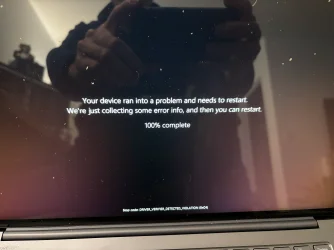
I didn't restore the laptop. I was able to boot by just getting into safe mode and disable WDV via terminal. What I said was that the BSOD screen would remain on the below screen and the laptop wouldn't restart by itself so after many minutes I power cycled the laptop myself.

IMG_0112.webp

Yes, I see the dump files, April 11th is one of my tests but apparently only one and not three.

So I look into c:\windows\minidump and if there is no new dump I don't need to run V2 logs right? Sorry for pestering but I'm trying to save a little time, you asked for 8 more tests and if I can skip generating the V2 logs 8 times, that would save me quite some time.
Thanks.
 

My Computers

System One System Two

  • OS
    Windows 10
    Computer type
    PC/Desktop
    CPU
    Ryzen 5800X
    Motherboard
    MSI B550 Tomahawk
    Memory
    32GB
    Graphics Card(s)
    RTX 3070
  • Operating System
    Windows 11 24H1
    Computer type
    Laptop
    Manufacturer/Model
    Lenovo
    CPU
    Ryzen 6800HS
    Memory
    32GB
WDV is a Windows tool designed to find misbehaving drivers.

The BSOD can occur at any moment in time when the computer reboots.

If bitlocker creates more work or interference then consider turning it off overnight while sleeping.

This may create a more efficient environment in which to use WDV.
 

My Computer

System One

  • OS
    Windows 10
    Computer type
    Laptop
    Manufacturer/Model
    HP
    CPU
    Intel(R) Core(TM) i7-4800MQ CPU @ 2.70GHz
    Motherboard
    Product : 190A Version : KBC Version 94.56
    Memory
    16 GB Total: Manufacturer : Samsung MemoryType : DDR3 FormFactor : SODIMM Capacity : 8GB Speed : 1600
    Graphics Card(s)
    NVIDIA Quadro K3100M; Intel(R) HD Graphics 4600
    Sound Card
    IDT High Definition Audio CODEC; PNP Device ID HDAUDIO\FUNC_01&VEN_111D&DEV_76E0
    Hard Drives
    Model Hitachi HTS727575A9E364
    Antivirus
    Microsoft Defender
    Other Info
    Mobile Workstation
So I look into c:\windows\minidump and if there is no new dump (Edit: after windows crashed, rebooted and WDV was disabled) I don't need to run V2 logs right?

This is what I am trying to understand.
 

My Computers

System One System Two

  • OS
    Windows 10
    Computer type
    PC/Desktop
    CPU
    Ryzen 5800X
    Motherboard
    MSI B550 Tomahawk
    Memory
    32GB
    Graphics Card(s)
    RTX 3070
  • Operating System
    Windows 11 24H1
    Computer type
    Laptop
    Manufacturer/Model
    Lenovo
    CPU
    Ryzen 6800HS
    Memory
    32GB
When WDV is turned on a crash may or may not occur.

If a crash occurs post a new V2 share link into the newest post.

If a crash does not occur post verifier /querysettings results.

The selected WDV tests are then modified as needed.
 

My Computer

System One

  • OS
    Windows 10
    Computer type
    Laptop
    Manufacturer/Model
    HP
    CPU
    Intel(R) Core(TM) i7-4800MQ CPU @ 2.70GHz
    Motherboard
    Product : 190A Version : KBC Version 94.56
    Memory
    16 GB Total: Manufacturer : Samsung MemoryType : DDR3 FormFactor : SODIMM Capacity : 8GB Speed : 1600
    Graphics Card(s)
    NVIDIA Quadro K3100M; Intel(R) HD Graphics 4600
    Sound Card
    IDT High Definition Audio CODEC; PNP Device ID HDAUDIO\FUNC_01&VEN_111D&DEV_76E0
    Hard Drives
    Model Hitachi HTS727575A9E364
    Antivirus
    Microsoft Defender
    Other Info
    Mobile Workstation
What I am trying to do is to find out whether a DUMP has been written after a BSOD or not. I don't want to run V2 eight times to then discover "Windows failed to write the dump each time".

So My question is: if a dump is created is created in C:\Windows\Minidump correct? If I don't see a new dump in there with date and time matching the BSOD, it means that Windows failed to write the dump, correct?
 

My Computers

System One System Two

  • OS
    Windows 10
    Computer type
    PC/Desktop
    CPU
    Ryzen 5800X
    Motherboard
    MSI B550 Tomahawk
    Memory
    32GB
    Graphics Card(s)
    RTX 3070
  • Operating System
    Windows 11 24H1
    Computer type
    Laptop
    Manufacturer/Model
    Lenovo
    CPU
    Ryzen 6800HS
    Memory
    32GB
WDV has the capability of running 1 or 21 customized tests simultaneously.
And WDV has the capability of testing 1 or more drivers.
The selected tests and drivers will either cause or not cause crashes.
Some crashes will or will not create dump files.
Each run is modified as needed to find misbehaving drivers.
When running WDV it is best to have dump files for debugging.
Windows can create memory dumps or mini dumps or both.
So looking only for minidump does not mean windows failed to create a memory dump file.
 

My Computer

System One

  • OS
    Windows 10
    Computer type
    Laptop
    Manufacturer/Model
    HP
    CPU
    Intel(R) Core(TM) i7-4800MQ CPU @ 2.70GHz
    Motherboard
    Product : 190A Version : KBC Version 94.56
    Memory
    16 GB Total: Manufacturer : Samsung MemoryType : DDR3 FormFactor : SODIMM Capacity : 8GB Speed : 1600
    Graphics Card(s)
    NVIDIA Quadro K3100M; Intel(R) HD Graphics 4600
    Sound Card
    IDT High Definition Audio CODEC; PNP Device ID HDAUDIO\FUNC_01&VEN_111D&DEV_76E0
    Hard Drives
    Model Hitachi HTS727575A9E364
    Antivirus
    Microsoft Defender
    Other Info
    Mobile Workstation

My Computers

System One System Two

  • OS
    Windows 10
    Computer type
    PC/Desktop
    CPU
    Ryzen 5800X
    Motherboard
    MSI B550 Tomahawk
    Memory
    32GB
    Graphics Card(s)
    RTX 3070
  • Operating System
    Windows 11 24H1
    Computer type
    Laptop
    Manufacturer/Model
    Lenovo
    CPU
    Ryzen 6800HS
    Memory
    32GB
Back
Top Bottom