Solved Bulk save outlook 2019 exchange emails


Summer02

Well-known member
Local time
4:32 PM
Posts
59
OS
Windows 11 Pro
Hi guy I am using outlook 2019 on my pc and outlook connects to Exchange so both my computer is always in sync.

My inbox is getting quite large and I would like to save the emails and attachments to a saved location on a spare hard drive so I have a copy of them.

Then empty my inbox completely and start again.

Is this possible please
 

My Computer My Computer

At a glance

Windows 11 Proi7-1065G7 CPU @ 1.30GHz 1.50 GHz16.0 GB
OS
Windows 11 Pro
Computer type
Laptop
Manufacturer/Model
HP Envy
CPU
i7-1065G7 CPU @ 1.30GHz 1.50 GHz
Memory
16.0 GB
Sure and rather simple, on my 2021 outlook, it works like this:
(I don't think this has changed in a while)
Select File >
Open & Export >
Import/Export. Select Export to a file,
and then select Next.
Select Outlook Data File (.
pst),
and select Next
.

You can avoid duplication by ticking the appropriate box.
 

My Computers My Computers

  • At a glance

    All Branches but ReleaseAMD Ryzen 7 7735HS 3200-4500 Mhz 8 cores x 232 GB DDR5Radeon Graphic / NVIDIA GeForce RTX 4060 8 GB...
    OS
    All Branches but Release
    Computer type
    Laptop
    Manufacturer/Model
    Acer Nitro ANV15-51
    CPU
    AMD Ryzen 7 7735HS 3200-4500 Mhz 8 cores x 2
    Motherboard
    Sportage_RBH
    Memory
    32 GB DDR5
    Graphics Card(s)
    Radeon Graphic / NVIDIA GeForce RTX 4060 8 GB GDDR6
    Sound Card
    AMD/Realtek(R) Audio
    Monitor(s) Displays
    Integrated Monitor (15.3"vis)
    Screen Resolution
    FHD 1920X1080 16:9 144Hz
    Hard Drives
    KINGSTON OM8SEP4512Q-AA 1TB
    Western Digital 256GB
    PSU
    19V DC 6.32 A 120 W
    Cooling
    Dual Fans
    Mouse
    MS Bluetooth
    Internet Speed
    Fiber 1GB Cox -us & 1GB Orange-fr
    Browser
    Edge Canary- Firefox Nightly-Chrome Dev-Chrome Dev
    Antivirus
    Windows Defender
  • At a glance

    Windows 11 BetaAMD A9-94208 GB of DDR4AMD Radeon R5
    Operating System
    Windows 11 Beta
    Computer type
    Laptop
    Manufacturer/Model
    Asus X751BP
    CPU
    AMD A9-9420
    Memory
    8 GB of DDR4
    Graphics card(s)
    AMD Radeon R5
    Screen Resolution
    1600x900
    Hard Drives
    Seagate 1 TB
Sure and rather simple, on my 2021 outlook, it works like this:
(I don't think this has changed in a while)
Select File >
Open & Export >
Import/Export. Select Export to a file,
and then select Next.
Select Outlook Data File (.
pst),
and select Next
.

You can avoid duplication by ticking the appropriate box.
Hi OAT i have followed you advice and yes i can make a outlook pst file on a external have drive, but then i am not able the see the emails unless i load it back into outlook and is that not going be have the same problem
 

My Computer My Computer

At a glance

Windows 11 Proi7-1065G7 CPU @ 1.30GHz 1.50 GHz16.0 GB
OS
Windows 11 Pro
Computer type
Laptop
Manufacturer/Model
HP Envy
CPU
i7-1065G7 CPU @ 1.30GHz 1.50 GHz
Memory
16.0 GB
It is the way Outlook works. I have kept several generations of .pst files from work, and indeed you must re-import them to manage them.
Keep in mind that you can select which folder gets backed up, not the whole box need to go in that .pst.
 

My Computers My Computers

  • At a glance

    All Branches but ReleaseAMD Ryzen 7 7735HS 3200-4500 Mhz 8 cores x 232 GB DDR5Radeon Graphic / NVIDIA GeForce RTX 4060 8 GB...
    OS
    All Branches but Release
    Computer type
    Laptop
    Manufacturer/Model
    Acer Nitro ANV15-51
    CPU
    AMD Ryzen 7 7735HS 3200-4500 Mhz 8 cores x 2
    Motherboard
    Sportage_RBH
    Memory
    32 GB DDR5
    Graphics Card(s)
    Radeon Graphic / NVIDIA GeForce RTX 4060 8 GB GDDR6
    Sound Card
    AMD/Realtek(R) Audio
    Monitor(s) Displays
    Integrated Monitor (15.3"vis)
    Screen Resolution
    FHD 1920X1080 16:9 144Hz
    Hard Drives
    KINGSTON OM8SEP4512Q-AA 1TB
    Western Digital 256GB
    PSU
    19V DC 6.32 A 120 W
    Cooling
    Dual Fans
    Mouse
    MS Bluetooth
    Internet Speed
    Fiber 1GB Cox -us & 1GB Orange-fr
    Browser
    Edge Canary- Firefox Nightly-Chrome Dev-Chrome Dev
    Antivirus
    Windows Defender
  • At a glance

    Windows 11 BetaAMD A9-94208 GB of DDR4AMD Radeon R5
    Operating System
    Windows 11 Beta
    Computer type
    Laptop
    Manufacturer/Model
    Asus X751BP
    CPU
    AMD A9-9420
    Memory
    8 GB of DDR4
    Graphics card(s)
    AMD Radeon R5
    Screen Resolution
    1600x900
    Hard Drives
    Seagate 1 TB
It is the way Outlook works. I have kept several generations of .pst files from work, and indeed you must re-import them to manage them.
Keep in mind that you can select which folder gets backed up, not the whole box need to go in that .pst.
OK i can make a external pst file no problem but how do i get it back into outlook. preferably into i different outlook folder so i can see the email i want then copy the one i need to my inbox and the delete the new folder

i carnt see the point of importing into the same folder
 

My Computer My Computer

At a glance

Windows 11 Proi7-1065G7 CPU @ 1.30GHz 1.50 GHz16.0 GB
OS
Windows 11 Pro
Computer type
Laptop
Manufacturer/Model
HP Envy
CPU
i7-1065G7 CPU @ 1.30GHz 1.50 GHz
Memory
16.0 GB
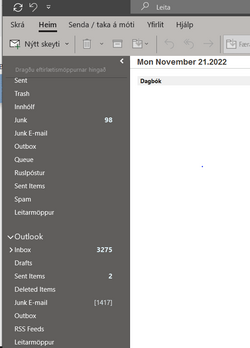
Following the same steps but Import this time and point where you saved it.
You can restore that box and name it/and put it anywhere within the Outlook tree.
As you can see, I needed to check some stuff from 6 years ago (personal_old)
I just loaded it there under my current content.

Screenshot 2022-11-20 230832.jpg
 
Last edited:

My Computers My Computers

  • At a glance

    All Branches but ReleaseAMD Ryzen 7 7735HS 3200-4500 Mhz 8 cores x 232 GB DDR5Radeon Graphic / NVIDIA GeForce RTX 4060 8 GB...
    OS
    All Branches but Release
    Computer type
    Laptop
    Manufacturer/Model
    Acer Nitro ANV15-51
    CPU
    AMD Ryzen 7 7735HS 3200-4500 Mhz 8 cores x 2
    Motherboard
    Sportage_RBH
    Memory
    32 GB DDR5
    Graphics Card(s)
    Radeon Graphic / NVIDIA GeForce RTX 4060 8 GB GDDR6
    Sound Card
    AMD/Realtek(R) Audio
    Monitor(s) Displays
    Integrated Monitor (15.3"vis)
    Screen Resolution
    FHD 1920X1080 16:9 144Hz
    Hard Drives
    KINGSTON OM8SEP4512Q-AA 1TB
    Western Digital 256GB
    PSU
    19V DC 6.32 A 120 W
    Cooling
    Dual Fans
    Mouse
    MS Bluetooth
    Internet Speed
    Fiber 1GB Cox -us & 1GB Orange-fr
    Browser
    Edge Canary- Firefox Nightly-Chrome Dev-Chrome Dev
    Antivirus
    Windows Defender
  • At a glance

    Windows 11 BetaAMD A9-94208 GB of DDR4AMD Radeon R5
    Operating System
    Windows 11 Beta
    Computer type
    Laptop
    Manufacturer/Model
    Asus X751BP
    CPU
    AMD A9-9420
    Memory
    8 GB of DDR4
    Graphics card(s)
    AMD Radeon R5
    Screen Resolution
    1600x900
    Hard Drives
    Seagate 1 TB
Hi thank you for all your advice i can create a pst file on a external hard drive ans then import it back into outlook but then i am not able to select where i import to

I did fine if i just went to open and export then just selected open data file that placed it at the bottom of the outlook tree with all the folder i need
 
Last edited:

My Computer My Computer

At a glance

Windows 11 Proi7-1065G7 CPU @ 1.30GHz 1.50 GHz16.0 GB
OS
Windows 11 Pro
Computer type
Laptop
Manufacturer/Model
HP Envy
CPU
i7-1065G7 CPU @ 1.30GHz 1.50 GHz
Memory
16.0 GB
Yes ,this is true, I skipped a few steps.
You can rename the imported box to your liking and move its content around as well by renaming folders.
It is no longer static.
Once you start doing that a few times, you will start realizing that you might just want to do backups of only selected
folders rather than the whole box every time.
 

My Computers My Computers

  • At a glance

    All Branches but ReleaseAMD Ryzen 7 7735HS 3200-4500 Mhz 8 cores x 232 GB DDR5Radeon Graphic / NVIDIA GeForce RTX 4060 8 GB...
    OS
    All Branches but Release
    Computer type
    Laptop
    Manufacturer/Model
    Acer Nitro ANV15-51
    CPU
    AMD Ryzen 7 7735HS 3200-4500 Mhz 8 cores x 2
    Motherboard
    Sportage_RBH
    Memory
    32 GB DDR5
    Graphics Card(s)
    Radeon Graphic / NVIDIA GeForce RTX 4060 8 GB GDDR6
    Sound Card
    AMD/Realtek(R) Audio
    Monitor(s) Displays
    Integrated Monitor (15.3"vis)
    Screen Resolution
    FHD 1920X1080 16:9 144Hz
    Hard Drives
    KINGSTON OM8SEP4512Q-AA 1TB
    Western Digital 256GB
    PSU
    19V DC 6.32 A 120 W
    Cooling
    Dual Fans
    Mouse
    MS Bluetooth
    Internet Speed
    Fiber 1GB Cox -us & 1GB Orange-fr
    Browser
    Edge Canary- Firefox Nightly-Chrome Dev-Chrome Dev
    Antivirus
    Windows Defender
  • At a glance

    Windows 11 BetaAMD A9-94208 GB of DDR4AMD Radeon R5
    Operating System
    Windows 11 Beta
    Computer type
    Laptop
    Manufacturer/Model
    Asus X751BP
    CPU
    AMD A9-9420
    Memory
    8 GB of DDR4
    Graphics card(s)
    AMD Radeon R5
    Screen Resolution
    1600x900
    Hard Drives
    Seagate 1 TB
eMClient (freeware for up to 2 accounts) can open .pst files. I frequently use it searately to review the contents of .pst files simply to keep away from MS Outlook.

You could then use it to export emails (selectively or completely) to individual .eml files
 

My Computers My Computers

  • At a glance

    Windows 11 2xH2 (latest update ... forever anal)Intel i5-124008GBNVIDIA GeForce GT730
    OS
    Windows 11 2xH2 (latest update ... forever anal)
    Computer type
    PC/Desktop
    Manufacturer/Model
    HP Slim S01
    CPU
    Intel i5-12400
    Memory
    8GB
    Graphics Card(s)
    NVIDIA GeForce GT730
    Sound Card
    OOBE
    Monitor(s) Displays
    Acer 32"
    Screen Resolution
    1920x1080
    Hard Drives
    512GB KIOXIA NVMe
    1TB SATA SSD
    PSU
    OOBE
    Case
    OOBE
    Cooling
    OOBE
    Keyboard
    BT
    Mouse
    BT
    Browser
    Brave FFox Chrome Opera
    Antivirus
    KIS
  • At a glance

    Windows 11 Pro 2xH2 (latest update ... 4ever ...i7-1165G7 @ 2.80GHzIntel Iris Xe Graphics
    Operating System
    Windows 11 Pro 2xH2 (latest update ... 4ever anal)
    Computer type
    Laptop
    Manufacturer/Model
    HP Pavillion 15
    CPU
    i7-1165G7 @ 2.80GHz
    Graphics card(s)
    Intel Iris Xe Graphics
    Hard Drives
    Samsung NVMe 512GB
    + numerous/multiple SSD Type C USB enclosures
    Internet Speed
    NBN FTTN 50
    Browser
    Brave
    Antivirus
    KIS
eMClient (freeware for up to 2 accounts) can open .pst files. I frequently use it searately to review the contents of .pst files simply to keep away from MS Outlook.

You could then use it to export emails (selectively or completely) to individual .eml files
Thank you i will have a look at that
 

My Computer My Computer

At a glance

Windows 11 Proi7-1065G7 CPU @ 1.30GHz 1.50 GHz16.0 GB
OS
Windows 11 Pro
Computer type
Laptop
Manufacturer/Model
HP Envy
CPU
i7-1065G7 CPU @ 1.30GHz 1.50 GHz
Memory
16.0 GB
  • Like
Reactions: OAT
Hi guy I am using outlook 2019 on my pc and outlook connects to Exchange so both my computer is always in sync.

My inbox is getting quite large and I would like to save the emails and attachments to a saved location on a spare hard drive so I have a copy of them.

Then empty my inbox completely and start again.

Is this possible please
"Seemples"

@Summer02

Just create a data .pst file on a folder on your local drive -- open it in outlook and copy / move all the contents relevant folders to it -- whether IMAP or POP3.

To create -- use the mail app in Control panel - might be labelled 2016 or whatever - doesn't matter works for all later versions from Outlook 2010 onwards !!

Choose the middle sel;ection to create your data file => open it and move / copy data.

outlook1.png

Then just close that file -- now you've got an archive -- to add to it just open again in outlook.

I'm using Outlook in office 2021 - IMAP, with 3 accounts -- no problem with a "data file" for copying things including attachments etc -- does the whole kybosh.

outlook.png

you can in the outlook data folder create as many sub folders as you like.

Cheers
jimbo
 
Last edited:

My Computer My Computer

At a glance

Windows XP,11 Linux Fedora Rawhide pre-releas...2 X Intel i7
OS
Windows XP,11 Linux Fedora Rawhide pre-release 45
Computer type
PC/Desktop
CPU
2 X Intel i7
Screen Resolution
4KUHD X 2

Latest Support Threads

Back
Top Bottom