- Local time
- 2:54 PM
- Posts
- 557
- OS
- Windows 11 Pro 26H2
IMHO, it makes it easier to do repairs and upgrades.
My Computer
At a glance
Windows 11 Pro 26H2
- OS
- Windows 11 Pro 26H2
- Computer type
- Laptop
- Manufacturer/Model
- Toshiba
- Antivirus
- Defender

Follow along with the video below to see how to install our site as a web app on your home screen.
Note: This feature may not be available in some browsers.
A modular or semi-modular power will greatly help in cable management.

I see you're advertising my case up there again.Here's mine with a non-modular PSU...
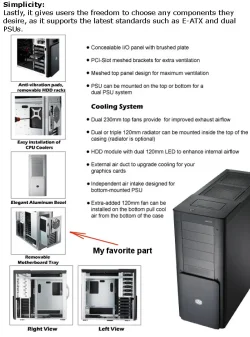
It's a full tower (Cooler Master ATCS 840 from 2008).
View attachment 181097
 (It's a beast, folks. It's huge.)
The difference is you have a full tower case with plenty of space to hide cables. I have an Antec Three Hundred mid-tower case with little space to hide cables. The fewer cables the better.Here's mine with a non-modular PSU...
It's a full tower (Cooler Master ATCS 840 from 2008).
View attachment 181097
I have a computer I built in 2017. The motherboard only has one M.2 connector. It started with one NVMe SSD and two SATA HHDs. I bought a PCIe card so I could add a second NVMe SSD. Now it has two NVMe SSDs and no HHDs.As does using NVMe drives.
Two less cables for each drive as no cable for power or the SATA connector.

I think there's pretty minimal impact if your cabling isn't as neat as a mass produced product. It certainly isn't going to affect performance to any measurable degree. Providing better air paths for cooling can drop temperatures a few degrees in your case. In extreme cases that could affect performance during heavy use to limit thermal throttling, but for the vast majority of PC users, they'll never get to that threshold.Some of you do know, but for those of you that may not, introduce yourself to inductance and high speed data cabling sometime.
All my computers have at least one HDD, my main computer and standby machine both have a 4TB IronWolf HDD for secondary backup. Both of my machines have two NVMe Gen4 SSD's and one SATA SSD as well.I have a computer I built in 2017. The motherboard only has one M.2 connector. It started with one NVMe SSD and two SATA HHDs. I bought a PCIe card so I could add a second NVMe SSD. Now it has two NVMe SSDs and no HHDs.

not that hard to document.. make a really hard knot on a cat cable and measure how much speed it drops on 10Gbit.. or make a hard 90 degree bend on a optical cable.I realize this topic is abour "air flow", however there are can be electriconic speed of data issues becocme may be problematic. HArd to document but not impossible.

None of which happens even in a pretty messy computer case. You can artificially create problems if desired, but I don't believe that's really what we're talking about.not that hard to document.. make a really hard knot on a cat cable and measure how much speed it drops on 10Gbit.. or make a hard 90 degree bend on a optical cable.
Or roll up a really long 220Volt cable that you have current running thru and put a cat cable next to it that you also rolled up and put the two rolls ontop of each other or even better the network roll inside the 220 roll so you get a really good and strong induction field.. then it becomes easy to measure.
no it dont.. but he mention induction and data speeds and how its hard to document.. so i just did an extreme spinoff how to get actual numbers on it.None of which happens even in a pretty messy computer case. You can artificially create problems if desired, but I don't believe that's really what we're talking about.


I have one of these, now demoted to test machine. Replaced by a Fractal Define 7.Here's mine with a non-modular PSU...
It's a full tower (Cooler Master ATCS 840 from 2008).
View attachment 181097

I've been assembling my own and other folks computers since the 1980's, and so far I can't point to a single incident where the problem was cable management. I don't go out of my way to make it sloppy, but I don't do handstands to make it perfect either.The long answer is if you think it does then it matters and if you think it doesn't then it won't matter until you discover that your bad cable management generated some nasty issues you never anticipated. Then suddenly it will matter.

I have one of these, now demoted to test machine. Replaced by a Fractal Define 7.
Actually lack of cable management have affected air flow a few times. A loose cable got caught in a fan and stopped it from turning. It could be a case fan, CPU fan, or GPU fan. Disrupting air flow is not good for CPUs or GPUs.I think there's pretty minimal impact if your cabling isn't as neat as a mass produced product. It certainly isn't going to affect performance to any measurable degree. Providing better air paths for cooling can drop temperatures a few degrees in your case. In extreme cases that could affect performance during heavy use to limit thermal throttling, but for the vast majority of PC users, they'll never get to that threshold.

Back in 2002 I bought a case that had a removable tray for the motherboard. The case wiring had connectors in the middle so could be detached. That allowed me to wire up the motherboard on the tray outside the case. After I pushed the tray back in I could connect the wiring using the connector. The case is totally obsolete now. The case did come with six case fans but they were all 80mm ones. Unfortunately, that is the only size fan the case could use.I also like the Define 6 and 7.
But I keep using this one cause the motherboard tray comes out with everything still attached.
Takes about 15-20 minutes to do a complete upgrade.
View attachment 181159