Cabled internet connection keeps dropping


cbreemer

Well-known member
Member
Local time
4:58 AM
Posts
98
OS
Windows 11 Pro Version 22H2 (OS Build 22621.3155)
Hey all, Over the past week or so my computer has had a strange issue. Every now and then the internet connection via LAN cable suddenly disappears for no reason I can think of. The tray icon changes from cable connection to the Wi-Fi icon. It's not my router (I think) because the Wi-Fi on my phone still works fine. Rebooting the router does not help anyway. After rebooting the computer things are back to normal again (at least for the time being...).

I can find many posts about Wi-Fi connection dropping, but none about cable connection dropping. Anyone got an idea? My specs:
Model: Intel NUC12WSHi7
CPU: 12th Gen Intel(R) Core(TM) i7-1260P, 2100 Mhz, 12 Core(s), 16 Logical Processor(s)
BIOS: Intel Corp. WSADL357.0090.2023.0821.1714, 21/08/2023
Motherboard: Intel NUC12WSHi7 version M46422-304
Memory: 64Gb
Graphics: Onboard Intel Iris Xe Graphics
OS: Microsoft Windows 11 Pro (64-bit) Version 24H2 10.0.26100.6899
Disk 1: Adata Legend 710 2Tb SSD
Disk 2: PNY CS9000 2Tb SSD
 
Windows Build/Version
Microsoft Windows 11 Pro (64-bit) Version 24H2 10.0.26100.6899

My Computer My Computer

At a glance

Windows 11 Pro Version 22H2 (OS Build 22621.3...Intel Core i7-1260P64GbIntel Iris Xe Graphics
OS
Windows 11 Pro Version 22H2 (OS Build 22621.3155)
Computer type
PC/Desktop
Manufacturer/Model
Intel NUC12WSHi7
CPU
Intel Core i7-1260P
Motherboard
Intel NUC12WSHi7
Memory
64Gb
Graphics Card(s)
Intel Iris Xe Graphics
Sound Card
Intel Smart Sound for USB
Monitor(s) Displays
LG 34WP500 UltraWide Monitor
Screen Resolution
2560x1080
Hard Drives
Adata Legend 710 2Tb SSD
PNY CS9000 2Tb SSD
Keyboard
Logitech K540 Bluetooth
Mouse
Logitech M310 Bluetooth
Internet Speed
200Mbps
Browser
Chrome
Antivirus
Avast Free Antivirus
Perhaps the connector plug at one or other end of your Ethernet cable is rattling about.
Perhaps the little plastic securing lever on top has cracked or snapped off.
Try jamming both connectors in place by forcing in a folded up slip of paper.


Denis
 

My Computer My Computer

At a glance

Windows 11 Home x64 Version 25H2 Build 26200....
OS
Windows 11 Home x64 Version 25H2 Build 26200.9168
OK, first and most obvious thing is to test quality of ethernet cables i.e. are they a tight fit.

Also, I would use cat 7+ cables.

@Try3 beat me to it.
 

My Computer My Computer

At a glance

Windows 11 Pro + Win11 Canary VM.I9 13th gen i9-13900H 2.60 GHZ16 GB solderedIntegrated Intel Iris XE
OS
Windows 11 Pro + Win11 Canary VM.
Computer type
Laptop
Manufacturer/Model
ASUS Zenbook 14
CPU
I9 13th gen i9-13900H 2.60 GHZ
Motherboard
Yep, Laptop has one.
Memory
16 GB soldered
Graphics Card(s)
Integrated Intel Iris XE
Sound Card
Realtek built in
Monitor(s) Displays
laptop OLED screen
Screen Resolution
2880x1800 touchscreen
Hard Drives
1 TB NVME SSD (only weakness is only one slot)
PSU
Internal + 65W thunderbolt USB4 charger
Case
Yep, got one
Cooling
Stella Artois (UK pint cans - 568 ml) - extra cost.
Keyboard
Built in UK keybd
Mouse
Bluetooth , wireless dongled, wired
Internet Speed
900 mbs (ethernet), wifi 6 typical 350-450 mb/s both up and down
Browser
Edge
Antivirus
Defender
Other Info
TPM 2.0, 2xUSB4 thunderbolt, 1xUsb3 (usb a), 1xUsb-c, hdmi out, 3.5 mm audio out/in combo, ASUS backlit trackpad (inc. switchable number pad)

Macrium Reflect Home V8
Office 365 Family (6 users each 1TB onedrive space)
Hyper-V (a vm runs almost as fast as my older laptop)
Thanks guys. I suppose this needs to be checked, even though I'm 99% convinced this is no hardware issue, happening out of the blue and fixed by a soft reboot.
 

My Computer My Computer

At a glance

Windows 11 Pro Version 22H2 (OS Build 22621.3...Intel Core i7-1260P64GbIntel Iris Xe Graphics
OS
Windows 11 Pro Version 22H2 (OS Build 22621.3155)
Computer type
PC/Desktop
Manufacturer/Model
Intel NUC12WSHi7
CPU
Intel Core i7-1260P
Motherboard
Intel NUC12WSHi7
Memory
64Gb
Graphics Card(s)
Intel Iris Xe Graphics
Sound Card
Intel Smart Sound for USB
Monitor(s) Displays
LG 34WP500 UltraWide Monitor
Screen Resolution
2560x1080
Hard Drives
Adata Legend 710 2Tb SSD
PNY CS9000 2Tb SSD
Keyboard
Logitech K540 Bluetooth
Mouse
Logitech M310 Bluetooth
Internet Speed
200Mbps
Browser
Chrome
Antivirus
Avast Free Antivirus
first and foremost, open command prompt as admin and run:

Code:
ipconfig /release
Code:
ipconfig /renew
Code:
ipconfig /flushdns

reboot. if that doesnt help, check the speed of your NIC.

Control Panel > Network and Sharing Center > Change Adapter Settings (for your NIC) > Right Click it > Properties > Configure > Advanced > Speed & Duplex - make sure its set properly
 

My Computer My Computer

At a glance

Windows 11 Pro
OS
Windows 11 Pro
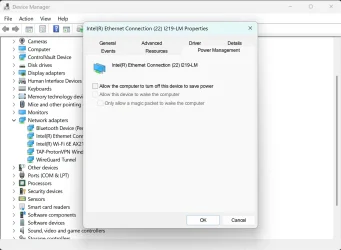
Windows is probably turning off your network adapter to "save power. " (the power saved is negligible.)

Open Device manager from the start menu
Expand Network Adapters
Right Click on your ethernet adapter and select Properties
Select the Power Management tab
Uncheck the boxes and click OK


devman.webp
 

My Computer My Computer

At a glance

Windows 11 22H2 Pro (X-lite Micro 11 version)i7 13850HX (20 cores, 28 threads)32GB DDR5Intel UHD/ RTX 1000 ADA
OS
Windows 11 22H2 Pro (X-lite Micro 11 version)
Computer type
Laptop
Manufacturer/Model
Dell/ Precision 7680
CPU
i7 13850HX (20 cores, 28 threads)
Motherboard
Dell
Memory
32GB DDR5
Graphics Card(s)
Intel UHD/ RTX 1000 ADA
Sound Card
Realtek
Monitor(s) Displays
4K UHD Touchscreen
Screen Resolution
3840 x 2400
Hard Drives
Samsung 512GB system drive
WD Blue 1TB game drive
PSU
240W AC adapter, 1800W when docked
Internet Speed
1 gigabit symmetrical
Browser
Firefox, Librewolf
Antivirus
None. Manully configured so nobody except me can change any critical system files. (Don't ask how, it's probably against some rule somewhere)
first and foremost, open command prompt as admin and run:

Code:
ipconfig /release
Code:
ipconfig /renew
Code:
ipconfig /flushdns

reboot. if that doesnt help, check the speed of your NIC.

Control Panel > Network and Sharing Center > Change Adapter Settings (for your NIC) > Right Click it > Properties > Configure > Advanced > Speed & Duplex - make sure its set properly
Thank you! I'll do the ipconfig stuff at the end of the day.

I checked the NIC properties and the "Speed & Duplex" value is set to "Auto Negotiation". I'm a bit scared to change that...
 

My Computer My Computer

At a glance

Windows 11 Pro Version 22H2 (OS Build 22621.3...Intel Core i7-1260P64GbIntel Iris Xe Graphics
OS
Windows 11 Pro Version 22H2 (OS Build 22621.3155)
Computer type
PC/Desktop
Manufacturer/Model
Intel NUC12WSHi7
CPU
Intel Core i7-1260P
Motherboard
Intel NUC12WSHi7
Memory
64Gb
Graphics Card(s)
Intel Iris Xe Graphics
Sound Card
Intel Smart Sound for USB
Monitor(s) Displays
LG 34WP500 UltraWide Monitor
Screen Resolution
2560x1080
Hard Drives
Adata Legend 710 2Tb SSD
PNY CS9000 2Tb SSD
Keyboard
Logitech K540 Bluetooth
Mouse
Logitech M310 Bluetooth
Internet Speed
200Mbps
Browser
Chrome
Antivirus
Avast Free Antivirus
Windows is probably turning off your network adapter to "save power. " (the power saved is negligible.)
Thanks for that! This seems like a real silly Windows feature to me.
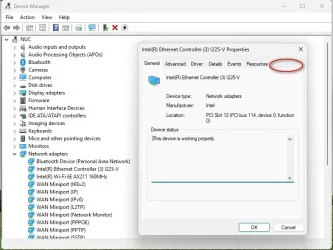
So I went into the NIC properties, and there is no "Power Management" tab. Maybe it's only there on a battery-powered computer?

nic.webp
 

My Computer My Computer

At a glance

Windows 11 Pro Version 22H2 (OS Build 22621.3...Intel Core i7-1260P64GbIntel Iris Xe Graphics
OS
Windows 11 Pro Version 22H2 (OS Build 22621.3155)
Computer type
PC/Desktop
Manufacturer/Model
Intel NUC12WSHi7
CPU
Intel Core i7-1260P
Motherboard
Intel NUC12WSHi7
Memory
64Gb
Graphics Card(s)
Intel Iris Xe Graphics
Sound Card
Intel Smart Sound for USB
Monitor(s) Displays
LG 34WP500 UltraWide Monitor
Screen Resolution
2560x1080
Hard Drives
Adata Legend 710 2Tb SSD
PNY CS9000 2Tb SSD
Keyboard
Logitech K540 Bluetooth
Mouse
Logitech M310 Bluetooth
Internet Speed
200Mbps
Browser
Chrome
Antivirus
Avast Free Antivirus
Have you checked other devices to see if a power management tab is present? I found, to my annoyance, that everything that can be turned off to "save power" is set to turn off to "save power" by default in spite of having my system set on the Ultimate Performance power plan. There's a script that unlocks all hidden advanced power management settings, but for the life of me, I can't remember where I found it. One of these days I'm going to figure out how to remove everything related to Windows "energy recommendations" without breaking Windows in the process, but so far, no luck.
 

My Computer My Computer

At a glance

Windows 11 22H2 Pro (X-lite Micro 11 version)i7 13850HX (20 cores, 28 threads)32GB DDR5Intel UHD/ RTX 1000 ADA
OS
Windows 11 22H2 Pro (X-lite Micro 11 version)
Computer type
Laptop
Manufacturer/Model
Dell/ Precision 7680
CPU
i7 13850HX (20 cores, 28 threads)
Motherboard
Dell
Memory
32GB DDR5
Graphics Card(s)
Intel UHD/ RTX 1000 ADA
Sound Card
Realtek
Monitor(s) Displays
4K UHD Touchscreen
Screen Resolution
3840 x 2400
Hard Drives
Samsung 512GB system drive
WD Blue 1TB game drive
PSU
240W AC adapter, 1800W when docked
Internet Speed
1 gigabit symmetrical
Browser
Firefox, Librewolf
Antivirus
None. Manully configured so nobody except me can change any critical system files. (Don't ask how, it's probably against some rule somewhere)
If you plug into a switch between your PC and the router, power off the switch for a minute, turn it back on.
In fact turn both the router and switch off for a minute.
 

My Computers My Computers

  • At a glance

    Windows 11 Pro 25H2 Build 26200.9168Intel(R) Core(TM) i7-4770K CPU @ 3.50GHz32.0 GB of I forget and the box is in storage.Gigabyte nVidia GeForce GTX 1660 Super OC 6GB
    OS
    Windows 11 Pro 25H2 Build 26200.9168
    Computer type
    PC/Desktop
    Manufacturer/Model
    Sin-built 2013
    CPU
    Intel(R) Core(TM) i7-4770K CPU @ 3.50GHz
    Motherboard
    ASUS ROG Maximus VI Formula
    Memory
    32.0 GB of I forget and the box is in storage.
    Graphics Card(s)
    Gigabyte nVidia GeForce GTX 1660 Super OC 6GB
    Sound Card
    ROG SupremeFX Formula 8-Channel High Definition Audio
    Monitor(s) Displays
    5 x LG 25MS500-B - 1 x 24MK430H-B - 1 x Wacom Pro 22" Touch Screen Tablet
    Screen Resolution
    All over the place
    Hard Drives
    Too many to list. OS on Samsung 1TB 870 QVO SATA
    PSU
    Silverstone 1500
    Case
    NZXT Phantom 820 Full-Tower Case
    Cooling
    Noctua NH-D15 Elite Class Dual Tower CPU Cooler / 6 x EziDIY 120mm / 2 x Corsair 140mm somethings / 1 x 140mm Thermaltake something / 2 x 200mm Corsair.
    Keyboard
    Corsair K95 / Logitech diNovo Edge Wireless
    Mouse
    Logitech: G402 / G502 / Mx Masters / Mx Air Cordless
    Internet Speed
    2000/500Mbps
    Browser
    All sorts
    Antivirus
    Kaspersky Premium
    Other Info
    ㅤㅤㅤㅤㅤㅤㅤㅤㅤㅤㅤㅤㅤㅤㅤㅤㅤㅤㅤㅤㅤㅤㅤㅤㅤㅤㅤㅤㅤㅤㅤㅤㅤㅤㅤㅤㅤㅤㅤㅤ⠀⠀⠀⠀⠀⠀⠀⠀⠀⠀
    TP-Link BE9300 WiFi 7 Bluetooth 5.4 (Archer TBE550E)
    TP-Link TX201 V1 2.5GB Lan

    Grandstream HT812 - VoIP
    ASUS DSL-AX82U - Mesh
    ASUS RT-AC68U - Mesh
    ASUS RT-BE88U Router

    Brother MFC-L2880DW Printer

    I’m on a horse.
  • At a glance

    Windows 11 Pro 25H2 Build 26200.9168 (Wifes)13th Generation Intel® Core™ i5-1340P Process...16GB LPDDR5-52001x Intel® Iris® Xe Graphics
    Operating System
    Windows 11 Pro 25H2 Build 26200.9168 (Wifes)
    Computer type
    Laptop
    Manufacturer/Model
    LENOVO Yoga 7 14IRL8 - Type 82YL
    CPU
    13th Generation Intel® Core™ i5-1340P Processor(Core™ i5-1340P)
    Memory
    16GB LPDDR5-5200
    Graphics card(s)
    1x Intel® Iris® Xe Graphics
    Sound Card
    Optimized with Dolby Atmos®
    Screen Resolution
    QHD 2880 x 1800 OLED
    Hard Drives
    M.2 512 GB SSD PCIe
    Mouse
    Logiteck MX Master 3S
    Internet Speed
    2000/500
    Antivirus
    Defender / Malwarebytes
    Other Info
    …still on a horse.


    Wireless Network: Wi-Fi 6E 2x2 AX; Bluetooth® 5.1 or above
    Ports: 1x 1 Novo button; 2 in 1 Audio Combo jack; Micro SD Card Reader; HDMI 1.4b; 2 x USB Type-C (TBT4)
    USB 3.2 Gen 2 DP 1.4a
    PD 3.0); 1 x USB 3.2 Gen1 Type A
    Camera
    1x 1080P FHD IR/RGB Hybrid with Privacy Shutter and Dual Array Microphone
    Graphics
    1x Intel® Iris® Xe Graphics
    Monitor
    14" WUXGA
    Form Factor
    Convertible Notebook
  • Windows 11 Pro 25H2 Build 26200.9168 (Wifes)

    Yoga 7 2-in-1 14IML9 - Type 83DJ

    Processor: Intel® Core™ Ultra 7 155H Processor(Core™ Ultra 7 155H)

    Memory: 32GB LPD5X-7467

    Hard Drive: 1 TB SSD PCIe

    Wireless Network: 1x Wi-Fi 6E 2x2 AX; Bluetooth® 5.1 or above

    Ports: 1 x HDMI 2.1 TMDS; 1 x Novo Button; 1 x Combo Audio Jack
    2 x USB-C (USB 4.0)
    1 x USB-A 3.2 Gen 1

    Camera: 1080P FHD IR Hybrid with Dual Microphone

    Graphics: Intel® Arc™ Graphics

    Monitor: 14" 2.8K

    ...Where's my horse?
Ethernet/LAN cable plugs can be bad on no-name ones. I have a couple of cables with latches that no longer spring out to keep the connector in properly. Also it is possible for finger contacts to get bent in the sockets hence unreliability. They can normally be bent back in to position with care.

Check all aspects of ethernet cables Plugs/Sockets/Cable.

Because you have the Wireless adapter still on, It may switch to best connection at any time. I forget the exact Windows criteria/priorities.

A soft reboot means nothing as you have both connected so of course that "appears" to correct it.
 

My Computer My Computer

At a glance

Windows 11
OS
Windows 11
So I went into the NIC properties, and there is no "Power Management" tab. Maybe it's only there on a battery-powered computer?


I have a Power Management tab on my Desktop computer, which is not battery powered.
Maybe you don't have the Power Management tab because that computer is a NUC Mini PC?


Something else to check... call your ISP tech support, and have them run a "line test".
 

My Computers My Computers

  • At a glance

    Win 11 Home ♦♦♦26200.9168 ♦♦♦♦♦♦♦25H2AMD Ryzen 7 3700XG.Skill (F4-3200C14D-16GTZKW)EVGA RTX 2070 (08G-P4-2171-KR)
    OS
    Win 11 Home ♦♦♦26200.9168 ♦♦♦♦♦♦♦25H2
    Computer type
    PC/Desktop
    Manufacturer/Model
    Built by Ghot® [May 2020]
    CPU
    AMD Ryzen 7 3700X
    Motherboard
    Asus Pro WS X570-ACE (BIOS 5302)
    Memory
    G.Skill (F4-3200C14D-16GTZKW)
    Graphics Card(s)
    EVGA RTX 2070 (08G-P4-2171-KR)
    Sound Card
    Realtek ALC1220P / ALC S1220A
    Monitor(s) Displays
    Dell U3011 30"
    Screen Resolution
    2560 x 1600
    Hard Drives
    2x Samsung 860 EVO 500GB,
    WD 4TB Black FZBX - SATA III,
    WD 8TB Black FZBX - SATA III,
    DRW-24B1ST CD/DVD Burner
    PSU
    PC Power & Cooling 750W Quad EPS12V
    Case
    Cooler Master ATCS 840 Tower
    Cooling
    CM Hyper 212 EVO (push/pull)
    Keyboard
    Ducky DK9008 Shine II Blue LED
    Mouse
    Logitech Optical M-100
    Internet Speed
    300/300
    Browser
    Firefox (latest)
    Antivirus
    Bitdefender Total Security
    Other Info
    Speakers: Klipsch Pro Media 2.1
  • At a glance

    Windows XP Pro 32bit w/SP3AMD Athlon 64 X2 5000+ (OC'd @ 3.2Ghz)TWIN2X2048-6400C4DHX (2 x 1GB, DDR2 800)EVGA 256-P2-N758-TR GeForce 8600GT SSC
    Operating System
    Windows XP Pro 32bit w/SP3
    Computer type
    PC/Desktop
    Manufacturer/Model
    Built by Ghot® (not in use)
    CPU
    AMD Athlon 64 X2 5000+ (OC'd @ 3.2Ghz)
    Motherboard
    ASUS M2N32-SLI Deluxe Wireless Edition
    Memory
    TWIN2X2048-6400C4DHX (2 x 1GB, DDR2 800)
    Graphics card(s)
    EVGA 256-P2-N758-TR GeForce 8600GT SSC
    Sound Card
    Onboard
    Monitor(s) Displays
    ViewSonic G90FB Black 19" Professional (CRT)
    Screen Resolution
    up to 2048 x 1536
    Hard Drives
    WD 36GB 10,000rpm Raptor SATA
    Seagate 80GB 7200rpm SATA
    Lite-On LTR-52246S CD/RW
    Lite-On LH-18A1P CD/DVD Burner
    PSU
    PC Power & Cooling Silencer 750 Quad EPS12V
    Case
    Generic Beige case, 80mm fans
    Cooling
    ZALMAN 9500A 92mm CPU Cooler
    Keyboard
    Logitech Classic Keybooard 200
    Mouse
    Logitech Optical M-BT96a
    Internet Speed
    300/300
    Browser
    Firefox 3.x ??
    Antivirus
    Symantec (Norton)
    Other Info
    Still assembled, still runs. Haven't turned it on for 15 years?
Have you checked other devices to see if a power management tab is present? I found, to my annoyance, that everything that can be turned off to "save power" is set to turn off to "save power" by default in spite of having my system set on the Ultimate Performance power plan. There's a script that unlocks all hidden advanced power management settings, but for the life of me, I can't remember where I found it. One of these days I'm going to figure out how to remove everything related to Windows "energy recommendations" without breaking Windows in the process, but so far, no luck.
I checked some other devices (not all) and none have the Power Management tab. I guess @Ghot may be right in suspecting that this is simply because it's a NUC mini PC. When I check advanced power settings, the only power plan available is "Balanced".
 

My Computer My Computer

At a glance

Windows 11 Pro Version 22H2 (OS Build 22621.3...Intel Core i7-1260P64GbIntel Iris Xe Graphics
OS
Windows 11 Pro Version 22H2 (OS Build 22621.3155)
Computer type
PC/Desktop
Manufacturer/Model
Intel NUC12WSHi7
CPU
Intel Core i7-1260P
Motherboard
Intel NUC12WSHi7
Memory
64Gb
Graphics Card(s)
Intel Iris Xe Graphics
Sound Card
Intel Smart Sound for USB
Monitor(s) Displays
LG 34WP500 UltraWide Monitor
Screen Resolution
2560x1080
Hard Drives
Adata Legend 710 2Tb SSD
PNY CS9000 2Tb SSD
Keyboard
Logitech K540 Bluetooth
Mouse
Logitech M310 Bluetooth
Internet Speed
200Mbps
Browser
Chrome
Antivirus
Avast Free Antivirus
Because you have the Wireless adapter still on, It may switch to best connection at any time. I forget the exact Windows criteria/priorities.

That is interesting. I can't imagine what would trigger Windows to suddenly prefer Wi-Fi over cable.

But as I never use Wi-Fi on this system I have switched it off.
 

My Computer My Computer

At a glance

Windows 11 Pro Version 22H2 (OS Build 22621.3...Intel Core i7-1260P64GbIntel Iris Xe Graphics
OS
Windows 11 Pro Version 22H2 (OS Build 22621.3155)
Computer type
PC/Desktop
Manufacturer/Model
Intel NUC12WSHi7
CPU
Intel Core i7-1260P
Motherboard
Intel NUC12WSHi7
Memory
64Gb
Graphics Card(s)
Intel Iris Xe Graphics
Sound Card
Intel Smart Sound for USB
Monitor(s) Displays
LG 34WP500 UltraWide Monitor
Screen Resolution
2560x1080
Hard Drives
Adata Legend 710 2Tb SSD
PNY CS9000 2Tb SSD
Keyboard
Logitech K540 Bluetooth
Mouse
Logitech M310 Bluetooth
Internet Speed
200Mbps
Browser
Chrome
Antivirus
Avast Free Antivirus
I have a Power Management tab on my Desktop computer, which is not battery powered.
Maybe you don't have the Power Management tab because that computer is a NUC Mini PC?


Something else to check... call your ISP tech support, and have them run a "line test".
Thanks! I think you are right on the Power Management tab
 

My Computer My Computer

At a glance

Windows 11 Pro Version 22H2 (OS Build 22621.3...Intel Core i7-1260P64GbIntel Iris Xe Graphics
OS
Windows 11 Pro Version 22H2 (OS Build 22621.3155)
Computer type
PC/Desktop
Manufacturer/Model
Intel NUC12WSHi7
CPU
Intel Core i7-1260P
Motherboard
Intel NUC12WSHi7
Memory
64Gb
Graphics Card(s)
Intel Iris Xe Graphics
Sound Card
Intel Smart Sound for USB
Monitor(s) Displays
LG 34WP500 UltraWide Monitor
Screen Resolution
2560x1080
Hard Drives
Adata Legend 710 2Tb SSD
PNY CS9000 2Tb SSD
Keyboard
Logitech K540 Bluetooth
Mouse
Logitech M310 Bluetooth
Internet Speed
200Mbps
Browser
Chrome
Antivirus
Avast Free Antivirus
If you plug into a switch between your PC and the router, power off the switch for a minute, turn it back on.
In fact turn both the router and switch off for a minute.
Thanks. I don't have a switch though. Turning off the router for a while has not solved this in the past. A PC reboot was needed.
 

My Computer My Computer

At a glance

Windows 11 Pro Version 22H2 (OS Build 22621.3...Intel Core i7-1260P64GbIntel Iris Xe Graphics
OS
Windows 11 Pro Version 22H2 (OS Build 22621.3155)
Computer type
PC/Desktop
Manufacturer/Model
Intel NUC12WSHi7
CPU
Intel Core i7-1260P
Motherboard
Intel NUC12WSHi7
Memory
64Gb
Graphics Card(s)
Intel Iris Xe Graphics
Sound Card
Intel Smart Sound for USB
Monitor(s) Displays
LG 34WP500 UltraWide Monitor
Screen Resolution
2560x1080
Hard Drives
Adata Legend 710 2Tb SSD
PNY CS9000 2Tb SSD
Keyboard
Logitech K540 Bluetooth
Mouse
Logitech M310 Bluetooth
Internet Speed
200Mbps
Browser
Chrome
Antivirus
Avast Free Antivirus
Windows uses a metric system to determine which network interface is "preferred". One can manually adjust this on systems that contain more than one NIC (Ethernet and Wi-Fi, for example). Here is a list of steps that may assist to set Ethernet as "preferred". (Or at least to verify the current status).
Windows uses a metric system to decide which adapter to use when multiple are available. The lower the metric, the higher the priority.

My original query posted to Copilot--​

there is an area in Windows networking where one can set a priority list og network connections so that, for example, LAN would be preferred over Wi-Fi. Where is that?

Quick Answer: Yes—Windows does let you control which network adapter takes priority. By default, Ethernet (LAN) is already preferred over Wi-Fi, but you can manually adjust this by changing the interface metric in the adapter’s advanced settings or by using PowerShell.​

Option 1: Control Panel (GUI method)​

  1. Press Win + R, type ncpa.cpl, and hit Enter.This opens the Network Connections window.
  2. Right-click your Ethernet adapterProperties.
  3. Select Internet Protocol Version 4 (TCP/IPv4)PropertiesAdvanced.
  4. Uncheck Automatic metric.
  5. In the Interface metric box, enter a lower number (e.g., 5) for Ethernet.
    • Do the same for Wi-Fi, but give it a higher number (e.g., 20).
  6. Click OK to save.
👉 Result: Windows will always prefer the adapter with the lower metric (Ethernet in this case).

Hope this helps.
 

My Computer My Computer

At a glance

Windows 11 Pro 26200.9168Ryzen 5 5600G24GB
OS
Windows 11 Pro 26200.9168
Computer type
PC/Desktop
Manufacturer/Model
Home Built
CPU
Ryzen 5 5600G
Motherboard
ASUS X470 Prime Pro
Memory
24GB
Monitor(s) Displays
Alienware 2518HF
Screen Resolution
1920 x 1080
Hard Drives
Boot: NVME WDC WDS500G; ASUS M.2 Riser card with 3 additional NVME drives
Various Internal SDD (Samsung and WDC) and HDD drives mostly Western Digital
PSU
Seasonic Focus Gold 650W
Case
Corsair 200R
Cooling
Noctua PWM fans x 3
Keyboard
Corsair K60 SE Pro
Mouse
Corsair Dark Core RGB Pro SE
Internet Speed
500/500
Browser
MS Edge
Antivirus
Malwarebytes Premium
Thanks! I think you are right on the Power Management tab
Odd because I'm using a NUC for my plex server and I have the power management tab.

I would double check to make sure you have the latest drivers.
 

My Computer My Computer

At a glance

Windows 11 Pro Version 25H2 (26200.6901)AMD Ryzen 5 2600Corsair 32 GBASRock AMD Radeon RX 6600
OS
Windows 11 Pro Version 25H2 (26200.6901)
Computer type
PC/Desktop
Manufacturer/Model
DIY
CPU
AMD Ryzen 5 2600
Motherboard
MSI B450 Tomahawk Max (MS-7C02)
Memory
Corsair 32 GB
Graphics Card(s)
ASRock AMD Radeon RX 6600
Sound Card
Realtek 7.1
Monitor(s) Displays
LG IPS Full HD 27 (x2)
Screen Resolution
1920 x 1080
Hard Drives
NVMe XPG Spectrix S40G - 1 TB
PSU
CX-M Series CX750M — 750 Watt 80 PLUS Bronze Semi Modular ATX PSU
Case
Corsair Carbide Series Air 540 High Airflow ATX Cube Case
Cooling
CORSAIR Hydro Series H60 AIO Liquid CPU Cooler
Keyboard
Redragon Caesura
Mouse
Redragon Vampire Elite
Internet Speed
1 GB
Browser
Mozilla Firefox
Antivirus
Windows Defender
it maybe worth while setting your system to static IP addressing.
settings > network & internet > ethernet

IP address
subnet mask
gateway

also the DNS
cloudflare
primary 1.1.1.1
secondary 1.0.0.1

or

google
primary 8.8.8.8
secondary 8.8.4.4

then see if the connection is stable
you can also reserve that static IP address within the router
best of luck Steve ..
 

My Computers My Computers

  • At a glance

    Windows 11 HomeRyzen 7 5825u64GB DDR4 3200Ryzen 7 5825u
    OS
    Windows 11 Home
    Computer type
    PC/Desktop
    Manufacturer/Model
    HP 24" AiO
    CPU
    Ryzen 7 5825u
    Motherboard
    HP
    Memory
    64GB DDR4 3200
    Graphics Card(s)
    Ryzen 7 5825u
    Sound Card
    RealTek
    Monitor(s) Displays
    24" HP AiO
    Screen Resolution
    1920 x 1080 @60 Hz
    Hard Drives
    1TB WD Blue SN580 M2 SSD Partitioned.
    2x 1TB USB HDD External Backup/Storage.
    PSU
    90W external power brick
    Case
    24" All in One
    Cooling
    Default Air Cooling
    Keyboard
    HP WiFi UK extended
    Mouse
    HP WiFi 3 Button
    Internet Speed
    1GB full fibre
    Browser
    Edge & Firefox
    Antivirus
    AVG Internet Security/Windows Defender
    Other Info
    Mainly Open Source Software
  • At a glance

    Ubuntu 22.04.5 LTSi5 7200u16GB DDR4Intel
    Operating System
    Ubuntu 22.04.5 LTS
    Computer type
    Laptop
    Manufacturer/Model
    Dell 13" Latitude 2017
    CPU
    i5 7200u
    Motherboard
    Dell
    Memory
    16GB DDR4
    Graphics card(s)
    Intel
    Sound Card
    Intel
    Monitor(s) Displays
    13" Dell Laptop
    Hard Drives
    250GB Crucial 2.5" SSD
    Mouse
    Generic WiFi 3 button
    Internet Speed
    WiFi only
    Browser
    Firefox
    Antivirus
    ClamAV TK
    Other Info
    Mainly Open Source Software
it maybe worth while setting your system to static IP addressing.
settings > network & internet > ethernet

IP address
subnet mask
gateway

also the DNS
cloudflare
primary 1.1.1.1
secondary 1.0.0.1

or

google
primary 8.8.8.8
secondary 8.8.4.4

then see if the connection is stable
you can also reserve that static IP address within the router
best of luck Steve ..
Agreed, Cloudflare has been a great DNS choice for years!
 

My Computers My Computers

  • At a glance

    Windows 11 Pro 25H2 (OS Build 26200.8246)Intel(R) Xeon(R) CPU E3-1535M v5 @ 2.90 Max T...64GB DDR4 ECC (Error-Correcting Code memory)NVIDIA Quadro M2000M 4GB GDDR5 & Intel(R) HD ...
    OS
    Windows 11 Pro 25H2 (OS Build 26200.8246)
    Computer type
    Laptop
    Manufacturer/Model
    Dell Precision Mobile Workstation
    CPU
    Intel(R) Xeon(R) CPU E3-1535M v5 @ 2.90 Max Turbo 3.80
    Motherboard
    00V5FJ
    Memory
    64GB DDR4 ECC (Error-Correcting Code memory)
    Graphics Card(s)
    NVIDIA Quadro M2000M 4GB GDDR5 & Intel(R) HD Graphics P530
    Sound Card
    Realtek Audio
    Monitor(s) Displays
    15.6" 4K UltraHD
    Screen Resolution
    4K UHD 3840x2160
    Hard Drives
    2TB Crucial NVMe & 2TB Seagate SATA
    PSU
    Dell 180W 19.5V-9.23A
    Keyboard
    Backlit
    Mouse
    Logitech G703 & Logitech G305
    Internet Speed
    WIFI: Intel(R) Wi-Fi 6E AX210NGW(Gig+) 160MHz Bands 2.4GHz(574Mbps), 5GHz 2.4Gbps, 6 GHz (160MHz) 2.4Gbps
    Browser
    Mozilla Firefox
    Antivirus
    Windows Defender/Microsoft Security + additional Anti Spyware, Anti Malware, etc.
    Other Info
    Thunderbolt 3
  • At a glance

    Windows 11 Pro 24H2 (OS Build 26100.6725)Dual (X2) Intel(R) Xeon(R) CPU E5-2690 0 @ 2....64GB DDR3 ECC (Error-Correcting Code memory)NVIDIA GeForce GTX 970 4GB of GDDR5
    Operating System
    Windows 11 Pro 24H2 (OS Build 26100.6725)
    Computer type
    PC/Desktop
    Manufacturer/Model
    Dell Precision Workstation T5610
    CPU
    Dual (X2) Intel(R) Xeon(R) CPU E5-2690 0 @ 2.90GHz Max Turbo 3.80
    Motherboard
    0WN7Y6
    Memory
    64GB DDR3 ECC (Error-Correcting Code memory)
    Graphics card(s)
    NVIDIA GeForce GTX 970 4GB of GDDR5
    Sound Card
    Realtek Audio & NVIDIA High Definition Audio
    Monitor(s) Displays
    3 Acer Monitors
    Screen Resolution
    1920x1080
    Hard Drives
    2 Seagate Barracuda ST2000DM008-2UB102 (RAID)
    Mouse
    Logitech G305

Latest Support Threads

Back
Top Bottom