Solved Calendar widget displays in Chinese


BadgerCU

Member
Local time
7:39 AM
Posts
4
OS
Windows 11
As stated, the calendar widget display is using Chinese characters instead of English.
It started several months ago ... after an update ... of course.
I don't have alternate languages set up on my PC.
It's not really important, just annoying.
Can I do anything to fix this?

2025-11-20_calendar-in-chinese.webp
 
Windows Build/Version
25H2 (OS Build 26200.7171)

My Computer

System One

  • OS
    Windows 11
    Computer type
    PC/Desktop
    Manufacturer/Model
    Beelink | AMD
    CPU
    Ryzen 7
    Graphics Card(s)
    Radeon
Does this help?


My Computer

System One

  • OS
    Windows 11 Professional 25H2
    Computer type
    PC/Desktop
    Manufacturer/Model
    Digital Storm VELOX
    CPU
    Intel Core i9 11900K
    Motherboard
    ASUS PRIME Z590-P
    Memory
    64GB
    Graphics Card(s)
    NVIDIA GeForce GTX 1650
    Sound Card
    Realtek onboard
    Monitor(s) Displays
    Acer R221Q 21.5"
    Screen Resolution
    1920 x 1080
    Hard Drives
    2 x Samsung SSD 990 EVO Plus (1 TB)
    2 x Seagate ST4000NE001 (4 TB)
    PSU
    None
    Case
    VELOX
    Cooling
    Cooler Master
    Keyboard
    Logitech
    Mouse
    Kensington trackball
    Browser
    Firefox, Chrome
    Antivirus
    Windows Defender, Malwarebytes
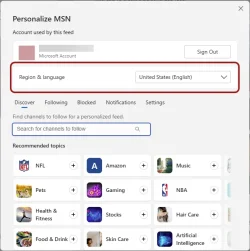
Thanks very much for your very prompt reply! I don't use MSN widgets. I have most MS junk turned off. This calendar/clock widget is really the only one that I ever touch.
However, I did follow the directions in the tutorial and my language is already set to English. (see new image)
(I also discovered to my annoyance that I am logged into Windows, which I usually try to keep my PC disconnected from MS. - but that's a separate issue.) Just on the off chance that it would help, I noticed that I can sign out of MS on the widgets app, so I did that, too. No change in the calendar display, though.
 

Attachments

  • 2025-11-20_personalize-widgets.webp
    2025-11-20_personalize-widgets.webp
    30.2 KB · Views: 1
Last edited:

My Computer

System One

  • OS
    Windows 11
    Computer type
    PC/Desktop
    Manufacturer/Model
    Beelink | AMD
    CPU
    Ryzen 7
    Graphics Card(s)
    Radeon
我甚至不知道 Win11 里有日历小部件。我用的是众多可用免费软件中的一个:WinCalendar。

抱歉,必须这么说。
 

My Computer

System One

  • OS
    Win 11 26100.2894
    Computer type
    PC/Desktop
    Manufacturer/Model
    Spec Build
    CPU
    AMD Ryzen 7 9700X Granite Ridge AM5 3.8Ghz 8 Core
    Motherboard
    Gigbyte B650 Lorus Elite AX ICE AMD AM5 ATX
    Memory
    GSkill Flare 5 32G DDR5
    Graphics Card(s)
    GE Force RTX 3060 Dual Fas 12Gb GDDR6
    Sound Card
    On Board Realtek High Definition Audio
    Monitor(s) Displays
    MSI G274PF 27"
    Screen Resolution
    1920x1080@180KZ
    Hard Drives
    1 x 2Tb Samsung 970 2T VNAND, 1 x 2T Samsung 870 EVO SATA on board, 2 x 1TB external SSD's for backups
    PSU
    Corsair RM850e
    Case
    Thermaltake VTX 100
    Cooling
    3 x Front Case, 1 Rear, Hyper212 CPU
    Keyboard
    Logitech Wireless K295
    Mouse
    Logitech Wireless M190
    Internet Speed
    DL 935Mbps, UL 80Mbps
    Browser
    Edge 132.0.2957.127, Opera 116.0.5366.51, Firefox 134.02
    Antivirus
    MSE, CClnr, MWBytes, SAS
    Other Info
    MS Office Home 2024
Good point Chef Duane. I used a translation app. ;-)
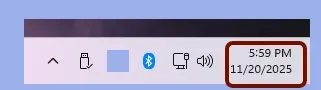
I don't have a special widget installed to use as a calendar.
This is the calendar that comes attached with the clock and usually sits on the bottom right of the taskbar in the system tray area. (image)
 

Attachments

  • 2025-11-20_systray-clock-widget.webp
    2025-11-20_systray-clock-widget.webp
    2.6 KB · Views: 1

My Computer

System One

  • OS
    Windows 11
    Computer type
    PC/Desktop
    Manufacturer/Model
    Beelink | AMD
    CPU
    Ryzen 7
    Graphics Card(s)
    Radeon
It's not a widget. It's just the tray calendar.

Have you looked in Settings > Time & Language > Language & Region?
 

My Computers

System One System Two

  • OS
    Windows 11 Pro
    Computer type
    PC/Desktop
    Manufacturer/Model
    Stigg's Build
    CPU
    Intel Core i9-10900X
    Motherboard
    GIGABYTE X299X DESIGNARE 10G
    Memory
    Corsair 64 GB (4 x 16 GB) CMW64GX4M4C3000C15 Vengeance RGB Pro 3000Mhz DDR4
    Graphics Card(s)
    GIGABYTE GeForce GTX 1660 Super Mini ITX 6 GB OC
    Sound Card
    Realtek ALC1220
    Monitor(s) Displays
    Samsung 27" FHD LED FreeSync Gaming Monitor (LS27F350FHEXXY)
    Screen Resolution
    1920 x 1080
    Hard Drives
    Samsung 970 Pro Series 1TB M.2 2280 NVMe SSD
    Western Digital Red Pro WD8003FFBX-68B9AN0 8 TB, 7200 RPM, SATA-III
    Western Digital Red Pro WD8003FFBX-68B9AN0 8 TB, 7200 RPM, SATA-III
    PSU
    Corsair HX1200 1200W 80 Plus Platinum
    Case
    Fractal Design Define 7 Black Solid Case
    Cooling
    Noctua NH-D15 Chromax Black
    Keyboard
    Razer Ornata V2
    Mouse
    Razer DeathAdder Essential
    Internet Speed
    FTTN 100Mbps / 40Mbps
    Browser
    Mozilla Firefox
    Antivirus
    N/A
    Other Info
    Logitech BRIO 4k Ultra HD USB-C Webcam
  • Operating System
    Windows 10 Pro
    Computer type
    Laptop
    Manufacturer/Model
    ASUS ROG Zephyrus M GM501GS
    CPU
    Core i7-8750H
    Motherboard
    Zephyrus M GM501GS
    Memory
    SK Hynix 32 GB (2 x 16 GB) HMA82GS6CJR8N-VK 16 GB DDR4-2666 DDR4 SDRAM
    Graphics card(s)
    NVIDIA GeForce GTX 1070
    Sound Card
    Realtek ALC294
    Monitor(s) Displays
    AU Optronics B156HAN07.1 [15.6" LCD]
    Screen Resolution
    1920 x 1080
    Hard Drives
    Samsung MZVKW512HMJP-00000 512 GB, PCI-E 3.0 x4
    Samsung SSD 860 QVO 4TB 4 TB, SATA-III
    PSU
    N/A
    Case
    N/A
    Cooling
    N/A
    Keyboard
    PC/AT Enhanced PS2 Keyboard (101/102-Key)
    Mouse
    Razer DeathAdder Essential
    Internet Speed
    FTTN 100Mbps / 40Mbps
    Browser
    Mozilla Firefox
    Antivirus
    N/A
    Other Info
    USB2.0 HD UVC Webcam
I actually did this to myself recently. It's in the Date and Time settings (ms-settings:dateandtime). Under Additional settings, Show additional calendars.
 

My Computer

System One

  • OS
    Windows 11 Pro 25H2
    Computer type
    PC/Desktop
    Manufacturer/Model
    Intel NUC12WSHi7
    CPU
    12th Gen Core i7-1260P
    Motherboard
    NUC12WSBi7
    Memory
    64 GB Micron PC4-25600
    Graphics Card(s)
    Intel Iris Xe Graphics
    Sound Card
    on-board Realtek HD Audio
    Monitor(s) Displays
    Dell U3219Q
    Screen Resolution
    3840 x 2160
    Hard Drives
    Samsung SSD 990 PRO 1TB
    Crucial MX500 2 TB
    Antivirus
    Microsoft Defender
It's not a widget. It's just the tray calendar.

Have you looked in Settings > Time & Language > Language & Region?
Yes. I used the wrong term in my Thread title. I did not know it was called "Tray calendar". Thanks for that correction. Language and Region was set correctly Thanks Stigg!


I actually did this to myself recently. It's in the Date and Time settings (ms-settings:dateandtime). Under Additional settings, Show additional calendars.

pseymour, That worked, Thanks very much!

I did not add an Additional Chinese Calendar on purpose. However when I checked, it was showing in Date and Time Settings > Additional Settings > Additional Calendars. I have removed it. And all is back to normal.
Many Thanks to all who commented!
 

My Computer

System One

  • OS
    Windows 11
    Computer type
    PC/Desktop
    Manufacturer/Model
    Beelink | AMD
    CPU
    Ryzen 7
    Graphics Card(s)
    Radeon

Latest Support Threads

Back
Top Bottom