Solved Can anyone run CrystalDiskInfo on the latest windows


but downloading the zip file from the CrystalDisk page work


Always get the ZIP version for Crystal Disk XXXX, and for CPU-Z and GPU-Z.
They're all portable.

Why?
I have no idea. They just work.
 

My Computers

System One System Two

  • OS
    Win 11 Home ♦♦♦26200.8457 ♦♦♦♦♦♦♦25H2
    Computer type
    PC/Desktop
    Manufacturer/Model
    Built by Ghot® [May 2020]
    CPU
    AMD Ryzen 7 3700X
    Motherboard
    Asus Pro WS X570-ACE (BIOS 5302)
    Memory
    G.Skill (F4-3200C14D-16GTZKW)
    Graphics Card(s)
    EVGA RTX 2070 (08G-P4-2171-KR)
    Sound Card
    Realtek ALC1220P / ALC S1220A
    Monitor(s) Displays
    Dell U3011 30"
    Screen Resolution
    2560 x 1600
    Hard Drives
    2x Samsung 860 EVO 500GB,
    WD 4TB Black FZBX - SATA III,
    WD 8TB Black FZBX - SATA III,
    DRW-24B1ST CD/DVD Burner
    PSU
    PC Power & Cooling 750W Quad EPS12V
    Case
    Cooler Master ATCS 840 Tower
    Cooling
    CM Hyper 212 EVO (push/pull)
    Keyboard
    Ducky DK9008 Shine II Blue LED
    Mouse
    Logitech Optical M-100
    Internet Speed
    300/300
    Browser
    Firefox (latest)
    Antivirus
    Bitdefender Total Security
    Other Info
    Speakers: Klipsch Pro Media 2.1
  • Operating System
    Windows XP Pro 32bit w/SP3
    Computer type
    PC/Desktop
    Manufacturer/Model
    Built by Ghot® (not in use)
    CPU
    AMD Athlon 64 X2 5000+ (OC'd @ 3.2Ghz)
    Motherboard
    ASUS M2N32-SLI Deluxe Wireless Edition
    Memory
    TWIN2X2048-6400C4DHX (2 x 1GB, DDR2 800)
    Graphics card(s)
    EVGA 256-P2-N758-TR GeForce 8600GT SSC
    Sound Card
    Onboard
    Monitor(s) Displays
    ViewSonic G90FB Black 19" Professional (CRT)
    Screen Resolution
    up to 2048 x 1536
    Hard Drives
    WD 36GB 10,000rpm Raptor SATA
    Seagate 80GB 7200rpm SATA
    Lite-On LTR-52246S CD/RW
    Lite-On LH-18A1P CD/DVD Burner
    PSU
    PC Power & Cooling Silencer 750 Quad EPS12V
    Case
    Generic Beige case, 80mm fans
    Cooling
    ZALMAN 9500A 92mm CPU Cooler
    Keyboard
    Logitech Classic Keybooard 200
    Mouse
    Logitech Optical M-BT96a
    Internet Speed
    300/300
    Browser
    Firefox 3.x ??
    Antivirus
    Symantec (Norton)
    Other Info
    Still assembled, still runs. Haven't turned it on for 15 years?
Always get the ZIP version for Crystal Disk XXXX, and for CPU-Z and GPU-Z.
They're all portable.

Why?
I have no idea. They just work.

Yeah, that's a different way of doing it.

I use the PortableApps launcher because it's convenient and I've rarely had a problem with it. Not to mention I can do numerous updates to it all at one time.

For a native install then the Revo option would apply.

Whatever works...
 

My Computers

System One System Two

  • OS
    Windows 11 Pro 25H2 build: (26200.7623)
    Computer type
    Laptop
    Manufacturer/Model
    Microsoft Surface Pro
    Memory
    32GB
  • Operating System
    Microsoft 25H2 Pro
    Computer type
    Laptop
    Manufacturer/Model
    Dell Pro 14 - PC14250
    CPU
    Intel Core Ultra 7
    Memory
    64GB
    Graphics card(s)
    Intel Integrated Graphics
    Hard Drives
    Micron 1TB SSD
Well I've never done it without using the PortableApps.exe launcher. That might be the problem there.

If you try to open the apps individually without it then it becomes a crap-shoot. It was designed to revolve around their launcher.
That's how all PortableApps programs work even without using the launcher
When you try it they add registry if needed and when you close the program they remove them
I have been using PortableApps for years and I know how they work

You are not supposed to open the file in
CrystalDiskInfoPortable\App\CrystalDiskInfo\DiskInfo64.exe
but the
CrystalDiskInfoPortable\CrystalDiskInfoPortable.exe

@Ghot there are some PortableApps program that don't actually have an official portable version
 

My Computer

System One

  • OS
    Windows 11
    Computer type
    Laptop
    Manufacturer/Model
    MSI Sword 17 HX
    CPU
    14700HX
    Memory
    64GB
    Graphics Card(s)
    RTX 4070
That's how all PortableApps programs work even without using the launcher
When you try it they add registry if needed and when you close the program they remove them
I have been using PortableApps for years and I know how they work

You are not supposed to open the file in
CrystalDiskInfoPortable\App\CrystalDiskInfo\DiskInfo64.exe
but the
CrystalDiskInfoPortable\CrystalDiskInfoPortable.exe

To be honest with ya, I've never used the portableapps version without the launcher. That's what it's made for. In fact I didn't know those portableapps versions would work without it. That's new to me.

Doing it the way @Ghot suggests by downloading Crystal Dew World's portable zip file and installing it directly on to a USB may be the way to go.


If that doesn’t work then I would suggest using the PortableApps launcher as an workaround alternative to what you're used to doing.
 

My Computers

System One System Two

  • OS
    Windows 11 Pro 25H2 build: (26200.7623)
    Computer type
    Laptop
    Manufacturer/Model
    Microsoft Surface Pro
    Memory
    32GB
  • Operating System
    Microsoft 25H2 Pro
    Computer type
    Laptop
    Manufacturer/Model
    Dell Pro 14 - PC14250
    CPU
    Intel Core Ultra 7
    Memory
    64GB
    Graphics card(s)
    Intel Integrated Graphics
    Hard Drives
    Micron 1TB SSD
downloading Crystal Dew World's portable zip file and installing it directly on to a USB


I just run it straight from the desktop.
The USB method has the advantage of being able to use it on many computers.
 

My Computers

System One System Two

  • OS
    Win 11 Home ♦♦♦26200.8457 ♦♦♦♦♦♦♦25H2
    Computer type
    PC/Desktop
    Manufacturer/Model
    Built by Ghot® [May 2020]
    CPU
    AMD Ryzen 7 3700X
    Motherboard
    Asus Pro WS X570-ACE (BIOS 5302)
    Memory
    G.Skill (F4-3200C14D-16GTZKW)
    Graphics Card(s)
    EVGA RTX 2070 (08G-P4-2171-KR)
    Sound Card
    Realtek ALC1220P / ALC S1220A
    Monitor(s) Displays
    Dell U3011 30"
    Screen Resolution
    2560 x 1600
    Hard Drives
    2x Samsung 860 EVO 500GB,
    WD 4TB Black FZBX - SATA III,
    WD 8TB Black FZBX - SATA III,
    DRW-24B1ST CD/DVD Burner
    PSU
    PC Power & Cooling 750W Quad EPS12V
    Case
    Cooler Master ATCS 840 Tower
    Cooling
    CM Hyper 212 EVO (push/pull)
    Keyboard
    Ducky DK9008 Shine II Blue LED
    Mouse
    Logitech Optical M-100
    Internet Speed
    300/300
    Browser
    Firefox (latest)
    Antivirus
    Bitdefender Total Security
    Other Info
    Speakers: Klipsch Pro Media 2.1
  • Operating System
    Windows XP Pro 32bit w/SP3
    Computer type
    PC/Desktop
    Manufacturer/Model
    Built by Ghot® (not in use)
    CPU
    AMD Athlon 64 X2 5000+ (OC'd @ 3.2Ghz)
    Motherboard
    ASUS M2N32-SLI Deluxe Wireless Edition
    Memory
    TWIN2X2048-6400C4DHX (2 x 1GB, DDR2 800)
    Graphics card(s)
    EVGA 256-P2-N758-TR GeForce 8600GT SSC
    Sound Card
    Onboard
    Monitor(s) Displays
    ViewSonic G90FB Black 19" Professional (CRT)
    Screen Resolution
    up to 2048 x 1536
    Hard Drives
    WD 36GB 10,000rpm Raptor SATA
    Seagate 80GB 7200rpm SATA
    Lite-On LTR-52246S CD/RW
    Lite-On LH-18A1P CD/DVD Burner
    PSU
    PC Power & Cooling Silencer 750 Quad EPS12V
    Case
    Generic Beige case, 80mm fans
    Cooling
    ZALMAN 9500A 92mm CPU Cooler
    Keyboard
    Logitech Classic Keybooard 200
    Mouse
    Logitech Optical M-BT96a
    Internet Speed
    300/300
    Browser
    Firefox 3.x ??
    Antivirus
    Symantec (Norton)
    Other Info
    Still assembled, still runs. Haven't turned it on for 15 years?

Are you using the PortableApps version?
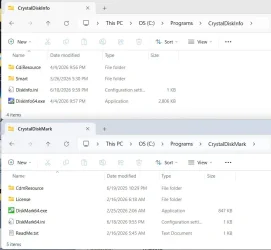
No need to go get a portable version of info or mark as all you have to do is download the zip instead of the installer.
The zip is just the binaries so it is a portable version.
Unzip the files wherever you want then run the exe.

DiskMark:

Screenshot 2026-04-04 112443.webp

Diskinfo:

Screenshot 2026-04-04 112229.webp
 

My Computer

System One

  • OS
    Windows 11 Pro
No need to go get a portable version of info or mark as all you have to do is download the zip instead of the installer.
The zip is just the binaries so it is a portable version.
Unzip the files wherever you want then run the exe.

DiskMark:

View attachment 167812

Diskinfo:

View attachment 167814

Yup, that'll work.

I have it installed natively using a zip file, and I also have installed on a PortableApps USB, along with a number of other apps through the PortableApps.com's own app store. Been doing it that way for years, although if there's something even more convenient than that, I'm willing to look at it another way.
 

My Computers

System One System Two

  • OS
    Windows 11 Pro 25H2 build: (26200.7623)
    Computer type
    Laptop
    Manufacturer/Model
    Microsoft Surface Pro
    Memory
    32GB
  • Operating System
    Microsoft 25H2 Pro
    Computer type
    Laptop
    Manufacturer/Model
    Dell Pro 14 - PC14250
    CPU
    Intel Core Ultra 7
    Memory
    64GB
    Graphics card(s)
    Intel Integrated Graphics
    Hard Drives
    Micron 1TB SSD
Like magic after reinstalling windows,every single problem I had got fixed
I wish I knew what exactly the problem was
 

My Computer

System One

  • OS
    Windows 11
    Computer type
    Laptop
    Manufacturer/Model
    MSI Sword 17 HX
    CPU
    14700HX
    Memory
    64GB
    Graphics Card(s)
    RTX 4070
Back
Top Bottom