Can I somehow completely turn off windows defender


vsub

Active member
Member
VIP
Local time
1:13 PM
Posts
207
OS
Windows 11
Just temporary
I want to turn off all of it's features as if it's not installed at all

I have a weird problem and I cannot figure out what is causing it
Some games take A LOT of time(sometimes a minute)to load IF I start them from the desktop or from folder window that is creased by windows explorer
If I run the game from any other way(some other file manager or cmd and million other ways),there is no problem at all(the load time is from 3 to 5 times faster when I am not starting it from the explorer)

Today I also tried loading those games on my old laptop with win10(nothing is updated there for months)and there was no problems loading them from a window(folder)created by explorer.exe
I have no idea what could be causing this problem
The old laptop is MUCH weaker and I also tried at least half a year older nvidia drivers on the new one but no change
 

My Computer

System One

  • OS
    Windows 11
    Computer type
    Laptop
    Manufacturer/Model
    MSI Sword 17 HX
    CPU
    14700HX
    Memory
    64GB
    Graphics Card(s)
    RTX 4070
this maybe of help

best of luck Steve ..
 

My Computers

System One System Two

  • OS
    Debian Trixie KDE Windows 11 Home
    Computer type
    PC/Desktop
    Manufacturer/Model
    HP 24" AiO
    CPU
    Ryzen 7 5825u
    Motherboard
    HP
    Memory
    64GB DDR4 3200
    Graphics Card(s)
    Ryzen 7 5825u
    Sound Card
    RealTek
    Monitor(s) Displays
    24" HP AiO
    Screen Resolution
    1920 x 1080 @60 Hz
    Hard Drives
    1TB WD Blue SN580 M2 SSD Partitioned.
    2x 1TB USB HDD External Backup/Storage.
    PSU
    90W external power brick
    Case
    24" All in One
    Cooling
    Default Air Cooling
    Keyboard
    HP WiFi UK extended
    Mouse
    HP WiFi 3 Button
    Internet Speed
    1GB full fibre
    Browser
    Edge & Firefox
    Antivirus
    AVG Internet Security/Windows Defender
    Other Info
    Mainly Open Source Software
  • Operating System
    Ubuntu 22.04.5 LTS
    Computer type
    Laptop
    Manufacturer/Model
    Dell 13" Latitude 2017
    CPU
    i5 7200u
    Motherboard
    Dell
    Memory
    16GB DDR4
    Graphics card(s)
    Intel
    Sound Card
    Intel
    Monitor(s) Displays
    13" Dell Laptop
    Hard Drives
    250GB Crucial 2.5" SSD
    Mouse
    Generic WiFi 3 button
    Internet Speed
    WiFi only
    Browser
    Firefox
    Antivirus
    ClamAV TK
    Other Info
    Mainly Open Source Software
This batch script will permanently disable or enable Defender on Windows 11.


Code:
:: How to Permanently Disable Windows Defender Antivirus in Windows 11

:: Coded by FreeBooter

@Echo Off & Cls

net sess>nul 2>&1||(powershell start cmd -ArgumentList """/c %~0""" -verb Runas & exit)

:_Start
Cls & Mode CON  LINES=11 COLS=60 & Color 0E &Title Created By FreeBooter
Echo.
Echo.      
Echo         Type (D) letter to Disable Windows Defender
Echo.      
Echo.
Echo.
Echo.        
Echo         Type (E) letter to Enable Windows Defender  
Echo.      


Set /p input=^>
If /i  Not %input%==D (Goto :_Ex) Else (Goto :_Disable)

:_Ex
If /i  Not %input%==E  (Goto :_Start) Else (Goto :_Enable)


:_Disable

PowerShell Checkpoint-Computer -Description "Enable Windows Defender" -RestorePointType "MODIFY_SETTINGS"


Reg.exe add "HKLM\SOFTWARE\Policies\Microsoft\Windows Defender" /v "DisableAntiSpyware" /t REG_DWORD /d "1" /f
Reg.exe add "HKLM\SOFTWARE\Policies\Microsoft\Windows Defender" /v "DisableRealtimeMonitoring" /t REG_DWORD /d "1" /f
Reg.exe add "HKLM\SOFTWARE\Policies\Microsoft\Windows Defender" /v "DisableAntiVirus" /t REG_DWORD /d "1" /f
Reg.exe add "HKLM\SOFTWARE\Policies\Microsoft\Windows Defender" /v "DisableSpecialRunningModes" /t REG_DWORD /d "1" /f
Reg.exe add "HKLM\SOFTWARE\Policies\Microsoft\Windows Defender" /v "DisableRoutinelyTakingAction" /t REG_DWORD /d "1" /f
Reg.exe add "HKLM\SOFTWARE\Policies\Microsoft\Windows Defender" /v "ServiceKeepAlive" /t REG_DWORD /d "0" /f
Reg.exe add "HKLM\SOFTWARE\Policies\Microsoft\Windows Defender" /v "ServiceStartStates" /t REG_DWORD /d "1" /f
Reg.exe add "HKLM\SOFTWARE\Policies\Microsoft\Windows Defender\Real-Time Protection" /v "DisableBehaviorMonitoring" /t REG_DWORD /d "1" /f
Reg.exe add "HKLM\SOFTWARE\Policies\Microsoft\Windows Defender\Real-Time Protection" /v "DisableOnAccessProtection" /t REG_DWORD /d "1" /f
Reg.exe add "HKLM\SOFTWARE\Policies\Microsoft\Windows Defender\Real-Time Protection" /v "DisableScanOnRealtimeEnable" /t REG_DWORD /d "1" /f
Reg.exe add "HKLM\SOFTWARE\Policies\Microsoft\Windows Defender\Real-Time Protection" /v "DisableRealtimeMonitoring" /t REG_DWORD /d "1" /f
Reg.exe add "HKLM\SOFTWARE\Policies\Microsoft\Windows Defender\Signature Updates" /v "ForceUpdateFromMU" /t REG_DWORD /d "0" /f
Reg.exe add "HKLM\SOFTWARE\Policies\Microsoft\Windows Defender\Spynet" /v "DisableBlockAtFirstSeen" /t REG_DWORD /d "1" /f


Cls & Mode CON  LINES=5 COLS=48 & Color 04 & Title - WARNING -
 Echo.
 Echo.
 Echo            Windows Defender Disabled
Ping -n 5  localhost > Nul

Goto :Reboot


:_Enable
 
Reg.exe delete "HKLM\SOFTWARE\Policies\Microsoft\Windows Defender" /v "DisableAntiSpyware"  /f
Reg.exe delete "HKLM\SOFTWARE\Policies\Microsoft\Windows Defender" /v "DisableRealtimeMonitoring"  /f
Reg.exe delete "HKLM\SOFTWARE\Policies\Microsoft\Windows Defender" /v "DisableAntiVirus"  /f
Reg.exe delete "HKLM\SOFTWARE\Policies\Microsoft\Windows Defender" /v "DisableSpecialRunningModes" /f
Reg.exe delete "HKLM\SOFTWARE\Policies\Microsoft\Windows Defender" /v "DisableRoutinelyTakingAction"  /f
Reg.exe delete "HKLM\SOFTWARE\Policies\Microsoft\Windows Defender" /v "ServiceKeepAlive" /f
Reg.exe delete "HKLM\SOFTWARE\Policies\Microsoft\Windows Defender" /v "ServiceStartStates" /f
Reg.exe delete "HKLM\SOFTWARE\Policies\Microsoft\Windows Defender\Real-Time Protection" /f
Reg.exe delete "HKLM\SOFTWARE\Policies\Microsoft\Windows Defender\Signature Updates"  /f
Reg.exe delete "HKLM\SOFTWARE\Policies\Microsoft\Windows Defender\Spynet"  /f


Cls & Mode CON  LINES=5 COLS=48 & Color E0 & Title - WARNING -
 Echo.
 Echo.
 Echo            Windows Defender Enabled

Ping -n 5  localhost > Nul


:Reboot
Cls & Mode CON  LINES=11 COLS=42 & Color 0E & Title FreeBooter
Echo.
Echo.
Echo    THIS COMPUTER WILL REBOOT
Echo.
Echo.
Echo    PLEASE SAVE ALL WORK IN PROGRESS
Echo.
Echo.
Echo    PRESS 'ENTER' KEY TO RESTART COMPUTER
Pause >Nul

Shutdown  -r  -t 5  -c "REBOOTING SYSTEM" 2>&1 > Nul

Exit
 

My Computer

System One

  • OS
    Windows 11
    Computer type
    PC/Desktop
    Manufacturer/Model
    HP Pavilion
    CPU
    AMD Ryzen 7 5700G
    Motherboard
    Erica6
    Memory
    Micron Technology DDR4-3200 16GB
    Graphics Card(s)
    NVIDIA GeForce RTX 3060
    Sound Card
    Realtek ALC671
    Monitor(s) Displays
    Samsung SyncMaster U28E590
    Screen Resolution
    3840 x 2160
    Hard Drives
    SAMSUNG MZVLQ1T0HALB-000H1
I use windows defender and malwarebytes on my gaming pc and have no issues, I think something else is affecting you. If you have memory integrity on, you can turn that off in device security that can help with some older games.

If your games require a launcher to load, and its not set up to auto start with your pc, that could be the other reason.

The launcher may be loading in the background and then launches the game.
 

My Computers

System One System Two

  • OS
    Windows 11 Pro
    Computer type
    PC/Desktop
    Manufacturer/Model
    Custom Built
    CPU
    Ryzen 7 5700 X3D
    Motherboard
    MSI MPG B550 GAMING PLUS
    Memory
    64 GB DDR4 3600mhz Gskill Ripjaws V
    Graphics Card(s)
    RTX 4070 Super , 12GB VRAM Asus EVO Overclock
    Monitor(s) Displays
    Gigabyte M27Q (rev. 2.0) 2560 x 1440 @ 170hz HDR
    Hard Drives
    2TB Samsung nvme ssd
    4TB Western Digital nvme ssd
    PSU
    CORSAIR RMx SHIFT Series™ RM750x 80 PLUS Gold Fully Modular ATX Power Supply
    Case
    CORSAIR 3500X ARGB Mid-Tower ATX PC Case – Black
    Cooling
    ID-COOLING FROSTFLOW X 240 CPU Water Cooler
    Keyboard
    Logitech G213
    Mouse
    Logitech G203
    Internet Speed
    1.2gbps Fiber 😎
  • Operating System
    Chrome OS
    Computer type
    Laptop
    Manufacturer/Model
    HP Chromebook
    CPU
    Intel Pentium Quad Core
    Memory
    4GB LPDDR4
    Monitor(s) Displays
    14 Inch HD SVA anti glare micro edge display
    Hard Drives
    64 GB emmc

My Computer

System One

  • OS
    Win11 Pro 25H2 Latest GA build
    Computer type
    PC/Desktop
    Manufacturer/Model
    Powerspec
    CPU
    Intel(R) Core(TM) i9-14900KF 3.20 GHz
    Motherboard
    MSI PRO Z690-A WIFI (latest BIOS)
    Memory
    G.Skill DDR5-5600 / PC5-44800 DDR5 SDRAM UDIMM
    Graphics Card(s)
    GIGABYTE GeForce RTX 4070 Ti WINDFORCE OC 12G (GV-N407TWF3OC-12GD)
    Sound Card
    OnBoard
    Monitor(s) Displays
    Dell - various (3)
    Screen Resolution
    1920x1080
    Hard Drives
    SSD/HDD/NVME
    PSU
    850 Watt 80+ Gold Modular
    Case
    PowerSpec/Lian Li ATX 205 Mesh
    Cooling
    Coolermaster MASTERLIQUID ML240L V2 RGB
    Keyboard
    Logi MX Keys S
    Mouse
    MX Master 3S
    Internet Speed
    600 mbps
    Browser
    various (Opera, Vivaldi, Edge, Brave, Chrome)
    Antivirus
    anitmalwarebytes; superantispyware; defender
    Other Info
    Windows Feature Experience Pack 1000.26100.36.0
I use windows defender and malwarebytes on my gaming pc and have no issues, I think something else is affecting you. If you have memory integrity on, you can turn that off in device security that can help with some older games.

If your games require a launcher to load, and its not set up to auto start with your pc, that could be the other reason.

The launcher may be loading in the background and then launches the game.
The games have a launcher but the thing is,IF the launcher is started from explorer(exeplorer.exe is the parent process),then I will get a slow load and if the parent process is something else(even cmd=>drop the file and run)then the load is fast(at least 3 times faster always)
 

My Computer

System One

  • OS
    Windows 11
    Computer type
    Laptop
    Manufacturer/Model
    MSI Sword 17 HX
    CPU
    14700HX
    Memory
    64GB
    Graphics Card(s)
    RTX 4070
  1. Do you have the games stored on another drive? like a hard drive by chance?

  2. Are these certain games using the same launcher? Or multiple?

  3. If you download a new game does it have the same problem?
 

My Computers

System One System Two

  • OS
    Windows 11 Pro
    Computer type
    PC/Desktop
    Manufacturer/Model
    Custom Built
    CPU
    Ryzen 7 5700 X3D
    Motherboard
    MSI MPG B550 GAMING PLUS
    Memory
    64 GB DDR4 3600mhz Gskill Ripjaws V
    Graphics Card(s)
    RTX 4070 Super , 12GB VRAM Asus EVO Overclock
    Monitor(s) Displays
    Gigabyte M27Q (rev. 2.0) 2560 x 1440 @ 170hz HDR
    Hard Drives
    2TB Samsung nvme ssd
    4TB Western Digital nvme ssd
    PSU
    CORSAIR RMx SHIFT Series™ RM750x 80 PLUS Gold Fully Modular ATX Power Supply
    Case
    CORSAIR 3500X ARGB Mid-Tower ATX PC Case – Black
    Cooling
    ID-COOLING FROSTFLOW X 240 CPU Water Cooler
    Keyboard
    Logitech G213
    Mouse
    Logitech G203
    Internet Speed
    1.2gbps Fiber 😎
  • Operating System
    Chrome OS
    Computer type
    Laptop
    Manufacturer/Model
    HP Chromebook
    CPU
    Intel Pentium Quad Core
    Memory
    4GB LPDDR4
    Monitor(s) Displays
    14 Inch HD SVA anti glare micro edge display
    Hard Drives
    64 GB emmc
  1. Do you have the games stored on another drive? like a hard drive by chance?

  2. Are these certain games using the same launcher? Or multiple?

  3. If you download a new game does it have the same problem?
1.There are on an external ssd but I tried moving the one that gives me the longest delay to my internal ssd but there is no difference at all
If the game or the launcher are started from explorer,then it's slow and if I start it with another file manager,then it's fast

2.Multiple launchers

3.All of the games that require online connection have this problem(they are only 7 tho,4 of them on one company and 3 on another)
All offline games are fine
The problem happens even if i disconnect from the wifi

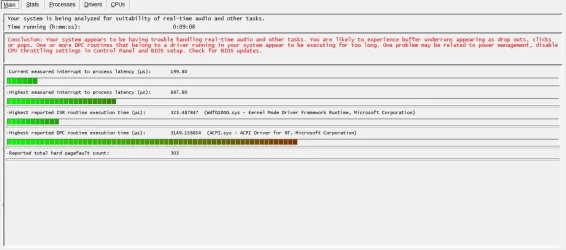
@S0C9 what is this supposed to mean and how can it be related to this weird behaviour(slow loading only when running from explorer)
I have the latest bios version installed
1769097293590.webp
 

My Computer

System One

  • OS
    Windows 11
    Computer type
    Laptop
    Manufacturer/Model
    MSI Sword 17 HX
    CPU
    14700HX
    Memory
    64GB
    Graphics Card(s)
    RTX 4070
Wdf01000.sys is the Windows Kernel-Mode Driver Framework (KMDF) Runtime, a core system file that helps your computer's hardware (like USB devices, audio, Bluetooth) communicate with the operating system, and high latency involving it usually point to a faulty or outdated driver, often Bluetooth, USB, or graphics-related, requiring updates, driver rollbacks, or hardware disconnection to fix.
 

My Computer

System One

  • OS
    Windows 11
    Computer type
    PC/Desktop
    Manufacturer/Model
    HP Pavilion
    CPU
    AMD Ryzen 7 5700G
    Motherboard
    Erica6
    Memory
    Micron Technology DDR4-3200 16GB
    Graphics Card(s)
    NVIDIA GeForce RTX 3060
    Sound Card
    Realtek ALC671
    Monitor(s) Displays
    Samsung SyncMaster U28E590
    Screen Resolution
    3840 x 2160
    Hard Drives
    SAMSUNG MZVLQ1T0HALB-000H1

My Computer

System One

  • OS
    Win11 Pro 25H2 Latest GA build
    Computer type
    PC/Desktop
    Manufacturer/Model
    Powerspec
    CPU
    Intel(R) Core(TM) i9-14900KF 3.20 GHz
    Motherboard
    MSI PRO Z690-A WIFI (latest BIOS)
    Memory
    G.Skill DDR5-5600 / PC5-44800 DDR5 SDRAM UDIMM
    Graphics Card(s)
    GIGABYTE GeForce RTX 4070 Ti WINDFORCE OC 12G (GV-N407TWF3OC-12GD)
    Sound Card
    OnBoard
    Monitor(s) Displays
    Dell - various (3)
    Screen Resolution
    1920x1080
    Hard Drives
    SSD/HDD/NVME
    PSU
    850 Watt 80+ Gold Modular
    Case
    PowerSpec/Lian Li ATX 205 Mesh
    Cooling
    Coolermaster MASTERLIQUID ML240L V2 RGB
    Keyboard
    Logi MX Keys S
    Mouse
    MX Master 3S
    Internet Speed
    600 mbps
    Browser
    various (Opera, Vivaldi, Edge, Brave, Chrome)
    Antivirus
    anitmalwarebytes; superantispyware; defender
    Other Info
    Windows Feature Experience Pack 1000.26100.36.0
Back
Top Bottom