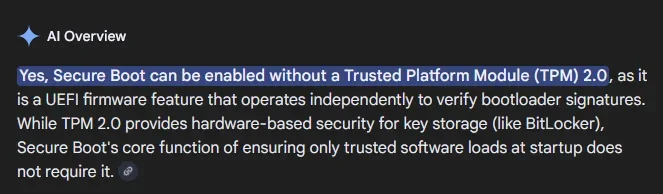
Can Secure boot be enabled without TPM 2.0?


Galane

New member
Local time
1:51 PM
Posts
7
OS
Windows 11
Today I enabled secure boot on my desktop and did the thing to update the keys. It's a normal fully supported system, no bypasses to install.

My laptop is a Dell Latitude E6530. No TPM 2.0 firmware update from Dell (despite some other models of similar age got it) and the CPU is an older i7*. Will enabling secure boot work without TPM 2.0?

The laptop has a rather fresh install of 25H2 due to when I tried updating soon after that was released, it totally blew it up to where it wasn't recoverable. I had to use data recovery software to save my stuff then wipe the 2TB SSD and start over.

*Currently a quad core newer/faster than anything originally offered in it.
 
Windows Build/Version
11 25H2

My Computer

System One

  • OS
    Windows 11
    Computer type
    PC/Desktop
    Manufacturer/Model
    Self built
1770880521260.webp
 

My Computers

System One System Two

  • OS
    Win 11 Pro 25H2 26200.8524
    Computer type
    PC/Desktop
    Manufacturer/Model
    Self Built
    CPU
    Intel® Core™ i7-14700K
    Motherboard
    ASUS TUF Z690-PLUS WIFI BIOS 4505 11/29/25
    Memory
    G.SKILL Ripjaws S5 Series 64GB (2 x 32GB) DDR5
    Graphics Card(s)
    ASUS GeForce RTX 4070 Super 12GB
    Sound Card
    Sound Blaster AE-5 Plus
    Monitor(s) Displays
    ASUS TUF Gaming 27" 2K HDR Gaming
    Screen Resolution
    2560 x 1440
    Hard Drives
    Samsung 990 Pro 1TB NVMe (Win 11 25H2)
    SK hynix P41 500GB NVMe 25H2 DEV/Games
    SK hynix P41 2TB NVMe (x3)
    Crucial P3 Plus 4TB
    PSU
    Corsair RM850x Shift
    Case
    Antec Dark Phantom DP502 FLUX
    Cooling
    Corsair Nautilus 360 RS AIO
    Keyboard
    Logitech MK 320
    Mouse
    Razer Basilisk V3
    Internet Speed
    350Mbs
    Browser
    Firefox
    Antivirus
    Winows Security
    Other Info
    MR 8.1 Home

    System 3 Specs
    Win 11 Pro 25H2 26200.8524
    ASUS PRIME Z370-P II BIOS 3004 7/12/21
    Intel Core i7-8700 CPU @ 3.20GHz
    32GB DDR4 RAM (4x8)
    iGPU Intel UHD Graphics 630
  • Operating System
    Win 11 Pro 25H2 26200.8524
    Computer type
    PC/Desktop
    Manufacturer/Model
    Self Built
    CPU
    Intel Core i7-11700F
    Motherboard
    Asus TUF Gaming Z590 Plus WiFi (BIOS 2803)
    Memory
    64 GB DDR4
    Graphics card(s)
    MSI GeForce RTX 3060 Ventus 2X 12GB
    Sound Card
    SoundBlaster Audigy Fx V2
    Monitor(s) Displays
    Samsung F27T350
    Screen Resolution
    1920x1080
    Hard Drives
    Samsung 980 Pro 1TB
    Samsung 970 EVO Plus 2TB
    Samsung 870 EVO 500GB SSD
    PSU
    Corsair HX750
    Case
    Cougar MX330-G Window
    Cooling
    Thermalright Frozen Edge 240 Black AIO
    Internet Speed
    350Mbps
    Browser
    Firefox
    Antivirus
    Windows Security
The UEFI standard for Secure Boot doesn't involve TPM.
But in order to install 24H2/25H2, your system is required to have TPM 2.0 support (unless you use a known HW bypass trick).
 

My Computer

System One

  • OS
    Windows 7
The UEFI standard for Secure Boot doesn't involve TPM.
But in order to install 24H2/25H2, your system is required to have TPM 2.0 support (unless you use a known HW bypass trick).
Therefore TPM 2.0 support is not required to install Windows 11!
 

My Computer

System One

  • OS
    Windows 11 Pro
    Computer type
    PC/Desktop
    Manufacturer/Model
    Self build
    CPU
    Core i7-13700K
    Motherboard
    Asus TUF Gaming Plus WiFi Z790
    Memory
    64 GB Kingston Fury Beast DDR5
    Graphics Card(s)
    Gigabyte GeForce RTX 2060 Super Gaming OC 8G
    Sound Card
    Realtek S1200A
    Monitor(s) Displays
    Viewsonic VP2770 & Dell (secondary)
    Screen Resolution
    2560 x 1440
    Hard Drives
    Kingston KC3000 2TB NVME SSD & SATA HDDs & SSD
    PSU
    EVGA SuperNova G2 850W
    Case
    Nanoxia Deep Silence 1
    Cooling
    Noctua NH-D14
    Keyboard
    Microsoft Digital Media Pro
    Mouse
    Logitech Wireless
    Internet Speed
    80 Mb / s
    Browser
    Chrome
    Antivirus
    Defender, Malwarebytes Free & AdwCleaner
Therefore TPM 2.0 support is not required to install Windows 11!
Windows 11 won't install without TPM enabled however Secure boot only needs to be supported not enabled (UEFI BIOS)
 

My Computer

System One

  • OS
    Windows 11 Pro 25H2 (RP channel)
    Computer type
    PC/Desktop
    Manufacturer/Model
    MSI
    CPU
    AMD Ryzen 7 9800X3D 8-core
    Motherboard
    MEG X870E Godlike
    Memory
    64GB Corsair Titanium 6000/CL30
    Graphics Card(s)
    MSI Suprim 5080 SOC
    Sound Card
    Soundblaster AE-9
    Monitor(s) Displays
    ASUS TUF Gaming VG289Q
    Screen Resolution
    3840x2160
    Hard Drives
    Samsung 9100 Pro 4TB (gen 5 x4, system drive/games)
    Samsung 990 Pro 2TB
    Samsung 980 Pro 2TB
    Samsung 870 Evo 4TB
    Samsung 870 Evo 2TB
    Samsung T9 4TB
    PSU
    Seasonic PX-2200
    Case
    Bequiet! Dark Base Pro 901
    Cooling
    Noctua NH-D15S Chromax black
    Keyboard
    Logitech G915 X (wired)
    Mouse
    Logitech G903 with PowerPlay charger
    Internet Speed
    900Mb/sec
    Browser
    Microsoft Edge
    Antivirus
    Windows Defender
Windows 11 won't install without TPM enabled however Secure boot only needs to be supported not enabled (UEFI BIOS)
Wrong - there are easy fixes such as install using setup.exe /product server
 

My Computer

System One

  • OS
    Windows 11 Pro
    Computer type
    PC/Desktop
    Manufacturer/Model
    Self build
    CPU
    Core i7-13700K
    Motherboard
    Asus TUF Gaming Plus WiFi Z790
    Memory
    64 GB Kingston Fury Beast DDR5
    Graphics Card(s)
    Gigabyte GeForce RTX 2060 Super Gaming OC 8G
    Sound Card
    Realtek S1200A
    Monitor(s) Displays
    Viewsonic VP2770 & Dell (secondary)
    Screen Resolution
    2560 x 1440
    Hard Drives
    Kingston KC3000 2TB NVME SSD & SATA HDDs & SSD
    PSU
    EVGA SuperNova G2 850W
    Case
    Nanoxia Deep Silence 1
    Cooling
    Noctua NH-D14
    Keyboard
    Microsoft Digital Media Pro
    Mouse
    Logitech Wireless
    Internet Speed
    80 Mb / s
    Browser
    Chrome
    Antivirus
    Defender, Malwarebytes Free & AdwCleaner
Wrong - there are easy fixes such as install using setup.exe /product server
OK I meant a *standard* install without any tweaking!
 

My Computer

System One

  • OS
    Windows 11 Pro 25H2 (RP channel)
    Computer type
    PC/Desktop
    Manufacturer/Model
    MSI
    CPU
    AMD Ryzen 7 9800X3D 8-core
    Motherboard
    MEG X870E Godlike
    Memory
    64GB Corsair Titanium 6000/CL30
    Graphics Card(s)
    MSI Suprim 5080 SOC
    Sound Card
    Soundblaster AE-9
    Monitor(s) Displays
    ASUS TUF Gaming VG289Q
    Screen Resolution
    3840x2160
    Hard Drives
    Samsung 9100 Pro 4TB (gen 5 x4, system drive/games)
    Samsung 990 Pro 2TB
    Samsung 980 Pro 2TB
    Samsung 870 Evo 4TB
    Samsung 870 Evo 2TB
    Samsung T9 4TB
    PSU
    Seasonic PX-2200
    Case
    Bequiet! Dark Base Pro 901
    Cooling
    Noctua NH-D15S Chromax black
    Keyboard
    Logitech G915 X (wired)
    Mouse
    Logitech G903 with PowerPlay charger
    Internet Speed
    900Mb/sec
    Browser
    Microsoft Edge
    Antivirus
    Windows Defender
I turned on Secure Boot in the laptop's BIOS setup and got it to install a 2023 key. So it shouldn't be popping up with any surprises later this year.

(Get-UEFISecureBootCerts db).signature shows two 2011 keys and the Windows UEFI CA 2023 key on the laptop, but variable currently undefined on my desktop *now*, but last night it listed keys.

(Get-UEFISecureBootCerts dbdefault).signature is giving me variable is currently undefined

Get-SecureBootUEFI kek returns one line for Name, Bytes, Attributes
KEK {161, 89, 192, 165, ...} NON VOLATILE...

Why the bleep doesn't Microsoft just make a Windows app that does this? Click button to install the updated keys and just make it work, then check to verify that it worked.

It's not making people feel good things about security when some of the tests say it's good, some says it's not, and some just don't work because *something* may be missing or isn't defined.
 
Last edited:

My Computer

System One

  • OS
    Windows 11
    Computer type
    PC/Desktop
    Manufacturer/Model
    Self built
Why the bleep doesn't Microsoft just make a Windows app that does this? Click button to install the updated keys and just make it work, then check to verify that it worked.
They're doing a gradual rollout. Last year, they asked large enterprises to opt-in and beta test the process.
Now MS is slowly rolling out KEK updates to supported BIOS'es.

The actual update is done by a scheduled task. MS doesn't want you screwing around, and blaming them. Going slow is better than bricking your PC. While MS can improve their public messaging, most of the blame on OEM vendors not rolling out BIOS updates on time.

MS has promised to build certs visibility into an upcoming version of the Windows Security Center. In the meantime, we have PowerShell scripts for detailed reporting.
 

My Computer

System One

  • OS
    Windows 7
Today I enabled secure boot on my desktop and did the thing to update the keys. It's a normal fully supported system, no bypasses to install.

My laptop is a Dell Latitude E6530. No TPM 2.0 firmware update from Dell (despite some other models of similar age got it) and the CPU is an older i7*. Will enabling secure boot work without TPM 2.0?

The laptop has a rather fresh install of 25H2 due to when I tried updating soon after that was released, it totally blew it up to where it wasn't recoverable. I had to use data recovery software to save my stuff then wipe the 2TB SSD and start over.

*Currently a quad core newer/faster than anything originally offered in it.
I installed Windows 11 on my 2014-era AM3+ system with FX processor. I installed a TPM1.2 device in the socket that motherboard has. It's BIOS is a UEFI BIOS, and I enabled Secure Boot with it. I then installed 25H2; using RUFUS to ignore unsupportability limitations it installed and runs in Secure Boot mode. It (Windows Update) even updated the keys to the 2023 keys.

Furthermore, I also enabled BitLocker on the system drive and it is using the TPM for a Key Protector, so the OS is using it. I cannot say whether any games that require a TPM device will work with a TPM1.2 device because they definitely have limited functionality compared to TPM2.0.

So I can state rather conclusively from actual experience that yes, Windows 11, even the latest build of 25H2, doesn't absolutely REQUIRE a TPM 2.0 device and will even work rather well with at least SOME TPM1.2 devices in at least SOME use cases.
 
Last edited:

My Computers

System One System Two

  • OS
    Windows 11 Pro
    Computer type
    PC/Desktop
    Manufacturer/Model
    DIY
    CPU
    Ryzen 7 5800X
    Motherboard
    Gigabyte B550M Aorus Pro
    Memory
    GSkill 3200, 2x8GB
    Graphics Card(s)
    MSI RX 6800 XT Gaming Z
    Sound Card
    on-board Realtek
    Monitor(s) Displays
    MSI 180hz
    Screen Resolution
    1440p
    Hard Drives
    Samsung 980 Pro, Samsung 870 Evo, generic PCIe NVME, WD 1TB 2.5" laptop spinner
    PSU
    Corsair RM 650
    Case
    mATX
    Cooling
    BeQuiet 240mm AIO and a bunch of case fans
    Keyboard
    one that clacks softly
    Mouse
    logitech
    Internet Speed
    bunches of bps
    Browser
    Firefox
    Antivirus
    Windows' own
  • Operating System
    Win11 Pro
    Computer type
    PC/Desktop
    Manufacturer/Model
    DIY
    CPU
    Ryzen 7 1700
    Motherboard
    GA-AB350M G-3
    Memory
    16GB DDR4
    Graphics card(s)
    RX-480
    Sound Card
    In-Built Realtek
    Monitor(s) Displays
    Samsung
    Screen Resolution
    1440p
    Hard Drives
    NVME/SSD's
    PSU
    Thermaltake BX1 550W
    Case
    Some junky thing
    Cooling
    ThermalTake Assassin(?)
    Browser
    FF/Edge
    Antivirus
    Whatever Windows does
    Other Info
    Secure Boot enabled updated to 2023 CA keys, TPM2.0 enabled with system drive Bitlocker'd.
The BitLocker FAQ warns you may have to initialize a TPM 1.2 module, before using it.

TPM owner password

Prior to enabling BitLocker on a computer with a TPM version 1.2, you must initialize the TPM. The initialization process generates a TPM owner password, which is a password set on the TPM. You must be able to supply the TPM owner password to change the state of the TPM, such as when enabling or disabling the TPM or resetting the TPM lockout.
 

My Computer

System One

  • OS
    Windows 7
The BitLocker FAQ warns you may have to initialize a TPM 1.2 module, before using it.
I do recall reading that somewhere. But all I did was clear it in Windows using the Windows Security Processor system settings screen (on the Troubleshooting button). I'd also read you should do these actions through Windows, not the BIOS, so that it can take ownership properly. I took that to be the same as initializing it, I guess.

I think I did that before enabling BitLocker and encrypting system drive.

I don't recall a place, screen or prompt in BIOS or the OS to enter or create a TPM owner password: is that something later OS builds of Windows does when it takes ownership?
 

My Computers

System One System Two

  • OS
    Windows 11 Pro
    Computer type
    PC/Desktop
    Manufacturer/Model
    DIY
    CPU
    Ryzen 7 5800X
    Motherboard
    Gigabyte B550M Aorus Pro
    Memory
    GSkill 3200, 2x8GB
    Graphics Card(s)
    MSI RX 6800 XT Gaming Z
    Sound Card
    on-board Realtek
    Monitor(s) Displays
    MSI 180hz
    Screen Resolution
    1440p
    Hard Drives
    Samsung 980 Pro, Samsung 870 Evo, generic PCIe NVME, WD 1TB 2.5" laptop spinner
    PSU
    Corsair RM 650
    Case
    mATX
    Cooling
    BeQuiet 240mm AIO and a bunch of case fans
    Keyboard
    one that clacks softly
    Mouse
    logitech
    Internet Speed
    bunches of bps
    Browser
    Firefox
    Antivirus
    Windows' own
  • Operating System
    Win11 Pro
    Computer type
    PC/Desktop
    Manufacturer/Model
    DIY
    CPU
    Ryzen 7 1700
    Motherboard
    GA-AB350M G-3
    Memory
    16GB DDR4
    Graphics card(s)
    RX-480
    Sound Card
    In-Built Realtek
    Monitor(s) Displays
    Samsung
    Screen Resolution
    1440p
    Hard Drives
    NVME/SSD's
    PSU
    Thermaltake BX1 550W
    Case
    Some junky thing
    Cooling
    ThermalTake Assassin(?)
    Browser
    FF/Edge
    Antivirus
    Whatever Windows does
    Other Info
    Secure Boot enabled updated to 2023 CA keys, TPM2.0 enabled with system drive Bitlocker'd.
I presume what they're saying is if you're setting it up from the BIOS menu, create a password so nobody else can access the TPM settings. Otherwise Windows creates a random password, and gives you the option to later change it to something you specify.
 

My Computer

System One

  • OS
    Windows 7
I presume what they're saying is if you're setting it up from the BIOS menu, create a password so nobody else can access the TPM settings. Otherwise Windows creates a random password, and gives you the option to later change it to something you specify.
BTW... I also cleared it once from within Windows, after Bitlocker was running and drive fully encrypted. Since I was in an "unsupported" configuration I thought I should understand what happens before committing to it in any way.

As I was hoping, it failed to start and asked for the BL recovery key. After entering all 40 something characters, it started up and resumed using the TPM PCR's for validation of secure boot hashes before releasing the encryption key and starting up. That was logical so along with a test when disabling secure boot in BIOS (with the same response) I have at least some confidence things are actually working right!

At least until Microsoft changes things in the future.
 

My Computers

System One System Two

  • OS
    Windows 11 Pro
    Computer type
    PC/Desktop
    Manufacturer/Model
    DIY
    CPU
    Ryzen 7 5800X
    Motherboard
    Gigabyte B550M Aorus Pro
    Memory
    GSkill 3200, 2x8GB
    Graphics Card(s)
    MSI RX 6800 XT Gaming Z
    Sound Card
    on-board Realtek
    Monitor(s) Displays
    MSI 180hz
    Screen Resolution
    1440p
    Hard Drives
    Samsung 980 Pro, Samsung 870 Evo, generic PCIe NVME, WD 1TB 2.5" laptop spinner
    PSU
    Corsair RM 650
    Case
    mATX
    Cooling
    BeQuiet 240mm AIO and a bunch of case fans
    Keyboard
    one that clacks softly
    Mouse
    logitech
    Internet Speed
    bunches of bps
    Browser
    Firefox
    Antivirus
    Windows' own
  • Operating System
    Win11 Pro
    Computer type
    PC/Desktop
    Manufacturer/Model
    DIY
    CPU
    Ryzen 7 1700
    Motherboard
    GA-AB350M G-3
    Memory
    16GB DDR4
    Graphics card(s)
    RX-480
    Sound Card
    In-Built Realtek
    Monitor(s) Displays
    Samsung
    Screen Resolution
    1440p
    Hard Drives
    NVME/SSD's
    PSU
    Thermaltake BX1 550W
    Case
    Some junky thing
    Cooling
    ThermalTake Assassin(?)
    Browser
    FF/Edge
    Antivirus
    Whatever Windows does
    Other Info
    Secure Boot enabled updated to 2023 CA keys, TPM2.0 enabled with system drive Bitlocker'd.

Latest Support Threads

Back
Top Bottom