Cannot Add Lock Screen Weather Widget Windows 11 25H2


pbcguy

Well-known member
Local time
5:08 PM
Posts
14
OS
Windows 11
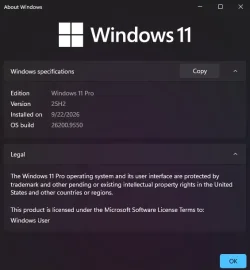
I can't add the lock screen weather widget. Windows 11 25H2, OS Build 26200.9550. Settings > Personalization > Lock screen > Widgets is enabled. The Add widget catalog opens normally. Some widgets can be added, but Weather's Add button is grayed out and Weather cannot be selected. Location services are enabled. Also, I'm not seeing the older "Choose one app to show detailed status" setting, because I'm using the newer lock-screen Widgets experience.

Anyone else having this issue? Or, is this an issue due to the September update KB5124010 that we'll have to wait for Microsoft to resolve?
 
Windows Build/Version
Version 25H2 (OS Build 26200.9550)

My Computer My Computer

At a glance

Windows 11Intel(R) Core(TM) i7-8665U CPU @ 1.90GHz 2.11...16.0 GBIntel UHD Graphics 620
OS
Windows 11
Computer type
Laptop
Manufacturer/Model
Lenovo T490
CPU
Intel(R) Core(TM) i7-8665U CPU @ 1.90GHz 2.11 GHz
Motherboard
Lenovo
Memory
16.0 GB
Graphics Card(s)
Intel UHD Graphics 620
Sound Card
Realtek Audio
Try going to the MS Store > Library and updating the Weather app.
 

My Computer My Computer

At a glance

Windows 11 Pro 25H2
OS
Windows 11 Pro 25H2
Computer type
Laptop
Manufacturer/Model
Toshiba
Thanks for your suggestion. The app is already up-to-date. It's more likely the issue has something to do with the update.
 

My Computer My Computer

At a glance

Windows 11Intel(R) Core(TM) i7-8665U CPU @ 1.90GHz 2.11...16.0 GBIntel UHD Graphics 620
OS
Windows 11
Computer type
Laptop
Manufacturer/Model
Lenovo T490
CPU
Intel(R) Core(TM) i7-8665U CPU @ 1.90GHz 2.11 GHz
Motherboard
Lenovo
Memory
16.0 GB
Graphics Card(s)
Intel UHD Graphics 620
Sound Card
Realtek Audio
I tried that and it did not work for me either, but I take it as a good Bug.
 

My Computers My Computers

  • At a glance

    Windows11 Pro 26300.9550Intel Core i9 14900F (24 -Core, 68 MB Total C...32GB DDR5RTX 4080 Super w/610..88
    OS
    Windows11 Pro 26300.9550
    Computer type
    PC/Desktop
    Manufacturer/Model
    Dell Alienware Aurora R16
    CPU
    Intel Core i9 14900F (24 -Core, 68 MB Total Cache)
    Motherboard
    Dell Alienware
    Memory
    32GB DDR5
    Graphics Card(s)
    RTX 4080 Super w/610..88
    Sound Card
    Realtec
    Monitor(s) Displays
    Corsair XENEON 32QHD165
    Screen Resolution
    2560 X 1440
    Hard Drives
    1-2TB Samsung 990 Pro PCIe NVMe M2 SSD
    1-4TB Samsung 990 Pro PCIe NVMe M2 SSD
    PSU
    1000 Watt Platinum Dell
    Case
    Alienware
    Cooling
    Liquid Closed Loop
    Keyboard
    Corsair Strafe RGB
    Mouse
    Logitech MK270 Wireless
    Internet Speed
    100Gb's Down-20 Up
    Browser
    Firefox 157.0
    Antivirus
    Defender
    Other Info
    Very Quiet And Fast
    CyberPower UPS CP1500PFCLCD
  • At a glance

    MX-Linux13th Gen Inter(R) Core(TM) i3-1315U64 GB DDR4 @3200 MHz.Internal
    Operating System
    MX-Linux
    Computer type
    PC/Desktop
    Manufacturer/Model
    Intel
    CPU
    13th Gen Inter(R) Core(TM) i3-1315U
    Motherboard
    Intel
    Memory
    64 GB DDR4 @3200 MHz.
    Graphics card(s)
    Internal
    Sound Card
    None
    Monitor(s) Displays
    Dell 2419HGCF
    Screen Resolution
    1920 X 1080
    Hard Drives
    SAMSUNG 980 PRO SSD 2TB, PCIe 4.0 M.2 2280
    PSU
    Chicony 30 Watt
    Case
    Small
    Keyboard
    Dell
    Mouse
    Razor
    Internet Speed
    1GB
    Browser
    Slimjet
Thanks for your suggestion. The app is already up-to-date. It's more likely the issue has something to do with the update.
What have you tried ? Uninstall the update? Restore from backup? Did it work before?
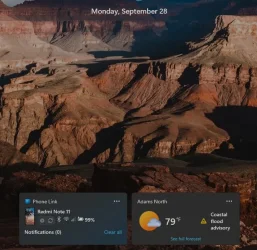
I am on the same version and have not encountered any issues.
First thing to do would be to launch the weather app.

Screenshot 2026-09-28 210434.webpScreenshot 2026-09-28 205808.webp
 

My Computers My Computers

  • At a glance

    All Branches but StableAMD Ryzen 7 7735HS 3200-4500 Mhz 8 cores x 232 GB DDR5Radeon Graphic / NVIDIA GeForce RTX 4060 8 GB...
    OS
    All Branches but Stable
    Computer type
    Laptop
    Manufacturer/Model
    Acer Nitro ANV15-51
    CPU
    AMD Ryzen 7 7735HS 3200-4500 Mhz 8 cores x 2
    Motherboard
    Sportage_RBH
    Memory
    32 GB DDR5
    Graphics Card(s)
    Radeon Graphic / NVIDIA GeForce RTX 4060 8 GB GDDR6
    Sound Card
    AMD/Realtek(R) Audio
    Monitor(s) Displays
    Integrated Monitor (15.3"vis)
    Screen Resolution
    FHD 1920X1080 16:9 144Hz
    Hard Drives
    KINGSTON OM8SEP4512Q-AA 1TB
    Western Digital 256GB
    PSU
    19V DC 6.32 A 120 W
    Cooling
    Dual Fans
    Mouse
    MS Bluetooth
    Internet Speed
    Fiber 1GB Cox -us & 1GB Orange-fr
    Browser
    Edge Canary- Firefox Nightly-Chrome Dev-Chrome Dev
    Antivirus
    Windows Defender
  • At a glance

    Windows 11 BetaAMD A9-94208 GB of DDR4AMD Radeon R5
    Operating System
    Windows 11 Beta
    Computer type
    Laptop
    Manufacturer/Model
    Asus X751BP
    CPU
    AMD A9-9420
    Memory
    8 GB of DDR4
    Graphics card(s)
    AMD Radeon R5
    Screen Resolution
    1600x900
    Hard Drives
    Seagate 1 TB
What have you tried ? Uninstall the update? Restore from backup? Did it work before?
I am on the same version and have not encountered any issues.
First thing to do would be to launch the weather app.

View attachment 184536View attachment 184537
I have never gotten it to work on 26300.9550 and I am glad that it doesn't.
 

My Computers My Computers

  • At a glance

    Windows11 Pro 26300.9550Intel Core i9 14900F (24 -Core, 68 MB Total C...32GB DDR5RTX 4080 Super w/610..88
    OS
    Windows11 Pro 26300.9550
    Computer type
    PC/Desktop
    Manufacturer/Model
    Dell Alienware Aurora R16
    CPU
    Intel Core i9 14900F (24 -Core, 68 MB Total Cache)
    Motherboard
    Dell Alienware
    Memory
    32GB DDR5
    Graphics Card(s)
    RTX 4080 Super w/610..88
    Sound Card
    Realtec
    Monitor(s) Displays
    Corsair XENEON 32QHD165
    Screen Resolution
    2560 X 1440
    Hard Drives
    1-2TB Samsung 990 Pro PCIe NVMe M2 SSD
    1-4TB Samsung 990 Pro PCIe NVMe M2 SSD
    PSU
    1000 Watt Platinum Dell
    Case
    Alienware
    Cooling
    Liquid Closed Loop
    Keyboard
    Corsair Strafe RGB
    Mouse
    Logitech MK270 Wireless
    Internet Speed
    100Gb's Down-20 Up
    Browser
    Firefox 157.0
    Antivirus
    Defender
    Other Info
    Very Quiet And Fast
    CyberPower UPS CP1500PFCLCD
  • At a glance

    MX-Linux13th Gen Inter(R) Core(TM) i3-1315U64 GB DDR4 @3200 MHz.Internal
    Operating System
    MX-Linux
    Computer type
    PC/Desktop
    Manufacturer/Model
    Intel
    CPU
    13th Gen Inter(R) Core(TM) i3-1315U
    Motherboard
    Intel
    Memory
    64 GB DDR4 @3200 MHz.
    Graphics card(s)
    Internal
    Sound Card
    None
    Monitor(s) Displays
    Dell 2419HGCF
    Screen Resolution
    1920 X 1080
    Hard Drives
    SAMSUNG 980 PRO SSD 2TB, PCIe 4.0 M.2 2280
    PSU
    Chicony 30 Watt
    Case
    Small
    Keyboard
    Dell
    Mouse
    Razor
    Internet Speed
    1GB
    Browser
    Slimjet
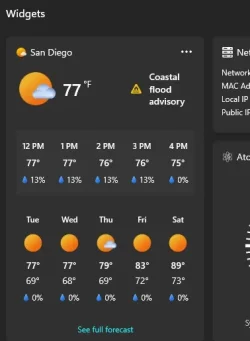
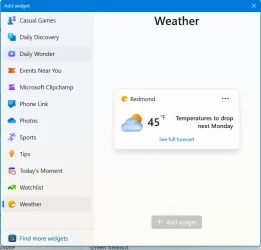
The weather widget/app works just fine when I launch the widgets panel. I just can't add it to the lock screen. The add button is grayed out in the personalization>lock screen settings. It worked prior to the update, and I have seen postings elsewhere of people having this issue after the update, but no solutions. I have not uninstalled the update. My hope is that if there are enough complaints, Microsoft will fix it. At this point, not having the widget on the lock screen is only a minor annoyance.
 

My Computer My Computer

At a glance

Windows 11Intel(R) Core(TM) i7-8665U CPU @ 1.90GHz 2.11...16.0 GBIntel UHD Graphics 620
OS
Windows 11
Computer type
Laptop
Manufacturer/Model
Lenovo T490
CPU
Intel(R) Core(TM) i7-8665U CPU @ 1.90GHz 2.11 GHz
Motherboard
Lenovo
Memory
16.0 GB
Graphics Card(s)
Intel UHD Graphics 620
Sound Card
Realtek Audio
  • Like
Reactions: OAT
The weather widget/app works just fine when I launch the widgets panel. I just can't add it to the lock screen. The add button is grayed out in the personalization>lock screen settings. It worked prior to the update, and I have seen postings elsewhere of people having this issue after the update, but no solutions. I have not uninstalled the update. My hope is that if there are enough complaints, Microsoft will fix it. At this point, not having the widget on the lock screen is only a minor annoyance.
Sorry about that, it might come earlier via an application update rather than a system one. One can hope.
Why is it affecting only some systems though, I know you need to have UAC enabled for the widgets to show on the log on screen
but I don't think you have touched that.

Screenshot 2026-09-28 213724.webpScreenshot 2026-09-28 224343.webp
 
Last edited:

My Computers My Computers

  • At a glance

    All Branches but StableAMD Ryzen 7 7735HS 3200-4500 Mhz 8 cores x 232 GB DDR5Radeon Graphic / NVIDIA GeForce RTX 4060 8 GB...
    OS
    All Branches but Stable
    Computer type
    Laptop
    Manufacturer/Model
    Acer Nitro ANV15-51
    CPU
    AMD Ryzen 7 7735HS 3200-4500 Mhz 8 cores x 2
    Motherboard
    Sportage_RBH
    Memory
    32 GB DDR5
    Graphics Card(s)
    Radeon Graphic / NVIDIA GeForce RTX 4060 8 GB GDDR6
    Sound Card
    AMD/Realtek(R) Audio
    Monitor(s) Displays
    Integrated Monitor (15.3"vis)
    Screen Resolution
    FHD 1920X1080 16:9 144Hz
    Hard Drives
    KINGSTON OM8SEP4512Q-AA 1TB
    Western Digital 256GB
    PSU
    19V DC 6.32 A 120 W
    Cooling
    Dual Fans
    Mouse
    MS Bluetooth
    Internet Speed
    Fiber 1GB Cox -us & 1GB Orange-fr
    Browser
    Edge Canary- Firefox Nightly-Chrome Dev-Chrome Dev
    Antivirus
    Windows Defender
  • At a glance

    Windows 11 BetaAMD A9-94208 GB of DDR4AMD Radeon R5
    Operating System
    Windows 11 Beta
    Computer type
    Laptop
    Manufacturer/Model
    Asus X751BP
    CPU
    AMD A9-9420
    Memory
    8 GB of DDR4
    Graphics card(s)
    AMD Radeon R5
    Screen Resolution
    1600x900
    Hard Drives
    Seagate 1 TB
I know you need to have UAC enabled for the widgets to show on the log on screen
but I don't think you have touched that.
I discovered that a long time ago when I completely disabled UAC with Winareo Tweaker and it took me awhile to figure out that was the cause. 🤣
 

My Computers My Computers

  • At a glance

    Windows 11 25H2Intel Core Ultra 9 275HX (24-Core)64GB DDR5 6400MT/sNVIDIA GeForce RTX 5080 and Intel UHD Graphics
    OS
    Windows 11 25H2
    Computer type
    Laptop
    Manufacturer/Model
    Alienware 18 Area-51
    CPU
    Intel Core Ultra 9 275HX (24-Core)
    Motherboard
    Alienware
    Memory
    64GB DDR5 6400MT/s
    Graphics Card(s)
    NVIDIA GeForce RTX 5080 and Intel UHD Graphics
    Sound Card
    Onboard, Realtek high-performance Audio chips (ALC3329 & ALC1708))
    Monitor(s) Displays
    300HZ 18-inch QHD 500 nit Comfort View+
    Screen Resolution
    2560 x 1600
    Hard Drives
    2TB NVMe M.2 PCIe Gen 5 SSD
    Case
    Magnesium Alloy
    Cooling
    Advanced Cryo-Tech Quad-Fan Cooling system & large vapor chamber
    Keyboard
    Cherry MX ultra low profile mechanical keyboard with per key AlienFX RGB lighting
    Mouse
    Logitech MX Master 4
    Browser
    Vivaldi (main), Firefox, Chrome, Edge
    Antivirus
    MS Defender and Malwarebytes Free
  • At a glance

    Windows 11 26H2Qualcomm Snapdragon X Elite (12 Core) ARM bas...16GB LPDDR5Qualcomm Adreno X1-85
    Operating System
    Windows 11 26H2
    Computer type
    Laptop
    Manufacturer/Model
    Microsoft Surface Laptop 7
    CPU
    Qualcomm Snapdragon X Elite (12 Core) ARM based CPU
    Motherboard
    Microsoft Corp.
    Memory
    16GB LPDDR5
    Graphics card(s)
    Qualcomm Adreno X1-85
    Sound Card
    Omnisonic speakers with Dolby Atmos spatial sound
    Monitor(s) Displays
    120 Hz 13.8-inch 600 nit PixelSense Flow touchscreen
    Screen Resolution
    2304x1536
    Hard Drives
    1TB NVMe Gen 4 SSD
    Case
    Anodized Aluminum
    Cooling
    Traditional active cooling fan system
    Keyboard
    Mechanical QWERTY, backlit when in use
    Mouse
    Logitech MX Master 4 and Surface Arc Mouse
    Browser
    Vivaldi (main), Firefox, Chrome, Edge
    Antivirus
    MS Defender and Malwarebytes Free
Sorry about that, it might come earlier via an application update rather than a system one. One can hope.
Why is it affecting only some systems though, I know you need to have UAC enabled for the widgets to show on the log on screen
but I don't think you have touched that.

View attachment 184546
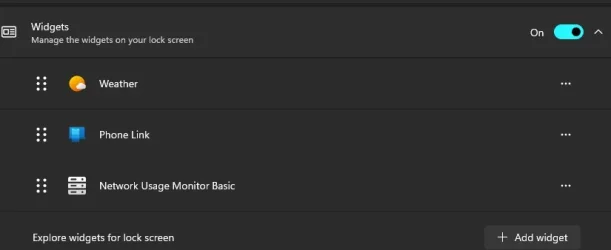
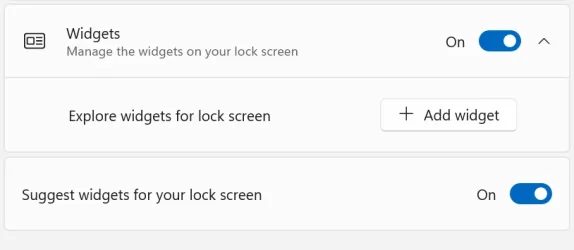
As you can see, my widgets settings look nothing like yours. There's also a shot of the widgets "catalog" open to the weather widget where you can see the add button grayed out.

Widgets Screenshot 2026-09-28 155016.webpScreenshot 2026-09-28 155114.webp
 

My Computer My Computer

At a glance

Windows 11Intel(R) Core(TM) i7-8665U CPU @ 1.90GHz 2.11...16.0 GBIntel UHD Graphics 620
OS
Windows 11
Computer type
Laptop
Manufacturer/Model
Lenovo T490
CPU
Intel(R) Core(TM) i7-8665U CPU @ 1.90GHz 2.11 GHz
Motherboard
Lenovo
Memory
16.0 GB
Graphics Card(s)
Intel UHD Graphics 620
Sound Card
Realtek Audio
  • Like
Reactions: OAT
Back
Top Bottom