Solved Cannot to disable Widgets panel


Meisha

Member
Member
Local time
11:02 PM
Posts
12
OS
Windows 11 Pro
I'm on Windows 11 Pro 23H2 Build 22631.4602. I have a Wacom tablet and would like to use the touch pad feature to get a break from the mouse, but whenever that feature is on, the panel that has Weather, News, Stockmarket, etc. keeps popping out from the right. I tried turning off Widgets in the Taskbar settings, but it still pops up whenever I move toward the right side of the screen. Maybe it's called something else. Could anyone please tell me how to disable this feature? Thank you!
 

My Computer

System One

  • OS
    Windows 11 Pro
    Computer type
    PC/Desktop
    Manufacturer/Model
    Boxx Apexx S4
    CPU
    Intel Core i9-14900K
    Motherboard
    ASRock Z790 Taichi
    Memory
    192 GB
    Graphics Card(s)
    NVIDIA GeForce RTX 4080 Super
    Monitor(s) Displays
    NEC PA322UHD-2, NEC EA275UHD
    Screen Resolution
    4K x 2
Hi Meisha,

You can permanently delete the News Widget from Windows 11 (23H2) for a single user by using PowerShell:

open PowerShell (as administrator) and run the “Get-AppxPackage *Microsoft News* | Remove-AppxPackage” command.

Let me know if you need further assistance once performing the above.

Kind regards,

tecknot
 

My Computer

System One

  • OS
    Windows 11 Pro 25H2 build 26200.8457
    Computer type
    Laptop
    Manufacturer/Model
    Lenovo ThinkPad Workstation P72
    CPU
    Intel i7 8750H @ 2.2 GHz
    Motherboard
    Lenovo 01YU291
    Memory
    16 GB (all Samsung) DDR4-3200 SODIMM (non-ECC) PCIe 3
    Graphics Card(s)
    Intel UHD Graphics 630 & NVIDIA Quadro P600
    Sound Card
    Realtek ALC3286 & Focusrite Saffire 24 Pro DSP
    Monitor(s) Displays
    17.3"
    Screen Resolution
    3840x2160
    Hard Drives
    1TB SSD Samsung 860 EVO SATA 3
    1TB SSD Samsung 970 EVO M.2 NVMe PCIe 3 x 4
    2TB SSD Samsung 990 PRO M.2 NVMe PCIe 3 x 4
    PSU
    230W
    Cooling
    fan
    Keyboard
    UltraNav
    Mouse
    Kensington wireless Orbit
    Internet Speed
    640Mbps
    Browser
    DuckDuckGo and Firefox
    Antivirus
    Defender
    Other Info
    CM246 Chipset
Thank you, tecknot. What else will removing this package disable? I can't understand what Microsoft is thinking if users have to go this far to remove a feature that should be easy to turn off. Is this a bug? Thank you!
 

My Computer

System One

  • OS
    Windows 11 Pro
    Computer type
    PC/Desktop
    Manufacturer/Model
    Boxx Apexx S4
    CPU
    Intel Core i9-14900K
    Motherboard
    ASRock Z790 Taichi
    Memory
    192 GB
    Graphics Card(s)
    NVIDIA GeForce RTX 4080 Super
    Monitor(s) Displays
    NEC PA322UHD-2, NEC EA275UHD
    Screen Resolution
    4K x 2
@Meisha,
What is suggested above is for the News content option, not the actual widgets.
Please kindly follow what this very site has to suggest:


It is odd that you are unable to disable the widgets via the GUI though.
 

My Computers

System One System Two

  • OS
    All Branches but Release
    Computer type
    Laptop
    Manufacturer/Model
    Acer Nitro ANV15-51
    CPU
    AMD Ryzen 7 7735HS 3200-4500 Mhz 8 cores x 2
    Motherboard
    Sportage_RBH
    Memory
    32 GB DDR5
    Graphics Card(s)
    Radeon Graphic / NVIDIA GeForce RTX 4060 8 GB GDDR6
    Sound Card
    AMD/Realtek(R) Audio
    Monitor(s) Displays
    Integrated Monitor (15.3"vis)
    Screen Resolution
    FHD 1920X1080 16:9 144Hz
    Hard Drives
    KINGSTON OM8SEP4512Q-AA 1TB
    Western Digital 256GB
    PSU
    19V DC 6.32 A 120 W
    Cooling
    Dual Fans
    Mouse
    MS Bluetooth
    Internet Speed
    Fiber 1GB Cox -us & 1GB Orange-fr
    Browser
    Edge Canary- Firefox Nightly-Chrome Dev-Chrome Dev
    Antivirus
    Windows Defender
  • Operating System
    Windows 11 Beta
    Computer type
    Laptop
    Manufacturer/Model
    Asus X751BP
    CPU
    AMD A9-9420
    Memory
    8 GB of DDR4
    Graphics card(s)
    AMD Radeon R5
    Screen Resolution
    1600x900
    Hard Drives
    Seagate 1 TB
Thank you, tecknot. What else will removing this package disable? I can't understand what Microsoft is thinking if users have to go this far to remove a feature that should be easy to turn off. Is this a bug? Thank you!

Hi Meisha,

It will only remove the News from Windows. It won't affect anything else, so it is a safe procedure.

Kind regards,

tecknot
 

My Computer

System One

  • OS
    Windows 11 Pro 25H2 build 26200.8457
    Computer type
    Laptop
    Manufacturer/Model
    Lenovo ThinkPad Workstation P72
    CPU
    Intel i7 8750H @ 2.2 GHz
    Motherboard
    Lenovo 01YU291
    Memory
    16 GB (all Samsung) DDR4-3200 SODIMM (non-ECC) PCIe 3
    Graphics Card(s)
    Intel UHD Graphics 630 & NVIDIA Quadro P600
    Sound Card
    Realtek ALC3286 & Focusrite Saffire 24 Pro DSP
    Monitor(s) Displays
    17.3"
    Screen Resolution
    3840x2160
    Hard Drives
    1TB SSD Samsung 860 EVO SATA 3
    1TB SSD Samsung 970 EVO M.2 NVMe PCIe 3 x 4
    2TB SSD Samsung 990 PRO M.2 NVMe PCIe 3 x 4
    PSU
    230W
    Cooling
    fan
    Keyboard
    UltraNav
    Mouse
    Kensington wireless Orbit
    Internet Speed
    640Mbps
    Browser
    DuckDuckGo and Firefox
    Antivirus
    Defender
    Other Info
    CM246 Chipset
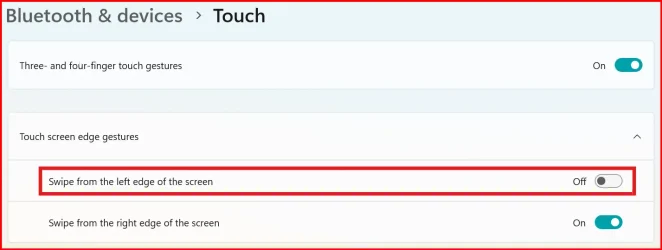
Settings, Bluetooth & devices, Touch, Swipe from the left edge of the screen, OFF:

Swipe from left.webp

This tutorial will show you how to enable or disable screen edge swipe for all users in Windows 11.

If your Windows 11 device has a touchscreen, you can swipe in from a screen edge to invoke a system UI below.

Swipe in from the right side edge of your screen to open the Notification Center (Win+N).
Swipe in from the left side edge of your screen to open Widgets (Win+W).

Starting with Windows 11 build 22631.4541 (23H2) and build 22631.4534 (24H2), Microsoft has updated Settings > Bluetooth & Devices > Touch to have a new section for touch screen edge gestures, where you can choose if you would like to disable the left or right screen edge touch gesture.

Enable or Disable Screen Edge Swipe in Windows 11
 
Last edited:

My Computer

System One

  • OS
    Windows 11
    Computer type
    Laptop
@Meisha,
What is suggested above is for the News content option, not the actual widgets.
Please kindly follow what this very site has to suggest:


It is odd that you are unable to disable the widgets via the GUI though.

Thank you, OAT, this worked to disable through Local Group Policy Editor.
Thanks, everyone for your replies and suggestions, as well!
 

My Computer

System One

  • OS
    Windows 11 Pro
    Computer type
    PC/Desktop
    Manufacturer/Model
    Boxx Apexx S4
    CPU
    Intel Core i9-14900K
    Motherboard
    ASRock Z790 Taichi
    Memory
    192 GB
    Graphics Card(s)
    NVIDIA GeForce RTX 4080 Super
    Monitor(s) Displays
    NEC PA322UHD-2, NEC EA275UHD
    Screen Resolution
    4K x 2
  • Like
Reactions: OAT
Back
Top Bottom