Cannot update the BIOS


where would I see this new firmware update ?


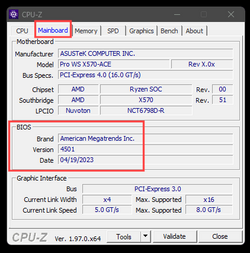
The easiest way to see the BIOS version is CPU-Z (portable)
The "ZIP" version is the portable one...


CPU-Z doesn't "get" confused. :-)


Image1.png


I only have one firmware listing is Device Manager...
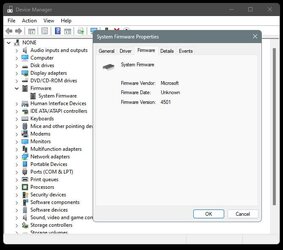
Image1.jpg


I don't know nuffin' about no Microsoft firmware updates.
I have all driver updates from MS... blocked. :D


My Computers My Computers

  • At a glance

    Win 11 Home ♦♦♦26200.8655 ♦♦♦♦♦♦♦25H2AMD Ryzen 7 3700XG.Skill (F4-3200C14D-16GTZKW)EVGA RTX 2070 (08G-P4-2171-KR)
    OS
    Win 11 Home ♦♦♦26200.8655 ♦♦♦♦♦♦♦25H2
    Computer type
    PC/Desktop
    Manufacturer/Model
    Built by Ghot® [May 2020]
    CPU
    AMD Ryzen 7 3700X
    Motherboard
    Asus Pro WS X570-ACE (BIOS 5302)
    Memory
    G.Skill (F4-3200C14D-16GTZKW)
    Graphics Card(s)
    EVGA RTX 2070 (08G-P4-2171-KR)
    Sound Card
    Realtek ALC1220P / ALC S1220A
    Monitor(s) Displays
    Dell U3011 30"
    Screen Resolution
    2560 x 1600
    Hard Drives
    2x Samsung 860 EVO 500GB,
    WD 4TB Black FZBX - SATA III,
    WD 8TB Black FZBX - SATA III,
    DRW-24B1ST CD/DVD Burner
    PSU
    PC Power & Cooling 750W Quad EPS12V
    Case
    Cooler Master ATCS 840 Tower
    Cooling
    CM Hyper 212 EVO (push/pull)
    Keyboard
    Ducky DK9008 Shine II Blue LED
    Mouse
    Logitech Optical M-100
    Internet Speed
    300/300
    Browser
    Firefox (latest)
    Antivirus
    Bitdefender Total Security
    Other Info
    Speakers: Klipsch Pro Media 2.1
  • At a glance

    Windows XP Pro 32bit w/SP3AMD Athlon 64 X2 5000+ (OC'd @ 3.2Ghz)TWIN2X2048-6400C4DHX (2 x 1GB, DDR2 800)EVGA 256-P2-N758-TR GeForce 8600GT SSC
    Operating System
    Windows XP Pro 32bit w/SP3
    Computer type
    PC/Desktop
    Manufacturer/Model
    Built by Ghot® (not in use)
    CPU
    AMD Athlon 64 X2 5000+ (OC'd @ 3.2Ghz)
    Motherboard
    ASUS M2N32-SLI Deluxe Wireless Edition
    Memory
    TWIN2X2048-6400C4DHX (2 x 1GB, DDR2 800)
    Graphics card(s)
    EVGA 256-P2-N758-TR GeForce 8600GT SSC
    Sound Card
    Onboard
    Monitor(s) Displays
    ViewSonic G90FB Black 19" Professional (CRT)
    Screen Resolution
    up to 2048 x 1536
    Hard Drives
    WD 36GB 10,000rpm Raptor SATA
    Seagate 80GB 7200rpm SATA
    Lite-On LTR-52246S CD/RW
    Lite-On LH-18A1P CD/DVD Burner
    PSU
    PC Power & Cooling Silencer 750 Quad EPS12V
    Case
    Generic Beige case, 80mm fans
    Cooling
    ZALMAN 9500A 92mm CPU Cooler
    Keyboard
    Logitech Classic Keybooard 200
    Mouse
    Logitech Optical M-BT96a
    Internet Speed
    300/300
    Browser
    Firefox 3.x ??
    Antivirus
    Symantec (Norton)
    Other Info
    Still assembled, still runs. Haven't turned it on for 15 years?
Every time LOL!😊


I have four Firmware entries in Device Manager and none have the same date or version or the version
that is stated in the update. But, the BIOS is the correct one that I updated when I did a re-install from
scratch. where would I see this new firmware update ?
Don't confuse with Device Firmware updates with System Firmware updates. Device Firmware updates will be for any connected devices such as SSDs, WIFI cards etc. The last in your list is the UEFI firmware update.
 

My Computers My Computers

  • At a glance

    Win 11 ProAMD Ryzen™ 7 7730U24GB Dual-Channel DDR4 @ 1596MHz (22-22-22-52)512MB ATI AMD Radeon Graphics (ASUStek Comput...
    OS
    Win 11 Pro
    Computer type
    Laptop
    Manufacturer/Model
    ASUS Vivobook
    CPU
    AMD Ryzen™ 7 7730U
    Motherboard
    M1605YA
    Memory
    24GB Dual-Channel DDR4 @ 1596MHz (22-22-22-52)
    Graphics Card(s)
    512MB ATI AMD Radeon Graphics (ASUStek Computer Inc)
    Monitor(s) Displays
    Generic PnP Monitor (1920x1200@60Hz) - P1 PLUS (1920x1080@59Hz)
    Screen Resolution
    1920 X 1200
    Hard Drives
    953GB Western Digital WD
    PSU
    45 Watts
    Mouse
    Lenovo Bluetooth.
    Internet Speed
    500 Mbps
    Browser
    Edge
    Antivirus
    Defender
  • At a glance

    Windows 11AMD Ryzen 7 5800H / 3.2 GHz32 GB DDR4 SDRAM 3200 MHzNVIDIA GeForce RTX 3060 6 GB GDDR6 SDRAM
    Operating System
    Windows 11
    Computer type
    Laptop
    Manufacturer/Model
    ACER NITRO
    CPU
    AMD Ryzen 7 5800H / 3.2 GHz
    Motherboard
    CZ Scala_CAS (FP6)
    Memory
    32 GB DDR4 SDRAM 3200 MHz
    Graphics card(s)
    NVIDIA GeForce RTX 3060 6 GB GDDR6 SDRAM
    Sound Card
    Realtek Audio. NVIDIA High Definition Audio
    Monitor(s) Displays
    15.6" LED backlight 1920 x 1080 (Full HD) 144 Hz
    Screen Resolution
    1920 x 1080 (Full HD)
    Hard Drives
    Samsung 970 Evo Plus 2TB NVMe M.2
    PSU
    180 Watt, 19.5 V
    Mouse
    Lenovo Bluetooth
    Internet Speed
    500 Mbps
    Browser
    Edge
    Antivirus
    Defender
Ok thanks to you all and I have tried the Asus wizard to install the new BIOS update but that doesn't work and the the USB stick method comes up as a .bin file but tells me that it isn't the right BIOS version. However I have double checked the download of the BIOS version from the Asus site but it still gives me that message. So I think I shall just leave alone as I don't want to brick this laptop.
 

My Computers My Computers

  • At a glance

    Windows 11 Pro 23H2 (OS Build 22631.4169) Des...i7 -10510U / Intel i5 3750KSamsung 16GB DDR4 2666 MHz & G-Skill 16GB DDR...On board Intel CPU graphics & Nvidia GeForce ...
    OS
    Windows 11 Pro 23H2 (OS Build 22631.4169) Desktop (OS Build 22621.4317)
    Computer type
    Laptop
    Manufacturer/Model
    Asus Vivo notebook X712FA or Desktop Ivy Bridge build
    CPU
    i7 -10510U / Intel i5 3750K
    Motherboard
    Asus generic & Asus P8Z77-V
    Memory
    Samsung 16GB DDR4 2666 MHz & G-Skill 16GB DDR3 2134MHz
    Graphics Card(s)
    On board Intel CPU graphics & Nvidia GeForce GTX 1050Ti
    Sound Card
    Laptop onboard & Xonar DSX Card
    Monitor(s) Displays
    Generic & Samsung 27" SAM0C4C
    Hard Drives
    Samsung 970 Pro NMe & Samsung 870 EVO 500GB
    PSU
    N/A
    Case
    N/A
    Cooling
    Asus in built
    Keyboard
    Generic
    Mouse
    Logitec Wireless
    Internet Speed
    50Mbs max allowance - occasionally up to 75Mbs
    Browser
    Brave
    Antivirus
    ESET Ultimate Security on both
    Other Info
    Desktop running Windows11 Pro with unsupported hardware fix
  • At a glance

    Windows 11 Pro OS build 22000.376i53750K16GB DDR3 @ 2133MHzAsus GTX 650TI
    Operating System
    Windows 11 Pro OS build 22000.376
    Computer type
    PC/Desktop
    Manufacturer/Model
    Home build
    CPU
    i53750K
    Motherboard
    Asus P8Z77-V
    Memory
    16GB DDR3 @ 2133MHz
    Graphics card(s)
    Asus GTX 650TI
    Sound Card
    Asus Xonar DSX
    Monitor(s) Displays
    Samsung 4K
    Screen Resolution
    3840x2160
    Hard Drives
    Samsung EVO 970
    PSU
    Corsair HX1100
    Case
    Coolermaster HAF -M
    Cooling
    Liquid
    Keyboard
    Microsoft Sidewinder 6
    Mouse
    Logitec
    Internet Speed
    50Mbs
    Browser
    Edge
    Antivirus
    Only Windows at the moment
Ok thanks to you all and I have tried the Asus wizard to install the new BIOS update but that doesn't work and the the USB stick method comes up as a .bin file but tells me that it isn't the right BIOS version. However I have double checked the download of the BIOS version from the Asus site but it still gives me that message. So I think I shall just leave alone as I don't want to brick this laptop.
Is there a reason for you to update the BIOS. You can read what the new BIOS will either update
or enhance. IF your notebook is not experiencing any abnormal malfunction(s), I would skip it.
When I used my G73JH I always read what the new BIOS was for and if I figured it was necessary
then I would update. I did skip a few of them because the BIOS would not bring anything new or
fix any problems. Just enjoy your notebook.
 

My Computers My Computers

  • At a glance

    windows 11 22631.5039Core i9 12th gen 12900HK 2.9 MHz (overcloked:...32 Gigs DDR5-4800nVidia RTX 3070 Ti / 8 Gigs DDR6
    OS
    windows 11 22631.5039
    Computer type
    Laptop
    Manufacturer/Model
    MSI Raider GE76
    CPU
    Core i9 12th gen 12900HK 2.9 MHz (overcloked: 3890.48)
    Motherboard
    MSI
    Memory
    32 Gigs DDR5-4800
    Graphics Card(s)
    nVidia RTX 3070 Ti / 8 Gigs DDR6
    Sound Card
    DYNAUDIO - Steelsries Arena 7- Sound Effects by Nahimic 3
    Monitor(s) Displays
    17.3" 1920 x 1080 360 Hz 3 ms, IPS / Connected to MSI 32 inch curved @ 165 Hz
    Screen Resolution
    1920 x 1080 / Both
    Hard Drives
    Samsung 990 Pro 2TB (OS) - Solidigm P41 2TB (Storage)
    PSU
    280 watts
    Case
    MSI GE series
    Cooling
    internal
    Keyboard
    Steelseries
    Mouse
    G903 Lightspeed
    Internet Speed
    1000 Mbps
    Browser
    Firefox / Opera GX- Do not like Edge
    Antivirus
    Malwarebytes'
    Other Info
    just ask.
  • At a glance

    Windows 10 22H2Intel Core i7 7820HK 2.9 Ghz16 Gigs DDR4 2400 MhznVidia 1070 8GB RAM
    Operating System
    Windows 10 22H2
    Computer type
    Laptop
    Manufacturer/Model
    MSI GT73 7RE VR Titan
    CPU
    Intel Core i7 7820HK 2.9 Ghz
    Motherboard
    MSI
    Memory
    16 Gigs DDR4 2400 Mhz
    Graphics card(s)
    nVidia 1070 8GB RAM
    Sound Card
    DYNAUDIO / Nahimic 2
    Monitor(s) Displays
    IPS / 120HZ
    Screen Resolution
    1920x1080P
    Hard Drives
    Samsung NVME EVO 970 1TB / Samsung SSD (SATA) 1TB
    PSU
    240 watts
    Case
    MSI
    Cooling
    Internal
    Keyboard
    Steelseries
    Mouse
    Logitech G903 Lightspeed
    Internet Speed
    1 Gb/s
    Browser
    Firefox / Vivaldi
    Antivirus
    MalwareBytes'
    Other Info
    none.
@ICIT2LOL


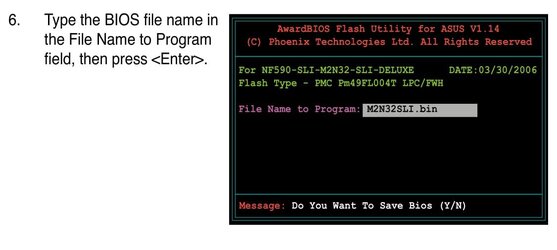
Back in the early 2000's ASUS named their regular BIOS files with a .bin extension. (circa 2006)
Later they had a .rom extension, and recently a .cap extension.
For example, this was from my ASUS M2N32 SLI Deluxe motherboard manual's BIOS flashing instructions...


Image1.jpg


It might be a good idea, to just call ASUS tech support, and ask them. :-)


Official Support | ASUS Australia

Image1.jpg
 
Last edited:

My Computers My Computers

  • At a glance

    Win 11 Home ♦♦♦26200.8655 ♦♦♦♦♦♦♦25H2AMD Ryzen 7 3700XG.Skill (F4-3200C14D-16GTZKW)EVGA RTX 2070 (08G-P4-2171-KR)
    OS
    Win 11 Home ♦♦♦26200.8655 ♦♦♦♦♦♦♦25H2
    Computer type
    PC/Desktop
    Manufacturer/Model
    Built by Ghot® [May 2020]
    CPU
    AMD Ryzen 7 3700X
    Motherboard
    Asus Pro WS X570-ACE (BIOS 5302)
    Memory
    G.Skill (F4-3200C14D-16GTZKW)
    Graphics Card(s)
    EVGA RTX 2070 (08G-P4-2171-KR)
    Sound Card
    Realtek ALC1220P / ALC S1220A
    Monitor(s) Displays
    Dell U3011 30"
    Screen Resolution
    2560 x 1600
    Hard Drives
    2x Samsung 860 EVO 500GB,
    WD 4TB Black FZBX - SATA III,
    WD 8TB Black FZBX - SATA III,
    DRW-24B1ST CD/DVD Burner
    PSU
    PC Power & Cooling 750W Quad EPS12V
    Case
    Cooler Master ATCS 840 Tower
    Cooling
    CM Hyper 212 EVO (push/pull)
    Keyboard
    Ducky DK9008 Shine II Blue LED
    Mouse
    Logitech Optical M-100
    Internet Speed
    300/300
    Browser
    Firefox (latest)
    Antivirus
    Bitdefender Total Security
    Other Info
    Speakers: Klipsch Pro Media 2.1
  • At a glance

    Windows XP Pro 32bit w/SP3AMD Athlon 64 X2 5000+ (OC'd @ 3.2Ghz)TWIN2X2048-6400C4DHX (2 x 1GB, DDR2 800)EVGA 256-P2-N758-TR GeForce 8600GT SSC
    Operating System
    Windows XP Pro 32bit w/SP3
    Computer type
    PC/Desktop
    Manufacturer/Model
    Built by Ghot® (not in use)
    CPU
    AMD Athlon 64 X2 5000+ (OC'd @ 3.2Ghz)
    Motherboard
    ASUS M2N32-SLI Deluxe Wireless Edition
    Memory
    TWIN2X2048-6400C4DHX (2 x 1GB, DDR2 800)
    Graphics card(s)
    EVGA 256-P2-N758-TR GeForce 8600GT SSC
    Sound Card
    Onboard
    Monitor(s) Displays
    ViewSonic G90FB Black 19" Professional (CRT)
    Screen Resolution
    up to 2048 x 1536
    Hard Drives
    WD 36GB 10,000rpm Raptor SATA
    Seagate 80GB 7200rpm SATA
    Lite-On LTR-52246S CD/RW
    Lite-On LH-18A1P CD/DVD Burner
    PSU
    PC Power & Cooling Silencer 750 Quad EPS12V
    Case
    Generic Beige case, 80mm fans
    Cooling
    ZALMAN 9500A 92mm CPU Cooler
    Keyboard
    Logitech Classic Keybooard 200
    Mouse
    Logitech Optical M-BT96a
    Internet Speed
    300/300
    Browser
    Firefox 3.x ??
    Antivirus
    Symantec (Norton)
    Other Info
    Still assembled, still runs. Haven't turned it on for 15 years?
Back in the early 2000's ASUS named their regular BIOS files with a .bin extension.
It might be a good idea, to just call ASUS tech support, and ask them.
Yes mate the downloaded file is a .bin extension but still the laptop will not recognise this as a proper BIOS update in the EZ feature in the BIOS Advanced screen.
 

My Computers My Computers

  • At a glance

    Windows 11 Pro 23H2 (OS Build 22631.4169) Des...i7 -10510U / Intel i5 3750KSamsung 16GB DDR4 2666 MHz & G-Skill 16GB DDR...On board Intel CPU graphics & Nvidia GeForce ...
    OS
    Windows 11 Pro 23H2 (OS Build 22631.4169) Desktop (OS Build 22621.4317)
    Computer type
    Laptop
    Manufacturer/Model
    Asus Vivo notebook X712FA or Desktop Ivy Bridge build
    CPU
    i7 -10510U / Intel i5 3750K
    Motherboard
    Asus generic & Asus P8Z77-V
    Memory
    Samsung 16GB DDR4 2666 MHz & G-Skill 16GB DDR3 2134MHz
    Graphics Card(s)
    On board Intel CPU graphics & Nvidia GeForce GTX 1050Ti
    Sound Card
    Laptop onboard & Xonar DSX Card
    Monitor(s) Displays
    Generic & Samsung 27" SAM0C4C
    Hard Drives
    Samsung 970 Pro NMe & Samsung 870 EVO 500GB
    PSU
    N/A
    Case
    N/A
    Cooling
    Asus in built
    Keyboard
    Generic
    Mouse
    Logitec Wireless
    Internet Speed
    50Mbs max allowance - occasionally up to 75Mbs
    Browser
    Brave
    Antivirus
    ESET Ultimate Security on both
    Other Info
    Desktop running Windows11 Pro with unsupported hardware fix
  • At a glance

    Windows 11 Pro OS build 22000.376i53750K16GB DDR3 @ 2133MHzAsus GTX 650TI
    Operating System
    Windows 11 Pro OS build 22000.376
    Computer type
    PC/Desktop
    Manufacturer/Model
    Home build
    CPU
    i53750K
    Motherboard
    Asus P8Z77-V
    Memory
    16GB DDR3 @ 2133MHz
    Graphics card(s)
    Asus GTX 650TI
    Sound Card
    Asus Xonar DSX
    Monitor(s) Displays
    Samsung 4K
    Screen Resolution
    3840x2160
    Hard Drives
    Samsung EVO 970
    PSU
    Corsair HX1100
    Case
    Coolermaster HAF -M
    Cooling
    Liquid
    Keyboard
    Microsoft Sidewinder 6
    Mouse
    Logitec
    Internet Speed
    50Mbs
    Browser
    Edge
    Antivirus
    Only Windows at the moment
Yes mate the downloaded file is a .bin extension but still the laptop will not recognise this as a proper BIOS update in the EZ feature in the BIOS Advanced screen.


As others have mentioned... flashing a BIOS incorrectly can brick the motherboard.
It's best just to call and ask ASUS.

Because of many changes in Win 11 and changes for security reasons... there have been many recent BIOS updates.
Some are necessary.

I found the ASUS - Australia, tech support phone number in post #25
 
Last edited:

My Computers My Computers

  • At a glance

    Win 11 Home ♦♦♦26200.8655 ♦♦♦♦♦♦♦25H2AMD Ryzen 7 3700XG.Skill (F4-3200C14D-16GTZKW)EVGA RTX 2070 (08G-P4-2171-KR)
    OS
    Win 11 Home ♦♦♦26200.8655 ♦♦♦♦♦♦♦25H2
    Computer type
    PC/Desktop
    Manufacturer/Model
    Built by Ghot® [May 2020]
    CPU
    AMD Ryzen 7 3700X
    Motherboard
    Asus Pro WS X570-ACE (BIOS 5302)
    Memory
    G.Skill (F4-3200C14D-16GTZKW)
    Graphics Card(s)
    EVGA RTX 2070 (08G-P4-2171-KR)
    Sound Card
    Realtek ALC1220P / ALC S1220A
    Monitor(s) Displays
    Dell U3011 30"
    Screen Resolution
    2560 x 1600
    Hard Drives
    2x Samsung 860 EVO 500GB,
    WD 4TB Black FZBX - SATA III,
    WD 8TB Black FZBX - SATA III,
    DRW-24B1ST CD/DVD Burner
    PSU
    PC Power & Cooling 750W Quad EPS12V
    Case
    Cooler Master ATCS 840 Tower
    Cooling
    CM Hyper 212 EVO (push/pull)
    Keyboard
    Ducky DK9008 Shine II Blue LED
    Mouse
    Logitech Optical M-100
    Internet Speed
    300/300
    Browser
    Firefox (latest)
    Antivirus
    Bitdefender Total Security
    Other Info
    Speakers: Klipsch Pro Media 2.1
  • At a glance

    Windows XP Pro 32bit w/SP3AMD Athlon 64 X2 5000+ (OC'd @ 3.2Ghz)TWIN2X2048-6400C4DHX (2 x 1GB, DDR2 800)EVGA 256-P2-N758-TR GeForce 8600GT SSC
    Operating System
    Windows XP Pro 32bit w/SP3
    Computer type
    PC/Desktop
    Manufacturer/Model
    Built by Ghot® (not in use)
    CPU
    AMD Athlon 64 X2 5000+ (OC'd @ 3.2Ghz)
    Motherboard
    ASUS M2N32-SLI Deluxe Wireless Edition
    Memory
    TWIN2X2048-6400C4DHX (2 x 1GB, DDR2 800)
    Graphics card(s)
    EVGA 256-P2-N758-TR GeForce 8600GT SSC
    Sound Card
    Onboard
    Monitor(s) Displays
    ViewSonic G90FB Black 19" Professional (CRT)
    Screen Resolution
    up to 2048 x 1536
    Hard Drives
    WD 36GB 10,000rpm Raptor SATA
    Seagate 80GB 7200rpm SATA
    Lite-On LTR-52246S CD/RW
    Lite-On LH-18A1P CD/DVD Burner
    PSU
    PC Power & Cooling Silencer 750 Quad EPS12V
    Case
    Generic Beige case, 80mm fans
    Cooling
    ZALMAN 9500A 92mm CPU Cooler
    Keyboard
    Logitech Classic Keybooard 200
    Mouse
    Logitech Optical M-BT96a
    Internet Speed
    300/300
    Browser
    Firefox 3.x ??
    Antivirus
    Symantec (Norton)
    Other Info
    Still assembled, still runs. Haven't turned it on for 15 years?
Yes mate the downloaded file is a .bin extension but still the laptop will not recognise this as a proper BIOS update in the EZ feature in the BIOS Advanced screen.
Could you provide a link to your source for the file?

It might make it possible to get a better idea what's going on.

No current Asus BIOS should have a .bin extension.
 
Last edited:

My Computers My Computers

  • At a glance

    Windows 11 26200.8728Amd Threadripper 7970X128GB (4 X 32) G.Skill DDR5 6400 (RDIMM)Gigabyte RTX 4090 OC
    OS
    Windows 11 26200.8728
    Computer type
    PC/Desktop
    Manufacturer/Model
    homebuilt
    CPU
    Amd Threadripper 7970X
    Motherboard
    Gigabyte TRX50 Aero D Rev. 1.0
    Memory
    128GB (4 X 32) G.Skill DDR5 6400 (RDIMM)
    Graphics Card(s)
    Gigabyte RTX 4090 OC
    Sound Card
    none (USB to speakers), Realtek
    Monitor(s) Displays
    Innocn 32" OLED
    Screen Resolution
    3840 X 2160 @ 60Hz
    Hard Drives
    Crucial T700 2TB M.2 NVME SSD
    WD 4TB Blue SATA SSD
    Seagate 18TB IronWolf Pro
    PSU
    BeQuiet! Straight Power 12 1500W
    Case
    Lian Li 011 Dynamic Evo XL
    Cooling
    SilverStone Technology XE360-TR5, with 3 Phanteks T30 fans
    Keyboard
    Cherry KC 500 MX LP (mechanical)
    Mouse
    Logitech M500s (wired)
    Internet Speed
    2000/250 Mbps (down/up)
    Other Info
    xFinity gateway
  • At a glance

    windows 11 26200.8728Intel I9-13900K64GB G.Skill DDR5-6000Gigabyte RTX 3090 ti
    Operating System
    windows 11 26200.8728
    Computer type
    PC/Desktop
    Manufacturer/Model
    homebuilt
    CPU
    Intel I9-13900K
    Motherboard
    Asus RoG Strix Z690-E
    Memory
    64GB G.Skill DDR5-6000
    Graphics card(s)
    Gigabyte RTX 3090 ti
    Sound Card
    built in Realtek
    Monitor(s) Displays
    Philips 27E1N8900 27" OLED
    Screen Resolution
    3840 X 2160 @60Hz
    Hard Drives
    WDC SN850 1TB
    8TB Seagate Ironwolf
    4TB Seagate Ironwolf
    PSU
    eVGA SuperNOVA 1300 GT
    Case
    Lian Li 011 Dynamic Evo
    Cooling
    Corsair iCUE H150i ELITE CAPELLIX Liquid CPU Cooler
    Keyboard
    Cherry Streaming (wired)
    Mouse
    Logitech M500s (wired)
I found the ASUS - Australia, tech support phone number in post #25
Ok mate I have contacted them and they are emailing a link for the BIOS update download.
 

My Computers My Computers

  • At a glance

    Windows 11 Pro 23H2 (OS Build 22631.4169) Des...i7 -10510U / Intel i5 3750KSamsung 16GB DDR4 2666 MHz & G-Skill 16GB DDR...On board Intel CPU graphics & Nvidia GeForce ...
    OS
    Windows 11 Pro 23H2 (OS Build 22631.4169) Desktop (OS Build 22621.4317)
    Computer type
    Laptop
    Manufacturer/Model
    Asus Vivo notebook X712FA or Desktop Ivy Bridge build
    CPU
    i7 -10510U / Intel i5 3750K
    Motherboard
    Asus generic & Asus P8Z77-V
    Memory
    Samsung 16GB DDR4 2666 MHz & G-Skill 16GB DDR3 2134MHz
    Graphics Card(s)
    On board Intel CPU graphics & Nvidia GeForce GTX 1050Ti
    Sound Card
    Laptop onboard & Xonar DSX Card
    Monitor(s) Displays
    Generic & Samsung 27" SAM0C4C
    Hard Drives
    Samsung 970 Pro NMe & Samsung 870 EVO 500GB
    PSU
    N/A
    Case
    N/A
    Cooling
    Asus in built
    Keyboard
    Generic
    Mouse
    Logitec Wireless
    Internet Speed
    50Mbs max allowance - occasionally up to 75Mbs
    Browser
    Brave
    Antivirus
    ESET Ultimate Security on both
    Other Info
    Desktop running Windows11 Pro with unsupported hardware fix
  • At a glance

    Windows 11 Pro OS build 22000.376i53750K16GB DDR3 @ 2133MHzAsus GTX 650TI
    Operating System
    Windows 11 Pro OS build 22000.376
    Computer type
    PC/Desktop
    Manufacturer/Model
    Home build
    CPU
    i53750K
    Motherboard
    Asus P8Z77-V
    Memory
    16GB DDR3 @ 2133MHz
    Graphics card(s)
    Asus GTX 650TI
    Sound Card
    Asus Xonar DSX
    Monitor(s) Displays
    Samsung 4K
    Screen Resolution
    3840x2160
    Hard Drives
    Samsung EVO 970
    PSU
    Corsair HX1100
    Case
    Coolermaster HAF -M
    Cooling
    Liquid
    Keyboard
    Microsoft Sidewinder 6
    Mouse
    Logitec
    Internet Speed
    50Mbs
    Browser
    Edge
    Antivirus
    Only Windows at the moment

My Computers My Computers

  • At a glance

    Win 11 Home ♦♦♦26200.8655 ♦♦♦♦♦♦♦25H2AMD Ryzen 7 3700XG.Skill (F4-3200C14D-16GTZKW)EVGA RTX 2070 (08G-P4-2171-KR)
    OS
    Win 11 Home ♦♦♦26200.8655 ♦♦♦♦♦♦♦25H2
    Computer type
    PC/Desktop
    Manufacturer/Model
    Built by Ghot® [May 2020]
    CPU
    AMD Ryzen 7 3700X
    Motherboard
    Asus Pro WS X570-ACE (BIOS 5302)
    Memory
    G.Skill (F4-3200C14D-16GTZKW)
    Graphics Card(s)
    EVGA RTX 2070 (08G-P4-2171-KR)
    Sound Card
    Realtek ALC1220P / ALC S1220A
    Monitor(s) Displays
    Dell U3011 30"
    Screen Resolution
    2560 x 1600
    Hard Drives
    2x Samsung 860 EVO 500GB,
    WD 4TB Black FZBX - SATA III,
    WD 8TB Black FZBX - SATA III,
    DRW-24B1ST CD/DVD Burner
    PSU
    PC Power & Cooling 750W Quad EPS12V
    Case
    Cooler Master ATCS 840 Tower
    Cooling
    CM Hyper 212 EVO (push/pull)
    Keyboard
    Ducky DK9008 Shine II Blue LED
    Mouse
    Logitech Optical M-100
    Internet Speed
    300/300
    Browser
    Firefox (latest)
    Antivirus
    Bitdefender Total Security
    Other Info
    Speakers: Klipsch Pro Media 2.1
  • At a glance

    Windows XP Pro 32bit w/SP3AMD Athlon 64 X2 5000+ (OC'd @ 3.2Ghz)TWIN2X2048-6400C4DHX (2 x 1GB, DDR2 800)EVGA 256-P2-N758-TR GeForce 8600GT SSC
    Operating System
    Windows XP Pro 32bit w/SP3
    Computer type
    PC/Desktop
    Manufacturer/Model
    Built by Ghot® (not in use)
    CPU
    AMD Athlon 64 X2 5000+ (OC'd @ 3.2Ghz)
    Motherboard
    ASUS M2N32-SLI Deluxe Wireless Edition
    Memory
    TWIN2X2048-6400C4DHX (2 x 1GB, DDR2 800)
    Graphics card(s)
    EVGA 256-P2-N758-TR GeForce 8600GT SSC
    Sound Card
    Onboard
    Monitor(s) Displays
    ViewSonic G90FB Black 19" Professional (CRT)
    Screen Resolution
    up to 2048 x 1536
    Hard Drives
    WD 36GB 10,000rpm Raptor SATA
    Seagate 80GB 7200rpm SATA
    Lite-On LTR-52246S CD/RW
    Lite-On LH-18A1P CD/DVD Burner
    PSU
    PC Power & Cooling Silencer 750 Quad EPS12V
    Case
    Generic Beige case, 80mm fans
    Cooling
    ZALMAN 9500A 92mm CPU Cooler
    Keyboard
    Logitech Classic Keybooard 200
    Mouse
    Logitech Optical M-BT96a
    Internet Speed
    300/300
    Browser
    Firefox 3.x ??
    Antivirus
    Symantec (Norton)
    Other Info
    Still assembled, still runs. Haven't turned it on for 15 years?
Well they sent me aa link which was the one that I was using but the EZ flash method does not work I might just give it a miss as something is wrong with .bin file as it tells me that it is not a proper BIOS.
 

My Computers My Computers

  • At a glance

    Windows 11 Pro 23H2 (OS Build 22631.4169) Des...i7 -10510U / Intel i5 3750KSamsung 16GB DDR4 2666 MHz & G-Skill 16GB DDR...On board Intel CPU graphics & Nvidia GeForce ...
    OS
    Windows 11 Pro 23H2 (OS Build 22631.4169) Desktop (OS Build 22621.4317)
    Computer type
    Laptop
    Manufacturer/Model
    Asus Vivo notebook X712FA or Desktop Ivy Bridge build
    CPU
    i7 -10510U / Intel i5 3750K
    Motherboard
    Asus generic & Asus P8Z77-V
    Memory
    Samsung 16GB DDR4 2666 MHz & G-Skill 16GB DDR3 2134MHz
    Graphics Card(s)
    On board Intel CPU graphics & Nvidia GeForce GTX 1050Ti
    Sound Card
    Laptop onboard & Xonar DSX Card
    Monitor(s) Displays
    Generic & Samsung 27" SAM0C4C
    Hard Drives
    Samsung 970 Pro NMe & Samsung 870 EVO 500GB
    PSU
    N/A
    Case
    N/A
    Cooling
    Asus in built
    Keyboard
    Generic
    Mouse
    Logitec Wireless
    Internet Speed
    50Mbs max allowance - occasionally up to 75Mbs
    Browser
    Brave
    Antivirus
    ESET Ultimate Security on both
    Other Info
    Desktop running Windows11 Pro with unsupported hardware fix
  • At a glance

    Windows 11 Pro OS build 22000.376i53750K16GB DDR3 @ 2133MHzAsus GTX 650TI
    Operating System
    Windows 11 Pro OS build 22000.376
    Computer type
    PC/Desktop
    Manufacturer/Model
    Home build
    CPU
    i53750K
    Motherboard
    Asus P8Z77-V
    Memory
    16GB DDR3 @ 2133MHz
    Graphics card(s)
    Asus GTX 650TI
    Sound Card
    Asus Xonar DSX
    Monitor(s) Displays
    Samsung 4K
    Screen Resolution
    3840x2160
    Hard Drives
    Samsung EVO 970
    PSU
    Corsair HX1100
    Case
    Coolermaster HAF -M
    Cooling
    Liquid
    Keyboard
    Microsoft Sidewinder 6
    Mouse
    Logitec
    Internet Speed
    50Mbs
    Browser
    Edge
    Antivirus
    Only Windows at the moment
Well they sent me aa link which was the one that I was using but the EZ flash method does not work I might just give it a miss as something is wrong with .bin file as it tells me that it is not a proper BIOS.


The only other thing I can think of, is that some antivirus (Windows or 3rd party), is not allowing some part of the BIOS file download. Or maybe the USB stick you're using is not formatted as FAT32.
 

My Computers My Computers

  • At a glance

    Win 11 Home ♦♦♦26200.8655 ♦♦♦♦♦♦♦25H2AMD Ryzen 7 3700XG.Skill (F4-3200C14D-16GTZKW)EVGA RTX 2070 (08G-P4-2171-KR)
    OS
    Win 11 Home ♦♦♦26200.8655 ♦♦♦♦♦♦♦25H2
    Computer type
    PC/Desktop
    Manufacturer/Model
    Built by Ghot® [May 2020]
    CPU
    AMD Ryzen 7 3700X
    Motherboard
    Asus Pro WS X570-ACE (BIOS 5302)
    Memory
    G.Skill (F4-3200C14D-16GTZKW)
    Graphics Card(s)
    EVGA RTX 2070 (08G-P4-2171-KR)
    Sound Card
    Realtek ALC1220P / ALC S1220A
    Monitor(s) Displays
    Dell U3011 30"
    Screen Resolution
    2560 x 1600
    Hard Drives
    2x Samsung 860 EVO 500GB,
    WD 4TB Black FZBX - SATA III,
    WD 8TB Black FZBX - SATA III,
    DRW-24B1ST CD/DVD Burner
    PSU
    PC Power & Cooling 750W Quad EPS12V
    Case
    Cooler Master ATCS 840 Tower
    Cooling
    CM Hyper 212 EVO (push/pull)
    Keyboard
    Ducky DK9008 Shine II Blue LED
    Mouse
    Logitech Optical M-100
    Internet Speed
    300/300
    Browser
    Firefox (latest)
    Antivirus
    Bitdefender Total Security
    Other Info
    Speakers: Klipsch Pro Media 2.1
  • At a glance

    Windows XP Pro 32bit w/SP3AMD Athlon 64 X2 5000+ (OC'd @ 3.2Ghz)TWIN2X2048-6400C4DHX (2 x 1GB, DDR2 800)EVGA 256-P2-N758-TR GeForce 8600GT SSC
    Operating System
    Windows XP Pro 32bit w/SP3
    Computer type
    PC/Desktop
    Manufacturer/Model
    Built by Ghot® (not in use)
    CPU
    AMD Athlon 64 X2 5000+ (OC'd @ 3.2Ghz)
    Motherboard
    ASUS M2N32-SLI Deluxe Wireless Edition
    Memory
    TWIN2X2048-6400C4DHX (2 x 1GB, DDR2 800)
    Graphics card(s)
    EVGA 256-P2-N758-TR GeForce 8600GT SSC
    Sound Card
    Onboard
    Monitor(s) Displays
    ViewSonic G90FB Black 19" Professional (CRT)
    Screen Resolution
    up to 2048 x 1536
    Hard Drives
    WD 36GB 10,000rpm Raptor SATA
    Seagate 80GB 7200rpm SATA
    Lite-On LTR-52246S CD/RW
    Lite-On LH-18A1P CD/DVD Burner
    PSU
    PC Power & Cooling Silencer 750 Quad EPS12V
    Case
    Generic Beige case, 80mm fans
    Cooling
    ZALMAN 9500A 92mm CPU Cooler
    Keyboard
    Logitech Classic Keybooard 200
    Mouse
    Logitech Optical M-BT96a
    Internet Speed
    300/300
    Browser
    Firefox 3.x ??
    Antivirus
    Symantec (Norton)
    Other Info
    Still assembled, still runs. Haven't turned it on for 15 years?
The only other thing I can think of, is that some antivirus (Windows or 3rd party), is not allowing some part of the BIOS file download.
Yes mate I guess something is blocking it although my security suite I don't think is responsible.
 

My Computers My Computers

  • At a glance

    Windows 11 Pro 23H2 (OS Build 22631.4169) Des...i7 -10510U / Intel i5 3750KSamsung 16GB DDR4 2666 MHz & G-Skill 16GB DDR...On board Intel CPU graphics & Nvidia GeForce ...
    OS
    Windows 11 Pro 23H2 (OS Build 22631.4169) Desktop (OS Build 22621.4317)
    Computer type
    Laptop
    Manufacturer/Model
    Asus Vivo notebook X712FA or Desktop Ivy Bridge build
    CPU
    i7 -10510U / Intel i5 3750K
    Motherboard
    Asus generic & Asus P8Z77-V
    Memory
    Samsung 16GB DDR4 2666 MHz & G-Skill 16GB DDR3 2134MHz
    Graphics Card(s)
    On board Intel CPU graphics & Nvidia GeForce GTX 1050Ti
    Sound Card
    Laptop onboard & Xonar DSX Card
    Monitor(s) Displays
    Generic & Samsung 27" SAM0C4C
    Hard Drives
    Samsung 970 Pro NMe & Samsung 870 EVO 500GB
    PSU
    N/A
    Case
    N/A
    Cooling
    Asus in built
    Keyboard
    Generic
    Mouse
    Logitec Wireless
    Internet Speed
    50Mbs max allowance - occasionally up to 75Mbs
    Browser
    Brave
    Antivirus
    ESET Ultimate Security on both
    Other Info
    Desktop running Windows11 Pro with unsupported hardware fix
  • At a glance

    Windows 11 Pro OS build 22000.376i53750K16GB DDR3 @ 2133MHzAsus GTX 650TI
    Operating System
    Windows 11 Pro OS build 22000.376
    Computer type
    PC/Desktop
    Manufacturer/Model
    Home build
    CPU
    i53750K
    Motherboard
    Asus P8Z77-V
    Memory
    16GB DDR3 @ 2133MHz
    Graphics card(s)
    Asus GTX 650TI
    Sound Card
    Asus Xonar DSX
    Monitor(s) Displays
    Samsung 4K
    Screen Resolution
    3840x2160
    Hard Drives
    Samsung EVO 970
    PSU
    Corsair HX1100
    Case
    Coolermaster HAF -M
    Cooling
    Liquid
    Keyboard
    Microsoft Sidewinder 6
    Mouse
    Logitec
    Internet Speed
    50Mbs
    Browser
    Edge
    Antivirus
    Only Windows at the moment
Yes mate I guess something is blocking it although my security suite I don't think is responsible.


Well... make sure the USB stick is formatted FAT32, and temporarily disable your security suite, for the download and when putting the file on the USB stick... and until you try to flash the BIOS again.

It might also be Brave browser, that's doing it, or some wacky browser extension.

Can you post the link that ASUS gave you? I can at least check if Bitdefender likes the BIOS file or not.


Either something is affecting the download, or there's something wrong with the USB stick, or ASUS is smoking some... Vegemite cigarettes. :cool:
 
Last edited:

My Computers My Computers

  • At a glance

    Win 11 Home ♦♦♦26200.8655 ♦♦♦♦♦♦♦25H2AMD Ryzen 7 3700XG.Skill (F4-3200C14D-16GTZKW)EVGA RTX 2070 (08G-P4-2171-KR)
    OS
    Win 11 Home ♦♦♦26200.8655 ♦♦♦♦♦♦♦25H2
    Computer type
    PC/Desktop
    Manufacturer/Model
    Built by Ghot® [May 2020]
    CPU
    AMD Ryzen 7 3700X
    Motherboard
    Asus Pro WS X570-ACE (BIOS 5302)
    Memory
    G.Skill (F4-3200C14D-16GTZKW)
    Graphics Card(s)
    EVGA RTX 2070 (08G-P4-2171-KR)
    Sound Card
    Realtek ALC1220P / ALC S1220A
    Monitor(s) Displays
    Dell U3011 30"
    Screen Resolution
    2560 x 1600
    Hard Drives
    2x Samsung 860 EVO 500GB,
    WD 4TB Black FZBX - SATA III,
    WD 8TB Black FZBX - SATA III,
    DRW-24B1ST CD/DVD Burner
    PSU
    PC Power & Cooling 750W Quad EPS12V
    Case
    Cooler Master ATCS 840 Tower
    Cooling
    CM Hyper 212 EVO (push/pull)
    Keyboard
    Ducky DK9008 Shine II Blue LED
    Mouse
    Logitech Optical M-100
    Internet Speed
    300/300
    Browser
    Firefox (latest)
    Antivirus
    Bitdefender Total Security
    Other Info
    Speakers: Klipsch Pro Media 2.1
  • At a glance

    Windows XP Pro 32bit w/SP3AMD Athlon 64 X2 5000+ (OC'd @ 3.2Ghz)TWIN2X2048-6400C4DHX (2 x 1GB, DDR2 800)EVGA 256-P2-N758-TR GeForce 8600GT SSC
    Operating System
    Windows XP Pro 32bit w/SP3
    Computer type
    PC/Desktop
    Manufacturer/Model
    Built by Ghot® (not in use)
    CPU
    AMD Athlon 64 X2 5000+ (OC'd @ 3.2Ghz)
    Motherboard
    ASUS M2N32-SLI Deluxe Wireless Edition
    Memory
    TWIN2X2048-6400C4DHX (2 x 1GB, DDR2 800)
    Graphics card(s)
    EVGA 256-P2-N758-TR GeForce 8600GT SSC
    Sound Card
    Onboard
    Monitor(s) Displays
    ViewSonic G90FB Black 19" Professional (CRT)
    Screen Resolution
    up to 2048 x 1536
    Hard Drives
    WD 36GB 10,000rpm Raptor SATA
    Seagate 80GB 7200rpm SATA
    Lite-On LTR-52246S CD/RW
    Lite-On LH-18A1P CD/DVD Burner
    PSU
    PC Power & Cooling Silencer 750 Quad EPS12V
    Case
    Generic Beige case, 80mm fans
    Cooling
    ZALMAN 9500A 92mm CPU Cooler
    Keyboard
    Logitech Classic Keybooard 200
    Mouse
    Logitech Optical M-BT96a
    Internet Speed
    300/300
    Browser
    Firefox 3.x ??
    Antivirus
    Symantec (Norton)
    Other Info
    Still assembled, still runs. Haven't turned it on for 15 years?
Yes mate I guess something is blocking it although my security suite I don't think is responsible.
One last try:

Visit Vivobook 17 X712|Laptops For Home|ASUS Global

Download the BIOS update file. You should receive ASUS_X712FA_313_BIOS_Update.exe. Not a .bin, .rom, or .cap.

Execute it from within Windows. It ought to reboot your laptop, and finish the update outside of Windows.

Let us know what happens.

Good luck.
 

My Computers My Computers

  • At a glance

    Windows 11 26200.8728Amd Threadripper 7970X128GB (4 X 32) G.Skill DDR5 6400 (RDIMM)Gigabyte RTX 4090 OC
    OS
    Windows 11 26200.8728
    Computer type
    PC/Desktop
    Manufacturer/Model
    homebuilt
    CPU
    Amd Threadripper 7970X
    Motherboard
    Gigabyte TRX50 Aero D Rev. 1.0
    Memory
    128GB (4 X 32) G.Skill DDR5 6400 (RDIMM)
    Graphics Card(s)
    Gigabyte RTX 4090 OC
    Sound Card
    none (USB to speakers), Realtek
    Monitor(s) Displays
    Innocn 32" OLED
    Screen Resolution
    3840 X 2160 @ 60Hz
    Hard Drives
    Crucial T700 2TB M.2 NVME SSD
    WD 4TB Blue SATA SSD
    Seagate 18TB IronWolf Pro
    PSU
    BeQuiet! Straight Power 12 1500W
    Case
    Lian Li 011 Dynamic Evo XL
    Cooling
    SilverStone Technology XE360-TR5, with 3 Phanteks T30 fans
    Keyboard
    Cherry KC 500 MX LP (mechanical)
    Mouse
    Logitech M500s (wired)
    Internet Speed
    2000/250 Mbps (down/up)
    Other Info
    xFinity gateway
  • At a glance

    windows 11 26200.8728Intel I9-13900K64GB G.Skill DDR5-6000Gigabyte RTX 3090 ti
    Operating System
    windows 11 26200.8728
    Computer type
    PC/Desktop
    Manufacturer/Model
    homebuilt
    CPU
    Intel I9-13900K
    Motherboard
    Asus RoG Strix Z690-E
    Memory
    64GB G.Skill DDR5-6000
    Graphics card(s)
    Gigabyte RTX 3090 ti
    Sound Card
    built in Realtek
    Monitor(s) Displays
    Philips 27E1N8900 27" OLED
    Screen Resolution
    3840 X 2160 @60Hz
    Hard Drives
    WDC SN850 1TB
    8TB Seagate Ironwolf
    4TB Seagate Ironwolf
    PSU
    eVGA SuperNOVA 1300 GT
    Case
    Lian Li 011 Dynamic Evo
    Cooling
    Corsair iCUE H150i ELITE CAPELLIX Liquid CPU Cooler
    Keyboard
    Cherry Streaming (wired)
    Mouse
    Logitech M500s (wired)
They sent you a link - it's neither private nor has any personal information on it.

So, share the link. Then us folks here will have a better idea of what their tech support says you should have, and we can move forward on trying to figure out why it ain't working for ya.
 

My Computers My Computers

  • At a glance

    Windows 11 23H2 Current buildAMD Ryzen 9 3950X4 * 32 GB - Corsair Vengeance 3600 MHzEVGA GeForce RTX 3080 Ti XC3 ULTRA GAMING (12...
    OS
    Windows 11 23H2 Current build
    Computer type
    PC/Desktop
    Manufacturer/Model
    HomeBrew
    CPU
    AMD Ryzen 9 3950X
    Motherboard
    MSI MEG X570 GODLIKE
    Memory
    4 * 32 GB - Corsair Vengeance 3600 MHz
    Graphics Card(s)
    EVGA GeForce RTX 3080 Ti XC3 ULTRA GAMING (12G-P5-3955-KR)
    Sound Card
    Realtek® ALC1220 Codec
    Monitor(s) Displays
    2x Eve Spectrum ES07D03 4K Gaming Monitor (Matte) | Eve Spectrum ES07DC9 4K Gaming Monitor (Glossy)
    Screen Resolution
    3x 3840 x 2160
    Hard Drives
    3x Samsung 980 Pro NVMe PCIe 4 M.2 2 TB SSD (MZ-V8P2T0B/AM) } 3x Sabrent Rocket NVMe 4.0 1 TB SSD (USB)
    PSU
    PC Power & Cooling’s Silencer Series 1050 Watt, 80 Plus Platinum
    Case
    Fractal Design Define 7 XL Dark ATX Full Tower Case
    Cooling
    Arctic Liquid Freezer III 420 RGB + Air 3x 140mm case fans (pull front) + 1x 120 mm (push back) and 1 x 120 mm (pull bottom)
    Keyboard
    SteelSeries Apex Pro Wired Gaming Keyboard
    Mouse
    Logitech MX Master 3S | MX Master 3 for Business
    Internet Speed
    AT&T LightSpeed Gigabit Duplex Ftth
    Browser
    Nightly (default) + Firefox (stable), Chrome, Edge , Arc
    Antivirus
    Defender + MB 5 Beta
  • At a glance

    ChromeOS Flex Dev Channel (current)Intel(R) Core(TM) i5-6300U CPU @ 2.40GHz, 250...16 GBIntel(R) HD Graphics 520
    Operating System
    ChromeOS Flex Dev Channel (current)
    Computer type
    Laptop
    Manufacturer/Model
    Dell Latitude E5470
    CPU
    Intel(R) Core(TM) i5-6300U CPU @ 2.40GHz, 2501 Mhz, 2 Core(s), 4 Logical Processor(s)
    Motherboard
    Dell
    Memory
    16 GB
    Graphics card(s)
    Intel(R) HD Graphics 520
    Sound Card
    Intel(R) HD Graphics 520 + RealTek Audio
    Monitor(s) Displays
    Dell laptop display 15"
    Screen Resolution
    1920 * 1080
    Hard Drives
    Toshiba 128GB M.2 22300 drive
    INTEL Cherryville 520 Series SSDSC2CW180A 180 GB SATA III SSD
    PSU
    Dell
    Case
    Dell
    Cooling
    Dell
    Keyboard
    Dell
    Mouse
    Logitech MX Master 3S (shared w. Sys 1) | Dell TouchPad
    Internet Speed
    AT&T LightSpeed Gigabit Duplex Ftth
Well at last I have a solution to my issue. Asus support have emailed me and said that they have researched it and the model that I had entered for the BIOS update was not the correct one I entered X712F and they have said that it should have been X712FAC and that the BIOS I have in the laptop is the current one. I am quite annoyed as the model number on the bottom of the machine is X712F and so I searched for that model BIOS and it was only that Asus support researched it as I said and found the discrepancy that a solution is now that I don't have to flash the BIOS.
Thanks to all who have tried to offer me some resolution I am sorry for any nonsense I have caused.
 

My Computers My Computers

  • At a glance

    Windows 11 Pro 23H2 (OS Build 22631.4169) Des...i7 -10510U / Intel i5 3750KSamsung 16GB DDR4 2666 MHz & G-Skill 16GB DDR...On board Intel CPU graphics & Nvidia GeForce ...
    OS
    Windows 11 Pro 23H2 (OS Build 22631.4169) Desktop (OS Build 22621.4317)
    Computer type
    Laptop
    Manufacturer/Model
    Asus Vivo notebook X712FA or Desktop Ivy Bridge build
    CPU
    i7 -10510U / Intel i5 3750K
    Motherboard
    Asus generic & Asus P8Z77-V
    Memory
    Samsung 16GB DDR4 2666 MHz & G-Skill 16GB DDR3 2134MHz
    Graphics Card(s)
    On board Intel CPU graphics & Nvidia GeForce GTX 1050Ti
    Sound Card
    Laptop onboard & Xonar DSX Card
    Monitor(s) Displays
    Generic & Samsung 27" SAM0C4C
    Hard Drives
    Samsung 970 Pro NMe & Samsung 870 EVO 500GB
    PSU
    N/A
    Case
    N/A
    Cooling
    Asus in built
    Keyboard
    Generic
    Mouse
    Logitec Wireless
    Internet Speed
    50Mbs max allowance - occasionally up to 75Mbs
    Browser
    Brave
    Antivirus
    ESET Ultimate Security on both
    Other Info
    Desktop running Windows11 Pro with unsupported hardware fix
  • At a glance

    Windows 11 Pro OS build 22000.376i53750K16GB DDR3 @ 2133MHzAsus GTX 650TI
    Operating System
    Windows 11 Pro OS build 22000.376
    Computer type
    PC/Desktop
    Manufacturer/Model
    Home build
    CPU
    i53750K
    Motherboard
    Asus P8Z77-V
    Memory
    16GB DDR3 @ 2133MHz
    Graphics card(s)
    Asus GTX 650TI
    Sound Card
    Asus Xonar DSX
    Monitor(s) Displays
    Samsung 4K
    Screen Resolution
    3840x2160
    Hard Drives
    Samsung EVO 970
    PSU
    Corsair HX1100
    Case
    Coolermaster HAF -M
    Cooling
    Liquid
    Keyboard
    Microsoft Sidewinder 6
    Mouse
    Logitec
    Internet Speed
    50Mbs
    Browser
    Edge
    Antivirus
    Only Windows at the moment
It's good that it point blank refused to flash an incorrect UEFI firmware update then. Dodged what could have been a pretty nasty bullet there.
They have an app called My Asus for laptops and that will usually give the full details of your laptop. It will also check for updates for you. Might be worth using .
 

My Computers My Computers

  • At a glance

    Win 11 ProAMD Ryzen™ 7 7730U24GB Dual-Channel DDR4 @ 1596MHz (22-22-22-52)512MB ATI AMD Radeon Graphics (ASUStek Comput...
    OS
    Win 11 Pro
    Computer type
    Laptop
    Manufacturer/Model
    ASUS Vivobook
    CPU
    AMD Ryzen™ 7 7730U
    Motherboard
    M1605YA
    Memory
    24GB Dual-Channel DDR4 @ 1596MHz (22-22-22-52)
    Graphics Card(s)
    512MB ATI AMD Radeon Graphics (ASUStek Computer Inc)
    Monitor(s) Displays
    Generic PnP Monitor (1920x1200@60Hz) - P1 PLUS (1920x1080@59Hz)
    Screen Resolution
    1920 X 1200
    Hard Drives
    953GB Western Digital WD
    PSU
    45 Watts
    Mouse
    Lenovo Bluetooth.
    Internet Speed
    500 Mbps
    Browser
    Edge
    Antivirus
    Defender
  • At a glance

    Windows 11AMD Ryzen 7 5800H / 3.2 GHz32 GB DDR4 SDRAM 3200 MHzNVIDIA GeForce RTX 3060 6 GB GDDR6 SDRAM
    Operating System
    Windows 11
    Computer type
    Laptop
    Manufacturer/Model
    ACER NITRO
    CPU
    AMD Ryzen 7 5800H / 3.2 GHz
    Motherboard
    CZ Scala_CAS (FP6)
    Memory
    32 GB DDR4 SDRAM 3200 MHz
    Graphics card(s)
    NVIDIA GeForce RTX 3060 6 GB GDDR6 SDRAM
    Sound Card
    Realtek Audio. NVIDIA High Definition Audio
    Monitor(s) Displays
    15.6" LED backlight 1920 x 1080 (Full HD) 144 Hz
    Screen Resolution
    1920 x 1080 (Full HD)
    Hard Drives
    Samsung 970 Evo Plus 2TB NVMe M.2
    PSU
    180 Watt, 19.5 V
    Mouse
    Lenovo Bluetooth
    Internet Speed
    500 Mbps
    Browser
    Edge
    Antivirus
    Defender
They have an app called My Asus for laptops and that will usually give the full details of your laptop. It will also check for updates for you. Might be worth using
Yes I know mate and I did use it for info but it still showed my machine as X712FA but as you say I dodged a nasty bullet eh?
 

My Computers My Computers

  • At a glance

    Windows 11 Pro 23H2 (OS Build 22631.4169) Des...i7 -10510U / Intel i5 3750KSamsung 16GB DDR4 2666 MHz & G-Skill 16GB DDR...On board Intel CPU graphics & Nvidia GeForce ...
    OS
    Windows 11 Pro 23H2 (OS Build 22631.4169) Desktop (OS Build 22621.4317)
    Computer type
    Laptop
    Manufacturer/Model
    Asus Vivo notebook X712FA or Desktop Ivy Bridge build
    CPU
    i7 -10510U / Intel i5 3750K
    Motherboard
    Asus generic & Asus P8Z77-V
    Memory
    Samsung 16GB DDR4 2666 MHz & G-Skill 16GB DDR3 2134MHz
    Graphics Card(s)
    On board Intel CPU graphics & Nvidia GeForce GTX 1050Ti
    Sound Card
    Laptop onboard & Xonar DSX Card
    Monitor(s) Displays
    Generic & Samsung 27" SAM0C4C
    Hard Drives
    Samsung 970 Pro NMe & Samsung 870 EVO 500GB
    PSU
    N/A
    Case
    N/A
    Cooling
    Asus in built
    Keyboard
    Generic
    Mouse
    Logitec Wireless
    Internet Speed
    50Mbs max allowance - occasionally up to 75Mbs
    Browser
    Brave
    Antivirus
    ESET Ultimate Security on both
    Other Info
    Desktop running Windows11 Pro with unsupported hardware fix
  • At a glance

    Windows 11 Pro OS build 22000.376i53750K16GB DDR3 @ 2133MHzAsus GTX 650TI
    Operating System
    Windows 11 Pro OS build 22000.376
    Computer type
    PC/Desktop
    Manufacturer/Model
    Home build
    CPU
    i53750K
    Motherboard
    Asus P8Z77-V
    Memory
    16GB DDR3 @ 2133MHz
    Graphics card(s)
    Asus GTX 650TI
    Sound Card
    Asus Xonar DSX
    Monitor(s) Displays
    Samsung 4K
    Screen Resolution
    3840x2160
    Hard Drives
    Samsung EVO 970
    PSU
    Corsair HX1100
    Case
    Coolermaster HAF -M
    Cooling
    Liquid
    Keyboard
    Microsoft Sidewinder 6
    Mouse
    Logitec
    Internet Speed
    50Mbs
    Browser
    Edge
    Antivirus
    Only Windows at the moment
If this were 20 years ago, maybe even 10, yeah, I'd say you dodged a bullet.

With more modern mobos, though, it's pretty hard for you to flash the wrong UEFI firmware / BIOS when using the default tools and not trying to force it yourself (which I would say is where you really did the good bit of your dodging - you let common sense prevail and decided to hold off trying anything further when the known working tools did not work for you).
 

My Computers My Computers

  • At a glance

    Windows 11 23H2 Current buildAMD Ryzen 9 3950X4 * 32 GB - Corsair Vengeance 3600 MHzEVGA GeForce RTX 3080 Ti XC3 ULTRA GAMING (12...
    OS
    Windows 11 23H2 Current build
    Computer type
    PC/Desktop
    Manufacturer/Model
    HomeBrew
    CPU
    AMD Ryzen 9 3950X
    Motherboard
    MSI MEG X570 GODLIKE
    Memory
    4 * 32 GB - Corsair Vengeance 3600 MHz
    Graphics Card(s)
    EVGA GeForce RTX 3080 Ti XC3 ULTRA GAMING (12G-P5-3955-KR)
    Sound Card
    Realtek® ALC1220 Codec
    Monitor(s) Displays
    2x Eve Spectrum ES07D03 4K Gaming Monitor (Matte) | Eve Spectrum ES07DC9 4K Gaming Monitor (Glossy)
    Screen Resolution
    3x 3840 x 2160
    Hard Drives
    3x Samsung 980 Pro NVMe PCIe 4 M.2 2 TB SSD (MZ-V8P2T0B/AM) } 3x Sabrent Rocket NVMe 4.0 1 TB SSD (USB)
    PSU
    PC Power & Cooling’s Silencer Series 1050 Watt, 80 Plus Platinum
    Case
    Fractal Design Define 7 XL Dark ATX Full Tower Case
    Cooling
    Arctic Liquid Freezer III 420 RGB + Air 3x 140mm case fans (pull front) + 1x 120 mm (push back) and 1 x 120 mm (pull bottom)
    Keyboard
    SteelSeries Apex Pro Wired Gaming Keyboard
    Mouse
    Logitech MX Master 3S | MX Master 3 for Business
    Internet Speed
    AT&T LightSpeed Gigabit Duplex Ftth
    Browser
    Nightly (default) + Firefox (stable), Chrome, Edge , Arc
    Antivirus
    Defender + MB 5 Beta
  • At a glance

    ChromeOS Flex Dev Channel (current)Intel(R) Core(TM) i5-6300U CPU @ 2.40GHz, 250...16 GBIntel(R) HD Graphics 520
    Operating System
    ChromeOS Flex Dev Channel (current)
    Computer type
    Laptop
    Manufacturer/Model
    Dell Latitude E5470
    CPU
    Intel(R) Core(TM) i5-6300U CPU @ 2.40GHz, 2501 Mhz, 2 Core(s), 4 Logical Processor(s)
    Motherboard
    Dell
    Memory
    16 GB
    Graphics card(s)
    Intel(R) HD Graphics 520
    Sound Card
    Intel(R) HD Graphics 520 + RealTek Audio
    Monitor(s) Displays
    Dell laptop display 15"
    Screen Resolution
    1920 * 1080
    Hard Drives
    Toshiba 128GB M.2 22300 drive
    INTEL Cherryville 520 Series SSDSC2CW180A 180 GB SATA III SSD
    PSU
    Dell
    Case
    Dell
    Cooling
    Dell
    Keyboard
    Dell
    Mouse
    Logitech MX Master 3S (shared w. Sys 1) | Dell TouchPad
    Internet Speed
    AT&T LightSpeed Gigabit Duplex Ftth
Back
Top Bottom