Solved Can't access 127.0.0.1:8000


geoB

Member
Member
Local time
12:55 AM
Posts
43
OS
Windows 11 Pro
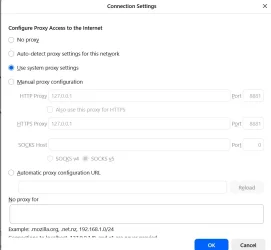
I'm trying to fiddle with Symfony's CMS sulu. Took a few extra steps but finally got it installed. Documentation says that access to the app is `127.0.0.1:8000`. But I just can't get Chrome to take me there. Environment: Apache/2.4.62, PHP 8.4.15.

Here's what I've tried so far:

`etc\host` has `127.0.0.1`. There are a few other apps listed with that, but they all behave as expected. Trying `http://127.0.0.1` launches the first entry in `httpd-vhosts.conf`.

With suffix `:8000`, Chrome says "127.0.0.1 refused to connect."

Created firewall rules for port 8000, both TCP & UDP. No change.

`netstat -ano | findstr :80` & `tasklist /fi "PID eq [PID_number]"` showed only Apache process (PID_number).
 
Windows Build/Version
Windows 11 Pro, Version 25H2, Build 26200.7462

My Computer My Computer

At a glance

Windows 11 ProIntel(R) Core(TM) Ultra 7 265 2.40 GHz16.0 GBIntel Graphics
OS
Windows 11 Pro
Computer type
PC/Desktop
Manufacturer/Model
Dell Slim ECS1250
CPU
Intel(R) Core(TM) Ultra 7 265 2.40 GHz
Memory
16.0 GB
Graphics Card(s)
Intel Graphics
Monitor(s) Displays
HP Pavilion 20xi
???

1.webp

2.webp
 

My Computer My Computer

At a glance

Microsoft Windows 11 HomeIntel Core i5-13490F2 x 16 Patriot Memory (PDP Systems) PSD516G56...GIGABYTE GeForce RTX 4070 WINDFORCE OC 12G (G...
OS
Microsoft Windows 11 Home
Computer type
PC/Desktop
Manufacturer/Model
MSI MS-7D98
CPU
Intel Core i5-13490F
Motherboard
MSI B760 GAMING PLUS WIFI
Memory
2 x 16 Patriot Memory (PDP Systems) PSD516G560081 6400MT (32-37-37-74); 1.35V)
Graphics Card(s)
GIGABYTE GeForce RTX 4070 WINDFORCE OC 12G (GV-N4070WF3OC-12GD)
Sound Card
Bluetooth Аудио
Monitor(s) Displays
INNOCN 15K1F
Screen Resolution
1920 x 1080
Hard Drives
WD_BLACK SN770 250GB
KINGSTON SNV2S1000G (ELFK0S.6)
PSU
Thermaltake Toughpower GF3 1000W
Case
CG560 - DeepCool
Cooling
ID-COOLING SE-224-XTS / 2 x 140Mm Fan - rear and top; 3 x 120Mm - front
Keyboard
Corsair K70 RGB TKL
Mouse
Corsair KATAR PRO XT
Internet Speed
100 Mbps
Browser
Firefox
Antivirus
Microsoft Defender Antivirus
Other Info
https://www.userbenchmark.com/UserRun/66553205
@abactuon Could you kindly be more explicit? It's not at all clear what you are suggesting.
 

My Computer My Computer

At a glance

Windows 11 ProIntel(R) Core(TM) Ultra 7 265 2.40 GHz16.0 GBIntel Graphics
OS
Windows 11 Pro
Computer type
PC/Desktop
Manufacturer/Model
Dell Slim ECS1250
CPU
Intel(R) Core(TM) Ultra 7 265 2.40 GHz
Memory
16.0 GB
Graphics Card(s)
Intel Graphics
Monitor(s) Displays
HP Pavilion 20xi
I had the same problem two days ago. I could access localhost fine, I could ping 127.0.0.1, but no browser could reach it. Tinkered with all kinds of TCP/IP settings, the hosts file, etc.; nothing worked. I think it's a bad Windows update. I did a system restore to a state a week ago and that fixed it.
 

My Computer My Computer

At a glance

Windows 11 Pro
OS
Windows 11 Pro
Computer type
Laptop
Manufacturer/Model
HP X360 Spectre
@bar_foo Were you able to access before? I don’t have the luxury of prior success. May have to try to make some sense out of proxy.
 

My Computer My Computer

At a glance

Windows 11 ProIntel(R) Core(TM) Ultra 7 265 2.40 GHz16.0 GBIntel Graphics
OS
Windows 11 Pro
Computer type
PC/Desktop
Manufacturer/Model
Dell Slim ECS1250
CPU
Intel(R) Core(TM) Ultra 7 265 2.40 GHz
Memory
16.0 GB
Graphics Card(s)
Intel Graphics
Monitor(s) Displays
HP Pavilion 20xi
Yes, two apps that I'd been using for years that depended on it suddenly stopped working.
 

My Computer My Computer

At a glance

Windows 11 Pro
OS
Windows 11 Pro
Computer type
Laptop
Manufacturer/Model
HP X360 Spectre
Nov 2025's Monthly Update fixed a problem introduced by Oct 2025, which broke loopback (localhost) calls over HTTP. Check to see if you're current on updates.
 

My Computer My Computer

At a glance

Windows 7
OS
Windows 7
I'm abandoning efforts to experiment with sulu. When I worked around the port issues I ran into issues with the sulu code itself. Just not up for tracking those down. Calling the question resolved.
 

My Computer My Computer

At a glance

Windows 11 ProIntel(R) Core(TM) Ultra 7 265 2.40 GHz16.0 GBIntel Graphics
OS
Windows 11 Pro
Computer type
PC/Desktop
Manufacturer/Model
Dell Slim ECS1250
CPU
Intel(R) Core(TM) Ultra 7 265 2.40 GHz
Memory
16.0 GB
Graphics Card(s)
Intel Graphics
Monitor(s) Displays
HP Pavilion 20xi
Tenacity. I kept poking around, trying to make sense out of sulu's documentation. Just for the h*** of it, instead of trying to use `127.0.0.1:8000` (which would never connect) I tried `localhost:8000` and BINGO! Access was gained. Documentation, however, remains relatively opaque. But issue is now resolved (in my head).
 

My Computer My Computer

At a glance

Windows 11 ProIntel(R) Core(TM) Ultra 7 265 2.40 GHz16.0 GBIntel Graphics
OS
Windows 11 Pro
Computer type
PC/Desktop
Manufacturer/Model
Dell Slim ECS1250
CPU
Intel(R) Core(TM) Ultra 7 265 2.40 GHz
Memory
16.0 GB
Graphics Card(s)
Intel Graphics
Monitor(s) Displays
HP Pavilion 20xi
And the reason why 127... failed is because the instructions said to use localhost:8000.... in the command to start a PHP website. And then use 127.etc. to access the website. As though 127.0.0.1 and localhost were equivalent. Not always so. Live & learn.
 
Last edited:

My Computer My Computer

At a glance

Windows 11 ProIntel(R) Core(TM) Ultra 7 265 2.40 GHz16.0 GBIntel Graphics
OS
Windows 11 Pro
Computer type
PC/Desktop
Manufacturer/Model
Dell Slim ECS1250
CPU
Intel(R) Core(TM) Ultra 7 265 2.40 GHz
Memory
16.0 GB
Graphics Card(s)
Intel Graphics
Monitor(s) Displays
HP Pavilion 20xi
Back
Top Bottom