Marshall Brooks
Member
- Local time
- 1:36 PM
- Posts
- 39
- OS
- Windows
Similar issue to Can't get a daily Shutdown working in Task Scheduler... - Except ...
This used to work.
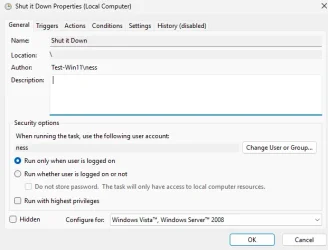
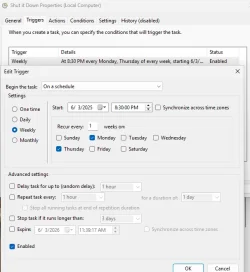
I want the computer to shut down at 8:30 P.M. on Monday and Thursday only.
From the other thread:
- S0 is not supported by firmware.
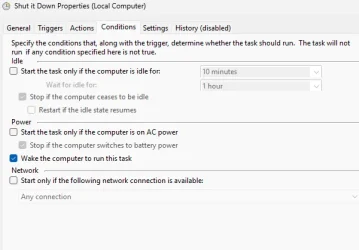
- The computer intentionally never enters sleep modes. (the only allowed one is sleep after 10 minutes of inactivity on battery).
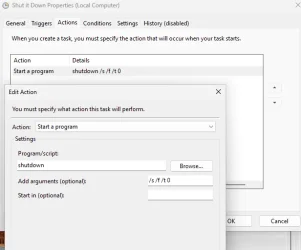
- I originally had the task set to shutdown running "shutdown.exe /s /t /0 /f" I changed it to use an AutoHotKey command.
- Other scheduled tasks work fine.
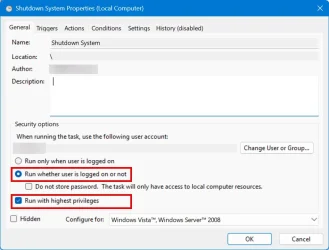
- Shutdown scheduled task works fine if I click Run on it from the Task Scheduler.
- Shutdown scheduled task previously worked fine from Task Scheduler.
- Shutdown scheduled task does not work on a timer from Task Scheduler - i.e. I set the task to shut down the computer 5 minutes from now, walk away from the computer and 10 minutes later it is still running.
I would be open to other (free) software, but I don't have full admin rights on the machine, and I want something that could run from the command line. I downloaded Wise Auto Shutdown, and I can run it, but it looks like I need to open the program and select start task so it would run. I don't want to have to do that two days each week. It may be possible to run it via command line options, but I didn't see that in the documentation.
This used to work.
I want the computer to shut down at 8:30 P.M. on Monday and Thursday only.
From the other thread:
- S0 is not supported by firmware.
- The computer intentionally never enters sleep modes. (the only allowed one is sleep after 10 minutes of inactivity on battery).
- I originally had the task set to shutdown running "shutdown.exe /s /t /0 /f" I changed it to use an AutoHotKey command.
- Other scheduled tasks work fine.
- Shutdown scheduled task works fine if I click Run on it from the Task Scheduler.
- Shutdown scheduled task previously worked fine from Task Scheduler.
- Shutdown scheduled task does not work on a timer from Task Scheduler - i.e. I set the task to shut down the computer 5 minutes from now, walk away from the computer and 10 minutes later it is still running.
I would be open to other (free) software, but I don't have full admin rights on the machine, and I want something that could run from the command line. I downloaded Wise Auto Shutdown, and I can run it, but it looks like I need to open the program and select start task so it would run. I don't want to have to do that two days each week. It may be possible to run it via command line options, but I didn't see that in the documentation.
- Windows Build/Version
- 23H2 22631.5335
My Computer
At a glance
Windows
- OS
- Windows