can't get rid of PC App Store pop-ups


GerryPeters

Well-known member
Member
Local time
5:28 AM
Posts
171
OS
WIN 11 PRO
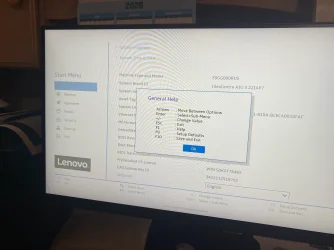
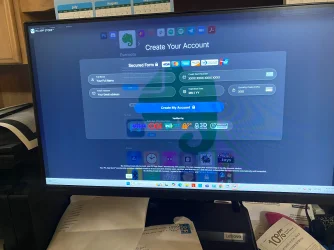
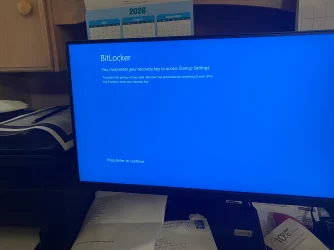
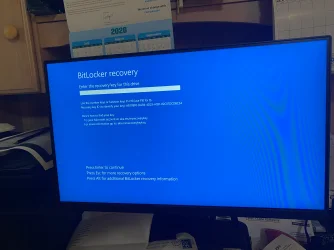
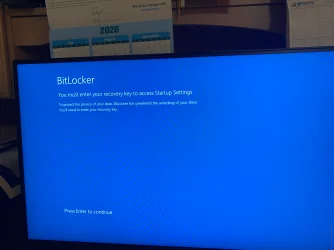
My wife's Lenovo computer is stuck with PC App Store pop-ups. I can't get task manager, the Run box, The PC app window blocks everything. I can't get this computer to go to the safe mode or command prompt. Trying the safe mode had it go to bitlocker asking for a recovery code. This is maddening
 

My Computers My Computers

  • At a glance

    WIN 11 PROIntel(R) Core(TM) i5-14400 2.50 Ghz,32 Gigs
    OS
    WIN 11 PRO
    Computer type
    PC/Desktop
    Manufacturer/Model
    Custom built - WIN 11 PRO 64-bit ,
    CPU
    Intel(R) Core(TM) i5-14400 2.50 Ghz,
    Motherboard
    ACER Z790 motherboard
    Memory
    32 Gigs
    Hard Drives
    256 gig M2 SSD boot HD, 3 internal HD's, 2 USB
  • At a glance

    Win 10 PROHaswell CPU 4790k @ 4.4GHz,16 Gigs
    Operating System
    Win 10 PRO
    Computer type
    PC/Desktop
    Manufacturer/Model
    CUSTOM
    CPU
    Haswell CPU 4790k @ 4.4GHz,
    Motherboard
    AsRock Z97 motherboard,
    Memory
    16 Gigs
    Hard Drives
    OS drive 250GB SSD,

My wife's Lenovo computer is stuck with PC App Store pop-ups. I can't get task manager, the Run box, The PC app window blocks everything. I can't get this computer to go to the safe mode or command prompt. Trying the safe mode had it go to bitlocker asking for a recovery code. This is maddening
Too much missing info. What kind of pop-ups? Can you not right click on start icon and get into task manager from there? Can you hold down shift and restart to get into recovery to access command prompt? And yes, to get into recovery, if you have device encryption or bitlocker enabled you will have to have your bitlocker key.
 

My Computers My Computers

  • At a glance

    Windows 11 Pro 25H2 26200.8875i9-10900 10 core 20 threads32 gbnone-Intel UHD Graphics 630
    OS
    Windows 11 Pro 25H2 26200.8875
    Computer type
    PC/Desktop
    Manufacturer/Model
    Dell Optiplex 7080
    CPU
    i9-10900 10 core 20 threads
    Motherboard
    DELL 0J37VM
    Memory
    32 gb
    Graphics Card(s)
    none-Intel UHD Graphics 630
    Sound Card
    Integrated Realtek
    Monitor(s) Displays
    Benq 27
    Screen Resolution
    2560x1440
    Hard Drives
    2x1tb Solidigm m.2 nvme /External drives 512gb Samsung m.2 sata+2tb Kingston m2.nvme
    PSU
    500w
    Case
    MT
    Cooling
    Dell Premium
    Keyboard
    Logitech wired
    Mouse
    Logitech wireless
    Internet Speed
    so slow I'm too embarrassed to tell
    Browser
    #1 Edge #2 Firefox
    Antivirus
    Defender+MWB Premium
  • At a glance

    Windows 11 Pro 24H2 26200.8875AMD Ryzen 7 6800U32 gbintegrated
    Operating System
    Windows 11 Pro 24H2 26200.8875
    Computer type
    PC/Desktop
    Manufacturer/Model
    Beelink Mini PC SER5
    CPU
    AMD Ryzen 7 6800U
    Memory
    32 gb
    Graphics card(s)
    integrated
    Sound Card
    integrated
    Monitor(s) Displays
    Benq 27
    Screen Resolution
    2560x1440
    Hard Drives
    1TB Crucial nvme
    Keyboard
    Logitech wired
    Mouse
    Logitech wireless
    Internet Speed
    still too embarrassed to tell
    Browser
    Firefox
    Antivirus
    Defender
    Other Info
    System 3 is non compliant Dell 9020 i7-4770/24gb ram Win11 PRO 26200.8875
I can't get task manager, the Run box, The PC app window blocks everything. I can't get this computer to go to the safe mode or command prompt. Trying the safe mode had it go to bitlocker asking for a recovery code.
Sounds like some serious corruption/failing. Backup all personal data before going any further.

With such a range and variety of faults, prepare for worst case scenario - clean install. A system restore may work, though

Outta curiosity, run CrystalDiskInfo to check integrity
 

My Computers My Computers

  • At a glance

    Windows 11 2xH2 (latest update ... forever anal)Intel i5-124008GBNVIDIA GeForce GT730
    OS
    Windows 11 2xH2 (latest update ... forever anal)
    Computer type
    PC/Desktop
    Manufacturer/Model
    HP Slim S01
    CPU
    Intel i5-12400
    Memory
    8GB
    Graphics Card(s)
    NVIDIA GeForce GT730
    Sound Card
    OOBE
    Monitor(s) Displays
    Acer 32"
    Screen Resolution
    1920x1080
    Hard Drives
    512GB KIOXIA NVMe
    1TB SATA SSD
    PSU
    OOBE
    Case
    OOBE
    Cooling
    OOBE
    Keyboard
    BT
    Mouse
    BT
    Browser
    Brave FFox Chrome Opera
    Antivirus
    KIS
  • At a glance

    Windows 11 Pro 2xH2 (latest update ... 4ever ...i7-1165G7 @ 2.80GHzIntel Iris Xe Graphics
    Operating System
    Windows 11 Pro 2xH2 (latest update ... 4ever anal)
    Computer type
    Laptop
    Manufacturer/Model
    HP Pavillion 15
    CPU
    i7-1165G7 @ 2.80GHz
    Graphics card(s)
    Intel Iris Xe Graphics
    Hard Drives
    Samsung NVMe 512GB
    + numerous/multiple SSD Type C USB enclosures
    Internet Speed
    NBN FTTN 50
    Browser
    Brave
    Antivirus
    KIS
Trying the safe mode had it go to bitlocker asking for a recovery code.

You need to Disable Bitlocker

However from what you say normal methods may not be available. You might try launching the task manager
CTRL SHIFT ESC and File, New Task, cmd.exe then

Method 3: Using Command Prompt (Advanced)
If the graphical user interfaces are unavailable or failing, you can force BitLocker to turn off using an administrator command prompt. [1, 2]

  • Press Windows Key + S, type cmd, and select Run as administrator.
  • Type manage-bde -status and press Enter to verify which drives have BitLocker active.
  • Type manage-bde -off C: (replace C: with the appropriate drive letter if necessary) and press Enter.

- and in your case in particular

CTRL SHIFT DEL
Click task manager

=======================================================================
*** Please be aware that Win 11 Pro (is your wife's O/S that? - presumably..) enables Bitlocker by default.
This in my view is a remarkably poor design decision by MS and guaranteed to catch some people out at some time, as they won't have a recovery code provided automatically.

Therefore disable Bitlocker, and if you don't plan to use it, do so immediately after a clean install.
=======================================================================
Too much missing info. What kind of pop-ups?
Take a photo as you can't create a screenshot. Reduce the image file size enough as necessary to upload it. Size limits apply.

Agree with above. Worst case could be malware.
 

My Computer My Computer

At a glance

Windows 11 Proi7-8650U16GBIntel UHD 620
OS
Windows 11 Pro
Computer type
Laptop
Manufacturer/Model
Lenovo t480s
CPU
i7-8650U
Memory
16GB
Graphics Card(s)
Intel UHD 620
Screen Resolution
1920x1080
Hard Drives
C SN810 SDCPNRY-512G-1006
Browser
Edge, Firefox
Antivirus
Defender

My Computers My Computers

  • At a glance

    Win 11 ProAMD Ryzen™ 7 7730U24GB Dual-Channel DDR4 @ 1596MHz (22-22-22-52)512MB ATI AMD Radeon Graphics (ASUStek Comput...
    OS
    Win 11 Pro
    Computer type
    Laptop
    Manufacturer/Model
    ASUS Vivobook
    CPU
    AMD Ryzen™ 7 7730U
    Motherboard
    M1605YA
    Memory
    24GB Dual-Channel DDR4 @ 1596MHz (22-22-22-52)
    Graphics Card(s)
    512MB ATI AMD Radeon Graphics (ASUStek Computer Inc)
    Monitor(s) Displays
    Generic PnP Monitor (1920x1200@60Hz) - P1 PLUS (1920x1080@59Hz)
    Screen Resolution
    1920 X 1200
    Hard Drives
    953GB Western Digital WD
    PSU
    45 Watts
    Mouse
    Lenovo Bluetooth.
    Internet Speed
    500 Mbps
    Browser
    Edge
    Antivirus
    Defender
  • At a glance

    Windows 11AMD Ryzen 7 5800H / 3.2 GHz32 GB DDR4 SDRAM 3200 MHzNVIDIA GeForce RTX 3060 6 GB GDDR6 SDRAM
    Operating System
    Windows 11
    Computer type
    Laptop
    Manufacturer/Model
    ACER NITRO
    CPU
    AMD Ryzen 7 5800H / 3.2 GHz
    Motherboard
    CZ Scala_CAS (FP6)
    Memory
    32 GB DDR4 SDRAM 3200 MHz
    Graphics card(s)
    NVIDIA GeForce RTX 3060 6 GB GDDR6 SDRAM
    Sound Card
    Realtek Audio. NVIDIA High Definition Audio
    Monitor(s) Displays
    15.6" LED backlight 1920 x 1080 (Full HD) 144 Hz
    Screen Resolution
    1920 x 1080 (Full HD)
    Hard Drives
    Samsung 970 Evo Plus 2TB NVMe M.2
    PSU
    180 Watt, 19.5 V
    Mouse
    Lenovo Bluetooth
    Internet Speed
    500 Mbps
    Browser
    Edge
    Antivirus
    Defender

Latest Support Threads

Back
Top Bottom